

A familiar television host, a sudden departure, and a health discovery powerful enough to anger colleagues form the opening of an irresistible online drama.
The Dana Perino dementia story used that drama to introduce Catalina Farms CBD Gummies and a purchase decision carrying far more risk than the article admitted.
Overview
The fabricated television controversy
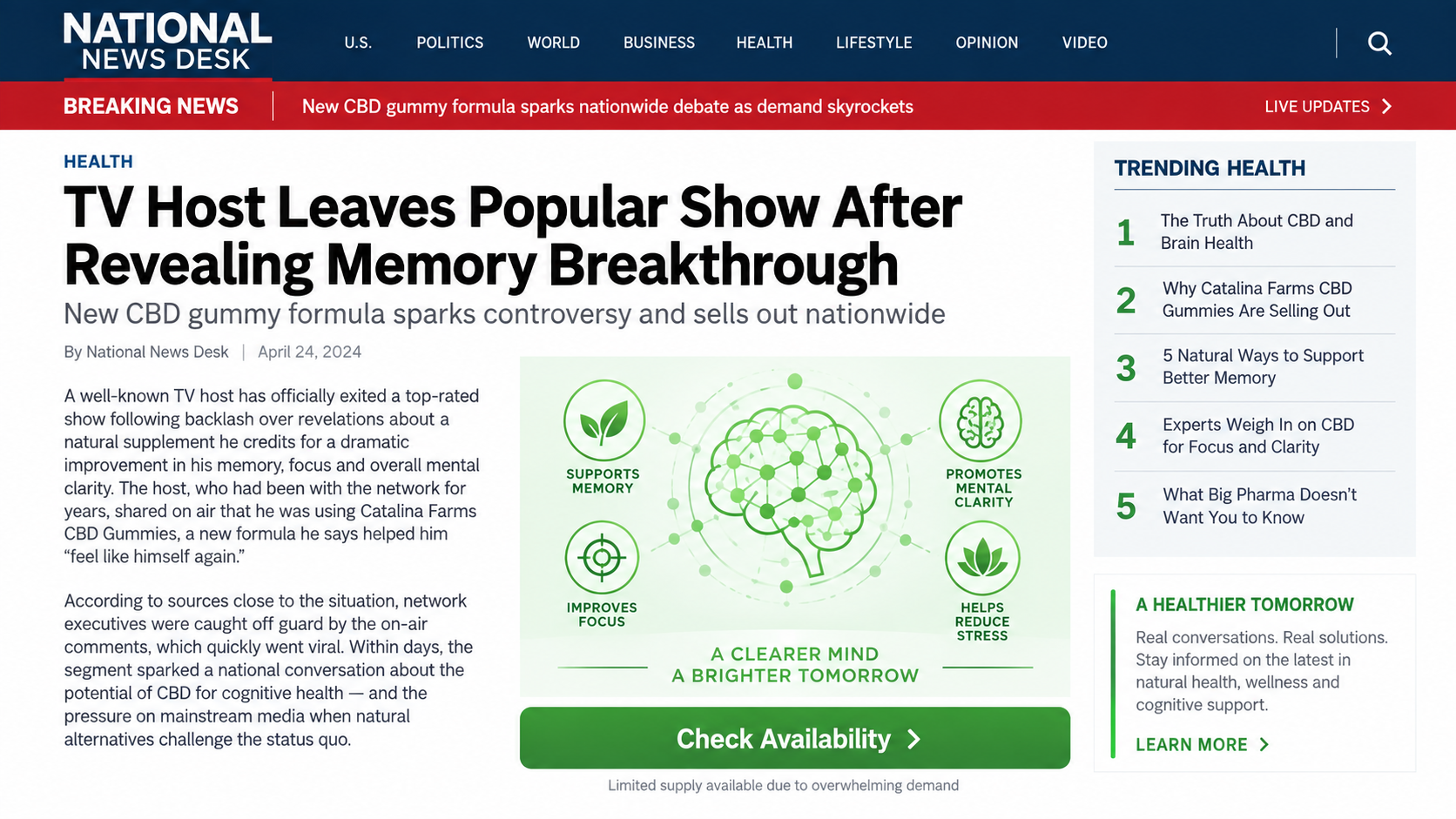
A counterfeit Fox News page claimed Dana Perino left The Five after revealing a CBD gummy business and clashing with Sean Hannity.
The article falsely attributed its reporting to Brit Hume and framed the supposed disagreement as breaking entertainment and health news.
That story was not authentic Fox News reporting, and the public figures named in it did not verify the promoted product.
The page appeared on holdan.top, a domain unrelated to the network it imitated.
The dangerous medical promise
Marketing text claimed Catalina Farms CBD Gummies could instantly and permanently reverse dementia.
No over-the-counter gummy has established that capability, and dementia requires evaluation from qualified medical professionals.
A hidden disclaimer later admitted the product was not intended to diagnose, cure, prevent, or replace individual medical advice.
That admission directly conflicts with the dramatic cure language used to obtain attention.
The sales and subscription concerns
The fake article sent readers to secure.catalinafarmscbd.com, while the root website reportedly lacked a normal public homepage.
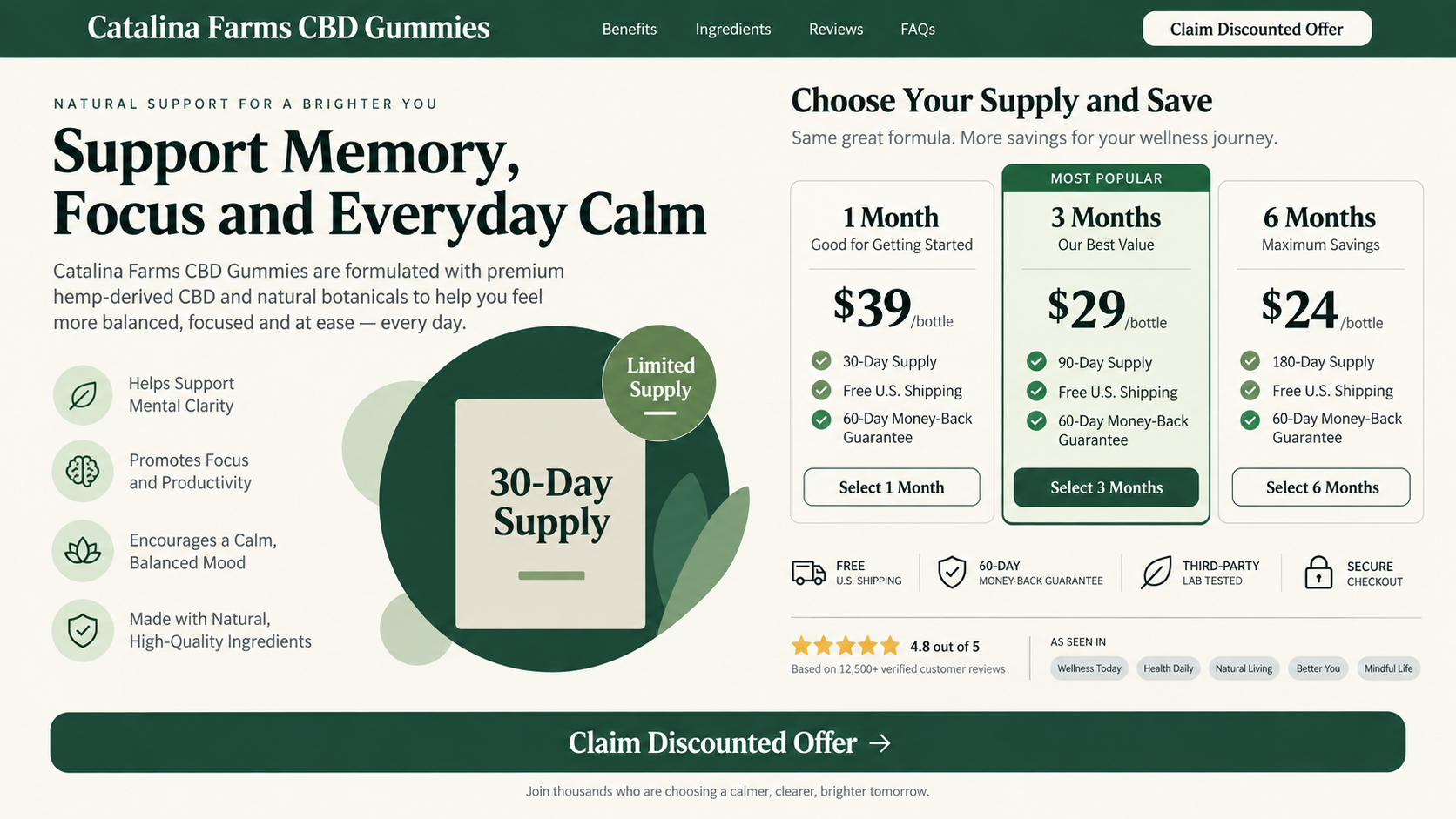
The order page promoted a discounted bottle, limited supply, heavy demand, media coverage, and seller-controlled testimonials.
Warning signs include:
- A copied Fox News appearance on the unrelated holdan.top domain.
- A false story involving Dana Perino, Sean Hannity, and Brit Hume.
- An unsupported promise to reverse dementia instantly and permanently.
- Paid or substituted testimonial identities disclosed only in fine print.
- Media logos unsupported by genuine coverage from those outlets.
- A discounted-bottle pitch linked with automatic monthly shipments.
- No normal homepage explaining the seller’s broader operation.
Why a Dementia Cure Claim Is Especially Harmful
Memory loss frightens patients and families because it touches independence, identity, relationships, safety, and the ability to plan.
That fear can make a hopeful personal story feel more urgent than ordinary product research.
Dementia is not one simple condition with one universal cause or treatment.
Symptoms can arise from several diseases, medications, infections, sleep problems, mood disorders, vitamin deficiencies, strokes, and other medical issues.
Some causes may be treatable, while others require long-term planning and specialist care.
A gummy advertisement cannot distinguish among those possibilities.
Claims of instant reversal may encourage someone to postpone assessment, stop prescribed treatment, or spend limited savings on repeated shipments.
Delay can also prevent families from addressing driving, medication management, fraud vulnerability, legal documents, and home safety.
Anyone experiencing new confusion, rapid cognitive change, weakness, severe headache, speech difficulty, or altered consciousness needs prompt medical attention.
An online testimonial is never an emergency assessment.
How the Dana Perino Dementia Cure Scam Works
Step 1: A sensational headline creates emotional urgency
The campaign invents a conflict involving a recognizable television personality and a dramatic departure from a popular program.
Readers click for celebrity news, then encounter a supposed medical revelation inside the narrative.
This approach bypasses the skepticism that might greet a direct supplement advertisement.
Step 2: A counterfeit news layout borrows authority
The holdan.top page copies colors, navigation, typography, and presentation associated with Fox News.
It also names a genuine journalist as the supposed writer, creating the impression of editorial review.
The domain, not the decorative masthead, reveals that the article belongs to an unrelated operator.
Step 3: Invented quotations transform the host into a founder
The story claims Perino created the CBD line, discussed it on air, and faced professional conflict because of its success.
Such quotations are presented as direct speech without any authentic broadcast, transcript, verified post, or company filing.
The controversy supplies a convenient explanation for why mainstream outlets supposedly refuse to support the product.
Step 4: The health promise escalates beyond ordinary wellness
Rather than limiting itself to relaxation or general support, the article says the gummies can reverse dementia permanently.
That wording turns a dietary supplement into an alleged disease treatment.
The promise is both emotionally powerful and inconsistent with the disclaimer later shown on the seller’s site.
Step 5: Fake comments simulate community confirmation
The page adds names, enthusiastic experiences, and statements about memories returning or health professionals being impressed.
These comments cannot be opened into traceable profiles or verified through independent medical records.
A disclosure reportedly states that names and photographs used in testimonials may be changed and individuals may be compensated.
Step 6: Scarcity moves the reader toward the order form
The product page claims unusually high media demand, limited supply, and a special discounted bottle.
Logos from familiar publications suggest widespread attention even though genuine reports supporting the product were not found.
Urgency discourages the reader from leaving the funnel to search official channels.
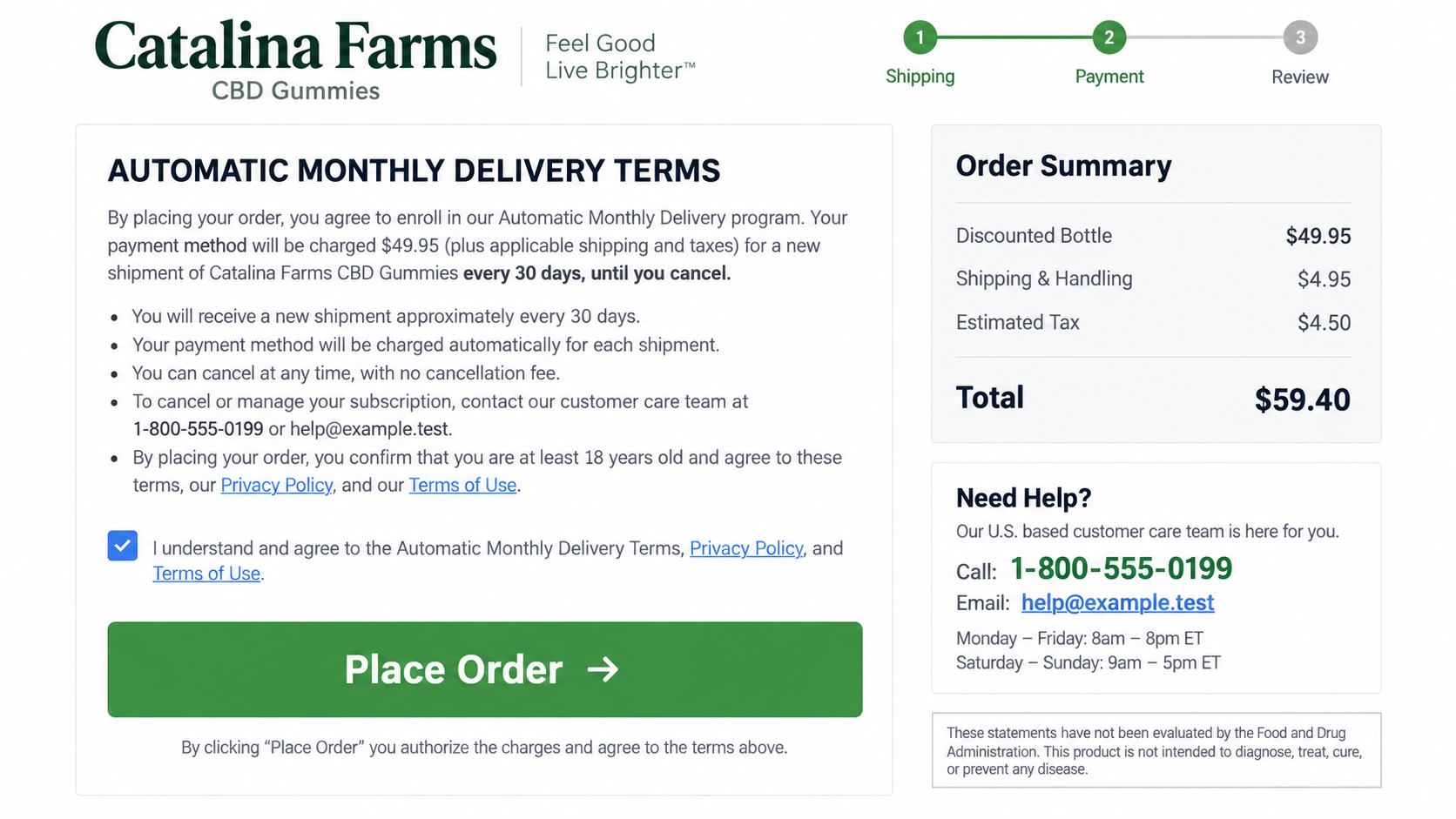
Step 7: Fine print converts a bottle into repeated billing
Automatic-delivery language can authorize new shipments and card charges at regular intervals until cancellation.
The recurring obligation may be much less prominent than the visible discount and medical story.
Customers then face repeated costs for a product that never possessed the advertised cure evidence.
The Fake Fox News Page, Explained
Cloned news pages rely on instant visual recognition rather than careful reading.
A viewer sees the familiar red, white, and blue design before noticing the address bar.
The fabricated headline claims Perino left The Five and provoked legal conflict through her new product.
That plot gives the supplement a newsworthy origin and turns ordinary advertising into a story about courage and censorship.
The named colleagues create realism because they genuinely appear within the same media environment.
However, plausible casting does not authenticate the events.
Search FoxNews.com directly for the headline, author, alleged interview, and broadcast segment.
Check Perino’s verified accounts for an announcement linking to the same domain and product.
Copied sidebars may link to real news stories, allowing the center promotion to borrow legitimacy from unrelated content.
Every purchase button should be treated as advertising, especially when all paths lead toward one seller.
What the Testimonials Really Establish
The displayed comments use ordinary names and conversational language to imitate spontaneous discussion.
One message claims memories returned, while another says a medical practitioner reviewed studies and found them credible.
Neither statement identifies the practitioner, studies, diagnosis, dosage, treatment period, or objective cognitive testing.
Personal experience cannot establish that a product reverses a progressive neurological disease.
Memory can fluctuate with sleep, stress, medication, depression, pain, illness, expectations, and normal day-to-day variation.
When the site’s own disclosure says testimonial identities may be changed and people compensated, the comments lose additional evidentiary value.
Seller-controlled review sections also determine which entries appear, how they are ordered, and whether criticism remains visible.
Look for independent reporting of adverse effects, billing disputes, delivery outcomes, and laboratory analysis.
Do not use review stars to make a treatment decision for a person with cognitive symptoms.
CBD Gummies Are Not Approved Dementia Treatments
CBD products are sold in many forms and may contain different concentrations, contaminants, or amounts than their labels suggest.
A dietary supplement disclaimer does not prove safety, purity, dosing accuracy, or clinical effectiveness.
CBD can interact with medicines and may cause sedation, gastrointestinal problems, appetite changes, or altered liver-enzyme levels.
Older adults frequently use several prescriptions, increasing the importance of a pharmacist or clinician reviewing possible interactions.
Families should bring the exact label, ingredient panel, batch number, and planned dose to that discussion.
Words such as natural, hemp-derived, premium, or doctor recommended do not answer medical questions.
Likewise, “FDA registered” would not mean that the agency approved a supplement for dementia.
Evidence for a disease treatment requires controlled research, transparent methods, meaningful outcomes, and review beyond the seller.
The promotion provides a dramatic testimonial story instead of that standard.
The Subscription Trap Behind the Discount
Recurring supplement offers often emphasize the first bottle while disclosing automatic refills near the bottom of a long page.
A customer may believe the card authorizes one discounted order.
The merchant may interpret the same action as enrollment in shipments every thirty days.
The precise price, interval, cancellation deadline, return conditions, and unopened-product rule should appear beside the final button.
Do not infer those terms from a headline describing a sample, trial, discount, or limited offer.
Save the order page because sellers can revise language after a campaign receives complaints.
Check the statement descriptor immediately and search it separately from the product name.
A billing company may handle numerous supplement brands, making Catalina Farms difficult to recognize later.
Automatic refills can continue even when the customer stops using the gummies.
Discarding the product does not cancel the contract the merchant claims was accepted.
How Families Can Verify a Celebrity Health Story
Begin with the celebrity’s verified website and social accounts rather than the link supplied inside the advertisement.
A genuine product launch involving a prominent broadcaster would normally leave a consistent trail across interviews, corporate records, and reputable reporting.
Search the claimed quotation in quotation marks and compare the publication date across several independent outlets.
When every result repeats identical promotional wording, the apparent coverage may be affiliate distribution rather than separate journalism.
Next, type the supposed news outlet’s address manually and search its own archive for the headline.
Do not trust a copied logo, functional menu, or unrelated sidebar links to establish ownership of the page.
Open the domain registration record and check whether the website belongs to the organization displayed in its masthead.
A recently created unrelated domain is incompatible with claims that the article came from an established national newsroom.
Medical verification requires a different path.
Ask a clinician which condition causes the symptoms, what evidence supports the proposed ingredient, and whether it conflicts with existing medicines.
Request the exact clinical study, product formulation, dose, participant group, duration, and measured outcome behind any reversal claim.
A study involving one isolated compound cannot automatically validate a finished gummy containing different amounts and additional ingredients.
Finally, preserve the advertisement before reporting it.
Record the domain, social account, sponsored-post identifier, redirect chain, checkout address, product label, and precise statements presented as quotations.
That evidence helps platforms, payment providers, regulators, and impersonated organizations identify the complete campaign rather than one disposable page.
Company, Address, and Fulfillment Checks
The brand name does not identify the legal merchant
Catalina Farms sounds like a producer, but the examined materials did not clearly establish who manufactured, tested, owned, and sold the gummies.
Do not contact similarly named legitimate businesses merely because their names resemble the label.
The contracting entity must appear consistently across checkout, terms, receipt, and statement.
The missing homepage is a serious transparency failure
secure.catalinafarmscbd.com accepted traffic from the advertorial while the root domain reportedly offered no normal storefront homepage.
That structure prevents shoppers from reviewing a coherent company history, product catalog, support center, or policy library.
A campaign-only checkout can disappear more easily than an accountable business presence.
The phone and email need real-world testing
Historical pages listed (833) 571-3592 and care@catalinafarmscbd.com for customer assistance.
Call before purchasing and ask for the legal seller, refill price, billing interval, cancellation cutoff, return destination, and manufacturer.
An unanswered mailbox or scripted call center does not resolve those responsibilities.
A returns warehouse cannot prove product quality
Packages may come from a fulfillment center serving multiple direct-response brands.
That facility can pick and ship inventory without creating the claims, owning the formula, or controlling refunds.
Unknown manufacturing and testing are especially concerning for ingestible products used by medically vulnerable customers.
How Families Should Respond to Memory Concerns
Begin with a medical appointment rather than a product checkout.
Write down when symptoms started, how they changed, and which daily activities have become difficult.
Bring a complete medication and supplement list, including sleep aids, antihistamines, CBD, alcohol use, and recent dosage changes.
Ask about hearing, vision, mood, sleep, nutrition, infections, pain, and other factors that can affect cognition.
Do not stop prescribed medicine without guidance from the clinician who understands the patient’s history.
Discuss financial safeguards because people experiencing cognitive decline can become repeated targets for health, investment, romance, and technical-support scams.
Consider trusted-contact alerts at banks and account-monitoring arrangements appropriate to the person’s independence and legal rights.
Keep conversations calm and respectful. Shame can make someone hide later purchases or avoid asking for help.
What to Do if You Have Fallen Victim to This Scam
- Call the issuing bank. Describe the misleading dementia claim and ask how to stop both current and scheduled card transactions.
- Cancel automatic delivery in writing. Include the order number, customer name, billing address, and a direct statement withdrawing permission for future shipments.
- Request a replacement card if advised. Ask whether merchant updater services could transfer recurring billing to the new account number.
- Keep every package sealed when possible. Photograph labels and request authorized return instructions before paying for postage.
- Arrange a medical review. Tell the clinician what was consumed, how much, when, and which medications or symptoms are involved.
- Expect follow-up targeting. Treat calls offering refunds, lawsuits, reimbursements, or government recovery as suspicious until independently verified.
- Examine affected devices. Malwarebytes can check for unwanted software when the promotion triggered downloads, notifications, or questionable browser extensions.
- Block deceptive ad routes. AdGuard may reduce malicious advertising exposure, but it cannot evaluate supplement safety or cancel billing.
- Report both harms. Send the medical claims and subscription evidence to the FTC, FDA, advertising platform, and impersonated media organization.
Is Your Device Infected? Run a Free Malware Scan
Slow performance, constant pop-ups, or strange behavior? These are classic signs of a malware infection. The fastest way to find out is to scan your device with Malwarebytes Free — one of the most trusted malware removal tools available.
The free version detects and removes the most common threats, including:
- Adware — the cause of those annoying pop-ups
- Browser hijackers — unwanted redirects and changed homepages
- Trojans and spyware — hidden programs stealing your data
- Potentially unwanted programs (PUPs) — software you never asked for
👉 Select your device below — Windows, Mac, or Android — then follow the simple steps to download Malwarebytes, scan your system, and remove any threats it finds. The scan usually takes 5 to 20 minutes.
Run a Malware Scan with Malwarebytes for Windows
Malwarebytes is one of the most popular and trusted anti-malware tools for Windows — and it’s completely free for removing infections. It catches threats that many antivirus programs miss, including adware, browser hijackers, and trojans. Follow the steps below to scan and clean your PC in just a few minutes.
Download Malwarebytes
Click the button below to download the latest version of Malwarebytes for Windows from the official source. The free version is all you need — it will scan your computer and remove adware, browser hijackers, and other malicious software at no cost.
Download MalwarebytesOfficial installer for Windows 11 and 10. Your download starts right away.Want real-time protection? See Malwarebytes Premium Malwarebytes Free for WindowsScans and removes malware at no cost
-
Install Malwarebytes
When the download finishes, open your Downloads folder and double-click the MBSetup file. If Windows shows a User Account Control pop-up, click “Yes” to allow the installation.

Follow the On-Screen Prompts to Install Malwarebytes
The setup wizard will walk you through a few quick screens:
-
Choose where you’re installing the program — “Personal Computer” or “Work Computer” — then click Next.

-
Malwarebytes will now install on your device. This usually takes under a minute.

-
When installation is complete, the “Welcome to Malwarebytes” screen will open automatically.

-
On the final screen, click Open Malwarebytes to launch the program.

-
Enable “Scan for Rootkits”
Before scanning, turn on rootkit detection so Malwarebytes can find even the most hidden threats. Click the Settings gear icon on the left side of the screen.

In the settings menu, find “Scan for rootkits” and click the toggle so it turns blue.

Done? Click “Dashboard” in the left pane to return to the main screen.
Start the Scan
Click the blue Scan button. Malwarebytes will automatically update its virus database and start checking your computer for malware.

-
Wait for the Scan to Finish
The scan checks your entire system for browser hijackers and other malicious programs, so it can take 5 to 20 minutes depending on your computer. Feel free to do something else — just check back occasionally to see the progress.

-
Quarantine the Detected Threats
When the scan is done, you’ll see a list of everything Malwarebytes found — malware, adware, and potentially unwanted programs. Click the “Quarantine” button to remove all of them at once.

Malwarebytes will now remove the malicious files and registry entries and move them safely into quarantine.

-
Restart Your Computer
Some threats can only be fully removed after a reboot. If Malwarebytes asks you to restart, click Yes. Once you’re logged back in, Malwarebytes has finished removing the threats it found.

That’s it — your Windows PC is now clean of trojans, adware, and other malware, and should be back to running smoothly.
If you are still having problems with your computer after completing these instructions, then please follow one of the steps:
- Run a computer scan with ESET Online Scanner
- Ask for help in our Windows Malware Removal Help & Support forum.
Run a Malware Scan with Malwarebytes for Mac
Malwarebytes for Mac is a free on-demand scanner that removes the malware other security software tends to miss — adware, browser hijackers, and unwanted programs included. Cleaning an infected Mac with Malwarebytes has always been completely free, and it’s our go-to recommendation. Follow the steps below to scan and clean your Mac in just a few minutes.
-
Download Malwarebytes for Mac
Click the button below to download the latest version of Malwarebytes for Mac.
Download MalwarebytesOfficial installer for macOS. Your download starts right away.Want real-time protection? See Malwarebytes PremiumMalwarebytes Free for MacScans and removes malware at no cost -
Open the Malwarebytes setup file
When the download finishes, open your Downloads folder and double-click the setup file to begin the installation.

-
Follow the On-Screen Prompts to Install Malwarebytes
The Malwarebytes for Mac Installer will guide you through a few quick screens. Click “Continue” and keep following the prompts until the installation completes.



When the installation is complete, Malwarebytes opens to the Welcome to Malwarebytes screen. Click “Get started“.
-
Select “Personal Computer” or “Work Computer”
Malwarebytes will ask what type of computer you’re installing it on. Click either Personal Computer or Work Computer, whichever applies.

-
Start the Scan
Click the “Scan” button. Malwarebytes will automatically update its detection database and begin checking your Mac for malware.

-
Wait for the Scan to Finish
Malwarebytes will scan your Mac for adware, browser hijackers, and other malicious programs. This can take a few minutes, so feel free to do something else — just check back occasionally to see the progress.

-
Quarantine the Detected Threats
When the scan is done, you’ll see a list of everything Malwarebytes found. Click the “Quarantine” button to remove all the threats at once.

-
Restart Your Mac
Malwarebytes will now remove all the malicious files it found. Some threats can only be fully removed after a reboot — if Malwarebytes asks you to restart, allow it. Once you’re logged back in, your Mac is clean.

That’s it — your Mac is now free of adware, rogue browser extensions, and other potentially harmful software.
If you are still experiencing problems while trying to remove a malicious program from your computer, please ask for help in our Mac Malware Removal Help & Support forum.
Run a Malware Scan with Malwarebytes for Android
Malwarebytes for Android automatically detects and removes dangerous threats like malware and ransomware so you don’t have to worry about your most-used device being compromised. Aggressive detection of adware and potentially unwanted programs keeps your Android phone or tablet running smooth.
-
Download Malwarebytes for Android.
You can download Malwarebytes for Android by clicking the link below.
Get Malwarebytes for AndroidOpens Google Play in a new tab.Want real-time protection? See Malwarebytes Premium for AndroidMalwarebytes for AndroidScans your phone and removes malware at no cost -
Install Malwarebytes for Android on your phone.
In the Google Play Store, tap “Install” to install Malwarebytes for Android on your device.

When the installation process has finished, tap “Open” to begin using Malwarebytes for Android. You can also open Malwarebytes by tapping on its icon in your phone menu or home screen.

-
Follow the on-screen prompts to complete the setup process
When Malwarebytes will open, you will see the Malwarebytes Setup Wizard which will guide you through a series of permissions and other setup options.
This is the first of two screens that explain the difference between the Premium and Free versions. Swipe this screen to continue.
Tap on “Got it” to proceed to the next step.
Malwarebytes for Android will now ask for a set of permissions that are required to scan your device and protect it from malware. Tap on “Give permission” to continue.
Tap on “Allow” to permit Malwarebytes to access the files on your phone.
-
Update database and run a scan with Malwarebytes for Android
You will now be prompted to update the Malwarebytes database and run a full system scan.

Click on “Update database” to update the Malwarebytes for Android definitions to the latest version, then click on “Run full scan” to perform a system scan.

-
Wait for the Malwarebytes scan to complete.
Malwarebytes will now start scanning your phone for adware and other malicious apps. This process can take a few minutes, so we suggest you do something else and periodically check on the status of the scan to see when it is finished.

-
Click on “Remove Selected”.
When the scan has been completed, you will be presented with a screen showing the malware infections that Malwarebytes for Android has detected. To remove the malicious apps that Malwarebytes has found, tap on the “Remove Selected” button.

-
Restart your phone.
Malwarebytes for Android will now remove all the malicious apps that it has found. To complete the malware removal process, Malwarebytes may ask you to restart your device.
That’s it — your Android phone is now clean — no more malicious apps, adware, or browser redirects.
If you are still having problems with your phone after completing these instructions, then please follow one of the steps:
- Restore your phone to factory settings by going to Settings > General management > Reset > Factory data reset.
- Ask for help in our Mobile Malware Removal Help & Support forum.
Stay Protected: Block Ads and Malicious Sites
Now that your device is clean, keep it that way. Most infections start with a malicious ad or a fake download button — so blocking them at the source is your best defense.
We recommend AdGuard, which blocks malicious ads, phishing pages, and dangerous redirects before they can reach you.
👉 Download AdGuard and browse safely
Frequently Asked Questions
Did Dana Perino create Catalina Farms CBD Gummies?
No reliable evidence supports that story. The claim appeared inside a fake news article hosted outside Fox News.
Can CBD gummies instantly reverse dementia?
No credible clinical evidence establishes an instant, permanent dementia cure from an over-the-counter gummy.
People with symptoms need individualized medical evaluation.
Was Brit Hume the author of the article?
The counterfeit page used his name, but its unrelated domain and sales purpose show it was not authentic network reporting.
What happened after clicking the fake story?
Readers were directed toward a Catalina Farms product page featuring urgency, media claims, testimonials, discounts, and automatic-delivery terms.
How do I stop monthly shipments?
Send a traceable cancellation to the merchant and contact the card issuer.
Keep proof and continue checking statements after the expected renewal date.
Are similarly named farms involved?
No connection should be assumed. Contacting unrelated businesses can harm innocent companies and will not resolve the actual merchant dispute.
The Bottom Line
The Dana Perino dementia cure story is a counterfeit-news sales funnel, not a verified medical report or celebrity business announcement.
Its unsupported cure language and automatic-delivery risks make medical consultation, official-domain verification, and careful billing review essential before any purchase.

Join the discussion
0 commentsShare your experience or ask a question about this article.
Discussion
Start the conversation
Have a question or something useful to share? Add the first comment.