Alain Wertheimer Foundation Email Scam: Is the $3.5M Donation Offer Real?
Written by: Lapain Epuran
Published on:
An unexpected message says a private foundation selected you for a life-changing $3.5 million gift. It appears generous, formal, and strangely personal.
The name attached to the offer is recognizable, but the invitation has none of the safeguards expected from serious philanthropy.
Overview
The message promises money you never requested
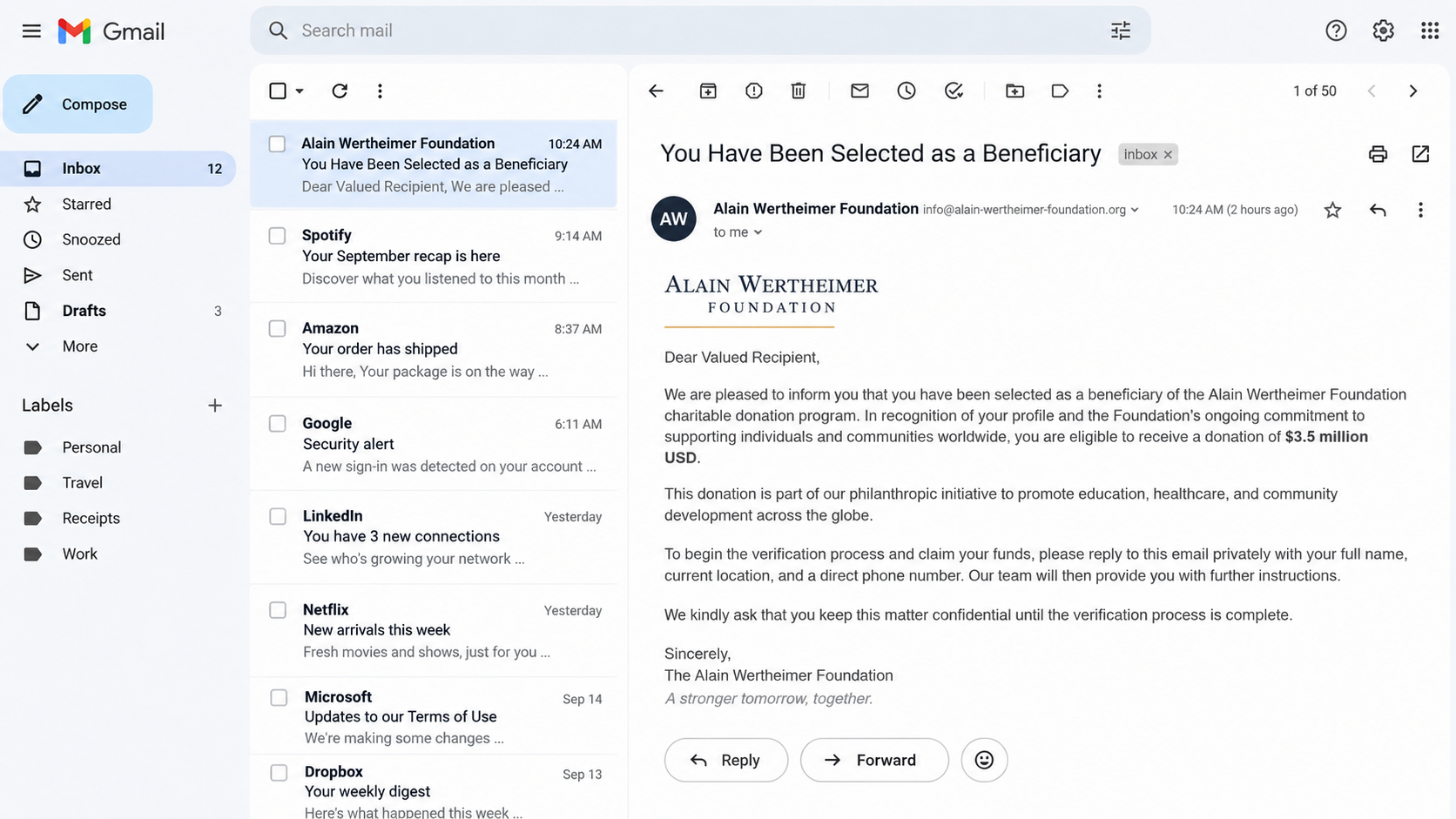
The email claims its recipient was privately chosen as a beneficiary of an Alain Wertheimer Foundation donation program.
Versions of the pitch promise $3.5 million and ask the recipient to reply with personal details for verification.
There is no application, established relationship, or independently confirmed selection process explaining why that particular mailbox was chosen.
A famous identity supplies borrowed credibility
Alain Wertheimer is publicly associated with Chanel, making his name useful to impostors who want an enormous donation to sound financially possible.
The email does not prove that he, Chanel, any family office, or a legitimate charity sent it.
A recognizable surname is the hook. The sender domain, process, and requests must stand on their own.
The real objective appears after the reply
Beneficiary scams often begin gently. The first response confirms a working mailbox and a recipient willing to consider the story.
Later messages request identity documents, banking information, or advance payments described as taxes, clearance, legal processing, or transfer fees.
The essential findings are:
Unsolicited private grants are a familiar advance-fee setup.
The sender’s display name can be typed by anyone.
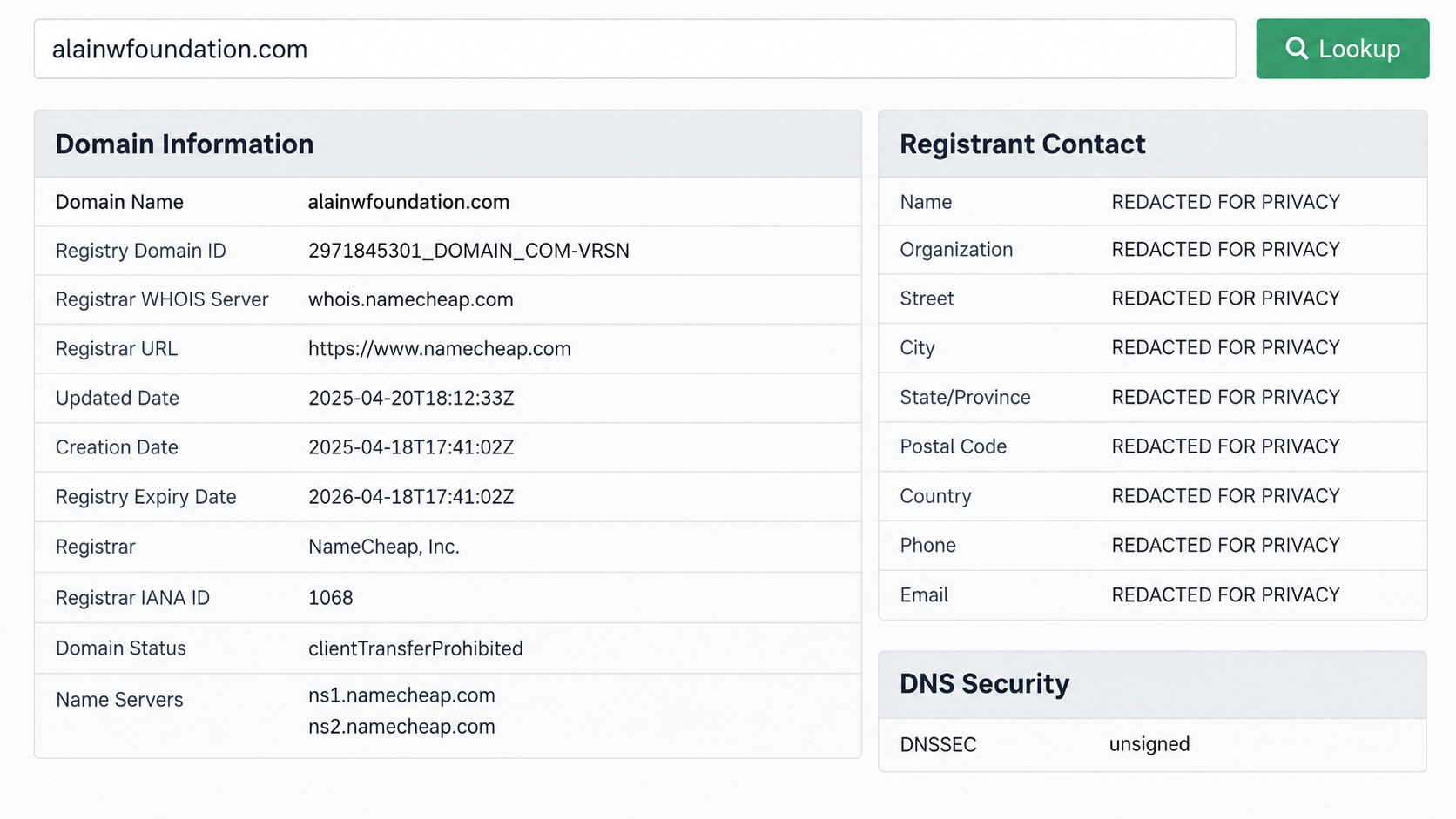
A recently created domain has no established charitable history.
Confidentiality requests isolate the recipient from advice.
Real gifts do not require gift cards or cryptocurrency payments.
Each payment usually leads to a new invented obstacle.
Why the $3.5 Million Story Feels Believable
The email combines wealth, philanthropy, and personal selection. Those ideas make the promise feel more plausible than an anonymous lottery win.
It may describe education, health, community development, or helping ordinary families. Broad charitable language creates warmth without providing verifiable program details.
The amount is enormous, yet not presented as a contest. Calling it a donation avoids the obvious question of whether the recipient entered anything.
The sender invents a reason for secrecy
Recipients may be told to keep the matter confidential until verification finishes. The explanation sounds protective but serves the scammer.
Secrecy prevents a relative, bank employee, lawyer, or genuine foundation from challenging the story before money moves.
No legitimate donor needs a random beneficiary to hide basic verification from trusted advisers.
Formal language masks missing facts
The message may mention a board, legal department, banking partner, global initiative, or compliance procedure.
Those terms imitate institutional communication. They do not supply a registered charity number, audited report, named officer, or traceable program.
Grand language should invite more verification, not less.
Personal details can look like proof
A scammer may include the recipient’s name, city, employer, or social profile information gathered from public and breached sources.
That personalization only shows that data was collected. It does not connect the sender to the person being impersonated.
The crucial evidence would be confirmation through an independently verified organization, not facts repeated inside the unsolicited email.
How the Alain Wertheimer Foundation Email Scam Works
Step 1: Mass email creates a private opportunity
The first message is sent broadly or to addresses selected from leaked and commercial lists.
It presents the recipient as unusually fortunate, compassionate, or suitable for a charitable transfer.
The sender needs only a few replies to justify thousands of ignored messages.
Step 2: The recipient is asked to confirm interest
The request may seem harmless: reply with a full name, country, occupation, telephone number, or reason for accepting the gift.
That response confirms the address is active and gives the criminal material for a more convincing second message.
Even refusing politely can reveal language, time zone, and willingness to engage.
Step 3: Fake verification documents arrive
The sender may provide a certificate, donation letter, identification image, legal form, or bank-branded notice.
Logos and signatures are easy to copy. A PDF does not become authentic because it looks official.
Attachments can also contain malicious files or links to credential-stealing portals.
Step 4: An invented professional joins the conversation
A supposed lawyer, foundation secretary, compliance officer, or bank representative may contact the recipient from another address.
Multiple characters make the transfer seem to be moving through independent checks. In reality, one group may control every mailbox.
The new contact usually confirms the original story instead of verifying it independently.
Step 5: A release fee blocks the promised donation
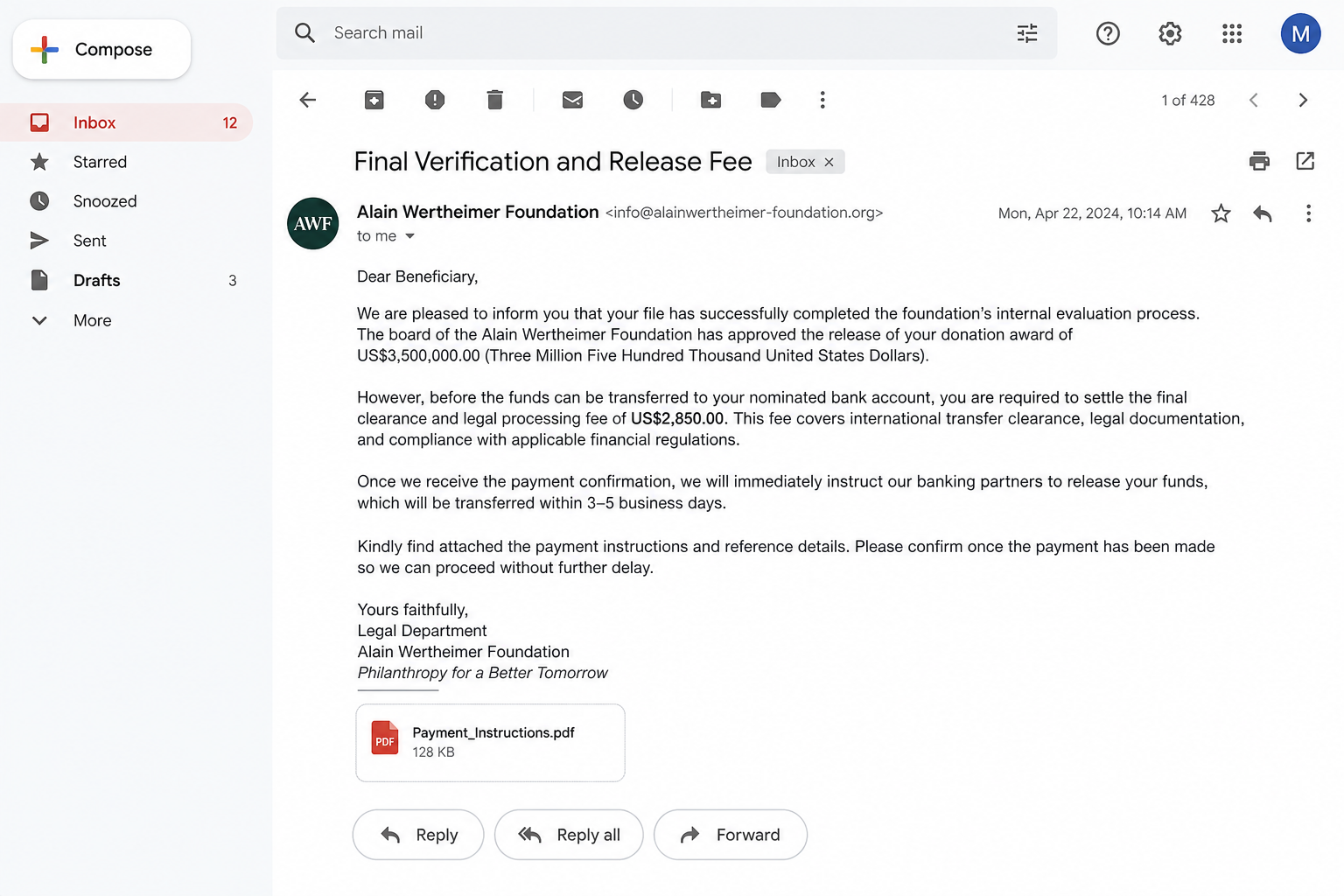
After hope is established, the recipient learns that $2,850 or another amount is needed for clearance, tax, notarization, insurance, or processing.
The fee is tiny compared with $3.5 million, making payment feel rational to someone already imagining the gift.
Legitimate compliance costs are not settled by sending irreversible payments to strangers.
Step 6: Each payment produces another problem
Once the first fee is paid, a new obstacle appears: currency conversion, anti-money-laundering certification, customs, inheritance tax, or account activation.
The promised funds remain one step away. Receipts and fake bank screenshots keep the story alive.
The sequence continues until the victim refuses, runs out of money, or seeks outside help.
Step 7: Stolen identity data gains a second use
Passport scans, signatures, addresses, and bank statements can support account takeover, impersonation, or future targeted fraud.
Victims may later receive recovery messages from another invented organization claiming to know their loss.
That second approach is not rescue. It is an attempt to extract more money from a proven target.
The Domain and Sender Check
Email authentication requires more than reading the name beside the message. Display names are ordinary text fields.
Expand the sender details and inspect the full address, reply-to field, return path, and links without opening them.
A domain that merely combines a famous name with foundation does not become official through wording.
Recent registration is a serious warning
Campaign-related domains can be registered shortly before messages begin. That leaves no history of published grants, staff, reports, or genuine beneficiaries.
A one-year registration and privacy-redacted owner are not proof of fraud by themselves. Together with an unsolicited fortune, they increase concern.
Established foundations normally have a traceable public presence that predates the email campaign.
The reply address may differ from the sender
Some messages display one domain while directing replies to a free mailbox or a second newly registered address.
That separation helps the operator keep conversations alive if the sending account is blocked.
Any change in domain, contact person, or bank should trigger a complete restart of verification.
HTTPS and email delivery do not certify identity
A padlock only encrypts a website connection. It does not prove that the site belongs to the individual named in its logo.
Similarly, a message passing basic spam filters does not mean its charitable claim was investigated.
Authentication records can show who controls a domain, not whether its story is honest.
What a Real Charitable Grant Process Looks Like
Serious foundations publish eligibility rules, application windows, program areas, governance, and contact channels before selecting recipients.
They do not discover random individuals through private email and immediately promise unrestricted millions.
Institutional grants often go to verified nonprofit organizations or defined projects, with written agreements and oversight.
Verification happens through established channels
A genuine organization can be contacted through a long-standing official website, public registry entry, professional staff listing, and known office number.
Its representatives will not object when a potential beneficiary checks with counsel, regulators, or the named institution.
Pressure and secrecy are incompatible with transparent philanthropy.
Tax questions are handled openly
Tax treatment depends on jurisdiction and the nature of the transfer. A legitimate donor does not demand secret prepaid fees to solve it.
Recipients can consult an independent tax professional before accepting significant funds.
A scammer instead provides an invented tax officer whose only function is to validate the next payment.
Funds do not require a stranger’s payment method
Gift cards, cryptocurrency, cash couriers, and personal transfer-app accounts are not normal channels for institutional legal expenses.
Instructions to split payments or describe them falsely are especially dangerous.
If paying a fee is necessary to receive a surprise fortune, the fortune is the bait.
Company, Address, and Fulfillment Checks
The foundation identity may be entirely fabricated
Search official charity registries, annual reports, reputable news archives, and the purported founder’s established corporate channels.
Do not rely on a website reached through the email. The sender may control every page and testimonial there.
A name that sounds plausible is not a legal entity, grant program, or confirmed relationship.
The address may belong to somebody else
Scam documents often copy prestigious offices, law firms, hotels, homes, or unrelated companies to appear grounded.
Search the exact address and telephone number. Then contact the real occupant using details obtained independently.
Receiving mail at a virtual office would still not prove the promised donation exists.
Phone and email contacts may all be controlled together
A supposed lawyer who confirms the foundation is not independent when both identities were introduced by the same email.
Free webmail, recently created domains, messaging apps, and internet phone numbers allow one operator to perform several roles.
True verification must leave the sender’s controlled network.
There is no legitimate fulfillment trail
The promised transfer has no independently confirmed bank, escrow agent, grant agreement, or public program record.
Fake transfer screenshots and pending-payment dashboards can be edited. Only confirmation obtained directly from a regulated institution matters.
Do not pay against an image of funds. Ask your own bank to verify any genuine incoming transfer.
Warning Signs Inside the Message
You are selected without applying or having a prior relationship.
The donation amount is enormous but the selection criteria remain vague.
The sender uses a newly created or lookalike domain.
The greeting is generic despite claims of personal selection.
You are asked to keep the opportunity confidential.
Identity documents are requested before independent verification.
A lawyer or bank contact appears only after you reply.
Fees must be paid before funds can be released.
The preferred payment method is difficult to reverse.
Every completed requirement reveals another unexpected charge.
Poor grammar can appear in scams, but polished writing is not proof of legitimacy. Modern tools can produce professional messages instantly.
Focus on the impossible selection process, hidden identity, advance payment, and lack of independent confirmation.
A real foundation will survive patient scrutiny. A fraudulent narrative becomes more urgent as questions increase.
Why Victims Keep Paying After the First Fee
The first payment changes the victim’s calculation. Walking away now means accepting that both the promised gift and the fee are gone.
Scammers exploit that discomfort by making the next charge appear smaller than the reward and essential to recovering earlier spending.
They may send congratulatory messages between demands, briefly restoring hope whenever the recipient begins to question the process.
Fake officials also divide responsibility. A supposed bank blames a lawyer, while the lawyer blames an international regulator.
That confusion keeps the victim solving invented problems instead of testing the original claim.
Family members may encounter resistance because the recipient has invested money, time, secrecy, and emotion in the promised outcome.
A calm conversation works better than ridicule. Focus on independent verification, payment recovery, and preventing the next transfer.
There is no shame in being targeted. The scheme is deliberately constructed to reward cooperation and punish hesitation.
How to Respond Safely
Do not reply, even to request removal. Mark the message as phishing and preserve a copy with complete headers.
Do not open attachments or follow links. Search independently if you want to notify the person or organization being impersonated.
If a domain is involved, report it to the registrar and hosting provider with the message headers and screenshots.
Forward phishing material to appropriate reporting channels. Reports help providers connect individual messages to larger campaigns.
Tell family members about the approach, especially anyone who may receive a follow-up using details disclosed in the first exchange.
Remove public posts that reveal unnecessary identity documents, travel, inheritance, or financial information.
Be cautious with social profiles that receive new friend requests immediately after the email. Fraud groups reuse gathered information.
Do not hire an online recovery agent who contacts you unsolicited. Seek help from banks, law enforcement, and recognized legal professionals.
What to Do if You Fell Victim to This Scam
Stop every conversation. Block all email addresses, telephone numbers, and messaging accounts connected to the supposed donation.
Contact the payment provider now. Request a recall or fraud review for transfers, cards, cryptocurrency purchases, or payment-app transactions.
Warn your bank. Explain which account details, statements, signatures, and identification images were shared.
Replace exposed credentials. Change email and banking passwords, enable strong multifactor authentication, and end unfamiliar sessions.
Protect your identity. Freeze credit files and create an IdentityTheft.gov plan when government identifiers or documents were sent.
Preserve the evidence. Keep full headers, attachments, chat exports, wallet addresses, receipts, domains, and telephone numbers.
Submit reports. Notify the FTC, local police when money was lost, and the organization or public figure being impersonated.
Check devices safely. Run Malwarebytes if an attachment opened, a program installed, or a suspicious page requested access.
Limit malicious follow-ups. AdGuard can reduce dangerous advertisements and known harmful pages while account recovery continues.
Reject recovery fees. Anyone guaranteeing the return of stolen funds after another payment is extending the original fraud.
Is Your Device Infected? Run a Free Malware Scan
Slow performance, constant pop-ups, or strange behavior? These are classic signs of a malware infection. The fastest way to find out is to scan your device with Malwarebytes Anti-Malware Free — one of the most trusted malware removal tools available.
The free version detects and removes the most common threats, including:
Adware — the cause of those annoying pop-ups
Browser hijackers — unwanted redirects and changed homepages
Trojans and spyware — hidden programs stealing your data
Potentially unwanted programs (PUPs) — software you never asked for
👉 Select your device below — Windows, Mac, or Android — then follow the simple steps to download Malwarebytes, scan your system, and remove any threats it finds. The whole process takes about 5 minutes.
Malwarebytes for WindowsMalwarebytes for MacMalwarebytes for Android
Run a Malware Scan with Malwarebytes for Windows
Malwarebytes is one of the most popular and trusted anti-malware tools for Windows — and it’s completely free for removing infections. It catches threats that many antivirus programs miss, including adware, browser hijackers, and trojans. Follow the steps below to scan and clean your PC in just a few minutes.
Download Malwarebytes
Click the button below to download the latest version of Malwarebytes for Windows from the official source. The free version is all you need — it will scan your computer and remove adware, browser hijackers, and other malicious software at no cost.
(The link opens in a new page where your download will start)
Install Malwarebytes
When the download finishes, open your Downloads folder and double-click the MBSetup file. If Windows shows a User Account Control pop-up, click “Yes” to allow the installation.
Follow the On-Screen Prompts to Install Malwarebytes
The setup wizard will walk you through a few quick screens:
Choose where you’re installing the program — “Personal Computer” or “Work Computer” — then click Next.
Malwarebytes will now install on your device. This usually takes under a minute.
When installation is complete, the “Welcome to Malwarebytes” screen will open automatically.
On the final screen, click Open Malwarebytes to launch the program.
Enable “Scan for Rootkits”
Before scanning, turn on rootkit detection so Malwarebytes can find even the most hidden threats. Click the Settings gear icon on the left side of the screen.
In the settings menu, find “Scan for rootkits” and click the toggle so it turns blue.
Done? Click “Dashboard” in the left pane to return to the main screen.
Start the Scan
Click the blue Scan button. Malwarebytes will automatically update its virus database and start checking your computer for malware.
Wait for the Scan to Finish
The scan checks your entire system for browser hijackers and other malicious programs, so it can take several minutes. Feel free to do something else — just check back occasionally to see the progress.
Quarantine the Detected Threats
When the scan is done, you’ll see a list of everything Malwarebytes found — malware, adware, and potentially unwanted programs. Click the “Quarantine” button to remove all of them at once.
Malwarebytes will now remove the malicious files and registry entries and move them safely into quarantine.
Restart Your Computer
Some threats can only be fully removed after a reboot. If Malwarebytes asks you to restart, click Yes. Once you’re logged back in, your PC is clean and you can continue with the next steps in this guide.
When the scan finishes, click Quarantine to remove everything Malwarebytes found. That’s it — your Windows PC is now clean of trojans, adware, and other malware, and should be back to running smoothly.
If your current antivirus allowed this malicious program on your computer, you may want to consider purchasing Malwarebytes Premium to protect against these types of threats in the future. If you are still having problems with your computer after completing these instructions, then please follow one of the steps:
Malwarebytes for Mac is a free on-demand scanner that removes the malware other security software tends to miss — adware, browser hijackers, and unwanted programs included. Cleaning an infected Mac with Malwarebytes has always been completely free, and it’s our go-to recommendation. Follow the steps below to scan and clean your Mac in just a few minutes.
Download Malwarebytes for Mac
Click the button below to download the latest version of Malwarebytes for Mac.
When the download finishes, open your Downloads folder and double-click the setup file to begin the installation.
Follow the On-Screen Prompts to Install Malwarebytes
The Malwarebytes for Mac Installer will guide you through a few quick screens. Click “Continue” and keep following the prompts until the installation completes.
When the installation is complete, Malwarebytes opens to the Welcome to Malwarebytes screen. Click “Get started“.
Select “Personal Computer” or “Work Computer”
Malwarebytes will ask what type of computer you’re installing it on. Click either Personal Computer or Work Computer, whichever applies.
Start the Scan
Click the “Scan” button. Malwarebytes will automatically update its detection database and begin checking your Mac for malware.
Wait for the Scan to Finish
Malwarebytes will scan your Mac for adware, browser hijackers, and other malicious programs. This can take a few minutes, so feel free to do something else — just check back occasionally to see the progress.
Quarantine the Detected Threats
When the scan is done, you’ll see a list of everything Malwarebytes found. Click the “Quarantine” button to remove all the threats at once.
Restart Your Mac
Malwarebytes will now remove all the malicious files it found. Some threats can only be fully removed after a reboot — if Malwarebytes asks you to restart, allow it. Once you’re logged back in, your Mac is clean.
Once the scan is done, remove every threat it detected. Your Mac is now free of adware, rogue browser extensions, and other potentially harmful software.
If your current antivirus allowed a malicious program on your computer, you might want to consider purchasing the full-featured version of Malwarebytes Anti-Malware to protect against these types of threats in the future. If you are still experiencing problems while trying to remove a malicious program from your computer, please ask for help in our Mac Malware Removal Help & Support forum.
Run a Malware Scan with Malwarebytes for Android
Malwarebytes for Android automatically detects and removes dangerous threats like malware and ransomware so you don’t have to worry about your most-used device being compromised. Aggressive detection of adware and potentially unwanted programs keeps your Android phone or tablet running smooth.
Download Malwarebytes for Android.
You can download Malwarebytes for Android by clicking the link below.
In the Google Play Store, tap “Install” to install Malwarebytes for Android on your device.
When the installation process has finished, tap “Open” to begin using Malwarebytes for Android. You can also open Malwarebytes by tapping on its icon in your phone menu or home screen.
Follow the on-screen prompts to complete the setup process
When Malwarebytes will open, you will see the Malwarebytes Setup Wizard which will guide you through a series of permissions and other setup options. This is the first of two screens that explain the difference between the Premium and Free versions. Swipe this screen to continue. Tap on “Got it” to proceed to the next step. Malwarebytes for Android will now ask for a set of permissions that are required to scan your device and protect it from malware. Tap on “Give permission” to continue. Tap on “Allow” to permit Malwarebytes to access the files on your phone.
Update database and run a scan with Malwarebytes for Android
You will now be prompted to update the Malwarebytes database and run a full system scan.
Click on “Update database” to update the Malwarebytes for Android definitions to the latest version, then click on “Run full scan” to perform a system scan.
Wait for the Malwarebytes scan to complete.
Malwarebytes will now start scanning your phone for adware and other malicious apps. This process can take a few minutes, so we suggest you do something else and periodically check on the status of the scan to see when it is finished.
Click on “Remove Selected”.
When the scan has been completed, you will be presented with a screen showing the malware infections that Malwarebytes for Android has detected. To remove the malicious apps that Malwarebytes has found, tap on the “Remove Selected” button.
Restart your phone.
Malwarebytes for Android will now remove all the malicious apps that it has found. To complete the malware removal process, Malwarebytes may ask you to restart your device.
After the scan, tap Remove Selected to delete all detected threats. Your Android phone is now clean — no more malicious apps, adware, or browser redirects.
If your current antivirus allowed a malicious app on your phone, you may want to consider purchasing the full-featured version of Malwarebytes to protect against these types of threats in the future. If you are still having problems with your phone after completing these instructions, then please follow one of the steps:
Restore your phone to factory settings by going to Settings > General management > Reset > Factory data reset.
Now that your device is clean, keep it that way. Most infections start with a malicious ad or a fake download button — so blocking them at the source is your best defense.
We recommend AdGuard, which blocks malicious ads, phishing pages, and dangerous redirects before they can reach you.
Is the $3.5 million Alain Wertheimer donation real?
No credible evidence supports the unsolicited beneficiary message. Its selection story and likely advance-fee progression match a familiar fraud pattern.
Do not reply or submit documents.
Could a wealthy person privately choose random beneficiaries?
A person can give money privately, but an unexpected email still requires independent confirmation through established representatives and legal channels.
Secrecy and upfront fees make this claim unsafe.
Why does the email use a foundation domain?
Registering a plausible domain is inexpensive. It gives the display name, website, and reply address a coordinated appearance.
Domain ownership does not prove endorsement by the named person.
What if the sender provides identification?
Passport images, employee cards, seals, and signatures can be stolen or fabricated.
Verify through independently located official contacts, never through another person introduced by the sender.
Are taxes or clearance fees normal before a donation?
Not through secret payments to strangers. Significant transfers may have legal or tax implications, but independent professionals handle them transparently.
Do not pay to unlock surprise money.
Can a bank recover cryptocurrency or gift-card payments?
Recovery is difficult, but immediate reporting still matters. Contact the exchange, card issuer, gift-card company, and law enforcement without delay.
Ignore private recovery guarantees.
The Bottom Line
The Alain Wertheimer Foundation email borrows a famous identity to make an impossible $3.5 million gift feel credible.
Delete the message, verify outside its contact network, and never send documents or advance fees to release money you never applied to receive.
10 Rules to Avoid Online Scams
Here are 10 practical safety rules to help you avoid malware, online shopping scams, crypto scams, and other online fraud. Each tip includes a quick “if you already got hit” action.
Stop and verify before you click, log in, download, or pay.
Most scams win by creating urgency. Verify using a trusted method: type the website address yourself, use the official app, or call a known number (not the one in the message).
If you already clicked: close the page, do not enter passwords, and run a malware scan.
Keep your operating system, browser, and apps updated.
Updates patch security holes used by malware and malicious ads. Turn on automatic updates where possible.
If you saw a scary “update now” pop-up: close it and update only through your device settings or the official app store.
Use layered protection: antivirus plus an ad blocker.
Antivirus helps block malware. An ad blocker reduces scam redirects, phishing pages, and malvertising.
If your browser is acting weird: remove unknown extensions, reset the browser, then run a full scan.
Install apps, software, and extensions only from official sources.
Avoid cracked software, “keygens,” and random downloads. During installs, choose Custom/Advanced and decline bundled offers you do not recognize.
If you already installed something suspicious: uninstall it, restart, and scan again.
Treat links and attachments as untrusted by default.
Phishing often impersonates delivery services, banks, and popular brands. If it is unexpected, do not open attachments or log in through the message.
If you entered credentials: change the password immediately and enable 2FA.
Shop safely: research the store, then pay with protection.
Be cautious with brand-new stores, “closing sale” stories, and prices that make no sense. Prefer credit cards or PayPal for dispute options. Avoid wire transfers, gift cards, and crypto payments.
If you already paid: contact your card issuer or PayPal quickly to dispute the transaction.
Crypto rule: never pay a “fee” to withdraw or recover money.
Common patterns include fake profits, then “tax,” “gas,” or “verification” fees. Another is a “recovery agent” who demands upfront crypto.
If you already sent crypto: stop paying, save evidence (wallet addresses, TXIDs, chats), and report the scam to the platform used.
Secure your accounts with unique passwords and 2FA (start with email).
Use a password manager and unique passwords for every account. Enable 2FA using an authenticator app when possible.
If you suspect an account takeover: change passwords, sign out of all devices, and review recent logins and recovery settings.
Back up important files and keep one backup offline.
Backups protect you from ransomware and device failure. Keep at least one backup on an external drive that is not always connected.
If you suspect infection: do not connect backup drives until the system is clean.
If you think you are a victim: stop losses, document evidence, and escalate fast.
Move quickly. Speed matters for disputes, account recovery, and limiting damage.
Stop payments and contact: do not send more money or respond to the scammer.
Call your bank or card issuer: block transactions, replace the card if needed, and start a dispute or chargeback.
Secure your email first: change the email password, enable 2FA, and remove unfamiliar recovery options.
Secure other accounts: change passwords, enable 2FA, and log out of all sessions.
Scan your device: remove suspicious apps or extensions, then run a full malware scan.
Save evidence: screenshots, emails, order pages, tracking pages, wallet addresses, TXIDs, and chat logs.
Report it: to the payment provider, marketplace, social platform, exchange, or wallet service involved.
These rules are intentionally simple. Most online losses happen when decisions are rushed. Slow down, verify independently, and use payment methods and account controls that give you recourse.
Hello! I'm Lapain Epuran, your go-to source for detailed and honest product reviews. From tech gadgets to miracle cures, I provide insights to help you make informed choices. Join me as we discover what's truly worth your time and money.