Cupids Brick’d Gummies Exposed: Hidden Refill Terms and Health Claim Risks
Written by: Lapain Epuran
Published on:
Cupids Brick’d Gummies arrive with bright packaging, playful promises, and the suggestion that two pineapple gummies could quietly improve an intimate part of life.
The offer looks simple at first glance. A closer reading, however, reveals details every shopper should understand before entering a card number.
Overview
What Cupids Brick’d Gummies are
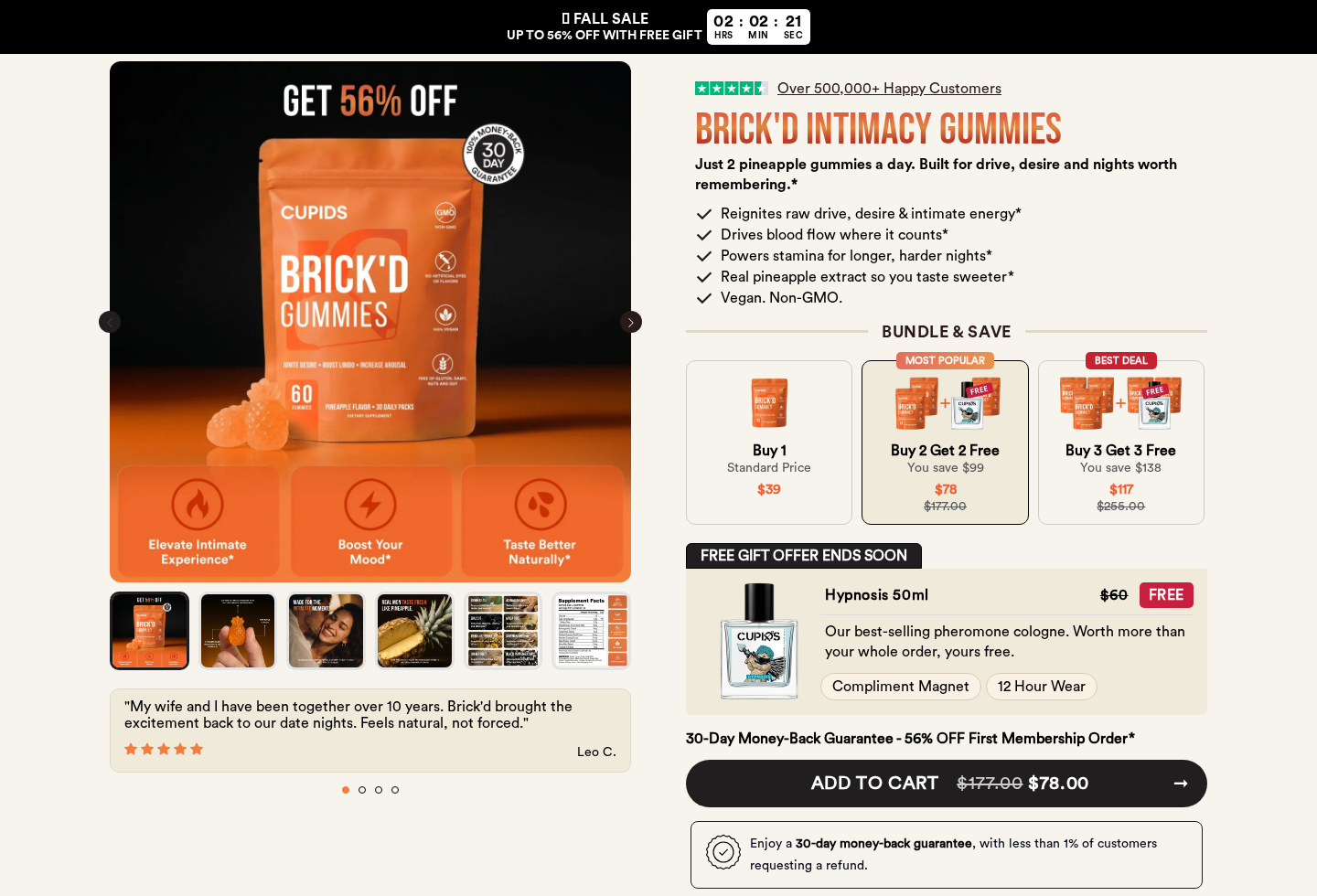
Cupids sells Brick’d Gummies as a daily men’s supplement for energy, blood flow, stamina, performance, and what the page describes as improved taste.
The suggested serving is two pineapple-flavored gummies each day. The formula advertises eight botanical ingredients commonly used in male vitality products.
Those ingredients include shilajit, ashwagandha, maca, ginger, tongkat ali, tribulus, Siberian ginseng, and black pepper extract.
That list sounds impressive, but ingredient names alone do not establish that a finished supplement produces the advertised results or suits every customer.
Why the offer deserves a careful reading
The storefront presents both one-time and recurring purchase choices. The refill option can look attractive because the initial package carries a lower effective price.
According to the displayed terms, refill orders ship every 30 days at $37. That recurring commitment matters far more than the first checkout total.
A shopper moving quickly through the page may focus on bundle savings, customer counts, and colorful benefit claims while overlooking the renewal language.
This does not mean every buyer receives an unwanted shipment. It means the selection and confirmation screens deserve deliberate attention before payment.
What our investigation found
The product is attached to an operating storefront, published policies, a support email, and a telephone number. It is not merely an empty product image.
Still, the offer combines broad intimate-health claims, recurring delivery, customer-paid returns, and a third-party warehouse address. Those features create avoidable purchase risks.
The refill selection renews every 30 days at the disclosed recurring price.
Refund requests require approval and a return reference before a package is sent back.
The customer generally pays return shipping under the published policy.
The listed return destination is a ShipBob fulfillment facility in Illinois.
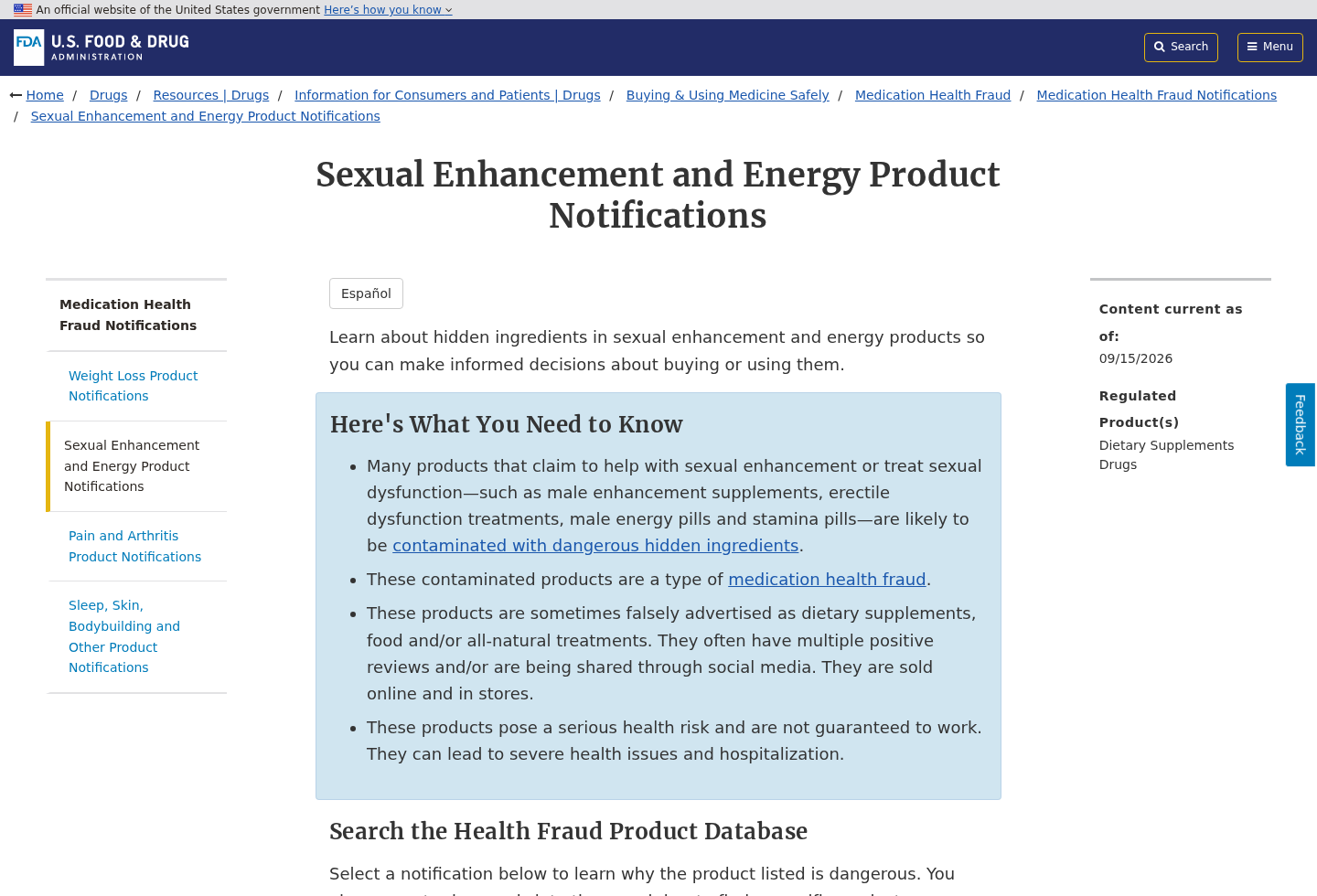
Sexual-enhancement supplements deserve extra caution because this category has repeatedly drawn regulatory warnings.
The central issue is not a single dramatic red flag. It is how several smaller details interact after an impulsive order.
Are Cupids Brick’d Gummies a Scam?
Available evidence does not justify claiming that Cupids is a nonexistent company or that every order is fraudulent. Products, policies, and support channels are visible.
Calling the entire operation fake would ignore those facts. A more accurate conclusion is that the sales presentation creates meaningful subscription and health-claim concerns.
The word “scam” often appears in customer searches after a recurring charge, an unexpected refill, or difficulty obtaining a refund. Those experiences require context.
A recurring plan may be legally disclosed yet still surprise a shopper who believed the highlighted amount covered a single delivery.
Likewise, a supplement can contain the ingredients on its label without delivering the broad outcome implied by lifestyle-focused marketing.
The safest assessment separates three questions: whether the product ships, whether the billing choice was understood, and whether the health promises are adequately supported.
How the Cupids Brick’d Gummies Sales Funnel Works
Step 1: Social advertising creates a private problem
The journey often begins with a short advertisement built around confidence, attraction, stamina, or relationship anxiety. The message feels personal despite reaching a broad audience.
That emotional framing encourages immediate action. It also makes some viewers less likely to discuss the purchase with a doctor, pharmacist, or partner.
Ads in this category rarely lead with limitations. They emphasize transformation, convenience, and a discreet product that supposedly fits into an ordinary routine.
Step 2: The product page builds credibility through volume
The landing page highlights large customer figures, benefit icons, testimonials, ingredient graphics, and bundle discounts. Together, these elements simulate strong social proof.
A displayed customer count is not the same as independent evidence. Testimonials cannot show how typical a result is, nor rule out placebo effects.
Shoppers should distinguish what the seller says about popularity from what controlled research establishes about the complete formulation.
Step 3: Bundles make the cart feel more valuable
The pricing ladder rewards larger orders. One bottle appears less economical beside offers that double or match the number purchased.
This comparison changes the decision from “Do I need this?” to “Which bundle wastes the least value?” That is a familiar direct-response technique.
Ordering several containers also increases the amount at risk if the gummies cause side effects, arrive late, or fail to meet expectations.
Step 4: The refill option lowers the first barrier
Recurring delivery can be convenient for a satisfied customer. The problem begins when the renewal is noticed only after another charge appears.
Cupids states that refills ship every 30 days at $37. Buyers should capture that wording and confirm which option the cart selected.
Do not assume a discounted first order is automatically a one-time purchase. Read the line beside the selector and the final order summary.
Step 5: The return process adds friction
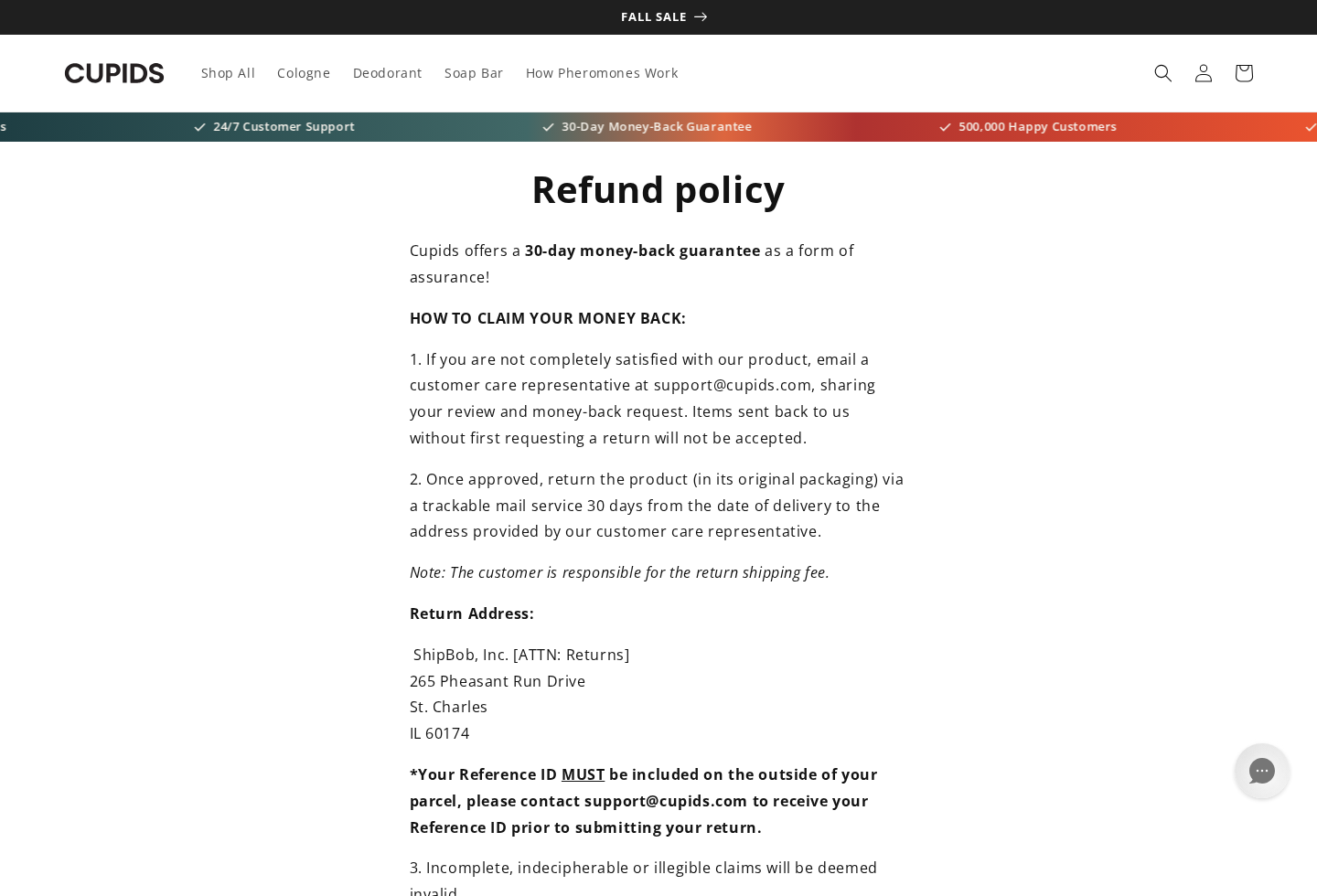
The published refund policy gives customers 30 days, but a return is not simply a matter of mailing the bottle back.
The buyer must contact support, receive approval, obtain a reference, and use the instructed destination. Sending an unapproved package may complicate the request.
Return postage is generally the customer’s responsibility. That cost can make a low-value refund feel less worthwhile, especially after opening or using the product.
Read whether opened containers qualify, when the 30-day window begins, and whether original shipping charges are recoverable before placing an order.
Step 6: A warehouse address can look like headquarters
The return address points to a ShipBob facility in St. Charles, Illinois. ShipBob is a logistics provider that stores and sends merchandise for many brands.
A fulfillment warehouse does not prove deception. It also does not identify who formulated the product, where it was manufactured, or who controls customer decisions.
That distinction becomes important when a buyer needs a refund, safety information, batch details, or a responsible legal entity.
Step 7: Health expectations outlast the checkout
A customer may continue taking gummies while waiting for the promised change. Intimate concerns can have medical, psychological, medication-related, or lifestyle causes.
Relying on a supplement may delay a proper evaluation. It may also create interactions with prescriptions, stimulants, anticoagulants, or blood-pressure treatments.
The product page’s confident language should never replace personalized medical advice, especially for anyone with cardiovascular conditions or ongoing symptoms.
What the Ingredient Claims Really Mean
Botanical formulas often borrow credibility from studies involving a single ingredient. A finished gummy may use a different dose, extract, schedule, or participant population.
Evidence for one component cannot automatically be transferred to an eight-ingredient blend. The complete product needs its own reliable support for the advertised outcome.
Labels should disclose serving size and ingredient amounts clearly. Proprietary blends can prevent shoppers from knowing whether an ingredient appears at a meaningful quantity.
Black pepper extract may change how some compounds are absorbed. That effect is not automatically beneficial and may matter for medicine interactions.
Ashwagandha can affect thyroid function, sedation, and gastrointestinal comfort in some people. Tongkat ali and other stimulatory ingredients may not suit everyone.
Shilajit products require careful sourcing because contamination and purification quality can vary. A familiar traditional name is not a manufacturing guarantee.
Supplements are not approved like prescription medicines before sale. A polished package and a listed manufacturing facility do not establish effectiveness.
Ask for a current certificate of analysis tied to the lot number, not a generic badge. It should cover identity, potency, microbes, and heavy metals.
How to Compare This Supplement With Alternatives
Begin with the reason for considering the product. Fatigue, low desire, erectile changes, and relationship stress do not share one universal cause.
A clinician can review medicines, sleep, blood pressure, hormones, mental health, alcohol use, and circulation before a supplement clouds the picture.
Next, compare formulas by actual serving amounts. A longer ingredient list is not automatically stronger, safer, or better supported.
Look for transparent labels that avoid proprietary blends. Exact quantities let pharmacists assess interactions and help consumers compare value between competing products.
Calculate the monthly cost using the recommended daily serving. Bottle price can be misleading when one container lasts less than 30 days.
Include shipping, future refills, and return postage. A cheap introductory order may cost more across three months than a clearly priced alternative.
Search the precise product and company names with “recall,” “warning,” “lawsuit,” and “adverse event.” Confirm any result through the original authority.
Check whether testing documents identify the batch you would receive. Undated laboratory graphics without sample numbers offer little assurance about current inventory.
Consider whether gummies add sugars, sweeteners, or allergens relevant to your health. Flavor and convenience should not obscure those ordinary label details.
Finally, decide what result would justify continuing. A written review date prevents an open-ended subscription from replacing an evidence-based health decision.
Sexual-Enhancement Supplements Need Extra Caution
Regulators have repeatedly found hidden drug ingredients in products marketed for sexual enhancement. That warning applies to the category, not automatically to this specific brand.
We found no basis to state that Cupids Brick’d Gummies contain an undeclared prescription compound. Making that accusation without laboratory evidence would be irresponsible.
The category history still matters. Hidden sildenafil-like substances can dangerously interact with nitrate medicines and cause a severe drop in blood pressure.
Consumers should avoid any supplement promising prescription-strength effects, immediate results, or guaranteed performance while claiming to be completely risk-free.
Stop using the product and seek medical advice after chest pain, fainting, severe headache, vision changes, allergic symptoms, or a prolonged painful erection.
Report suspected adverse effects with the product name, lot number, purchase date, and remaining packaging. Those details help clinicians and regulators investigate.
Keep the gummies away from children. A candy-like format can make accidental consumption more likely than with ordinary capsules.
Company, Address, and Fulfillment Checks
The legal name must match the seller
The terms identify Cupids LLC and reference cupids.com and cupidfragrances.com. Save a copy because business names and web pages can change.
Compare that entity with the name on the receipt and card statement. A completely different descriptor makes later charge identification harder.
A warehouse is not corporate accountability
The Illinois destination is associated with ShipBob fulfillment. That may explain where returns are processed, but it should not be mistaken for brand headquarters.
Fulfillment centers move boxes for clients. They usually cannot answer questions about formula decisions, advertising substantiation, billing authorization, or refund approval.
Test support before relying on it
The published contact channels include support@cupids.com and (513) 540-0761. Contact them before ordering if any recurring term remains unclear.
Ask whether the selected cart is one-time, the exact next billing date, cancellation timing, opened-product eligibility, and the required return authorization.
Manufacturing transparency matters
A seller should provide a complete Supplement Facts panel, lot identification, country of manufacture, warnings, and testing information without evasive answers.
Do not infer that a product was made in the United States because a return warehouse is domestic. Shipping location and manufacturing origin are separate facts.
Warning Signs to Notice Before Ordering
Benefits are framed broadly, while evidence for the finished formulation remains difficult to locate.
Bundle arithmetic receives more visual emphasis than the recurring commitment.
Testimonials describe dramatic personal outcomes without showing how common those results are.
A satisfaction promise sounds effortless, but the policy requires advance approval and customer-paid postage.
The return destination is a logistics warehouse rather than a clearly explained corporate office.
The product addresses a sensitive concern that may discourage buyers from seeking outside advice.
No single point proves fraud. The combination should slow the purchase and move attention from the advertisement to the written agreement.
Take screenshots of the selected purchase type, price, quantity, renewal schedule, cancellation method, and guarantee. Those records can resolve later disputes.
What to Do if You Bought Cupids Brick’d Gummies
Confirm the order type. Review the receipt and account page for “refill,” “subscription,” “every 30 days,” or a future shipment date.
Cancel recurring delivery in writing. Contact the seller promptly, state that authorization for future shipments is withdrawn, and request written confirmation.
Follow the return procedure exactly. Obtain approval and the required reference before mailing anything. Use tracked postage and photograph the sealed parcel.
Preserve the sales record. Save advertisements, checkout screenshots, policies, emails, labels, lot numbers, tracking pages, and your card statement.
Watch for another charge. Check the payment account around the expected renewal date and dispute any billing that continues after cancellation.
Speak with the card issuer. Explain whether the concern is an unrecognized renewal, incorrect quantity, missing delivery, or refused policy-compliant refund.
Prioritize physical safety. Stop use after a concerning reaction and contact a clinician or poison-control service with the packaging available.
Secure the device if needed. Run Malwarebytes after suspicious redirects or downloads, and use AdGuard to reduce deceptive ads and tracking pages.
Report unresolved conduct. Submit accurate records to consumer-protection authorities and report serious supplement reactions through the appropriate health channel.
Is Your Device Infected? Run a Free Malware Scan
Slow performance, constant pop-ups, or strange behavior? These are classic signs of a malware infection. The fastest way to find out is to scan your device with Malwarebytes Anti-Malware Free — one of the most trusted malware removal tools available.
The free version detects and removes the most common threats, including:
Adware — the cause of those annoying pop-ups
Browser hijackers — unwanted redirects and changed homepages
Trojans and spyware — hidden programs stealing your data
Potentially unwanted programs (PUPs) — software you never asked for
👉 Select your device below — Windows, Mac, or Android — then follow the simple steps to download Malwarebytes, scan your system, and remove any threats it finds. The whole process takes about 5 minutes.
Malwarebytes for WindowsMalwarebytes for MacMalwarebytes for Android
Run a Malware Scan with Malwarebytes for Windows
Malwarebytes is one of the most popular and trusted anti-malware tools for Windows — and it’s completely free for removing infections. It catches threats that many antivirus programs miss, including adware, browser hijackers, and trojans. Follow the steps below to scan and clean your PC in just a few minutes.
Download Malwarebytes
Click the button below to download the latest version of Malwarebytes for Windows from the official source. The free version is all you need — it will scan your computer and remove adware, browser hijackers, and other malicious software at no cost.
(The link opens in a new page where your download will start)
Install Malwarebytes
When the download finishes, open your Downloads folder and double-click the MBSetup file. If Windows shows a User Account Control pop-up, click “Yes” to allow the installation.
Follow the On-Screen Prompts to Install Malwarebytes
The setup wizard will walk you through a few quick screens:
Choose where you’re installing the program — “Personal Computer” or “Work Computer” — then click Next.
Malwarebytes will now install on your device. This usually takes under a minute.
When installation is complete, the “Welcome to Malwarebytes” screen will open automatically.
On the final screen, click Open Malwarebytes to launch the program.
Enable “Scan for Rootkits”
Before scanning, turn on rootkit detection so Malwarebytes can find even the most hidden threats. Click the Settings gear icon on the left side of the screen.
In the settings menu, find “Scan for rootkits” and click the toggle so it turns blue.
Done? Click “Dashboard” in the left pane to return to the main screen.
Start the Scan
Click the blue Scan button. Malwarebytes will automatically update its virus database and start checking your computer for malware.
Wait for the Scan to Finish
The scan checks your entire system for browser hijackers and other malicious programs, so it can take several minutes. Feel free to do something else — just check back occasionally to see the progress.
Quarantine the Detected Threats
When the scan is done, you’ll see a list of everything Malwarebytes found — malware, adware, and potentially unwanted programs. Click the “Quarantine” button to remove all of them at once.
Malwarebytes will now remove the malicious files and registry entries and move them safely into quarantine.
Restart Your Computer
Some threats can only be fully removed after a reboot. If Malwarebytes asks you to restart, click Yes. Once you’re logged back in, your PC is clean and you can continue with the next steps in this guide.
When the scan finishes, click Quarantine to remove everything Malwarebytes found. That’s it — your Windows PC is now clean of trojans, adware, and other malware, and should be back to running smoothly.
If your current antivirus allowed this malicious program on your computer, you may want to consider purchasing Malwarebytes Premium to protect against these types of threats in the future. If you are still having problems with your computer after completing these instructions, then please follow one of the steps:
Malwarebytes for Mac is a free on-demand scanner that removes the malware other security software tends to miss — adware, browser hijackers, and unwanted programs included. Cleaning an infected Mac with Malwarebytes has always been completely free, and it’s our go-to recommendation. Follow the steps below to scan and clean your Mac in just a few minutes.
Download Malwarebytes for Mac
Click the button below to download the latest version of Malwarebytes for Mac.
When the download finishes, open your Downloads folder and double-click the setup file to begin the installation.
Follow the On-Screen Prompts to Install Malwarebytes
The Malwarebytes for Mac Installer will guide you through a few quick screens. Click “Continue” and keep following the prompts until the installation completes.
When the installation is complete, Malwarebytes opens to the Welcome to Malwarebytes screen. Click “Get started“.
Select “Personal Computer” or “Work Computer”
Malwarebytes will ask what type of computer you’re installing it on. Click either Personal Computer or Work Computer, whichever applies.
Start the Scan
Click the “Scan” button. Malwarebytes will automatically update its detection database and begin checking your Mac for malware.
Wait for the Scan to Finish
Malwarebytes will scan your Mac for adware, browser hijackers, and other malicious programs. This can take a few minutes, so feel free to do something else — just check back occasionally to see the progress.
Quarantine the Detected Threats
When the scan is done, you’ll see a list of everything Malwarebytes found. Click the “Quarantine” button to remove all the threats at once.
Restart Your Mac
Malwarebytes will now remove all the malicious files it found. Some threats can only be fully removed after a reboot — if Malwarebytes asks you to restart, allow it. Once you’re logged back in, your Mac is clean.
Once the scan is done, remove every threat it detected. Your Mac is now free of adware, rogue browser extensions, and other potentially harmful software.
If your current antivirus allowed a malicious program on your computer, you might want to consider purchasing the full-featured version of Malwarebytes Anti-Malware to protect against these types of threats in the future. If you are still experiencing problems while trying to remove a malicious program from your computer, please ask for help in our Mac Malware Removal Help & Support forum.
Run a Malware Scan with Malwarebytes for Android
Malwarebytes for Android automatically detects and removes dangerous threats like malware and ransomware so you don’t have to worry about your most-used device being compromised. Aggressive detection of adware and potentially unwanted programs keeps your Android phone or tablet running smooth.
Download Malwarebytes for Android.
You can download Malwarebytes for Android by clicking the link below.
In the Google Play Store, tap “Install” to install Malwarebytes for Android on your device.
When the installation process has finished, tap “Open” to begin using Malwarebytes for Android. You can also open Malwarebytes by tapping on its icon in your phone menu or home screen.
Follow the on-screen prompts to complete the setup process
When Malwarebytes will open, you will see the Malwarebytes Setup Wizard which will guide you through a series of permissions and other setup options. This is the first of two screens that explain the difference between the Premium and Free versions. Swipe this screen to continue. Tap on “Got it” to proceed to the next step. Malwarebytes for Android will now ask for a set of permissions that are required to scan your device and protect it from malware. Tap on “Give permission” to continue. Tap on “Allow” to permit Malwarebytes to access the files on your phone.
Update database and run a scan with Malwarebytes for Android
You will now be prompted to update the Malwarebytes database and run a full system scan.
Click on “Update database” to update the Malwarebytes for Android definitions to the latest version, then click on “Run full scan” to perform a system scan.
Wait for the Malwarebytes scan to complete.
Malwarebytes will now start scanning your phone for adware and other malicious apps. This process can take a few minutes, so we suggest you do something else and periodically check on the status of the scan to see when it is finished.
Click on “Remove Selected”.
When the scan has been completed, you will be presented with a screen showing the malware infections that Malwarebytes for Android has detected. To remove the malicious apps that Malwarebytes has found, tap on the “Remove Selected” button.
Restart your phone.
Malwarebytes for Android will now remove all the malicious apps that it has found. To complete the malware removal process, Malwarebytes may ask you to restart your device.
After the scan, tap Remove Selected to delete all detected threats. Your Android phone is now clean — no more malicious apps, adware, or browser redirects.
If your current antivirus allowed a malicious app on your phone, you may want to consider purchasing the full-featured version of Malwarebytes to protect against these types of threats in the future. If you are still having problems with your phone after completing these instructions, then please follow one of the steps:
Restore your phone to factory settings by going to Settings > General management > Reset > Factory data reset.
Now that your device is clean, keep it that way. Most infections start with a malicious ad or a fake download button — so blocking them at the source is your best defense.
We recommend AdGuard, which blocks malicious ads, phishing pages, and dangerous redirects before they can reach you.
The refill choice displayed on the storefront renews every 30 days at $37. A separate one-time option may be available, so verify the final selection.
Is the ShipBob address fake?
It appears to be a fulfillment location, not necessarily a fake address. It should not be interpreted as proof of the brand’s headquarters or manufacturing site.
Are the gummies FDA approved?
Dietary supplements are not approved by the FDA in the same manner as prescription drugs. Registration language does not mean the agency endorsed the product.
Do the eight ingredients prove the advertised benefits?
No. Ingredient presence alone does not establish that the complete formula, dosage, and schedule reliably produce the page’s promised intimate-health outcomes.
Can I return an opened bottle?
Eligibility depends on the current written policy and approval from support. Ask before shipping, obtain a reference, and retain proof of delivery.
What should I ask before buying?
Ask for the exact renewal terms, cancellation deadline, ingredient amounts, manufacturing origin, lot-specific testing, return cost, and card-statement descriptor.
The Bottom Line
Cupids Brick’d Gummies are sold through a functioning storefront, but recurring refills, broad health claims, and a conditional return process deserve careful scrutiny.
Choose one-time billing deliberately, discuss health concerns with a professional, and preserve every checkout detail. Confidence should come from clear evidence, not pressure-driven marketing.
10 Rules to Avoid Online Scams
Here are 10 practical safety rules to help you avoid malware, online shopping scams, crypto scams, and other online fraud. Each tip includes a quick “if you already got hit” action.
Stop and verify before you click, log in, download, or pay.
Most scams win by creating urgency. Verify using a trusted method: type the website address yourself, use the official app, or call a known number (not the one in the message).
If you already clicked: close the page, do not enter passwords, and run a malware scan.
Keep your operating system, browser, and apps updated.
Updates patch security holes used by malware and malicious ads. Turn on automatic updates where possible.
If you saw a scary “update now” pop-up: close it and update only through your device settings or the official app store.
Use layered protection: antivirus plus an ad blocker.
Antivirus helps block malware. An ad blocker reduces scam redirects, phishing pages, and malvertising.
If your browser is acting weird: remove unknown extensions, reset the browser, then run a full scan.
Install apps, software, and extensions only from official sources.
Avoid cracked software, “keygens,” and random downloads. During installs, choose Custom/Advanced and decline bundled offers you do not recognize.
If you already installed something suspicious: uninstall it, restart, and scan again.
Treat links and attachments as untrusted by default.
Phishing often impersonates delivery services, banks, and popular brands. If it is unexpected, do not open attachments or log in through the message.
If you entered credentials: change the password immediately and enable 2FA.
Shop safely: research the store, then pay with protection.
Be cautious with brand-new stores, “closing sale” stories, and prices that make no sense. Prefer credit cards or PayPal for dispute options. Avoid wire transfers, gift cards, and crypto payments.
If you already paid: contact your card issuer or PayPal quickly to dispute the transaction.
Crypto rule: never pay a “fee” to withdraw or recover money.
Common patterns include fake profits, then “tax,” “gas,” or “verification” fees. Another is a “recovery agent” who demands upfront crypto.
If you already sent crypto: stop paying, save evidence (wallet addresses, TXIDs, chats), and report the scam to the platform used.
Secure your accounts with unique passwords and 2FA (start with email).
Use a password manager and unique passwords for every account. Enable 2FA using an authenticator app when possible.
If you suspect an account takeover: change passwords, sign out of all devices, and review recent logins and recovery settings.
Back up important files and keep one backup offline.
Backups protect you from ransomware and device failure. Keep at least one backup on an external drive that is not always connected.
If you suspect infection: do not connect backup drives until the system is clean.
If you think you are a victim: stop losses, document evidence, and escalate fast.
Move quickly. Speed matters for disputes, account recovery, and limiting damage.
Stop payments and contact: do not send more money or respond to the scammer.
Call your bank or card issuer: block transactions, replace the card if needed, and start a dispute or chargeback.
Secure your email first: change the email password, enable 2FA, and remove unfamiliar recovery options.
Secure other accounts: change passwords, enable 2FA, and log out of all sessions.
Scan your device: remove suspicious apps or extensions, then run a full malware scan.
Save evidence: screenshots, emails, order pages, tracking pages, wallet addresses, TXIDs, and chat logs.
Report it: to the payment provider, marketplace, social platform, exchange, or wallet service involved.
These rules are intentionally simple. Most online losses happen when decisions are rushed. Slow down, verify independently, and use payment methods and account controls that give you recourse.
Hello! I'm Lapain Epuran, your go-to source for detailed and honest product reviews. From tech gadgets to miracle cures, I provide insights to help you make informed choices. Join me as we discover what's truly worth your time and money.