

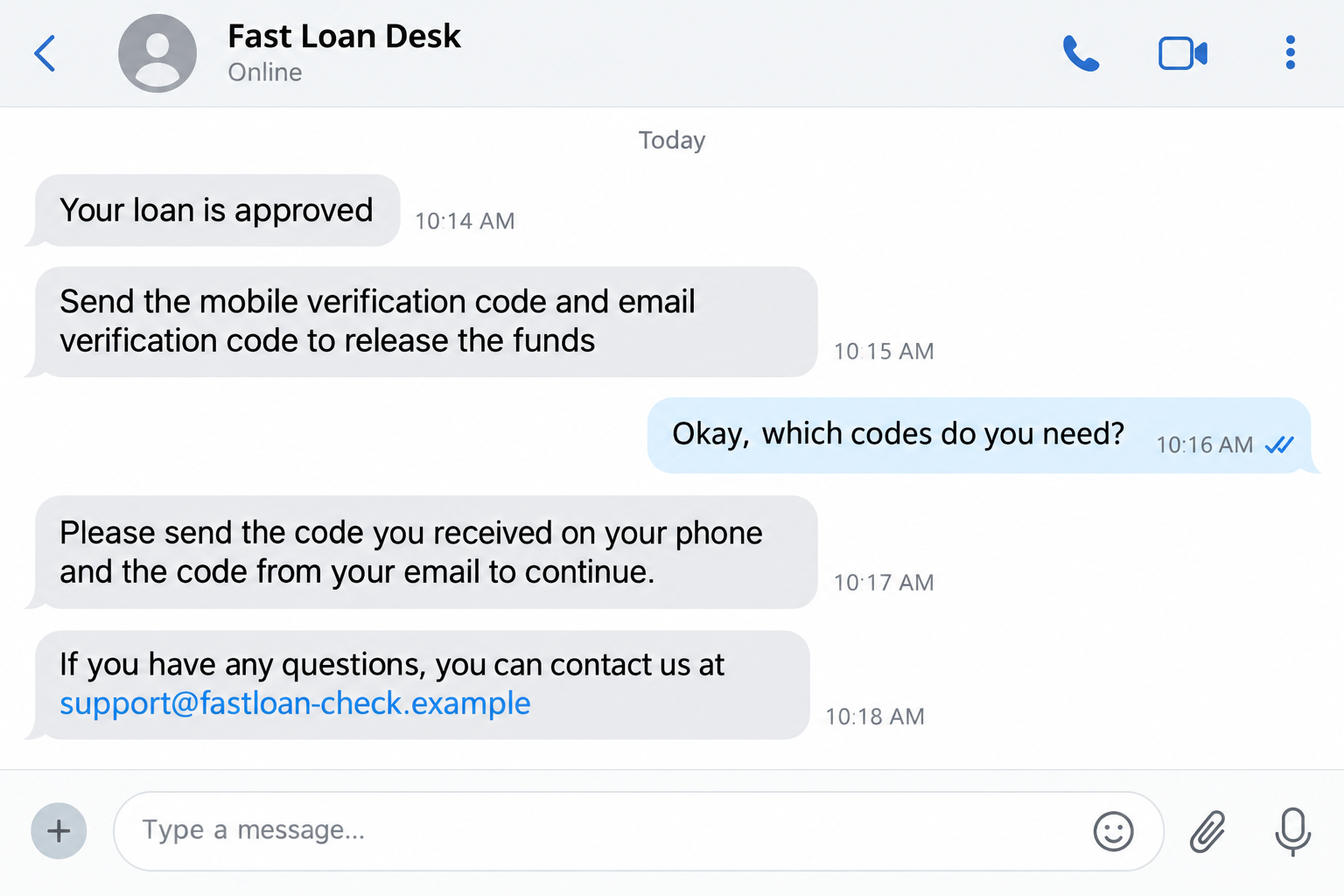
A lender says your application has been approved. The money is supposedly ready, but one last security check stands between you and the transfer. The request sounds technical: send the codes that just arrived on your phone and email.
The BiMPay loan verification code scam turns that small request into account access. Barbados’ central bank has confirmed the fraud pattern and explained exactly which credentials a victim was persuaded to disclose.
Overview
A fake loan offer led to an unauthorized transaction
On September 15, 2026, the Central Bank of Barbados warned about a reported social-engineering fraud connected to a purported online loan.
The customer gave a third party a mobile verification code, an email verification code, and a BiMPay token during the supposed loan process. A transaction was then made without the customer’s authorization.
This is direct confirmation of a scam, not a rumor about the payment platform. The bank also made clear that there was no indication BiMPay itself had been compromised.
A lender does not need your BiMPay security credentials
The official warning states that a legitimate lender or financial institution does not need a customer’s BiMPay verification codes, BiMPay token, or password to provide a loan or make a payment to the customer.
That gives you a simple stop rule. A person who says a code will “release” loan funds is asking you to surrender a control designed to protect your account.
The story may arrive through social media, a messaging app, an advertisement, or another online channel. The contact method can change, but the request for secret credentials exposes the fraud.
BiMPay is the system being abused, not the scam operator
BiMPay is Barbados’ national instant-payment system. The Central Bank’s BiMPay support information explains that a token links the e-wallet to a bank or credit-union account and that the user’s financial institution remains the first point of contact.
Calling the incident a BiMPay scam describes the impersonator’s use of the service and its credentials. It does not mean the genuine platform offered the fake loan.
- An unsolicited contact offers a fast or guaranteed loan.
- Approval comes before meaningful identity or affordability checks.
- The contact asks for codes delivered to your phone or email.
- A BiMPay token or password is described as a loan-release requirement.
- The sender wants the conversation kept inside social media or chat.
Why the “Release the Funds” Story Feels Plausible
Real financial services do use one-time codes and tokens. That familiarity helps the criminal. The victim recognizes the security step but is given a false explanation for why it appeared.
Urgency adds pressure. Someone seeking a loan may need rent, medical expenses, or business cash quickly. The scammer frames hesitation as the only thing delaying relief.
The code may arrive from a genuine bank or payment service, which can make the request feel more legitimate. In reality, the real message proves that someone is attempting an action on the account. It does not prove the person in the chat is authorized.
Read the security message itself. One-time-code notices often say not to share the code. The warning belongs to the genuine provider; the explanation offered by the “loan agent” belongs to the scammer.
A lender sending you money does not need the secret that lets another person register, link, access, or authorize your payment account.
What Each Requested Credential Can Do
A mobile verification code can confirm control of a phone number or approve a step in a registration flow. An email code can do the same for the mailbox attached to the account.
The BiMPay support page describes a token as a 36-digit security code used to link an e-wallet to a bank or credit-union account. That is not an ordinary loan reference number.
A password, device PIN, or biometric prompt protects later access and transfers. No honest loan salesperson should ask you to read those secrets aloud, paste them into chat, or enter them into a page reached from the salesperson.
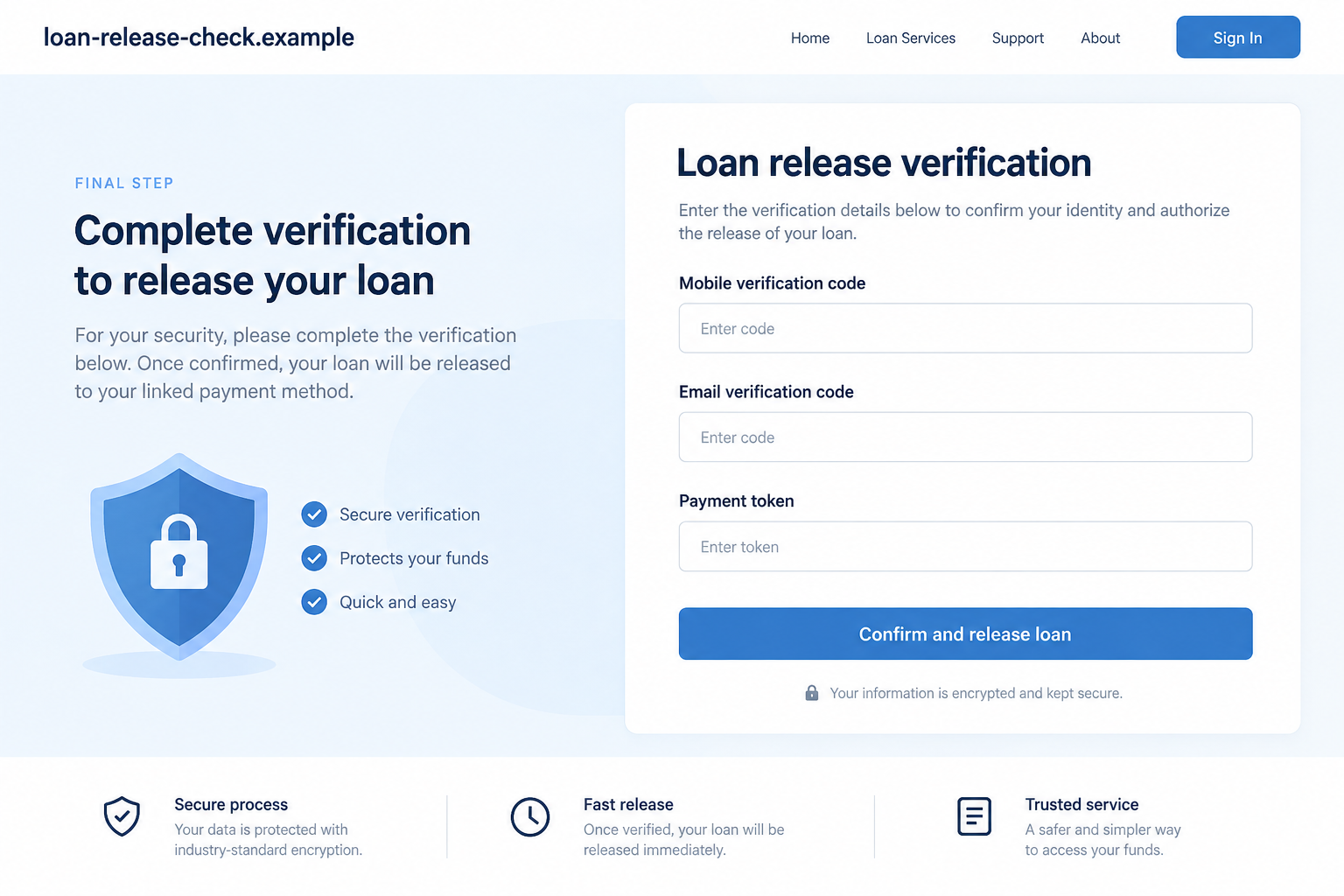
The fictional reconstruction below collects several credentials on one screen to show the danger. The central bank confirmed that the reported victim shared the mobile code, email code, and token, but it did not say they appeared on this exact type of page.
How the BiMPay Loan Verification Code Scam Works
Step 1: A supposed lender finds the victim online
The approach may start with a social media ad, direct message, group post, or chat account. The offer emphasizes quick approval, minimal checks, or access for people rejected elsewhere.
A professional profile, polished form, or copied financial language can make the operator look established. Those elements are inexpensive to create and do not prove a lending license.
Before applying, find the lender through independent records and contact it using details you did not receive in the advertisement.
Step 2: Approval arrives unusually fast
The scammer may announce approval after collecting only basic details. The speed creates excitement and moves attention away from the lender’s identity.
Sometimes the criminal shows a fake balance or approval document. It is a promise inside the scam’s own interface, not evidence that funds exist.
Do not send additional identity documents merely because a screen displays your name and an approved amount. Those details may have come from your own application.
Step 3: The scammer initiates a real BiMPay action
Using information already collected, the criminal may begin an account-registration, linking, access, or transaction process. The genuine system then sends codes to the real customer’s phone and email.
This is the crucial illusion. A genuine code is being generated, but it relates to the attacker’s action, not to releasing a loan.
If you did not initiate the action yourself inside the official service, do not approve it and do not share the code.
Step 4: The codes are renamed as loan verification
The supposed agent says the mobile code and email code prove eligibility or unlock payment. The language separates the secret from its real purpose.
The victim may be asked to send a token next. By treating each request as a small administrative step, the criminal avoids revealing the combined effect.
Stop at the first secret. A person who needs a security code to send you money is reversing the direction of trust.
Step 5: The attacker completes an unauthorized transaction
Once enough credentials are collected, the criminal can use them to complete the action already underway. In the reported case, the central bank says a transaction was made without authorization.
The fake lender may blame a delay, ask for another code, or claim a fee is required. Continuing the conversation gives the attacker more opportunities.
Contact your financial institution immediately. Do not ask the scammer to undo the transaction or wait for the promised loan.
Step 6: The same victim may be targeted again
Criminals know that someone who needed a loan may still be looking for help. A second account may offer recovery, refinancing, or a refund.
The follow-up can reuse personal details from the first application. Familiar information proves only that the data was retained or shared.
Treat unsolicited recovery offers as new scams. Work directly with the financial institution and police.
Company and Lender Checks for a BiMPay Loan Offer
Verify the lender before discussing the payment method
Ask for the lender’s legal name, licensing details, physical address, and written terms. Check those details through the relevant regulator or official registry.
Do not accept a social profile, messaging account, or certificate image as independent proof. The operator controls all three.
BiMPay does not turn security secrets into loan paperwork
A token is a security credential used for account linking. Verification codes confirm actions. Their function does not change because a stranger calls them release numbers.
Use the official BiMPay app and information from your bank or credit union. Do not follow setup instructions supplied by an online lender you have not verified.
Your financial institution is the support route
The Central Bank says the relationship for wallet issues remains with the customer’s bank or credit union. Contact that institution through its app, card, statement, or official website.
A scammer may give you a “help desk” number that reaches an accomplice. Independent contact prevents the same group from answering both sides of the verification.
The transaction history is more reliable than the chat
Check your real bank and wallet activity. Screenshots sent by the supposed lender can be edited, and a pending label inside a fake portal does not prove money is coming.
If you see an action you do not recognize, report it immediately. Do not wait for the loan agent’s explanation.
How to Judge an Online Loan Without Sharing Secrets
Compare the offer with normal lending practice. Guaranteed approval, no meaningful review, and immediate pressure are not consumer benefits when the operator’s identity cannot be verified.
Read the full cost and repayment terms before providing sensitive information. A legitimate agreement should identify the legal lender and explain how complaints and cancellation work.
Never pay an advance fee by cryptocurrency, gift card, or transfer to an individual. The confirmed BiMPay incident focused on stolen credentials, but fake lenders often add fee demands after the victim is invested.
Most importantly, keep security codes inside the process that generated them. If you are speaking with someone else when the code arrives, stop the conversation and contact the provider.
Search the legal lender’s name with the word “license” and verify the result at the regulator, not on a directory the lender supplied. A copied registration number can belong to another business.
Compare the account receiving any fee with the name in the agreement. Payment to an unrelated individual or newly introduced company is a reason to stop and verify again.
Keep the conversation and application terms before blocking the account. Those records help your bank and police understand how the credentials were obtained.
A real provider can explain its process without asking you to surrender the controls that protect your account.
What to Do if You Have Fallen Victim to This Scam
-
End contact with the fake lender. Do not send another code, token, password, document, or fee. Preserve the chat, profile, advertisement, and any web addresses.
Block the account only after saving evidence. Criminals may delete messages once challenged.
-
Contact your bank or credit union immediately. Tell the fraud team exactly which mobile code, email code, token, password, or PIN you shared.
Ask it to secure or disable BiMPay access, review linked accounts, revoke sessions, and investigate unauthorized activity. Use a number from an official source.
-
Secure your email and phone accounts. Change exposed or reused passwords from a trusted device. Review recovery details and active sessions.
If your mobile service changed unexpectedly, contact the carrier about possible SIM-related abuse. Your email account may need priority because it can receive additional codes.
-
Document and dispute unauthorized transactions. Record amounts, times, recipients, and reference numbers. Follow the financial institution’s formal dispute process.
Do not pay a recovery agent who contacts you afterward. A promise to retrieve the money for another fee is a common second theft.
-
Report the fraud. The Central Bank advises victims to report to the Barbados Police Service. Also notify the platform where the loan offer or advertisement appeared.
Provide copies of the communication without posting your token, codes, passwords, or identity documents publicly.
-
Check the device if software was installed. Sharing a code is primarily an account-security event. Installing an app, profile, or remote-access tool adds a device risk.
Malwarebytes can help scan a supported personal device for malicious software. AdGuard can block some known malicious domains and deceptive ads, but neither can cancel a transaction or invalidate a shared BiMPay token.
Frequently Asked Questions
Did the Central Bank of Barbados confirm this scam?
Yes. It reported a social-engineering fraud involving a purported online loan and the disclosure of a mobile code, email code, and BiMPay token.
Was BiMPay hacked?
The Central Bank said there was no indication the BiMPay platform itself was compromised. The reported fraud relied on a customer sharing security credentials.
Can a legitimate lender ask for my BiMPay token?
No. The official warning says a legitimate lender or financial institution does not need your BiMPay codes, token, or password to provide a loan or payment.
What if the code came from my real bank?
That can mean a real action is being attempted against your account. Do not share the code. Contact the bank independently and describe what happened.
Is every online loan offer fraudulent?
No, but the lender must be independently verifiable and should never require your private payment credentials. Approval alone is not proof of legitimacy.
Are the images here from the reported victim?
No. They are non-functional reconstructions with fictional details. They show the confirmed method without exposing a real customer or active scam address.
The Bottom Line
The BiMPay loan verification code scam disguises account-security credentials as the last step before a payout. The central bank’s warning removes the ambiguity: lenders do not need those secrets to send you money.
If you shared a code or token, stop talking to the supposed lender and call your financial institution immediately. Protect the real account, not the promise displayed in the chat.








