

A quick tap is supposed to remove friction from checkout. That same speed becomes a weakness when the amount is hidden, the seller keeps talking, or the payment screen is turned away until the transaction is complete.
The tap-to-pay scam is not proof that contactless cards are inherently unsafe. It is a reminder that secure payment technology can still be placed inside a dishonest transaction.
Overview
The scam often manipulates the transaction, not the contactless chip
Tap-to-pay scams use contactless cards, mobile wallets, or payment terminals as part of a misleading or unauthorized purchase. A seller may enter a larger amount than agreed, obscure the screen, present several payment prompts, or claim that the first tap failed.
In more technical attacks, a compromised terminal, malicious app, stolen unlocked device, or relay setup can help criminals misuse a payment credential. Those situations are different from the popular story that a stranger can casually brush past any wallet and empty an account.
“Ghost tapping” describes several very different risks
The phrase ghost tapping is used loosely for unwanted contactless charges. It can refer to a dishonest merchant bringing a real terminal close to a card, a hidden high amount, a fraudulent terminal presented during a street transaction, or malware relaying a card tap to another location.
These methods do not have the same likelihood or warning signs. A careful explanation matters because fear about ordinary contactless use can distract from the more common point of failure: a person approving a transaction without seeing the amount and merchant.
Contactless payments contain important security controls
Major contactless systems generate transaction-specific security data, and the merchant must initiate a payment before a card can respond at very close range. Visa’s contactless payment guidance explains that a typical terminal requires the seller to enter an amount first and the card or device to be held within a few centimetres.
The practical risks to watch include:
- A merchant hides or changes the amount before the tap.
- A seller says a completed payment failed and requests another.
- A stolen card is used for transactions below verification limits.
- An unlocked phone or watch remains able to approve purchases.
- A fake checkout app records card and customer information.
- Malware or a relay attack extends a legitimate tap to a remote terminal.
- A follow-up caller impersonates the bank after an unauthorized charge.
What Tap-to-Pay Technology Actually Does
A contactless transaction begins when a merchant terminal prepares a payment and creates a short-range field. A card or wallet must be brought very close to that reader before the two exchange payment information.
The card does not broadcast a normal purchase continuously. Visa explains that each contactless transaction includes a one-time, transaction-specific code. Mastercard likewise describes a unique code for each purchase, which helps prevent captured transaction data from simply being replayed.
The terminal still sends an authorization request through the merchant’s acquiring bank and payment network. Risk checks, account status, transaction value, and issuer rules can affect whether the payment is approved or whether a PIN or other cardholder verification is requested.
A mobile wallet can replace the physical account number with a payment token and may require a fingerprint, face check, passcode, or prior device unlock. Those protections make a locked wallet different from an ordinary contactless card left in a pocket.
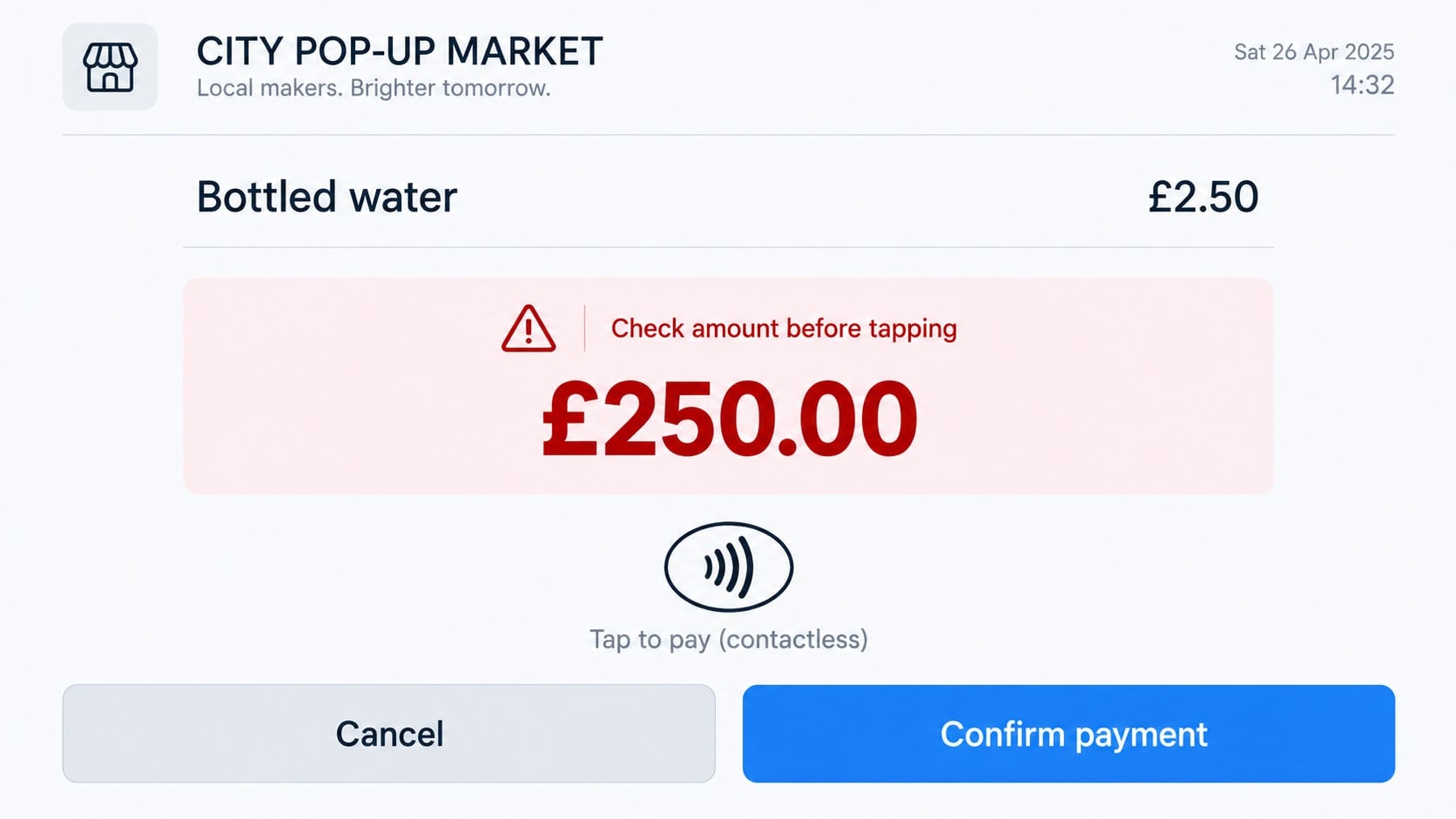
No security feature can verify the real-world agreement between buyer and seller. If the terminal says £250 and the buyer thought the amount was £2.50, the payment system sees a card presented to an initiated £250 transaction. The human context is where the deception occurred.
How the Tap-to-Pay Scam Works
Step 1: A rushed or informal sale reduces normal checks
The encounter may happen at a market stall, event, taxi, doorstep, nightclub, charity collection, or pop-up service. The setting is busy, the amount seems small, and there may be no printed price or conventional checkout counter.
The seller keeps the interaction moving. Friendly conversation, a queue, noise, or pressure from people behind the buyer makes asking to inspect the screen feel awkward.
Step 2: The merchant enters a different amount
A £2.50 item can become £250 through extra digits or a decimal shift. The terminal may be angled away, its brightness reduced, or the amount covered by a hand or sticker.
Some devices announce a total or display it on a customer-facing screen, but not every checkout makes the figure equally visible. The scam relies on the victim tapping from habit.
Step 3: The first payment is described as unsuccessful
After a tap, the seller may say the connection dropped or the payment was declined. The screen shown to the victim can be a new blank sale, an old error, or a fake image rather than the real authorization result.
A second tap can create a second transaction. The criminal may also switch terminals, changing the merchant descriptor that later appears on the statement.
Step 4: A legitimate receipt is withheld or made confusing
The buyer receives no receipt, a handwritten slip, or an email sent to the wrong address. A digital receipt can show an order value that differs from the card transaction or use a business name the customer does not recognize.
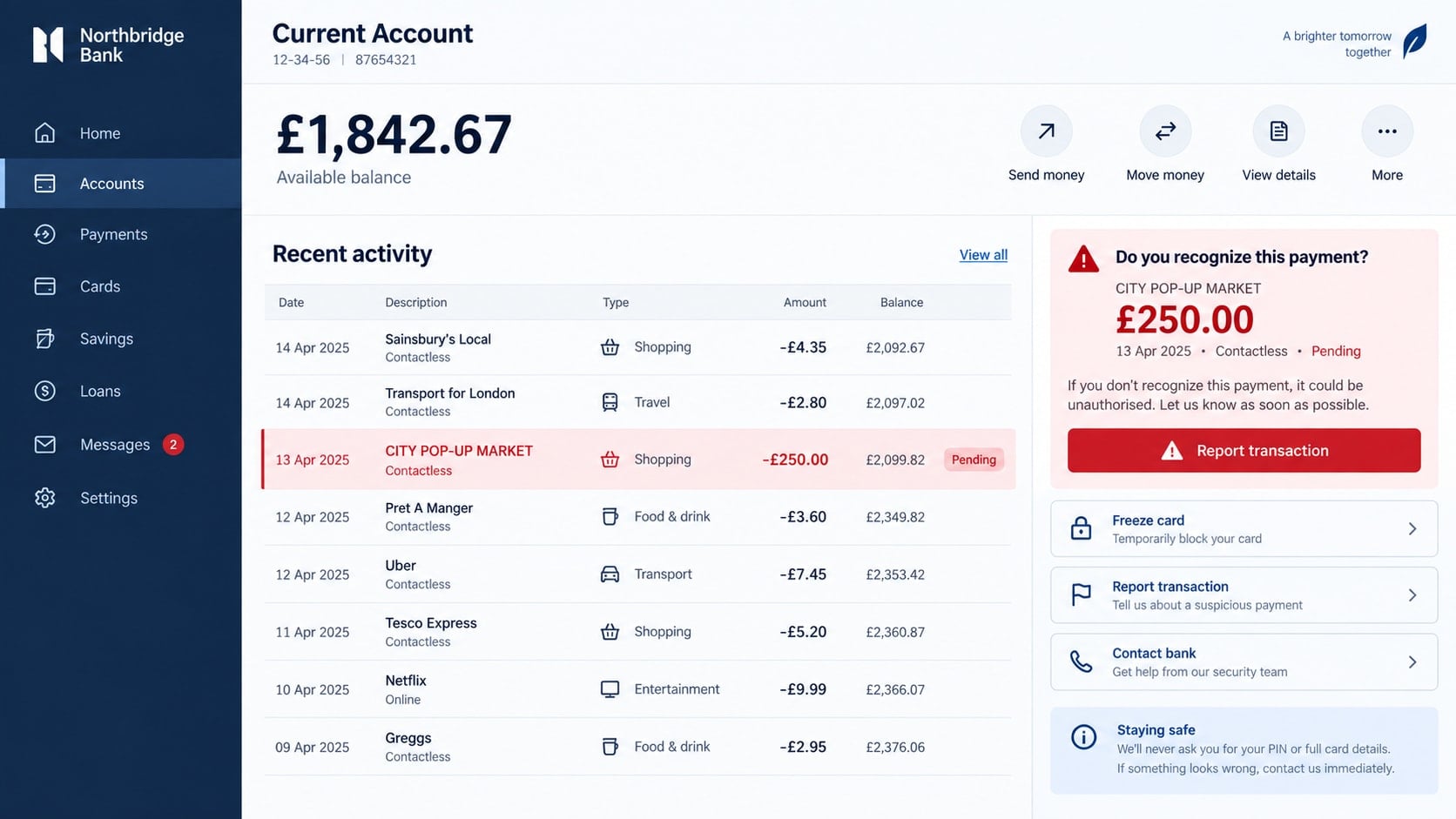
Without a clear record, a pending charge may be dismissed as another purchase until it posts. By then, the stall or temporary seller may be gone.
Step 5: The payment credential may be tested again
If the criminal obtained only one authorized contactless transaction, that does not automatically provide unlimited access to the card. However, a stolen physical card, captured card details, compromised wallet, or malicious checkout can support further attempts.
Small charges may be used to see whether the account is active. A familiar merchant-like descriptor can keep the cardholder from reacting immediately.
Step 6: A bank impersonation follows the suspicious charge
The victim may receive a text or call claiming that the bank detected the transaction. The caller already knows the amount or merchant because the same group created it, which makes the warning sound authentic.
The supposed investigator asks for a one-time code, wallet approval, remote access, or a transfer to protect the remaining balance. That follow-up can cause far greater loss than the original contactless payment.
Other Scenarios Called Ghost Tapping
A hidden terminal brought close to a physical card
A merchant-controlled reader must have an active transaction, be within a short distance, and obtain authorization. Crowded places can create opportunity, but the idea of effortless unlimited theft through every wallet is exaggerated.
Transaction limits, issuer risk controls, occasional verification, terminal registration, and merchant settlement records create obstacles. They do not make fraud impossible, but they make a random invisible tap less simple than viral warnings suggest.
A stolen contactless card
A thief may attempt lower-value transactions before the cardholder reports the loss. Issuers can require a PIN after cumulative spending, unusual activity, or a certain number of taps.
Speed matters. Freeze the card through the official banking app when available, call the issuer, and review activity rather than waiting to see whether another charge appears.
An unlocked payment-enabled device
Wallet behavior depends on the device, payment mode, transit settings, and issuer. A stolen phone or watch can be more dangerous if it is already unlocked, has weak screen protection, or permits certain payments without fresh authentication.
Use a strong device code, enable lost-device features, and review express or transit payment settings. Remote locking should begin as soon as the device is missing.
A contactless relay attack
A relay system extends communication between a victim’s card and a terminal somewhere else. The attacker near the card forwards signals to an accomplice or compromised device that is initiating a purchase.
This is a more technical attack than merely standing nearby. Payment standards include defenses, and real campaigns may depend on malware, social engineering, modified hardware, or a victim deliberately tapping a card during a fake verification process.
Warning Signs During a Contactless Purchase
A legitimate merchant should be comfortable showing the total, business name, and receipt. Leave the transaction when basic questions produce hostility or a story that changes.
- The terminal screen is covered, turned away, or too dim to read.
- The amount is not displayed before the card is requested.
- The seller asks you to tap a wallet, bag, or stack of cards.
- A first transaction supposedly failed without a visible result.
- You are asked to tap several terminals for the same purchase.
- The receipt total and banking notification do not match.
- The merchant name bears no reasonable connection to the seller.
- The seller discourages use of chip and PIN, cash, or another method.
- A stranger asks you to tap your card to verify or unlock an account.
- A bank caller wants a code or transfer immediately afterward.
Do not let a small purchase make the controls feel unnecessary. The moment before the tap is often the only opportunity to compare the amount with the agreement.
Identity, Contact, and Payment Checks
Read the amount and currency before presenting anything
Ask the seller to show the customer-facing screen. Confirm the decimal point, currency, tip, charity amount, and total after any surcharge. Do this again if a second attempt is requested.
If the display is unavailable, choose another payment method or leave. A merchant’s inconvenience is not a reason to approve an unseen amount.
Confirm the merchant and keep the receipt
Ask for the legal or trading name that will appear on the statement. Save the receipt, location, time, seller description, stall number, taxi identifier, and any messages connected to the transaction.
A descriptor can differ from the storefront name for legitimate reasons, but the merchant should be able to explain the relationship clearly.
Use wallet and bank alerts as a second screen
Enable immediate purchase notifications. Read the value before walking away, and open the banking app independently when an alert looks wrong.
Pending status does not mean the charge should be ignored. The issuer can explain whether to freeze the card now and when a formal dispute can begin.
Verify every follow-up through the issuer’s own channel
End unexpected calls about the payment. Use the number on the card or inside the official banking app, and tell the bank that another caller may already know the transaction details.
Never share a PIN or one-time code, approve a wallet enrollment, or move funds because the incoming caller says the account is under attack.
How to Pay Contactlessly More Safely
Take the card out of the wallet and tap it deliberately. This reduces accidental presentation of multiple cards and makes it easier to watch the exact screen involved.
Prefer a mobile wallet that requires device authentication when it fits your needs. Protect the device with a strong passcode, current software, remote-location features, and carefully reviewed express payment settings.
Set transaction alerts and review statements regularly. A small unfamiliar charge can be a clue that a card, merchant interaction, or account needs attention.
Do not install an application sent by a stranger who says a tap is needed for verification, employment, refunds, or account recovery. Use software only from the official store and verified provider.
In crowded settings, ordinary control of the card is usually more useful than panic. Keep it in a closed wallet, do not hand it to strangers, and watch the amount. Specialized blocking sleeves are optional, not a substitute for checking statements.
What to Do if You Have Fallen Victim to This Scam
- Freeze the card or wallet immediately. Use the official banking app if that control is available, then call the issuer through a trusted number. Explain whether the card, device, and transaction are still in your possession.
- Report the precise transaction. Give the amount, merchant descriptor, time, location, receipt, and what you believed you were approving. State whether the display was hidden or a second tap was requested.
- Ask about replacement and dispute timing. A pending charge and a posted charge may follow different procedures. Follow the issuer’s instructions without waiting for more unauthorized activity.
- Secure a lost device. Activate the platform’s lost mode, remove or suspend wallet cards, contact the carrier, and change the main account password from another trusted device.
- Preserve the physical and digital evidence. Save receipts, bank alerts, photos of the location, seller messages, transport records, and witness details. Do not return to confront an unknown operator alone.
- Protect accounts mentioned in follow-up calls. If a caller received a code or remote access, notify the bank, change exposed passwords, revoke sessions, and review wallet enrollments and payees.
- Check any device used in the scheme. Uninstall unknown payment, support, or verification apps. Run Malwarebytes if suspicious software, a file, or a browser extension was installed as part of the interaction.
- Limit malicious redirects. AdGuard can help block known scam pages and hostile advertising, especially if a QR code or message led to a fake support portal. It cannot reverse a completed contactless charge.
- Report the merchant or location. Notify the market organizer, taxi platform, venue, local police, payment provider, and consumer authority where appropriate. Include the terminal receipt or merchant information.
- Reject recovery pressure. A person claiming to retrieve the money for an upfront fee may be using information from the first incident. Work through the issuer and official authorities instead.
Frequently Asked Questions
Can someone charge my card just by walking past me?
Contactless communication requires an initiated merchant transaction and very close proximity. Unauthorized close-range attempts are possible, but the viral version of effortless long-distance theft is misleading.
Does a tap reveal my PIN or card security code?
A normal contactless transaction does not transmit the card’s PIN. Payment data and controls vary by system, but transaction-specific security makes simple reuse more difficult than copying a magnetic stripe.
Why was I charged more than the price I agreed to?
The terminal may have contained a different amount, an added tip, or a second transaction. Contact the issuer and preserve the receipt and circumstances rather than negotiating only with the seller.
Can I be charged twice if the seller says the first tap failed?
Two distinct authorization attempts can create two charges. Check the official bank activity before tapping again, and request a receipt showing the actual result.
Is a mobile wallet safer than a contactless card?
Mobile wallets can add tokenization and device authentication, which are useful safeguards. Security still depends on the device lock, payment settings, account recovery, and the amount shown by the merchant.
Should I disable contactless completely?
That choice depends on your preferences and issuer options. Most people can reduce risk by controlling the card, checking the screen, enabling alerts, and reporting loss quickly.
The Bottom Line
The tap-to-pay scam usually succeeds by manipulating attention, amount, or merchant trust rather than magically breaking every contactless card. The simplest defense is also the most immediate: read the total and know who is charging it before you tap.
If the transaction looks wrong, freeze the payment method and call the issuer through a trusted channel. Do not let a second caller turn one disputed charge into access to the rest of the account.








