

An email says PayPal is preparing a $1,305.31 payment for an iPhone you never ordered. It also gives you a phone number that promises to stop the charge before it is processed.
The transaction is invented, but the panic it creates is real. Calling that number opens the door to a refund scam that can cost far more than the fake purchase.
Overview
The email describes a transaction that does not exist
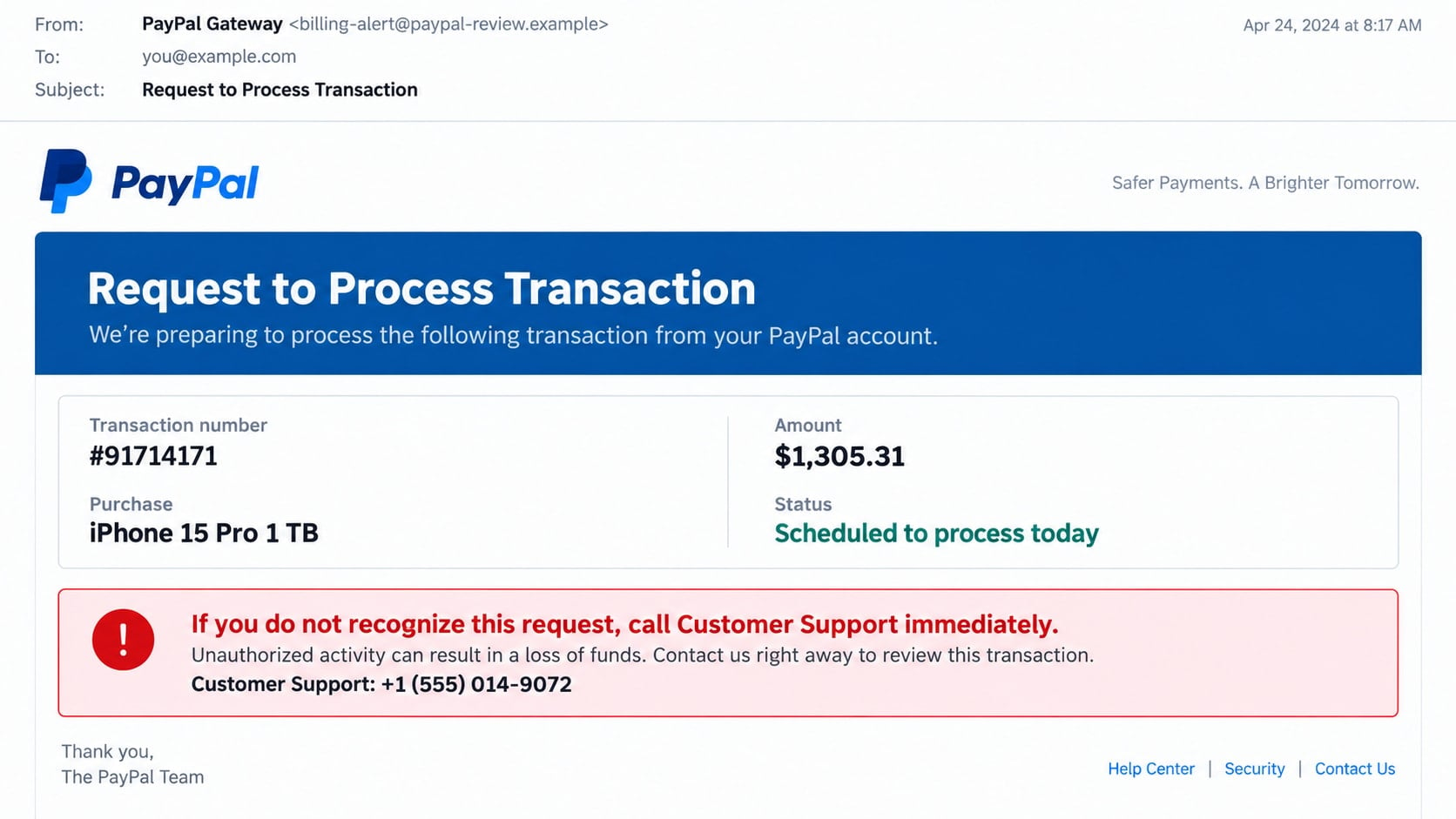
The PayPal process transaction scam is a fraudulent invoice or payment-alert email. One reported version lists transaction #91714171, an iPhone 15 Pro 1 TB, and a scheduled charge of $1,305.31.
The message is not evidence that money left the recipient’s PayPal account. Its main purpose is to make the reader call a fake customer-support number before checking PayPal independently. PayPal’s own invoice and money-request scam guidance tells users not to call numbers in suspicious notices and to verify activity through the official site or app.
The telephone call is the dangerous part
A scammer answering the number pretends to work for PayPal’s security or refund department. The caller is told that the purchase can be cancelled, but only after identity verification, installation of a support tool, or access to online banking.
The criminal can then steal credentials, request a transfer, capture one-time codes, or manipulate the victim while watching the screen remotely.
Real PayPal branding makes the false charge feel urgent
The email may use a PayPal logo, transaction table, reference number, security reminder, and professional footer. It can even warn that PayPal never asks for passwords, which makes the surrounding fraud look more credible.
Typical goals include:
- Getting the recipient to call a criminal-controlled help desk.
- Collecting PayPal, email, or banking credentials.
- Persuading the victim to install remote-access software.
- Obtaining card details and one-time security codes.
- Creating a fake refund that appears to overpay the victim.
- Demanding repayment through gift cards, cryptocurrency, or a transfer.
- Using stolen information in later account-recovery calls.
What the “Request to Process Transaction” Email Says
The message claims that PayPal received a request to process a transaction. It says no action is needed if the payment was authorized, but an unrecognized request should be reported to customer support immediately.
A specific purchase and amount make the story feel tied to a real account. The iPhone description also helps because it is expensive, familiar, and easy to resell, all details people associate with genuine payment fraud.
The email may include a transaction date, reference ID, wallet-like code, and one or more telephone numbers. Those fields are decorative until they can be matched to activity visible in the recipient’s independently opened PayPal account.
Some versions arrive as an image or PDF attachment. That format can bypass simple email filters and make the phone number easier to display while preventing the recipient from selecting or inspecting the text normally.
There may be no malicious link at all. That absence is intentional. Many people have learned not to click suspicious buttons, but a telephone number printed inside a formal invoice can still feel safe.
How the PayPal Process Transaction Scam Works
Step 1: A fake high-value purchase reaches the inbox
The campaign sends the same invoice to large lists of addresses. It does not need to know whether each recipient uses PayPal because the service is common enough to produce many worried responses.
The email may use a generic greeting or a name taken from breached data. Personalization does not mean the sender has entered the real PayPal account.
Step 2: A processing deadline creates a reason to call now
The transaction is described as pending, scheduled, or about to be processed today. The reader is led to believe that delaying even a few minutes will turn a simple cancellation into a permanent loss.
A genuine account check would weaken the story, so the phone number is placed beside the warning and presented as the fastest route to safety.
Step 3: The fake agent confirms the frightening details
When the victim calls, the agent asks for the invoice number and then reads back the same item and amount. This feels like access to a PayPal system, but the criminal is simply using information printed in the email they sent.
The agent may claim that several purchases or foreign logins are visible. Additional threats expand the problem and make the victim more willing to follow unusual instructions.
Step 4: A refund or security session moves onto the device
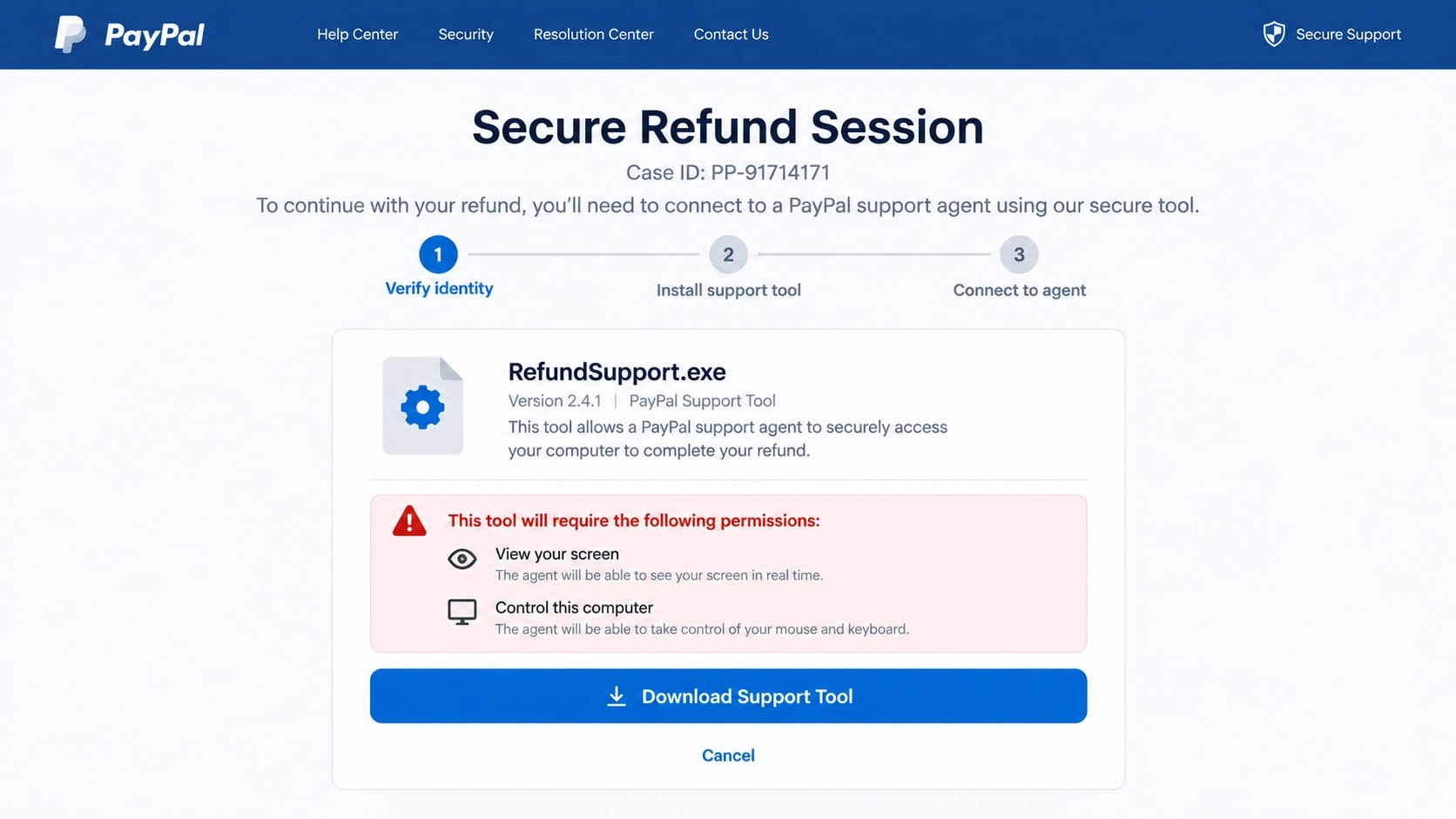
The caller asks the victim to open a website or install a remote-support application. It may be described as PayPal protection, a refund form, or a secure connection with the fraud department.
Real remote-access products can be abused. Once permission is granted, the criminal may see the screen, control the pointer, read codes, access files, or hide activity with a black overlay.
Step 5: The victim is sent into PayPal or online banking
The agent says the account must be checked for a refund, cancellation, or security credit. The victim is instructed to sign in while the remote session remains active.
A scammer who can watch the screen may capture balances, account numbers, contact details, and authentication prompts. Stored passwords or browser sessions can expose more services.
Step 6: A fake refund creates an apparent overpayment
One variation changes page text with browser tools or moves money between the victim’s own accounts. The agent makes it appear that PayPal accidentally refunded $13,053.10 instead of $1,305.31.
The victim is blamed for the supposed error and pressured to return the difference quickly. No extra PayPal money arrived, but a real transfer sent back to the scammer will leave the account.
Step 7: Repayment is routed through hard-to-reverse methods
The caller may demand gift cards, cryptocurrency, cash mailed in a package, a bank transfer, or a payment-app transaction. These methods are described as internal correction channels even though they have no legitimate connection to PayPal refunds.
The scammer may remain on the line while the victim visits a bank or store. Secrecy instructions are used to prevent staff and family members from interrupting the fraud.
Step 8: The victim is contacted again under another identity
If money or information was provided, another caller may pose as a bank investigator, government official, or recovery service. The details from the first call help this person sound informed.
Recovery requires no surprise fee paid to a stranger. The safest contacts are PayPal, the bank, law enforcement, and reporting bodies reached through information found independently.
Why the Email Can Pass a Quick Visual Check
A professional logo and color palette are easy to copy. The criminal does not need access to PayPal’s systems to reproduce the appearance of an ordinary transaction notice.
Reference numbers create false precision. A long combination of letters and digits looks as though it came from an internal database, but any document template can generate one.
The message may contain accurate safety language, including a warning not to share passwords or codes. That sentence can be copied from a real company and placed beside a fraudulent call instruction.
The purchase amount is carefully chosen. It is high enough to create alarm but plausible for a premium phone, computer, or cryptocurrency transaction.
Good grammar is no longer a reliable filter. Scam templates are edited, translated, and reused, while artificial intelligence can improve the tone. Verification must come from the real account and sender path.
Warning Signs in a Fake PayPal Invoice
- The transaction does not appear in the PayPal app or website opened independently.
- The sender address belongs to an unrelated domain or free mailbox.
- A telephone number is presented as the only cancellation route.
- The email says a large charge will process within hours.
- The greeting and account information are generic.
- The message arrives as an image or unexpected invoice attachment.
- The caller requests remote access to issue a refund.
- You are told to sign in to banking while the agent watches.
- The refund supposedly creates an accidental overpayment.
- Repayment must use gift cards, crypto, cash, or a personal transfer.
- The caller asks you to hide the situation from bank staff.
- A one-time code is needed to cancel a charge you cannot find.
Do not call merely to test the number. A response confirms that the email address reaches someone willing to engage and gives the operator another chance to apply pressure.
How to Verify a PayPal Transaction Safely
Open the PayPal app yourself or type paypal.com into a fresh browser tab. Do not use a link, QR code, bookmark supplied by the email, or a search advertisement presented as support.
Review recent activity, pending transactions, invoices, automatic payments, messages, and account notifications. A genuine payment should leave a record inside the account.
Also inspect the underlying card and bank statements. A fake email can exist without any charge, while a real unauthorized card transaction may need to be handled by the issuer even if PayPal was not involved.
If help is needed, use contact options displayed after opening PayPal independently. Do not transfer the phone number from the suspicious email into your verification process.
Remember that an unexpected money request or invoice inside PayPal is not automatically a debt. Anyone can send certain payment requests. Verify the person, purchase, and obligation before paying or calling a number in the note.
Identity, Contact, and Payment Checks
Compare the sender with the claimed service
Expand the complete email address and reply-to field. A PayPal display name above an unrelated domain shows only what the sender typed into the account profile.
Authentication indicators can help an email provider filter messages, but the decisive check is still whether the account shows the transaction and whether the contact route belongs to PayPal.
Search the real account before responding
Match the amount, date, recipient, item, and transaction identifier inside PayPal. If the activity is absent, take a screenshot and report the email rather than contacting its sender.
If an unfamiliar transaction is present, use the official Resolution Center or support flow. Do not let the existence of real fraud make a phone number from an email trustworthy.
Keep remote access out of refund handling
PayPal does not need to control a customer’s computer to inspect a transaction in its own system. A request to install remote viewing for cancellation or reimbursement is a decisive warning.
If software is already open, disconnect the computer from the internet before attempting cleanup. Use another trusted device to contact financial institutions and change important credentials.
Confirm movement of money from independent statements
A browser page can be altered, and a transfer between two accounts owned by the victim is not a refund. Check the actual ledger through a separate device or by speaking with the bank through its published number.
Never return an alleged overpayment until the institution confirms that new, settled funds arrived from the claimed sender and explains the correct process.
What a Real PayPal Resolution Does Not Require
A legitimate dispute does not require purchasing gift cards and reading their codes. Gift cards are products, not a channel for correcting a PayPal ledger.
Support does not need a wallet recovery phrase, online-banking password, full card PIN, or code that approves a new payee. Those secrets authorize access and payments.
A refund does not require sending money first. The receiving institution can account for a real reversal inside the original transaction path.
There is no reason to hide a resolution from the bank. A caller who tells the victim to lie about the purpose of a withdrawal is avoiding fraud controls.
An official company does not punish a customer for ending an unexpected call and contacting support again. Independent verification is a normal security step, not obstruction.
What to Do if You Have Fallen Victim to This Scam
- End the call and disconnect remote access. Turn off network connectivity if the agent is controlling the device. Do not warn the caller or wait for permission to close the program.
- Use another trusted device to contact the bank. Explain that a fake PayPal agent may have viewed online banking, obtained codes, or directed transactions. Ask about holds, recalls, replacement cards, and account monitoring.
- Contact PayPal through its official app or website. Review activity, report unauthorized changes, remove unknown payment methods, and ask support to document the impersonation.
- Secure email before resetting other accounts. Change its password, remove unknown forwarding rules, inspect recovery options, revoke sessions, and enable strong multifactor protection.
- Replace exposed passwords and codes. Start with PayPal, banking, payment apps, cloud storage, and any account visible during the session. Tell providers if a one-time code was shared.
- Remove the support software completely. Uninstall remote-access tools, unknown browser extensions, and downloaded files. Review startup applications and remote permissions rather than only deleting a desktop icon.
- Scan the affected computer. Run Malwarebytes from a trusted download source to look for information stealers, unwanted programs, and persistence left after the remote session.
- Reduce further malicious contact. AdGuard can block many known phishing pages and deceptive advertising routes, but it cannot secure an account that still uses exposed credentials.
- Save evidence and file reports. Keep the email, attachment, telephone numbers, remote-session ID, receipts, gift-card details, transfer records, and cryptocurrency transaction hashes. Report the incident to the relevant providers and authorities.
- Prepare for recovery impersonation. Refuse anyone who promises guaranteed retrieval for a fee. Criminals may call again with the exact invoice number and loss because they already possess the first case details.
Frequently Asked Questions
Was my PayPal account hacked if I received this email?
Not necessarily. Bulk campaigns can send the same fake transaction to people with and without PayPal accounts. Check activity through the official service before assuming access occurred.
Why does the invoice contain a real-looking transaction number?
The sender can invent any number and place it into a template. It matters only if the identifier appears in a genuine PayPal account and matches real activity.
Should I call the support number to cancel the $1,305.31 charge?
No. Use PayPal’s independently opened app or website. The number in the email leads into the scam and is not a safe verification route.
What if the email really came from a PayPal address?
Inspect the full headers and account activity. Payment requests can also be abused from real accounts, so a genuine delivery path does not automatically make the underlying invoice valid.
Can PayPal support ask me to install remote-access software?
A request to surrender screen control for an invoice cancellation or refund is not a normal resolution step. End the contact and reach PayPal again through its own service.
What if I called but did not share anything?
The immediate financial risk is lower if no software, credentials, codes, or payments were provided. Block the number, report the email, and remain cautious because your address and phone may now be marked responsive.
The Bottom Line
The PayPal process transaction scam invents a $1,305.31 purchase so the recipient will call a fake support desk. The email is bait; remote access, credentials, security codes, and repayment instructions create the actual loss.
Do not solve a PayPal warning through the contact details printed inside it. Open the real account yourself, verify the ledger, and let the bank and PayPal handle any genuine unauthorized activity through channels you reached independently.








