

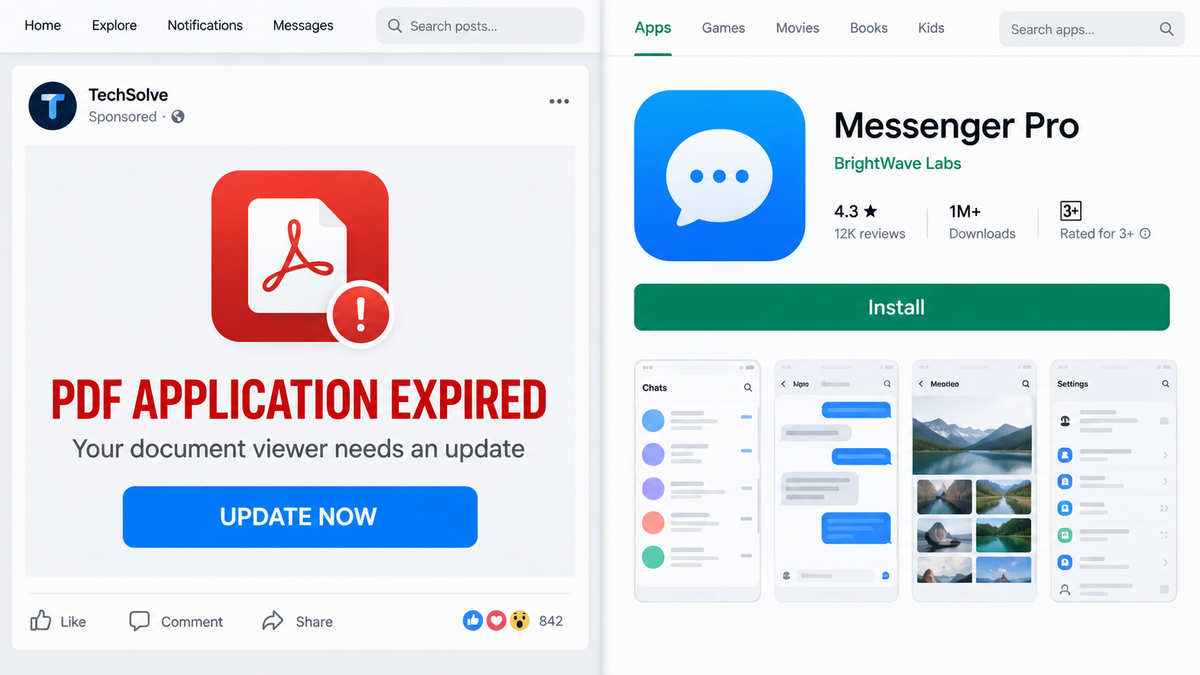
The warning arrives while someone is scrolling Facebook: the PDF app has expired, an important document may no longer open, and a bright update button promises an immediate fix.
Nothing about it feels like a risky download. It looks like routine phone maintenance, the sort of small interruption people clear away without much thought.
That ordinary-looking prompt was the front door to a much more expensive Android scheme.
Overview
The ad invents a problem that does not exist
Researchers at CERT Polska found Facebook ads claiming that a user’s PDF application had expired. That message is misleading on its face. A normal PDF reader does not suddenly make existing documents unavailable because an ad says its license has run out.
The fake warning creates just enough anxiety to earn a click. A person may be expecting a bill, ticket, contract, medical form, or work document, so the possibility of losing access feels urgent. The ad does not need a dramatic threat when the word “expired” can do the job.
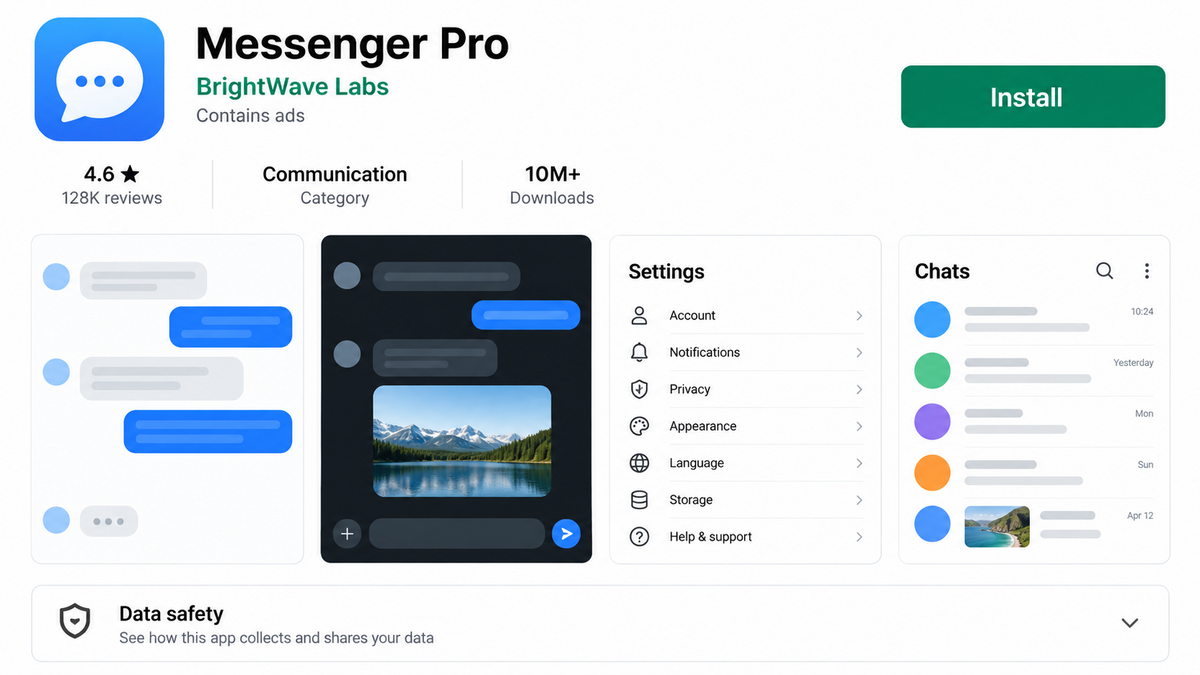
Clicking did not lead to a legitimate PDF update. CERT Polska observed ads that sent Android users to a Google Play listing for an app called Messenger Pro, a name and function unrelated to opening PDF files.
The downloaded app hides a billing operation
According to CERT Polska’s technical analysis, one confirmed branch of the campaign delivered toll-fraud malware. This category of malware makes money by enrolling a phone number in paid services, sending premium SMS messages, or using direct carrier billing without the owner understanding what was authorized.
The app did not immediately display a large ransom demand or an obvious theft screen. It used multiple loading stages, checked the device and mobile network, and waited for conditions that matched the operator’s target. That restraint helps malicious apps survive longer and makes an unexpected charge seem disconnected from the original download.
CERT Polska reported the first app to Google on September 15, 2026, and it was removed. The investigation then expanded far beyond one listing or one advertisement.
This was a broad, repeatable advertising campaign
The researchers identified 1,235 unique Meta ads operating under 74 profile names and found 29 associated Google Play packages. Code and infrastructure analysis connected 17 apps to the same activity, while 852 of the ads promoted those linked apps.
Those figures matter because they show why deleting a single app is not the end of the story. The visible name can change while the ad copy, loading code, billing logic, and traffic source remain familiar.
- The ad claims a PDF reader or document app has expired.
- The button leads to an app whose name does not match the promised update.
- The app uses several loaders instead of placing all malicious code in one package.
- Country, SIM, and carrier checks help select devices that can be billed.
- Premium SMS and direct carrier billing turn phone service into the payment channel.
- New app names and ad profiles can replace versions that are removed.
Why a Fake PDF Update Is So Convincing
PDF files are part of everyday life
People receive PDFs from banks, schools, doctors, employers, delivery companies, and government agencies. An ad that claims a document viewer needs attention borrows urgency from all of those real situations. The victim may not even remember which PDF app is installed.
That uncertainty works in the scammer’s favor. Instead of checking the phone’s app list or opening the Play Store directly, a hurried user accepts the shortcut presented in the ad.
An official app store can create false comfort
Many people have learned to avoid random APK files but still assume that every app in an official store is safe. Store screening removes a great deal of abuse, but it is not a guarantee that a newly uploaded or carefully concealed app has been fully understood.
In this campaign, arriving at Google Play was part of the persuasion. The listing made the path feel safer than a download from an unknown website, even though the advertised PDF update and the listed app did not logically match.
Phone-bill theft is easy to overlook
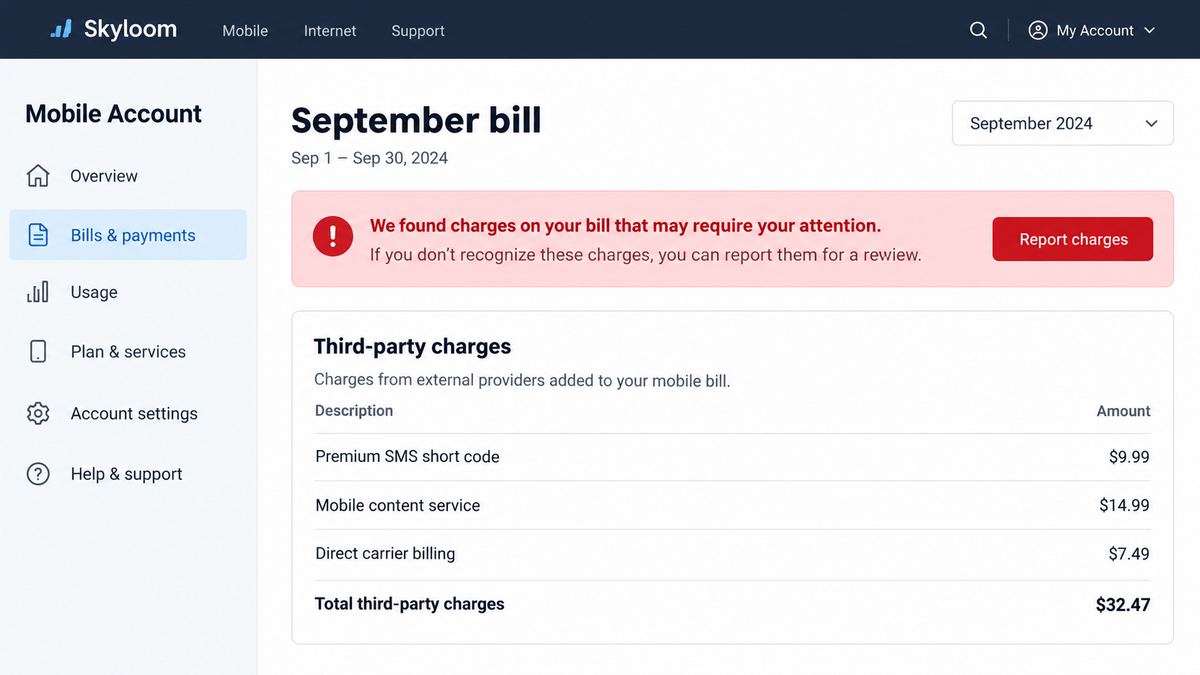
A card theft often triggers an immediate bank notification. Premium SMS charges and carrier-billed subscriptions can be less obvious. They may appear under vague service labels, join an ordinary monthly balance, or arrive weeks after the ad was forgotten.
Someone may first blame the mobile carrier or another family member. That delay gives the fraud time to continue and makes it harder to connect the charge to an app that has already been deleted.
Company and Checkout Checks
The advertiser name does not identify the operator
CERT Polska found dozens of profile names behind the ads. A Facebook page name, profile picture, or recent stream of technology posts does not establish who developed the app or who receives the billing proceeds.
Before trusting a software ad, open the advertiser’s transparency information and compare it with the developer shown in the app store. Missing history, frequent name changes, and a mismatch between the advertised function and developer portfolio are strong reasons to leave.
The destination does not match the promised product
A PDF-update button that opens a listing for Messenger Pro fails the most basic checkout test: the product changed between the advertisement and the download page. Legitimate developers do not fix a PDF reader by installing an unrelated messenger.
Read the app title, developer, category, screenshots, permissions, privacy label, and recent reviews as separate pieces of evidence. Do not let the ad’s wording carry over to a page that says something else.
Support may vanish with the listing
Malicious applications are built to be disposable. Once a store removes one package, the contact page, privacy-policy domain, and support address can disappear too. A generic email or a template policy does not provide a reliable route for billing disputes.
The practical support channel is often the mobile carrier, because the carrier can identify premium messages or direct-billing merchants on the account. Contacting the app developer alone may waste the limited time available to contest a charge.
The phone bill is the real checkout
There may be no familiar cart, card form, or final purchase button. Toll fraud treats the SIM card and mobile account as the payment mechanism. Permissions, text-message access, network requests, and carrier confirmation pages can replace a conventional checkout.
That is why “I never entered my card” does not rule out a financial loss. The right evidence includes the itemized carrier bill, premium short-code messages, subscription notices, installed-app history, and any carrier-billing confirmation received by text.
How the Fake PDF Update Ad Scam Works
Step 1: A sponsored post says the PDF app expired
The campaign begins inside a trusted social feed. The ad uses a document icon, warning colors, and language that resembles a routine software notice. It may say the PDF application has expired or must be updated before documents can be opened.
This message is not generated by the phone’s operating system or existing PDF reader. It is marketing creative purchased by an advertiser. The social platform label showing that the post is sponsored is an important clue.
Step 2: The click leads to an unrelated store listing
The user expects an update for software already installed. Instead, the link opens a new app listing. The name, icon, and described purpose may bear little relationship to PDFs.
The attacker benefits if the victim follows the button mechanically. Store pages are familiar, installation takes only seconds, and the mismatch can be missed on a small screen.
Step 3: The app starts a staged loading chain
CERT Polska described a four-stage loader. Splitting the operation across components makes the initial package look less suspicious and lets the operator change later stages without rebuilding every advertisement.
The app can collect technical information and contact remote infrastructure before the harmful function arrives. Security review sees a smaller first layer, while the victim eventually receives the complete chain.
Step 4: The malware checks the country, SIM, and carrier
Toll fraud only pays when a device can reach a supported premium service or carrier-billing route. The malware therefore checks whether the phone is in a useful country, has the expected SIM, and is connected through a compatible mobile operator.
Devices outside the target may see harmless behavior or nothing at all. This selective activation reduces complaints and makes automated testing less likely to observe the fraud.
Step 5: Premium messages or carrier billing create charges
The confirmed sample interacted with three premium SMS short codes and supported direct carrier billing. Depending on the path, the phone may send paid messages, receive subscription confirmations, or complete a charge through the mobile account.
The amount can be modest enough to hide in a normal bill. Repeated services matter more than one dramatic transaction because the operator can continue collecting until the account holder notices and cancels.
Step 6: New apps and ads replace the removed versions
When one package is reported, the campaign can move to another app, developer account, or ad profile. The fake PDF story remains useful because it does not depend on one brand name.
This rotation also explains why searching the current app name may produce little information. The behavior and acquisition path are more reliable identifiers than a disposable title.
Warning Signs to Check Before Installing
A real update normally appears inside the app itself or in the phone’s pending-updates list. A social ad cannot inspect an installed PDF reader and determine that it expired. If the warning appears only in Facebook, Instagram, or another ad-supported feed, treat it as advertising.
Stop immediately when the destination app has a different purpose from the promise. A messenger, cleaner, QR scanner, media player, or utility is not an update for a PDF reader merely because an ad sent you there.
- The post is labeled Sponsored, but its design imitates a system alert.
- The warning claims files will stop working unless you act now.
- The app title changes after the click.
- The developer has little history or a portfolio of unrelated utilities.
- The app requests SMS, phone, accessibility, notification, or background permissions without a clear need.
- The privacy-policy and support domains are new, generic, or unrelated.
- The app behaves differently on Wi-Fi and mobile data.
- The phone bill later shows premium content or third-party purchases.
If a PDF reader genuinely needs an update, close the ad. Open Google Play yourself, tap the account menu, and review pending updates. That removes the advertiser’s redirect from the decision.
What to Do if You Have Fallen Victim to This Scam
- Disconnect the phone from mobile data. Turn on airplane mode, then enable Wi-Fi only if needed for cleanup. This can interrupt carrier-specific requests while preserving access to security tools.
- Remove the suspicious app. In Android settings, review recently installed apps and uninstall the one reached through the ad. If removal is blocked, revoke device-administrator or accessibility access first.
- Check dangerous permissions. Review SMS, Phone, Accessibility, Notification access, Install unknown apps, and Device admin. Remove privileges that the app did not need.
- Scan the device with Malwarebytes. A reputable Android scan can find known malicious packages or related components that remain after the visible app is removed. Update the scanner before running a full check.
- Call the mobile carrier’s fraud or billing team. Ask for an itemized list of premium SMS, third-party content, and direct carrier billing. Request cancellation, a charge dispute, and a block on future premium services.
- Preserve the evidence. Save screenshots of the ad, app listing, developer name, permissions, text messages, billing entries, and the approximate install time. Do not rely on the listing remaining online.
- Change exposed passwords. If the app requested accessibility access or displayed login screens, change important account passwords from a different, clean device. Start with email, banking, and the Google account.
- Watch bank and carrier accounts. Toll-fraud software may be part of a broader package. Review card activity, account-recovery changes, new app passwords, and mobile-account contact details.
- Block the advertising route. AdGuard can reduce exposure to known malicious pages and intrusive ad redirects. It does not replace cautious installation, but it can remove part of the delivery channel.
- Report the ad and app. Report the sponsored post to Meta, the app through Google Play, and the incident to the relevant national cybercrime or consumer-protection authority.
Do not pay anyone who contacts you promising to recover carrier charges or remotely clean the phone for a fee. Recovery scammers often target people after the first incident. Work directly with the carrier, bank, platform, and a trusted local technician if help is needed.
Frequently Asked Questions
Can a PDF reader really expire because of a Facebook warning?
No. A sponsored post cannot inspect the status of an app on your phone. Check updates from the phone’s official app store or from the PDF reader’s own settings.
Was the Messenger Pro app itself confirmed as malicious?
CERT Polska reported the app promoted by the observed ads, analyzed the associated delivery chain, and confirmed toll-fraud behavior in the linked campaign. Google removed the reported package after notification.
How can money be taken if I never entered a card?
Premium SMS and direct carrier billing place charges on the mobile account rather than a payment card. That is why the itemized phone bill must be checked.
Is every unfamiliar Android utility malware?
No. The evidence here concerns a documented campaign and connected applications. Judge an app by its source, developer, permissions, behavior, and whether it matches what the advertisement promised.
Will uninstalling the app automatically refund the charges?
No. Uninstalling can stop further activity, but billing disputes and subscriptions must be handled with the mobile carrier or named billing provider.
What is the safest way to update a PDF app?
Close the advertisement, open Google Play directly, search for the app already installed, confirm the developer, and use the update button on that verified listing.
The Bottom Line
The fake PDF update ads were not harmless clickbait. They were part of a confirmed campaign that used unrelated Android apps, staged code, and mobile billing to turn an invented software problem into real charges.
A PDF warning seen inside an advertisement is not a system alert. Close it, check updates directly, and treat any unexplained premium service on the phone bill as a fraud issue that needs prompt action.








