

Sani Spiral is presented as a simple kitchen upgrade for people who want cleaner produce without scrubbing every piece by hand.
The surprise appears when the attractive per-item price meets the cart, optional add-ons, and a countdown that discourages careful arithmetic.
Overview
What the device claims to do
Sani Spiral is a countertop fruit and vegetable cleaner. Marketing materials describe water circulation and cleaning action intended to remove dirt from fresh produce.
The appliance is promoted through direct-response pages rather than a familiar kitchen retailer. Package choices appear beside large discounts and express-checkout options.
The idea itself is plausible as a washing device. Our concern is the selling process, especially how the selected package is represented in the order summary.
What the live checkout showed
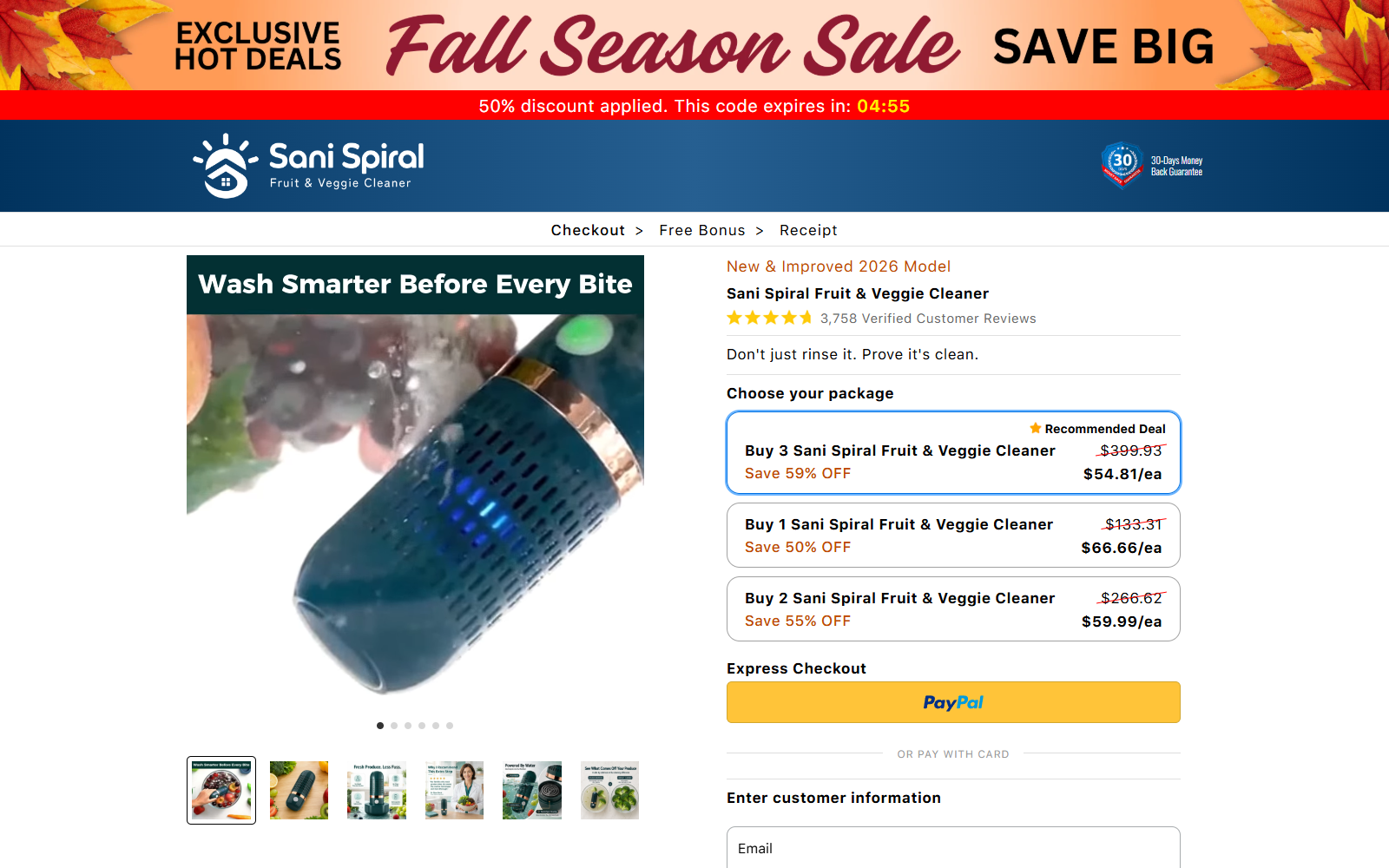
During our review, the recommended “Buy 3” option displayed a price of $54.81 each. That wording could reasonably suggest three cleaners.
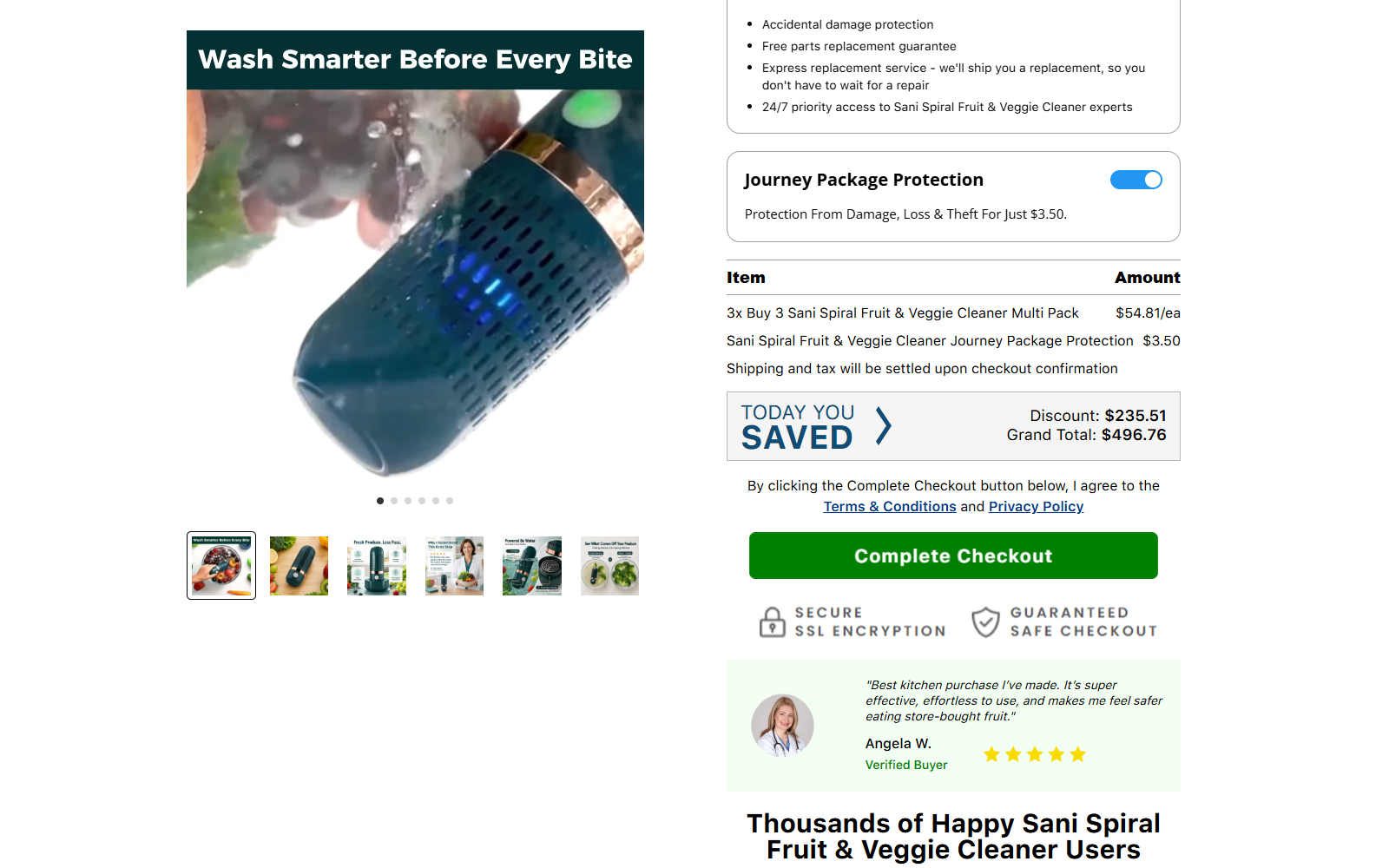
The cart summary instead displayed “3x Buy 3” and produced a merchandise amount consistent with nine units, not three.
The page then included $9.95 coverage and $3.50 package protection, producing a displayed grand total of $496.76 before completion.
Our assessment
The checkout design creates a serious quantity trap. A shopper can focus on $54.81 each while overlooking that the package itself has been multiplied three times.
We did not submit an order, so we cannot say the card is charged before the final button. The problem is the confusing total shown immediately beforehand.
We recommend leaving the checkout unless the quantity, add-ons, final amount, seller identity, and return destination are all unmistakably confirmed.
- The recommended choice can represent three packages of three units.
- The displayed grand total reached $496.76 during our test.
- An optional coverage charge appeared in the order form.
- Package protection was switched on in the reviewed checkout.
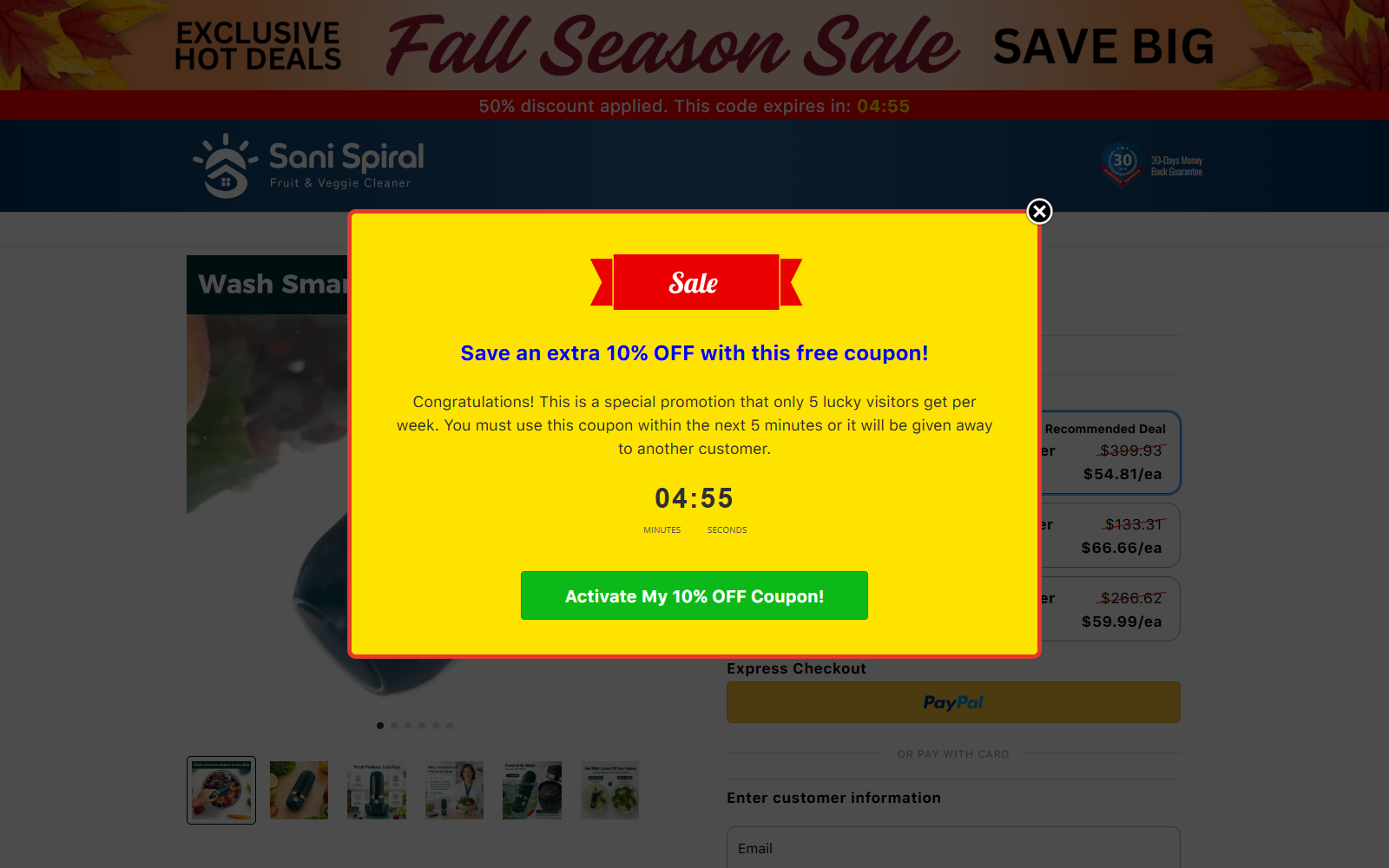
- A five-minute coupon popup claimed only five visitors qualified.
- Urgency messages competed with the information needed for informed consent.
The Arithmetic Is the Most Important Part of This Offer
Direct-response checkouts often emphasize a unit price because it looks smaller than the actual transaction. That approach is not automatically deceptive.
It becomes problematic when labels make the number of packages difficult to understand. “Buy 3” normally communicates three items to an ordinary shopper.
Displaying “3x Buy 3” deeper in the cart changes that meaning. The first three refers to package quantity, while the second refers to units inside each package.
Nine multiplied by $54.81 equals $493.29. Additional coverage and protection can then bring the visible total close to $500.
A hurried shopper may read only the package card, enter delivery details, and assume the final amount reflects three devices plus shipping.
The cart total is legally and practically more important than any bright price badge. Stop and calculate every line before pressing the final order button.
If the total does not match your intention, do not try to correct it after purchase. Leave the page and preserve a screenshot instead.
Urgency Makes a Confusing Checkout More Dangerous
The reviewed page displayed a seasonal sale banner and a countdown. Timers can create the impression that examining terms will cost the buyer a special price.
A popup offered an additional 10% discount and said only five lucky visitors received it each week.
The message gave roughly five minutes to activate the coupon before it would supposedly pass to someone else.
Scarcity statements are controlled by the merchant. A reset timer or recurring popup does not prove a genuinely limited allocation.
These devices matter because the underlying purchase requires more attention than normal. The shopper must decode package multiplication and remove unwanted add-ons.
A legitimate discount remains useful after a buyer has read the total. If a deal depends on skipping arithmetic, it is not a safe deal.
How the Sani Spiral Checkout Trap Works
Step 1: A kitchen demonstration sells convenience
Advertisements show produce being placed into a compact cleaner. Water movement and close-up footage make the appliance seem like a practical daily shortcut.
The viewer is encouraged to think about pesticides, wax, dirt, and family health. Those concerns make the product feel more urgent than an ordinary gadget.
Video demonstrations should not be treated as independent laboratory evidence. They rarely establish what was removed or how results compare with rinsing.
Step 2: A package card highlights the smaller number
The checkout presents several purchase options using per-unit prices. The recommended selection can emphasize $54.81 each rather than the total commitment.
Shoppers accustomed to “Buy 3” offers may assume that one click places three cleaners in the cart.
That assumption is precisely why the order summary deserves a separate, line-by-line review.
Step 3: The package is multiplied again
In our live check, the summary labeled the selection as three instances of the three-unit package.
This structure produces nine cleaners. The quantity difference is easy to miss because both numbers are represented by the word “three.”
A clearly designed cart would state “9 cleaners total” beside the final merchandise price before requesting customer information.
Step 4: Small add-ons enter the order
The page offered Sani Spiral coverage for $9.95. It also displayed $3.50 package protection through a separate switch.
Each fee appears modest beside a nearly $500 order. That does not make either service necessary or valuable.
Inspect whether each control is selected by default. Turn off anything you did not actively choose, then confirm that the total actually changes.
Step 5: Timers and notifications narrow attention
Countdowns, sale banners, low-stock language, and recent-purchase alerts give the page movement and social momentum.
The buyer begins responding to prompts instead of auditing the transaction. A coupon popup can cover the exact summary that needs attention.
Close every overlay, scroll back to the cart, and take a screenshot. Do not let a temporary code override a permanent card charge.
Step 6: The final button authorizes the displayed amount
The checkout states that clicking its completion button agrees to linked terms and privacy conditions.
That final action may be used to argue that the buyer accepted the quantity. Confusing design does not eliminate dispute rights, but documentation becomes essential.
We stopped before submitting. Our findings describe the page’s displayed offer, not an allegation that it secretly charges without a final action.
Does Sani Spiral Provide Unique Cleaning Benefits?
A powered water bath can loosen visible dirt. That broad function does not establish the dramatic health implications often used to sell produce cleaners.
Running water and gentle rubbing remain ordinary guidance for many fruits and vegetables. Soap and household detergents are generally not intended for produce.
Any appliance claiming removal of specific pesticides, bacteria, waxes, or chemicals should provide test methods, control groups, and complete results.
Look for the exact mechanism. Terms such as “advanced purification” or “deep cleaning” are marketing language unless tied to measurable performance.
Ask whether the device requires replacement cartridges, salts, powders, or consumables. An inexpensive machine can create an ongoing cost not visible in the headline.
Electrical equipment used near water should also have clear safety markings, voltage information, instructions, and a responsible importer.
A gadget can function while still being overpriced. Compare the physical product with generic produce washers sold through retailers offering simple returns.
Company, Address, and Fulfillment Checks
The sales page is not the same as a manufacturer
A branded checkout can be operated by a marketing seller while production and shipping come from unrelated suppliers.
Identify the legal entity on the receipt and card statement. Do not assume that “Sani Spiral” is the registered company responsible for refunds.
The return location matters more than the parcel label
Many direct-response sellers use fulfillment centers that cannot approve refunds. Sending products back to the dispatch address can fail.
Ask for the authorized return address before ordering nine units accidentally. International postage could erase much of any refund.
Support should explain the quantity clearly
Before purchase, ask how many physical cleaners arrive with each package option and what amount will appear on the card.
Save the answer. A seller that cannot state “three” or “nine” plainly should not receive payment information.
Fulfillment details must match the promise
Request delivery timing, dispatch country, tracking carrier, warranty contact, and replacement procedure for damaged electrical devices.
A warehouse can mail boxes without being the manufacturer or legal merchant. Keep each role separate when researching accountability.
What to Do if You Have Fallen Victim to This Scam
- Check the confirmation immediately. Count the total cleaners, package quantity, coverage, protection, shipping, tax, and final charge.
- Take screenshots now. Preserve the package cards, cart summary, timer, add-on switches, confirmation, policies, and any “Buy 3” wording.
- Request cancellation promptly. State that you intended a specific quantity and identify any multiplied package or add-on you did not knowingly select.
- Keep every support message. Record timestamps, email headers, ticket numbers, promised refunds, and any refusal to explain the quantity.
- Monitor the payment account. Compare the pending and posted amounts. Watch for separate charges or a descriptor different from the brand.
- Refuse unsafe use. If an electrical unit arrives damaged, lacks voltage information, overheats, leaks, or sparks, disconnect it and document the defect.
- Do not return without instructions. Obtain written authorization, the exact return address, deadline, package requirements, and confirmation of refundable charges.
- Use tracked shipping when appropriate. Photograph the contents and sealed parcel. Keep the receipt, weight, tracking record, and delivery proof.
- Dispute a misleading quantity when necessary. Give the card issuer screenshots showing what the package card implied and what the summary charged.
- Protect your device. Run Malwarebytes after suspicious downloads. AdGuard can block risky advertisements and repeated redirect pages.
- Report the checkout accurately. Consumer agencies need the URL, displayed wording, selected package, final total, and merchant response.
How to Challenge a Quantity Dispute Effectively
Begin with numbers, not labels. State how many physical units you intended, how many the confirmation listed, and how the price was calculated.
Show the package card and order summary together. The comparison demonstrates why “Buy 3” and “3x Buy 3” can produce different understandings.
Separate the merchandise amount from add-ons. Identify coverage and protection individually rather than describing the entire order as one unauthorized charge.
Explain when you noticed the issue and how quickly you contacted the seller. Prompt cancellation attempts strengthen the record.
If the seller ships after a timely cancellation request, preserve tracking dates. They may show dispatch occurred after the merchant received your message.
Do not claim the product was never ordered if you intentionally purchased some units. Describe the excess quantity and unwanted services precisely.
A card issuer may ask whether goods were returned. Explain any missing return authorization, hidden destination, excessive postage, or seller refusal.
Keep the unopened excess units when possible. Using every device can weaken the argument that the multiplied quantity was unwanted.
Safer Ways to Buy a Produce Cleaner
Buy from a retailer that states the total unit count beside the final price. The cart should never require interpreting nested bundles.
Compare return postage before ordering. Countertop appliances can be bulky even when the unit price appears low.
Look for electrical certification details, a model number, manual, responsible importer, and replacement-parts information.
Search the product image without the brand name. A generic equivalent may reveal the likely wholesale price and original specifications.
Ignore timers while researching. Open a new tab later and see whether the same offer, stock warning, or countdown returns.
Use a credit card and avoid express checkout until you have reviewed every cart line.
Start with one device. There is no practical reason to buy nine unfamiliar appliances to test whether the first one meets expectations.
Check the final total again after applying any coupon. A discount can alter one line while leaving the multiplied package quantity unchanged.
Print or save the receipt before leaving the confirmation page. Some direct-response pages are difficult to reopen from an email link.
If a sales page uses a new domain later, compare the legal merchant and card descriptor rather than relying on the product name alone.
Frequently Asked Questions
Is Sani Spiral a scam?
Our strongest finding is a confusing live checkout, not proof that every order is fraudulent. The nested package quantity creates a substantial purchase risk.
Why did the Sani Spiral total reach $496.76?
The reviewed summary showed three “Buy 3” packages, equaling nine units, plus $9.95 coverage and $3.50 package protection.
Does “Buy 3” mean three cleaners?
It may describe one three-unit package. The reviewed cart multiplied that package three times, so shoppers must confirm the physical unit count.
Are the countdown and limited coupon genuine?
The page controls those messages. We found no independent evidence that only five visitors qualified or that the offer permanently vanished after five minutes.
Can Sani Spiral remove pesticides?
Do not assume broad removal claims without complete independent testing. A visible washing action does not prove elimination of specific chemical residues.
What should I do before clicking Complete Checkout?
Count every unit, remove unwanted add-ons, calculate the merchandise amount, capture the cart, read return terms, and confirm the legal merchant.
The Bottom Line
Sani Spiral’s central problem is not merely an expensive kitchen gadget. It is a checkout that can turn an understandable package choice into nine units.
The $496.76 displayed total, optional services, scarcity popup, and timer demand the opposite of urgency. They demand slow, deliberate verification.
If the cart does not state the physical quantity in unmistakable language, close it. A safe seller should never require arithmetic to understand what arrives.








