

A recruiter texts just as you are thinking about your next job. The company name is familiar, and the opportunity sounds worth a reply.
Before that conversation becomes an application, there are a few details worth checking. A Randstad text scam can start with an entirely ordinary introduction.
Overview
The name is real; the recruiter still needs checking
Randstad is a legitimate recruitment business. This warning concerns people pretending to represent it, not an allegation that Randstad itself operates a scam.
Its U.S. recruitment fraud guidance warns about unauthorized requests for money and sensitive information through personal messages.
A copied company name gives a stranger an introduction. It does not establish employment, access to a vacancy, or authority to collect your documents.
The important question is not whether Randstad exists. It is whether this particular person and opportunity can be confirmed through the company’s own channels.
A text message alone does not prove fraud
Randstad also offers legitimate text job alerts. Treating every message bearing its name as fraudulent would therefore be inaccurate.
Recruitment arrangements differ between countries and services. This article focuses on identifying impersonation, particularly suspicious U.S. offers, rather than declaring one communication method universally forbidden.
Look at what the sender wants you to do, how the opportunity can be verified, and where your information or money would go.
- A job title and reference you can independently check are more useful than a polished greeting.
- A request to pay for recruitment contradicts Randstad’s stated policy.
- A secure onboarding process should be independently verified before sensitive documents are uploaded.
- A demand to keep the conversation secret from the real branch is a strong reason to stop.
The request can change after you engage
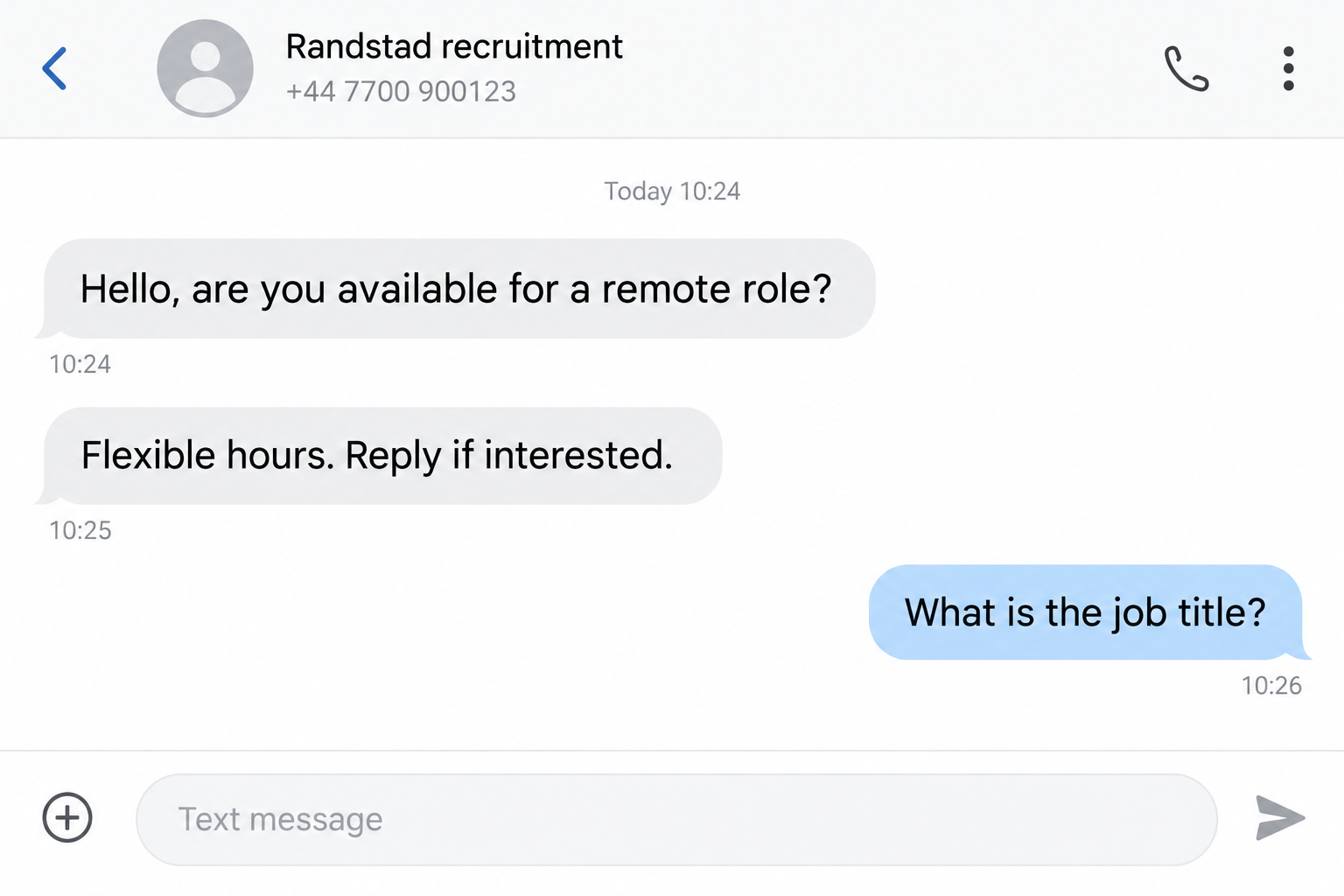
An opening message may ask only whether you are available. Later messages can introduce an equipment payment, identity form, or website that has no verified connection.
These are possible branches of recruitment fraud, not a claim that every Randstad impersonation follows exactly the same script.
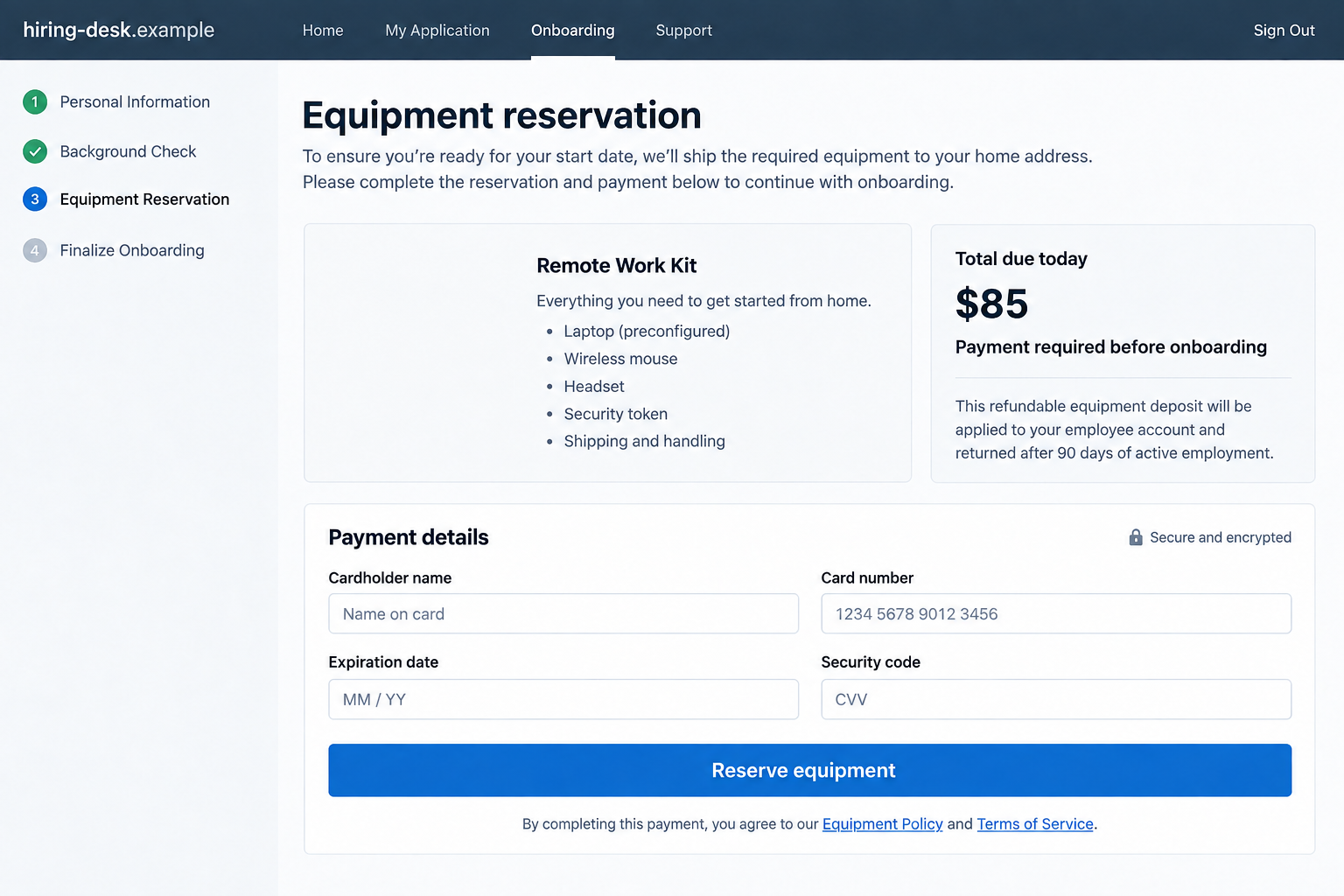
The screens in this article are illustrative reconstructions. Their fictional conversations and payment amounts demonstrate warning signs; they are not captured messages from an identified victim.
How the Randstad Text Scam Works
Step 1: A familiar employer name opens the conversation
The sender presents a short introduction as a recruiter. It may feel routine, especially if your resume is online or you recently applied for work.
You do not need to work out how someone obtained your number before protecting yourself. A message can be suspicious without proving a specific data breach.
Read the introduction as a claim awaiting confirmation. A first name, professional tone, and recognizable staffing brand are not independent evidence.
Nor does knowing your occupation establish legitimacy. Details from a public profile can make a generic pitch seem tailored to your career.
If you were expecting contact, compare the message with the application you actually submitted. Similar timing is a reason to investigate, not automatic approval.
Step 2: An appealing role keeps you talking
The conversation shifts toward convenience: flexible hours, quick onboarding, or work that seems unusually easy for the compensation offered.
High pay is not proof of fraud. The concern is a generous offer without a clear role, meaningful screening, or an independently verifiable hiring process.
Ask yourself what the employer would actually receive from your work. If the answer stays vague while the payment instructions become detailed, the priorities are wrong.
A legitimate opportunity should withstand a pause. You should be able to read the job description, compare requirements, and contact the branch without losing basic information.
Do not let enthusiasm substitute for that pause. Being interested in a better job is normal; it does not oblige you to follow an unfamiliar sender’s instructions.
Step 3: The conversation moves into an unverified process
You may be directed to a different messaging account, a form, or a supposed hiring portal. Each move introduces another identity that needs checking.
A company logo on a form is decoration, not authentication. A web address containing a brand name can still belong to someone else.
For illustration, randstad.hiring-desk.example would sit under hiring-desk.example. The word at the beginning would not turn it into a Randstad-controlled domain.
This reserved example address is not an active scam site. It simply shows why reading the entire domain matters more than recognizing one word.
Rather than testing the supplied page, navigate independently to the appropriate Randstad country website. Ask the branch to confirm the recruiter and exact vacancy.
Step 4: The opportunity becomes a request for money or data
The decisive moment may arrive as an equipment reservation, application deposit, identity check, or payroll setup. Stop and separate these requests.
Randstad says candidates and employees do not pay for its recruiting services. A stranger collecting a fee to secure a Randstad role contradicts that rule.
Identity and payroll information can be necessary during genuine employment. That does not justify sending it to an unverified contact through a personal chat.
Confirm the offer and approved submission method first. Do not let a reassuring explanation erase the need to verify who will receive sensitive information.
Requests for bank login credentials, authentication codes, or remote access are different from ordinary payroll details. They can expose existing accounts rather than establish employment.
Step 5: An apparent payment can make the request look safer
Some job fraud uses a supposed employer check for equipment. This is a broader recruitment-scam variation, not a verified feature of every Randstad impersonation.
The FTC explains that available bank funds do not prove a deposited check is genuine.
A sender may ask you to buy supplies from a designated vendor or return an alleged excess. Your outgoing payment can be real even when the check fails.
Do not conduct a small transfer to test the arrangement. Contact your bank’s fraud team and describe the check and accompanying instructions before moving any funds.
A payment screenshot from the recruiter is weaker still. It does not establish that money reached your account or that the underlying payment cannot be reversed.
Step 6: Pressure replaces normal recruitment
When you hesitate, an impersonator may insist the position is reserved only briefly. The conversation becomes about compliance instead of your qualifications.
That is a useful point to step away. You do not have to prove the sender is a criminal before refusing an unsafe request.
A real recruiter can have deadlines. The difference is whether the process remains verifiable and whether the requested action makes sense for genuine hiring.
Save the messages before blocking. If you already supplied information, your next steps should match what you shared rather than the sender’s reassurances.
How to Verify the Recruiter Without Using Their Links
Start from the correct country website
Use a known company address or an independently located official branch page. Avoid sponsored results that merely repeat the company name.
Tell the branch the recruiter’s stated name, job reference, contact address, and the action requested. Ask whether that exact combination belongs to an authorized process.
A vacancy existing somewhere on the website is not enough. An impersonator can copy a genuine listing and attach an unrelated payment or application form.
Likewise, finding a recruiter with the same name on a professional network does not authenticate the account contacting you. Their identity may have been copied.
Check the destination, not just the display name
Email display names are separate from email addresses. Expand the sender details and examine the complete address without replying to the message.
Even a plausible address is not a complete safety check. Messages can be spoofed, and legitimate accounts can be misused.
Independent confirmation remains stronger than a logo, signature, or reassuring link. If the branch cannot confirm the contact, do not send documents while you wait.
Ask questions that an actual hiring process can answer
- What is the role’s reference number and work location?
- Which verified branch or business unit is handling it?
- What interview stages occur before an offer?
- Where can the approved onboarding process be confirmed independently?
- Why is any requested information necessary at this stage?
You are not trying to win an argument with the sender. These questions organize what you will verify elsewhere.
If the only answer is another link supplied by the same stranger, you still have a single unverified source, not independent corroboration.
What to Do if You Have Fallen Victim to This Scam
- Stop the hiring conversation and preserve it.
Save the full exchange, profile details, addresses, forms, receipts, and job description. Keep timestamps so another person can reconstruct what happened.
Do not send more information to request deletion. A scammer’s promise to erase your documents cannot be relied upon.
- Tell your payment provider exactly how you paid.
Contact the bank, card issuer, or payment service through its official app or established number. Ask whether a recall, dispute, or protective restriction is available.
Describe whether you authorized a transfer under deception or whether charges appeared without permission. Accurate facts matter, and repayment is not guaranteed.
- Flag any employer check before spending against it.
If you deposited a suspicious check, explain the recruitment story to your bank. Do not forward equipment money or repay the sender independently.
Keep enough information to identify the deposit and outgoing transfers. The bank can explain the account-specific consequences and available next steps.
- Respond to the information actually exposed.
A resume creates different risks from a Social Security number or identity document. List what you submitted instead of assuming every account was compromised.
For U.S. identity misuse, use IdentityTheft.gov for a recovery plan. Discuss protective options with the relevant financial institutions when account information was shared.
- Secure any account whose password you entered.
From a trusted device, change the affected password and any reused copies. Review recovery settings, active sessions, and unfamiliar changes.
Enable multifactor authentication where available. If this involved work credentials, notify your organization’s security team promptly and follow its instructions.
- Check the device only when your exposure calls for it.
If you downloaded supposed interview software or opened a risky file, run an updated Malwarebytes scan and involve workplace IT for a managed device.
AdGuard can help reduce exposure to malicious advertising and some unwanted browsing content. It cannot authenticate a recruiter, reverse payments, or erase already submitted information.
Merely receiving a text does not mean malware was installed. Avoid panic-driven resets that destroy useful evidence without addressing the actual problem.
- Report the impersonation through independent channels.
Notify Randstad using its official website and report the account in the messaging service. U.S. readers can also submit the incident at ReportFraud.ftc.gov.
Share the relevant evidence, but do not post identity documents or banking details publicly. Warn anyone whose contact information you forwarded during the conversation.
Keep the Job Search Moving Safely
Keep a simple record of verified contacts
For each genuine recruiter, save the branch, business email, role reference, and date you independently confirmed the relationship. Keep unverified approaches in a separate folder.
If a previously verified contact suddenly changes payment instructions or requests unusual documents, check the new request again. Earlier verification does not approve every future message.
When a role disappears, ask the real branch what changed. Do not pay an unfamiliar intermediary claiming to restore your application or guarantee priority treatment.
Let verification support the search
A fake recruiter can leave you questioning every genuine opportunity. A simple verification routine is more useful than withdrawing from the search entirely.
Keep a list of applications, dates, role references, and official contacts. Then unexpected outreach has something concrete to be checked against.
Use a separate folder for verified onboarding documents. Never treat a file as approved merely because it arrived during a convincing interview conversation.
If a friend is being targeted, avoid making them feel foolish. Offer to verify the branch together before they send money or identification.
That small pause can interrupt the pressure without turning the conversation into an argument about whether the promised job sounds believable.
Frequently Asked Questions
Does Randstad genuinely send job texts?
Yes, legitimate SMS services exist. Verify the specific sender and role independently; a text bearing the name is neither automatically genuine nor automatically fraudulent.
Should I pay to reserve a Randstad interview?
No. Randstad states that candidates do not pay for its recruitment services. Confirm any unexpected payment demand with the actual company before taking further action.
Is a WhatsApp conversation enough to confirm a job?
No. A messaging account cannot establish hiring authority. Regional practices vary, but sensitive requests still need independent confirmation through approved business channels.
What if the recruiter knows details from my resume?
Those details can make an approach sound convincing without proving who sent it. Verify the contact rather than treating personal knowledge as authentication.
Did replying to the first text compromise my bank account?
A simple reply alone does not establish bank compromise. Assess whether you later supplied credentials, codes, financial details, payments, or installed software.
Can security software recover an equipment payment?
No. Security tools address certain device and browsing risks. Payment recovery requests belong with your financial institution or payment provider, which cannot promise a successful reversal.
The Bottom Line
A Randstad text scam borrows a trusted recruitment name. Verify the person, vacancy, and submission process separately before money or sensitive information changes hands.
You can stay open to genuine work while refusing an unsafe shortcut. A real opportunity should give you room to check the details.








