

A software dependency can look like a small, forgettable part of a larger project. Most developers install one and move on.
When a package behaves differently from its description, the first sign may appear somewhere else on the computer entirely.
Overview
What Kothamine is
Kothamine Agent is a Windows remote-access Trojan. It can let an operator inspect files, run commands, and extend its capabilities on an infected system.
Malwarebytes researchers analyzed multiple builds and found more than 30 supported commands in the agent.
Some versions also included browser-data theft or camera and microphone capabilities. Those features were not necessarily present in every sample.
This is malware, not a consumer checkout scam. The immediate problem is unauthorized code running on a Windows computer.
Why npm enters the story
The researchers linked Kothamine to malicious packages in the npm ecosystem. A developer installing a deceptively named dependency could expose a workstation.
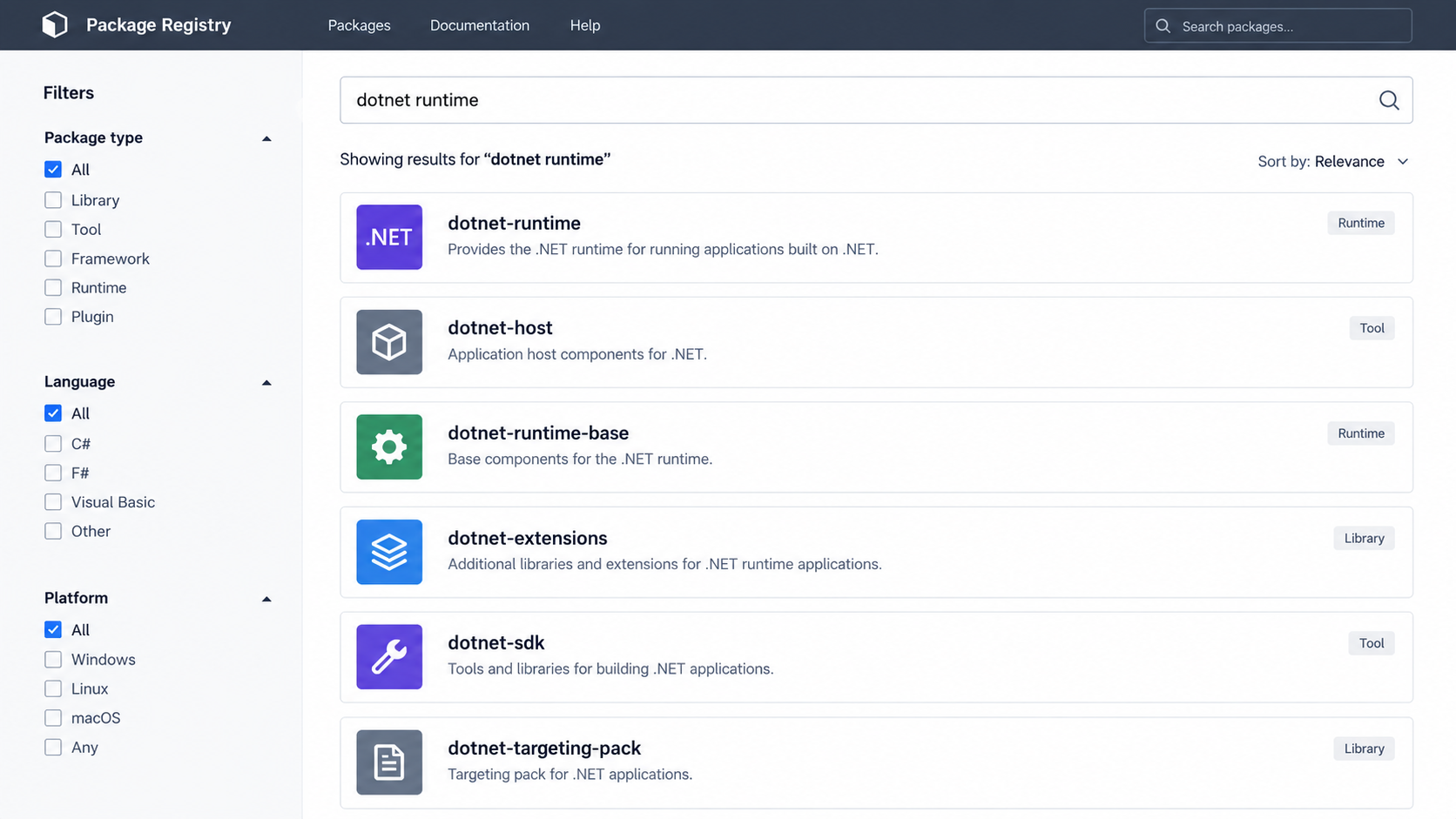
An advisory about dotnet-runtime-base connected that package to a file hosted in the same repository used by Kothamine-associated components.
That finding does not make npm itself malicious. It shows why software supply chains need the same skepticism as unfamiliar email attachments.
Install hooks and downloaded files can turn a seemingly ordinary dependency into a delivery route for Windows malware.
The unusual network connection
Recent Kothamine versions used tailcat, a legitimate open-source tool from Tailscale, to communicate through an encrypted channel.
Earlier versions used the Tailscale VPN. The project was abused as infrastructure; its ordinary users are not implicated.
Tailcat’s design can leave defenders without a conventional malicious domain to block. That complicates detection based only on network destinations.
- The reported threat is a remote-access Trojan with build-dependent capabilities.
- Malicious npm packages were one observed path into a Windows environment.
- The agent tried to persist and alter security exclusions in analyzed samples.
- Legitimate networking software was repurposed, not identified as malware itself.
How Kothamine Reaches a Computer and Stays Active
A package name that belongs in a project
Developers routinely add dependencies to solve narrow problems. The name `dotnet-runtime-base` can sound like a small compatibility component.
A plausible name should never be the only selection criterion. Look at the publisher, repository history, package age, downloads, and recent release changes.
Mondoo reported that the suspicious package downloaded an executable associated with the Kothamine investigation. That is not normal behavior for a harmless listing.
The same publisher had other packages that were removed by the time Malwarebytes published its analysis. Removal can limit exposure, but existing installations still matter.
A team may not remember installing the package directly. It could arrive during experimentation, copied setup instructions, or a dependency review gone too quickly.
Check lockfiles and build histories, not just the current package manifest. Past versions can remain in caches or on developer machines.
What happens after execution
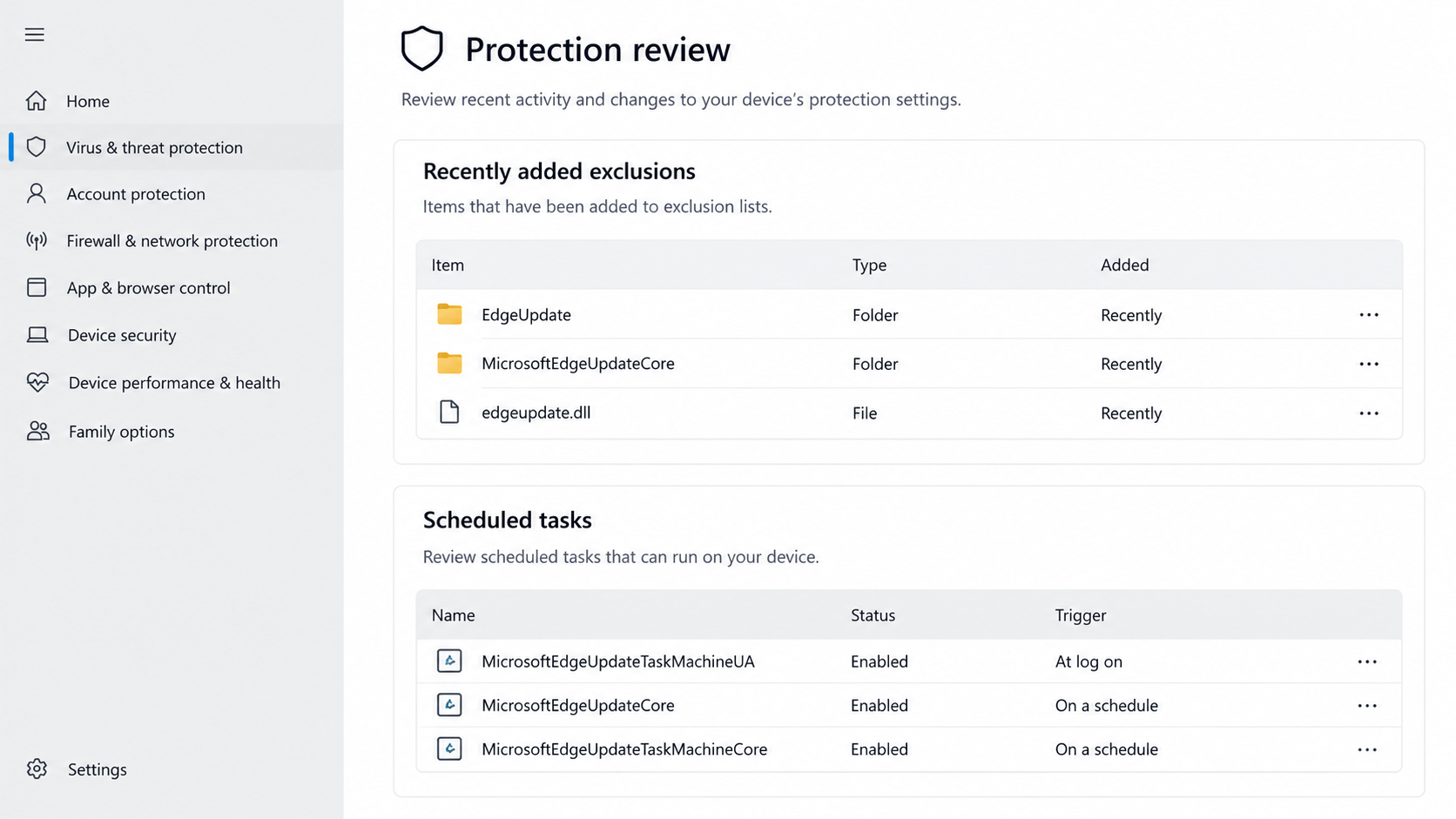
The analyzed Kothamine injector placed an executable and a companion DLL in a user-writable location while using a name that resembled an update component.
Malwarebytes observed it loading the agent into `explorer.exe`, a process people expect to see running on Windows.
That placement can make an unfamiliar component less visible during a casual glance at Task Manager. It does not make it legitimate.
The injector also created scheduled-task persistence in the analyzed build. This helps the malware return after a restart.
Security exclusions were another important part of the sequence. Excluded locations or processes receive less scanning, which can keep malicious files in place.
These details are forensic indicators, not a recipe for readers to recreate. Do not run any suspicious file to see whether it matches.
Why the tailcat connection is noteworthy
Traditional malware often calls a recognizable server. Defenders may block its domain or investigate unusual traffic to that destination.
Kothamine instead used tailcat in newer samples to establish an encrypted route for operator commands. It relies on a legitimate tool’s transport features.
That does not mean tailcat is unsafe software. Many legitimate tools can be repurposed by malicious programs.
The question for defenders is whether an unexpected process launched it and whether that behavior belongs on the specific endpoint.
Malwarebytes noted that the connection did not require the same sort of account or device registration as a conventional Tailscale deployment.
That makes an account dashboard an incomplete place to look. Endpoint behavior and file provenance matter too.
What an operator might do next
The agent could receive commands to list processes, inspect directories, read or write files, and run additional code.
Some builds had more invasive features. It would be misleading to say every infected machine had its camera activated or browser data taken.
Remote access creates opportunity, not proof of each downstream action. Incident responders need logs and forensic evidence to determine what actually happened.
A compromised developer workstation can hold repository tokens, package-publishing credentials, cloud secrets, and private source code.
That broader context makes containment important even if the first visible alert concerns only a package installation.
Never paste a secret into a public threat-reporting form while seeking help. Provide indicators and context without exposing credentials.
Signs That Merit Investigation
There is no single visual symptom that proves Kothamine is present. Some computers may appear normal while the agent waits for instructions.
A recently installed unfamiliar npm package is a starting point, especially if its install process downloaded a Windows executable.
Unexpected security exclusions deserve attention. A legitimate administrator can create exclusions, but they should have a documented reason.
A new scheduled task with a name resembling a common updater can also be suspicious when it points to a user-writable directory.
Look for a chain of evidence, not a string match. Ordinary software may use similar words in filenames without being related to this case.
Malwarebytes published sample hashes for investigators. Hash comparison can help, but a changed build may produce a different hash.
Endpoint detection logs may show the install hook, downloaded file, process injection, or security-setting changes. Preserve those records before cleanup.
For a personal computer, note when the package was installed and what account was active. This helps a responder narrow the exposure window.
For a company device, tell the security team before deleting files. Early removal can destroy useful evidence or cause the infection to restart unexpectedly.
If the machine held secrets, assume they may need rotation until investigation shows otherwise. Do not wait for a ransom note or visible theft.
Check whether the package ran only in a container or CI job. Isolation may change the affected systems, but it does not automatically eliminate risk.
CI runners sometimes have broad repository access. Review their tokens and artifacts if the malicious package executed during a build.
How to Review a Package Before Installing It
Start by finding the official project repository through a trusted source. Do not let a package name alone stand in for project identity.
Compare the publisher name, linked website, release tags, and source code. A package with no plausible maintenance history deserves extra scrutiny.
Read installation scripts and dependencies before running them on a workstation that holds production credentials.
Be particularly careful when an npm package downloads an unrelated executable during setup. Ask what feature requires it and where it comes from.
Look at recent changes, not merely lifetime popularity. A compromised maintainer account could publish a malicious update to an established project.
Use a lockfile to make dependency versions predictable. Review changes when the lockfile grows unexpectedly after a routine update.
Limit build and developer credentials to what each task needs. A package cannot abuse a secret it never receives.
Consider isolated test environments for untrusted dependencies. Disposable containers or virtual machines can reduce exposure, though misconfigured secrets still leak.
Keep endpoint protections and package-scanning tools current. They add a layer but do not replace manual review of suspicious install behavior.
Document approved packages in team projects. A surprising dependency addition is easier to spot when the expected set is clear.
When an advisory appears, compare the exact package name and affected versions. Similar names can cause unnecessary alarm or hide a real match.
Do not run a suspect package simply to check whether it is malicious. Use repository records and static analysis first.
What to Do if You Installed a Suspect Package
Respond as a potential malware incident, not as an ordinary broken dependency. The goal is to protect systems and preserve enough evidence to understand exposure.
- Stop new builds and installations. Pause jobs that may pull the package again. Record the package name, version, install time, and machine involved.
- Isolate the affected Windows device. Follow your organization’s incident procedure. A security team can disconnect it without immediately destroying forensic evidence.
- Preserve logs and artifacts. Keep npm logs, lockfiles, download records, endpoint alerts, scheduled-task details, and security-exclusion changes.
- Run trusted security checks. Use Malwarebytes or your managed endpoint protection to scan the device. Do not trust a clean result as the only clearance criterion.
- Review credentials and access. Rotate repository tokens, cloud keys, package-publishing secrets, and passwords that were accessible from the affected environment.
- Check connected systems. Investigate CI runners and other machines that installed the same dependency. A lockfile can help identify the exposure range.
- Clean or rebuild under guidance. Remove the malicious package and persistence only after evidence is captured. A known-good rebuild may be safer for a high-trust workstation.
- Reduce future exposure. Review dependency approval, install hooks, least-privilege credentials, and web filtering. AdGuard can block known malicious destinations during browsing.
Do not conclude that deleting `node_modules` removes a Windows Trojan that already executed. Package cleanup and endpoint remediation are separate tasks.
Likewise, turning security protection back on does not automatically remove an agent that may still be loaded in memory.
If you are not an administrator, avoid experimenting with exclusions or tasks. Capture what you see and let a qualified responder investigate.
Inform customers or partners only when the facts warrant it and according to your legal obligations. An investigation should not be confused with confirmed data theft.
Why Removal Alone May Not Be Enough
A package manager can remove a dependency from a project, but it cannot automatically undo everything an installer executed on Windows.
If an executable already ran, it may have copied files outside the project and created persistence in operating-system settings.
The analyzed Kothamine build used a scheduled task and security exclusions. Deleting the package directory would leave those changes untouched.
Likewise, a clean scan after deletion cannot prove that account credentials were never read. The relevant exposure window began when the code executed.
For a developer workstation, list the secrets that were available during that period. Include local environment files, SSH keys, browser sessions, and cloud credentials.
Rotate sensitive credentials from a separate trusted device. Changing them on a possibly infected machine can hand new secrets to the same operator.
Review repository activity for unfamiliar commits, tags, releases, or package publications. A remote-access Trojan creates paths beyond the local computer.
Examine build logs for other hosts that fetched the dependency. One laptop alert may be the first visible sign of a wider installation.
Rebuilding from trusted media can be the clearest endpoint recovery for a high-privilege developer machine. Preserve needed evidence before wiping it.
Document what was confirmed, what was merely possible, and which credentials were rotated. That record helps colleagues avoid repeating the same investigation.
Not every exposure requires a public breach announcement. Decisions about notification should follow established legal and organizational processes.
The goal is to restore trust in the workstation and its accounts, not merely to make an alert disappear.
Frequently Asked Questions
Is Kothamine a scam website?
No. It is a remote-access Trojan linked to certain malicious software packages. The relevant action is malware response, not a refund dispute.
A fake package description can be deceptive, but the harm comes from executable code.
Does installing Tailscale mean a computer has Kothamine?
No. Tailscale and tailcat are legitimate tools. Researchers found malicious software abusing them as a communication channel.
Investigate unexpected launches, suspicious package history, and other endpoint evidence together.
Is every npm package with “runtime” in its name dangerous?
No. Names alone do not establish malicious behavior. Check the exact package, version, publisher, and advisory.
Do not uninstall unrelated project dependencies because of a superficial naming similarity.
Can antivirus always detect the agent?
No tool guarantees detection of every build. The analyzed malware tried to add security exclusions and changed across versions.
Combine trusted scanning with forensic review and credential rotation when exposure is plausible.
Does a clean reboot end the incident?
Not necessarily. Analyzed versions used a scheduled task to return after restart, and exposed credentials may remain valuable.
Follow an incident-response plan rather than relying on one reboot or a single file deletion.
Should a developer report a suspicious install to the team?
Yes, quickly. Provide the exact package name, version, install time, device, and any alerts without sharing private tokens in a public channel.
Fast reporting helps determine whether build systems or colleagues installed the same dependency.
The Bottom Line
Kothamine shows how a small dependency can become a Windows remote-access foothold, with legitimate networking software misused to hide its traffic.
Verify packages before installation. If one already ran, treat the endpoint and its accessible credentials as an incident until investigation says otherwise.








