

A tiny plug-in device promises to make a painful electricity bill feel manageable. VoltSaver X ads turn that promise into an unusually easy decision.
The offer seems simple at first glance. Look a little closer, though, and the details raise questions a hurried shopper could easily miss.
Overview
The name changes, but the power-saving pitch is familiar
VoltSaver X is advertised as a small device that can reduce household electricity bills after being plugged into an ordinary outlet.
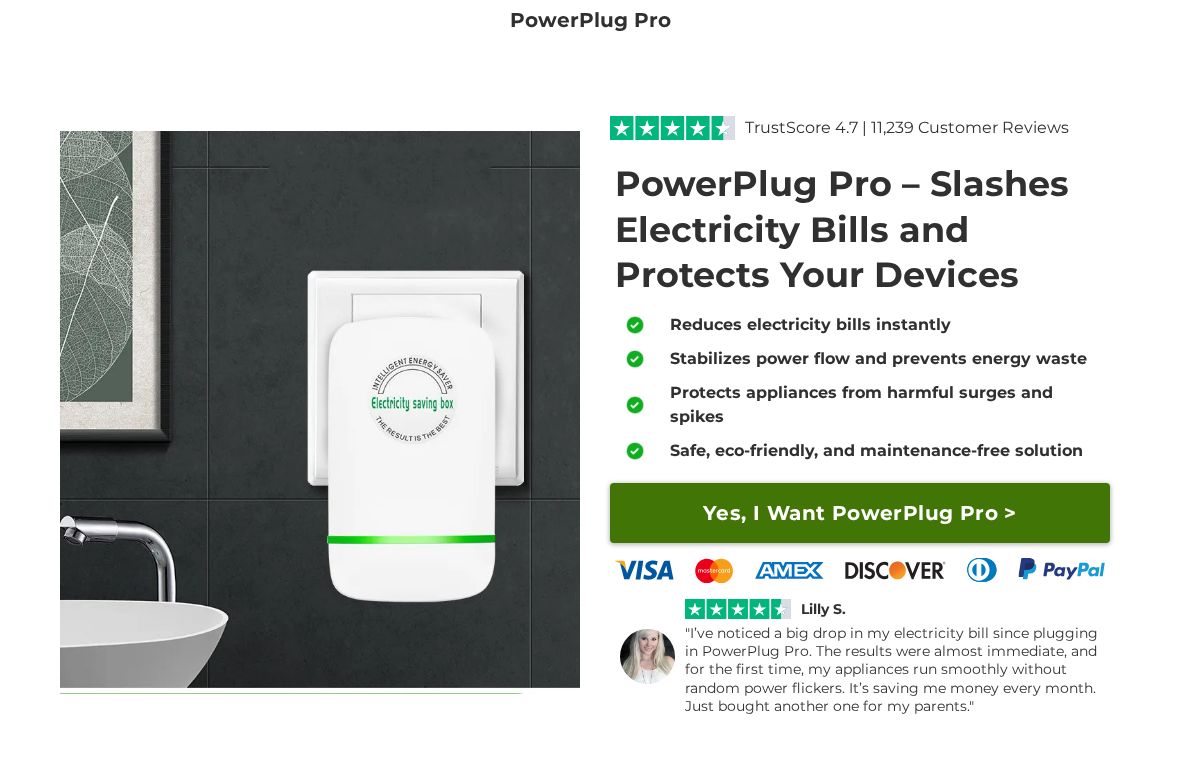
We could not locate a current VoltSaver X listing in Inovira’s public catalog. Its live energy-saving page instead markets a similar-looking offer called PowerPlug Pro.
That distinction matters. The screenshot above shows Inovira’s current PowerPlug Pro promotion, not proof that the pictured unit is branded VoltSaver X.
The live page promises immediate bill reductions, smoother power, and appliance protection. These are seller statements, not results from an independent electrical test.
The billing concern is visible on Inovira’s own pages
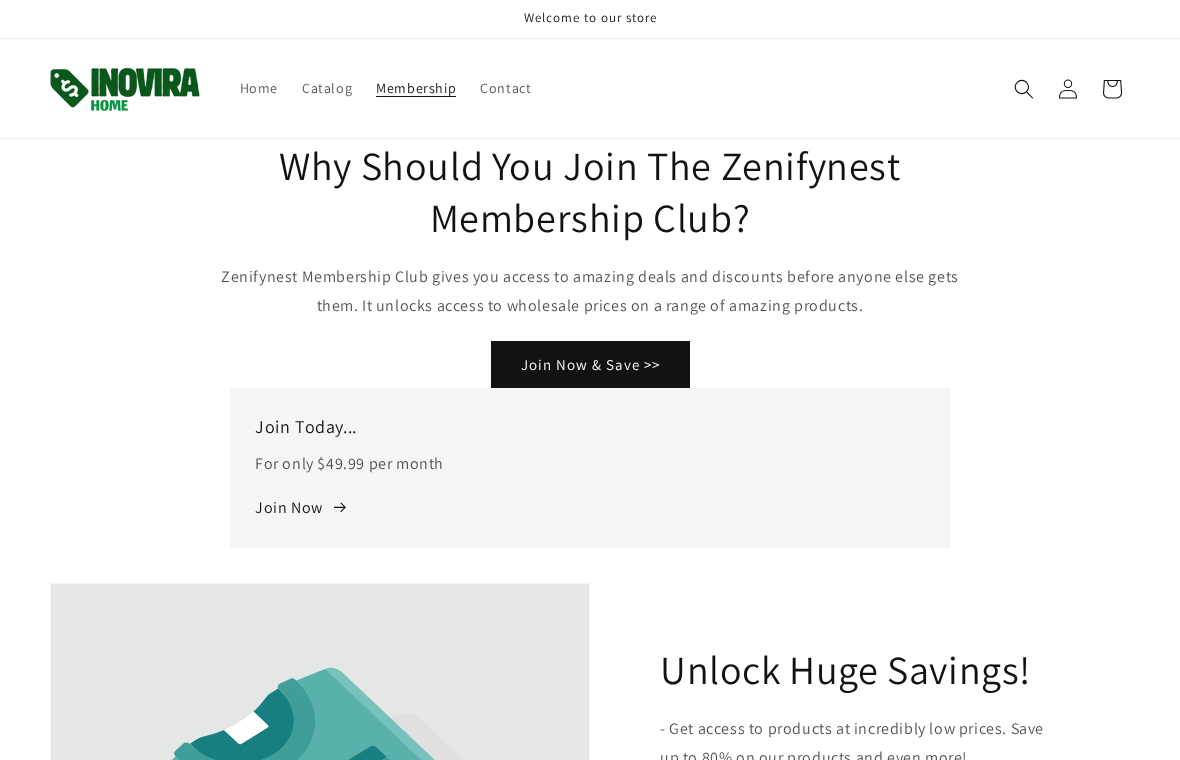
Inovira’s VIP membership page advertises a $49.99 monthly club. Its FAQ then describes $29.99 monthly billing after a 12-day introductory period.
A separate membership product page says first-time VIP buyers will be charged $49.99 each month and points to a guest-price alternative.
Those amounts cannot both describe one clear monthly price without further explanation. We did not place an order or observe an actual card charge.
Our verdict: avoid the device claim and scrutinize recurring fees
We found no independent evidence that this plug-in product produces the savings promoted to ordinary households. The published membership figures also conflict.
That is enough for a firm buyer warning. It is not evidence that every purchaser was enrolled without consent or that a particular unit failed laboratory testing.
Here is what a shopper should know before spending anything:
- Inovira currently sells an energy-saving plug under a different public product name.
- The page claims instant household savings without a product-specific independent test.
- The VIP club is recurring, not a one-time device purchase.
- Two public pages give incompatible monthly amounts.
- The guest option should be compared with the VIP total over several months.
Why a Plug in One Outlet Cannot Simply Rewrite Your Utility Bill
The claim sounds technical because it uses words such as voltage, spikes, dirty electricity, and power flow. Those words describe real electrical concepts.
What is missing is a measured link between this particular device and the amount your household meter records during normal use.
An air conditioner consumes energy to move heat. A dryer consumes energy to warm air and turn a drum. A plug elsewhere cannot remove that work.
That is the simple physical question the advertisement never answers: which appliance uses less energy, by how much, and under which measured conditions?
One green light proves the device receives power. It does not prove a reduced meter reading, safer wiring, or a meaningful change in an appliance’s workload.
A credible performance claim would identify a specific model, controlled test conditions, baseline consumption, measurement method, and independently repeatable result.
It would also explain whether the alleged saving applies to a particular motor load or to the entire house. Those are radically different propositions.
Inovira’s page presents broad household benefits without that kind of product-specific evidence. Testimonials on a sales page do not fill the gap.
One quoted customer says the bill dropped almost immediately. A bill normally covers a longer period, so a fast impression is not a controlled comparison.
Weather, occupancy, rate changes, and appliance use can all move a monthly total. To claim the device caused a saving, those factors must be addressed.
Power-factor correction is sometimes relevant to large commercial customers with specific tariff penalties. It should not be confused with a universal residential discount.
A U.S. Department of Energy analysis discusses such interventions in their actual engineering context and notes that residential power factor is not the general problem implied by these ads.
That does not mean no electrical device can ever save power. A smart thermostat, efficient appliance, or controlled power strip changes actual consumption.
The difference is mechanism. A thermostat runs heating or cooling less often. A mystery plug promises a whole-home result without showing what changed.
Ask the seller for an independent test using a utility-grade meter or a verifiable third-party lab. If the answer is only more testimonials, walk away.
Safety deserves separate attention. Do not assume a plug-in object is a surge protector because its landing page uses the word “protects.”
Look for a traceable manufacturer, model number, applicable certification, electrical rating, and documentation describing the protection circuit. We could not verify those for VoltSaver X.
A government product-safety notice found another plug-in power-saving product posed shock and fire risks. That notice does not identify or test VoltSaver X.
It shows why the category should not be treated as harmless simply because the object looks small and familiar.
How the VoltSaver X Offer Can Turn Into a Recurring-Billing Problem
Step 1: A short social video makes the saving feel effortless
The ad starts with an ordinary frustration: another high bill. Then it offers a device that appears to require no installation or behavior change.
That simplicity is the hook. It lets the viewer imagine keeping every appliance and habit while paying less for the same energy.
Some promotions use familiar faces or technical-sounding demonstrations to make the claim feel independently tested. Treat those elements as advertising until verified.
Do not infer that a real electrician or public figure endorses a product from a clipped video. Confirm identity through that person’s own channels.
Step 2: The landing page stacks benefits that need different proof
Inovira’s current PowerPlug Pro page says it can lower bills, stabilize electricity, prevent waste, and protect devices from damaging spikes.
Each benefit requires a different kind of testing. An energy measurement does not establish surge protection, and a surge test does not establish monthly savings.
The page gives a trust score and thousands of customer reviews. We did not independently authenticate the count, sample, or review collection method.
A large number beside a star icon can reduce skepticism before the buyer reads the underlying terms. It is not a substitute for laboratory data.
Step 3: The offer moves from a one-time object to a club choice
The critical turn occurs at the purchasing path. Inovira uses a VIP Add to Cart option and a guest alternative on its product pages.
A discount can look attractive when the buyer compares only today’s product price. A recurring club fee changes the calculation completely.
At $49.99 monthly, three months would add $149.97 before the device cost. The buyer should see that longer total before accepting a discount.
We have not verified the VoltSaver X checkout itself today. The membership language is visible on Inovira’s public pages and warrants direct scrutiny.
Step 4: The published monthly figures stop agreeing
The main VIP page invites visitors to join for $49.99 per month. Its FAQ says the charge after a 12-day introductory period is $29.99 monthly.
The membership product page again describes $49.99 each month for first-time buyers. These are not small differences in formatting or tax.
They are different recurring prices. Do not assume the lower amount will apply just because one FAQ mentions it.
Before checkout, save the exact page and ask support to identify the current fee, first billing date, and method of affirmative consent.
Step 5: Cancellation has its own timing and identity questions
Inovira’s FAQ lists email, telephone, a cancellation form, and replies to order confirmation emails as cancellation routes.
It also says cancellations must arrive at least three business days before the next billing. A last-minute request may not prevent the next charge.
The same page names a Zenifynest club and points to a support email using the Nuvio Home domain. That naming drift deserves an explanation.
A different support domain is not automatically fraudulent. It does make it harder to know which company will answer, cancel, and appear on a card statement.
Step 6: The bill, not the advertising, reveals the true outcome
After purchase, check the receipt for separate product and membership lines. Then inspect statements for the next several billing cycles.
Do not rely on a verbal cancellation promise. Keep the request, timestamp, acknowledgment, and any later charge in one folder.
If the statement shows a charge you did not authorize, dispute that specific transaction with the issuer. A disappointing product is a different complaint.
Separate the two issues clearly. It helps support and the card company understand whether you are challenging performance, disclosure, or consent.
Company, Address, and Fulfillment Checks
The current catalog does not establish the advertised product’s identity
We found Inovira’s PowerPlug Pro sales page but not a current VoltSaver X listing in the merchant’s public catalog.
That could reflect a renamed product, an older funnel, or a separate offer. We cannot confirm which without the exact ad destination and receipt.
For a device attached to household wiring, a recognizable brand name is less useful than a model number and manufacturer that can be independently checked.
If the bottle, box, website, and payment descriptor use different names, ask the merchant to reconcile them before deciding the item is the same.
The VIP club uses more than one name and fee
Inovira’s membership page describes Zenifynest, while its cancellation instructions use a Nuvio Home support address. The site footer names Inovira LLC.
Those pages can belong to one operation, but they do not make the buying path easy to understand. The two recurring amounts make clarity more urgent.
Ask which legal entity charges the card and which email address will confirm cancellation. Compare the answer with the receipt and statement.
If support will not give a written answer before payment, the claimed member discount is not worth accepting.
A listed address is not a device test or safety certificate
Inovira’s contact page lists an Athens, Georgia address. A postal address alone cannot establish who manufactured or tested the plug-in hardware.
It could be an office, registered address, or mail handling point. We did not visit it or verify an electrical production facility there.
Ask for the product’s exact electrical certification and the name of the organization that issued it. Check the certificate against the model being sold.
Do not treat “patent pending” as proof of measurable energy savings. A patent application and a tested consumer benefit are different things.
The relevant company check is who can fix billing
For buyers, the most practical test is whether the named merchant can supply a coherent invoice, cancellation confirmation, and refund route.
The club page says a customer can cancel at any time, subject to advance notice. Request the exact cancellation date and next scheduled billing date.
If a support reply comes from yet another brand, keep it. The message can help connect your order with the card descriptor later.
That paper trail matters more than guessing where a generic-looking plug was produced. We have no verified factory location for VoltSaver X.
What to Do if You Bought VoltSaver X or Joined the Inovira Club
- Stop relying on the claimed saving. Compare your actual utility usage, not just a changed bill total. Ask the provider for a usage history if you need a baseline.
- Unplug a questionable device safely. If it is hot, damaged, noisy, or lacks credible labeling, stop using it. Do not open it or attempt an electrical repair yourself.
- Find every transaction. Search email for the product, Inovira, Zenifynest, and Nuvio Home. Mark one-time charges separately from recurring membership fees.
- Cancel through a documented channel. Use the published form or contact address, retain a screenshot, and request written confirmation of the final billing date.
- Challenge the right issue. If a recurring charge was unauthorized or continues after timely cancellation, tell your card issuer precisely what was disclosed and when you cancelled.
- Preserve the evidence. Keep the ad URL, checkout screenshots, receipt, product packaging, tracking record, membership terms, and all support replies.
- Report misleading promotion. Flag the social ad and consider a complaint to the FTC. Describe what you actually saw rather than claiming an untested device caused damage.
If you merely opened an ad page, you do not need to replace your card. Act on actual payment, account, or device exposure.
For a different kind of energy saving, start with a utility usage review and proven efficiency changes. Those steps can show what is consuming power.
Frequently Asked Questions
Is VoltSaver X a proven electricity-saving device?
We found no independent product-specific test proving the promoted whole-home saving. The live Inovira page makes broad claims but does not provide such evidence.
Is PowerPlug Pro definitely the same product?
No. It is a currently visible Inovira energy-saving offer with a similar pitch. We did not verify that its hardware is identical to VoltSaver X.
Does Inovira publish a recurring fee?
Yes. Its membership pages describe monthly billing, but the public amounts conflict between $49.99 and $29.99 after an introductory period.
Can I buy without joining the club?
Inovira displays a guest Add to Cart alternative on its membership-related pages. Verify the final basket, total, and any continuing obligations before paying.
Will a power-factor device lower a typical household bill?
Do not assume so. Commercial power-factor corrections and residential energy use are different situations. Demand a credible test for your specific device and tariff.
What if I already see a monthly membership charge?
Request cancellation immediately, keep proof, and compare the charge with what your checkout disclosed. Ask your card issuer about disputed unauthorized billing.
The Bottom Line
VoltSaver X asks you to believe a small plug can cut a whole home’s bill. We found no trustworthy test to support that promise.
Inovira’s public membership pages create a second, concrete problem: recurring charges are disclosed with conflicting monthly amounts and changing brand labels.
Skip the miracle plug. If you already ordered, separate the device purchase from the club fee, cancel in writing, and dispute any charge you did not authorize.








