

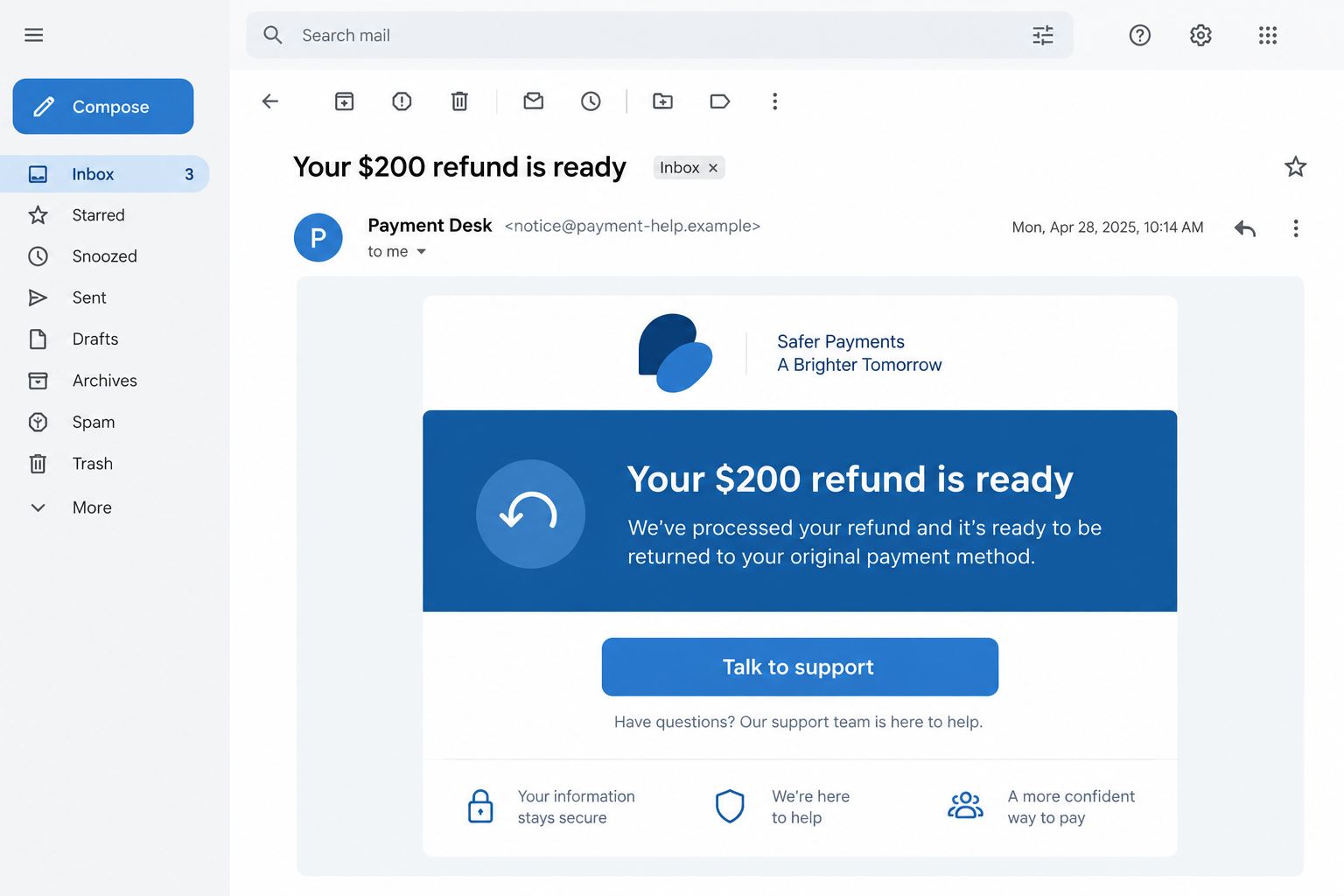
A refund email says money is waiting for you. Instead of taking you to an account statement, its button opens what looks like a helpful customer-service chat.
The exchange can feel more reassuring than a form. Before answering the person or bot on the other side, check who brought you there.
Overview
A real chat service can host a false conversation
Cofense documented phishing emails that routed readers into LiveChat, a legitimate customer-service platform. The attackers configured conversations that impersonated PayPal or Amazon support.
The service itself was not the scam. The deception was the false refund story and the requests for sensitive information inside attacker-controlled chats.
One observed email promised a $200 PayPal refund. Another spoke vaguely about a pending order before its link opened an Amazon-themed chat.
The evidence points to two related paths
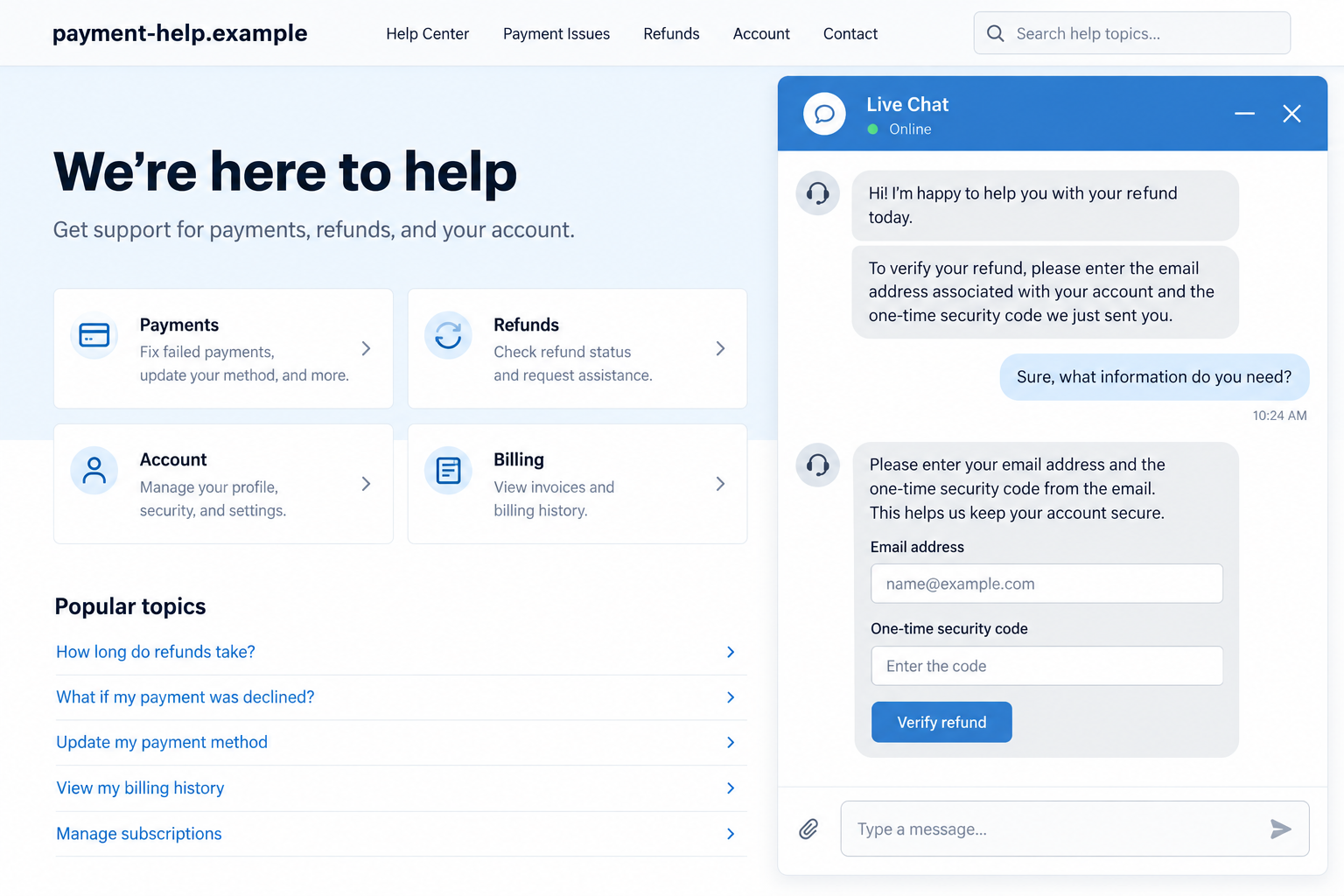
In the PayPal-themed path, a chat message sent the visitor onward to an external sign-in page. The sequence then requested a password, verification codes, and billing details.
In the Amazon-themed path, the person behind the chat asked for an email address, phone number, date of birth, home address, and full card information.
Cofense observed these requests in its investigated samples. Its report does not prove that every recipient replied, lost money, or had an account taken over.
The safest decision is to leave the email’s route
Do not use the chat link to verify the refund. Open the retailer or payment service through its known app or a bookmark and inspect your account directly.
- A refund notice is only a claim until it appears in a verified account.
- A familiar support platform does not authenticate the organization using it.
- A chat agent asking for a full card number and security code is a major warning sign.
- A login link supplied in the chat is still part of the untrusted journey.
PayPal, Amazon, and LiveChat should be distinguished from the criminals impersonating support staff. The brands are the cover, not evidence of their participation.
Why the Chat Feels Safer Than a Phishing Form
People have learned to distrust a blank page demanding a password. A conversation changes the pace: someone appears to listen, respond, and guide the next step.
The chat window might be hosted on a recognizable service. That can make the browser address look less alarming than an obviously counterfeit storefront.
Chat software is a tool. Many organizations can create an account, add a logo, and write greetings. The platform does not independently verify every customer claim.
The attacker also gains flexibility. If a visitor hesitates, the script can explain why a refund is pending or why another code is supposedly required.
Some parts can be automated, while others can involve a human operator. Either way, the conversation is designed to keep the reader inside the sender’s chosen process.
A real refund normally has a traceable transaction in the merchant or payment account. A stranger in a chat does not create that record by saying one exists.
How the Fake Refund LiveChat Scam Works
Step 1: A tempting or confusing email starts the exchange
The PayPal-themed message in Cofense’s case promised a $200 payment. Its button offered transaction details, a natural next click for someone curious about unexpected money.
The second message was less specific. It said an order was pending and needed confirmation, leaving the recipient to wonder whether a forgotten purchase was involved.
Both prompts exploit uncertainty. One offers a benefit; the other hints at an unresolved transaction that might require attention.
A displayed company logo, polished template, or familiar color scheme can make the message appear official. The actual sender and linked destination require separate checking.
Step 2: The button opens a real support-chat platform
Cofense saw the links lead to LiveChat-hosted conversations. The platform’s presence makes the move feel like ordinary customer support rather than a jump to an attacker.
In one case, the email claimed to be about PayPal. In the other, the chat introduced Amazon branding only after the generic email was opened.
That change is revealing. The brand is a costume applied to the conversation, not a reliable description of who sent the first message.
The relevant question is who controls the chat account. The chat provider’s domain does not answer it for the reader.
Step 3: The conversation builds a reason to disclose data
The Amazon-themed chat asked for an email address before continuing. It then moved through phone number, birth date, address, and card details.
Each request can be framed as a small verification step. Together they create a detailed identity and payment profile that no unsolicited refund conversation should require.
The reported operator claimed card information was needed because it was not on file. That explanation reverses the normal logic of a refund.
Money owed to you should not require sending a stranger your card’s security code through a chat box. Stop at that request.
Step 4: A login page and verification codes deepen the exposure
In the PayPal-themed route, the chat supplied an external link for completing the supposed payment. The destination imitated a PayPal login.
The following screens asked for verification codes and billing data. A code sent to your phone is meant for the real service, not for a chat agent or linked page.
A stolen password and current code may let an attacker sign in. Whether that happened to a particular victim requires account evidence.
The same warning applies when a chat says a second code is required to “release” money. Repeated prompts often mean the first attempt failed or another authorization is being sought.
Step 5: Reassurance replaces an actual refund record
Cofense reported that the PayPal-themed journey eventually returned the visitor to the chat with a promise that a refund would arrive.
That final message can make the exchange feel complete. It does not demonstrate that a payment was sent, reversed, or accepted by the real service.
The attacker benefits if the visitor waits, stops checking account security, or assumes the missing money is merely delayed.
Check the account directly, through the normal app or saved address. A genuine refund should have a corresponding transaction history or official support record.
What a Legitimate Support Conversation Should Not Need
Customer-service staff may ask enough information to locate an order. That is different from requesting the entire card number, expiration date, and CVC in chat.
Nor should a support agent demand the one-time code you just received to your phone. That code is an account security control, not proof that you deserve a refund.
If a conversation says you must sign in, navigate to the official app yourself. Do not let the chat provide the only route to your account.
Be especially wary when the original email was generic but the next page suddenly claims to represent a major brand. That mismatch can expose the script.
Look for your order number or transaction in your existing records. The absence of a matching purchase is a reason to investigate independently, not to share more personal information.
A small amount of authentic-looking support language can hide a data-collection exercise. Judge the request, not the politeness of the person making it.
How to Verify a Refund Without Using the Suspicious Link
Start with the payment service or retailer app already installed on your device. Open it normally, not from the email, and inspect recent activity.
If you do not have the app, type the service’s known address yourself or use a saved bookmark. Avoid search advertisements while trying to resolve a suspicious refund.
Compare the amount, merchant, transaction date, and status. A vague email with no matching entry is not enough to establish a refund.
Use customer support from the official account dashboard if the record is confusing. Give the agent the email’s claim, but do not provide a code sent to your phone.
For a card charge, contact the card issuer using the number on the physical card or its official app. The issuer can identify real transactions and advise on disputes.
Save the suspicious message and chat transcript if you can do so without clicking further. They may help support or security staff identify related attempts.
What to Do if You Have Fallen Victim to This Scam
- End the chat and stop following its links. Do not argue with the operator or ask the same chat to delete your data. Move to a verified support channel.
- If you entered a PayPal or retailer password, change it from the real site. Use a clean device, choose a unique password, and review sessions, connected devices, and payment settings.
- If you shared a verification code, tell the service immediately. A fresh code can be misused quickly. Ask support to secure the account and review recent logins or changes.
- If you disclosed card details, call the issuer promptly. Explain that the full number, expiration date, and security code were exposed. Ask about a replacement card and monitoring or disputing charges.
- If you shared personal identity details, monitor for follow-on fraud. Keep copies of the conversation. Consider a fraud alert or credit freeze if enough identifying data was exposed.
- Check your device according to what happened. A chat alone is not proof of malware. If you downloaded a file or enabled notifications, run a current scan; Malwarebytes can provide an additional check.
- Reduce repeat exposure. Report the email to your mail provider and the impersonated service. AdGuard may block some malicious destinations or ads, but it does not replace account recovery.
- Record the incident. Save dates, amounts, screenshots, and case numbers. This makes later disputes and reports clearer if unauthorized activity appears.
Why the Brand and the Platform Are Not the Same Thing
It is easy to say “the PayPal chat was fake” and leave an important detail out. The observed chat platform was real; the represented identity was not.
That distinction matters because a user may inspect the address and see a legitimate support-software domain. A real domain can still host a conversation opened by a fraudster.
It also prevents misplaced blame. The investigation does not show PayPal or Amazon instructed anyone to collect card details through these chats.
Think of the platform as rented office space. The building can exist while the person behind one desk lies about whom they work for.
The best verification happens outside the conversation. A real account statement, transaction record, and official support ticket carry more weight than a chat’s branding.
Why One-Time Codes Are the Turning Point
A verification code is normally sent because someone is trying to access or change an account. It is not a receipt showing that money is on its way.
In the investigated PayPal-themed route, the fake login was followed by code prompts. That sequence is more dangerous than a simple form collecting a name.
When a code arrives unexpectedly, read its message carefully. It may tell you the service, requested action, or whether someone is attempting to sign in.
Never paste the code into a page opened from the suspicious email. A thief can use that page to pass your code to the real service.
If you did share it, act promptly. Contact the affected provider through its verified support route and ask about active sessions and recent account changes.
Do not assume changing a password alone is enough. A current session, connected app, or altered recovery information could still need attention.
Check email forwarding rules if an email account was involved. Unexpected rules can hide security notices or send copies of messages elsewhere.
For payment accounts, review linked cards, bank details, shipping addresses, and transaction history. Make a list of anything you do not recognize.
A chat agent’s request for a second code should increase concern, not confidence. The operator may be testing another login or authorization route.
Stay calm if you provided one. The next useful action is a verified support contact, not continuing the conversation to see what happens.
Keep records of the exact prompts and any text messages received. The wording can help the real provider understand which account action was attempted.
Consider warning family members who share a payment account. They should know not to approve unexpected authentication requests while the account is being secured.
Frequently Asked Questions
Is LiveChat itself a scam?
No. LiveChat is a legitimate customer-service service. The documented scam involved attackers using it to impersonate major brands and collect data.
Was the $200 PayPal refund real?
Cofense identified the $200 promise as a phishing lure in the case it investigated. Check your own PayPal account independently for any actual transaction.
Can a live support agent ask for my card security code?
An unsolicited refund chat asking for the complete card details and CVC is a serious warning sign. Stop and contact the card issuer or merchant independently.
What if I only gave the chat my email address?
Expect possible follow-up messages. Do not reuse its links. Review account security if you also disclosed a password, code, or other identifying information.
Does a code texted to my phone prove the refund is genuine?
No. A one-time code may be generated by a real account sign-in attempt. Never pass it to a chat agent or enter it on an unverified page.
Will a malware scan reverse a stolen card number?
No. Device scans address software risk. The issuer and affected account providers must handle exposed payment details, suspicious sessions, and unauthorized charges.
The Bottom Line
This scam used a real chat platform as the stage for a false refund conversation. The decisive warning was the request for credentials, codes, and card data.
Leave the email’s route, inspect the transaction through your real account, and contact the affected service or card issuer quickly if you shared information.








