

A banking text asks whether you requested a payment code. Another says your payment schedule changed. Either message can arrive while you are busy with something else.
A Hudson Valley Credit Union scam warning is worth checking before you respond. A familiar abbreviation in your messages does not answer who sent the notice.
Overview
The legitimate credit union is being impersonated
The Hudson Valley Credit Union scam described here involves fake banking texts and spoofed calls. HVCU is a real financial institution, not the party behind the deception.
Its current security alert warns that impostors target personal and business members. Some claim to represent the Fraud Department while creating pressure to disclose sensitive information.
That warning concerns account numbers, card details, identification information, PINs, and one-time passcodes. A reassuring security explanation can hide a request that exposes the account.
You should verify a concerning notice directly with the credit union. Do not let the message choose where you log in or whom you call.
Reported messages use different reasons to make you act
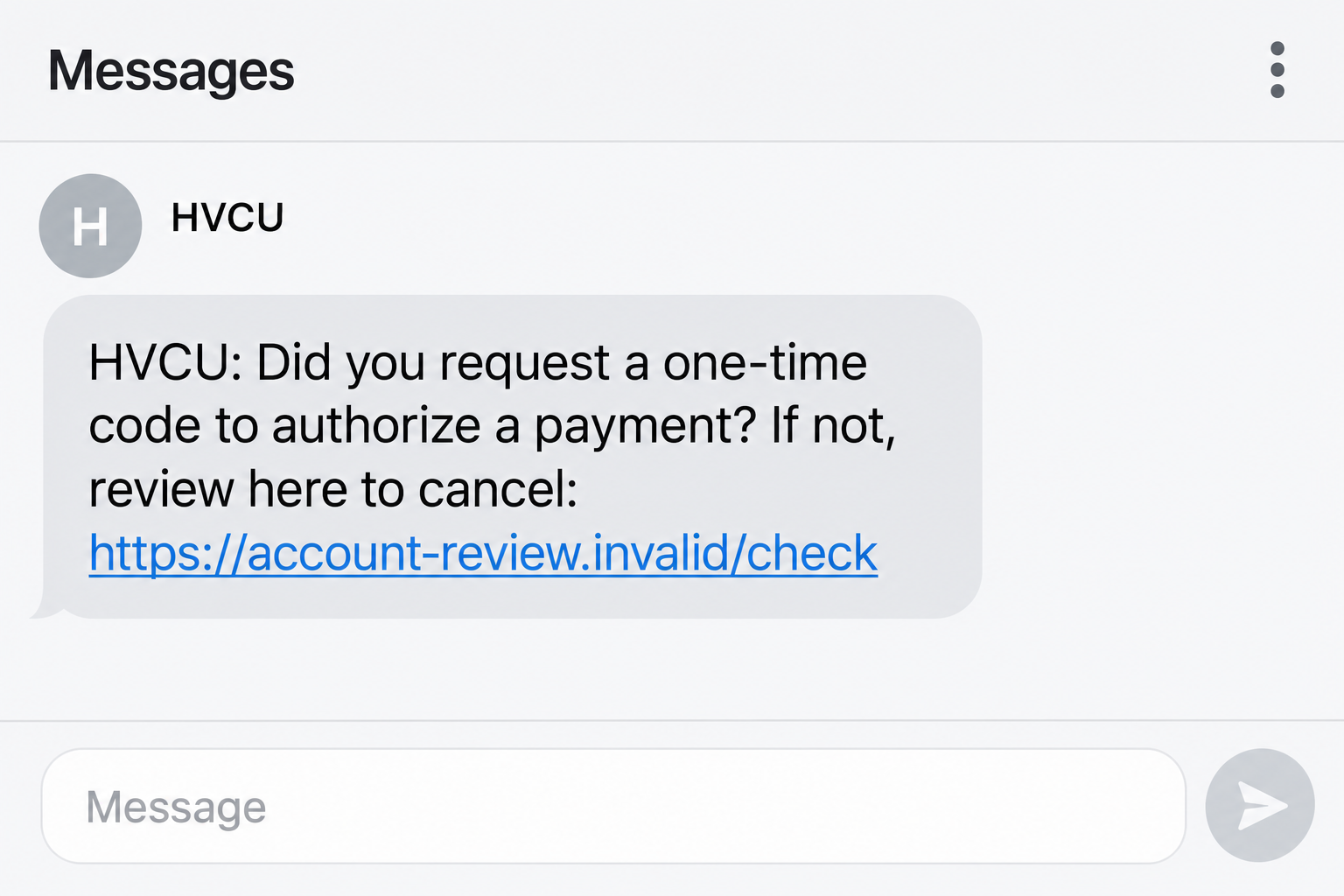
One archived text sample asks whether the recipient requested a one-time payment code. It supplies a shortened link for supposedly stopping the payment.
Another sample claims a payment date changed and directs the recipient to a lookalike billing address. The pretexts differ, but both move attention toward an unverified destination.
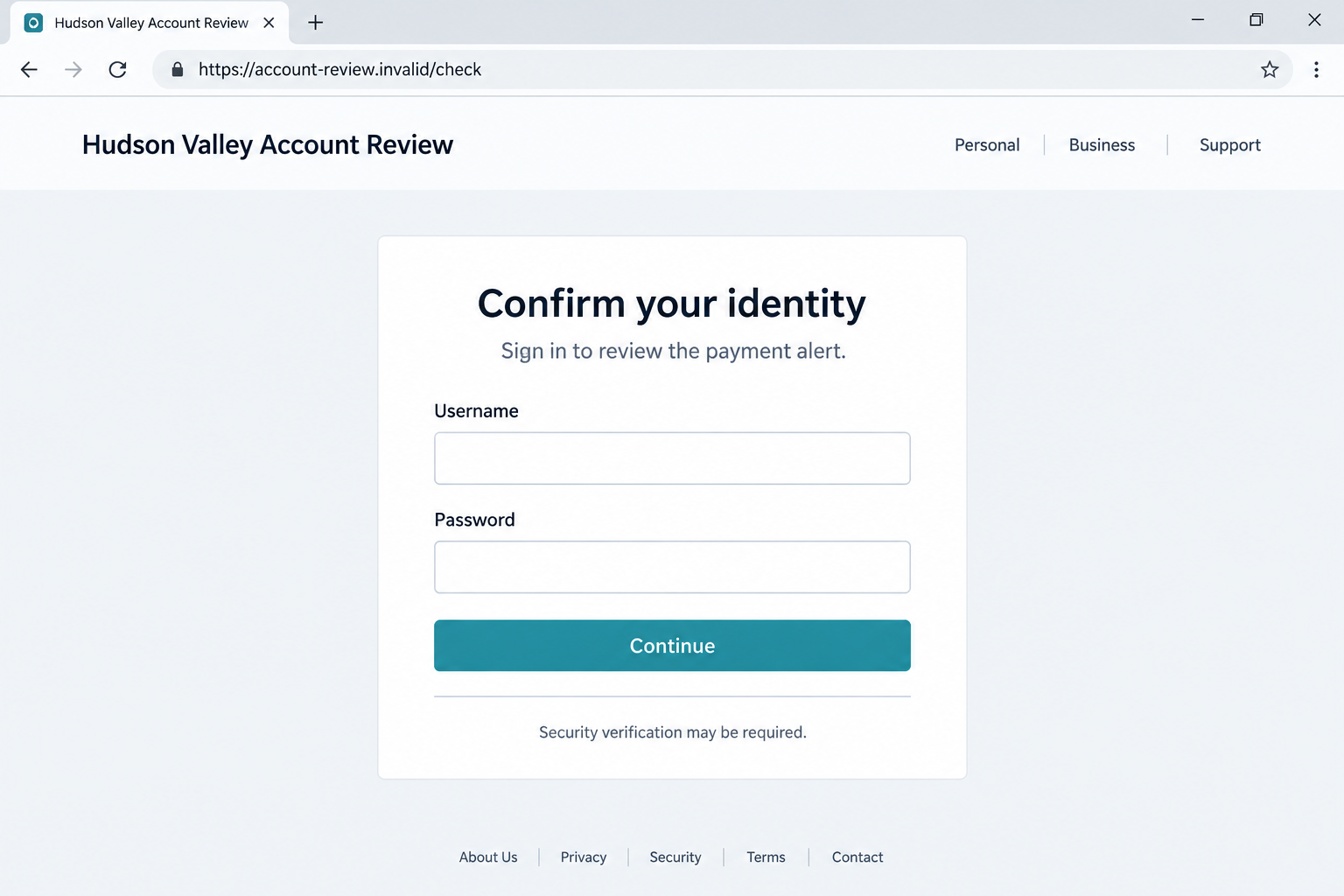
The screenshots in this article use fictional addresses to illustrate the payment-alert approach and a possible phishing destination. They are not exact captures of a live banking page.
Historical sample domains are not reliable guides to every current version. A new link can carry the same risk even if it looks nothing like an older report.
The safest check starts outside the message
HVCU advises members to enter Internet Banking or Mobile Banking directly and contact the institution independently. Its published main number is 845-463-3011.
- Do not share a one-time passcode, PIN, or complete card number with someone who contacts you by phone, text, or email.
- Do not sign in through an unexpected message link to investigate a supposed payment problem.
- Do not trust a caller solely because the displayed number resembles the credit union’s number.
- Check the genuine banking app and call using independently verified contact information if the notice raises a concern.
- Tell HVCU promptly if you disclosed information or see account activity you do not recognize.
A real fraud alert is possible. The right response is independent verification, rather than assuming every message is genuine or ignoring every warning automatically.
Why a Payment Alert Can Be Such an Effective Hook
The message offers a way to prevent a problem
A question about a payment you did not request creates a clear worry. The attached link then appears to offer immediate relief.
That sequence reverses the normal instinct to avoid unfamiliar links. The recipient may think clicking is necessary to protect the account rather than expose it.
A supposed schedule change can work more quietly. It gives you an administrative reason to inspect a billing page without making an obviously dramatic claim.
A reference number can make the notice feel specific
A message may contain a reference or verification-looking number. Such a detail can resemble a bank’s internal tracking information.
The number does not prove anything about the sender. An impersonator can invent a reference without access to the credit union’s account records.
Nor does an accurate personal detail validate a follow-up call. Information disclosed earlier or obtained elsewhere can be used to make another approach sound informed.
Security language can blur the meaning of a code
One-time codes are easy to misunderstand when someone claims they are needed to stop fraud. In reality, a code can relate to account access or another authorization.
Read any genuine code notification carefully. Its purpose is determined by the service issuing it, not by an incoming caller’s explanation.
If you did not initiate the action, do not give the code to someone else. Contact the credit union through your own trusted route.
How the Hudson Valley Credit Union Scam Works
Step 1: A text or caller borrows the credit union’s identity
The approach uses HVCU, Hudson Valley Credit Union, or a department name to sound familiar. It may resemble the kinds of notices members expect.
Branding in a message is not proof of origin. A copied name or logo does not establish a connection to the institution.
HVCU also warns about number spoofing. A call that appears to come from a legitimate number can still involve someone pretending to represent the credit union.
The first decision is whether to stay inside that incoming contact. Moving to the banking app or a separately placed call breaks its control over verification.
Step 2: A supposed account event creates a reason to respond
The text might ask about a payment code or announce a billing schedule change. Other impersonation approaches can refer to unusual activity or account security.
The claim does not need to be accurate to feel urgent. You may worry that failing to respond will allow a payment or leave an account unprotected.
Do not treat the offered remedy as trustworthy merely because the problem sounds plausible. Verify both the event and the proposed action independently.
If an account event is real, HVCU can help through its authentic channels. You do not need the stranger’s link to establish that.
Step 3: The recipient is directed into an unverified channel
In the archived message examples, links are presented as the route to reviewing or stopping an account event. One hides the destination behind a shortened address.
A shortened link prevents a straightforward destination check. A lookalike address can also mislead by placing familiar banking letters inside an unrelated domain.
A caller may instead keep you on the phone and ask questions directly. The call and link are alternative paths, not stages every recipient necessarily encounters.
A padlock or HTTPS address does not settle the identity question. Encryption can protect a connection to an impersonator just as it protects a genuine banking connection.
Step 4: A login or verification request seeks account information
A possible destination is a false sign-in page. Entering your banking credentials there gives them to whoever operates the page, rather than to HVCU.
The exact destination form behind every historical message has not been independently established here. Do not assume all examples collect identical fields.
HVCU’s own warning confirms the broader information risk. An incoming contact can seek security codes or card details while pretending that disclosure will prevent fraud.
The second illustration shows a hypothetical credential-request stage. It is included to explain the risk, not to certify an intercepted phishing page.
Step 5: Exposed information may support unauthorized activity
Stolen credentials can be used in an attempted account login. A disclosed code could assist an action for which that code was actually issued.
The result depends on what was shared and the protections involved. A suspicious text alone does not prove that money moved or an account was accessed.
A later caller could use details from an earlier interaction to sound convincing. That possibility is another reason to stop relying on incoming contact for verification.
If you disclosed anything sensitive, let the credit union assess the exposure promptly. Waiting for an unfamiliar transaction can delay useful protective action.
How to Check an HVCU Text Without Following Its Link
Open the banking service you already trust
Use the genuine app you normally use, or navigate independently to the official site. Do not install a replacement application from the suspicious message.
Review notices and recent transactions there. A message’s reference number should not be treated as a substitute for the account information inside your authenticated banking session.
Absence of a visible alert is not the whole investigation. If the message concerns a serious issue, ask the credit union directly about it.
Call from a verified number, not the message’s instructions
Use the number on your card or the contact information on HVCU’s official website. Its security alert lists 845-463-3011 for independent confirmation.
If you are already speaking with an unexpected caller, end that conversation first. Do not let them transfer you to another supposed employee as the identity check.
Explain the notice you received and what you have done so far. The legitimate staff member can assess both the reported event and any information exposure.
Distinguish your own sign-in from a stranger’s code request
A code used inside a verified login you initiated is different from a code read aloud to someone who called you unexpectedly.
HVCU says it will not request your one-time passcode, PIN, or full card number by phone, text, or email. Treat contradictory instructions as a reason to stop.
Do not disclose an access code because someone claims it will cancel a transaction. Confirm the intended banking action directly with the institution instead.
Personal and business members should follow the same identity principle. Businesses may also need to involve the person responsible for account permissions and payment approvals.
What to Do if You Have Fallen Victim to This Scam
- Contact HVCU immediately about the exposure.
Call through a verified number and explain whether you shared a password, code, PIN, card information, identification, or account number.
Be specific about any payment you approved or transfer you made. Do not describe an authorized action as unauthorized; explain the deception that led to it.
Ask the credit union which credentials, permissions, cards, or account access need protection. The right response depends on what the impostor actually obtained.
- Stop interaction with the false sender.
Do not click another link or answer a callback to complete cancellation. If the caller insists that hanging up will cause a loss, contact HVCU independently.
Keep the message until you have saved its details. Then use your messaging application’s available blocking and reporting controls.
- Replace exposed login credentials through authentic banking.
If a false page received your password, change it using the genuine service or follow HVCU’s recovery instructions. Address reused passwords on other accounts too.
Ask about existing sessions, recognized devices, and any changed recovery information. A new password is useful, but the institution may identify additional access to revoke.
If you cannot sign in, do not use recovery links from the original sender. Obtain help through the official support route.
- Review activity with the credit union.
Check recent transactions, scheduled payments, and changes you do not recognize. Business account administrators should also review relevant user permissions and payment instructions.
Provide dates and amounts for questionable activity. Ask which transactions need a dispute, investigation, or other response, and record the case reference.
Act promptly without assuming every loss is automatically refundable. The institution needs the facts of each action and the method involved.
- Preserve a private record of the messages and calls.
Save the text, displayed sender, full link as shown, timestamps, and any voicemail. Record what the caller claimed and what information you supplied.
Avoid putting account numbers or security codes in public comments. A factual private record is more helpful than a public accusation based on a spoofable number.
- Assess identity information separately from banking access.
If you provided a Social Security number or identification document, use IdentityTheft.gov for US guidance tailored to that exposure.
Tell HVCU if a caller also obtained information about business owners or authorized account users. Those details can affect how a later impersonation is presented.
- Check downloads or device changes only if they occurred.
A phishing link can steal submitted information without installing malware. Conversely, a requested application, opened file, or unexpected extension may create additional device risks.
Run Malwarebytes if the exchange involved suspicious software or files. If remote access was granted, stop that access and get trusted help before continuing sensitive activity.
AdGuard may help filter some malicious destinations and advertising. It cannot reverse a bank transfer or make a disclosed one-time code safe again.
If you only opened a page and entered nothing, tell HVCU what happened. Do not assume either guaranteed infection or guaranteed safety without considering the interaction.
- Report the impersonation and reject recovery pressure.
Notify the credit union and your messaging provider. US readers can also report internet-enabled financial fraud through IC3.
Ignore strangers promising to return money for a fee or requesting codes to complete a refund. Revisit your existing case through the institution’s verified support channel.
Frequently Asked Questions
Is Hudson Valley Credit Union behind the scam?
No. The warning concerns impostors using the legitimate institution’s identity. HVCU has published guidance about phishing texts and spoofed calls targeting members.
Are all HVCU text messages fake?
No. A genuine alert is possible. Check concerning messages through your normal banking service or a verified phone call rather than trusting the incoming link.
What if the caller ID shows the credit union’s number?
That does not prove authenticity. HVCU warns that numbers can be spoofed. End the call and contact the institution using information you independently trust.
Should I provide a code to cancel a suspicious payment?
Not to an incoming caller or text sender. HVCU says it will not ask for your one-time passcode by phone, text, or email.
Does an HTTPS banking page prove the link is genuine?
No. HTTPS encrypts the connection but does not establish the operator’s identity. Use the official banking route rather than a link from an unverified message.
What should I do if I already entered my password?
Contact HVCU promptly, recover the login through its authentic service, and review account access and activity. Explain whether any codes or other information were shared too.
The Bottom Line
The Hudson Valley Credit Union scam uses banking familiarity and payment concerns to draw members into unverified contact. The real credit union is being impersonated.
Keep passwords and codes out of incoming conversations. Check the account directly, call through verified contact information, and report any exposure promptly.








