

You are moving, the checklist keeps growing, and a search result offers to update your mailing address. It looks like one small task you can finish quickly.
The USPS change of address scam exploits that busy moment. Before entering two addresses and a card, establish which organization is actually taking the request.
Overview
A postal-looking page can sell something other than the official request
The scam involves a website that misrepresents its connection to USPS or obscures what the customer is buying. The reader believes they are completing the official address change.
The Postal Inspection Service warns that unofficial sites have charged substantially more and, in some cases, the address change never took place.
That is different from automatically calling every paid moving service fraudulent. A private assistant can offer optional work if its identity, fees, and responsibilities are honestly disclosed.
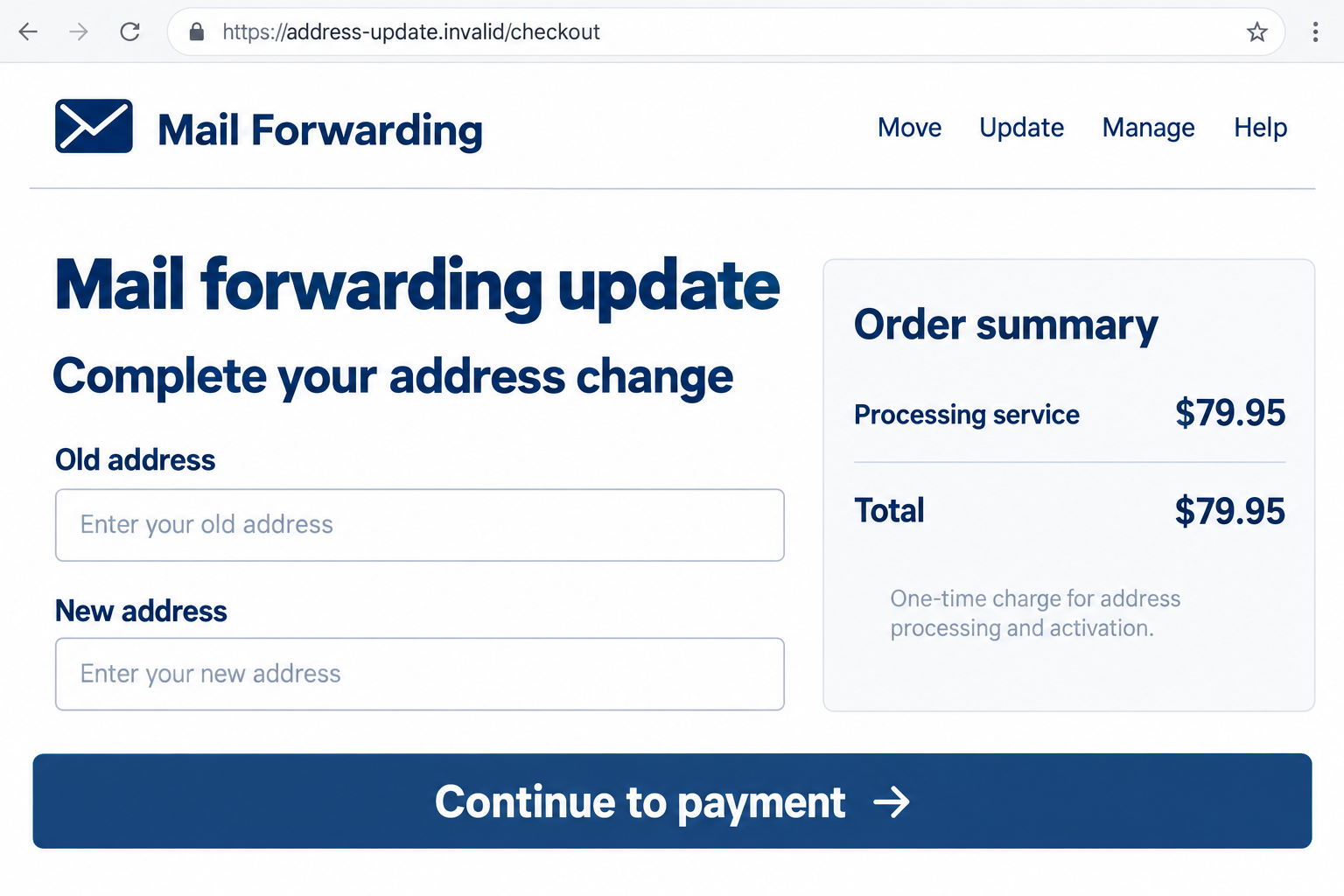
The illustrated checkout is fictional. Its $79.95 amount demonstrates a costly intermediary request, not a verified current price or transaction at a named business.
The current official service provides a useful point of comparison
USPS’s forwarding page currently lists a $1.25 online identity-verification fee. The ordinary in-person address-change request is free, subject to the required identity checks.
USPS also offers paid premium or extended forwarding options. A larger charge needs explanation, but price alone does not establish impersonation or an unauthorized transaction.
Older warnings can contain different official fees. Check the present service, the selected option, and the total rather than treating a historical figure as today’s price.
Confirm both the seller and the actual forwarding request
- Begin with USPS.com instead of an uncertain search advertisement.
- Identify the website that owns the checkout and receives payment.
- Read the total and any separately offered services before submitting.
- Keep the receipt and confirmation associated with each organization.
- Verify that the intended postal request exists, not just that a payment succeeded.
- Investigate unrequested changes or missing mail separately from a fee dispute.
This report concerns misleading address-change funnels, not a parcel-delivery text or every ordinary mailing problem. Those situations can require different evidence and response steps.
Why Moving Creates an Opportunity for the Wrong Checkout
The customer knows the task but not always the official address
Most people change a mailing address infrequently. They may recognize USPS branding without remembering the exact entry point for the online service.
A search advertisement can therefore become the first introduction to the process. A prominent position in results is not proof that the advertiser is the postal authority.
The page can use familiar words such as forwarding, mover, official, or update. Those labels describe an intention, not the ownership of the website.
Check the registered host rather than a postal-looking phrase. The official entry can be found by navigating from USPS’s own website, which avoids guessing among lookalike names.
The form asks questions that already seem appropriate
An old address, a new address, and a move date fit the expected task. That familiarity can make later billing questions feel like a natural continuation.
The relevant question is who receives those answers and under which terms. Useful-looking fields do not establish that the operator is authorized to process your request.
A moving deadline can also discourage comparison. Paying immediately appears easier than starting again, even when the checkout’s identity or total has become uncertain.
Pausing is still preferable to submitting information you cannot retrieve. You can return to the genuine service without explaining your hesitation to the unfamiliar website.
How the USPS Change of Address Scam Works
Step 1: A search or link directs the mover to an unofficial page
The reader looks for a convenient address update and reaches a site that resembles the expected service. The path can begin with advertising or an ordinary search result.
A polished layout or matching colors supplies familiarity. The website may leave its private status less visible than the instruction to begin the move.
Before starting, identify the host and organization. A website should explain what it does without depending on your assumption that postal branding means USPS ownership.
Step 2: The page gathers information before clarifying the relationship
The form invites the reader to supply move details. Completing several fields creates momentum and makes leaving the process feel like abandoning work already done.
A legitimate intermediary should identify itself and the service offered before that point. You should not have to discover its role only on a bank statement.
Read how the information will be used and which organizations, if any, will receive it. Do not assume a single submission updates every account associated with the address.
A request for unnecessary secrets or financial access should stop the process. Identity checking through the genuine postal service is different from an unrelated site’s unexplained demands.
Step 3: A processing charge is presented as part of the official task
The payment step may call the fee activation, handling, processing, or convenience. Those words do not establish whether it is a postal fee or a private-service charge.
Locate the total before authorizing anything. If a package includes optional assistance or forwarding products, identify exactly which selections generated that amount.
A price discrepancy can reveal that you reached a different seller. It is a reason to stop and compare, not proof of a particular criminal’s identity.
Do not enter payment details merely to reveal the final cost. A service should let you understand the transaction without requiring an irreversible submission first.
Step 4: A payment confirmation can be mistaken for a postal confirmation
A website receipt may show that the intermediary accepted an order. It does not necessarily establish that USPS received, verified, and processed the intended change.
That distinction matters when the seller promises to handle the task later. Ask what document will establish completion and how you can verify it independently.
The real postal process has its own confirmation and validation communications. Check through USPS if a private receipt leaves the actual request uncertain.
Do not submit multiple overlapping requests in a panic. First establish whether a change exists and which details need correction or cancellation.
Step 5: The mover discovers a fee problem, an unfinished task, or both
The customer may notice a charge from an unexpected company or find that mail is not arriving as anticipated. Those observations need investigation rather than one automatic conclusion.
An unfamiliar descriptor can relate to a service you bought without understanding it. Missing mail can reflect processing, forwarding limits, an incorrect request, or unauthorized activity.
Separate the facts: who was paid, what was promised, what postal request exists, and which mail is affected. That record helps both billing and postal support.
Do not rely on the seller’s reassurance to settle an unverified forwarding status. Contact the postal service and the payment provider for their respective records.
Who Is Collecting Your Address-Change Payment
The checkout identity should be visible before you enter details
Look for the legal or trading name in the terms, privacy information, receipt, and payment description. Compare those references rather than treating a logo as an identity check.
If the page claims an official postal relationship, ask where that relationship is documented. A statement written by the seller is not independent confirmation.
A business address can identify a contact location, but does not by itself establish government affiliation. Do not invent an ownership or origin claim from a shared building.
The service description must distinguish assistance from postal processing
Read whether you are buying form assistance, account updates, a notification package, or forwarding itself. Those are not interchangeable services.
A clearly disclosed private convenience service can cost more than the basic official process. The deception is misrepresenting it as mandatory or obscuring the transaction.
Save the offer and the selected package as they appeared when you ordered. Later changes to the homepage may not explain what you originally authorized.
Support and refund claims need an actual record
Use the contact details on your receipt when requesting clarification, but do not send new sensitive documents just to prove that an existing charge occurred.
Keep the date and substance of your written request. Distinguish an unanswered inquiry you actually made from a general assumption that the company’s support is fake.
If you cannot obtain a useful response, give the payment provider the original offer, receipt, and attempts to resolve it. An inaccessible website alone does not identify its operator.
The forwarding result should be traceable to the real authority
Ask what evidence confirms the postal submission and whether further identity verification remains. A seller’s internal order number may not be a USPS confirmation.
Do not assume a completed payment changes your banking, government, insurance, and shopping records too. Those senders may require separate address updates.
Unrequested forwarding or validation letters need prompt attention through USPS. That is an identity and delivery matter, not something a private billing refund necessarily fixes.
Do Not Confuse an Expensive Service With Confirmed Mail Theft
The unauthorized change is a separate incident
Someone can pay an unwanted intermediary without their mail being stolen. Conversely, a person may receive an unrequested address-change notice without visiting a moving-services website.
If an official validation letter refers to a move you did not request, follow the USPS dispute guidance and seek confirmation through the real service.
Record the order reference and affected addresses privately. Do not post identity documents or full home details in a public review to prove your complaint.
A forwarding request does not replace direct account updates
Contact important senders through established accounts or verified support. Mail handling and the address stored on a bank, insurer, or government account are different records.
Keep a simple list of which organizations have been updated and which confirmations are outstanding. It reduces the temptation to pay a stranger for an unexplained universal solution.
For specific mail that is missing, ask the sender and postal service about its handling. A general moving receipt is not evidence of what happened to that item.
What to Do if You Have Fallen Victim to This Scam
-
Stop the questionable checkout. Do not provide another card or identity document to release the supposed request. Keep any page address and confirmation already available.
Write down what the site represented, what you selected, and the total shown. Preserve the original transaction details before contacting the seller.
-
Establish whether USPS has your intended request. Reach the genuine postal service and clarify its status. Do not assume the intermediary’s order number proves completion.
If no valid request exists, arrange the move through the official process. Ask how to avoid duplicating or conflicting with a change already underway.
-
Ask the intermediary for a clear written explanation. Identify the purchased service and request the promised evidence or refund where applicable. Keep the correspondence factual.
Do not disclose extra banking credentials in a dispute. If the seller denies the charge, preserve both the receipt and its response for the issuer.
-
Contact the card issuer about the transaction. Explain the representation, price, authorization, and service outcome accurately. Ask what review or dispute procedure applies.
The FTC’s response guide recommends prompt payment-provider contact. A disputed service purchase is not automatically the same as a completely unauthorized card charge.
-
Protect information that was disclosed. If card details or identity information may have been misused, discuss appropriate safeguards with the relevant provider and follow actual activity.
A postal address alone does not prove identity theft. Use IdentityTheft.gov for a recovery plan when identity misuse is suspected or established.
-
Investigate any unauthorized forwarding independently. An unrequested validation letter or confirmed diverted mail deserves a postal incident report, even if you also receive a billing refund.
The Postal Inspection Service reporting route can direct appropriate complaints. Preserve dates and references while keeping home and identity details out of public posts.
-
Complete important direct address updates. Check banks, insurers, employers, and other essential senders through their own records. Prioritize mail that contains financial or personal information.
Keep genuine confirmations together and track anything still outstanding. Do not buy a second vague package before identifying what remains to be done.
-
Report deceptive conduct and watch repeat charges. Use ReportFraud.ftc.gov for US consumer fraud reports and monitor the payment method involved.
Ask the seller and issuer about unfamiliar subsequent billing without assuming every service has a subscription. Reject paid recovery offers that appear after the original complaint.
Frequently Asked Questions
Which website should I use for a USPS address change?
Start at USPS.com. Its forwarding page links to moversguide.usps.com for the official request. Avoid assuming every postal-looking result belongs to USPS.
What does the standard online request currently cost?
USPS currently lists a $1.25 identity-verification fee for the ordinary online request. Paid premium or extended forwarding products are separate options with their own terms.
Does a higher fee always prove a scam?
No. A private optional service may charge more when honestly disclosed. Check the identity, representation, selected product, total, and evidence of delivery.
Does an intermediary receipt prove my mail will forward?
Not necessarily. It may confirm only a private-service order. Verify the actual postal request and any remaining identity requirements through USPS.
What if I received a validation letter but am not moving?
Use USPS’s official dispute and support process promptly. Treat an unrequested address change as separate from an ordinary purchase or refund disagreement.
Will a forwarding request change my address at the bank?
No. Postal forwarding and the address recorded by a financial institution are separate. Contact important senders directly through their verified account or support routes.
The Bottom Line
The USPS change of address scam depends on confusion about who is providing the service. Identify the checkout, understand the price, and verify the actual postal request.
Use the official route for an ordinary move. If a misleading site collected money or information, handle the payment dispute and any postal or identity incident separately.








