

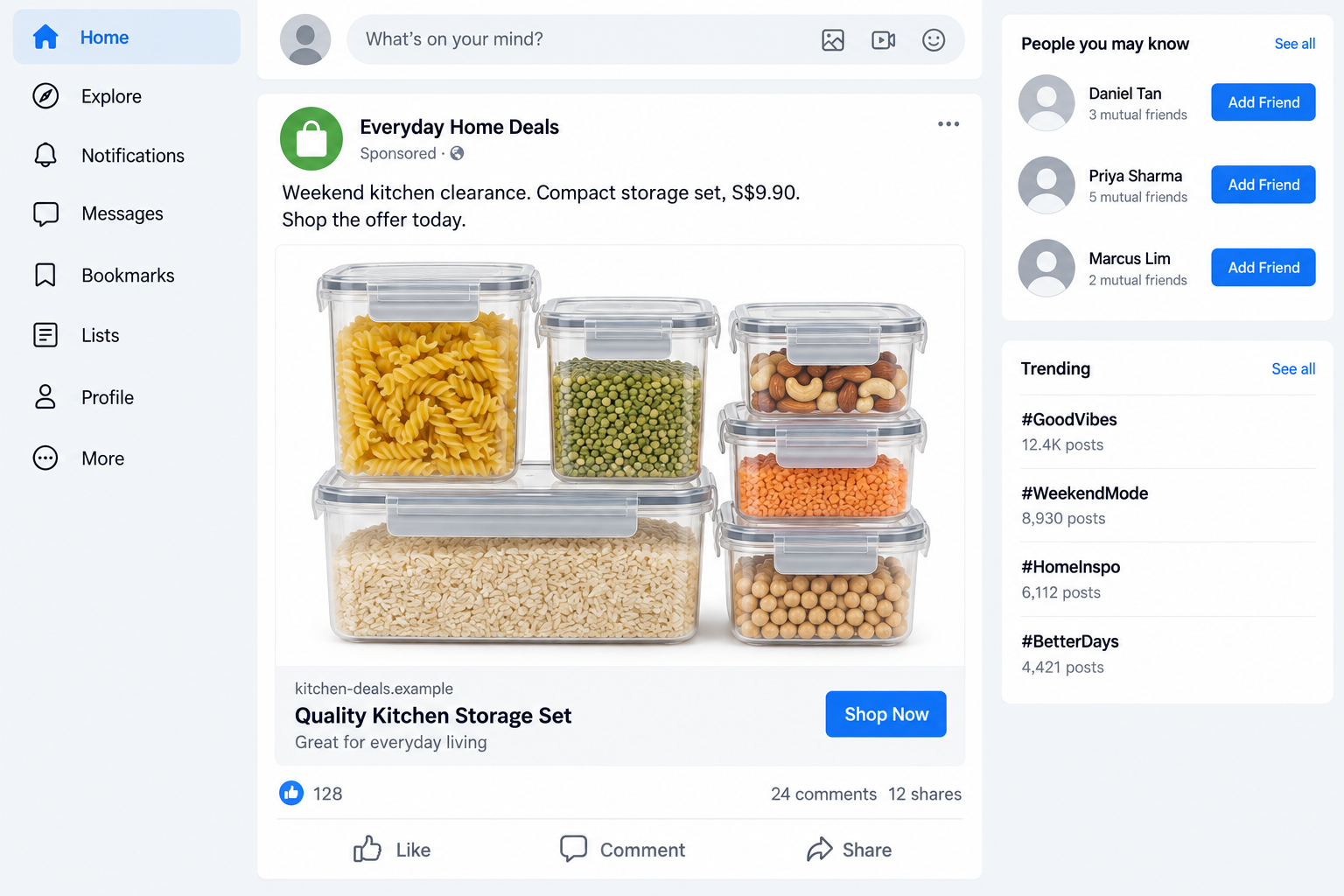
A sponsored post offers an everyday product at a price worth stopping for. The photos look ordinary, and the shop button promises a quick checkout.
The social media bargain ad scam doesn’t always begin with an unbelievable prize. Sometimes the question is what the checkout asks you to do next.
Overview
Affordable products bring shoppers to phishing pages
These scams use ads for household goods, food, and fashion to pull people into fraudulent websites. The product gives the financial-information request a believable setting.
Singapore Police’s October 2 advisory confirms campaigns on Facebook, Instagram, and TikTok. It describes phishing, not merely disappointing merchandise or a disputed delivery.
Since July 2026, the advisory records at least 246 cases with losses totaling at least S$1.4 million. Those are Singapore reports, not a worldwide victim count.
The everyday scale of the advertised purchase matters. A person buying a modest item may not expect the transaction to threaten access to a bank account.
The fake checkout seeks more than an order
The linked pages request card details or online-banking credentials. Some victims also provide one-time passwords or authorize operations through their bank’s digital token.
Unauthorized transactions then reveal the deception. The supposed purchase was the reason to reach the form, not proof that a genuine retailer was taking an order.
This article concerns that confirmed phishing mechanism. It doesn’t accuse every discounted shop, sponsored post, or social platform of fraud.
The illustrated kitchen ad uses a fictional merchant, price, and destination. It shows the kind of everyday shopping hook, not a specific shop identified by police.
Where a quick purchase becomes an account-security issue
- A bargain ad sends you to a site you haven’t independently verified.
- The checkout asks for bank credentials outside the bank’s genuine service.
- A verification screen requests a code without clearly matching your intended transaction.
- The bank’s approval shows an unfamiliar amount, merchant, device, or operation.
- The site keeps asking for more details after claiming the payment failed.
The useful boundary is not “never shop online.” It’s “don’t let an unverified store direct banking access or unexplained approvals.”
If you’ve already shared financial information, contact the bank before waiting for delivery. Treat a possible phishing exposure differently from an ordinary late parcel.
Why an Ordinary Shopping Ad Can Lower Your Guard
A product you recognize doesn’t require much explanation. Storage containers, groceries, or clothes can be presented with a photo, a price, and one button.
That leaves the shopper thinking about value and usefulness. The destination’s identity can become an afterthought, especially when the purchase seems inexpensive.
A sponsored placement adds familiarity, too. You see paid promotions alongside genuine shops, friends, and accounts you follow, so the surrounding feed feels routine.
But placement on a platform doesn’t authenticate the external checkout. Once you leave the feed, you need to know who is receiving the data.
Likes and comments are also not a payment guarantee. They can’t replace independent confirmation of the merchant, even when the conversation appears enthusiastic.
A polished product image answers what the offer looks like. It doesn’t answer whether the seller exists or whether the linked payment process is trustworthy.
You came to choose a product, not hand over a bank account. Notice when the checkout stops asking about the order and starts asking for banking access.
Pause when the request changes. Choosing a size is part of shopping; giving an unknown page your bank login is a very different task.
How the Social Media Bargain Ad Scam Works
Step 1: A low-cost product gives the ad broad appeal
The pitch starts with something people already buy. It doesn’t require the reader to believe a celebrity, a secret investment, or an extraordinary medical promise.
A tempting price can create a quick decision: you could use the item, and the loss seems small if the purchase disappoints.
That reasoning overlooks the checkout risk. The information requested may be worth far more than the advertised item, regardless of whether the first payment looks modest.
Assess the destination before treating the offer as a harmless experiment. You don’t need to make a purchase to determine whether banking requests are inappropriate.
Step 2: The shop button opens a separate website
The ad directs the visitor away from the social feed to the phishing destination. A copied storefront can make this transition look like normal shopping.
Don’t assume the name on the post matches a verified business behind the website. A shop label and a domain can both be created for the promotion.
If the offer names an established retailer, open that retailer’s genuine site independently. Confirm whether the promotion exists there rather than trusting the ad’s link.
Keep your decision attached to the actual destination. The scam is not established by price alone, and a brand name by itself doesn’t make the checkout legitimate.
Step 3: The checkout requests card or banking information
The documented sites collect payment-card details or online-banking credentials. The shopping context helps those fields appear necessary to complete an ordinary purchase.
A normal card checkout can request payment details. That is why verifying the merchant and destination comes before entering them, not after pressing the final button.
A store’s own form should not be trusted with your bank password. Genuine banking authentication needs its own verified service and a clear, intended purpose.
Stop if the page turns from ordering an item into giving access to unrelated accounts. Don’t supply another login simply because a screen calls it verification.
Step 4: Codes and token approvals can authorize the wrong operation
Some variants ask for a one-time password or a digital-token approval. The person may believe this confirms the price shown by the store.
Read the bank’s own message instead. The amount, merchant, and operation should make sense for the purchase you intended to make.
If the bank describes something different, decline it and contact the bank independently. A real authentication system doesn’t make the request behind it genuine.
Never give a code to a supposed seller or support agent to cancel a charge. An attacker can use reassurance to obtain another approval.
Step 5: Unauthorized transactions appear while the buyer expects an order
A confirmation page can keep the shopper focused on shipping. They may wait for tracking while financial activity unrelated to the advertised purchase begins.
Police describe victims realizing the scam when unauthorized transactions hit their card or bank accounts. That is the outcome requiring immediate bank attention.
Don’t wait through a delivery window after identifying phishing signs. The bank may still be able to restrict access or investigate activity if told promptly.
Keep any receipt or order message as evidence, but don’t mistake it for proof of fulfillment. An attacker can generate a convincing order number.
How to Check the Offer Before Entering Payment Details
First, establish where you landed. A page’s product heading and logo are less useful than a destination tied to a business you can independently identify.
If a known company is advertised, visit its site directly and look for the offer. Don’t use another promotional link to validate the first one.
For an unfamiliar shop, look for consistent business details and independent evidence of its operation. Treat that as a check, not a guarantee against phishing.
A missing record doesn’t by itself prove criminality. But if you can’t establish who is receiving financial data, don’t proceed through that offer.
Review the checkout request itself. Does it concern the item and chosen payment, or does it demand bank-account access, software, or unexplained approvals?
Look carefully at the bank’s separate confirmation. Don’t rush because the store warns about stock or a payment-session deadline.
If you discover a mismatch, don’t repeatedly attempt payment. A supposed technical failure can draw you into providing additional cards or credentials.
Keep platform protections where a transaction genuinely offers them. Don’t move to a private chat or separate transfer because an unknown seller promises a smoother checkout.
These checks aren’t a challenge to legitimate advertising. They keep the responsibility for banking access with you and the real payment provider, not the ad’s operator.
What This Warning Does Not Establish
The confirmed cases concern phishing and unauthorized financial activity. They don’t establish the manufacturing origin, quality, or subscription terms of every item shown in an ad.
A late shipment, poor product, or refused return can raise a consumer dispute without proving this particular credential-theft mechanism. Describe what actually happened when reporting.
Likewise, a low price isn’t enough to accuse a real company of fraud. The relevant issue here is an impostor checkout collecting information for unauthorized use.
Keep that distinction when warning others. Share the suspicious destination and requests, with private details removed, rather than making an unsupported accusation against a legitimate brand.
What to Do if You Have Fallen Victim to This Scam
-
Stop the checkout and any follow-up chat. Don’t try another card or approve a replacement transaction. Preserve the ad and destination without completing more requests.
Seeing the post alone isn’t a financial compromise. Match your response to whether you clicked, entered information, authorized an operation, or installed anything.
-
Contact the bank immediately after financial exposure. Explain that a social-media ad led to a suspected phishing checkout. List the details and approvals you supplied.
Ask it to secure the affected card or banking access and review unfamiliar activity. Tell it about information entered even if the page displayed a failed transaction.
-
Challenge unauthorized transactions through the issuer. Note pending and posted amounts, merchant descriptions, dates, and reference numbers. Keep the bank’s case number for follow-up.
Ask about its dispute process and applicable deadlines. Reimbursement isn’t automatic, and an online stranger can’t guarantee recovery through a special service.
-
Protect account access from a safe device. Change exposed online-banking credentials through the genuine bank service. Review available session, device, and authorization settings with its support.
If you reused the password, change it on the other affected services. Protect the email account connected to those accounts as well.
-
Report the ad and its landing page. Use the social platform’s reporting tools and include the destination. A screenshot alone may not identify the operator’s current link.
In Singapore, use ScamShield or call 1799 for help. Report financial loss to police and give the bank any relevant report reference.
-
Check unexpected downloads or permissions. If the journey included installed software, added extensions, or browser notification access, investigate that exposure separately from the payment dispute.
Malwarebytes can assist with detecting malicious software after an installation. Account and card protections still require direct action with the relevant provider.
For future ad browsing, AdGuard offers filtering that can reduce some malicious-ad and destination exposure. It isn’t a substitute for checking a checkout.
-
Ignore paid recovery offers. Someone may approach you after a public report and claim to retrieve money. Don’t provide bank access or pay an advance recovery fee.
Continue with the actual bank, platform, and authorities. Sharing evidence publicly shouldn’t include card numbers, passwords, verification codes, or unredacted account screenshots.
Setting Up a Safer Shopping Routine
A helpful routine starts before the next ad. Decide that unfamiliar shops won’t get a bank login, regardless of the advertised saving.
Use transaction alerts so unexpected activity is noticed sooner. Review alerts in the bank’s real app rather than through links in newly arriving messages.
Where your bank offers them, consider transaction limits or controls that restrict access to savings. Choose settings that fit your actual payment needs.
Singapore’s police advisory mentions Money Lock as an additional protection where available. Don’t assume every bank or account offers the same feature.
Multifactor security remains important, but it doesn’t mean every approval is harmless. A person can still be tricked into authorizing the wrong request.
Teach family members to read the bank prompt aloud when unsure. It can reveal a different amount or operation before anyone approves it.
For shared cards, agree who will investigate unfamiliar charges. A small purchase by one household member can otherwise be mistaken for ordinary activity by another.
Save evidence before a suspicious ad disappears. Record the account, destination, product, and time, rather than relying on finding the same post later.
Don’t return to an ad just to prove the scam to someone else. You can explain the inappropriate banking request without repeating the checkout.
If you made a mistake, ask for help quickly. The bank needs the facts of the exposure, not a perfect explanation of how the entire campaign operates.
Frequently Asked Questions
Are all cheap Facebook or TikTok ads scams?
No. This warning concerns confirmed ads leading to phishing pages. Discounted prices or sponsored placement alone don’t establish that a real seller is fraudulent.
Why would a shopping page ask for online-banking credentials?
The reported scam uses shopping to justify collecting them. Don’t give an unverified store your bank login; verify any genuine banking authentication independently.
Does a real bank OTP prove my order is legitimate?
No. It can authenticate an attacker-initiated operation. Confirm the actual amount, merchant, and request in the bank’s message before approving anything.
Should I wait for delivery before calling the bank?
Not when you suspect phishing or unauthorized activity. Report financial exposure promptly, while handling any genuine order or consumer dispute as a separate matter.
What if the checkout failed after I entered information?
A failure screen doesn’t establish that your information stayed private. Tell the bank what you typed and whether you supplied a code or approval.
Are the S$1.4 million losses a global total?
No. They are the losses reported in Singapore’s October advisory for cases since July 2026, not a worldwide or continuously updated figure.
The Bottom Line
Don’t continue a bargain checkout that requests unverified banking access or mismatched approvals. The confirmed campaigns use ordinary shopping ads to reach card and bank accounts.
Verify the actual merchant before paying. If you already supplied financial data or authorized anything suspicious, contact your bank now instead of waiting for a parcel.








