

A Belastingdienst email announces a tax refund and says there’s one last thing to confirm. The payout looks close enough to start planning around.
Then comes a personal link, a short expiry window, and a request about your bank details. Before using it, look at how that promise is packaged.
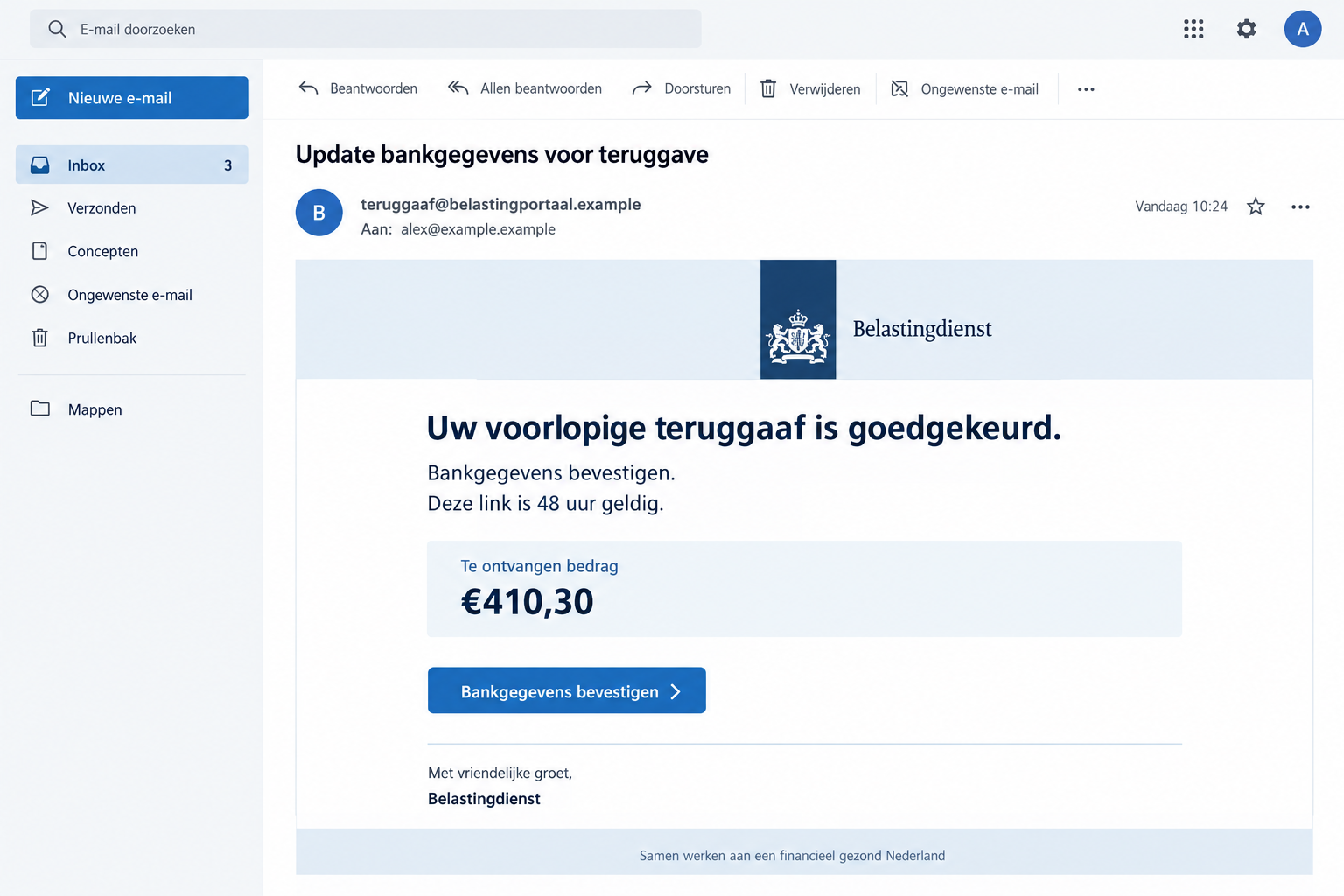
Overview
A Refund Promise Turns Verification Into a Condition
The Belastingdienst tax refund scam impersonates the Netherlands’ tax authority. It tells recipients that money is ready but banking information must first be checked.
In one documented version, the email promises confirmation will lead to payment within one or two business days. It gives the link a 48-hour validity window.
The subject refers to €410.30. That amount belongs to a false email, not a verified entitlement that the recipient can claim.
By describing the refund as already approved, the message encourages completing the remaining task rather than questioning whether the award exists.
The Real Tax Authority Has Identified the Trick
Belastingdienst’s false-message examples include an urgent €410 refund lure. The authority explicitly identifies that message as phishing.
Fraudehelpdesk also lists repeated refund-themed false emails. Their wording changes, but the request still depends on trusting a message-supplied route.
The legitimate agency is not offering this phishing page. This warning concerns an impersonation, not an accusation that ordinary tax refunds are fraudulent.
The important distinction is between a real tax record and a claim about that record. A convincing email layout cannot substitute for the former.
What Makes This Particular Offer Dangerous
- A claimed approved refund that you have not independently confirmed.
- An alleged mismatch in banking details used to delay the payout.
- A personal confirmation link with a short validity period.
- A page requesting information under the authority’s name.
- Further instructions justified as necessary to release the money.
The image above illustrates the refund lure using fictional contact details. It is not a screenshot of an actual tax account or payment approval.
The available examples establish the false message, not one universal bank-login screen, malware installation, or specific loss amount for everyone who clicks.
If you already responded, separate the data you entered from any action you authorized. That distinction determines the most useful recovery steps.
The Word “Approved” Does Most of the Persuading
A refund is welcome news, especially when you have recently filed a return or are waiting for an assessment. That context can make an unexpected email feel timely.
The sender doesn’t have to prove they know your finances. A broadly plausible claim can reach people who happen to be expecting money.
The approved status also changes the emotional starting point. Instead of deciding whether to seek a refund, you feel responsible for finishing a payment already arranged.
Now the link looks like the obstacle between you and your money. A reader may interpret caution as a risk of losing the payout.
The 48-hour window strengthens that impression. It makes independent checking feel like an unnecessary delay, even though checking is exactly what protects you.
A one-or-two-business-day payment promise adds another detail people recognize from real financial services. Familiar timing is not proof of a genuine case.
Think of the email as an unsolicited assertion, not a notification you must obey. The existence of an actual refund needs a separate source.
If you have never filed the relevant return, the mismatch may be obvious. If you have, the same message requires just as much verification.
Do not compare only the amount. A coincidental match or believable estimate doesn’t authenticate the requested banking update.
A calm check through your regular tax account is more useful than arguing with the sender about how the money was calculated.
How the Belastingdienst Tax Refund Scam Works
Step 1: The Message Presents an Attractive Tax Outcome
The email uses the authority’s name and the language of an approved refund. It may include a case reference or a summary of the alleged status.
Those details create the appearance of completed administrative work. The recipient is encouraged to accept the result before seeing any genuine account record.
The documented banking-confirmation email frames the remaining issue as information that might no longer be current.
A second refund notice uses a more general instruction to complete necessary steps. Not every false message includes the same amount or explanation.
Before you click, you can still check the claim without giving the sender anything. Use your genuine tax account instead of their link.
Step 2: The Sender Makes a Link Feel Necessary
To obtain the promised money, you are told to open a secure-looking dossier and verify account information. The button supplies the supposedly easiest route.
The link’s personal label does not prove it is connected to your file. A fraudster can describe any address as personal or secure.
Likewise, an expiry notice is just part of the request. It does not establish a genuine tax deadline or tell you that your refund will disappear.
Once you follow it, the email’s story may continue on a page bearing copied branding. A consistent design is not independent confirmation.
Do not return to the page to see whether the timer changes. Investigating the sender’s urgency through their own site keeps you inside their process.
Step 3: Confirmation Requests Put Information at Risk
The request for bank and contact details is the point where a promising email becomes a data-exposure risk.
A fake form can collect information while displaying reassuring language about a payment. The purpose suggested by the label is not necessarily the purpose served.
The exact fields may vary. Treat an exposed account password differently from a bank account number, and treat an approved banking action differently again.
A bank account number alone is not the same as full login access. Still, it can give a future impersonator more context for a convincing approach.
Only your bank can assess what an approval did in its system. The tax-refund page cannot reliably explain the consequences of its own request.
Step 4: Waiting for the Payout Can Delay the Response
After submitting details, someone may wait for the promised money rather than question the page. The short payout estimate can encourage that pause.
Do not wait for a missed deposit if you realize the request was false. Credentials or financial details need attention as soon as the exposure is recognized.
A page saying the refund is processing is not a receipt from Belastingdienst. It may simply be the end of the false journey.
Unexpected follow-up messages also need fresh scrutiny. A second request to finish a failed confirmation does not become genuine because you responded to the first.
You can verify a real refund separately while your bank or account provider handles the phishing incident. Neither process needs the sender’s continued participation.
Check a Real Refund Without Following the Payout Link
Start With the Official Tax Website
Enter belastingdienst.nl yourself or use a trusted saved route. Navigate from there to the account appropriate for your actual tax question.
Review the assessment and payment information available through that service. Ask the authority about any discrepancy rather than relying on the email’s summary.
If you use an accountant, ask them to check the claim through their established workflow. Don’t send the phishing button as a task to complete.
A family member can help locate the official route without receiving your password. Keep account access private even when you need assistance understanding a notice.
Check the Request, Not Just the Envelope
The authority does use email in some circumstances. A blanket rule that every Belastingdienst email is false is not an accurate checking method.
Its reporting guidance draws the relevant boundary: it never requests money transfers or personal information through an email link.
That is a stronger clue than typography, a logo, or whether the sender used formal Dutch. The action being requested determines your exposure.
A real communication route should let you confirm the issue without surrendering information to the suspicious message’s destination.
Don’t Turn a Refund Check Into a Payment
If any page or caller asks you to pay to release this supposed refund, stop and verify independently. The claim of incoming money does not justify outgoing money.
Read bank prompts in their own terms. A displayed beneficiary, amount, or authorization request matters more than a webpage calling it confirmation.
Do not approve an action you cannot explain. When in doubt, close the request and contact the bank without the sender on the line.
Keep the genuine tax question separate. You can still investigate whether a legitimate refund exists after rejecting the fraudulent route.
What the Reference Number Can and Cannot Tell You
A long assessment or refund number can make an email look individualized. It is easy to mistake complicated formatting for access to an official system.
But a number shown by the sender has no value as authentication unless it corresponds to a record you locate independently.
Don’t publish your real tax identifiers in a social media request for help. A public screenshot can reveal information unrelated to checking the email.
Preserve the original privately. Redact your name, address, account information, and identifiers when sharing an example with someone who doesn’t need them.
If the email contains accurate personal information, report that detail. Accuracy may matter to an investigation, but it still doesn’t establish the sender’s authority.
Also avoid assuming a tax-system breach solely from one accurate item. The source of information needs evidence beyond the false message itself.
For an accountant handling several clients, record whose data was entered and which account was used. One shared inbox can contain notices for different people.
That prevents an understandable but costly response error: resetting an unrelated account while leaving the exposed login unchanged.
Keep records of any authorized financial action alongside the message. They show what happened, rather than merely what the email promised.
What to Do if You Have Fallen Victim to This Scam
-
Stop trying to claim the emailed refund. Close the confirmation page and avoid subsequent instructions to restart, correct, or complete the supposed payout.
If you only read the message, do not escalate into the link to gather evidence. Save the email itself and report it.
-
Assess exactly what you submitted. Make a private list of contact information, tax identifiers, account numbers, passwords, and any documents.
Include bank prompts you accepted, even if you believed they only confirmed a refund. Those approvals may require urgent financial action.
-
Use your bank’s genuine fraud channel. If bank credentials, card details, payments, or approvals were involved, contact the institution immediately.
Explain that the approach was a fake tax-refund notice. Ask which access or payment instruments need blocking and what investigation options are available.
-
Recover exposed logins directly with their providers. Replace the password that was entered, remove reused copies elsewhere, and check available session controls.
Review recovery email addresses and phone numbers. If a real login fails, use official recovery rather than a helper recommended by the false page.
-
Send the message to the tax authority’s reporting address. Belastingdienst publishes valse-email@belastingdienst.nl for this purpose.
Email headers can help but are not mandatory. A forwarded message or screenshot is acceptable when collecting technical details is impractical.
-
Preserve payment and communication records. Keep transaction references, amounts, the original message, and the time you entered information.
Provide evidence privately to your bank or authorities. Do not circulate a screenshot containing your full banking or tax information.
-
Investigate additional device exposure when applicable. If a file downloaded or software was installed during the visit, scan with Malwarebytes.
If the browsing route produced unwanted pop-ups or redirects, consider AdGuard as an added protective layer. Scanning cannot retract information submitted to a form.
-
Reject claims that recovery requires another fee. Do not fund a release, identity-check, or refund-processing payment suggested by an unsolicited contact.
Return to your genuine tax account for the real refund question. Use established financial channels for any money already lost.
Frequently Asked Questions
Is the €410.30 Refund a Real Belastingdienst Offer?
That figure appears in a documented false email. It does not prove a real refund exists; verify your own assessment through the official tax service.
Does Belastingdienst Never Send Email?
It does use email in certain circumstances. The key warning is an email link demanding a money transfer or personal information, not email as a channel itself.
Will I Lose a Refund if the Personal Link Expires?
The phishing message’s expiry claim is not an official deadline. Check any genuine tax obligation or payout through your account or the authority’s normal contact route.
What if I Only Shared My Bank Account Number?
Tell your bank what was disclosed and follow its guidance. An account number alone differs from a password, but follow-up impersonation remains a concern.
Should I Wait Two Business Days Before Reporting It?
No. The promised payout time belongs to the false message. Once you recognize exposure, start protecting the relevant accounts without waiting for a deposit.
Can an Antivirus Fix the Tax Account Problem?
No. Device scanning addresses possible software exposure. A compromised login, disclosed banking information, or payment needs a separate response through the relevant provider.
The Bottom Line
Do not claim a refund through the fake Belastingdienst email. Its approved status and personal deadline are not proof of money owed to you.
Check the real tax record independently. If you submitted banking information or approved anything, contact your bank now and secure the affected login.








