

A message about a role at Meta finally lands in your inbox. The recruiter wants a quick call, and choosing an interview time looks easy.
Then the booking process takes an unexpected turn. Before you confirm anything, it helps to know which requests belong in an interview invitation.
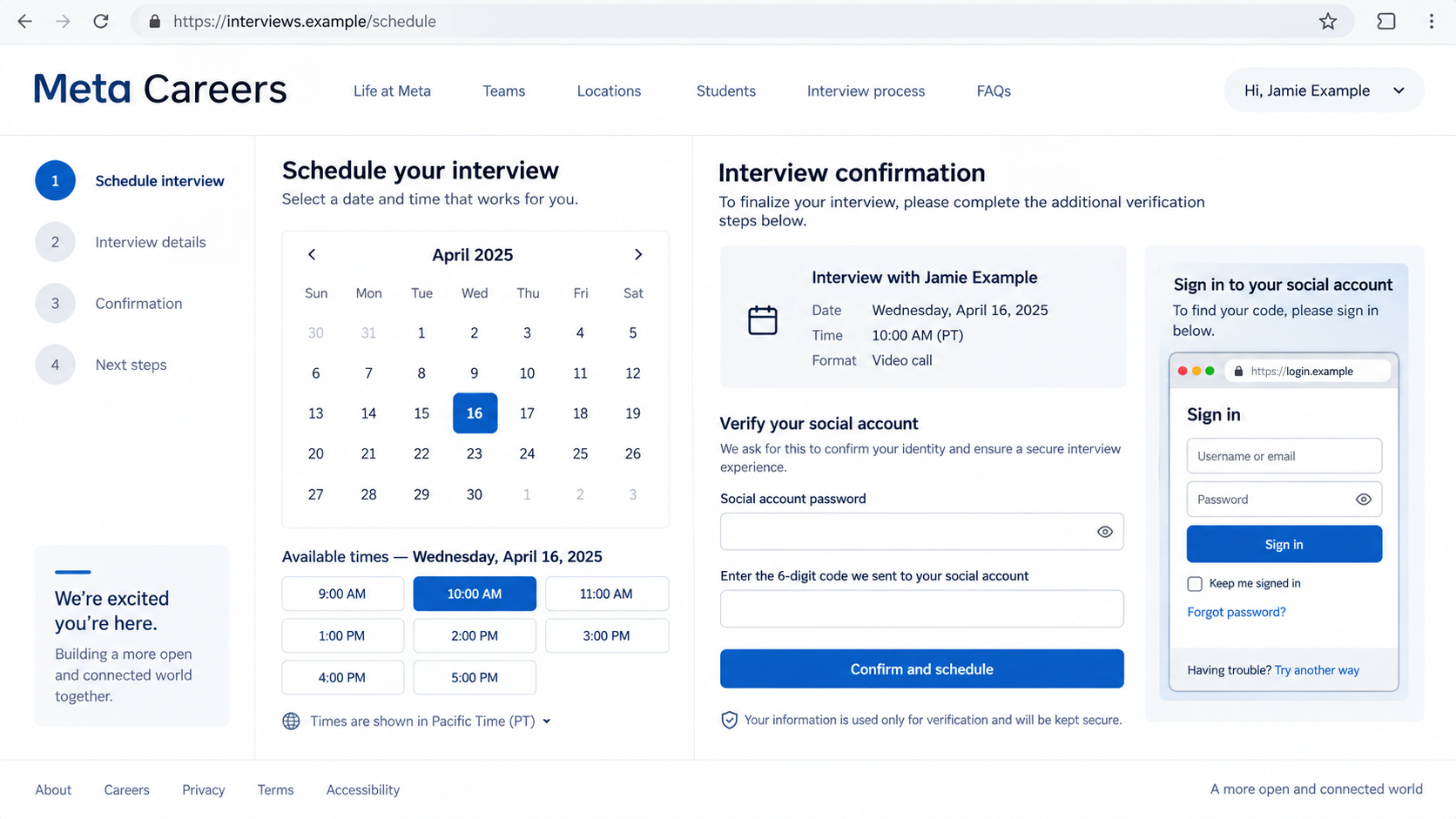
Overview
The invitation borrows trust from a familiar routine
The Meta Careers interview scam uses counterfeit scheduling pages to make a request for account access feel like part of applying for work.
The documented campaign imitates Calendly, then requests Facebook credentials, verification codes, and Google account access. Meta, Calendly, and Google are being impersonated.
A job seeker can become invested in the appointment before the sensitive request appears. You’ve selected a time and imagined the conversation going well.
The password request changes what you are agreeing to
Booking a conversation and authorizing an account sign-in are different actions. An interview invitation gives a stranger no right to your social accounts or email.
- A calendar design can be copied without using the genuine scheduling service.
- A browser address painted inside a webpage can imitate a separate login window.
- A real verification code can approve a criminal’s sign-in when you supply it in the wrong place.
- An authentic job listing cannot authenticate the person sending you a message.
Account recovery matters more than the appointment
If you supplied a password or approved a prompt, treat the affected account as exposed. Don’t wait for the supposed recruiter to explain.
If you only selected a time, your next task is simpler: stop using the invitation and independently establish who contacted you.
The illustration above uses fictional details to show the problem. Its appearance is an example, not an additional captured campaign page.
Why a Job Interview Is Such an Effective Opening
Job hunting asks you to trust unfamiliar people repeatedly. A new contact, a form, and a calendar link can all belong to an ordinary application.
That makes context important. A calendar alone offers little reassurance when the message arrived unexpectedly or the recruiter cannot be reached through the employer.
Consider what you actually know before clicking. Did you apply? Is there a position number? Does your existing application account show an invitation?
A scammer can copy the description of an advertised job. Finding that description elsewhere confirms the vacancy, not the sender’s identity.
The same distinction applies to a professional profile. A name and headshot may belong to a real employee while the message comes from someone else.
Keep the invitation outside your application process until the connection is verified. You can acknowledge genuine opportunities through established employer channels without completing an unfamiliar login.
The FTC’s job scam guidance describes how criminals imitate employers and recruiters. Check the organization independently before providing sensitive information.
How the Meta Careers Interview Scam Works
Step 1: A promising conversation starts with a booking link
The initial request offers an interview rather than demanding money. That gives you an apparently reasonable reason to open a scheduling page.
At this stage, your best checkpoint is outside the message. Find the employer’s careers service independently and compare the invitation with your application.
Don’t let a narrow selection of interview times rush that check. A worthwhile opportunity should survive a basic question about the recruiter’s identity.
Step 2: Ordinary appointment details make the page feel familiar
The documented fake pages include appointment times, contact fields, and a CAPTCHA-style screen. These details create the appearance of a working booking process.
Entering a name or telephone number isn’t equivalent to surrendering a password, but it can provide useful material for later messages.
Write down exactly what you submitted. That small record helps you respond proportionately instead of assuming either complete safety or complete compromise.
Step 3: The page asks you to cross into account access
The campaign introduces imitation Facebook and Google login screens. Their drawn address bars can make content inside the page resemble a trustworthy browser window.
Use the address bar supplied by your browser. A website’s picture of an address has no authority over where your information actually goes.
If you can’t confidently identify the genuine service, close the flow. You don’t need to complete the form to investigate the invitation.
Step 4: A security prompt becomes part of the deception
The attackers can request the verification step needed for their own sign-in. A code or approval supplied under the interview pretext can complete that attempt.
The question is what the prompt authorizes. Read it separately from whatever the recruiter or booking page says it means.
Keep multifactor authentication enabled. Its protection improves when you refuse unexpected approvals and use stronger sign-in methods offered by the genuine provider.
Step 5: A reassuring confirmation delays your response
The fake booking ends with a confirmation. You may wait for an interview while someone else attempts to use the access you supplied.
An appointment appearing in your calendar would still prove only that an event exists. It would not establish the identity behind the request.
Once you’ve recognized an exposed credential, prioritize recovery. Don’t return to the invitation for cancellation instructions or another security check.
Check the Login Without Completing It
A convincing page can reproduce colors, typography, and error messages. None of those elements tell you who receives the submitted information.
Start with a fresh tab and a trusted bookmark when checking an account. Keep the suspicious page out of that process entirely.
A password manager’s refusal to fill a password deserves attention. Investigate the address before overriding the hesitation and typing the secret yourself.
Be especially wary of a recruiter explaining away a mismatched address. Their reassurance comes from the same unverified relationship you’re trying to assess.
There are legitimate services that use third-party sign-in. The meaningful checks are the genuine authentication domain, requested permissions, and reason for the connection.
A social account password typed directly into an unrelated appointment page does not become safe because the button says verification.
You should also understand the difference between proving your email address and signing into your email account. Those actions expose very different information.
A legitimate appointment might send a code that confirms the address receiving the invitation. A Google login prompt concerns access to a Google account.
Read the issuing service and stated action before approving anything. When the account and the task don’t match, stop the process.
Why Passkeys Help, and Where Their Protection Ends
Google explains that passkeys resist phishing because signing in uses your device rather than a secret you type into a copied form.
Use them on accounts where they’re available and appropriate. Set them up through the account’s own security settings, not instructions from an unfamiliar recruiter.
That protection does not make every message legitimate. Someone can still pressure you into using a weaker alternative or sharing information outside the sign-in process.
A request to abandon your usual sign-in method deserves scrutiny. Don’t disable safeguards simply because a page claims its appointment software is incompatible.
Keep access to your recovery methods too. A stronger login is most useful when you can recognize changes and regain control if something goes wrong.
Only create a passkey on a device you control. Shared or borrowed equipment introduces a separate access problem that an interview should never require.
What to Do if You Have Fallen Victim to This Scam
-
End the exchange and make a short exposure record. Note which passwords, codes, contact details, downloads, or approvals were involved. Save the invitation without reopening its links.
Keeping that sequence clear helps you distinguish a suspicious message from an account that needs urgent recovery. Don’t send the recruiter another explanation.
-
Recover the email account promptly if it was involved. Open the provider independently on a trusted device and follow its compromised-account process.
Google’s recovery guidance covers checking security activity and repairing unauthorized changes. Replace an exposed password and review recovery contact information.
Use a different password wherever you reused the old one. Prioritize accounts that allow email-based password resets or contain financial and workplace information.
-
Review devices and active sessions. Use the genuine account’s security settings to identify access you don’t recognize and sign it out.
Google’s device list helps you inspect signed-in sessions. Check the details carefully instead of judging solely by a familiar device label.
-
Check how mail and linked services are configured. Look for unfamiliar forwarding, filters, delegated access, or connected applications that could preserve access to incoming information.
Review Gmail forwarding settings through Gmail itself. If you find an unauthorized destination, preserve its details and remove the forwarding.
-
Secure Facebook and any business assets you manage. Use Facebook’s official recovery options and examine page roles, advertising access, payment methods, and unfamiliar activity.
Tell other authorized administrators what happened through a separate trusted channel. They may be able to spot changes or stop spending while recovery proceeds.
-
Check the device if the invitation led to software. If you installed a file, extension, or remote tool, stop using it and assess the exposure.
Our Malwarebytes guide explains scanning for unwanted software. A clean result doesn’t undo a stolen password or remove an account session.
AdGuard can help reduce exposure to deceptive advertising and known harmful destinations. It cannot authenticate a recruiter or recover an account.
-
Report the impersonation and any financial loss. Notify the messaging platform and the employer through independently located contacts. Include the booking address and message dates.
Contact your bank immediately about unauthorized charges. If workplace credentials were involved, alert your security team before continuing work from the affected account.
Make Your Report Useful Without Sharing More Secrets
A useful report starts with the original message, the sender identifier, and the actual booking address. Keep the information in the order you encountered it.
If you saved a screenshot, include the real browser bar where possible. A cropped login panel can omit the very detail that identifies the impersonation.
Don’t include your password, one-time code, recovery codes, or full payment details in an ordinary support message. Explain which category of information was exposed.
If you manage a company account, use the organization’s incident channel. Colleagues need enough context to recognize similar invitations without receiving a clickable trap.
When warning friends publicly, conceal personal phone numbers, addresses, and applicant information. Keep the original evidence privately for the relevant platform or investigator.
A report doesn’t require another visit to the malicious page. Preserve what you already have instead of taking more risks to recreate every screen.
When the Recruiter Contacts You Again
Someone may explain the failed interview as a technical fault and offer a replacement link. Treat that message as part of the same unresolved contact.
A familiar name can feel reassuring after you’ve already exchanged messages. It still doesn’t establish employment or justify another account approval.
Recovery impersonators can also exploit the situation. Refuse anyone who promises to restore a social account in exchange for cryptocurrency, codes, or remote access.
Use the platform’s established recovery route. If a genuine employer confirms the invitation was fraudulent, keep that confirmation with the rest of your record.
Returning to your job search is reasonable once the immediate exposure is addressed. The lesson is a verification checkpoint, not avoiding every online interview.
A Quick Check for Teams Managing Business Accounts
An employee can encounter this invitation through a personal job search and still control a business page. Ask about that connection during recovery.
For example, a stolen social account may have a role in a small company’s advertising. Recovering the personal profile and checking business access are related tasks.
Have an authorized administrator inspect recent changes and spending through the normal business tools. Preserve unfamiliar activity before removing access.
Use a separate workplace channel for the warning. A message sent through the affected account may be visible to whoever obtained access.
A concise internal notice should describe the invitation and unexpected login request. It should not circulate the live phishing link as a convenient example.
Assign one person to keep the incident timeline. That prevents multiple colleagues from changing settings without knowing what another administrator has already repaired.
These checks are precautionary when business access exists. They do not mean every recipient of the recruitment message has lost an advertising account.
Frequently Asked Questions
Does a Meta interview require my Facebook password?
Don’t give a recruiter or booking page your Facebook password. Verify any separate sign-in requirement through the employer and the genuine account service.
Is Calendly responsible for this campaign?
The documented pages counterfeit its scheduling interface. Their appearance does not establish that the booking occurs through Calendly or that Calendly approved the invitation.
Can an authentic Google prompt still be dangerous?
Yes. A genuine prompt can correspond to someone else’s attempted login. Approve only the account action you initiated on the real service.
What if I entered only my contact details?
Expect possible follow-up messages using those details. Stop the exchange, verify independently, and avoid treating personalized information as evidence that a sender is legitimate.
Should I turn off two-factor authentication?
No. Keep it enabled, refuse unexpected approvals, and consider passkeys or supported security keys. The problem is surrendering access through a deceptive request.
Will a malware scan fix the stolen login?
No. Scanning addresses device software. Account recovery also requires securing credentials, sessions, recovery methods, and any business access the attacker may have changed.
The Bottom Line
Do not enter account credentials or approve sign-ins to complete this Meta Careers booking. Verify the invitation through an independently reached employer channel.
If you already supplied access, secure the affected accounts now. Deal with the email and social account exposure before waiting for an interview that may never happen.

Join the discussion
0 commentsShare your experience or ask a question about this article.
Discussion
Start the conversation
Have a question or something useful to share? Add the first comment.