

A request for prices arrives while you’re working through the inbox. There are project drawings to review, and the sender seems ready to place an order.
Before opening the files, take a closer look at the invitation. A few details can change how you should handle the entire request.
Overview
A quotation request creates a reason to open the document
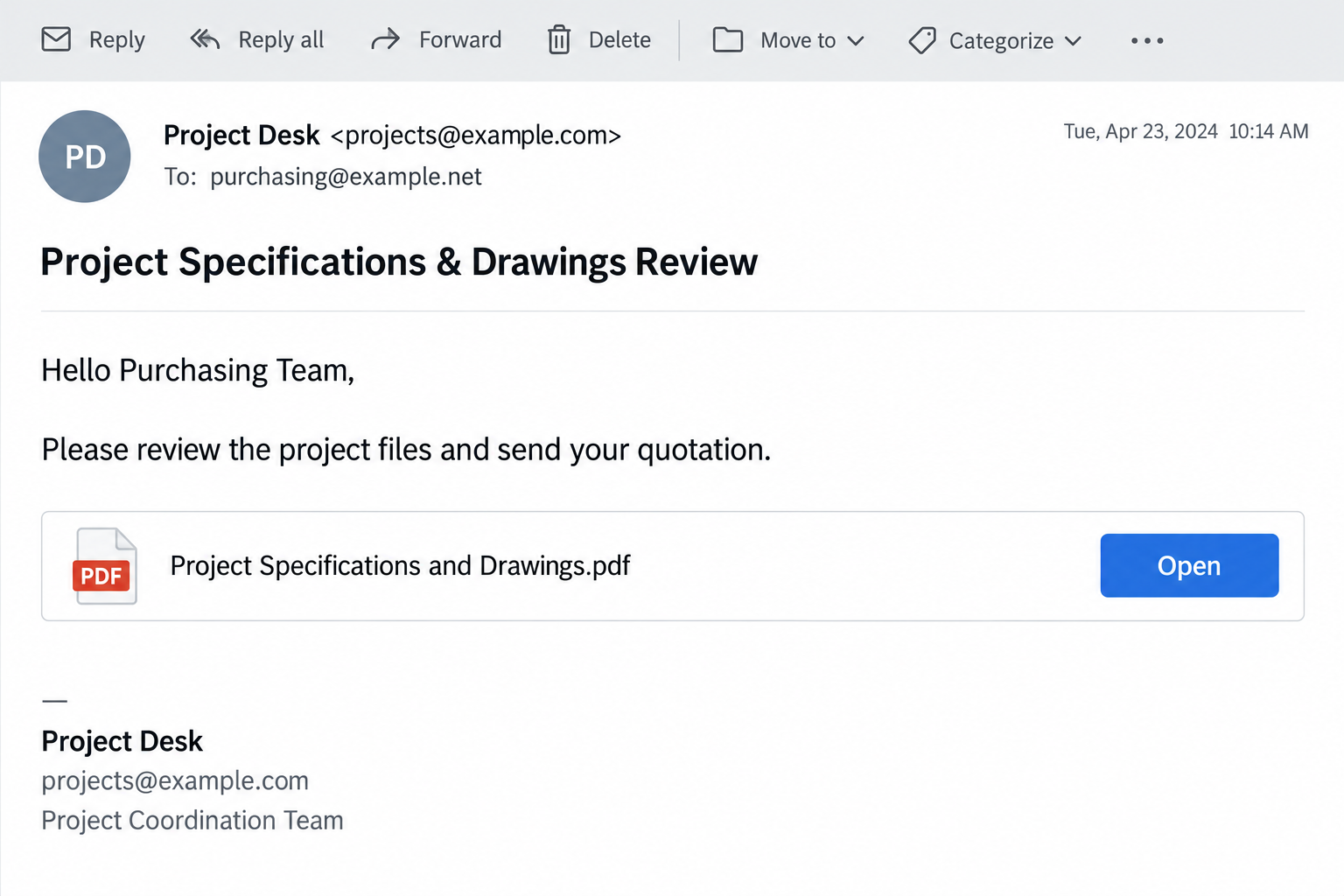
The Project Specifications & Drawings Review email scam approaches the recipient as a potential business contact, rather than threatening to close an account.
A reported version impersonates klarx GmbH and offers a SharePoint link to a PDF. It asks the recipient to review specifications, provide prices, and send an invoice.
That combination fits the rhythm of a purchasing department. To quote accurately, someone needs to read the drawings first. The document becomes an apparently necessary starting point.
The important question is where the Open button leads
The reported destination is a credential-harvesting page, not a genuine project document. A precise Microsoft-style sign-in design has not been independently confirmed here.
Phishing means the sender is trying to obtain information by impersonating a trusted party. In this case, the business opportunity supplies the reason to sign in.
There is no need to prove that every detail in the signature is false. A real address or company registration cannot authenticate a link beside it.
The company and the invitation are separate things
klarx is a real business. Its official legal notice identifies a Munich company and registered address. Those public details can be copied.
The warning concerns the impersonating email, not a finding that the real company operates a phishing service or that its systems were breached.
- The commercial request is unexpected or cannot be matched to an existing conversation.
- The document is represented by a link, so its filename does not establish what will open.
- An unfamiliar page requests account access before showing the promised material.
- A copied signature gives the message credibility without proving who sent it.
Why This Message Can Feel Like Real Work
A purchasing email doesn’t have to look dramatic to be persuasive. It only needs to resemble something the recipient already handles several times a day.
Think of an estimator waiting on drawings, a supplier preparing a quote, or an accounts employee checking an invoice request. Opening documents is part of the job.
The lure borrows that ordinary workflow. Instead of asking for a password directly, it presents a task that appears to require access to a shared file.
The employee may be thinking about the potential order, the deadline, or whether the attachment contains enough specifications. The destination of the link becomes a secondary concern.
A document-sharing logo can make the next screen seem unsurprising. Many legitimate files require authentication, so the appearance of a login box is not automatically suspicious.
What matters is the relationship between the request, the sender, and the service receiving the credentials. A familiar logo cannot supply a missing business relationship.
This is also why spelling tests aren’t enough. A polished request can still be fraudulent, while a genuine customer may write imperfect English.
How the Project Drawings Email Scam Works
Step 1: A plausible business task gets your attention
The message opens a conversation about work you could reasonably perform. The reader is invited to assess a project rather than consider an obviously unrelated offer.
A job title, telephone number, website, and formal company footer can make the sender look accountable. None requires the sender to control the company being named.
For a small business, a possible new customer can be especially compelling. Taking a minute to review a file feels like good service, not an unusual risk.
Pause at that first decision. Was there an earlier call, quotation request, or introduction? If the message refers to a discussion you never had, verify it separately.
Don’t let a copied reply chain settle the question. The words beneath a message can be edited just as easily as the signature at the bottom.
Step 2: The file listing turns a link into an apparent attachment
A row showing a filename and an Open button feels more concrete than a bare web address. It suggests that the document already exists and is waiting.
But a filename printed inside an email is only text. The button can lead somewhere unrelated, regardless of whether the row ends with .pdf.
Hovering over a link can reveal a mismatch without opening it. On a managed work device, use your organization’s reporting tool instead of experimenting with suspicious destinations.
Link protection services sometimes rewrite legitimate addresses. An unfamiliar wrapper is a reason for your IT team to inspect the destination, not proof by itself.
Do not paste private document links into random public scanners. Some links contain access tokens or information that should stay inside your company’s security process.
Step 3: Access to the promised document becomes a login request
The critical transition occurs when the reader stops evaluating project information and starts supplying account information. The document request has redirected the task toward identity.
A counterfeit form can collect credentials while appearing to unlock a file. A padlock only means the connection is encrypted, not that the organization is genuine.
A password manager refusing to fill a familiar account can be a useful warning. Don’t override that hesitation simply because the page carries a Microsoft logo.
Some legitimate organizations use different authentication providers. That complexity makes independent confirmation more important, not a reason to type credentials into every professionally styled page.
If a file cannot be obtained without an unexplained login, ask the known contact to resend it through an agreed channel. A genuine quotation can wait for verification.
Step 4: An exposed work account creates business consequences
Once a password has been submitted to an impostor, treat it as exposed even if the form reports an error. Failure messages can conceal successful collection.
Possible consequences include unauthorized mailbox access, stolen files, or messages sent to customers. These are risks of account compromise, not confirmed outcomes for every recipient.
A mailbox can also reveal ongoing supplier relationships. That context could help an intruder make a later payment-change request look like part of an existing project.
Multifactor authentication helps, but an unexpected approval request is not something to accept merely to finish viewing a document. Report it to the person managing the account.
The right response is to contain the exposed identity. Deleting the original email or running a device scan cannot, on its own, revoke unauthorized cloud access.
Sender, Signature, and SharePoint Checks
Compare the actual sender with the contact you already know
Expand the sender details rather than relying on the display name. Compare the full address and Reply-To field with earlier, independently verified correspondence.
A mismatch needs investigation, but a match isn’t a complete guarantee. A real mailbox can be compromised, and a familiar account can send an unsafe message.
Use a saved telephone contact, established procurement portal, or independently located company channel to confirm the specific request. Don’t use the suspicious email as its own reference.
Ask a concrete question: did your team send this project, to this recipient, through this service? A vague confirmation that the company exists answers something else.
Look for an actual project, not just convincing paperwork
A genuine request should have a business context. The recipient should understand what is being priced, who commissioned it, and how the proposed work relates to their services.
Confidential projects may limit what can be shared publicly. That still doesn’t justify entering your existing email password into an unexplained external form.
Do not send your own invoice, banking details, or tax documents merely to keep the conversation moving. First establish that the customer and request are genuine.
Real SharePoint sharing does not excuse an unsafe destination
SharePoint is a legitimate collaboration platform. Its name in an email does not establish that Microsoft hosts the next page or that a real file is present.
Microsoft’s phishing guidance recommends reporting suspicious messages and involving IT when a work or school account may be affected.
Where available, use your normal Microsoft 365 workspace to look for expected shared material. Don’t search for an unverified sender’s login portal through sponsored results.
What to Do If You Responded
If you only received the request, report it through your workplace process. Preserve the original message if IT needs it, then follow their instructions for removal.
Receiving this email is not evidence that the computer is infected or that anyone has accessed your work account. Avoid unnecessary password changes across unrelated services.
If you opened the page, stop before supplying anything else. Close it and write down whether you entered information, approved a prompt, downloaded something, or installed software.
Keep the browser address from history if it is available safely. Don’t revisit the destination to recreate the experience for a screenshot.
If you entered a work password, contact IT immediately. Tell them which identity was exposed and when. Change the password through your established corporate access route.
Ask the administrator to investigate sessions, authentication methods, application consent, and mailbox rules. A password reset alone may not address every form of unauthorized access.
Protect any other account using that same password. Give each affected service a unique replacement. Start with email or identity accounts that control password recovery elsewhere.
Do not include the old password in an incident ticket. Describe the exposure without distributing the secret again.
Review the business activity the account could reach. Check with IT before contacting everyone. They can identify affected messages, files, or recipients and coordinate a precise warning.
If invoices or payment instructions changed, have finance verify them with customers through known contacts. Stop a pending transfer before debating who wrote the email.
Handle downloaded software as a separate device incident. On a company machine, let IT decide how to isolate it and preserve evidence before cleanup.
For a personal Windows computer where suspicious software ran, Malwarebytes can help check for malware. A clean scan does not restore a stolen account session.
AdGuard may reduce exposure to malicious advertising during future browsing. It does not authenticate shared files, reverse payments, or replace workplace email security.
Keep a short incident record. Note the subject, sender, destination, exposure time, and actions already taken. Store sensitive evidence securely rather than in a public discussion.
Prompt reporting is useful even when you’re uncertain. It gives the security team a chance to contain the problem before another employee receives the same invitation.
Is Your Device Infected? Run a Free Malware Scan
Slow performance, constant pop-ups, or strange behavior? These are classic signs of a malware infection. The fastest way to find out is to scan your device with Malwarebytes Free — one of the most trusted malware removal tools available.
The free version detects and removes the most common threats, including:
- Adware — the cause of those annoying pop-ups
- Browser hijackers — unwanted redirects and changed homepages
- Trojans and spyware — hidden programs stealing your data
- Potentially unwanted programs (PUPs) — software you never asked for
👉 Select your device below — Windows, Mac, or Android — then follow the simple steps to download Malwarebytes, scan your system, and remove any threats it finds. The scan usually takes 5 to 20 minutes.
Run a Malware Scan with Malwarebytes for Windows
Malwarebytes is one of the most popular and trusted anti-malware tools for Windows — and it’s completely free for removing infections. It catches threats that many antivirus programs miss, including adware, browser hijackers, and trojans. Follow the steps below to scan and clean your PC in just a few minutes.
Download Malwarebytes
Click the button below to download the latest version of Malwarebytes for Windows from the official source. The free version is all you need — it will scan your computer and remove adware, browser hijackers, and other malicious software at no cost.
Download MalwarebytesOfficial installer for Windows 11 and 10. Your download starts right away.Want real-time protection? See Malwarebytes Premium Malwarebytes Free for WindowsScans and removes malware at no cost
-
Install Malwarebytes
When the download finishes, open your Downloads folder and double-click the MBSetup file. If Windows shows a User Account Control pop-up, click “Yes” to allow the installation.

Follow the On-Screen Prompts to Install Malwarebytes
The setup wizard will walk you through a few quick screens:
-
Choose where you’re installing the program — “Personal Computer” or “Work Computer” — then click Next.

-
Malwarebytes will now install on your device. This usually takes under a minute.

-
When installation is complete, the “Welcome to Malwarebytes” screen will open automatically.

-
On the final screen, click Open Malwarebytes to launch the program.

-
Enable “Scan for Rootkits”
Before scanning, turn on rootkit detection so Malwarebytes can find even the most hidden threats. Click the Settings gear icon on the left side of the screen.

In the settings menu, find “Scan for rootkits” and click the toggle so it turns blue.

Done? Click “Dashboard” in the left pane to return to the main screen.
Start the Scan
Click the blue Scan button. Malwarebytes will automatically update its virus database and start checking your computer for malware.

-
Wait for the Scan to Finish
The scan checks your entire system for browser hijackers and other malicious programs, so it can take 5 to 20 minutes depending on your computer. Feel free to do something else — just check back occasionally to see the progress.

-
Quarantine the Detected Threats
When the scan is done, you’ll see a list of everything Malwarebytes found — malware, adware, and potentially unwanted programs. Click the “Quarantine” button to remove all of them at once.

Malwarebytes will now remove the malicious files and registry entries and move them safely into quarantine.

-
Restart Your Computer
Some threats can only be fully removed after a reboot. If Malwarebytes asks you to restart, click Yes. Once you’re logged back in, Malwarebytes has finished removing the threats it found.

That’s it — your Windows PC is now clean of trojans, adware, and other malware, and should be back to running smoothly.
If you are still having problems with your computer after completing these instructions, then please follow one of the steps:
- Run a computer scan with ESET Online Scanner
- Ask for help in our Windows Malware Removal Help & Support forum.
Run a Malware Scan with Malwarebytes for Mac
Malwarebytes for Mac is a free on-demand scanner that removes the malware other security software tends to miss — adware, browser hijackers, and unwanted programs included. Cleaning an infected Mac with Malwarebytes has always been completely free, and it’s our go-to recommendation. Follow the steps below to scan and clean your Mac in just a few minutes.
-
Download Malwarebytes for Mac
Click the button below to download the latest version of Malwarebytes for Mac.
Download MalwarebytesOfficial installer for macOS. Your download starts right away.Want real-time protection? See Malwarebytes PremiumMalwarebytes Free for MacScans and removes malware at no cost -
Open the Malwarebytes setup file
When the download finishes, open your Downloads folder and double-click the setup file to begin the installation.

-
Follow the On-Screen Prompts to Install Malwarebytes
The Malwarebytes for Mac Installer will guide you through a few quick screens. Click “Continue” and keep following the prompts until the installation completes.



When the installation is complete, Malwarebytes opens to the Welcome to Malwarebytes screen. Click “Get started“.
-
Select “Personal Computer” or “Work Computer”
Malwarebytes will ask what type of computer you’re installing it on. Click either Personal Computer or Work Computer, whichever applies.

-
Start the Scan
Click the “Scan” button. Malwarebytes will automatically update its detection database and begin checking your Mac for malware.

-
Wait for the Scan to Finish
Malwarebytes will scan your Mac for adware, browser hijackers, and other malicious programs. This can take a few minutes, so feel free to do something else — just check back occasionally to see the progress.

-
Quarantine the Detected Threats
When the scan is done, you’ll see a list of everything Malwarebytes found. Click the “Quarantine” button to remove all the threats at once.

-
Restart Your Mac
Malwarebytes will now remove all the malicious files it found. Some threats can only be fully removed after a reboot — if Malwarebytes asks you to restart, allow it. Once you’re logged back in, your Mac is clean.

That’s it — your Mac is now free of adware, rogue browser extensions, and other potentially harmful software.
If you are still experiencing problems while trying to remove a malicious program from your computer, please ask for help in our Mac Malware Removal Help & Support forum.
Run a Malware Scan with Malwarebytes for Android
Malwarebytes for Android automatically detects and removes dangerous threats like malware and ransomware so you don’t have to worry about your most-used device being compromised. Aggressive detection of adware and potentially unwanted programs keeps your Android phone or tablet running smooth.
-
Download Malwarebytes for Android.
You can download Malwarebytes for Android by clicking the link below.
Get Malwarebytes for AndroidOpens Google Play in a new tab.Want real-time protection? See Malwarebytes Premium for AndroidMalwarebytes for AndroidScans your phone and removes malware at no cost -
Install Malwarebytes for Android on your phone.
In the Google Play Store, tap “Install” to install Malwarebytes for Android on your device.

When the installation process has finished, tap “Open” to begin using Malwarebytes for Android. You can also open Malwarebytes by tapping on its icon in your phone menu or home screen.

-
Follow the on-screen prompts to complete the setup process
When Malwarebytes will open, you will see the Malwarebytes Setup Wizard which will guide you through a series of permissions and other setup options.
This is the first of two screens that explain the difference between the Premium and Free versions. Swipe this screen to continue.
Tap on “Got it” to proceed to the next step.
Malwarebytes for Android will now ask for a set of permissions that are required to scan your device and protect it from malware. Tap on “Give permission” to continue.
Tap on “Allow” to permit Malwarebytes to access the files on your phone.
-
Update database and run a scan with Malwarebytes for Android
You will now be prompted to update the Malwarebytes database and run a full system scan.

Click on “Update database” to update the Malwarebytes for Android definitions to the latest version, then click on “Run full scan” to perform a system scan.

-
Wait for the Malwarebytes scan to complete.
Malwarebytes will now start scanning your phone for adware and other malicious apps. This process can take a few minutes, so we suggest you do something else and periodically check on the status of the scan to see when it is finished.

-
Click on “Remove Selected”.
When the scan has been completed, you will be presented with a screen showing the malware infections that Malwarebytes for Android has detected. To remove the malicious apps that Malwarebytes has found, tap on the “Remove Selected” button.

-
Restart your phone.
Malwarebytes for Android will now remove all the malicious apps that it has found. To complete the malware removal process, Malwarebytes may ask you to restart your device.
That’s it — your Android phone is now clean — no more malicious apps, adware, or browser redirects.
If you are still having problems with your phone after completing these instructions, then please follow one of the steps:
- Restore your phone to factory settings by going to Settings > General management > Reset > Factory data reset.
- Ask for help in our Mobile Malware Removal Help & Support forum.
Stay Protected: Block Ads and Malicious Sites
Now that your device is clean, keep it that way. Most infections start with a malicious ad or a fake download button — so blocking them at the source is your best defense.
We recommend AdGuard, which blocks malicious ads, phishing pages, and dangerous redirects before they can reach you.
👉 Download AdGuard and browse safely
A Safer Routine for Incoming Quotation Requests
Businesses can’t stop opening customer documents altogether. A better routine gives employees a predictable way to confirm unfamiliar work without sacrificing every potential sale.
Route unsolicited project requests to a designated address. Require enough context to identify the buyer before opening externally hosted specifications on a purchasing employee’s main account.
Keep a contact record for established customers and suppliers. When a message suddenly changes the sharing service, use that record instead of the new signature.
Agree on who can approve an unusual login or file format. Employees should not have to make a security exception alone because an apparent customer is impatient.
Finance and sales should also share a way to verify changes in payment instructions. A genuine-looking project thread is not authority to replace bank details.
For a small team without dedicated IT, an established support provider can help set up reporting and account recovery. Find that provider independently, before an alarming email arrives.
Keep verification simple enough that people actually use it. A short call through an existing contact record is more practical than expecting every employee to analyze email headers.
Document who confirmed the request and which sharing channel was agreed. That record gives another employee a trustworthy reference if the conversation later changes direction.
If the supposed customer refuses an ordinary confirmation, don’t let the possible value of the order override the missing identity check. Your quotation process needs a real counterpart.
Frequently Asked Questions
Is klarx responsible for this email scam?
The reported email misuses the identity of a real company. Copied contact details do not establish company involvement, a compromised mailbox, or authorization for the message.
Does a PDF filename mean the link is safe?
No. Text naming a PDF can point to a login form or another page. Assess the destination and the business request, not just the displayed filename.
Why would a quote request ask me to sign in?
Legitimate sharing can require authentication. The problem is an unexpected request that sends your credentials to an impostor instead of an authorized account provider.
What if I submitted the password but saw an error?
Act as though the password was captured. An error doesn’t show whether the form recorded it. Notify your administrator and secure the account through a known route.
Should I warn the person named in the signature?
Use independently verified company contact details if a report is appropriate. Don’t reply to the questionable message or publish accusations against the named employee.
Will scanning the computer fix the mailbox?
No. A scan addresses device threats. Mailbox recovery requires checking account access, sessions, settings, and unauthorized activity, ideally with the administrator responsible for that environment.
The Bottom Line
Do not sign in through the unverified project-drawings invitation. Confirm the customer and obtain the documents through an agreed route before preparing a quotation.
If you already supplied credentials, contact IT now. Securing the exposed work identity matters more than making the suspicious email disappear from your inbox.

Join the discussion
0 commentsShare your experience or ask a question about this article.
Discussion
Start the conversation
Have a question or something useful to share? Add the first comment.