

An email carrying UWV’s name asks you to check a few business details. It sounds like another small task to clear before getting back to work.
Then you notice something reassuring: the message even tells you how to stay safe online. That deserves a closer look, not an automatic click.
Overview
A Business Update With a Reassuring Twist
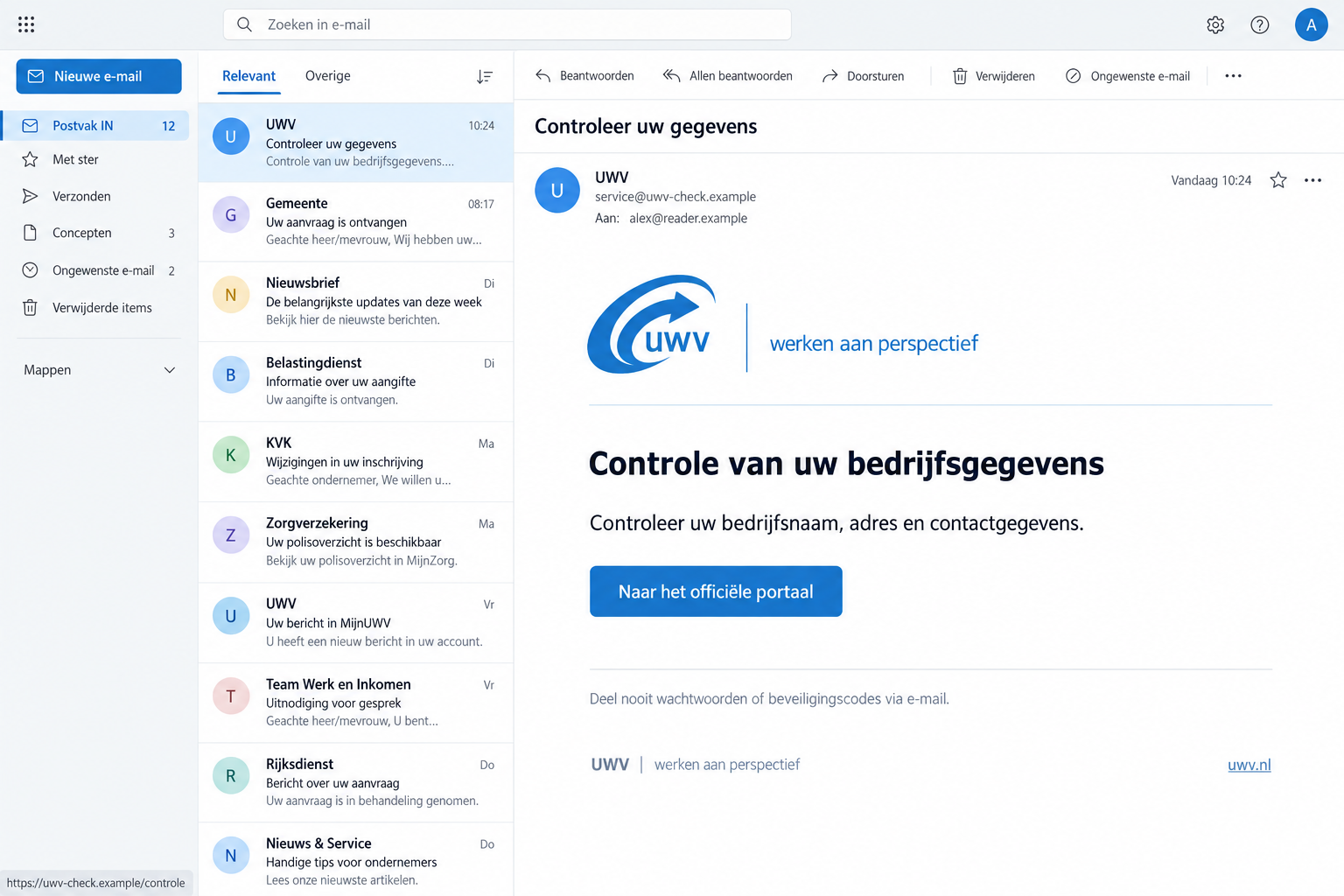
The UWV email scam borrows the identity of the Dutch employee insurance agency. This version presents a company-information check as ordinary administration.
It asks recipients to review details such as their business name, address, or contact information. A button promises access to an official portal.
Alongside that invitation, the email warns against sharing passwords and security codes by email. Sensible advice becomes part of the disguise.
The False Message Is Documented
Fraudehelpdesk published the reported false email under the subject “Controleer uw gegevens,” meaning “Check your details.”
UWV separately warns about impersonators seeking confidential information through bogus messages, websites, and calls. The genuine agency is not running this scam.
The lead image illustrates the lure using fictional addresses. It is not an original recipient’s inbox, and its interface details are not campaign evidence.
Check the Request Without Following Its Route
The useful question isn’t whether the wording sounds responsible. It’s whether you can confirm the request through a UWV service you opened independently.
- The impersonated organization is UWV, not an unknown employer offering a job.
- The hook is a business-data check, rather than a promised benefit payment.
- The deceptive element is the false sender and its suggested route into a portal.
- Passwords, banking details, and downloads require additional action only if you actually exposed them.
Why Good Security Advice Doesn’t Make an Email Genuine
Most people expect phishing to contain an obvious mistake: a wild promise, terrible spelling, or a demand for a password in plain text.
This message takes a quieter approach. It describes a familiar task and includes a warning that could appear in a legitimate security notice.
Those two features work together. The task gives you something to do, while the warning makes the sender seem careful about protecting you.
But a safety sentence cannot verify the button beside it. Anyone who writes an email can copy advice about keeping login codes private.
Think of the wording as a sign taped to a door. A sign saying “Authorized entrance” doesn’t tell you who owns the building.
The same distinction applies online. A link labeled “official portal” is a label chosen by its sender, not a certification from your browser.
You don’t need to prove that every sentence is false. A phishing message can combine accurate advice with a destination you should never trust.
That is also why professional design is a weak test. A tidy header, familiar agency name, and polite closing can all be reproduced.
How the UWV Email Scam Works
Step 1: The Message Arrives as Routine Business Administration
The opening places your business in a review process. It suggests that information held about the company needs checking or updating.
For someone handling payroll, staffing, or government correspondence, that sounds plausible enough to enter the day’s work queue.
You may also receive it in a shared mailbox. A colleague who sees a government name can forward it with a quick request to handle it.
Forwarding doesn’t authenticate the original. It can simply move the same unverified request closer to someone with access to company information.
A useful first response is to establish who normally handles UWV correspondence. Keep the message out of an approval workflow until that person checks it.
Step 2: Familiar Advice Lowers Your Guard
The warning about passwords encourages a narrow interpretation of danger: replying with a secret would be unsafe, but using the supplied portal must be fine.
That conclusion doesn’t follow. Information entered on an imitation website can reach the wrong person without ever being sent as an email reply.
A business address may seem harmless because some company information is public. The important issue is the unverified collection process, not secrecy alone.
Combining a name, role, telephone number, and workplace can make a later approach more convincing. Treat unexpected follow-up requests as new contacts requiring verification.
This is a possible consequence of disclosing data, not proof that every recipient receives a follow-up call.
Step 3: The Button Tries to Become Your Starting Point
Once you accept the message’s framing, clicking looks like the efficient way to finish. The email has supplied both the problem and its proposed solution.
Stop before that handoff. Open UWV’s website yourself, or use a trusted bookmark established before the message arrived.
The public example stops at the email. It doesn’t show what the linked page asks for, so don’t assume its form is safe.
The message impersonates UWV and directs you toward a supposed official portal. You don’t need to explore that page to reject the request.
If a page later asks for a login, code, document, or payment, assess that request through the real service instead of continuing the email’s instructions.
The Genuine UWV Route Depends on Your Role
UWV deals with both individuals and employers. Picking the right route matters because a business-themed message shouldn’t send you guessing between unrelated accounts.
For personal questions about a benefit or application, UWV directs users to “Mijn berichten” in Mijn UWV.
Employers can use the employer portal and its “Uw berichten” service. Access for a colleague should follow the organization’s authorized account arrangements.
Don’t pass someone your personal login because they offer to check the email. Ask the appropriate account holder to review the request through their own access.
Mijn UWV is the agency’s secure environment. Individuals can reach it through UWV’s independently opened website and use the supported login method.
If you can’t find the request, contact the agency through its published channels. A missing item is a reason to ask, not to resume the suspicious link.
Keep a note of what you asked and how the agency answered. That helps a colleague avoid reopening the same investigation the next morning.
Real Email Notifications Can Still Exist
Don’t replace one bad rule with another by deciding that every UWV email is fraudulent.
UWV explains that genuine email notifications can announce new post. The notification and the underlying official document are different things.
You can read the real correspondence through the appropriate account without using an unexpected email’s button. That keeps legitimate administration moving without trusting the message.
UWV also identifies Zivver as a channel it may use for confidential information. An unfamiliar-looking workflow deserves independent confirmation, not an automatic fraud accusation.
What to Check in the Sender and Link
Expand the sender information rather than relying on the name displayed in your inbox. A recognizable name can sit above an unrelated address.
Even an address that looks familiar isn’t a complete identity check. A sender label doesn’t tell you where a button actually leads.
On a desktop, hovering may reveal a link’s destination. If it looks wrong, stop. You don’t need to open the page to investigate further.
On a phone, avoid tapping just to discover the destination. Some previews or gestures can open links unexpectedly; the independent website route is simpler.
Read the actual hostname, not merely the agency name somewhere in a long address. Words in a path don’t establish ownership of the site.
A padlock also isn’t an endorsement. It concerns the connection to the displayed website, not whether that website belongs to UWV.
If your workplace has an IT reporting button, use it. Staff can inspect the message without asking you to revisit a potentially unsafe page.
Avoid forwarding the message widely as an ordinary task. Send a warning without an active link when colleagues only need to know what to ignore.
What to Do if You Have Fallen Victim to This Scam
Start with what actually happened. Reading the email, entering a company phone number, and surrendering a government login are different exposures.
-
Stop the interaction and preserve the request. Close the page and don’t reply to the sender. Keep the original email for reporting.
Write down any information you entered and whether you submitted it. An accurate account is more useful than trying to guess the worst possible outcome.
-
Report the impersonation to UWV. Its published reporting address is valse-email@uwv.nl. Forward the message there before removing it from your inbox.
UWV says that address is processed automatically, so a personal reply should not be expected. Use official customer channels for a question about your case.
-
Tell your workplace if company information was disclosed. Explain which mailbox received the message, who handled it, and what was supplied.
Ask staff to verify any resulting account-change or payment request separately. Don’t accuse a colleague of causing a breach before the facts are known.
-
Secure any login you entered. Reach the affected service independently and replace the exposed password. Change reused versions on other accounts too.
Check recovery contacts and recent activity. An unfamiliar password-reset email may deserve attention even when the original business-data message looked unrelated.
-
Use DigiD’s recovery guidance if DigiD details were involved. DigiD recommends changing the password and checking usage history.
If an unfamiliar organization or login appears, contact DigiD and the relevant organization. If you cannot regain access, use the official helpdesk route.
-
Contact your bank if financial information or money was exposed. Explain whether you supplied card data, banking credentials, an approval code, or an actual transfer.
Ask what can be blocked or investigated now. A report about the fake email doesn’t itself stop transactions or recover a payment.
-
Check the device only when the interaction warrants it. An unexpected download, installed app, or persistent redirect needs separate attention from a submitted form.
Malwarebytes can help check for malicious software. AdGuard may help reduce unwanted ads or redirects, but neither retracts information already disclosed.
Don’t install a scanner supplied by the suspicious page. If this is a work device, let your IT team choose the response.
Ask UWV a Specific Question, Not the Scammer for Reassurance
When you reach the real agency, explain the request in ordinary terms: an email asked your business to review its records through a portal button.
Ask whether there’s an outstanding task for the relevant employer or individual account. You don’t need to repeat every sentence of the suspicious email.
If the agency confirms a legitimate task, ask where to find it after signing in independently. Complete that task there, not through the original link.
If a deadline is involved in your real correspondence, clarify it with the agency. Don’t invent an extension or ignore genuine obligations because a phishing message arrived.
For an employer account managed by an accountant, use the existing relationship to coordinate the check. An unsolicited replacement contact should not receive payroll documents.
Someone who offers to investigate may need the email, but they don’t need your password. Use your workplace’s approved reporting process for potentially sensitive material.
Afterward, tell anyone who received the internal forward that the original route should not be used. Otherwise, another person may attempt the same check.
Keep that warning practical and brief. Name the subject and the action to avoid, while directing staff to the established account owner for genuine UWV matters.
Helping Someone Else Without Taking Over Their Identity
A worried parent, employee, or business partner may ask you to handle the message. Help them establish the real contact route first.
You can sit with them while they open the genuine site. They should enter their own credentials privately rather than reading passwords or codes aloud.
For company matters, involve the authorized administrator. Personal government access and employer permissions are not interchangeable shortcuts.
If someone feels embarrassed about responding, focus on the next practical action. Getting the facts quickly matters more than deciding who should have spotted the trick.
Use a short incident note: message received, link opened, information supplied, action taken. Leave passwords and full identity documents out of that note.
If the sender contacts you again, don’t let them supervise the cleanup. Verification must leave their conversation, not happen inside it.
Frequently Asked Questions
Is the UWV Business Details Email Genuine?
The documented “Controleer uw gegevens” message is a false UWV email. Check any similar request directly with UWV instead of using its portal button.
Why Would a Scam Email Tell Me Not to Share Passwords?
Correct advice can make the sender seem trustworthy. It doesn’t authenticate a linked website or protect information entered on that website.
Did Receiving This Message Put My Benefits at Risk?
Receiving an email doesn’t by itself alter your benefits or establish account access. Review actual UWV correspondence independently if you’re concerned.
Should I Change DigiD After Clicking the Link?
A click alone doesn’t prove your DigiD was exposed. If you entered DigiD details, follow its official recovery instructions and inspect usage history promptly.
What if I Only Supplied My Business Contact Details?
Record what you disclosed and warn the responsible people at work. Verify follow-up calls, account changes, and payment instructions through established contacts.
Can I Ignore All Future UWV Emails?
No. Genuine notifications and correspondence exist. Keep using official services, but reach them independently when a message asks you to take action.
The Bottom Line
Don’t use the business-check button in this UWV email scam. Reassuring security advice doesn’t turn an impersonator’s link into an official service.
If you responded, report the email and protect the information you actually exposed. Confirm any real business task through UWV’s independently opened website or employer portal.

Join the discussion
0 commentsShare your experience or ask a question about this article.
Discussion
Start the conversation
Have a question or something useful to share? Add the first comment.