

You need the VPN client before you can get back to work. A search result promises the right download, complete with a familiar name.
Then a small connection window interrupts the process. Before you type anything, there is an important difference between downloading software and signing into your workplace.
Overview
A fake WatchGuard download can hide an account theft
The WatchGuard VPN download scam is credential phishing. The impersonated vendor is a real security company; the deceptive download page is not its authorized service.
In an October incident documented by Huntress, a lookalike page collected connection information before directing the visitor toward genuine software.
That distinction matters. A person could receive the expected application and still have handed their workplace login to somebody else along the way.
The details attackers wanted belonged to the workplace
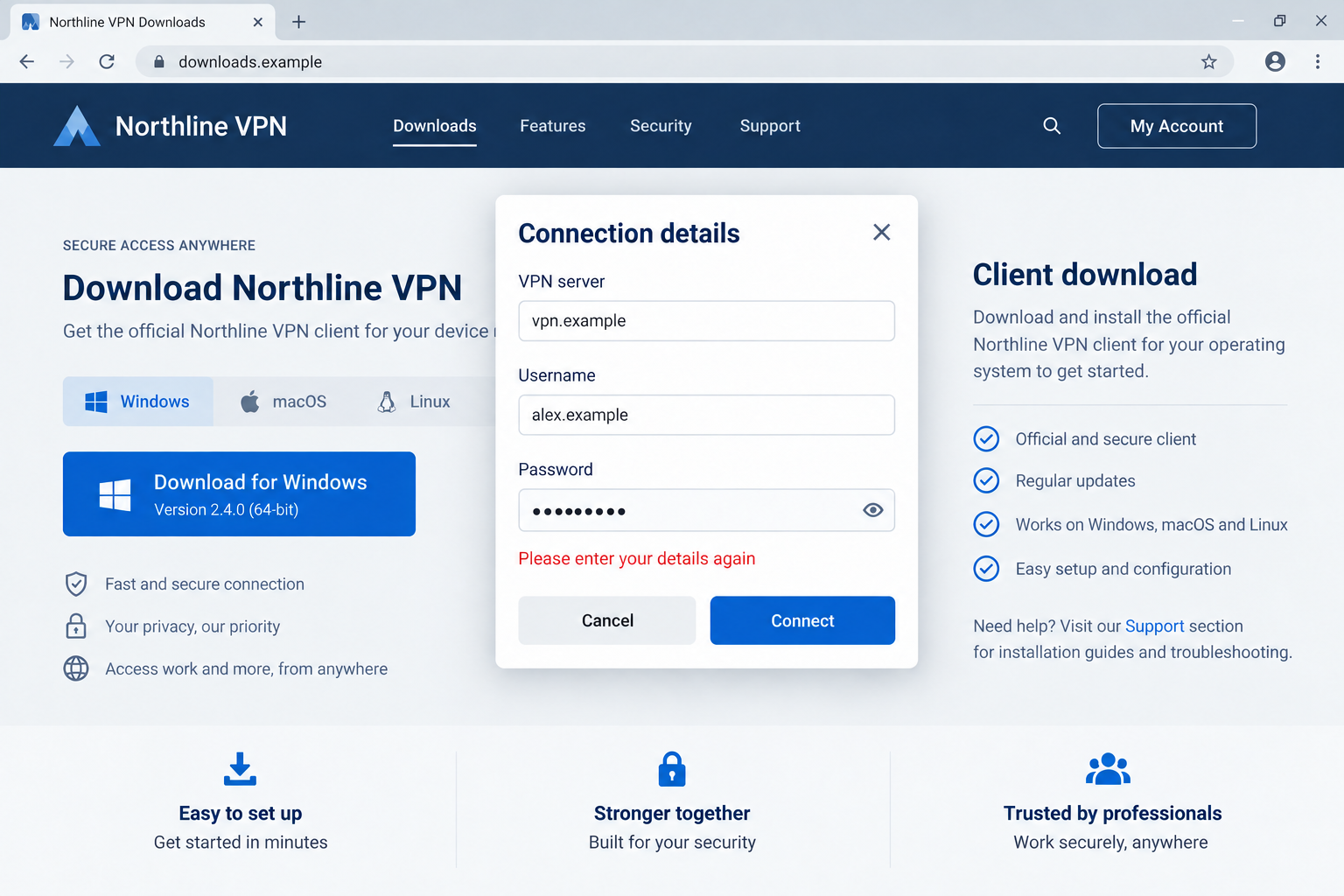
The browser prompt requested three fields: the VPN server, login, and password. Together, those details could identify both an account and its destination.
The reported lure used watchguard-vpn[.]net, while submitted information went to watchguard-ssl[.]online. These are historical indicators, not links readers should visit.
- A familiar product name in a domain does not establish ownership.
- A download button should not turn an unrelated website into your workplace authentication service.
- An error message can appear after information has already been transmitted.
- A genuine installer does not erase an earlier password disclosure.
The right response depends on what you entered
Merely viewing the page is different from submitting credentials. Someone who entered a work password should contact their IT or security team promptly.
Do not wait for a malware warning. This particular route was designed around collecting information in the browser, rather than hiding a virus inside the final installer.
The opening image uses a fictional interface to illustrate that interruption. It is not an authenticated capture of the reported WatchGuard page.
Why a Normal Download Feels Trustworthy
Software installation is usually a task, not an investigation. You want the correct program, perhaps because a meeting or support request is already waiting.
Search results make that task feel straightforward. A relevant title, product terminology, and a professional page can look like several independent signs of legitimacy.
They are not independent when the same publisher controls the title, description, and page. An impostor can arrange all three to tell a consistent story.
Encryption adds another easily misunderstood signal. A padlock protects the connection to the displayed domain. It does not certify that the domain belongs to WatchGuard.
The difficult moment comes when the page asks for information that resembles a real VPN connection screen. Familiar fields can make an unfamiliar location seem acceptable.
At work, however, context is crucial. Your administrator’s instructions determine which gateway and authentication flow are expected, not a public download page found through search.
How the WatchGuard VPN Download Scam Works
Step 1: A routine software search reaches a lookalike
Huntress traced the incident to a search result. That victim arrived from search; the report did not identify a paid ad.
For the reader, the important issue is the destination behind the result. An apparently useful ranking does not give a site permission to handle company credentials.
A copied download page can borrow the vocabulary of support documentation. Operating-system choices and product descriptions make it easier to continue without examining the address.
Before downloading a business VPN, use the link your organization supplies. If that link is missing, ask IT rather than choosing a plausible alternative.
A misspelled search is not a personal failure. Attackers design pages for ordinary hurried behavior, including people who already understand the software they need.
Step 2: The download becomes a connection-details request
The reported page placed a credential prompt between the visitor and the installer. That changed the transaction from receiving software to surrendering authentication information.
A server address may look less sensitive than a password, but it tells an attacker where a stolen login might be useful.
A username can also reveal an organization or naming convention. When several fields arrive together, the recipient needs less guesswork to attempt access.
Do not treat a request as safe simply because the information is familiar. Ask why this specific website needs it at this specific stage.
A vendor account, an organization’s VPN gateway, and a downloaded VPN application are different contexts. A legitimate login in one does not authorize another.
Step 3: A deliberate rejection encourages another submission
Huntress found that the first submission was intentionally rejected. The page then asked the visitor to enter the connection details again.
That apparent failure is important because people often interpret an error as evidence that nothing happened. A website can send information before displaying any result.
A retry may produce a more carefully typed password. It can also tempt someone to try a second password, potentially widening the exposure.
Never test other work or personal passwords against a suspicious prompt. Closing the window is safer than trying to discover which secret it will accept.
If you already submitted once, include that in your report. There is no need to complete a second attempt to justify asking for help.
Step 4: Genuine software makes the encounter feel successful
After a second submission, the analyzed page linked to a genuine, signed WatchGuard installer. The final file was not the malicious component in that flow.
A software signature answers a question about a file’s publisher and integrity. It does not authenticate every web form that appeared before the download.
This creates a misleadingly satisfying ending. The application arrives, installation looks ordinary, and the person has a reason to dismiss the earlier interruption.
Think of receiving a real parcel after giving an impostor your building access code. The parcel’s authenticity does not make the disclosure harmless.
That comparison does not mean the installer should be deleted blindly. Let IT verify the file and obtain an approved copy through the normal channel.
Step 5: The account, rather than the installer, needs attention
Stolen VPN credentials may allow attempted access to organizational resources. Whether an attempt succeeds depends on authentication controls, account privileges, and other defenses.
Do not assume a disclosed password automatically produced a network breach. Equally, do not assume a clean antivirus scan proves that the account remains safe.
Your security team can examine authentication history, investigate unfamiliar sessions, and decide whether additional containment is needed. Those checks are separate from scanning a computer.
Multi-factor authentication can add protection, but unexplained approval requests still need attention. Reject prompts you did not initiate and report them through an established channel.
If the affected account has administrative privileges, say so immediately. The potential scope is different from a low-privilege account with narrowly limited access.
Domain, Download, and Login Checks That Actually Help
Start with the organization’s instructions
The strongest shortcut is a known internal software catalog, bookmarked help page, or direct instruction from a verified administrator. Avoid rebuilding that trust through search.
If somebody sends a replacement link unexpectedly, confirm it through a separate familiar route. A reply inside the same suspicious conversation may reach the same impersonator.
WatchGuard’s own navigation identifies software.watchguard.com as its software-download service. Workplace administrators may provide an organization-specific approved route instead.
Read the actual domain, not its branding
Page headings and logos are editable artwork. The address bar identifies the domain you are actually visiting, although even that needs comparison with a trusted reference.
Extra words such as “vpn” or “support” do not turn a separate domain into a vendor subdomain. Hyphens and security terminology are not ownership checks.
Do not use a search for the suspicious domain as your only verification. Search results can repeat the same misleading descriptions that brought you there.
Keep historical variants separate
WatchGuard’s earlier campaign warning described lookalike VPN infrastructure and spoofed clients. Different versions can steal information at different stages.
The October browser-form flow should not be confused with every earlier executable-based variant. A warning about one does not prove identical files or operators elsewhere.
Likewise, an old malicious address going offline does not make future lookalikes safe. Blocklists help, but the lasting defense is using a trusted download path.
What to Do if You Have Fallen Victim to This Scam
-
Stop interacting with the page. Close the suspicious tab without trying another password, accepting browser permissions, or contacting a number displayed there.
If you only viewed it, note the address and whether a file downloaded. A page visit alone does not establish that your password was stolen.
-
Tell your workplace security team. Use a known help-desk number or internal channel. Explain that the prompt appeared on a public download website.
Give the approximate time, domain, username entered, and whether you submitted more than once. Never paste the actual password into the incident ticket.
Also identify the VPN gateway you supplied. Your team needs to know which access point the attacker may now associate with the account.
-
Replace exposed credentials through the approved process. Follow IT’s instructions, using a trusted device or session when they request it.
If you reused that password elsewhere, change those accounts individually. Start with accounts that could reset other passwords, especially your primary email.
Choose different replacements. Adding a predictable character to the disclosed password can leave the next version easier to guess.
-
Have active access checked, not just the password. Ask whether existing VPN sessions, identity-provider sessions, recovery settings, and recent authentication events need review.
Changing a secret and terminating previously established access are not always the same operation. Administrators should decide which controls apply to your environment.
Report unexpected multi-factor prompts, unfamiliar sign-in alerts, or newly registered authenticators. Do not approve a request simply to make repeated notifications stop.
-
Keep useful evidence without revisiting the lure. Preserve the URL, browser-history entry, download filename, and any security alert already available.
Do not reopen or run a suspicious file for a screenshot. Your security team can collect what it needs through its own investigation process.
-
Check downloaded software appropriately. On a managed device, follow organizational policy rather than installing additional utilities independently.
For a personally managed computer with an uncertain download, our Malwarebytes scanning guide can help check for malware. A scan cannot reset stolen credentials.
AdGuard can provide an additional layer against certain unwanted advertising and dangerous destinations. It cannot certify a VPN login page or replace approved software sources.
-
Return to work through a verified route. Obtain the client from IT or the approved vendor service, then confirm the expected gateway before connecting.
If colleagues received the same link, tell security staff rather than forwarding the live lure widely. A short warning can identify it without inviting more clicks.
A Short Incident Note You Can Send to IT
A useful report does not need technical jargon. Describe what you were trying to do, what changed on screen, and which information you supplied.
For example, explain that a VPN download page requested connection details and rejected the first attempt. State whether a second attempt or download followed.
Keep assumptions separate from observations. “I entered my password” is helpful evidence. “The entire network is infected” is a conclusion your team must investigate.
If you feel embarrassed, send the report anyway. Early reporting gives administrators more options and is more valuable than a perfectly written explanation delivered late.
Do not delay because the program now works. Successful installation is precisely why this kind of account theft can pass unnoticed after the original interaction.
A VPN account can be one entry point into a larger working environment. The resources behind it depend on the organization’s access rules.
That is why a personal password change may not complete the response. Your team needs to check whether anybody used the disclosed information before it was replaced.
Keep the timeline simple: page visit, first submission, second attempt if any, downloaded file, and report time. Approximate times are useful when exact ones are unavailable.
If the device is shared, identify the person and browser profile involved without circulating their secrets. Security staff can then match the report to the right activity.
Frequently Asked Questions
Is WatchGuard itself running this scam?
No. WatchGuard is the impersonated vendor. The concern is a separate website using its name to request workplace credentials during an apparent download.
Can a real signed installer follow a phishing page?
Yes. The documented October flow delivered genuine software after collecting information. A valid file signature does not approve the preceding website’s password request.
Am I safe if the first attempt said the details were incorrect?
Not necessarily. That rejection was deliberate in the analyzed flow. Treat submitted information as exposed and report it without testing the page again.
Does viewing the page mean my workplace was breached?
No. Viewing, submitting credentials, downloading, and successful unauthorized access are different events. Give your security team the facts so it can assess the actual exposure.
Will an antivirus scan fix a stolen VPN password?
No. Scanning addresses possible device threats. Password replacement, session review, and authentication checks address the account and must happen through the appropriate trusted process.
Where should I get the correct VPN download?
Use your employer’s approved software source or instructions. If those are unavailable, ask the help desk instead of relying on a similarly named search result.
The Bottom Line
Do not enter workplace credentials into an unverified VPN download page. The WatchGuard VPN download scam shows why receiving genuine software is not enough to establish trust.
If you submitted connection details, stop retrying and contact IT now. Protect the account first, then have any downloaded file checked through the approved process.

Join the discussion
0 commentsShare your experience or ask a question about this article.
Discussion
Start the conversation
Have a question or something useful to share? Add the first comment.