

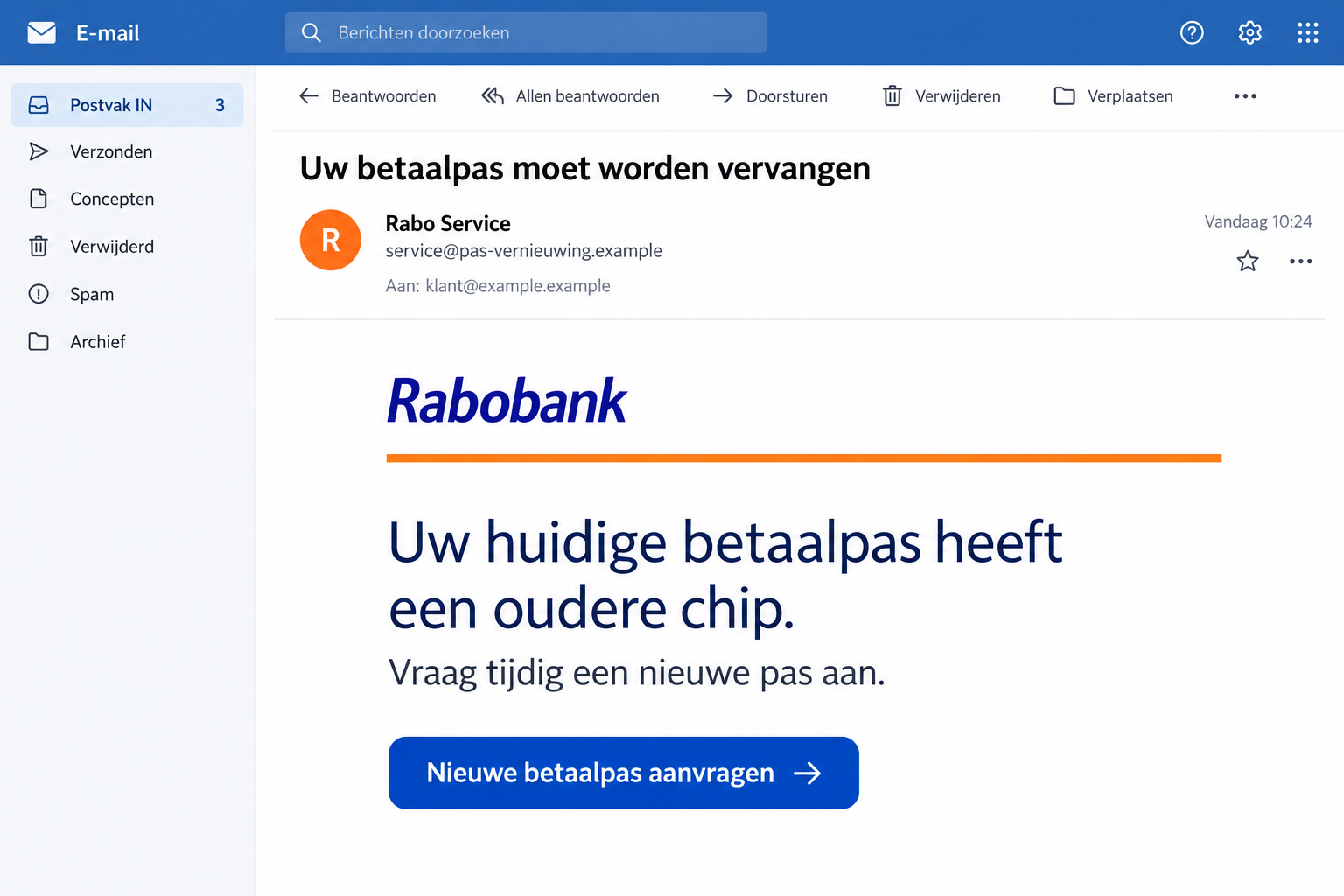
An email from Rabo Service says your bank card has an older chip. Unless you replace it, the message suggests, everyday payments could become a problem.
It sounds like routine maintenance, the sort of thing you might handle quickly before heading out. That is why the request deserves a second look.
Overview
The old-chip explanation is part of the lure
The Rabobank card replacement email scam turns a believable banking update into a reason to follow an impostor’s link.
The message says an older chip no longer meets security standards and encourages the recipient to request a replacement to avoid interrupted payments.
Rabobank lists these messages among its confirmed false emails. The bank itself is warning about impersonators, not announcing the replacement program described by the email.
The link is not the normal place to sort this out
Real cards can expire, become damaged, or need replacement. That doesn’t make an unsolicited card application link trustworthy.
The bank’s fraud guidance disowns message-based requests to log in, apply for a new card, send in a card, or disclose sensitive codes.
There are several useful warning signs to check together:
- A technical explanation about the chip creates pressure to replace the card.
- The email supplies the route for starting that replacement.
- A familiar sender name substitutes for independent confirmation.
- The message’s own support details are offered as reassurance.
What to do with the message
Leave the application button alone. Open the Rabo App yourself or contact the bank through a route you already know.
The image is an illustration with fictional addresses. The exact destination form is not reproduced here; any recovery steps depend on what you actually submitted.
Why an Old Chip Sounds Like a Reasonable Problem
Most people don’t know which security technology sits inside a debit card. A message about changing standards can sound credible without explaining anything you can check.
It also offers a simple solution. Instead of asking you to understand the technical issue, it presents a button that supposedly takes care of it.
You don’t want your card rejected at the checkout, so ordering a replacement feels sensible. First, make sure it is your bank asking.
A copied logo doesn’t answer that question. Nor does a paragraph describing contactless payments, because ordinary information about cards can be copied into a false message.
Don’t try to authenticate the request by searching for a picture of an old chip. The important issue is the communication, not the appearance of the card.
The expiry date on your card can be useful for ordinary account management. It doesn’t prove that this particular email came from the bank.
If the card has genuinely stopped working, handle that problem through the bank’s app or support. A real inconvenience shouldn’t steer you toward an unrelated sender.
How the Rabobank Card Replacement Scam Works
Step 1: A maintenance notice introduces a problem you didn’t know about
The sender claims the card’s chip is outdated. The warning is framed around continuing to pay safely and without interruption.
That makes the message feel helpful rather than obviously threatening. It appears to prevent trouble before you reach a shop or cash machine.
The reported false email uses that explanation to support its replacement request. It is the sender’s story, not a diagnosis of your actual card.
Step 2: The email gives you a replacement button
The instruction moves the reader from a general warning to a specific action. The supplied link becomes the apparent starting point for getting the new card.
That shortcut matters. Once you accept it, you may stop asking whether the page belongs to the real bank.
On a computer, the underlying destination can differ from the words printed on the button. A professional-looking label doesn’t determine who receives your information.
You don’t need to open the destination to settle the question. The genuine banking app provides a separate place to check card issues.
Step 3: The request borrows the bank’s customer-service authority
The reported message includes supposed help details alongside the replacement pitch. That makes it look as though assistance is available if you hesitate.
Don’t use those details to verify the message containing them. Otherwise, the sender gets to provide both the request and its supposed confirmation.
If a caller later refers to the card replacement, treat the call as another contact to check. Familiarity with the email isn’t proof of bank employment.
A call transfer or a second message within the same conversation isn’t an independent verification. End the exchange and make your own contact.
Step 4: A supposed card task can expose banking access
Phishing aims to obtain information or approvals the recipient would normally protect. The danger depends on what the false process asks you to do.
Don’t enter a PIN, share a signing code, or approve an unfamiliar operation because the page calls it card maintenance.
If you already proceeded, note the actual screens and actions. A code, a bank-app approval, and a card photograph are different disclosures.
No payment needs to be visible before you tell the bank about exposed access. Waiting for a loss can waste an opportunity to limit damage.
Checking a Replacement Without Trusting the Email
Open the bank’s app independently
Use the banking app already installed on your device. Don’t install an application offered by the unexpected message or a person claiming to help.
Look for the relevant card information and any genuine notification. If you’re unsure what a record means, ask the bank through its established support route.
You should not need the suspicious email to identify your bank account. Avoid copying its address into a fresh tab and assuming the new tab makes it safer.
If another household member received the message, have them check their own account. Your card status doesn’t determine whether theirs needs attention.
Check the actual reason for replacement
Separate expiry, damage, loss, and suspected compromise. They are different situations, and the appropriate bank process may differ.
For a missing or stolen card, don’t spend time investigating the email first. Reach the real bank and use its protective process.
For a working card and an unexpected chip warning, verify the warning before applying for anything. The sender doesn’t get to create an emergency by naming one.
If you already ordered a replacement legitimately, that still doesn’t authenticate a coincidental email. Continue through the channel where you made the original request.
Keep the card and its secrets out of the conversation
Don’t photograph both sides of a card to help a stranger identify its chip. Don’t send a PIN as a supposed identity check.
If the conversation changes into instructions to mail or hand over a card, stop and tell the bank. That is an additional risk, not routine troubleshooting.
The documented email doesn’t prove a collection visit happens in every case. The practical rule is to question any new instruction rather than following the original story.
Likewise, don’t treat cutting a card as a complete response after sharing codes. The bank needs to know about the account access as well.
Know What You Approved, Not Just What You Meant to Do
You might have intended to order a replacement while the actual screen asked you to authorize something else. Describe the screen, not only your intention.
If a scanner or QR code was involved, mention that explicitly. The bank needs to understand the requested operation, not just that you followed a replacement email.
Don’t generate another code to demonstrate what you did. Describe the earlier action without recreating it on the questionable website.
If you’re unsure what an approval meant, say so. Guessing that it was only identity verification can leave an important part of the interaction unexplained.
Separate information you typed from information the sender merely displayed. A card number printed on a page isn’t necessarily one you supplied there.
Also distinguish the card’s printed details from a bank login or signing operation. Replacing a physical card may not address every account action you approved.
Keep any genuine bank alerts received around the same time. Their timing can help the bank connect your report with activity in its records.
If another person helped during the interaction, ask what they saw without exchanging codes again. Their recollection may clarify which screen appeared before the approval.
Was an amount shown? Was there a recipient? Did you scan something, enter a code, or confirm an action in the app?
Write down what you remember without storing the codes themselves. These details help the bank understand which protections may be needed.
If an error appeared afterward, don’t assume the attempt failed. Information can be submitted before the page displays its final message.
Conversely, reading the email alone does not establish that your account was accessed. A clear description prevents both panic and underreaction.
What to Do if You Have Fallen Victim to This Scam
-
Stop the replacement process. Close the suspicious page and don’t continue through a new link, callback, or supposed support agent.
If someone is still speaking to you, end the conversation before opening your real banking app.
-
Reach Rabobank immediately after sharing banking details or approvals. Use the app, official website, or contact details you already trust.
Explain that an old-chip replacement email led to the interaction. List the information entered and any operations you approved, even if they seemed harmless.
Ask the bank what needs blocking or securing. Don’t decide that a password change alone is enough after sharing signing or authorization information.
-
Report any transaction separately and precisely. Give the amount, time, reference, and recipient from the genuine bank record.
Ask about available recovery steps without assuming reimbursement is automatic. Keep the bank’s case reference and follow its instructions through verified channels.
-
Explain whether the physical card was exposed. Tell the bank if you uploaded photographs, provided card details, mailed anything, or arranged a handover.
Do not try to retrieve a card by meeting an unknown collector. Preserve the correspondence and seek guidance through the bank and appropriate authorities.
-
Protect any other account involved. If you entered an email password or reused another account password, secure that account through its actual service.
Check available session and recovery settings. Keep new security codes private, including from anyone offering to help with the original replacement.
-
Retain the original email. Save the message and relevant screenshots before removing it from your inbox. Avoid publicly exposing card or customer details.
Use Rabobank’s published phishing-reporting route if you send the email. Reporting a specimen is separate from getting urgent help for your own account.
-
Investigate software only if the interaction involved it. If you installed an unfamiliar helper or gave remote access, stop sensitive activity on that device.
For an unexpected installation, consider checking the device with Malwarebytes. AdGuard can help filter risky advertisements; account approvals still need the bank’s attention.
A message about a chip is not itself evidence of a virus. Don’t pay an unexpected cleanup service simply because the email frightened you.
Make the Follow-Up Easier to Handle
After reporting, keep a short record of which bank channel you used and what was agreed. That gives you a trusted starting point for later questions.
If a new caller says your report needs another code, don’t continue on their terms. Return to the genuine bank using your case reference.
For a relative who responded, help organize the timeline rather than asking them to prove they weren’t careless. The useful information is what happened next.
Check whether any expected bank correspondence now needs attention, such as a legitimate replacement or account-security notice. Handle it through the real service.
Don’t forward the phishing email to friends as an instruction to replace their cards. Share a redacted warning and the genuine bank’s advice instead.
Frequently Asked Questions
Is the Rabobank older-chip email confirmed as false?
Yes. Rabobank reproduces this replacement story in its false-email examples. The warning is about impersonators, not wrongdoing by the bank.
Could my bank card genuinely need replacing?
Yes. Expiry, loss, damage, or compromise can require action. Check the real card situation independently rather than using an unsolicited application’s link.
Does a correct-looking logo or sender name make it safe?
No. Those details can be copied. Verify the request inside the genuine banking service or through independently reached bank support.
Should I give a code to confirm the replacement?
Not to the unexpected sender or its website. If you’ve already supplied a code or approved something, tell the bank what the operation involved.
What if I clicked but submitted nothing?
Close the suspect website and review any files or permissions it introduced. Simply following the link doesn’t establish that you supplied credentials or authorized money out.
Can a scanner recover money lost through the email?
No. Software checks deal with device exposure. Transaction recovery and banking-access protection need the bank’s own fraud response.
The Bottom Line
Do not replace your Rabobank card through the old-chip email. The bank identifies that message as phishing; check card issues through its real app or support.
If you disclosed banking information, shared codes, or approved an action, contact Rabobank now. Explain the actual interaction rather than waiting to see whether money disappears.

Join the discussion
0 commentsShare your experience or ask a question about this article.
Community experiences
Did this happen to you?
Your experience could help someone recognize the same scam. Submit a private report for our team to review.
I experienced this tooReports are reviewed before publication. Sharing publicly is always your choice.
Discussion
Start the conversation
Have a question or something useful to share? Add the first comment.