


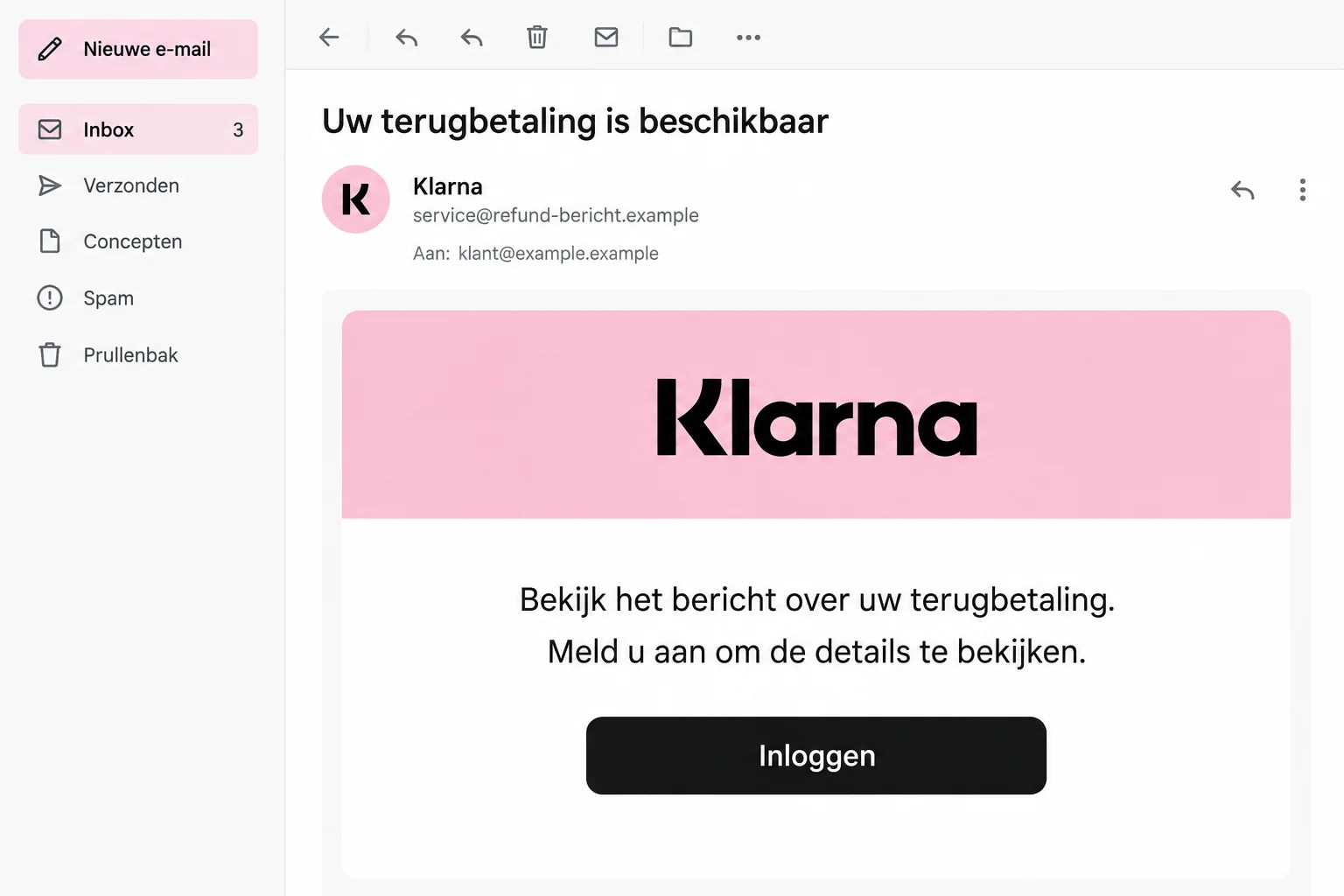
A Klarna email says a message about your refund is ready. If you’ve recently returned something, that sounds like the update you’ve been waiting for.
The login button looks convenient. Before using it, take a moment to check which account you’re actually about to open.
Overview
The refund is the reason given for signing in
The Klarna refund email scam borrows a routine shopping task: checking what happened to money after a return or account adjustment.
Fraudehelpdesk has published a false refund message directing readers to a login link. It also threatens temporary account restrictions if an update isn’t confirmed.
That is a deceptive message using Klarna’s identity. It doesn’t mean the genuine payment provider runs the scam or that your actual refund is fictitious.
A reference number can make an empty claim look specific
A reference beside the company name can resemble a real customer-service case. But it is only useful if you can match it to genuine account records.
Don’t let a plausible-looking code replace the checks that matter:
- Which real purchase or return does the alleged refund concern?
- Does that purchase appear in the app you access independently?
- Is there an actual refund or account message associated with it?
- What information or approval is the email’s route asking you to provide?
Check the refund without accepting the email’s shortcut
Open Klarna yourself and inspect the relevant purchase. If something remains unclear, ask support from within the genuine service.
The illustration has sample wording and fictional contact details. It isn’t an original email, and no exact final form or refund amount is established here.
Why This Email Can Arrive at a Convincing Moment
Returns often involve more than one update. The store may confirm delivery before the payment record changes, leaving you watching for another notification.
An impostor’s message can slip into that gap. It seems to explain the next step in a process you’re already thinking about.
Expecting money back can make the timing feel personal. It doesn’t mean the sender knows your shopping history; a widely sent message can simply arrive at the right moment.
Even if you aren’t expecting a refund, you may wonder whether a previous purchase was adjusted. The email offers its login button as the answer.
Don’t use uncertainty about an order as a reason to trust an unfamiliar route. Find the purchase through records you already control.
If the message promises information rather than naming an amount, there may be nothing concrete to compare until you leave the email.
That is exactly when an independent account check helps. It lets you investigate the claimed event without treating the sender as your guide.
How the Klarna Refund Email Scam Works
Step 1: A message announces an account update about money back
The opening claim makes the email look connected to an existing payment relationship. It invites you to find out more rather than immediately demanding money.
Fraudehelpdesk’s archive includes another false refund notification using the same broad login pretext. The wording can change while the reason for clicking remains familiar.
Don’t assume a reference identifies one of your orders. Compare it with your genuine purchase records, not with another detail supplied by the email.
Step 2: Curiosity is reinforced with an account restriction warning
The documented message couples refund information with a claim that access could be limited. Money back provides the attraction; possible interruption supplies the pressure.
Those two ideas can discourage a pause. You may feel you should check the refund and prevent a problem in one quick session.
But a threat in an unexpected email doesn’t establish that your real account is restricted. Check the genuine app before trying to fix anything.
If the account does show a problem, follow the service’s own instructions there. Don’t return to the suspicious link because part of its story seems plausible.
Step 3: The supplied login route takes control of the interaction
The link is presented as the place where the waiting message can be read. Its label may look familiar even when its destination is unrelated.
A page displaying Klarna’s name is not enough. The important question is whether you independently reached Klarna or followed an impostor’s chosen address.
Do not troubleshoot a suspicious login by supplying more information. Repeated failures can encourage you to enter codes, other passwords, or extra details unnecessarily.
Leave the page and start again through the genuine service. That changes who controls the route, not merely which browser tab holds it.
Step 4: A supposed refund check may expose access or approvals
The next risk depends on what the page requests and what you supply. Account details and authentication codes deserve protection even when no payment is requested.
If you receive a genuine code while using an unverified site, don’t assume the site is genuine too. Receiving a code doesn’t establish who initiated the process.
Likewise, an approval screen needs to be read as an actual operation. Don’t authorize an outgoing payment because the previous page called it a refund check.
These are exposure checks, not a claim that every copy uses an identical code flow. Record the actual interaction if you already responded.
Find the Real Purchase Before Chasing the Refund
Separate the store’s return from the payment account
Find the order confirmation and the return record you already have. Check which store, purchase, and payment arrangement they concern.
Then open the relevant order inside Klarna independently. Don’t guess that a vague message must relate to the most recent thing you returned.
A return acknowledgment, an adjusted outstanding balance, and money arriving back are different events. Ask about the specific event that seems to be missing.
For example, a purchase that wasn’t fully paid may need an account adjustment rather than a cash repayment. Don’t infer the outcome from a generic refund announcement.
If you returned only part of an order, identify the items involved. The remaining purchase and a credit for returned items should not be confused.
Use the store’s genuine confirmation to explain what was accepted. The false email cannot establish whether the merchant processed the return correctly.
When contacting support, say whether you’re asking about the merchant’s decision, the account balance, or an expected payment back. That gives the question a clear starting point.
For each item, note the store, original order, return confirmation, and current account entry. You don’t need to share unrelated purchases to explain the discrepancy.
Don’t send your full banking history to someone offering to track the credit. Ask genuine support what limited evidence is needed through its verified process.
If you’ve already asked the store about a return, retain that conversation too. A known support exchange is more useful than a new sender’s unexplained reference.
If several orders are involved, make a small list rather than trying to reconcile everything through the suspicious email. Keep each purchase with its own reference.
Do not stop dealing with a genuine payment issue simply because you found a false message. The real account may still require attention.
Keep account recovery separate from refund tracking
If you can no longer access Klarna, use its official help route. Don’t let a stranger offering to release a refund become your account-recovery contact.
Not every account uses the same sign-in method. Protect whichever access method was involved instead of assuming one generic password change settles the incident.
That may include the email account used for genuine messages. If its password was exposed, secure it and inspect unfamiliar recovery or forwarding changes.
Tell Klarna about any shared authentication code. The purpose of the code matters more than whether it looked like ordinary customer verification.
Ignore a request to send money to receive money
If a supposed refund process develops into an outgoing transfer, stop and check it independently. The advertised benefit doesn’t explain away the payment instruction.
Don’t make a test transfer to prove the account is yours. Don’t pay an unexplained release or correction charge to someone introduced by the email.
If you already approved something, open your real banking records and note the details. A confirmation from the suspicious page is not the authoritative transaction record.
Your card issuer and Klarna may need different information. One handles the exposed card or bank transaction; the other investigates activity involving its service.
If the Page Said Something Went Wrong
A blank page or error can leave you wondering whether any information was submitted. Don’t enter everything again just to find out.
Assume sensitive details you actually supplied need protection, even if the page didn’t show a success message. Tell support which stage you reached.
At the same time, don’t conclude that receiving or reading an email automatically compromised the account. Separate the message from your subsequent actions.
Check for unexpected downloads if a link behaved strangely. Downloading a file, opening it, and installing software are distinct events to describe.
A scam report is easier to act on when it says what happened, not simply that the whole device or account must be hacked.
What to Do if You Have Fallen Victim to This Scam
-
Abandon the email’s login route. Close the page, stop replying, and avoid a replacement link offered to complete the refund.
If someone is guiding you by phone or chat, end that contact before returning to the real app.
-
Contact Klarna through the genuine service. Explain the refund pretext and list the access details, codes, or approvals you supplied.
Ask support to review unfamiliar account activity and advise on securing your access. Don’t wait for a suspicious purchase to appear before reporting an exposed code.
Klarna’s security guidance distinguishes suspicious messages, authentication disclosures, and unknown activity. Follow the remedy that fits the actual interaction.
-
Tell your bank or card issuer about financial exposure. This applies if you entered financial details, approved a transaction, or see a charge you don’t recognize.
Give the transaction information from the bank record and explain that you expected refund information. Ask which protective or dispute options apply.
Do not assume a pending entry is harmless, and don’t assume recovery is guaranteed. Keep the reference from your report.
-
Secure related accounts where necessary. Change any password you actually entered on the false page, including reused copies on other services.
If you disclosed access to your email, review its recovery information and active sessions. Keep future account codes away from anyone discussing the refund unexpectedly.
-
Check genuine orders and account changes. Look for unfamiliar purchases or altered information with support’s help. Save records of anything you dispute.
Separately confirm the status of the real return or refund. A fraud report should not leave an unrelated legitimate payment problem unresolved.
-
Preserve and report the false message. Keep the original email, its destination, relevant screenshots, and the timeline of what you submitted.
Klarna’s official phishing report page lists phishing@klarna.com and prefers original email evidence as an attachment.
That reporting address is not a substitute for urgent account support. Don’t send passwords or full card details in the report.
-
Inspect unwanted device changes if they occurred. If a link downloaded a file, don’t run it to see whether it contains refund paperwork.
If software was installed, a Malwarebytes check may help identify unwanted programs. AdGuard filters some risky web content; neither tool resolves an unauthorized financial transaction.
No malware delivery is established in every version of this refund message. Device measures should reflect downloads, permissions, or installations that actually happened.
-
Question later recovery promises. Don’t pay an unexpected agent to unlock a refund, cancel the fraud, or retrieve lost money.
Use the support route you established yourself and verify any follow-up with your case reference. Knowledge of the original message does not authenticate a new caller.
Frequently Asked Questions
Is the Klarna refund email scam confirmed?
Yes. Fraudehelpdesk publishes false refund notifications that direct recipients toward a supplied login. The genuine Klarna service is being impersonated.
Could I still have a real refund waiting?
Yes. Check the relevant order independently. A genuine return doesn’t make an unexpected email authentic, and a false email doesn’t erase a legitimate refund.
Does the reference number prove the message concerns my order?
No. Match it to records you already have. A code printed by an unknown sender is not independent evidence of a purchase or case.
What if the email says my access will be restricted?
Inspect your genuine account rather than following the threat’s link. If a real restriction exists, handle it through the service’s official instructions.
Why report a code if no money has disappeared?
A code can relate to account access or another authorization. Tell support what you entered so they can assess exposure before a visible loss.
Does deleting the email undo the information I submitted?
No. Remove the message after preserving evidence, but also protect exposed access and report any financial information or approvals through the appropriate provider.
The Bottom Line
Do not use an unexpected Klarna refund email to sign in. Check the real purchase inside the app; the documented false notice uses money back as bait.
If you shared account access or codes, contact Klarna directly. Involve your bank or card issuer as well if financial details or payments were exposed.

Join the discussion
0 commentsShare your experience or ask a question about this article.
Discussion
Start the conversation
Have a question or something useful to share? Add the first comment.