

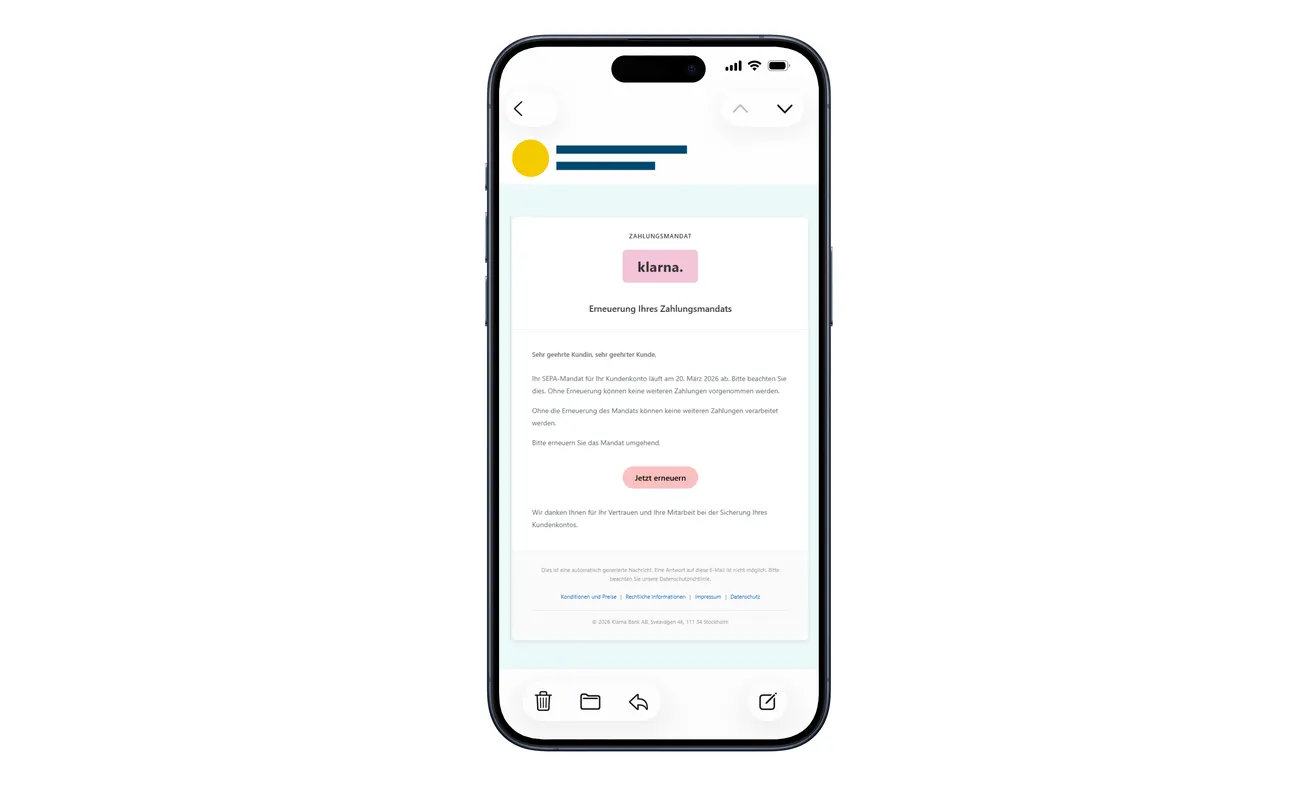
A Klarna email says your payment mandate is about to expire. There’s a pink button to renew it before your next payment runs into trouble.
It looks like a small piece of account housekeeping. Before dealing with it, look closely at what the renewal is asking you to hand over.
Overview
The expiring mandate is a made-up reason to sign in
The Klarna SEPA mandate email scam threatens a payment interruption to send you through an impostor’s login page.
Swiss police document the fraudulent renewal email and its phone-number and six-digit SMS-code requests. The code can help an attacker access the real account.
Klarna is the legitimate service being impersonated. This warning concerns the false renewal message, not ordinary purchases, genuine payment mandates, or the company itself.
A real text can arrive during a fake login
The pictured email is an original example published by the police. Its German subject refers to renewing a payment mandate, and its button says to renew now.
The most important detail comes after that button. You can receive an authentic authentication code while entering information on a fraudulent website.
The real text doesn’t authenticate the page that asked for it. Someone else may be trying to complete a genuine login using your information.
Protect account access, not just your card number
You don’t have to type a card number for this scheme to be dangerous. Think about the account access the code may authorize.
- Open Klarna independently instead of using the renewal button.
- Check whether your genuine account shows any issue needing attention.
- Keep authentication codes out of pages reached from an unexpected email.
- Tell Klarna promptly if you supplied a code, even without a visible charge.
- Handle a real payment question separately from reporting the phishing attempt.
Why This Message Can Feel More Urgent Than a Sale
The email isn’t offering a prize. It suggests that something you already rely on is about to stop working.
If you’ve used Klarna recently, you may picture an upcoming payment and want to avoid a complication. The renewal looks like a quick preventive task.
A term such as payment mandate can also sound technical enough to discourage questions. You may assume it’s a routine requirement you simply haven’t encountered before.
You can check this without understanding every payment term. Open the genuine account yourself and ask whether anything actually needs renewing.
If something really needs updating, you can ask about it there. Leaving an untrusted page doesn’t prevent you from resolving an actual account problem.
Keep that distinction in mind if the email says payments cannot continue. An allegation about your account is not the account’s own record.
The name and familiar colors help the instruction feel routine. They don’t explain who controls the website behind the button.
How the Klarna SEPA Mandate Email Scam Works
Step 1: An expiry warning creates a task you didn’t start
The message says the existing mandate will expire and needs attention. The consequence is framed as a possible interruption to payment processing.
That changes the question in your mind from whether to trust the sender to how quickly you can finish the update.
Slow the decision down before opening anything. Consider whether you’re already inside the genuine service or whether an unexpected email introduced the entire task.
Don’t use a date in the message as a deadline to bypass that check. A deadline supplied by a stranger is part of the claim.
Step 2: The renewal button opens a counterfeit sign-in
The email’s shortcut takes you away from the message and into a page that presents itself as Klarna.
The familiar layout can make this feel like ordinary authentication. But following a supplied link hasn’t established that you’re dealing with the real provider.
If you want to check the account, close that route and use the app you already know. Don’t search for another renewal button inside the questionable page.
A browser padlock isn’t a substitute for identifying the service. It concerns the connection, not whether the recipient deserves your account information.
Step 3: Your phone number starts a different process
The false login first asks for a phone number. That can seem less sensitive than a password or full bank details.
However, a number used to identify an account can help another person initiate access. Treat the next request as an authentication decision, not harmless contact confirmation.
There is a useful difference between entering your number in an app you opened yourself and supplying it through a page introduced by this email.
If you already entered it, don’t panic or complete the remaining fields to see what happens. Leave the page and check through genuine support.
Step 4: The six-digit code can complete the attacker’s login
The next form requests the SMS code. Police describe an attempt to use those details in real time against the genuine Klarna account.
You may think you’re confirming a mandate while the other side is pursuing access. The email’s explanation and the code’s actual purpose can be different.
Don’t enter a fresh code because the page says the first one failed. Nor should you approve another request to correct the supposed renewal.
Read the original authentication message and tell support which operation it described. If you don’t remember, say so rather than guessing.
An error screen doesn’t show that the information stayed private. It is enough to report what you actually submitted.
No Card Form Doesn’t Mean No Financial Risk
A traditional phishing warning often focuses on the card number, expiry date, and security code. This route aims at a different doorway.
An account can connect purchases, payment arrangements, and personal information. Protecting its access matters even if the fraudulent page never displays a card form.
That doesn’t mean every exposed code results in a purchase. It means a code disclosure deserves a prompt account check, not dismissal because your card stayed hidden.
Tell Klarna about the renewal pretext and the sign-in sequence. Those details help distinguish a suspicious message from a possible access incident.
If you notice a purchase you didn’t make, identify it separately. Record the merchant, amount, date, and order information visible in the genuine account.
Don’t argue with the fake page about canceling it. A cancellation button controlled by the same impostor isn’t the reliable place to recover the account.
Likewise, don’t assume removing a payment method settles every issue. Ask the provider about access and unfamiliar activity, not just one card setting.
If you receive more codes after leaving the page, don’t return to explain that they’re still arriving. Keep the messages for the real support team.
Note which requests you initiated and which appeared unexpectedly. That distinction helps you describe events without claiming to know who triggered every message.
Don’t assume the incident is resolved because a code has expired. Ask the provider whether any access or account activity needs further attention.
Check contact details inside the genuine account with support if necessary. A change you don’t recognize should be discussed through that established route.
If the phone number belongs to a family member, involve the actual account holder. Don’t collect their fresh codes while trying to help.
Keep legitimate purchase reminders separate from the phishing message. The goal is to protect access while continuing to manage the real account correctly.
What to Check in the Genuine Account
Start with the service you normally use. Check existing purchases and messages rather than trying to match the email’s appearance to a remembered template.
Look for an actual instruction about your payment arrangement. If one exists, follow the independently reached service’s guidance, not the emailed shortcut.
If you find nothing, you don’t need to keep testing the suspicious button. Ask genuine customer support if you remain concerned.
For a payment due soon, explain the specific purchase and due date shown in your account. Don’t substitute a phishing email’s deadline for that record.
If you manage purchases with someone else, tell them you’ve received a questionable renewal request. Agree who will check the real account so nobody repeats the fake process.
Someone helping you should not need your one-time codes. You can discuss the issue without passing authentication secrets between family members or coworkers.
If your sign-in no longer works, use the provider’s recovery channel. Don’t accept a new recovery contact introduced by the email or a stranger’s follow-up message.
Access trouble can be stressful, but repeated experiments on the counterfeit page make the situation harder to explain. Keep a simple account of the actions already taken.
Keep the Phishing Report Separate From Urgent Account Help
Klarna’s official phishing-report page accepts reports about impersonation. It directs account questions to customer service instead.
That distinction matters if a code has already been shared. Reporting the website helps flag the attack; it doesn’t necessarily secure your personal access immediately.
Contact the genuine service about your account as well. Explain which information was entered, whether another code arrived, and whether anything unfamiliar appears.
You can preserve the original email without opening its destination again. Keep the sender details and the link address if they’re already available to you.
Never include a working password or code in a public warning. Other readers don’t need those secrets to understand the scam.
If someone contacts you after the report, verify the conversation through the support route you initiated. A reference number alone doesn’t authenticate an unexpected caller.
What to Do if You Have Fallen Victim to This Scam
-
Stop the renewal interaction. Close the false page and don’t request more codes, enter replacement numbers, or continue with someone offering to finish it.
If you only received or read the email, report it as phishing through your email provider. Receipt alone doesn’t establish that your account was accessed.
-
Tell Klarna about any shared authentication code. Reach customer service through the genuine app or independently opened official website.
Describe the mandate-renewal message, the number you supplied, and the code request. Ask how to secure the account and review unfamiliar access or purchases.
Don’t wait for a bank charge before explaining the code disclosure. Account protection and payment investigation are related but separate tasks.
-
Report unknown purchases accurately. Use the real account to identify anything you didn’t authorize, and retain the details relevant to the provider’s investigation.
Don’t delete genuine order records or ignore actual account notices because a phishing message was involved. Ask support how to handle disputed entries.
-
Involve your financial institution when appropriate. Contact your bank or card issuer if you supplied payment details, approved an operation, or find an unwanted transaction.
Explain what you expected to do and what the genuine transaction record shows. Ask which protective steps, dispute procedures, and deadlines apply.
Keep the report reference. A promised refund from the fraudulent page isn’t a resolution, and no recovery outcome should be assumed in advance.
-
Protect other access information you disclosed. If the page also asked for a password, change that exposed password through the real service.
Address reused copies on other accounts. If email access was involved, inspect recovery settings and unfamiliar sessions with the email provider’s help.
-
Save the original evidence privately. Preserve the email, any existing screenshots, the destination, and a short timeline of what you entered.
Use Klarna’s official phishing route to report the impersonation. Separately retain your customer-service case number for account assistance.
Don’t return to the fake site to take better screenshots. Don’t post complete card information or authentication codes while asking for advice.
-
Check additional device exposure if it occurred. A file download or software installation deserves attention beyond the account-code incident.
Malwarebytes can help examine unwanted software. AdGuard may filter some dangerous web destinations; neither takes back an authentication code or cancels a purchase.
Keep cleanup proportional to what happened. Seeing a renewal email doesn’t, by itself, mean your device has malware.
Frequently Asked Questions
Is the Klarna mandate-renewal email a confirmed scam?
The police warning documents this fraudulent message and its false sign-in sequence. Check any separate, genuine account requirement independently through Klarna.
Can a genuine SMS arrive while I’m on a fake page?
Yes. Someone may have initiated a real authentication process. That does not make the website requesting the code trustworthy.
What if I gave only my phone number?
Stop before supplying codes. Check the real account and contact support if unexpected authentication requests or activity follow. Don’t complete the suspicious flow to investigate.
Why act if I never entered my card?
This scheme targets account access. A disclosed code can matter before any visible card charge, so explain the interaction to Klarna promptly.
Should I ignore a real upcoming payment?
No. Handle your genuine purchase through the app or verified support. Rejecting the fraudulent renewal route doesn’t cancel a legitimate obligation.
Will a phishing report automatically lock my account?
Don’t assume that. The report route and customer support serve different purposes. Request urgent account protection directly if you shared access information.
The Bottom Line
Don’t renew a supposed Klarna SEPA mandate through this email. Its false login turns an account-maintenance story into a request for your authentication code.
If you supplied that code, contact genuine Klarna support now. Report unfamiliar account activity and involve your bank when financial details or transactions were exposed.

Join the discussion
0 commentsShare your experience or ask a question about this article.
Discussion
Start the conversation
Have a question or something useful to share? Add the first comment.