

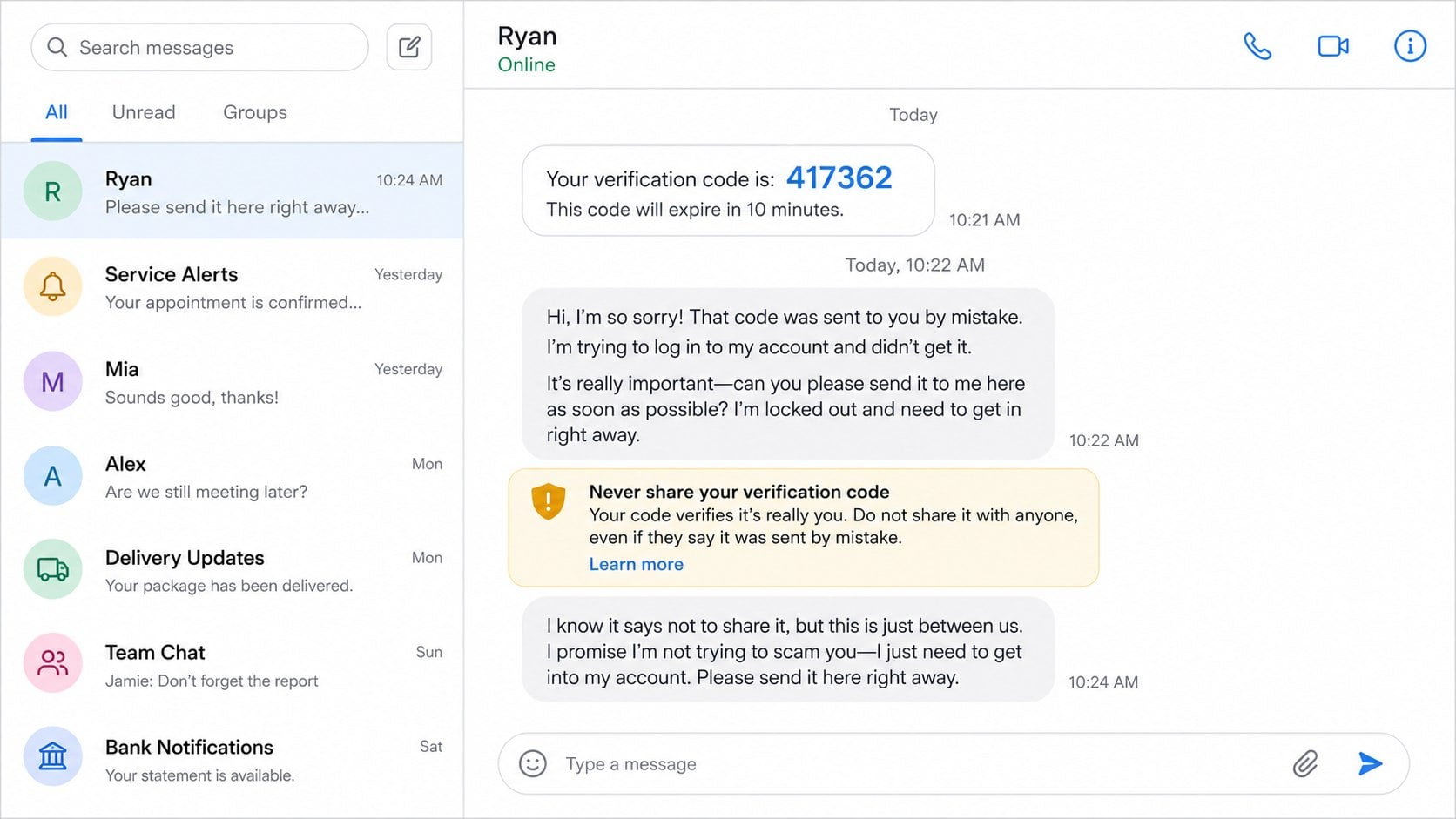
A six-digit code arrives without explanation. Seconds later, someone sends an apologetic message: they entered your number by mistake, they are locked out, and they desperately need you to copy the code back.
The request feels small because no money is mentioned. In the six-digit code scam, however, those numbers may be the final proof an attacker needs to register your WhatsApp account, reset a login, or attach a service to your phone number.
Overview
What the “sent by mistake” message says
The sender claims that a login or verification code intended for them reached you accidentally. They ask you to forward it quickly, often saying an account, appointment, purchase, or important conversation depends on it.
The message may come from a stranger or from a real contact whose account has already been compromised. A familiar name can make the request feel safe even though the person controlling the chat is a criminal.
- A six-digit SMS or call code appears unexpectedly
- Someone says they typed your number accidentally
- The request is urgent and discourages questions
- The code message itself says not to share it
- The sender asks for a screenshot or the exact numbers
What the code actually authorizes
A one-time password confirms control of a phone number, email address, or account. It may complete a new registration, password reset, device login, payment, or security change.
The code is not a harmless message that belongs to the sender. It was generated because someone submitted your details to a service. Sharing it can turn the attacker’s request into an authenticated action.
Why WhatsApp users are frequent targets
To register a WhatsApp phone number on a new device, the service verifies that number. An attacker who already knows your number may initiate registration and then use social engineering to obtain the code sent to you.
Once inside, the attacker can message your contacts, impersonate you, request emergency money, collect more codes, and study private conversations. The account becomes a trusted launch point for the next round of fraud.
How the Six-Digit Code Scam Works
Step 1: The attacker obtains your phone number
The number may be visible in a public profile, business listing, marketplace post, group chat, data breach, or contact list stolen from another victim. It may also be generated and tested automatically.
In contact-chain attacks, the criminal first hijacks one WhatsApp account and reads its address book. Friends and relatives are more likely to answer a message that appears to come from someone they know.
The attacker does not need your device at this stage. A valid number and a plausible way to contact you are enough to begin.
Step 2: A real verification request is triggered
The criminal enters your phone number into WhatsApp registration or another account recovery flow. The legitimate service then sends a code to your number by SMS or automated call.
This is why the code can look completely authentic. The service really generated it, but it did so in response to the attacker’s action, not a harmless typo.
An unexpected code is therefore a security alert. It means someone may be attempting to register, reset, or access something associated with your information.
Step 3: Social engineering reframes the alert as an accident
The attacker quickly sends an apology and says the code belongs to them. They may claim your phone numbers differ by one digit or that an address book selected the wrong contact.
Urgency keeps the target from reading the original SMS carefully. The scammer may say they need the code before it expires, a work account is locked, or a family emergency is unfolding.
If challenged, they can become friendly, embarrassed, or impatient. Those emotions are part of the persuasion and do not change what the code authorizes.
Step 4: The victim shares the six digits
The target types the code into chat, reads it on a call, or sends a screenshot. The attacker immediately enters it into the waiting verification page.
Warnings inside the SMS may explicitly say not to share the code. Scammers anticipate that language and insist that this situation is an innocent exception.
A legitimate employee, friend, buyer, seller, or support agent never needs you to override a security warning. The code is meant only for the person completing the action on your account.
Step 5: The attacker registers or changes the account
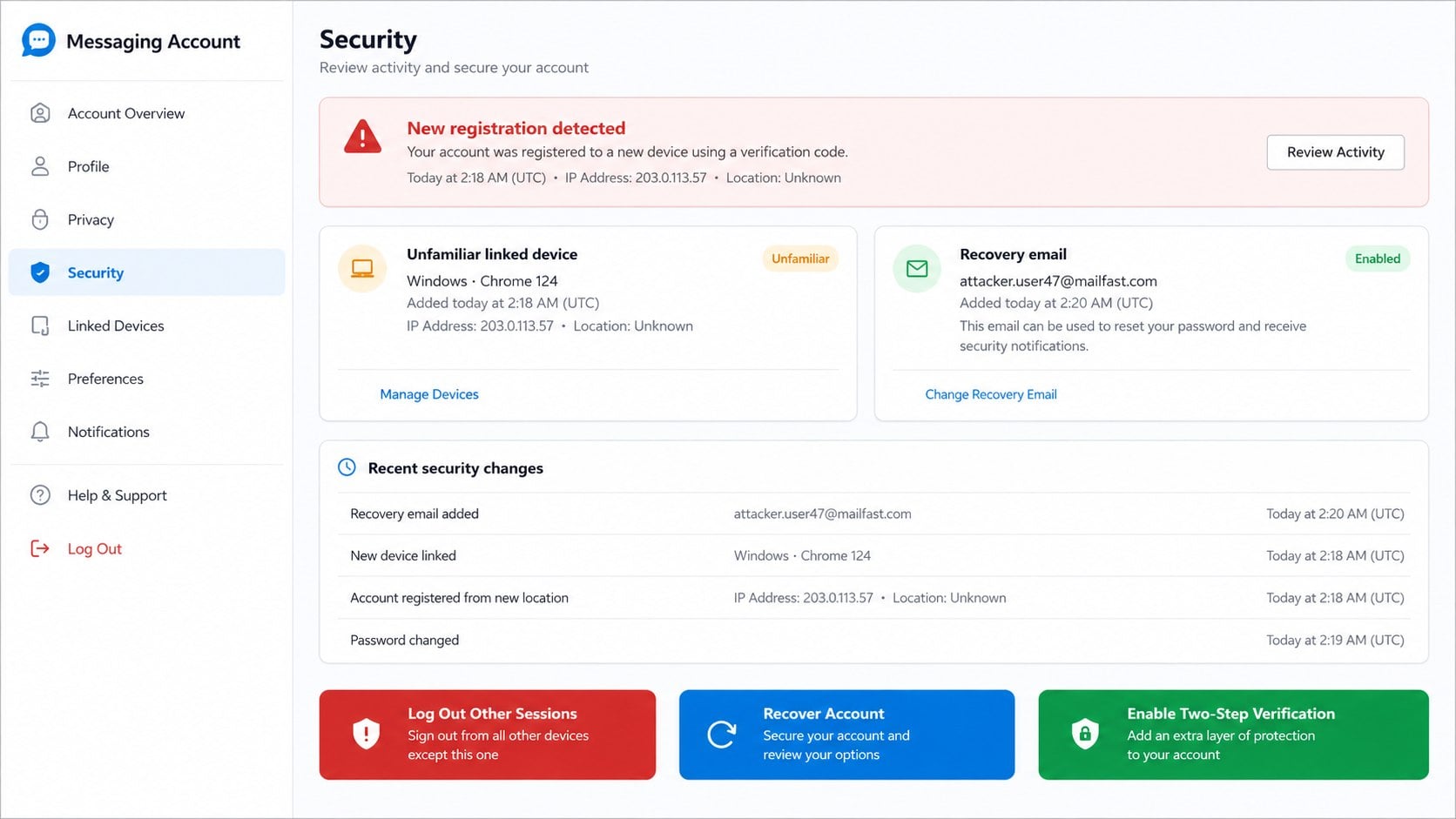
For a WhatsApp takeover, successful registration can remove the victim’s access. The attacker may then enable two-step verification, change recovery details, or link additional sessions to make recovery harder.
Other services can be abused differently. A code might approve a password reset, create a Google Voice number linked to the victim’s phone, confirm a payment, or authorize a new device.
The exact damage depends on the sender shown in the original code message. Read that message to identify which service needs immediate attention.
Step 6: The compromised identity targets trusted contacts
The criminal reads recent conversations and contacts family, coworkers, customers, or group members. Requests are tailored with names and context that make the impersonation believable.
A common follow-up claims there is an emergency and asks for an instant transfer. Another repeats the code scam, allowing the attacker to capture more accounts through the same trusted network.
The criminal may also collect personal information from private chats, download shared documents, or use the profile to support romance, investment, job, and marketplace scams.
Common Variations of the Verification Code Scam
A message from a compromised friend
The sender looks familiar because the account is real. The writing may feel slightly unusual, or the person may refuse a voice call. Contact them through another known channel before believing any security-related request.
Do not assume that a correct profile picture proves who is typing. Account takeover preserves the victim’s name, image, groups, and conversation history.
The Google Voice linking trick
A scammer responding to a marketplace or lost-pet post may say they need to verify that you are genuine. They send a Google-generated code and ask you to repeat it.
The code can be used to link your number to a Google Voice registration. The resulting number may then help the criminal conduct other scams while hiding behind a service associated with your phone.
The fake customer or delivery verification
A buyer claims a code is required before payment, or a supposed courier says it confirms delivery. Real transaction details should appear inside the official platform without handing a personal login code to another user.
Scammers create a plausible business reason because people are accustomed to receiving delivery and payment notifications. The original SMS wording reveals the real action.
The support-agent request
A caller impersonating bank, mobile carrier, or technical support staff says the code verifies your identity or cancels fraud. In reality, the code may approve the exact change the caller claims to prevent.
Hang up and contact the organization using its official app, statement, or known website. Do not use a callback number contained in the unexpected message.
Company, Address, and Fulfillment Checks
Identify the service that sent the code
Read the entire SMS or email. It should name the service and may describe the attempted action, location, device, amount, or expiration time.
Open that service through its official app or a bookmarked address. Do not follow links included in the conversation with the person requesting the code.
Verify the sender through another channel
If a known contact made the request, call a previously saved number or speak in person. Ask something an account thief would not learn from the visible conversation.
A refusal to talk, a claim that the microphone is broken, or continued urgency increases the risk. Silence is safer than sending the code while verification is incomplete.
Review account devices and recovery details
Check active sessions, linked devices, recovery email, recovery number, two-step verification, and recent security changes. Remove anything you do not recognize.
Repeat this review for the email account connected to the service. Control of email can let an attacker reset multiple accounts after the first takeover.
Confirm what action was completed
Look for registration alerts, password changes, payment confirmations, number-port requests, or new-account messages around the time the code arrived. The evidence determines which provider must act.
Record exact times and save the original code message, but never post an unexpired code publicly. Support may need transaction or session references, not the secret itself.
What to Do if You Have Fallen Victim to This Scam
- Re-register WhatsApp immediately. Sign in with your phone number and enter the new six-digit code sent to you. WhatsApp’s compromised-account guidance says this logs out the other person after successful registration.
- Handle an unknown two-step PIN carefully. If the attacker enabled a PIN, use official recovery options. WhatsApp may impose a waiting period when you cannot provide it.
- Remove unfamiliar linked devices. Review linked sessions and log out anything you do not recognize. Check recovery email and security settings.
- Warn your contacts. Tell friends, family, coworkers, customers, and important groups not to trust recent requests for money, codes, links, or personal information.
- Secure the connected email account. Change its password, enable multi-factor authentication, remove unknown forwarding rules, and sign out suspicious sessions.
- Contact the named service. If the code was not from WhatsApp, report the unauthorized action to that provider through its official support channel.
- Protect financial accounts. If the code approved a payment or bank change, contact the institution’s fraud team immediately and review recent activity.
- Check the device for malicious software. If you also installed an app or opened a file, remove it and complete a Malwarebytes scan.
- Reduce further phishing exposure. Remove abusive browser notifications. AdGuard can help block malicious ads, phishing sites, and redirect chains used in follow-up attacks.
- Report impersonation and losses. Report the compromised account within the platform, notify local contacts, and file a fraud report at ReportFraud.ftc.gov when money or identity data was taken.
How to Prevent Another Code Takeover
Enable two-step verification or a passkey when the service supports it. A second protection layer can prevent a stolen SMS code from being enough by itself.
Use a unique password for email and review its recovery settings regularly. Your inbox is often the control center for resets, so securing it protects many other accounts.
Limit public exposure of your phone number and be cautious about joining large open groups. A number does not need to be secret, but unnecessary publication gives attackers more opportunities.
Most importantly, treat every unexpected authentication code as private. You do not need to solve the sender’s supposed problem. If the request is genuine, they can correct their own number and request a new code.
Ask mobile carriers about account PINs and number-port protection. A messaging takeover and a SIM-swap attempt are different attacks, but stronger carrier controls reduce the chance that criminals can redirect future SMS codes.
Hide message previews on the lock screen if other people can access your device. A one-time code displayed without unlocking the phone may be enough to defeat an otherwise strong password.
Teach family members one simple rule: security codes never travel backward to another person. This works across messaging apps, banks, email providers, marketplaces, and delivery services without requiring anyone to recognize every scam script.
For business accounts, document an internal verification process and require a voice or in-person check for security changes. One compromised employee chat should not be able to authorize access to shared systems.
Review that process after staff changes, new devices, and account migrations.
Frequently Asked Questions
Why did I receive a real code if the message is a scam?
The criminal triggered a genuine verification flow using your phone number. The code is real, but the explanation asking you to share it is false.
Can someone hack WhatsApp with only my phone number?
The number lets them start registration, but they still need verification and may face additional protections. That is why criminals pressure the owner to reveal the code.
What if the request came from someone I know?
Their account may already be compromised. Contact the person through a different, previously known channel and do not send the code.
Should I reply to an unexpected verification message?
No reply is needed. Do not share the code, click links, or call numbers in the follow-up request. Review the named service directly.
Can I recover WhatsApp after sharing the code?
Often, yes. Re-register your number through the official app and follow WhatsApp’s compromised-account guidance. Recovery can take longer if the attacker enabled two-step verification.
Does a six-digit code always mean WhatsApp?
No. Banks, email providers, social networks, payment apps, and many other services use one-time codes. The original message identifies what the code protects.
The Bottom Line
The six-digit code scam turns a legitimate security control into a social engineering target. The attacker starts the login, then invents an innocent mistake so the real account owner completes it.
Never share an unexpected verification code, even with a familiar contact or convincing support caller. Open the named service independently, secure the account, and assume urgency is part of the attack until proven otherwise.

Join the discussion
0 commentsShare your experience or ask a question about this article.
Discussion
Start the conversation
Have a question or something useful to share? Add the first comment.