


The message may come from a stranger, a new number claiming to be your child, or even the real account of someone you know. It asks for one small favor before the conversation suddenly becomes urgent.
WhatsApp scams succeed because the request arrives inside a familiar conversation. The dangerous part is often not the first message, but the trust built during the next few minutes.
Overview
A WhatsApp scam alert can begin with almost any story
There is no single WhatsApp scam script. Criminals use the platform for family impersonation, fake jobs, task scams, romance fraud, investment schemes, marketplace deposits, bogus bills, account verification requests, and support impersonation.
The opening message is usually simple enough to answer. It might say “Hi,” ask whether you are available, claim the sender changed numbers, or mention a package, job, payment, or mutual friend.
Replying is not the same as losing money, but it tells the sender the number is active and opens the door to a more personalized script.
The account itself may be real while the person using it is not
A message from a saved contact can still be fraudulent. The person’s WhatsApp account may have been taken over through a stolen registration code, QR device-linking trick, SIM swap, or social engineering.
The attacker can study recent conversations, group memberships, profile names, and relationships. That context makes an urgent request for money or a verification code feel believable.
Common warning signs include:
- A known person writes from a new number and avoids a voice call.
- A stranger offers easy work, guaranteed returns, or a quick commission.
- The sender asks for a six-digit code, PIN, QR scan, or device link.
- A payment must be made immediately by transfer, gift card, or crypto.
- The conversation moves between several platforms and payment services.
- A contact’s tone, vocabulary, or personal details feel slightly wrong.
- The sender insists that secrecy is necessary.
Encryption protects messages in transit, not decisions made under pressure
WhatsApp uses end-to-end encryption for personal messages and calls. That security prevents outsiders from casually reading a conversation, but it cannot make the person at the other end honest.
Scammers do not need to break encryption when they can persuade a victim to send money, reveal a code, scan a QR image, or install an application voluntarily.
WhatsApp warns that suspicious messages often contain unusual links, requests for personal information, payment demands, grammatical errors, or promises that appear too good to be true.
The Most Common WhatsApp Scam Variations
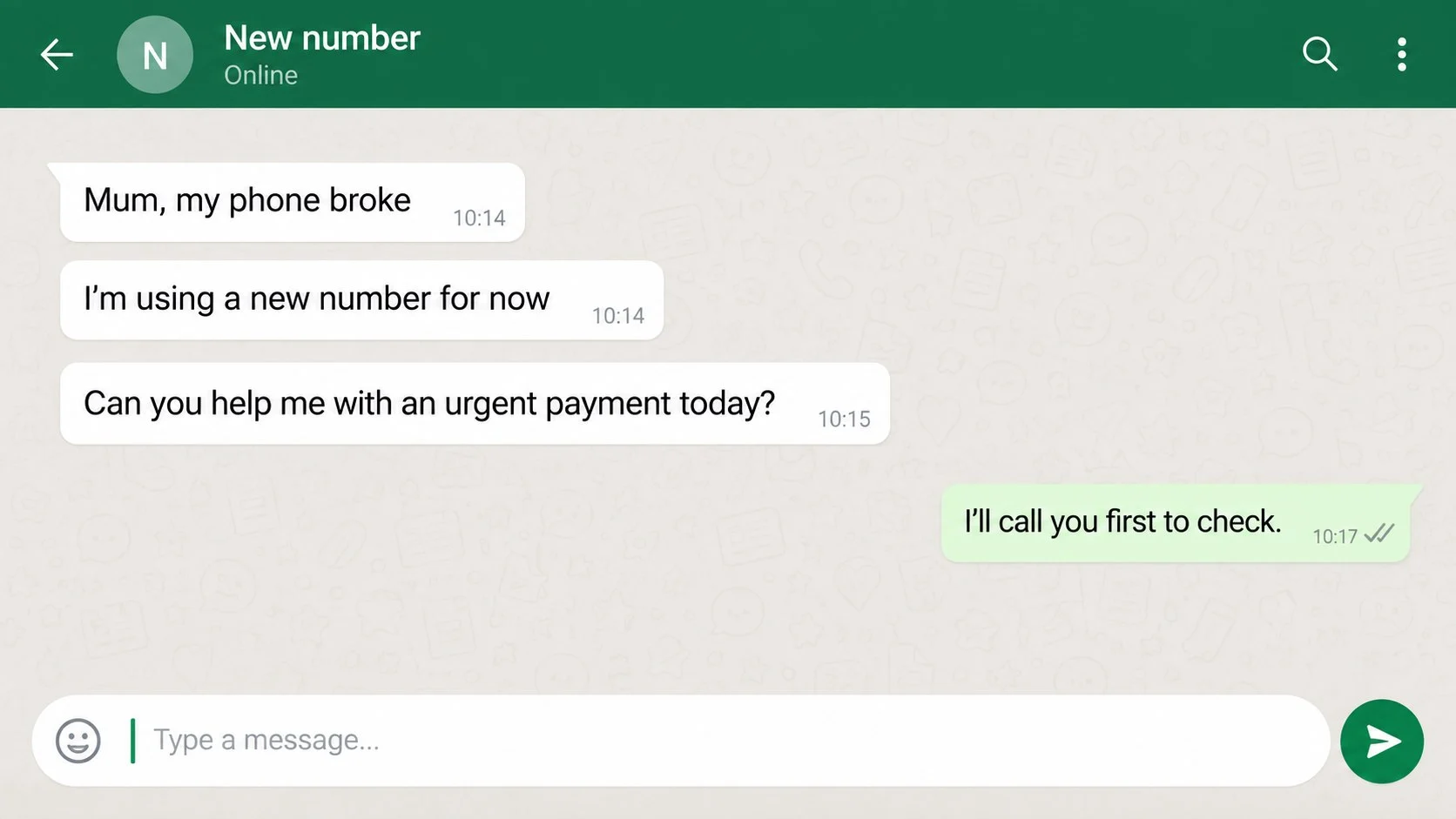
Family impersonation scams claim a son, daughter, parent, or friend has a damaged phone and urgently needs help paying a bill. The new number explains why the message does not come from the saved contact.
Job and task scams offer high pay for simple online work. Small early payments build confidence, then the victim must deposit increasing amounts to unlock commissions or complete a negative-balance task.
Investment scams begin with friendly advice, a group invitation, or a supposed expert. A fake trading dashboard displays profit, but withdrawals require taxes, security deposits, or additional investment.
Marketplace scams use fake buyers, couriers, and payment notices. The victim is sent to a phishing page or asked to pay insurance before receiving money for an item.
How WhatsApp Accounts Get Taken Over
A criminal enters the victim’s phone number into the WhatsApp registration process. WhatsApp sends a verification code to the real owner, and the criminal invents a reason the owner should share it.
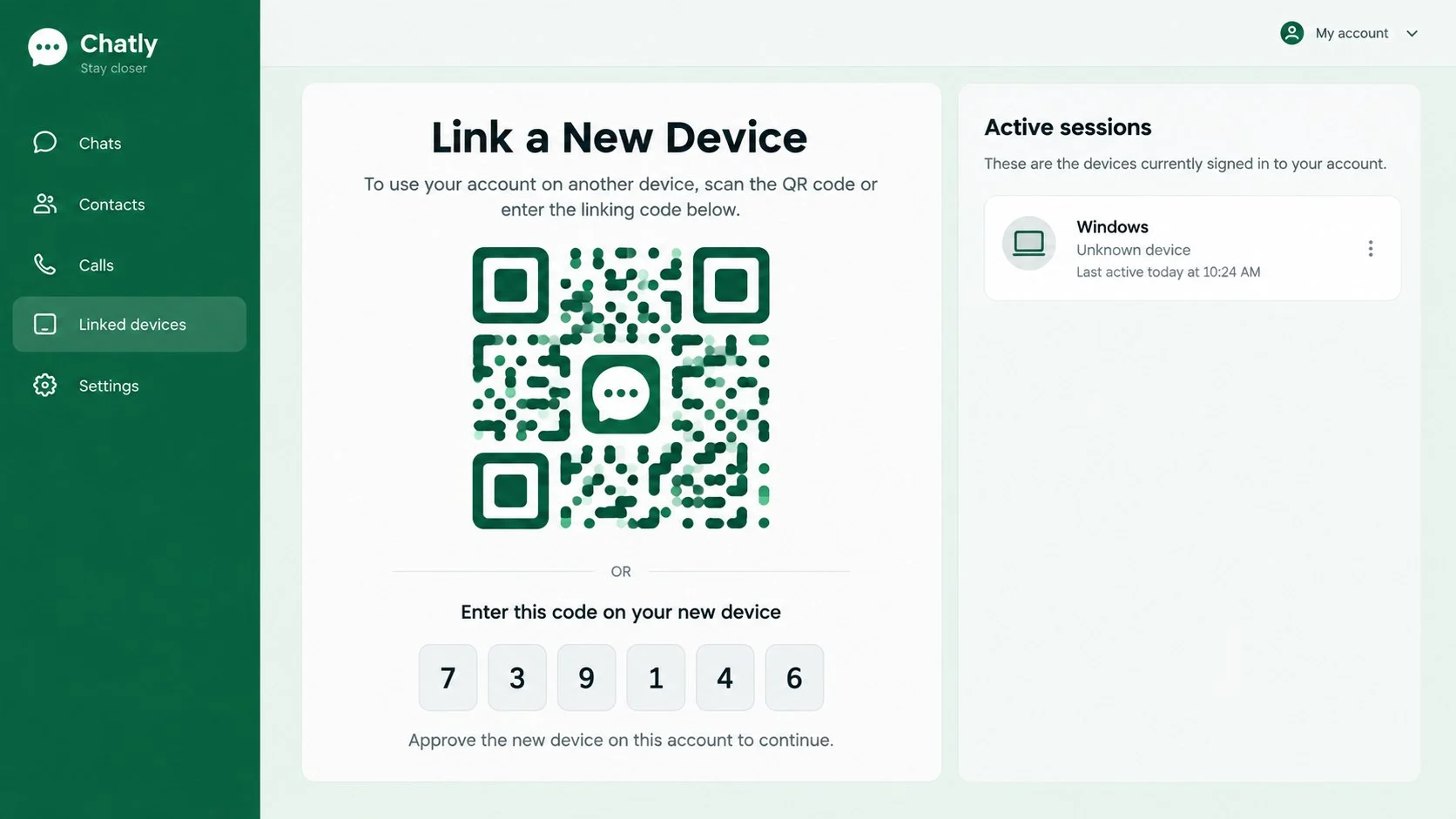
Another method uses device linking. The victim is told to scan a QR code for a prize, verification, customer service, or group invitation. The code actually links the attacker’s browser or computer to the victim’s account.
Meta has added warnings for suspicious linking requests, but the user can still approve one. A code or QR prompt that appears during an unexpected conversation should be canceled.
How the WhatsApp Scam Works
Step 1: The scammer starts a low-pressure conversation
The first message is designed to earn a response, not money. It may use a common name, pretend to be a recruiter, mention a wrong number, or ask whether the recipient remembers them.
A compromised friend’s account is even more effective because the sender already appears in the correct chat history.
Step 2: A believable identity and story are established
The scammer copies profile photos, company names, family details, or public social media information. For job scams, the account may use a recruiter title and stolen corporate images.
For impersonation scams, the attacker explains any inconsistency by claiming the phone is broken, the camera is unavailable, or the situation is too urgent for a call.
Step 3: The request begins with something small
The target may be asked to click a link, vote in a contest, receive a code, join a group, complete a simple task, or send a modest amount. A small commitment makes the next request easier.
Some task scams even send a tiny payment. That money is bait intended to prove the fake job is real.
Step 4: Credentials, device access, or money are captured
A phishing page requests a login and card details. A six-digit code allows account registration. A QR scan links the attacker’s device. A transfer, gift card, or crypto payment moves money beyond normal card protections.
The exact method changes according to what the victim is most willing to provide.
Step 5: The compromised identity is used against other people
After taking an account, the criminal contacts family members, friends, coworkers, and group participants. Requests from a known account produce far more replies than messages from a random number.
The scam can spread quickly because each new victim supplies another trusted identity.
Step 6: The payment demand escalates or recovery is sold
A first transfer is followed by a second emergency, tax, withdrawal fee, account release charge, or negative task balance. The story changes whenever the victim hesitates.
After the loss, another account may offer recovery for an upfront fee. That person may be the original scammer using a different identity.
Identity, Contact, and Payment Checks
A display name and profile photo do not verify the sender
Anyone can copy a public photo and choose a familiar name. Even a known account may be under someone else’s control.
Verify an urgent request through a separate channel. Call the person’s saved number, contact another family member, or ask a question only the real person could answer.
A business identity must exist outside the chat
Recruiters, brokers, couriers, and support agents should be verifiable through the organization’s official website and independently found contact information.
A business badge or polished catalog is not enough. Search the phone number, legal company name, domain, and physical address before sharing documents or sending money.
Support should not disappear when verification begins
Scammers become defensive when a victim asks to call an official number, speak by video, receive a written contract, or verify the offer with a bank.
A legitimate person may understand caution. Someone who demands secrecy and immediate compliance is trying to prevent independent checking.
The payment route reveals who has control
Transfers to personal accounts, crypto wallets, gift cards, and changing recipients are difficult to reconcile with a professional service. A payment description should match the company and transaction.
Never send a fee to receive wages, unlock a refund, activate a prize, or release investment profit. Those are common advance-fee patterns.
How to Check a Suspicious WhatsApp Message
Move the verification outside WhatsApp. If a family member asks for money from a new number, call a number you already had for that person or contact someone else who can confirm where they are.
For a business, search for its official website and contact it through the published number or support page. Do not rely on a link, email address, or phone number supplied inside the suspicious chat.
A few direct questions can reveal a copied identity, but avoid sharing new private details in the process. Ask something the real person would know that is not visible on social media, or arrange a live voice conversation.
Check the request itself as carefully as the identity. A genuine contact whose account has been hijacked may still appear under the correct saved name and profile photo.
Warning signs commonly include:
- An unexpected message from a new number claiming the old phone broke.
- A request to send a six-digit code, scan a QR code, or approve a device.
- A job that requires deposits before earnings can be withdrawn.
- An investment group promising dependable or guaranteed profits.
- A payment to an account that does not belong to the person in the story.
- Pressure to keep the request secret or avoid a normal phone call.
- A shortened or lookalike link that opens a sign-in or payment page.
- A supposed support agent asking for money to restore or verify an account.
WhatsApp provides guidance for recognizing, blocking, and reporting suspicious contacts. Preserve any information needed for a bank dispute or official complaint before removing the conversation.
Stop the conversation long enough to verify the story. Do not use the phone number, link, or website supplied in the message.
Look for a changed security code notice, unfamiliar linked device, new profile details, or a request that conflicts with the contact’s normal behavior. A voice note is better than text, but even voice can be imitated, so a direct call to a known number is safer.
Examine every web address carefully. WhatsApp may flag unusual characters, but the absence of a warning does not make a destination trustworthy.
What to Do if You Have Fallen Victim to This Scam
- End the exchange and freeze payments. Do not send a final fee to complete a task, release a withdrawal, cancel a transfer, or recover the account. Block the suspicious sender after preserving evidence.
- Recover a compromised WhatsApp account. Re-register the phone number in the official WhatsApp app using the six-digit code sent to you. This can disconnect another person who registered the number.
- Review linked devices. Open WhatsApp settings, inspect every linked device, and log out anything you do not recognize. Remove suspicious passkeys or security changes.
- Enable stronger account protection. Turn on two-step verification, use a unique PIN or password, add a recovery email you control, and protect the phone account against unauthorized SIM changes.
- Call the bank or payment provider. Report the transfer as fraud, ask whether it can be recalled, replace exposed cards, and monitor for follow-up charges. Speed matters with bank transfers and payment apps.
- Secure connected accounts. Change passwords for email, banking, social media, and any service entered on a phishing page. Sign out unknown sessions and enable multifactor authentication.
- Check the device. If you installed an app, opened an attachment, or granted accessibility or remote-control permissions, run a full Malwarebytes scan. It can help find credential stealers, malicious installers, and unwanted remote tools.
- Block dangerous pages. AdGuard can reduce exposure to known phishing domains, malicious redirects, and scam advertising. It cannot judge every conversation, so continue verifying people independently.
- Warn your contacts. Tell family, friends, and group members that the account or number was compromised. Ask them to ignore money requests, links, codes, and new-number messages sent in your name.
- Report the fraud. Use WhatsApp’s in-app report function and report financial loss to the relevant national fraud authority. Keep chat exports, usernames, numbers, wallet addresses, and transaction details.
- Watch for recovery scammers. Ignore unsolicited investigators, hackers, or agents who guarantee they can retrieve money for a fee. Legitimate recovery is never guaranteed.
Frequently Asked Questions
Can a scammer read all my old WhatsApp messages?
Not automatically. WhatsApp says past conversations are stored on your device, but linked devices, cloud backups, forwarded content, and continued account access can still expose sensitive information.
What does an unexpected WhatsApp verification code mean?
Someone may have entered your number by mistake or may be trying to register your account. Never share the code and review your security settings.
Can scanning a QR code give someone access to my account?
Yes, if the QR code is a device-linking request. Scan account QR codes only from the official linked-devices screen and only for a device you control.
Is a message safe because it came from a saved contact?
No. The account may be compromised. Verify unusual payment or code requests by calling the person through a number you already know.
Does replying to a scam message infect my phone?
A plain reply normally does not install malware, but it confirms the number is active and invites more manipulation. Avoid links, downloads, codes, and payments.
Will WhatsApp support ask me to pay to unban an account?
No. WhatsApp says the app is free and someone requesting payment to use or unban an account is likely seeking money or personal information.
The Bottom Line
A WhatsApp scam alert should make you pause, not panic. The sender may know a name, use a real account, or tell a convincing story, but none of those details replaces independent verification.
Never share a six-digit registration code, approve an unexpected device link, or send urgent money without speaking to the real person through another channel.
If the conversation resists a simple call or independent check, end it. A genuine friend, employer, bank, or support team will not need you to abandon basic security.

Join the discussion
0 commentsShare your experience or ask a question about this article.
Discussion
Start the conversation
Have a question or something useful to share? Add the first comment.