

You search for your insurer, click a result that looks right, and type the password you have used for years. The page even asks for a verification code, just like a real account.
Nothing about that sequence feels dramatic. The problem is that a copy of an ordinary login page can be enough to put a policy account and payment details in someone else’s hands.
Overview
Fake State Farm contact and login pages target routine account tasks
Customers look up State Farm to pay a bill, check a claim, update a vehicle, or reach an agent. The company’s security guidance warns that fraudulent websites and phone numbers can appear when people search for its contact information.
The impostor may start with a search result, a message, or a call. The common thread is a detour: the customer thinks they are using State Farm’s service, while the destination is controlled by someone who wants credentials, card details, or a verification code.
A convincing screen is not proof of an official connection
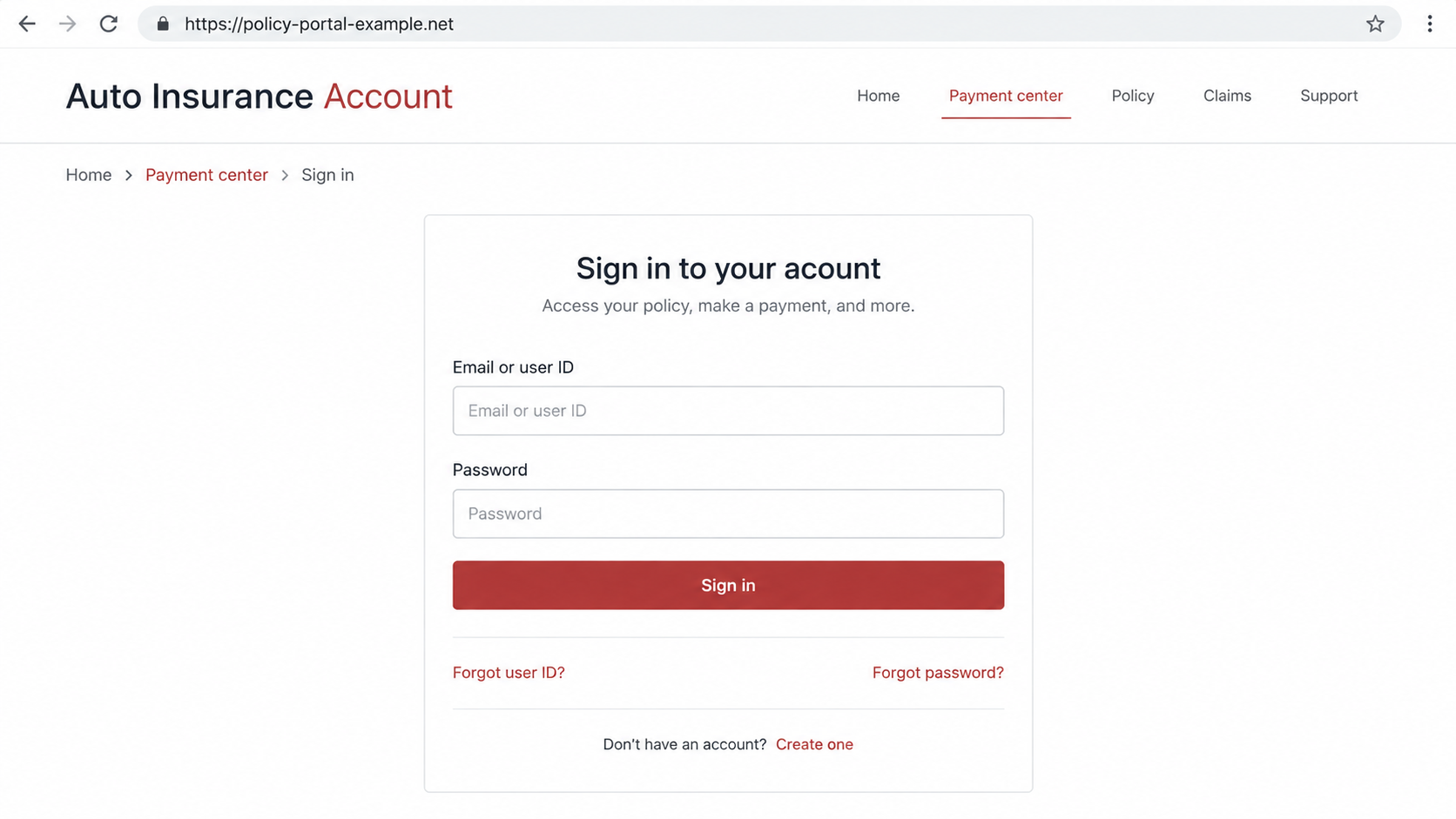
A fake login can copy the broad shape of an insurance portal: account fields, payment tabs, a claims menu, and a “forgot password” link. None of these features identifies the site owner. The full web address and the route you took to get there matter more than the familiar layout.
State Farm also warns about bogus support numbers. A caller who claims to be an agent can make the same requests as a fake page, sometimes while directing the customer to a site that appears to confirm the story.
The data can unlock more than one session
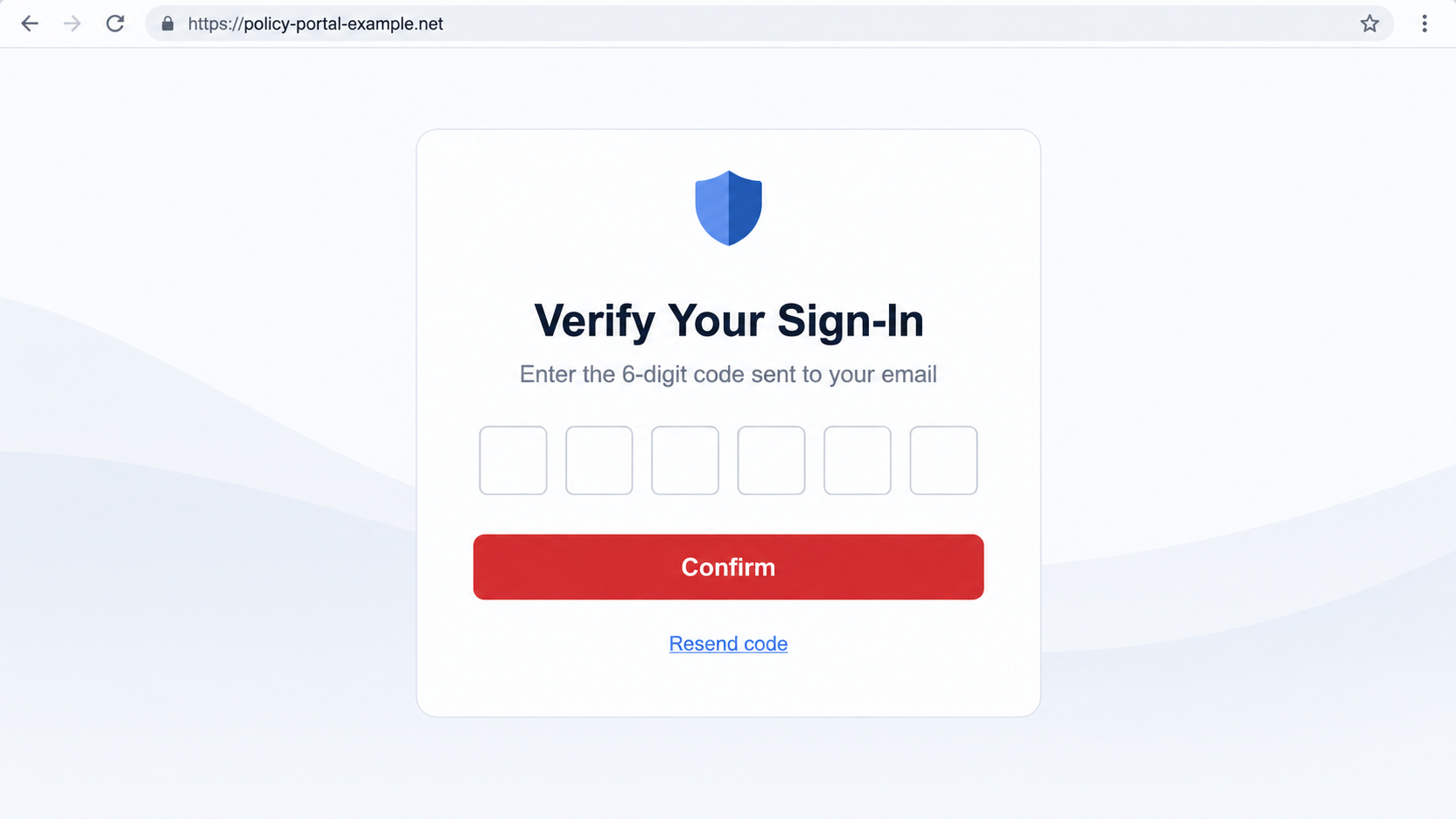
Username and password capture is the obvious risk, but a real-time impostor may also request a one-time code. State Farm uses temporary verification codes for account access. If a criminal asks you to read one aloud or type it into a fake site, they may be trying to complete a genuine sign-in elsewhere.
The main warning signs are practical rather than visual:
- The address is not the official State Farm site or a route verified there.
- The “support agent” number came from an ad, pop-up, or unsolicited message.
- A payment requires a code that arrived for account sign-in.
- The caller pressures you not to contact your usual agent.
- You are asked to repeat payments after a supposed error.
Why This Scam Can Feel Like Normal Customer Service
Insurance accounts are not visited every day. A person who signs in only when a bill arrives may not remember the exact design of the current login page. That is a reasonable human limitation, and scammers build around it.
They can buy or imitate search placements, send account notices, and create pages that use the right words. Some customers are already anxious about a missed payment or an open claim, so a result promising quick help can seem more valuable than an extra verification step.
The phone route is just as persuasive. A number displayed beside a company name in search results feels like public contact information. Yet State Farm says fraudulent numbers and sites have been used to impersonate its representatives and collect sensitive information during fake payment transactions.
The strongest independent check is simple: stop using the result or message that started the contact. Type statefarm.com yourself, open the official app, or call your known agent from policy documents. That clean route prevents an attacker from defining both the problem and the solution.
How the State Farm Login Scam Works
Step 1: A routine need sends the customer looking for help
The journey often begins with a normal task: making a payment, viewing a policy, finding a claim update, or checking a bill. The victim is not hunting for a suspicious offer. They are trying to solve an ordinary account problem.
That context matters. A login box or payment form seems expected, so the attacker does not have to invent a wild story. A fake page placed at the right moment can exploit the customer’s existing intent.
Step 2: A search result, email, or call redirects the journey
A sponsored result or deceptive listing may use State Farm’s name and a short description that promises customer support. An email can supply a “review policy” link. A caller can claim a payment failed and offer to walk the customer through a correction.
These are possible entry points, not evidence that every result or call is fraudulent. The red flag is an unverified route that asks you to enter sensitive information or call a number you did not obtain from State Farm itself.
Step 3: The impostor site copies the useful parts of a real portal
The copy may show a sign-in panel, account tabs, and a payment center. A privacy notice or padlock can add polish without proving ownership. A padlock only tells you that traffic to that particular domain is encrypted; it does not tell you whether the domain belongs to your insurer.
Long addresses can be especially deceptive. The brand name may appear early in a subdomain, while the actual registered domain appears later. Read the whole address before entering a password, and never rely on the words painted into a page header.
Step 4: The form captures credentials and asks for a second factor
After the user enters a username and password, the page may say additional verification is required. If the criminal immediately tests the stolen credentials on the real account, an authentic one-time code can arrive by text or email. The fake page then asks for that code.
This is why a real security message can appear in the middle of a scam. The code may genuinely come from State Farm, but it was triggered by the attacker attempting to log in. Never type a code into a page whose origin you have not verified.
Step 5: A fake payment flow collects card or banking details
Some variants move straight to a “payment due” page. A caller may ask for a card number, account information, or a code supposedly needed to process the payment. State Farm says impostors can collect payment details and one-time passwords during fake transactions.
A payment confirmation on the impostor page may not correspond to a real policy payment. The customer can be charged by the scammer while the genuine bill remains outstanding. That can create late fees or coverage problems if the real account is not checked promptly.
Step 6: Repeated errors keep the customer paying or disclosing
If the first charge is described as declined or reversed, the fake agent may request another card or tell the customer to retry. Each attempt can reveal more information. An attacker may also call later, using details from the first interaction to sound like a familiar representative.
Do not continue testing the page. Contact State Farm independently and check your actual account balance, policy status, and payment history. The real account record, not a screenshot or verbal reassurance from the stranger, determines whether a payment posted.
Identity and Account Verification Checks
The company name in a page is easy to copy
State Farm’s name, colors, and product descriptions are public. A fake website can reproduce them without any business relationship. Verify through the official site or your agent, especially if the page arrived through an ad, shortened URL, or unsolicited message.
The full web address identifies the destination
Read the domain from right to left and be wary of added words, swapped letters, and unfamiliar endings. State Farm’s public guidance recommends typing its own website directly. If a page claims to be an official portal but is not reachable from a verified State Farm path, do not supply credentials.
The support number needs an independent source
A phone number in a search ad or on the same suspicious page cannot validate that page. Find your local agent’s number on existing policy paperwork or the official site. The number you call should not be supplied by the party you are trying to verify.
The requested code must match what you initiated
A one-time code is for the action described in the authentic text or email. If you did not start a real login, a code request is a reason to stop and secure the account. No caller needs you to disclose a sign-in code to “fix” a routine payment.
What to Check Before Paying a Policy Bill Online
Open a fresh browser tab and type State Farm’s address yourself. Sign in from there, or use the official mobile app already installed. If a page from a message says a bill is overdue, compare that claim with the balance shown in your real account.
Look at the payment amount, due date, policy number, and recent transactions. A fraudster may know your name or policy type from data leaks or public records, but they should not be allowed to substitute their own form for your insurer’s payment process.
If you have to call, use a previously trusted number. Explain that you saw a possible impersonation page and ask whether the bill or claim issue is genuine. A real agent can investigate without needing you to read back your account sign-in code.
Be cautious about “helpful” directions to install remote-access software. Paying insurance or checking a policy should not require a stranger to control your computer. End the interaction and contact the company through a clean route instead.
What to Do if You Have Fallen Victim to This Scam
- Leave the fake site and stop speaking with its operator. Note the URL, phone number, time, and information requested. Save a screenshot and any message that led you there. Do not make another payment to correct an alleged error.
- Reset the affected password through State Farm’s genuine site. Type the official address yourself or use the app. Choose a unique password, review account activity, and tell State Farm if a one-time code was also entered or read aloud. Change reused passwords on other services as well.
- Call your verified State Farm agent. Ask whether the policy is active, whether a real payment posted, and whether any unauthorized contact or change appears on the account. The company’s security page also accepts suspicious email at abuse@statefarm.com.
- Notify your bank or card issuer if payment information was supplied. Use the official banking app or number on your card. Explain that a fake insurance site may have your details, ask about blocking or replacing the card, and dispute any unauthorized charges. Check whether the actual insurance bill still needs paying.
- Secure your email and phone account if a code was shared. Review recent sign-ins and forwarding rules in your email account. If you see account takeover or repeated verification messages, contact the affected provider. A code is often useful only briefly, but the password and other collected information can remain useful to the attacker.
- Scan the device if a file or remote-support tool was installed. Disconnect from the remote session, remove the software, and run Malwarebytes or another trusted security scan. AdGuard can help block malicious ads and known deceptive pages in future browsing, but it cannot undo data already entered.
- Report identity misuse and avoid paid recovery offers. Use IdentityTheft.gov if personal identifiers were exposed. Report the attempt to the FTC. Ignore anyone who contacts you later claiming they can restore an account or refund a charge for an upfront fee.
Frequently Asked Questions
Can a State Farm search result lead to a fake site?
Yes. State Farm warns that fraudulent websites and phone numbers can appear when customers search for contact information. A prominent placement or familiar name does not establish who operates the destination.
Does a padlock mean the login page is safe?
No. HTTPS encrypts the connection to that site. It does not certify that the site belongs to State Farm or that the form is legitimate.
Why did I receive a real verification code after using a fake page?
The attacker may have tried your stolen password on the real account and triggered its normal verification process. Do not enter or share the code. Reset the password from the official site.
What if the fake payment page said my card was declined?
Do not retry there. Check the card account for pending charges and contact the issuer. Then check your genuine State Farm account to see whether a real policy payment is still due.
Can a fake representative call from a familiar-looking number?
Caller ID can be spoofed, and State Farm warns about bogus contact numbers. Hang up and call a number obtained independently from your policy documents or the company’s website.
Should I tell my agent if I entered only my email address?
Yes, especially if the page also asked for a password or code. Your agent can help confirm whether the contact was genuine, while you can watch for tailored follow-up messages to that address.
The Bottom Line
The State Farm login scam works because it interrupts a normal task at the moment a customer expects to sign in or pay. The attacker does not need an extraordinary promise, only a credible detour.
Use State Farm’s official site, app, or your known agent as the starting point. If you already entered details, secure the account and payment method promptly, then confirm the real status of your policy.

Join the discussion
0 commentsShare your experience or ask a question about this article.
Discussion
Start the conversation
Have a question or something useful to share? Add the first comment.