

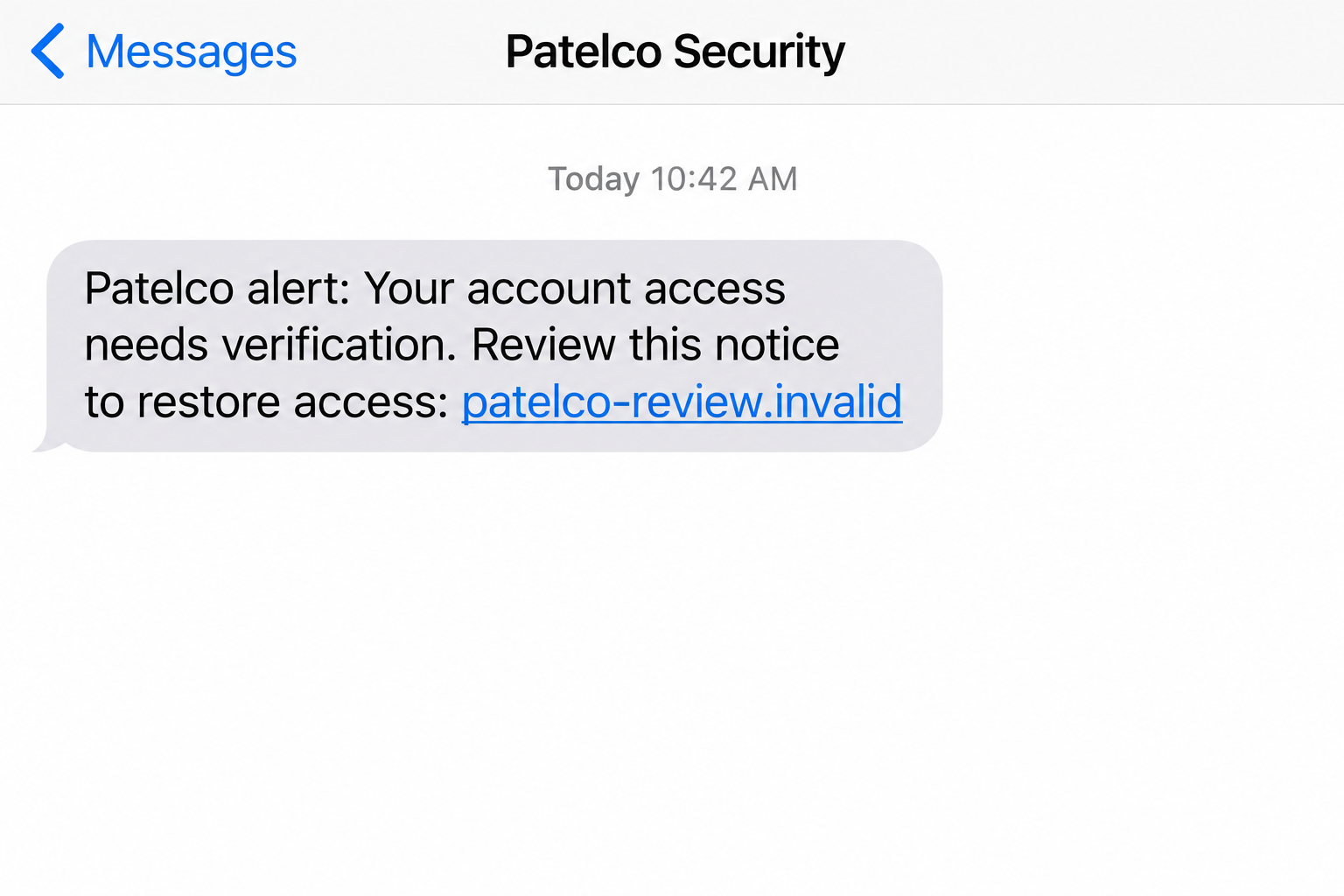
A possible Patelco scam text is unsettling because it resembles something useful: a banking alert that you really should not miss.
The difficult part is deciding which conversation to trust. A few small choices can keep an alarming message from taking over your afternoon.
Overview
The institution is real; the unsolicited verification route may not be
The Patelco scam text uses the credit union’s identity to make a fraudulent account-verification request believable. It is an impersonation attempt, not a verdict against Patelco.
Historical reports from October 2023 described these messages. Patelco’s own warning explains how criminals imitate financial institutions through texts, lookalike websites, and spoofed phone calls.
The useful lesson goes beyond a single sender or wording. A text can claim to protect your account while directing you toward the person threatening it.
Depending on the message, the lure may involve suspicious activity, disabled access, or a requested review. Do not treat those claims as confirmed account events.
Your safest next move is to consult Patelco independently. That lets you investigate a potentially genuine problem without accepting the sender’s instructions.
Why legitimate alerts make this impersonation confusing
Patelco does send genuine card-fraud alerts. Advice that labels every banking text fraudulent would therefore create a different problem: missed legitimate warnings.
Its financial-institution spoofing guidance distinguishes genuine transaction texts from impersonation, including messages sent from email addresses.
The historical guidance says genuine card-fraud texts use a five- or six-digit short code. That is useful context, but not universal proof of authenticity.
- Check the type of request, not just the displayed sender.
- Do not surrender a password or login code to an unexpected caller.
- Open your established banking app instead of following a verification link.
- Confirm unusual instructions with Patelco through a separately obtained contact.
- Distinguish a transaction question from a demand for full account access.
A familiar number or message thread can lower your guard. It should not override an instruction that would expose your credentials or authorize an unfamiliar payment.
What this guide can establish
The official warning corroborates Patelco impersonation and the danger of copied login pages or fraudulent verification requests. It does not identify one fixed criminal operator.
Specific links and scripts can change. The historical reports do not establish that every domain mentioned years ago remains active under the same ownership.
The sequence below explains the deceptive route and possible escalation. Not every recipient encounters a follow-up call, code request, or attempted money transfer.
That distinction matters when responding. Tell the real institution what actually happened, rather than assuming every possible harm has already occurred.
How the Patelco Scam Text Works
Step 1: A security-themed message catches you off guard
The text introduces a banking concern during an otherwise ordinary moment. You do not have time to review a statement, but you can quickly read a message.
Account access and suspicious-transaction wording both encourage immediate attention. The sender relies on your wish to prevent a loss, not necessarily on greed.
A message can feel timely even when it was sent indiscriminately. Perhaps you recently used your card, changed a password, or experienced an unrelated login problem.
Those coincidences can supply a story the sender never knew. Resist filling in missing details on the scammer’s behalf.
The first question is whether the message demands an action you can verify independently. Its emotional impact is not evidence of a real security incident.
If you are not a Patelco member, that mismatch is a straightforward warning. Members still need to check the request rather than assume it belongs to them.
Step 2: The text presents verification as the way to stay safe
A link or reply instruction can appear to offer the shortest path out of trouble. The scam makes following that path feel protective.
This is the central reversal: information normally guarded from strangers becomes something the sender says you must provide to prevent fraud.
A real transaction alert and a full-login request are not interchangeable. Review what the sender actually wants before responding.
Be especially cautious if the instruction expands from reviewing activity to entering banking credentials, revealing a code, or arranging a transfer.
Do not argue with the message or ask its sender to prove itself. That continues the interaction inside a channel you already have reason to distrust.
Instead, leave the conversation and open the app you already use. A genuine concern can still be addressed there or through verified support.
Step 3: A copied page or convincing caller reinforces the story
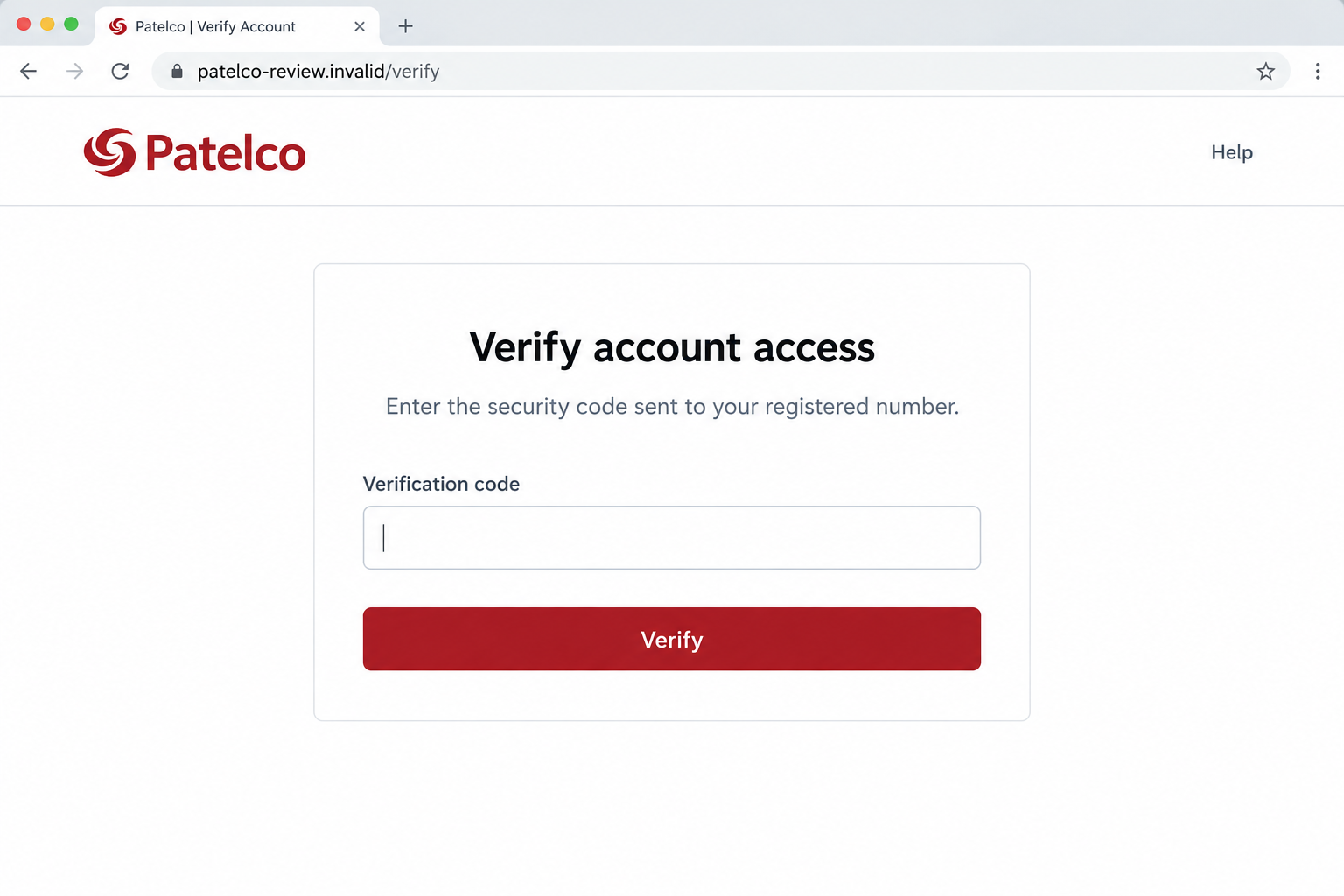
A linked page may resemble Patelco’s login experience. Its layout can look familiar while its address belongs to someone else.
Patelco’s warning describes lookalike domains, illustrating why a nearly correct spelling is not good enough. Branding and ownership are different questions.
For example, patelco.example.invalid is controlled under the fictional example.invalid hostname, not by the institution. A familiar word at the front cannot change that relationship.
Some impersonation attempts can also involve a caller claiming to handle the alert. A spoofed display may make that call appear to come from a trusted number.
You should not expect every text to include this stage. If a call follows, however, it needs independent verification rather than borrowed trust from the message.
An unsolicited caller’s knowledge of the earlier text does not settle the issue. It may simply mean both contacts belong to the same deceptive conversation.
Step 4: The request reaches information that can unlock real access
A fake login page may capture credentials. A caller may then frame an additional code request as a final security check.
That code could correspond to a genuine operation the criminal is attempting. Do not confuse the real delivery system with the legitimacy of the requester.
Look at what the actual code message says it is for. If it describes logging in, changing access, or approving a transaction, that context matters.
Patelco warns against disclosing sensitive access information in unsolicited interactions. A caller saying the code is needed to stop fraud does not create an exception.
Likewise, entering a password into a copied page does not merely identify you. It may give someone a credential they can try against the real service.
Stop at the first sensitive request you cannot verify. You do not need to complete every screen to establish that the route is unsafe.
Step 5: The fake security conversation can conceal the real problem
The sender may reassure you that the account is protected. Such reassurance can delay the independent call that would expose the impersonation.
Possible account misuse depends on what was disclosed or approved. A text alone does not prove that an attacker can access your funds.
Conversely, an unchanged balance does not prove that exposed credentials are safe. Ask Patelco to review access and suspicious activity after a disclosure.
If someone asks you to move funds for safekeeping, stop. A stranger’s proposed destination should not become trusted simply because the conversation began with a security alert.
A demand for secrecy or continued conversation is another reason to disconnect. You are allowed to seek independent advice before any banking action.
The scam loses its strongest advantage when the sender no longer controls your next step. Use your own contact route and let the institution assess the situation.
How to Handle a Patelco Alert Without Ignoring Real Fraud
Verify the account issue separately
Open Patelco’s established app or website from a trusted bookmark. Check available transaction information and account messages without using the unexpected text.
If the alleged charge is absent, that is useful information, but pending activity can complicate the picture. Ask support when uncertainty remains.
Call the number on your card or Patelco’s official site. Explain that you received an alert and want to confirm the requested action.
If there is a genuine transaction concern, handle it through that authenticated conversation. A real issue does not require trusting the suspicious message’s link.
Make sense of sender clues without overrelying on them
An email address sending an SMS-style fraud alert deserves particular scrutiny under Patelco’s published guidance. A conventional-looking number is not an automatic clearance.
Short codes describe a messaging route, not the contents of every request. Your independent check remains the stronger safeguard.
Keep screenshots showing the sender and timestamp. Those details can help the institution evaluate the message even when they cannot authenticate it alone.
Do not test a suspicious number by calling it. You may reach an impersonator who is prepared to answer every question convincingly.
What to Do If You Have Fallen Victim to This Scam
Start with the facts of your interaction. Writing them down can make the recovery conversation clearer and prevent uncertainty from turning into panic.
- End the suspicious conversation.
Leave the page, stop replying, and disconnect from any related caller. Ignore instructions to remain connected while the account is supposedly being secured.
A message you received but did not act on is different from information you entered. Do not assume a loss solely because the sender knew Patelco’s name.
- Reach Patelco through independently verified support.
Use the number on your card or the official Patelco Fraud Center. Request assistance with suspected account exposure.
Explain whether you supplied a password, security code, card information, or payment approval. Mention the time of each action as accurately as possible.
Ask what can be restricted or reviewed while the institution investigates. Save the case reference and the instructions you receive.
- Secure the exposed login and connected email.
Replace your banking password through the official service from a trusted device. If you cannot get in, let verified support guide the access-recovery process.
Check whether the same password protected other accounts. Change reused credentials and review the email account that receives banking notifications.
Ask about unauthorized contact changes or sessions. Do not assume a password replacement addresses every potential change by itself.
- Review transactions and report concerns immediately.
Identify unfamiliar transfers, recipients, card use, or pending activity. Bring the details to Patelco instead of attempting to reverse a transaction through the sender.
Tell support if you personally approved something because of deception. That distinction helps them understand the event and direct you to the appropriate review.
Request written confirmation when available and keep following the institution’s process. No article can promise reimbursement for an individual case.
- Preserve the text and related contact details.
Save the sender, message content, timestamp, and any call information. If the destination is already visible, record it without revisiting the page.
A screenshot should not include an active password, full card number, or one-time code. Share sensitive evidence only through a trusted reporting route.
You can also report the attempt through the FTC’s fraud reporting service. Reporting does not substitute for immediate banking protection.
- Review device exposure when relevant.
A plain credential form is not proof of installed malware. Additional downloads, software installation, or browser permissions call for a separate device review.
Malwarebytes can help scan for supported threats if you installed or downloaded something suspicious. Obtain it independently, not through the alleged fraud representative.
AdGuard’s applicable filtering features may help reduce exposure to some malicious pages or advertisements. Neither product authenticates every message or repairs banking transactions.
- Plan for follow-up attempts.
A later caller might offer account recovery, quote the earlier incident, or claim another urgent charge. Verify new contacts independently even if their story sounds informed.
If identity details were exposed, consult IdentityTheft.gov and consider its recommended protective steps. Match the response to the information actually disclosed.
Ask someone you trust to help keep records if needed. A calm second set of eyes can make pressure tactics much easier to resist.
A Useful Rule for Future Fraud Notifications
Decide in advance where you will check account warnings. Having a trusted app and saved support number removes the need to improvise under pressure.
Keep useful alerts enabled, but establish a boundary around access secrets. An unexpected security conversation should not receive a banking password or authentication code.
When a message is ambiguous, do not ask whether it looks professional enough. Ask whether you can confirm the requested action without engaging its sender.
That habit works even when an attacker writes fluently, copies the institution’s colors, and knows something about your account. Independent verification does not depend on spotting typos.
It also keeps legitimate alerts useful. You can check a real problem promptly while refusing the unfamiliar route that an impersonator wants you to follow.
Frequently Asked Questions
Are all Patelco fraud text messages scams?
No. Patelco uses genuine transaction alerts. Suspicious requests should be verified through the institution, especially when they seek access credentials or unexpected account actions.
Can a fake message show a familiar sender?
Yes, displayed identities can be misleading. A familiar label or number should not override a request for sensitive information in an unsolicited interaction.
Should I share a verification code to stop fraud?
Not with an unexpected caller or unverified page. Check the operation described in the real code message and consult Patelco independently.
What if I clicked but entered nothing?
Close the page and avoid further interaction. Check for downloads or permissions you granted, but do not assume that clicking alone proves account theft.
Can I tell whether a Patelco link is genuine from its logo?
No. A copied logo says nothing about ownership. Use your trusted banking app or independently opened official website instead of judging the design.
What should I tell Patelco after responding?
Describe the exact information and approvals you provided, the timing, and any suspicious activity. Keep the original text available for a private reporting process.
The Bottom Line
The Patelco scam text exploits a sensible instinct: responding to a possible account threat. The unsafe part is letting an unexpected sender direct the response.
Verify with Patelco through your own trusted route. If you shared credentials or approved an action, act promptly rather than waiting for visible financial damage.

Join the discussion
0 commentsShare your experience or ask a question about this article.
Discussion
Start the conversation
Have a question or something useful to share? Add the first comment.