


A message about your Nelnet account arrives when you already have enough bills to think about. It hints at a problem and offers one convenient link.
Nelnet scam emails and texts can look ordinary at first. The important question isn’t how official the notice appears, but where it sends you next.
Overview
A real servicer’s name can appear in a false account notice
Nelnet is a legitimate federal student loan servicer. Fraudulent messages use that familiar name to make requests for account information or payment seem routine.
The trap may be a supposed payment issue, urgent verification, or offer of repayment assistance. The request matters more than the borrowed branding.
A fraudulent link can collect credentials through a page that resembles a servicing portal. A callback can move the same conversation to an impostor.
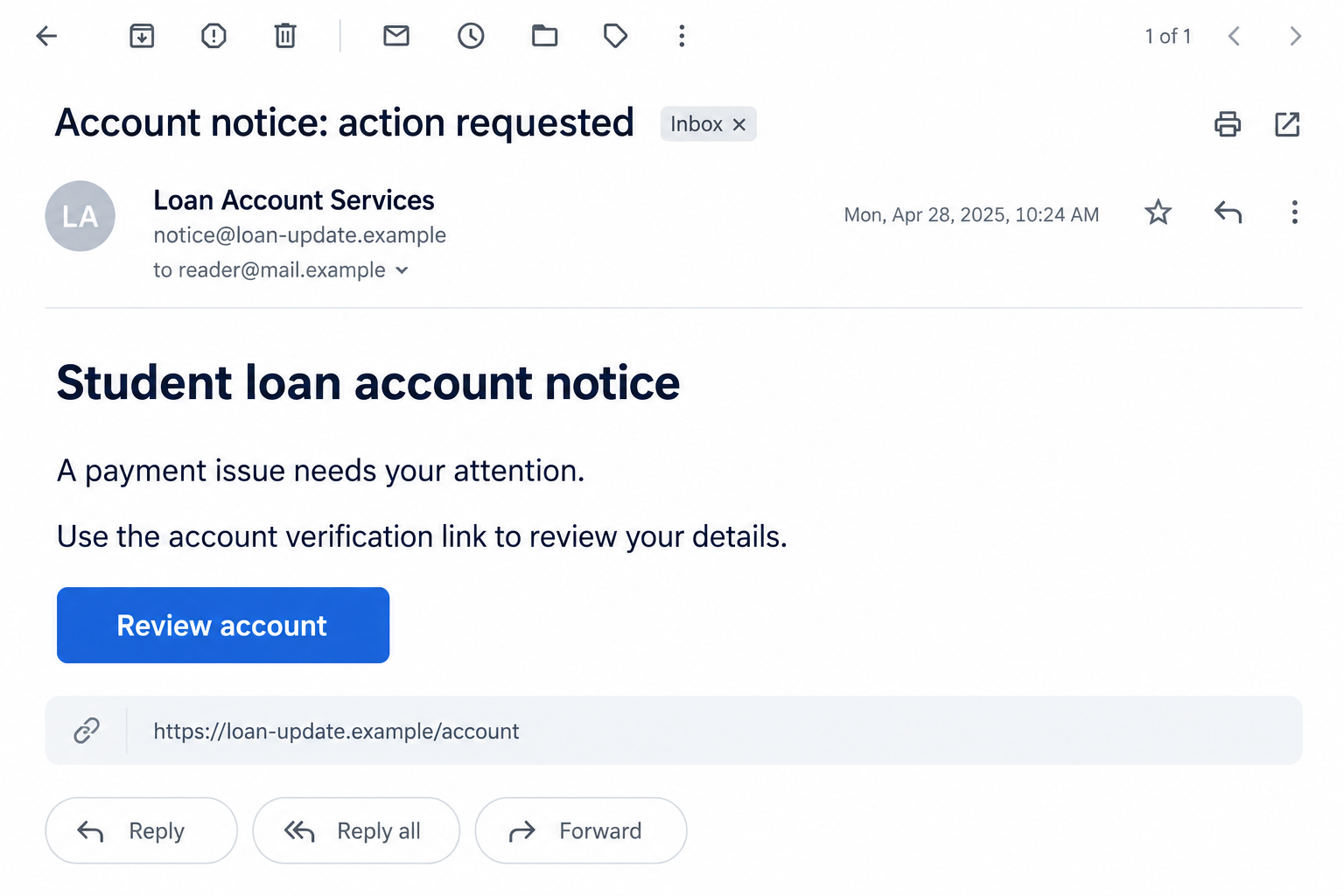
The illustrative email shows a generic account-review lure, not a captured Nelnet notice. Actual subjects, sender names, and destinations can differ.
Official help and real loan obligations still exist
Federal Student Aid identifies Nelnet as an official servicer and warns about impersonators seeking passwords or charging for help available free.
A loan payment is different from a fee to obtain repayment assistance. Don’t stop genuine payments merely because a suspicious message mentions your servicer.
The Department of Education and its partners won’t ask you to disclose your StudentAid.gov password. You may sign in yourself through a verified portal.
Likewise, a legitimate account notice can require attention. Verify the issue independently rather than dismissing every Nelnet-themed communication as fraudulent.
The strongest warning signs concern the requested action
Be especially cautious when a message asks you to bypass the account you normally use or gives a stranger control of the process.
- A request to disclose your StudentAid.gov password or a sign-in code.
- An upfront charge supposedly required to obtain a federal repayment option.
- A payment destination that doesn’t match your independently verified loan account.
- A demand to resolve an account problem before checking with the servicer.
- A login page whose address differs from the official portal.
- Instructions to stop normal payments and send money to the person contacting you.
Perfect spelling doesn’t cancel these concerns. A professional-looking message can still direct you to someone who has no authority over your loan.
Check Which Account the Message Is Actually About
StudentAid.gov and a servicing account are not interchangeable
Your StudentAid.gov account provides federal aid information and identifies your servicer. A servicing account is used for the loans that company handles.
Keep track of which login a page requests. A stranger asking for your federal aid password isn’t simply helping you check a payment.
You shouldn’t need to dictate a password to someone on the phone. Signing in yourself through an independently reached official page is a different action.
If the suspicious form requested several accounts, treat each entered password as exposed. Changing only the email password wouldn’t secure a separately disclosed servicing login.
A familiar name doesn’t confirm the current servicing relationship
Loan servicing can change. An old bookmark or a company name you remember isn’t enough to resolve a new payment warning.
Federal Student Aid’s servicer information provides an independent route to confirm the organization and contact details relevant to your federal loans.
Use your current account records to establish who services the loan. Don’t let the unexpected email decide that relationship for you.
If Nelnet isn’t your servicer, the mismatch deserves investigation. It doesn’t automatically prove a new debt is yours, or that an unfamiliar message is harmless.
How the Nelnet Scam Emails and Texts Work
Step 1: An account notice arrives outside your normal check-in
The approach begins in your inbox or messages. It presents a loan-related matter as something that requires attention before your next routine account visit.
Using a familiar servicer’s name gives the request context. You may already expect billing notices, repayment updates, or reminders, so it doesn’t immediately seem unusual.
A sender can copy a logo or display name without being the company. Expand the sender details if your app allows it, but don’t rely on appearance alone.
Some people receive irrelevant notices. If the message describes a loan relationship you don’t recognize, use official records to investigate rather than supplying information to correct it.
Avoid replying with your full account number, Social Security number, or payment history. You don’t need to prove your identity to an unverified sender.
You can set the notice aside and open your usual account separately. There’s no need to follow its link just to find out whether you owe anything.
Keep the message available for reference. You can compare its alleged problem with the account without replying to the sender.
Step 2: Concern about the loan pushes you toward the offered fix
A payment warning can make you worry about your credit or repayment status. A claim of special assistance can create the opposite emotion: relief.
The specific hook varies, but both can make immediate action seem sensible. The message supplies a link or contact as the convenient next step.
A deadline in a message should be checked against genuine records. Don’t assume that clicking is necessary to preserve options or resolve a late payment.
Real consequences depend on the actual loan, account status, and applicable rules. An email’s urgent wording doesn’t establish that a penalty has occurred.
If you’re worried, contact the current servicer independently. Ask about the particular notice or account issue without first calling the number supplied by the message.
If a payment really is late, the servicer can explain it from your account records. The suspicious sender doesn’t need to stay involved.
Step 3: The message moves you to a counterfeit page or impostor
A link may open a servicing-style page asking you to sign in. A telephone request can instead connect you with someone claiming to manage the account.
Both routes depend on the same assumption: that the person or page is connected to Nelnet because the original message used its name.
Read the actual destination before entering information. The word Nelnet in a page title, address path, or logo doesn’t establish who operates the website.
For a fictional example, nelnet-account.example resembles a service-related address but isn’t an official portal. A secure connection would not make that operator Nelnet.
A password manager that won’t recognize the page can provide a useful warning. Don’t override the mismatch simply because the page says verification is urgent.
Step 4: Credentials or an off-channel payment become the real target
The false process may request account credentials, identifying information, or money. What it collects depends on the particular version, not a single universal script.
Giving away a federal aid password can expose more than the ability to view a balance. An intruder may change account information or interfere with account-related actions.
An upfront assistance fee is another warning. Official help with federal repayment plans is available without paying an outside company to unlock it.
Some independent services charge for administrative assistance. That doesn’t automatically establish fraud, but they mustn’t misrepresent themselves as your servicer or promise powers they don’t have.
Don’t redirect loan payments to a person who contacted you unexpectedly. Check the destination against the payment process inside your verified servicing account.
Also stop if someone asks you to approve an unfamiliar sign-in. The stated purpose of a code or prompt must match the action you initiated.
Step 5: The false notice leaves a problem separate from the loan
You may discover an unwanted charge, changed account details, or continuing calls. Alternatively, you may realize the problem before sharing anything.
The fraudulent message doesn’t erase the underlying loan. If a real payment was due, that obligation needs separate attention through the genuine servicer.
Check whether the intruder changed contact information or whether a third party received authorization. A password reset may not reverse an already completed account action.
If you paid for supposed assistance, save the agreement and charges. Determine whether the issue involves an unauthorized payment, misleading service, or both.
Don’t accept a follow-up demand to pay another fee for release, cancellation, or a refund. A second payment can deepen the loss.
Move recovery back to independently verified accounts and contacts. The person who supplied the false notice shouldn’t direct the repair.
A Safer Way to Resolve a Loan Warning
Verify the account before deciding what the message means
Open StudentAid.gov yourself and identify the current servicer. Then reach that servicer using the official contact information, not a sponsored result resembling customer support.
Look at actual payments, account notices, and contact details. Preserve any discrepancy instead of assuming a familiar-looking balance confirms the entire email.
If the account shows a genuine issue, ask the servicer what needs correcting. Keep that conversation separate from the questionable sender.
You don’t have to decide from the inbox whether every detail is accurate. Independent access gives you a better basis for the decision.
Don’t confuse an account change with promised forgiveness
A changed balance, repayment option, or status message requires context. It isn’t automatically confirmation of a stranger’s promise that your debt disappeared.
Ask for the explanation through official account support. Avoid acting on guaranteed outcomes or transferring payments because a caller says new rules apply.
Keep copies of genuine correspondence and payment records. That helps you explain the account accurately if you need to dispute an unwanted change.
For current program eligibility, rely on Federal Student Aid and your servicer. This scam warning isn’t a prediction about which relief programs you qualify for.
What to Do if You Have Fallen Victim to This Scam
-
Stop the exchange and save the notice. Keep the message, sender details, destination, callback number, and any receipts without opening attachments again.
Note exactly which information you entered and which account it belonged to. A precise exposure list is more useful than assuming every account was compromised.
If you only received the message, report or delete it after preserving what you need. Receipt alone doesn’t establish account theft.
-
Secure exposed logins through genuine account recovery. Use a trusted device and independently reached StudentAid.gov or servicer portal to change the relevant password.
Inspect contact and recovery information for unauthorized changes. Strengthen sign-in protection using the options the account actually offers.
Replace a reused password on other affected accounts too. Don’t send a new password to anyone who contacted you about the notice.
-
Contact the actual loan servicer. Explain the exposure and ask whether payments, contact details, applications, or third-party authorizations changed.
If you signed an authorization agreement, ask how to revoke it through the servicer. Keep confirmation and check whether further correction is needed.
Don’t cancel legitimate loan payments without discussing the genuine account. Removing a scammer’s access isn’t the same as stopping repayment.
-
Contact the payment provider if money or card information was supplied. Describe the message and whether you approved a fee or discovered unauthorized charges.
Ask about blocking further payments, replacing exposed payment details, and disputing the charge. Include any recurring authorization or cancellation request.
FTC recovery guidance explains that the provider depends on how you paid. Act promptly, but don’t assume a refund is guaranteed.
-
Address identity exposure when sensitive documents or numbers were shared. Keep a record of what went out, including any Social Security information.
Use IdentityTheft.gov for an appropriate identity-theft recovery plan when your information has been misused or you need protective guidance.
A suspicious email alone doesn’t mean someone opened credit in your name. Match monitoring and protective measures to the information actually disclosed.
-
Check software only if the interaction involved installation or remote access. End any active remote session and avoid sensitive activity on that device until checked.
A Malwarebytes scan can help investigate unwanted software. AdGuard may reduce malicious advertising exposure, but neither tool repairs a student loan account or reverses fees.
Clicking a page without entering information or installing anything doesn’t by itself prove malware infection. Still check for unexpected downloads or new permissions.
-
Report the attempt through the relevant official route. Federal Student Aid’s scam guidance links to its complaint process for account and servicing concerns.
For a U.S. financial scam, submit the message and payment details through ReportFraud.ftc.gov. Keep the reference for your records.
Don’t publish full identity numbers or account credentials when warning others. Share the suspicious request, not the private data it sought.
-
Follow up on both problems. Confirm that account protection and unwanted payment disputes are progressing, while checking any genuine repayment issue separately.
Keep a simple timeline of contacts, case references, and requested corrections. That makes subsequent conversations easier when different organizations handle different parts.
Ignore unsolicited promises to recover fees or erase the debt for another payment. Return to your verified servicer whenever the next request seems uncertain.
Frequently Asked Questions
Is Nelnet itself a scam?
No. Nelnet is a legitimate federal loan servicer. The scam concerns messages or callers impersonating it and directing you toward unsafe disclosure or payment.
Can a genuine loan notice require action?
Yes. Check your actual servicing account and contact the servicer independently. Don’t ignore a real obligation merely because a separate message looks suspicious.
Should I give a caller my StudentAid.gov password?
No. Federal Student Aid says it and its partners won’t ask for that password. Sign in yourself through the official process rather than handing credentials over.
What if Nelnet is no longer my servicer?
Use your StudentAid.gov records to identify the current servicer. An unexpected company name should trigger verification, not a payment to the sender.
Does a fee mean my loan payment was processed?
Not necessarily. A charge for supposed assistance is separate from a loan payment. Verify where the money went and whether your real account reflects it.
Is changing the password enough after giving authorization?
It may not be. Ask the servicer to review unwanted account actions and third-party authorizations. Secure credentials and correct existing permissions separately.
The Bottom Line
Don’t follow Nelnet scam emails and texts into unverified login pages or payments. Confirm the current servicer and resolve any real issue through your account.
If you already shared information, secure the exposed login, ask the servicer to check account changes, and contact the payment provider about any money sent.

Join the discussion
0 commentsShare your experience or ask a question about this article.
Discussion
Start the conversation
Have a question or something useful to share? Add the first comment.