

Your boss appears in Microsoft Teams with a quick question. There’s a confidential matter to handle, and apparently you’re the person who can help.
The name is familiar. The timing sounds plausible. Before you answer, there’s one part of that conversation worth checking.
Overview
A familiar executive name arrives through an unfamiliar account
The Microsoft Teams CEO impersonation scam puts a false executive inside a real workplace conversation. The target is asked to trust authority, not inspect software.
Belgium’s cybersecurity service has warned about criminals posing as executives through Teams. Requests can concern money, confidential documents, or account access.
The warning describes carefully chosen names and company details. Knowing who chairs a meeting doesn’t make someone a participant in it.
Microsoft Teams is legitimate. The fraud is the person pretending to be your CEO, board member, or another senior decision-maker.
The pressure is to make one exception
A normal approval process suddenly becomes an obstacle. You’re told the matter is urgent, sensitive, or too important to discuss with the usual colleagues.
That request deserves more scrutiny, not less. A genuine executive should be able to confirm an instruction outside an unexpected conversation.
Watch for combinations like these:
- A senior person’s name attached to a new or external account.
- An unscheduled meeting followed by financial or confidential instructions.
- A request to avoid calling, involving a manager, or using normal approvals.
- New payment information supplied only through the chat.
- Questions about credentials or files the sender wouldn’t ordinarily need.
The real app doesn’t authenticate the person
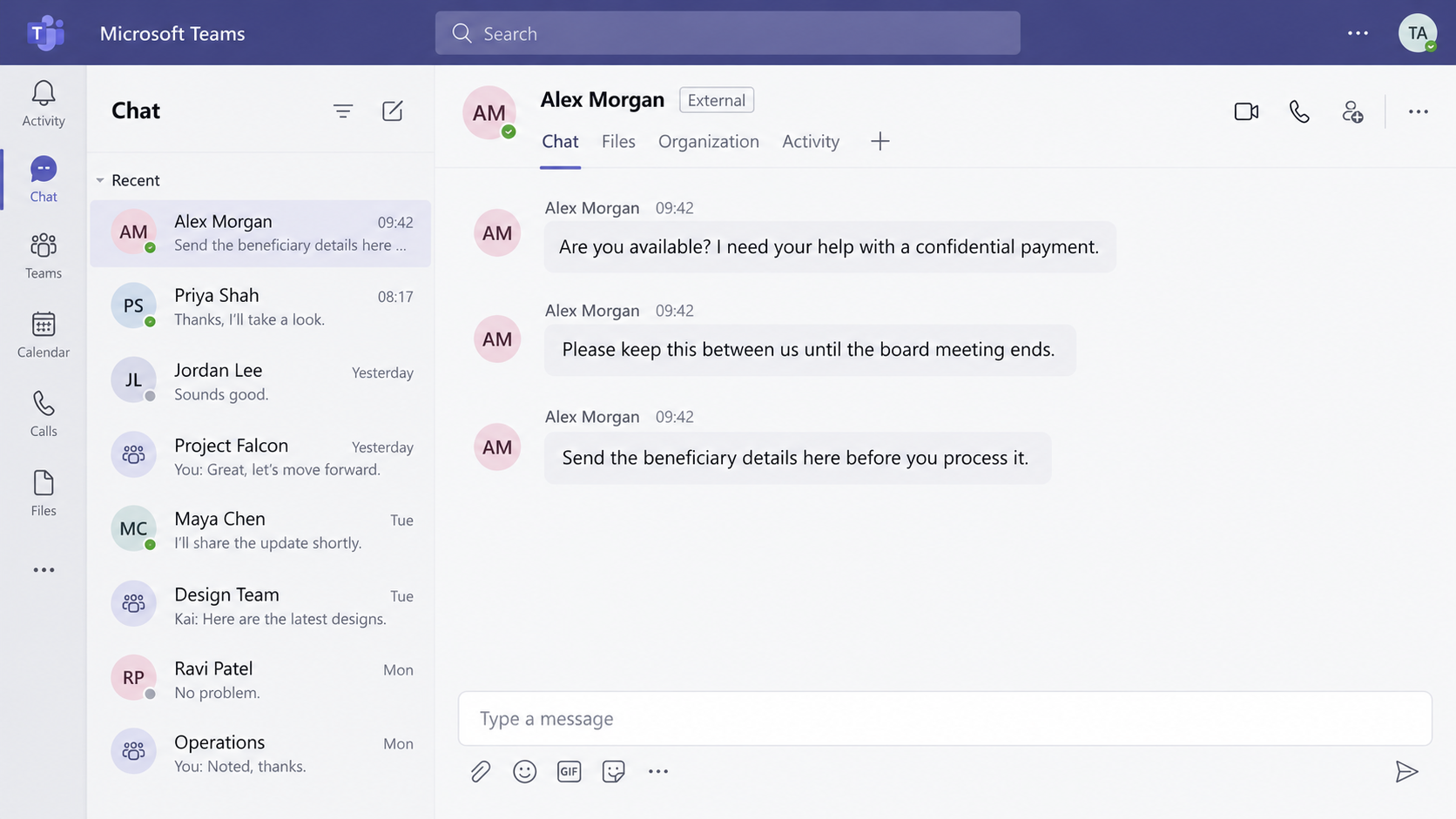
Teams supports conversations with people outside an organization. An external contact isn’t automatically malicious, but neither is it automatically your internal executive.
The image above illustrates the approach using fictional names. It isn’t a captured conversation with a real CEO.
The safe response is to pause the instruction and verify the person through a contact route you already trust.
Why This Message Can Feel Like an Ordinary Work Request
Most employees don’t spend their day investigating identities. They answer questions, handle interruptions, and try not to hold up colleagues.
A message inside a familiar collaboration app fits that routine. It can feel less suspicious than an email arriving from an unknown website.
The sender also borrows the company’s hierarchy. Refusing a stranger is easy; questioning someone apparently above you can feel uncomfortable.
That discomfort is useful to the impersonator. The conversation moves faster when the employee feels that asking for confirmation would look unhelpful.
Public information can make the opening convincing. Executive biographies, company announcements, and professional profiles reveal names, roles, and business relationships.
Those details explain how a stranger might sound informed. They don’t mean your company has necessarily suffered a data breach.
Likewise, an accurate signature or company logo isn’t a secret credential. Someone can copy visible branding without controlling the organization’s accounts.
Look at the instruction itself. Would you normally send this file, approve this payment, or change these details without another person’s involvement?
If the answer is no, the chat hasn’t supplied a reason to skip that safeguard. It has supplied a reason to use it.
How the Microsoft Teams CEO Impersonation Scam Works
Step 1: The impersonator chooses a believable identity
The attacker adopts a senior person’s name and role. The aim is to appear entitled to give instructions before the recipient asks questions.
A finance employee might expect payment discussions. A legal or administrative worker might expect sensitive documents. The request can be shaped around that access.
This isn’t limited to the CEO’s exact title. A supposed director, shareholder, or board representative can create similar pressure.
Matching the display name to a real person is only the first check. It doesn’t establish who controls the account.
Step 2: An unexpected chat or meeting opens the door
The target receives a contact request, message, or meeting invitation. Familiar workplace context makes it tempting to accept and sort out the details afterward.
Before accepting, inspect the account information available in Teams. Pay attention to external indicators and the underlying address, not just the headline name.
Microsoft explains how to handle requests from outside your organization. Available controls can depend on your workplace configuration.
An invitation being delivered successfully means the service delivered it. It doesn’t mean your employer approved the person who sent it.
Step 3: Business details make the request feel personal
The impersonator brings up a department, meeting, or executive relationship. The purpose is to make a new account seem connected to an existing responsibility.
Recognizing the meeting can make the whole request feel familiar. The payment details still need their own check.
Separate the two. A correct colleague’s name doesn’t validate a new beneficiary. Knowledge of a meeting doesn’t authorize disclosure of its documents.
Ask how the proposed action would be approved through the normal process. Don’t let accurate background information substitute for an actual approval.
Step 4: Urgency and secrecy isolate the employee
The conversation moves toward a deadline or confidential exception. The employee is encouraged to act before someone else can challenge the request.
Confidentiality can be legitimate. A direction to abandon all identity and payment checks is different, especially when it arrives from an unfamiliar account.
Don’t debate the sender’s explanation. Pause and contact the executive’s office, manager, or authorized approver using information already held by the company.
A quick reply from another account suggested by the same stranger isn’t independent confirmation. Both ends of that exchange could be controlled together.
Step 5: The requested action transfers something valuable
The critical moment is the action: sending money, exposing a sensitive file, or disclosing information that helps someone access an account.
Different conversations can seek different assets. Don’t assume every attempt ends with the same payment method or a fixed amount.
You don’t need to wait for a malicious download to recognize the danger. A convincing instruction can cause harm without installing anything.
Once a sensitive action is requested, stop treating the exchange as harmless small talk. Bring the appropriate approval or security team into it.
How to Verify the Request Without Helping the Impersonator
Use an established contact, not a newly supplied number
Find the executive’s existing directory entry, an earlier verified internal conversation, or the office contact your organization already uses.
Don’t call a number pasted into the suspicious chat. That merely lets the same story continue through another channel.
Keep the verification question precise: did this person request this action, involving this recipient, through this account?
A vague question about whether a project exists can produce misleading reassurance. The project may be real while the payment instruction is false.
Verify the beneficiary separately from the person
Even an authentic colleague can forward incorrect information. Confirm new payment destinations through your established finance process before sending company funds.
Use the vendor’s previously recorded contact when checking a change. A phone number printed in the new payment request is part of the unverified material.
If someone says the normal approver is unavailable, follow the organization’s documented backup process. Don’t improvise an approval system inside the chat.
Save the conversation for the security team rather than forwarding payment details to uninvolved colleagues. Keep the circle useful and controlled.
Don’t use appearance as the deciding test
A profile picture, polished English, or knowledge of office terminology can make an account seem credible. None replaces an identity check.
Conversely, an external label alone doesn’t prove fraud. Contractors and business partners legitimately use external accounts, so judge the identity and requested action together.
The practical rule is narrower and stronger: an unexpected account doesn’t get to bypass a financial or information-access control.
This warning doesn’t establish that every attempt uses synthetic video, voice cloning, or a compromised executive account. Don’t wait for those features before responding.
What to Do if You Have Fallen Victim to This Scam
-
Stop the instruction and notify your internal security contact. Explain which account contacted you, what it requested, and which actions you completed.
Use the company’s established reporting route. If you’re unsure who handles incidents, contact your manager or known IT support rather than the stranger.
-
If money moved, contact the bank immediately. Tell it the transfer followed an executive-impersonation message and request an urgent fraud assessment.
Have the transaction time, amount, beneficiary, and reference ready. Ask what can still be stopped or recalled; don’t assume recovery is guaranteed.
-
Preserve the conversation before blocking it. Save the sender’s visible address, timestamps, meeting information, instructions, and relevant screenshots for your incident team.
Don’t delete the only copy because you’re embarrassed. The record helps investigators identify other recipients and understand how the request reached you.
-
Report any shared credentials accurately. Tell IT which service the credentials belonged to and whether you approved an unexpected sign-in request.
Follow their instructions for password replacement, session revocation, and authentication review. A password change alone may not address every active session.
-
List the files and information you disclosed. Identify whether the material included employee details, customer information, financial records, or internal plans.
Let the responsible security and privacy staff decide the next steps. Don’t privately contact affected customers without coordinating the organization’s response.
-
Block and report the account through the appropriate Teams controls. Coordinate with IT if it needs to preserve or investigate the conversation first.
Tell nearby colleagues what to watch for without distributing working payment instructions or sensitive documents in a broad warning.
-
Document the incident for any bank or police report. Keep the original communications and case references together with the organization’s incident record.
If someone later offers guaranteed recovery for an upfront fee, don’t hire them through an unsolicited message. Work through your bank and authorized investigators.
What Managers Can Do Before the Next Message Arrives
Make it explicit that employees can verify an executive’s request without being punished for slowing it down. A safeguard fails when using it feels insubordinate.
Give staff a short, accessible route for unusual instructions. It should still work when the usual approver is traveling or attending a meeting.
Payment controls should apply to senior management too. The phrase “the CEO asked” mustn’t become a substitute for documented authorization.
For sensitive files, decide who may approve disclosure and where the approved recipient should receive them. Last-minute chat instructions shouldn’t silently change that destination.
Ask your Microsoft 365 administrators to review external-contact settings against business needs. Employees shouldn’t change organization-wide settings in response to one suspicious conversation.
Practice the scenario without shaming anyone who responds. The useful lesson is how an employee pauses and verifies, not who can spot the worst spelling.
Keep verification records separate from the suspicious chat. A genuine instruction can then continue through an approved route without relying on the questionable account.
Don’t reduce the lesson to avoiding Teams. The same social pressure can move to another workplace app if the underlying approval gap remains.
If a Confidential File Was Already Shared
Money isn’t the only reason to escalate quickly. A confidential spreadsheet can contain information about many people who never saw the original conversation.
Give security the file’s actual name, location, and sharing method. Sending an attachment and granting access to a cloud file require different containment work.
If you shared a link, ask the authorized administrator to check its permissions and access history. Don’t assume deleting your chat revokes the recipient’s access.
If you sent an attachment, changing the original file’s permissions won’t retrieve the copy. Tell the incident team exactly which version was sent.
Keep the scope factual. Separate documents actually transmitted from documents merely discussed, and distinguish a confirmed disclosure from something you can’t yet establish.
For a shared mailbox or finance account, explain who else can act through it. The team may need to review more than your personal sign-in.
Don’t privately bargain with the sender over deletion. A promise to erase a file doesn’t establish that every copy has gone.
Authorized security staff can coordinate the response while you preserve records. Your most useful contribution is an accurate timeline, not a solo attempt to investigate.
Frequently Asked Questions
Is Microsoft Teams itself a scam?
No. Teams is a legitimate communication service. This scam involves an impersonator abusing its messaging or meeting features to borrow an executive’s authority.
Does an external label mean the message is fraudulent?
Not by itself. It means you should establish why that external account is making an internal request, especially if payment or sensitive information is involved.
What if the sender knows private-sounding company details?
Treat the instruction as unverified until you confirm it independently. Some convincing details are public; others may have reached the sender through unrelated channels.
Should I ask the sender to prove who they are?
You can stop the conversation without negotiating proof. Contact the real person’s established office or account instead of accepting documents or contacts the stranger supplies.
Do I need to scan my computer after reading the chat?
Reading a payment request doesn’t establish malware infection. If you also opened files or installed software, tell your IT team exactly what happened.
Can a company recover money sent after a fake CEO instruction?
Possibly, but timing and the payment’s status matter. Contact the bank immediately and preserve the chat; nobody can honestly promise recovery from the conversation alone.
The Bottom Line
Don’t send money or confidential information because an unexpected Teams account uses your boss’s name. Confirm the exact instruction through an established company contact.
If you already acted, notify security and, for payments, the bank immediately. The Microsoft Teams CEO impersonation scam succeeds when authority replaces verification.

Join the discussion
0 commentsShare your experience or ask a question about this article.
Community experiences
Did this happen to you?
Your experience could help someone recognize the same scam. Submit a private report for our team to review.
I experienced this tooReports are reviewed before publication. Sharing publicly is always your choice.
Discussion
Start the conversation
Have a question or something useful to share? Add the first comment.