


A new message says there’s news about your holiday pay. It looks like a routine document notification, the kind you might open between other errands.
RJV, an eBox reference, a Doccle logo: the familiar details seem to belong together. The next screen deserves a closer look.
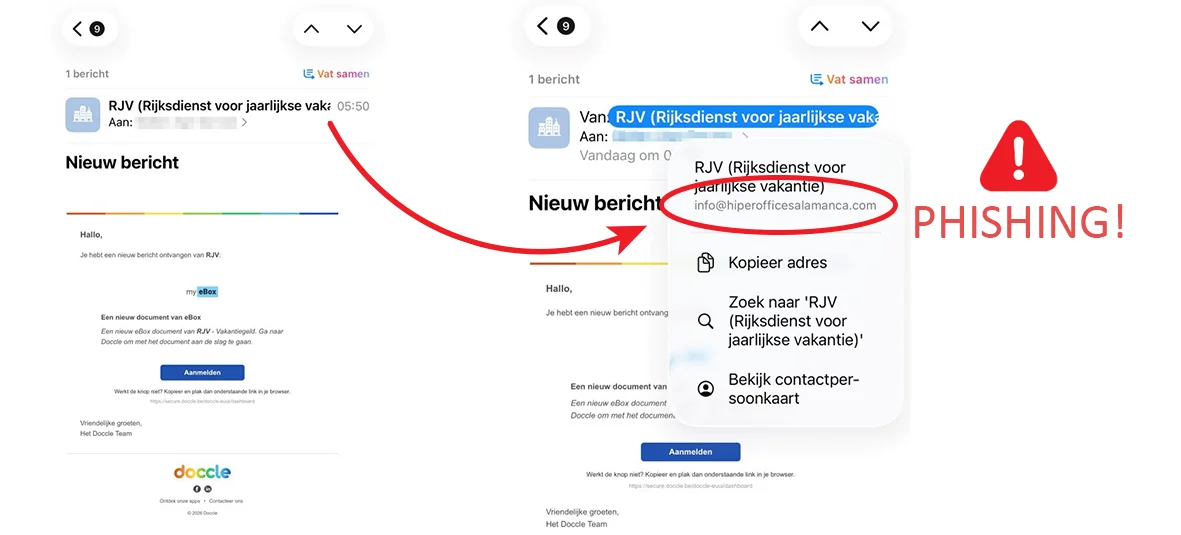
Overview
A holiday-payment notice borrows trusted document branding
The RJV holiday pay scam uses false emails and texts to impersonate Belgium’s annual-holiday institution, also known by the French abbreviation ONVA.
One version resembles a Doccle document notification. Other messages ask recipients to provide account information through a link connected to their holiday payment.
These aren’t complaints about a legitimate holiday benefit. RJV explicitly identifies the messages as phishing.
The institution, Doccle, and itsme are legitimate services. Their names are being used to make a fraudulent instruction feel administrative.
A login story can turn into a payment request
The danger isn’t merely that someone learns your bank account number. Some variants push people toward bank authentication or a payment approval.
When you’re expecting money, it’s easy to read an approval as another step toward receiving it. Check what the approval actually does.
The message’s branding doesn’t explain what you’re authorizing. Read the action shown by the genuine authentication service, not just the email’s promise.
- A claimed holiday-pay update arrives through an unexpected link.
- A trusted document-service logo supplies reassurance.
- The actual sender or destination doesn’t match the claimed institution.
- A bank, Digipass, or itsme action is presented as necessary to continue.
- The proposed approval doesn’t match the task you intended to perform.
This campaign has official, large-volume reporting
Safeonweb’s May 2026 campaign warning reported more than 14,000 forwarded copies during the preceding week.
That’s a historical reporting figure, not a count of people who lost money. It still shows why this deserves more than a one-off warning.
Check holiday-pay information by opening RJV’s official service yourself. Don’t let the email choose the route into your banking or identity app.
Why a Document Notification Makes Such Good Bait
A document notice doesn’t need a dramatic promise. It asks for a small, familiar action: sign in and read something waiting for you.
That modest request can lower your guard. You’re not apparently buying anything or making an investment; you’re catching up on personal administration.
Holiday pay gives the notification an appealing subject. If you’re expecting a payment, a message about confirming details may sound helpful rather than intrusive.
The impersonator benefits from that expectation even without knowing whether you’re actually entitled to money. A broadly distributed message will find some people waiting.
The original example shown above has the appearance of a document alert, while the expanded sender information points elsewhere.
The red annotation belongs to RJV’s published warning image. It highlights the mismatch without requiring you to visit the fraudulent destination.
Notice what the mismatch tells you: this sender isn’t authenticated by the visible RJV label. It doesn’t tell you the identity of the person responsible.
There’s no need to establish that person’s identity before refusing the request. The institution has already warned against this method of collecting information.
How the RJV Holiday Pay Scam Works
Step 1: An email or text announces a payment-related update
The opening connects the message to holiday money or a new official document. The recipient is invited to resolve the matter through a supplied link.
Names can vary with language and presentation. RJV and ONVA refer to the same Belgian institution, so switching abbreviations doesn’t make a message independently trustworthy.
Don’t assume a familiar email thread, correct season, or recognizable subject confirms the message. Check where the requested action actually takes place.
Step 2: Familiar logos encourage the click
A Doccle or eBox reference makes the next step look like ordinary document access. The sign-in button offers a convenient route forward.
The button’s label isn’t its destination. A link that says “sign in” can still lead to a page controlled by somebody else.
On a computer, you can inspect a destination without opening it. If a phone makes the address difficult to inspect, skip the link altogether.
You don’t lose a real entitlement by choosing a safer route to the real account. Start from the institution’s website instead.
Step 3: A false RJV page asks for information
The destination can imitate an official page and ask for personal or banking details. The request is framed as preparation for receiving the payment.
At that point, the recipient may already feel committed. They clicked to finish an administrative task, so another form can seem like normal procedure.
Don’t supply extra information to make a suspicious page work. A request becoming more detailed isn’t evidence that the institution needs those details.
RJV provides an independent way to communicate or change an account number. You don’t have to use a link received in an unexpected notification.
Step 4: Authentication is presented as a harmless formality
Some attempts invoke Digipass or itsme. These names can be used to steer the victim toward approving something different from simply reading a document.
An authentic app prompt can still relate to an action initiated by a fraudster. The fact that your app opened doesn’t validate the email’s explanation.
RJV tells users of its official service to check for the expected government-login description in itsme. Refuse an unexpected action or payment confirmation.
Don’t read out authentication codes to a caller who offers to help complete the holiday-payment process. That continues the unverified request rather than checking it.
Step 5: The recipient is pushed to complete the wrong action
The final instruction may seek sensitive account access or a transfer approval. The supposed incoming payment distracts from what the bank screen actually says.
If an amount, payee, or transaction appears that you didn’t initiate, stop. Don’t approve it because the preceding page promised money would arrive.
Not every copied message will use every stage. The consistent warning is the impersonation and the link-led request for information or authentication.
Check Your Real Holiday Pay Without Using the Message
Open a fresh browser tab and navigate from RJV’s official website. Use its published link to Mijn Vakantierekening.
Don’t reach that service through an advertisement that happens to repeat the name. Your starting point should be the institution you intend to contact.
Once inside the genuine service, review the information relevant to your account. You don’t need to continue the suspicious email’s sequence in parallel.
If a real account update is needed, perform it through the official service or RJV’s published form. Close the questionable page first.
Ask RJV about anything you can’t reconcile. Use its official contact options, not a reply address or support number supplied by the questionable message.
When helping someone else, explain each screen before they approve it. Don’t simply tell them to press a button because the interface looks familiar.
A useful check is to state the intended action aloud: “I’m signing in to view my holiday-pay information.” Compare that with the action actually displayed.
If the app describes transferring money, confirming a payment, or something unrelated, refuse. A refund story cannot make a different authorization safe.
The Details That Should Make You Stop
The sender’s name and address tell different stories
Email apps often emphasize the friendly name and hide the underlying address. Expand that information before trusting the identity.
Even a plausible address shouldn’t be your only check. The safest route is the official account opened independently, especially when banking information is requested.
Don’t forward the warning publicly with somebody’s unredacted personal information attached. Report the original privately through the appropriate channel.
The task changes from reading to authorizing
A document notification shouldn’t quietly become permission for an unrelated transaction. Treat that change as a new request, not a continuation you must finish.
Pause even if you’ve already supplied your name. Stopping halfway is safer than completing a dangerous action to avoid leaving a form unfinished.
Repeated error messages aren’t a reason to retry with more accounts or additional credentials. Close the page and verify what happened through the real service.
A helpful caller asks for the same sensitive action
RJV also warns against callers requesting personal details and banking authentication. A phone call doesn’t automatically repair a suspicious online process.
End the call and contact the institution yourself. Don’t let the caller remain connected while you open banking apps or confirm requests.
What to Do if You Have Fallen Victim to This Scam
-
Refuse outstanding approvals and stop interacting. Close the fraudulent page and end any associated call. Don’t approve another request to cancel the previous one.
Write down what you completed: opening the message, entering details, approving authentication, or authorizing a payment. That determines who needs to act.
-
Speak to your bank if banking access or payments were involved. Use the official app or the contact information on your existing bank documents.
Describe the holiday-pay pretext and the exact approval you made. Request a review of recent activity and any steps needed to secure access.
-
Report exposed card details immediately. Contact the issuer through its established channel and follow its instructions on blocking or replacing the card.
Don’t wait for a charge to prove the page captured your information. The bank can assess the exposure before an unauthorized payment appears.
-
Secure any account whose password you entered. Visit the genuine service directly, replace the exposed password, and review the available security settings.
If the password was reused, protect those accounts too. Tell the provider if you approved an unexpected identity request rather than entering a password.
-
Save the original email or text and transaction records. Keep the address, link, timestamps, screenshots, and bank reference numbers in one place.
Don’t reopen the malicious page to collect extra proof. What you already have can support the bank’s investigation and a police report.
-
Report the impersonation to RJV and Safeonweb. Follow the reporting instructions on their official websites, and report financial loss to the police.
A report can help protect other recipients. It doesn’t replace an urgent call to the bank when an account or payment is at risk.
-
Address device changes only if they occurred. If you installed a file while following the message, get help removing it and run Malwarebytes.
AdGuard can help reduce exposure to known malicious pages. Neither tool reverses a transfer or makes an approval safe; account protection comes first.
Help Someone Check the Request Without Taking Over
A relative may ask you to help because the holiday-payment notice looks confusing. Start by moving away from the email, not by clicking through it faster.
Ask what they’ve already done before opening any accounts. Someone who only received a notice needs different help from someone who approved a bank transaction.
Let the account holder read the authentication screen themselves. Don’t ask them to share a secret code so you can finish the process on their behalf.
If the notification is in a language they find difficult, explain the requested action before discussing whether to approve it. Familiar branding isn’t a translation.
Compare an incoming-payment claim with the bank’s actual wording. A screen authorizing money to leave an account cannot be explained away by a refund promise.
Write down the displayed action if an incident already occurred. “I approved itsme” is less useful than knowing which service and operation appeared.
When contacting the bank together, have the account holder present and follow the bank’s identification process. Don’t impersonate them to make the conversation easier.
Keep any holiday-pay documents separate from the scam screenshots. That helps the institution answer the legitimate benefits question without confusing it with fraudulent instructions.
After securing the account, help the person establish a trusted bookmark. The next document alert then doesn’t have to decide their route into the service.
Leave them with one repeatable action: check the official account independently before approving anything linked to a payment message.
Frequently Asked Questions
Are RJV and ONVA different organizations in these messages?
They’re Dutch and French abbreviations for the same Belgian annual-holiday institution. Fraudsters can use either name, so judge the requested action rather than the abbreviation.
Does the Doccle logo prove the document notice is genuine?
No. A copied logo doesn’t authenticate an email. Open your genuine document service independently if you want to check whether a notice is waiting.
Can I use itsme with the real holiday-pay service?
The official service supports identity verification. The problem is following an unexpected message into an unrelated authentication or payment action, not the existence of itsme.
What if I only gave my IBAN?
Tell your bank what you disclosed and watch for follow-up impersonation. Sharing an IBAN isn’t the same exposure as handing over login credentials or approving a transfer.
Does opening the text infect my phone?
Receiving or reading this type of message doesn’t establish infection. The next steps depend on whether you followed links, submitted information, or installed something.
Will ignoring the message stop my real holiday payment?
Don’t rely on the message to determine payment status. Check your genuine RJV account or contact RJV independently to resolve a real administrative issue.
The Bottom Line
Don’t use an unsolicited holiday-pay link to submit banking information or approve a transaction. Check the real RJV service on your own terms.
If the RJV holiday pay scam already led you to approve banking activity, contact your bank now. Report the message after securing the account.

Join the discussion
0 commentsShare your experience or ask a question about this article.
Discussion
Start the conversation
Have a question or something useful to share? Add the first comment.