

An email says your trademark has been approved. For a business owner who has waited months, that single sentence can feel like wonderful news.
Before you celebrate or forward the attachment, take a closer look. A document that looks official can tell a very different story.
Overview
A convincing notice at a sensitive moment
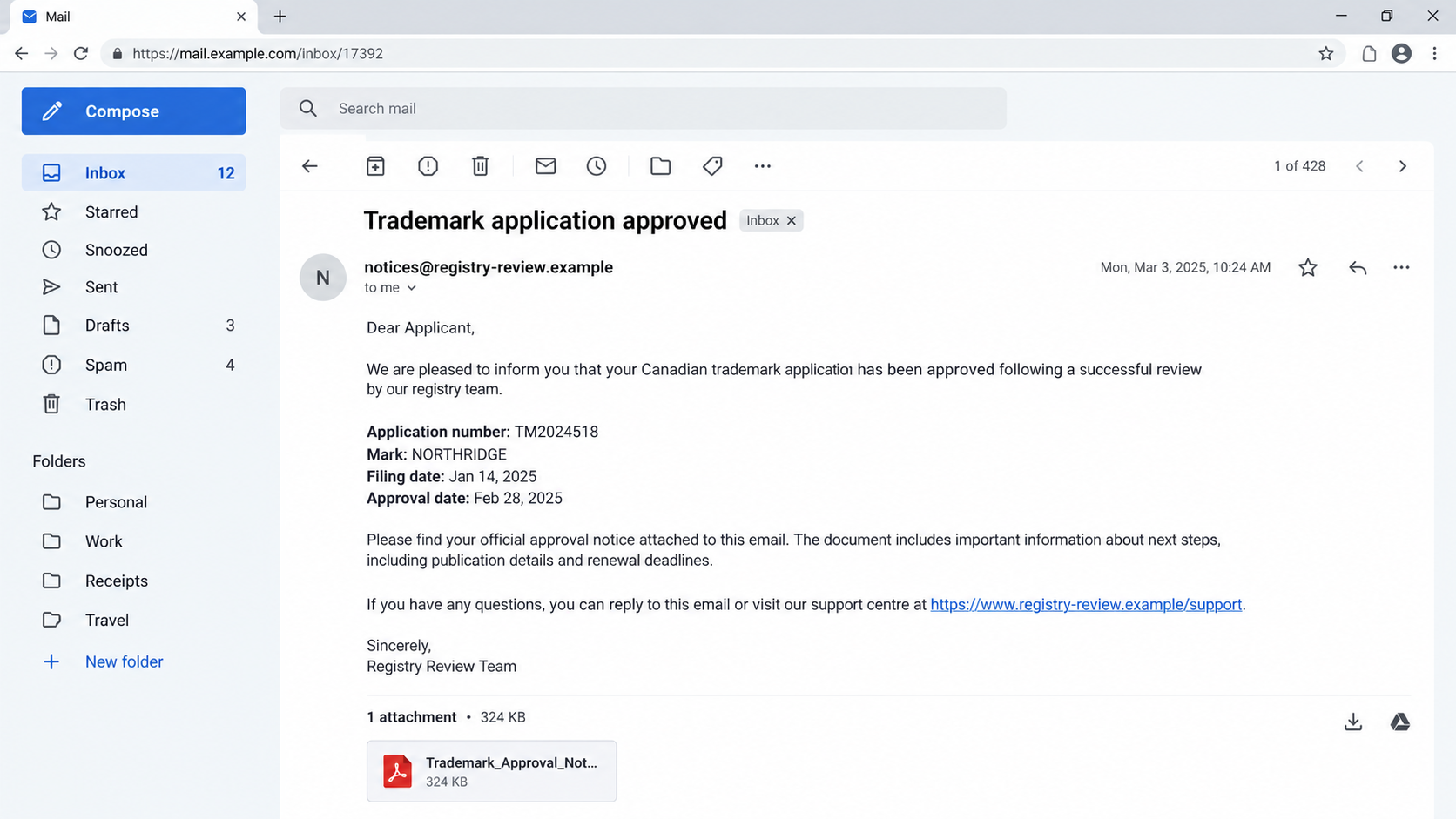
The fake CIPO trademark approval email targets people who have reason to care about an application. It borrows the language and appearance of a routine government update.
Canada’s Intellectual Property Office documented one fraudulent email on September 11, 2026. Its attached document was designed to resemble an official trademark approval notice.
That specific example establishes an impersonation attempt. It does not, by itself, establish that the sender collected a fee or obtained an applicant’s data.
What the message wants you to believe
A recipient may see a plausible application number, a familiar mark, formal formatting, and a sender claiming a connection to CIPO. Those details can create false confidence.
Trademark records are partly public. Knowing your business name or filing details does not prove the writer works for the government or your appointed agent.
The important question is not whether the attachment looks convincing. It is whether the claimed approval appears in the official record for your application.
The quick verification rule
CIPO says official trademark correspondence is available through the Canadian Trademarks Database and its Trademarks Document Retrieval Service, also called TDRS.
Open those services independently, using a bookmark or a typed government address. Search the application number and compare the official document with the email.
- Check the status: Does the record actually show the event described?
- Check the document: Is the purported approval in TDRS?
- Check the sender: Is the full address consistent with CIPO or your agent?
- Check the request: Are you being steered toward an unfamiliar payment or reply channel?
These checks matter together. An email can repeat true public details while carrying a fabricated conclusion about the application’s status.
How the Fake CIPO Trademark Approval Email Works
Step 1: Find a business expecting trademark news
The strongest version of this scam does not arrive as a completely random announcement. It reaches someone who has filed, considered filing, or hired help to file.
Application data can make a message feel personal. An attacker may repeat the mark, owner name, application number, or filing history without possessing inside access.
That is why a correct number is not a trust signal. It is a piece of information to verify against the official record.
Step 2: Present an approval as a finished government decision
A formal subject line gets the email opened. The attached document then does the heavy lifting with official-looking sections, dates, and administrative wording.
The CIPO example specifically involved a fraudulent document resembling a trademark approval notice. We should not assume every fake notice uses identical wording or branding.
The emotional hook is subtle. Most people fear bad trademark news, but apparent good news can lower their guard just as effectively.
Owners may share the attachment with staff, accountants, designers, or customers before verifying it. That spread makes the false status harder to unwind later.
Step 3: Use familiarity to bypass a basic sender check
An inbox often displays a sender name more prominently than the full address. A name containing CIPO can appear reassuring until the address is expanded.
CIPO says its emails end with @ised-isde.gc.ca. A lookalike spelling or unrelated domain deserves an immediate pause.
Even an apparently correct address is not conclusive. Some email displays can be spoofed, and forwarded content can contain a forged From line.
When the message concerns legal rights, verify the underlying record, not just the typography of an email header.
Step 4: Invite a reply, a click, or a premature decision
A fake approval can be a doorway to later contact. The sender may ask for a confirmation, a follow-up document, or payment outside normal channels.
Those are possible follow-on tactics, not established facts about CIPO’s September example. Treat any request on its own merits and verify it independently.
A reply also tells the sender the address is active and the owner is engaged. The conversation can then become more tailored and persuasive.
Do not send identity documents, business records, passwords, or card details simply because an attachment claims an approval was granted.
Step 5: Turn a fabricated status into business harm
Some recipients may change packaging, announce a registered mark, or stop monitoring a real deadline after believing an approval email.
Those decisions have consequences even if no money changes hands. A false sense of finality can derail careful follow-up with a legitimate trademark agent.
Where a payment demand appears, compare it with CIPO’s published fees and official online services. Do not pay a third-party link supplied in the message.
The safest response is boring but effective: preserve the email, open the official record yourself, and ask your actual agent or CIPO to reconcile any discrepancy.
Why the Attachment Can Look So Believable
Government correspondence follows patterns. A scammer can copy visual cues, borrow public terminology, and add a seal-like graphic without acquiring official authority.
A PDF also feels more substantial than a plain email. It has pages, margins, signatures, and a filename that can imply permanence.
None of those features authenticates the document. Files are easy to create, and a convincing template is not evidence that CIPO issued it.
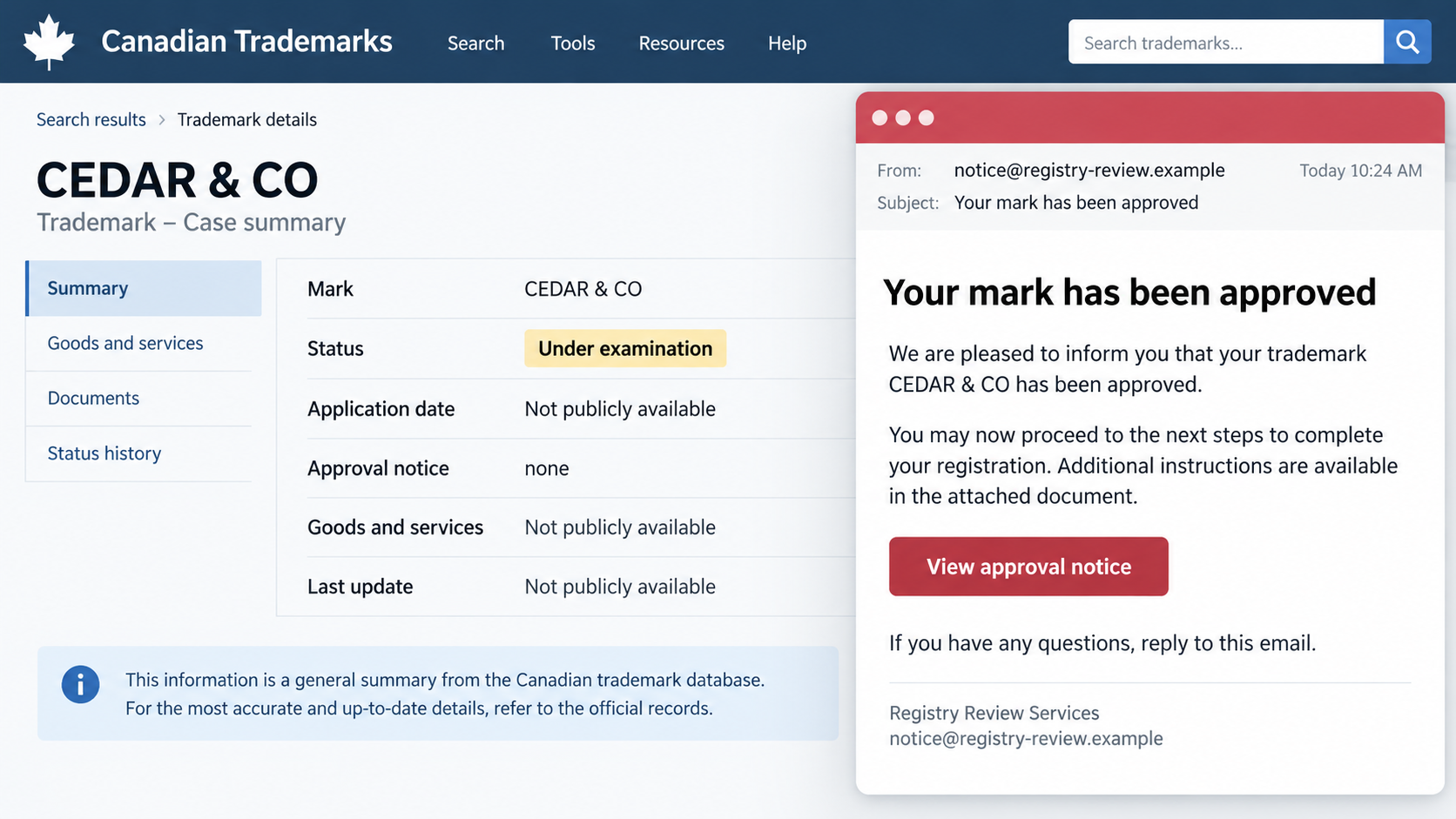
The clue that matters most is provenance. Can the document be found in the official correspondence record for the application?
The second image illustrates that comparison. It is a fictional reconstruction, not a screenshot of the reported 2026 email or an actual CIPO record.
How to Check a Claimed Trademark Approval
Start with the application, not the email
Find the application number in paperwork you already trust. If an agent filed for you, ask that agent for the number through an existing contact route.
Do not copy a number from the suspicious attachment and assume it belongs to your mark. Check the owner, goods or services, dates, and current status.
Look for the exact notice in TDRS. A missing document does not require you to decide the case yourself, but it is a reason to stop acting on the email.
Separate approval, registration, and next steps
Trademark processes involve distinct events. A message may misuse one word to imply a right is final when the record shows something different.
Read the official record’s actual status and correspondence. Avoid translating a cheerful email subject into a legal conclusion about ownership or registration.
If the status seems unclear, a qualified trademark agent can explain it. A genuine professional should be willing to work from official documents.
Check the sender without replying
Expand the full From address. Compare it with CIPO’s published domain or your agent’s known address, including every character after the @ sign.
Hover over links without opening them. If the displayed text and actual destination differ, do not treat the link as an official service.
Use a contact page you navigated to yourself. Do not call a number printed only on the suspicious PDF.
Red Flags That Deserve a Second Look
A fake approval may be polished. Look beyond spelling mistakes and focus on behavior that changes how you are asked to verify or pay.
- The sender is not a verified government or known agent address.
- The document is absent from the official trademark correspondence record.
- The email pushes you to a third-party payment portal.
- A short deadline is presented without a matching official notice.
- The sender refuses to identify a verifiable agent or filing reference.
- You are told not to contact CIPO or your existing agent.
One red flag is enough to pause. Several together make independent verification urgent, especially before any financial or legal decision.
Be careful with a message that uses accurate personal details. Public records and previous conversations can supply them to an impostor.
If the Email Arrives Through a Real Business Contact
Sometimes the suspicious file reaches a colleague first. An assistant, bookkeeper, or outside designer may forward it because the news seems relevant to their work.
A forward from someone you know does not authenticate the original sender. Ask for the original message headers and attachment before deciding what it means.
Tell your team to treat trademark status as a record-based fact. A forwarded PDF should not trigger website edits, packaging changes, or customer announcements.
For a small business, this boundary is practical. One person can verify the record, while everyone else waits for that confirmation before acting.
It also reduces the chance that several employees reply to the impostor from different addresses and provide more background for a tailored follow-up.
When an outside filing service is involved
Some owners use a lawyer, trademark agent, or online filing service. That adds another name to the chain, which scammers can exploit.
Check which professional actually filed the application. Use an invoice, engagement letter, or previous verified correspondence rather than the contact details on the new notice.
If a supposed agent asks for a new fee, request an itemized explanation tied to the official file. Compare the event and amount with CIPO’s public fee information.
A legitimate request should survive a calm, independent check. Pressure to pay before you consult your own record is a warning, not a reason to hurry.
If the notice contains a real-looking deadline
Deadlines are powerful because nobody wants to lose a trademark over an avoidable mistake. That fear can make an unrelated link seem like the fastest solution.
Write down the claimed date, then find the corresponding official document. A deadline without a matching entry is a question for CIPO or your appointed agent.
Do not assume a date is fake merely because the message is suspicious. A genuine application may still need attention for a separate reason.
Confirm the real timeline and handle any legitimate task through the appropriate official or professional channel. This protects both your money and your trademark position.
Practical Habits That Make Future Notices Safer
Keep a simple trademark file containing the application number, filing receipt, agent details, and a bookmark to the official database. Then verification takes minutes.
Limit who may approve trademark-related payments. A second person reviewing an unfamiliar invoice can catch an unexpected payee or altered instructions.
Use a password manager for the accounts involved in the filing. It can make lookalike login pages less convincing by refusing to autofill on an unfamiliar domain.
Set a calendar reminder to review the official status periodically. That way, a surprise email is not your only source of news about the application.
If your business name appears in public trademark records, expect unsolicited offers. Some may be ordinary commercial solicitations, while others may impersonate officials.
The distinction is whether the sender accurately identifies itself and its service. A private company should not pretend to be CIPO or manufacture an official approval.
Finally, normalize a short pause before major action. Careful verification is not skepticism about your own success. It is basic protection for a valuable business asset.
What To Do If You Fell Victim
- Stop the conversation and save the evidence. Keep the original email, attachment, full sender address, payment request, and any replies. Do not delete them before reporting.
- Check your actual trademark record. Access CIPO’s database and TDRS independently. If you have an agent, call the number already in your files and ask what has truly happened.
- Contact your bank or card issuer if you paid. Explain that the payment may have been induced by a false government notice. Ask promptly about a dispute, transfer recall, or account monitoring.
- Protect exposed accounts. If you entered a password on a linked page, change it from the genuine service, enable multifactor authentication, and review recent sign-ins and recovery settings.
- Scan a device if you opened a suspicious file. Update your operating system and run a reputable scan, such as Malwarebytes. If browser notifications began appearing, review permissions and consider AdGuard for unwanted ads.
- Report the message. CIPO accepts IP scam reports. Include the email and attachment, then consider a fraud report if money or identity information was lost.
Do not blame yourself for opening a professional-looking document. The useful next move is to limit further contact and restore a trustworthy view of your application.
Frequently Asked Questions
Can an authentic trademark approval arrive by email?
Official correspondence may be delivered electronically. The point is to confirm the claimed document in CIPO’s own records, not to reject every email automatically.
Is an accurate application number proof that the notice is genuine?
No. Trademark application information can be public. Compare the notice, current status, and correspondence in the official database and TDRS.
What if the From address looks like a government address?
Check the full domain carefully, but do not stop there. Display names and some forwarded headers can deceive. The official record remains the stronger check.
Should I open the attached PDF to see whether it is fake?
You do not need to open an unexpected attachment to verify the claim. Search the official record first and ask CIPO or your agent if needed.
Can a fake approval cause harm without a payment request?
Yes. Believing a false status can prompt premature announcements or missed follow-up. Preserve the message and reconcile it with the real application history.
Where should I report a suspicious CIPO message?
Use the reporting instructions on CIPO’s IP Scam Awareness Zone. Send the original email and a short explanation of what seemed wrong.
The Bottom Line
The fake CIPO trademark approval email succeeds when a believable document replaces the official record in your decision-making.
Check the application in CIPO’s database and TDRS, contact your known agent through an existing channel, and act only on verified correspondence.

Join the discussion
0 commentsShare your experience or ask a question about this article.
Discussion
Start the conversation
Have a question or something useful to share? Add the first comment.