

Filing a trademark already takes patience. An unexpected statement of opposition can make a business owner feel that months of work are suddenly in danger.
That anxiety is exactly why the document deserves a careful, independent check before anyone calls the sender or pays for help.
Overview
The allegation in the inbox
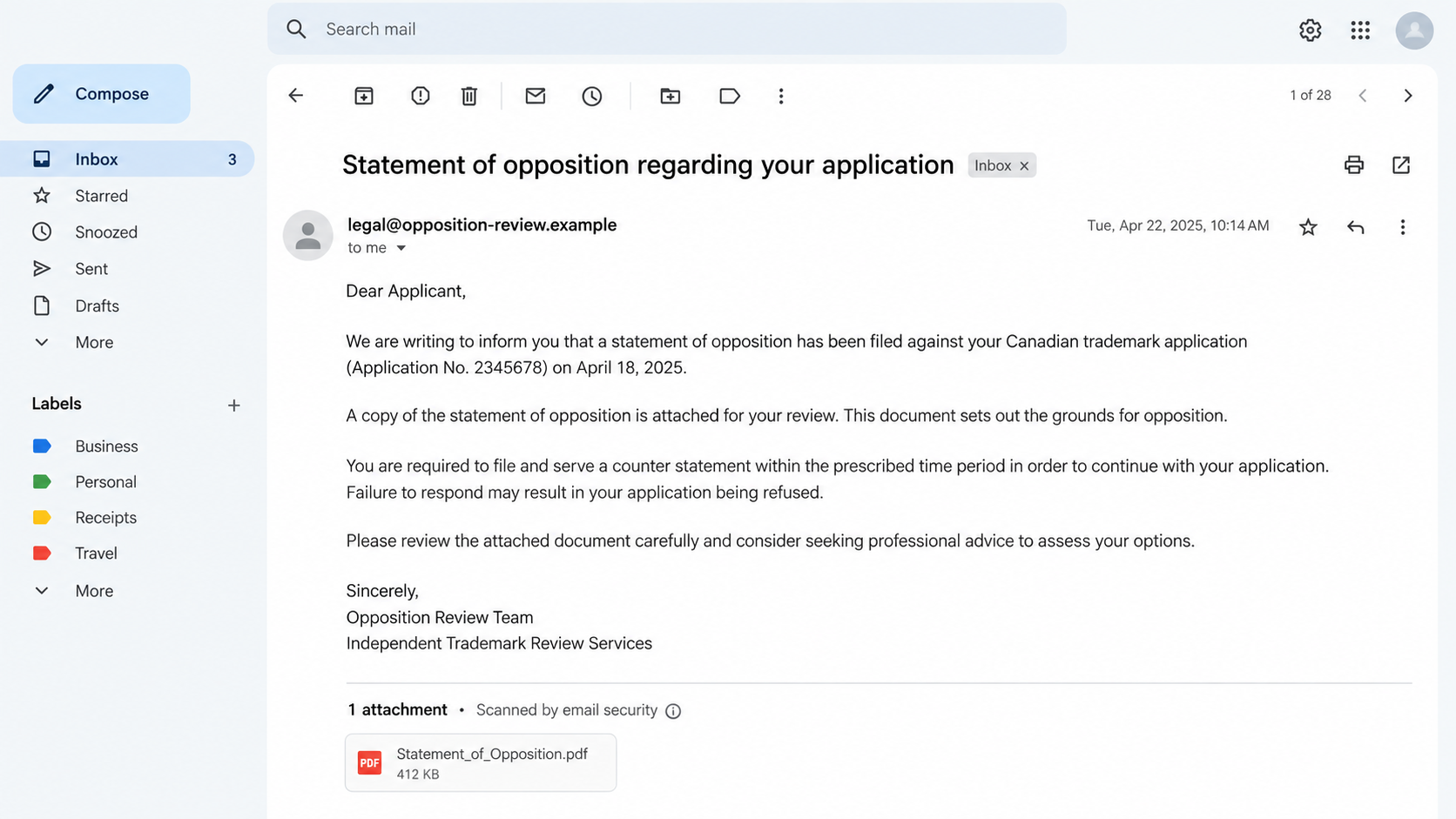
The trademark opposition notice scam presents a dispute as though it has already entered Canada’s official trademark process. A document may carry procedural language and an alarming deadline.
On July 7, 2026, the Canadian Intellectual Property Office documented an email from legal@vanguardtrademark.com with a fake statement of opposition.
CIPO says the document resembled an official one and falsely claimed that an opposition proceeding had started against a client’s trademark application.
That is the verified incident. The public alert does not establish that this exact sender received a payment or compromised an account.
Why this is more than a suspicious attachment
An opposition is a real type of trademark proceeding. The scam works by borrowing a genuine legal concept and attaching it to a false case.
Owners unfamiliar with the process may believe they must respond immediately through the person who sent the email. That hands the impostor control of the conversation.
The email’s legal vocabulary is not evidence. The decisive question is whether CIPO’s own case information shows that the proceeding exists.
What to check first
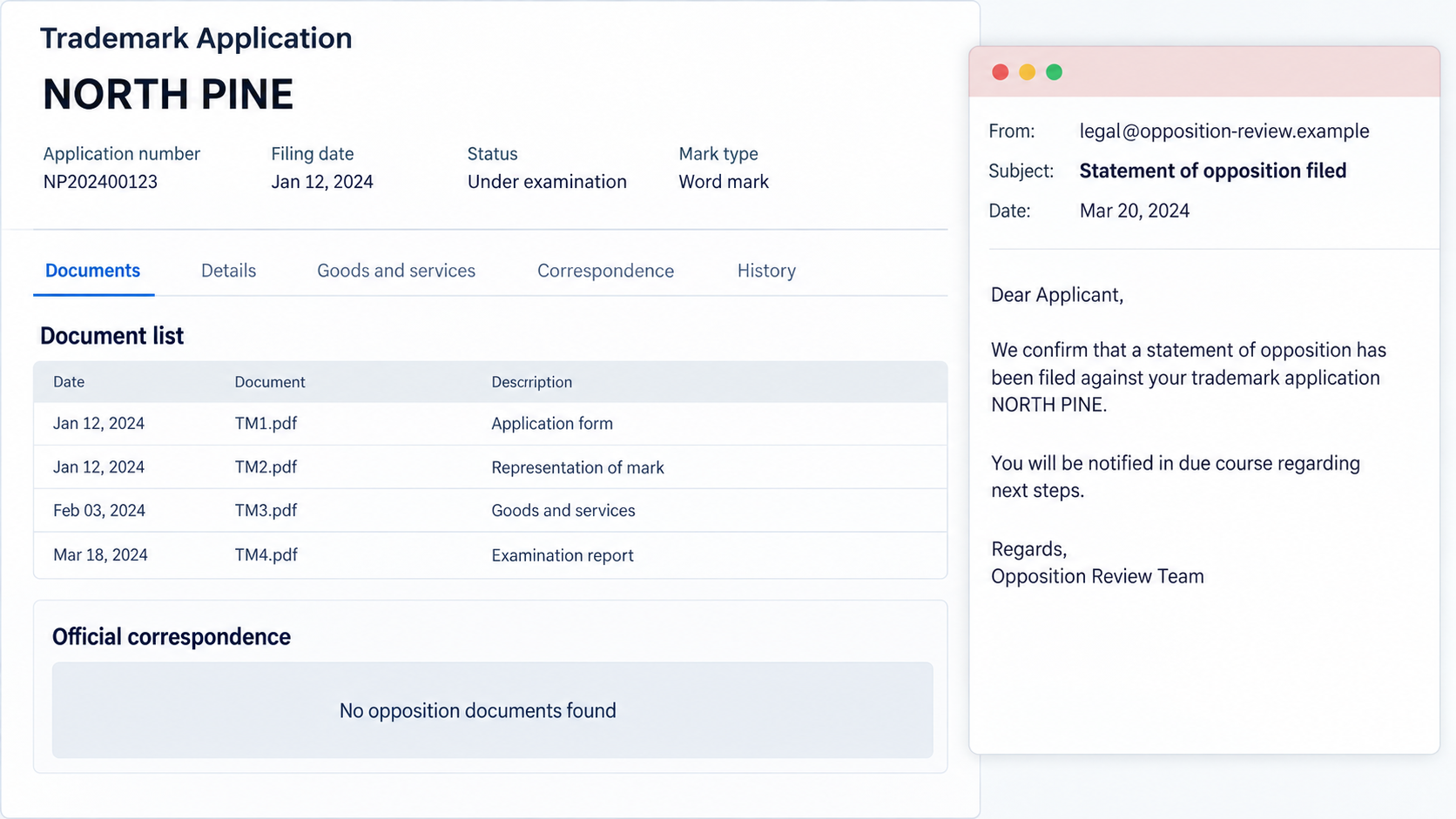
Use the application number from your existing filing record, not solely from the suspicious PDF. Review official correspondence and ask CIPO or your known agent to confirm.
- Does the official file show an opposition proceeding?
- Does the purported statement appear among official documents?
- Does the named party match what CIPO records?
- Did the message come from a verifiable agent or institution?
Do not let a sender’s deadline prevent these checks. If a real deadline exists, the official record and your professional adviser can identify it.
How the Fake Trademark Opposition Notice Works
Step 1: Choose an application that looks vulnerable
A new brand is more than a word in a database. It may be printed on inventory, announced to customers, and tied to a planned launch.
That makes a dispute notice emotionally charged. The attacker needs only enough public or gathered detail to make the email appear relevant to that particular owner.
An application number and business name can seem private, yet they may be obtainable from trademark records. Their presence does not authenticate the sender.
Step 2: Attach a legal-looking statement
The July 2026 example was not merely a vague warning. CIPO described a fake statement of opposition resembling an official document.
Words such as applicant, opponent, proceeding, and filing can sound intimidating. A document with page numbers and case formatting makes those words feel settled.
Yet a PDF is just a file. The reader must still establish who created it and whether an authorized body received or issued it.
Never rely on a logo, seal, or copied statute as proof. Those visual elements can be reproduced without any access to the trademark file.
Step 3: Create pressure around an alleged deadline
Opposition proceedings can involve time-sensitive choices, so a fabricated deadline is particularly effective. It reframes verification as a dangerous delay.
The fake email may claim that inaction will cost the applicant rights or make the dispute harder to defend. Treat that as a claim requiring confirmation.
There is a difference between taking a real legal notice seriously and obeying an unverified stranger. You can respond promptly without using the sender’s channel.
Step 4: Pull the owner into a private conversation
A reply, phone call, or document upload can reveal who makes decisions, which agent is involved, and how worried the owner feels.
In related trademark scams, impostors have pressed owners toward unfamiliar services or payments. Do not assume that occurred in this exact July example.
The risk is that an invented dispute becomes the justification for an expensive service, a sensitive document request, or a false settlement instruction.
Once a scammer presents themselves as the only route to resolve the problem, each new message can make the original lie seem more credible.
Step 5: Replace the official case file with the impostor’s narrative
The attacker wins attention when the owner starts reading the attached PDF as the case itself. In reality, the case must be checked through official channels.
That distinction matters even if the document includes correct filing details. Correct background facts do not make the allegation of opposition true.
The safest route is to stop the direct exchange and ask your own registered agent or CIPO about the actual record.
What a Real Opposition Is, and What This Email Is Not
A real trademark opposition is not a scam simply because it is unwelcome. Other parties can challenge a mark through established procedures.
This article concerns messages falsely claiming that such a proceeding exists. The CIPO example is specifically identified as fraudulent by the agency.
Do not dismiss a genuine notice based on a headline about scams. Check the record, preserve any communication, and obtain appropriate professional advice.
Equally, do not accept a supposed case only because it resembles one. Official records and independent contacts separate the two.
If you have a trademark agent, ask them to review the claim. If not, use CIPO’s published contact information, reached through its website.
The second image is a fictional illustration of a record comparison, not a copy of CIPO’s database or the reported July email.
How to Investigate the Notice Without Giving the Sender More Data
Keep the original filing information nearby
Start with the receipt or correspondence you already retained. A filing service, lawyer, or agent should also be able to provide the authentic application reference.
Search for the mark in the Canadian Trademarks Database. Check the owner’s name, application number, dates, and current status before examining the alleged dispute.
CIPO’s Trademarks Document Retrieval Service can show official correspondence. A document that is absent there deserves direct follow-up with CIPO.
Verify the professional identity
A sender can claim to represent a law firm or licensed trademark agent. Search the professional register and contact the firm using independently obtained details.
Do not call a number embedded in the PDF until you have verified who controls it. A convincing receptionist can be part of the same operation.
Check the exact email domain, not just the display name. A domain that sounds legal or trademark-related is not proof of authority.
Look at the requested action
Ask what the sender wants you to do today. Is the request to reply, provide a business record, pay a fee, or appoint their preferred adviser?
A genuine legal problem can be addressed through your own agent. You do not have to use a person introduced by an unexpected message.
If there is a real proceeding, your adviser can explain the actual deadline, documents, and response options without relying on the disputed email.
The Practical Red Flags
- The opposition appears only in the email, not in official correspondence.
- The sender presents an unfamiliar law office as your required contact.
- The attachment contains a payment instruction or a link unrelated to official services.
- A deadline is invoked to discourage independent verification.
- Correct public application details are used as the main proof of legitimacy.
- The message asks for sensitive files before the case is confirmed.
These are reasons to investigate, not a substitute for investigation. A legitimate case can also involve deadlines and documents.
What separates this scam from a real dispute is the fabricated proceeding. Verify that central claim before reacting to peripheral details.
If Your Team Already Responded
One employee may have answered the email before another notices the problem. Preserve the exchange and tell colleagues not to continue the conversation.
Record exactly what was shared. A public business address presents a different risk from a password, identity document, payment card, or confidential plan.
If you disclosed a document, ask whether it could help impersonate your business elsewhere. Alert your agent and relevant staff to unexpected follow-ups.
If you paid for a supposed defense or settlement, contact the payment provider promptly. Waiting for the sender to promise a refund can waste recovery time.
Take a calm approach with employees. Blame makes people hide mistakes, while a clear incident log makes response faster and more accurate.
Why the False Dispute Can Keep Working After the First Email
An invented case does not have to end with one attachment. The sender can follow up with a reminder that refers to the same fabricated file number.
Repetition makes the story feel older and more established. It does not make the proceeding real, even when the second message quotes the first.
A phone caller may then introduce themselves as a case manager or outside adviser. That change of channel can create the illusion of independent confirmation.
It is still the same claim until the official file confirms it. Avoid treating multiple messages from connected senders as separate evidence.
Be careful with copied court language
Trademark opposition is an administrative process with its own terminology. A scammer can borrow authentic terms from public guidance and place them in a counterfeit notice.
The words may be technically familiar while the alleged filing is fictional. This is why trying to spot a single awkward phrase is not enough.
Instead, focus on the record trail. Who filed the document, when was it received, and where is it shown in official correspondence?
If the sender answers those questions only with another attachment, you still have not received independent proof.
Do not let a fake case disrupt a real launch
A business might halt packaging, cancel advertising, or warn distributors after receiving a threatening PDF. Those choices can be expensive and difficult to reverse.
Keep the document confidential while you verify it. Alert only the staff who need to help protect accounts, payments, or an imminent launch decision.
Once you know the actual status, make decisions from that status. An unverified email should not become the company’s legal calendar.
If a real dispute is found, address it with a qualified professional. This article cannot determine the merits or deadline of any individual application.
How to Build a Reliable Trademark Contact Trail
Save the official filing receipt and your agent’s engagement details in a shared business record with restricted access. This gives staff a trusted starting point.
Use a separate approval step for unexpected IP invoices. The person paying should see an official file reference and know which professional requested the expense.
Have one team member check the application status on a schedule. Regular review makes a dramatic surprise notice less likely to become the only source of information.
Do not circulate the application password in email. Public filing details are one thing; account credentials and confidential documents are entirely different.
When a new law firm contacts you, verify the firm and individual independently. A genuine professional should not object to that basic precaution.
These habits are modest, but they remove the attacker’s best advantage: getting you to act before the true case file is consulted.
What To Do If You Fell Victim
- Pause contact and preserve the message. Keep the original email, attachment, headers, invoices, and any follow-up messages. These details can help your agent and investigators distinguish claims from actual events.
- Confirm the real case status. Use the Canadian Trademarks Database and TDRS independently. Contact your existing agent or CIPO through previously verified details to ask whether an opposition exists.
- Protect payments immediately. If money was sent, call your bank or card issuer and explain that an alleged legal proceeding may have been fabricated. Ask about a recall, chargeback, or fraud monitoring.
- Secure accounts and documents. Change any password entered through a linked page, enable multifactor authentication, and review account access. Identify sensitive documents you may have sent.
- Check devices if files or links behaved oddly. Run an updated Malwarebytes scan if you opened a suspicious download. Review browser permissions and use AdGuard if unwanted ads or redirects appeared.
- Report the impersonation. Follow CIPO’s reporting guidance and consider a fraud report if money or personal data was taken.
You may still need to handle a legitimate trademark deadline. Resolving the scam and checking the real application are separate tasks, and both deserve attention.
Frequently Asked Questions
Are all trademark opposition notices scams?
No. Opposition proceedings can be genuine. The reported July 2026 document was fake, so verify any particular notice against the official application record.
Can the attacker know my real application number?
Yes. Trademark information may be publicly accessible. Accurate background details can make a false allegation more persuasive without making it true.
Should I reply to ask the sender for proof?
Use an independent route first. A reply confirms your address and lets an impostor supply more self-serving material. Ask CIPO or your own agent instead.
What if the notice names a real law firm?
A name can be copied. Find the firm’s number through a trusted source and ask whether it sent the document and represents the claimed party.
Could ignoring a real opposition harm my trademark?
It could. This is why the right response is verification, not automatic dismissal. Check the official file promptly and obtain professional advice where appropriate.
Where can I check the alleged proceeding?
Start with CIPO’s Canadian Trademarks Database and TDRS. For an uncertain case, contact CIPO using details on its official website.
The Bottom Line
The fake trademark opposition notice turns an invented legal problem into immediate pressure. Its authority comes from appearance, not from a real proceeding.
Before paying, replying, or changing plans, confirm the case through CIPO and your established adviser. A genuine dispute will withstand independent scrutiny.

Join the discussion
0 commentsShare your experience or ask a question about this article.
Discussion
Start the conversation
Have a question or something useful to share? Add the first comment.