

A resort booking message can catch you at exactly the wrong moment. A name you recognize, a large amount and an unfamiliar link demand attention.
The Reservation247 text circulating around PGA National Resort raises an understandable question: is there a real problem with your stay, or something else entirely?
Overview
A Booking Alert Built Around a $1,245 Charge
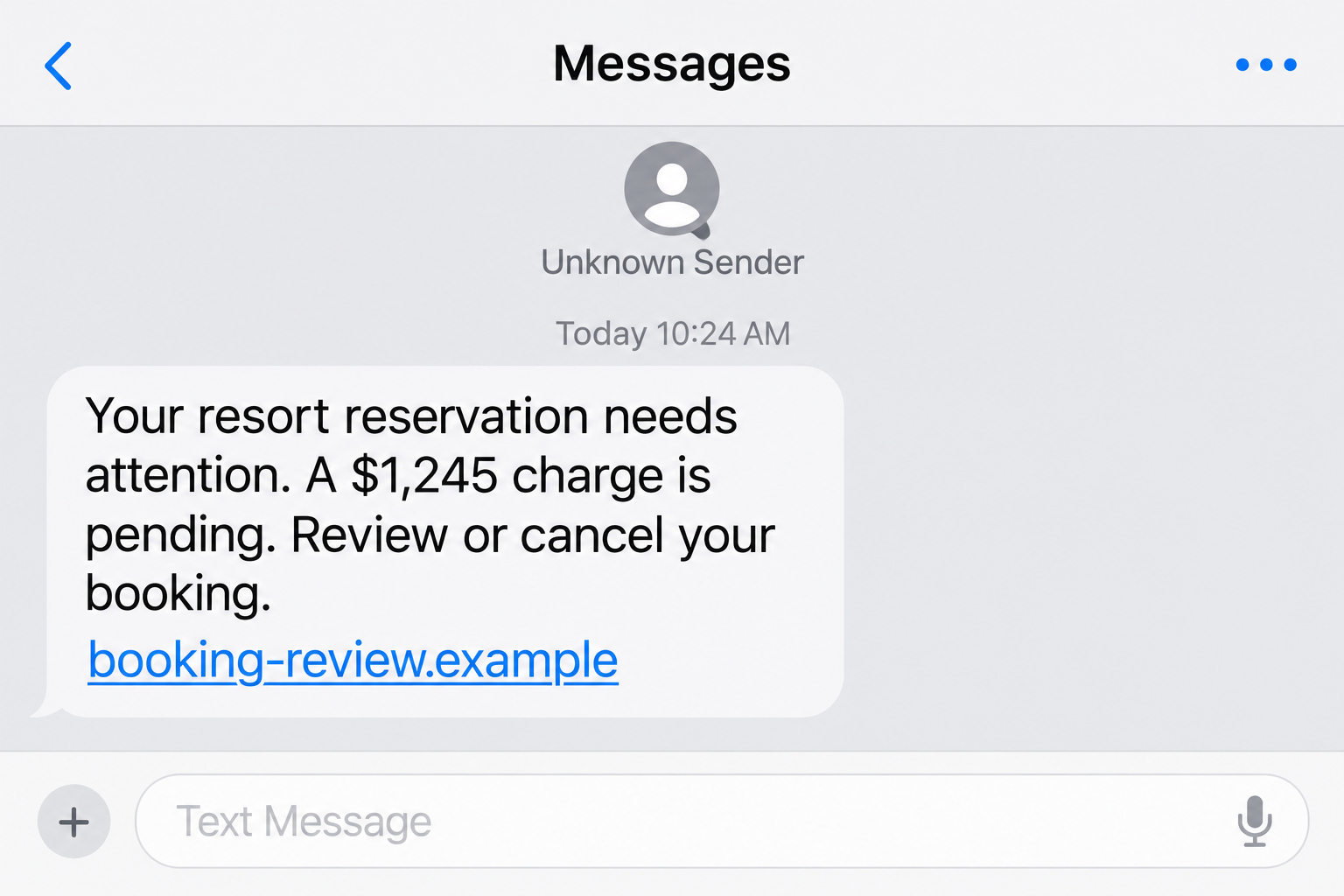
The reported text invokes PGA National Resort and refers to a $1,245 charge. It directs the recipient toward Reservation247 to review, modify or cancel a reservation.
The message reportedly includes booking details, such as the guest’s name, reservation reference and arrival information. That is what makes it more persuasive than generic spam.
A person with an upcoming stay may react immediately. Someone without a booking may follow the cancellation route, worried that a stranger used their card.
Both reactions can lead to the same untrusted destination. The text’s claim about a charge is not evidence that your bank actually processed one.
The Resort Name Is Not the Website Owner
The reported link uses a pgaresort subdomain beneath reservation247.com. That arrangement matters because the controlling domain is reservation247.com, not the resort’s own domain.
Placing a business name at the beginning of an address does not make that business the operator. The recognizable part can be chosen to encourage trust.
The resort’s official website is pgaresort.com. Its published reservation route gives travelers an independent place to check the underlying booking.
- Do not open the cancellation link to establish whether a charge exists.
- Check the bank and original reservation through channels you already trust.
- Confirm any payment request with the resort or booking provider independently.
- Keep the suspicious message without sharing a private reservation code publicly.
What Is Established About This Reported Campaign
The documented warning concerns a resort-impersonation text and its external booking link. It does not accuse PGA National Resort of operating the scheme.
The live Reservation247 destination could not be retrieved during these checks. Its present form fields, operator and payment-processing behavior therefore remain unverified.
The lead image uses a nonfunctional example address, not a captured guest message. No private booking code or traveler information is reproduced.
Those limits do not make the message safe. They mean the response should focus on independent verification instead of guessing how the sender acquired the details.
How the Reservation247 Text Scam Works
Step 1: A Specific Reservation Makes an Unexpected Text Feel Relevant
The first persuasive element is context. A resort name and apparent booking information turn an unsolicited text into something that seems connected to an existing trip.
That can lower skepticism because travel companies do send real confirmations, reminders and payment notices. The deception borrows a familiar communication pattern.
However, knowing a name or reservation detail does not establish authority to collect money. A sender must still be independently connected to your actual booking.
The available evidence does not identify a data breach, compromised account or particular source of the information. Accurate details alone cannot establish that explanation.
If your booking is real, preserve the original confirmation. It provides a safer reference than instructions arriving unexpectedly through a different domain.
Step 2: The Amount Creates a Reason to Act Quickly
The $1,245 figure is large enough to create anxiety. A recipient may stop examining the sender and start looking for the quickest way to prevent a loss.
That is especially effective when the text offers a cancellation or modification option. Following the link can feel like a protective action rather than a risky one.
Do not confuse a number in a message with a verified debit. Open your banking app separately and examine actual transactions.
If a pending authorization appears, ask the issuer what it represents. A legitimate hotel authorization and a fraudulent text can exist at the same time.
The correct response depends on the transaction, not merely whether the amount resembles a possible hotel charge.
Step 3: A Brand-Like Subdomain Hides the Important Part of the Address
In the reported address, pgaresort appears before reservation247.com. The brand-like opening can dominate a quick glance, particularly on a small phone screen.
The right-hand controlling domain is the part you must examine. A prefix is not an ownership certificate, and a hotel logo would not change that.
Some legitimate businesses use outside reservation providers. That possibility means you should verify the relationship, not assume every unfamiliar booking domain is fraudulent.
Use the contact information from the original confirmation or independently opened official site. Ask whether the exact message and hostname are authorized.
The genuine resort website can itself lead to an outside reservation platform. The difference is that you reach that service through an independently verified starting point.
Do not approve an unsolicited domain just because legitimate hotels sometimes outsource booking. Verify this specific relationship and request, not the general possibility.
Do not send the full booking link to strangers for investigation. Its final token may identify a private reservation or unlock information about a traveler.
Step 4: A Review or Cancellation Page Can Turn Concern Into Disclosure
The intended next move is getting the recipient off the text and onto a page the message controls. That is where the phishing risk increases.
A fraudulent booking page could request card details, an account password, contact information or a verification code under the pretext of securing the reservation.
Those are possible collection methods, not verified fields from a currently accessible Reservation247 form. The destination was unavailable for direct inspection.
The safety rule remains practical: do not provide credentials or payment information to a page merely because a threatening text sent you there.
Cancellation should not require handing a stranger an unrelated account password or reading them a bank’s one-time security code.
Step 5: Follow-Up Contact May Reinforce the Original Request
If someone replies or submits information, a later message can appear to continue the same booking issue. That continuity can make an impersonator seem more credible.
Be particularly cautious if the conversation moves to a personal messenger account or an unexpected telephone call requesting immediate payment.
This report does not establish that such follow-up occurred in every Reservation247 case. It is a relevant escalation to recognize if your interaction continues.
End the unverified conversation and contact the property yourself. A genuine booking problem can be discussed through a channel you independently locate.
Step 6: The Traveler Must Separate the Scam From the Real Reservation
The final source of confusion is the underlying trip. A suspicious message does not automatically mean the actual reservation is canceled, unpaid or compromised.
Travelers can accidentally create a second problem by canceling a valid stay, paying twice or ignoring a real issue after dismissing the fraudulent text.
Ask the hotel or original provider to verify the booking’s status, any balance and the authorized method of payment. Record the response.
That independent confirmation resolves the practical question the text tries to control. You no longer need its link to decide what happens next.
Why Correct Booking Details Do Not Settle the Question
Recognition Is a Starting Point, Not Authentication
A confirmation number can look reassuring because it is specific. But it only proves the sender knows, copied or invented a number that appears meaningful.
When other details match, take the message seriously enough to verify independently. Do not take the match as permission to provide additional sensitive information.
Ask the official booking channel whether it sent that exact request. A broad answer that the resort sometimes uses text messages is not enough.
A Padlock Does Not Authorize a Payment Request
An encrypted connection protects data in transit to a website. It does not establish that the website is entitled to collect that data.
A convincing reservation interface can still be operated by an unrelated party. Evaluate the request and business relationship rather than relying on visual polish.
If your browser displays a security warning, do not continue through it to investigate. You can resolve the reservation through the resort without opening that page.
Check the Charge Without Entering the Message’s Workflow
Use your bank’s existing app, a saved bookmark or the telephone number on your card. Do not use a support number supplied by the suspicious text.
For the stay itself, start with the original confirmation and official resort website. If you booked through an agent, check that original account too.
You are looking for agreement between trusted records, not a reassuring answer from the same sender who created the alarm.
What to Do If You Received or Responded to the Text
- Save the message before blocking it.
Capture the sender, text, visible hostname and receipt time. Preserve the original privately so your bank or booking provider can inspect it if needed.
Redact guest names, dates and reservation tokens before sharing screenshots publicly. Warning other travelers should not expose your own booking.
- Verify the reservation independently.
Open pgaresort.com yourself or use the original confirmation. Ask whether the payment request and Reservation247 hostname are authorized for your booking.
Do not cancel a genuine trip simply because this text arrived. First establish whether the original reservation remains valid and whether any balance is actually due.
- Check real payment activity.
Review your bank account separately. If there is no corresponding transaction, do not make a preventive payment or enter card information to cancel the supposed charge.
If a transaction exists, ask the issuer to identify it. Distinguish a hotel hold, completed payment and unauthorized charge before choosing the appropriate response.
- If you only opened the link, stop interacting.
Close the page and avoid further messages. Opening a page alone does not prove your phone is infected or require an automatic factory reset.
Check whether you downloaded anything, granted a permission or entered information. Those actions determine what additional protection is appropriate.
- If you entered card details, contact the issuer immediately.
Use the official banking app or card number. Explain that the details were supplied through an unverified reservation message and ask about blocking or replacing the card.
Report any unauthorized transactions accurately. Do not wait for a promised cancellation email from the same page before protecting the account.
- If you supplied a password or security code, secure the affected account.
Change the password through the genuine service, review active sessions and enable multifactor authentication. Replace reused passwords on other accounts as well.
If a bank code was involved, tell the bank what happened. An apparently unsuccessful form does not guarantee the information was not received.
- Check downloads only if a download actually occurred.
Remove an untrusted file without opening it. If you installed software or granted remote access, disconnect that session and seek appropriate technical help.
A Malwarebytes scan can help examine a device after a suspicious installation. AdGuard may reduce malicious advertising exposure, but neither service verifies a reservation or reverses payment.
- Report and monitor the right records.
Tell the hotel or booking provider about the impersonation attempt. Use your phone’s spam-reporting feature and continue monitoring payment activity and account notifications.
Keep correspondence and case references together. If another caller promises a refund for an upfront recovery fee, do not pay them.
Frequently Asked Questions
Is the $1,245 Charge Real?
The text cannot establish that. Check your actual bank records and ask the issuer about any matching transaction through a trusted channel.
A message may invent a charge or exploit a plausible amount. Do not enter payment details into its cancellation page to find out.
Is Reservation247 the Official PGA National Resort Website?
The resort’s independently accessible site is pgaresort.com. The reported message points to a different controlling domain, reservation247.com.
Any claimed relationship requires confirmation from the property or original booking provider. A hotel name placed in a subdomain is not proof of authorization.
How Could the Sender Know My Booking Information?
The available evidence does not establish the source. Several possibilities exist, and matching details do not identify a particular breach or responsible organization.
Preserve the message and notify the original booking channel. Avoid posting private references online while trying to determine what happened.
Should I Cancel My Actual Hotel Reservation?
Not solely because of this message. Confirm its status through the resort or the service where you originally booked.
If cancellation is necessary for another reason, use that trusted channel and review the real cancellation conditions. Do not let an impersonator choose the route.
Am I Infected If I Clicked the Link?
A click by itself does not prove infection. The more important questions are whether you submitted information, downloaded a file, installed software or allowed access.
Respond to the exposure that actually occurred. Protecting a disclosed card or password is usually more urgent than repeatedly checking an unavailable page.
What Is the Safest Way to Handle Another Payment Reminder?
Leave the message’s workflow and confirm the request through your original booking account or independently obtained resort contact information.
Ask for the balance, payment reason and authorized method. A legitimate issue can be resolved without trusting an unexpected link.
The Bottom Line
Do not use the Reservation247 text to pay, cancel or verify a PGA reservation. Check the real booking and bank activity independently instead.
If you disclosed payment or account information, secure that specific account now. Preserve the message, notify the legitimate booking channel and avoid further contact with the sender.

Join the discussion
0 commentsShare your experience or ask a question about this article.
Discussion
Start the conversation
Have a question or something useful to share? Add the first comment.