

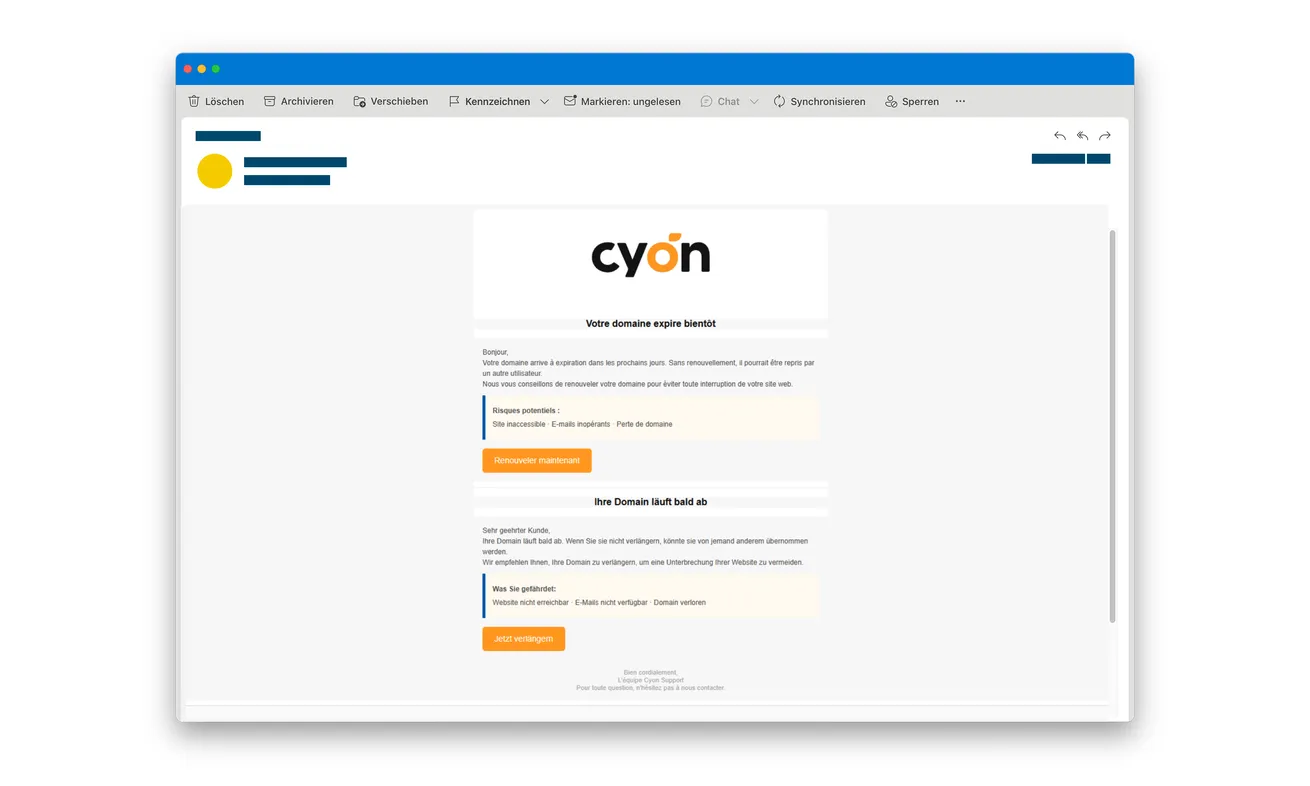
An email carrying the Cyon logo warns that your domain will expire soon. Your website and email addresses could supposedly stop working unless you renew.
The requested payment looks small compared with losing an important address. Before rushing to keep everything online, look at the approval the message leads toward.
Overview
The domain warning leads to payment phishing
The Cyon domain renewal email scam uses fear of service interruption to introduce a counterfeit renewal payment.
Swiss police document the false email and linked forms: card details are followed by a fake banking-approval screen asking for an SMS security code.
The actual hosting provider is being impersonated. This message doesn’t establish that Cyon sent the request, your domain expired, or your website was taken over.
The small fee isn’t the only decision
The original email shown here contains French and German warnings about a domain nearing expiry. Its existing police anonymization is retained.
The payment stage can look like a normal step toward renewal. The later approval request is where a banking operation may be disguised as finishing the task.
A security code must be judged by its real purpose, not by the website’s promise that it will keep your domain active.
Check the domain and protect the card through separate routes
Use the real provider for the renewal question and your financial institution for any exposed payment information.
- Open Cyon independently instead of using the email’s renewal link.
- Check the actual domain and billing information in the genuine account.
- Ask the person who manages the domain if you don’t handle its registration.
- Don’t enter a bank code into an unverified renewal page.
- Report submitted card information and approvals even if the page showed an error.
Why Domain Expiry Is Such a Convincing Threat
A domain can be connected to work, customer contact, a family project, or years of correspondence. Losing it sounds much more serious than missing a discount.
The warning therefore arrives with an easy comparison: pay a small amount now or risk an expensive disruption later.
That comparison leaves out the first question, whether the request came from your provider. The apparent cost of doing nothing can distract from checking the sender.
You may also handle domains infrequently. A renewal notice can seem unfamiliar without seeming impossible, especially when another person originally set up the service.
There’s no need to solve that uncertainty through the email. Contact the genuine account owner, administrator, or provider and establish the actual renewal position.
If an expiry date really is approaching, use the verified route to handle it. Finding a false notice doesn’t mean every legitimate service deadline can be ignored.
Equally, don’t pay a suspicious request simply because your website matters. The importance of the domain makes independent verification more useful, not less.
Find the exact domain named in the notice. A business may own several similar addresses, with different renewal dates and people responsible for them.
Ask the administrator to check that specific registration through the established account. You don’t need to exchange account passwords in order to ask the question.
If the original administrator has left, use the provider’s genuine support process to establish authorized access. Don’t accept the unexpected email as a shortcut around that problem.
Compare any actual invoice with the service and account it covers. A copied company logo isn’t enough to connect a new payment request to your registration.
If a genuine renewal was paid separately, retain its confirmation. It can help resolve the real deadline without confusing it with an attempted payment through the false page.
For a company card, tell the person responsible for that payment method about any disclosure. A domain administrator may not be authorized to arrange card protection.
Keep the bank’s actual approval description available for the issuer. It may explain the operation more accurately than the renewal page’s small advertised fee.
None of these checks requires changing your website’s configuration. Avoid making unrelated technical changes while you’re still establishing whether the notice corresponds to a real renewal.
Once the legitimate deadline is confirmed, record it in the normal account-management process. That gives the next person a trusted reference when another alarming email arrives.
How the Cyon Domain Renewal Email Scam Works
Step 1: A familiar provider name carries an interruption warning
The email makes renewal sound necessary to prevent a website, email service, or domain from becoming unavailable.
A recognizable logo can make that warning feel like routine administration. But recognizing the company isn’t the same as identifying who sent this particular message.
Compare the claim with your genuine account records rather than another statement inside the email. The sender controls its date, explanation, and payment instruction together.
If the domain is managed for a business, ask the responsible person before paying. A forwarded warning shouldn’t become approval to disclose the company’s card.
Step 2: The link presents a small renewal payment
The false site turns an account question into a checkout. The amount may seem too minor to justify delaying a service you depend on.
Think about the payment method, not only the price. A page receiving your card details can create a risk beyond the amount advertised.
Don’t make a test payment to see whether the renewal works. Confirm the provider and domain first, outside the route introduced by the email.
Step 3: A banking-looking screen requests the security code
The police describe a screen imitating approval through a bank or card app. Its appearance makes the next request feel connected to a legitimate security check.
However, a form on a renewal website isn’t your bank merely because it displays familiar approval language.
Read the actual message from your financial institution. Check the operation, recipient, currency, and amount wherever those details are shown.
A code can be real while the explanation surrounding it is false. Don’t let the preceding domain warning decide what the banking request means.
If you cannot understand the requested approval, stop and ask the issuer independently. You don’t need to finish the checkout to receive an explanation.
Step 4: Renewal instructions can authorize an unwanted financial action
Submitting the requested information can help the attackers complete a payment. The fact that two-factor authentication appeared doesn’t establish that you authorized the intended renewal.
This is deception around an authentication step, not evidence that every bank’s security has stopped working.
If you already supplied a code, describe that explicitly when seeking help. Reporting only a strange email can hide the important financial action.
If a page failed, don’t repeat the attempt with another card or code. Check the bank’s records instead of relying on the false page’s result.
Find the Real Renewal Without Reusing the Email
Cyon’s genuine website provides its account and support routes. Start there if you need to establish whether a renewal is due.
Use the account you normally use, not a new sign-in supplied by the warning. If someone manages the service for you, ask them to check.
Identify the exact domain before discussing a bill. A company may have several names and services, and a vague warning can cause confusion.
Keep the domain registration question separate from hosting and other subscriptions. Ask which actual service and billing record requires attention.
Don’t assume a website loading normally settles every renewal question. Use the provider’s records rather than trying to infer billing status from the homepage.
If the real provider says action is required, follow the verified account process. You don’t need to return to the suspicious email after confirming a genuine task.
For a business, retain the genuine invoice and payment authorization. That gives you a clear record of which request was verified and who handled it.
Avoid sending the untrusted link around as a task for another employee to complete. Explain the claim and ask them to check their normal administrative route.
A Card Disclosure Doesn’t Automatically Mean the Domain Was Stolen
A card entered on the payment page needs financial protection. That doesn’t automatically mean someone obtained your domain-account password or changed your website.
If you entered only card details, tell the issuer. If a password was also requested and supplied, tell the responsible account provider as well.
Don’t change website settings or move the domain merely because an impostor mentioned expiry. An unnecessary administrative change can create its own disruption.
Ask genuine support to assess any account change you don’t recognize. Keep your observations separate from the email’s threats.
For example, receiving a warning isn’t the same as seeing an unauthorized transfer request in the genuine account.
Likewise, a suspicious banking approval isn’t proof that someone accessed your website files. Describe the particular screen, code, and payment involved.
A precise report helps the issuer and provider work on their own parts of the incident without confusing one task with another.
If Someone Else Handles Your Website
Contact the administrator through the relationship you already have. Don’t use a new help address printed inside the disputed renewal email.
Ask them to confirm who manages the domain and which actual invoice exists. You don’t need to ask them for their password or authentication code.
If a staff member already paid, have the cardholder contact the issuer while the administrator checks the domain. Those actions can proceed separately.
Keep a record of the false request so another person doesn’t pay it later. A shared inbox can expose more than one employee to the same message.
Warn colleagues using the exact subject or a harmless description, without encouraging them to open the payment destination.
If someone previously forwarded the warning as genuine, correct that instruction clearly. The important thing is preventing another attempt, not assigning blame.
After the urgent response, make sure genuine renewal reminders still reach the right person. Removing a false email shouldn’t leave the real service unmanaged.
What to Do if You Have Fallen Victim to This Scam
-
Stop the false renewal. Close the linked page and don’t retry a failed payment, enter a second card, or request another bank code.
Keep the message and existing evidence. Use a separate route to check whether the real domain needs attention.
-
Contact the issuer after submitting card information. Explain the Cyon impersonation and the small-fee renewal pretext.
Ask about securing the exposed card and checking attempted or completed payments. Mention every card entered, including one the website appeared to reject.
Give actual transaction details from your account. Don’t assume the advertised renewal amount describes the financial operation attempted.
-
Describe codes and approvals specifically. Tell the bank if you submitted an SMS code or accepted an authentication request during the process.
Explain what the genuine message said, if you remember. Ask about the relevant protective measures and any unfamiliar financial activity.
Follow the provider’s dispute or recovery instructions, including time limits. No outcome is guaranteed simply because the original email was fraudulent.
-
Check the genuine domain account. Reach Cyon independently or involve the administrator who normally manages the registration.
Confirm any actual renewal requirement and report suspicious account activity if observed. Don’t treat the phishing payment as proof that a genuine bill was settled.
-
Secure credentials if they were exposed. Change any password actually entered on an unverified page through the legitimate service.
Address reused copies on other accounts and review unfamiliar access where relevant. A card-only disclosure shouldn’t be described as proof of every account being hacked.
-
Save and report the impersonation. Keep the original email, destination, existing screenshots, payment alerts, and a timeline of your actions.
Flag the email through your mail provider and notify genuine Cyon support. Consider a police report when money was lost or additional misuse needs documenting.
Keep banking secrets and complete card details out of public warnings. Don’t reopen the checkout to create more evidence.
-
Assess device exposure separately. If a file was downloaded or software installed, investigate that additional event rather than assuming the email itself caused infection.
Malwarebytes can help inspect unwanted programs. AdGuard may filter some dangerous destinations, but neither withdraws a submitted code or reverses a bank payment.
Account and card protection still require the relevant providers. Don’t delay those contacts while waiting for a device scan.
Frequently Asked Questions
Is this Cyon renewal message confirmed as phishing?
Yes. Police publish the false email and describe its card and security-code collection. The genuine provider is being impersonated.
Does receiving it mean my domain really expires today?
No. Check the actual registration and billing records through Cyon or your established administrator. The email’s deadline isn’t independent evidence.
Why can a small renewal fee cause a larger problem?
The false site receives payment information and may seek a banking approval. Its advertised price doesn’t limit what an attacker attempts.
Is a real bank code enough to trust the renewal page?
No. A genuine code can relate to an operation the attacker initiated. Read its purpose and verify through the financial institution.
Should I move the domain immediately after entering a card?
Don’t make disruptive changes based only on that disclosure. Protect the card and have the legitimate provider assess the actual domain account.
What if the genuine account also has a renewal due?
Handle it through the verified provider process. A real task doesn’t authenticate the unexpected message or its supplied payment route.
The Bottom Line
Don’t renew a domain through the false Cyon email. Its interruption warning leads to card collection and a counterfeit banking-approval step.
If you supplied payment information or a code, contact your financial institution promptly. Check the real domain separately through Cyon or your established administrator.

Join the discussion
0 commentsShare your experience or ask a question about this article.
Discussion
Start the conversation
Have a question or something useful to share? Add the first comment.