

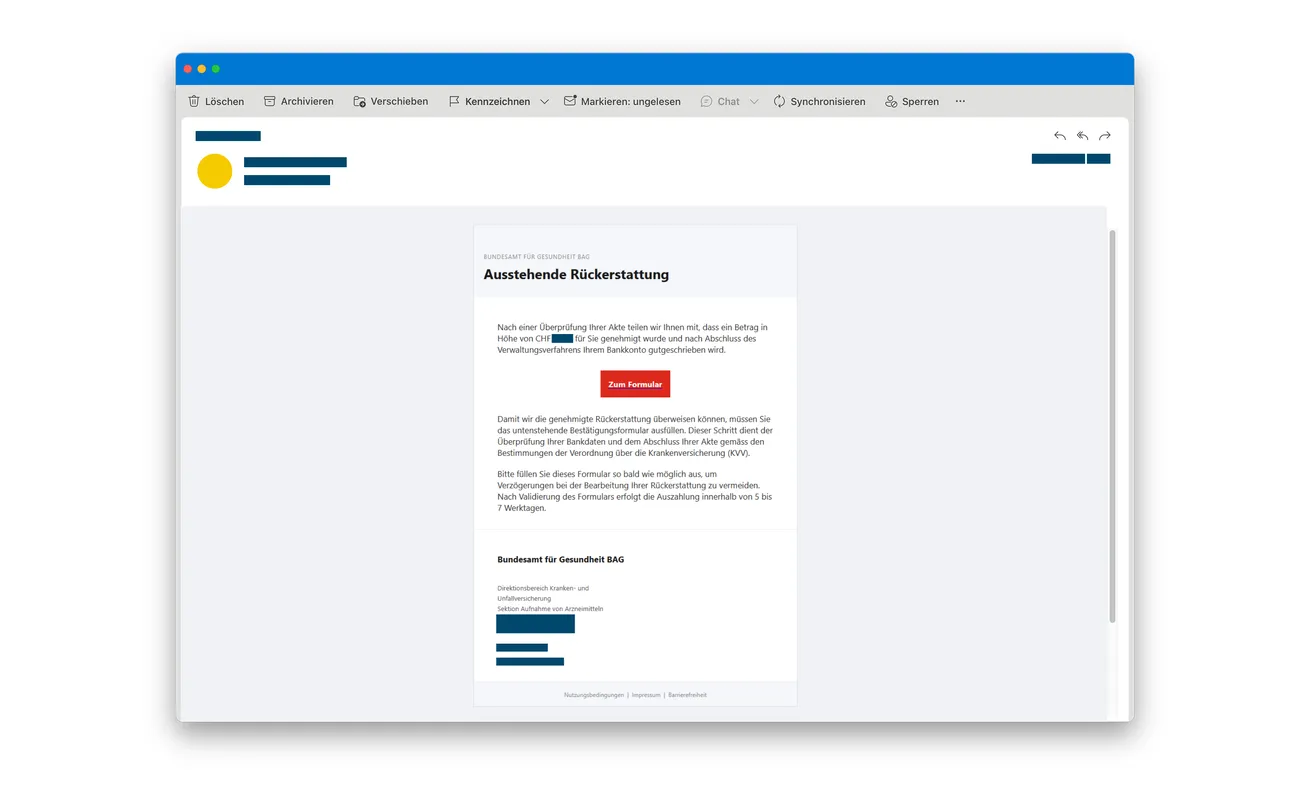
An email in the name of Switzerland’s health office says a refund has been approved. A form is supposedly all that remains before the money arrives.
The language sounds administrative, especially if you’ve recently dealt with healthcare paperwork. Before completing that last step, check which organization is actually asking for your details.
Overview
The health authority is being used as a false sender
The BAG health refund email scam impersonates the Swiss Federal Office of Public Health and invites recipients to claim a supposed reimbursement.
BAG is the agency’s German abbreviation. A familiar government name helps the message sound authoritative, but the agency itself warns that this refund approach is phishing.
It says it doesn’t handle these refunds or email private individuals about them. The claim therefore shouldn’t be treated as an official payment decision.
The form leads away from genuine reimbursement
Swiss police describe the counterfeit email and website, including a lookalike address and collection of personal and card details.
The original message pictured here presents an approved-refund story and a form button. Its source redactions are preserved, including the concealed amount.
The purpose of the false page is to collect information, not determine whether your real healthcare expenses are eligible for reimbursement.
Protect the card without abandoning a real claim
You can reject this form while continuing any genuine billing inquiry through your insurer or other responsible provider.
- Don’t enter financial details through the unexpected BAG refund link.
- Check genuine reimbursement questions through the organization handling your actual claim.
- Use independently obtained contacts for any question about the agency message.
- Tell the card issuer if the false form received your payment information.
- Keep health records and authentication secrets out of public scam reports.
Why the Official-Sounding Paperwork Can Work
Healthcare expenses can involve several organizations and documents. A message offering a refund may seem connected to a process you don’t fully control.
The government name makes that uncertainty easier to overlook. You may assume the office has reviewed information that isn’t visible in the email.
The wording can also make the payment sound settled. Instead of asking whether you’re entitled to anything, it presents a final administrative step.
That framing turns a decision about trust into a task about completing paperwork. You may focus on filling the form correctly rather than identifying its operator.
But formal language doesn’t establish that an authority holds your file or owes you money. Neither does a copied address or logo.
Start with the real claim you know about. If you can’t connect the message to the responsible provider through an independent route, don’t supply more information.
You don’t need to send medical documents to prove that the message is suspicious. The first task is to authenticate the request, not satisfy it.
How the BAG Health Refund Email Scam Works
Step 1: A supposed reimbursement creates an unfinished task
The email tells the recipient that money is waiting and a form is needed to finish the process. A short claim period may add pressure.
If you’ve paid a healthcare bill, you may supply the missing connection yourself. The message appears to explain what happens next.
Keep that assumption separate from the facts. A recent expense doesn’t authenticate a new sender, and a general refund announcement doesn’t identify your claim.
Find the organization responsible for the genuine expense before accepting another organization’s instructions about it.
Step 2: A lookalike address supports a copied authority page
The linked destination imitates the agency’s website. A similar-looking address adds another layer of familiarity.
Public information can be copied together: logos, office names, navigation, and contact text. Their agreement with one another isn’t independent confirmation.
Don’t let a government name appearing somewhere in an address replace checking the actual destination. If you’re uncertain, avoid the link and find the authority separately.
An encrypted connection doesn’t settle who operates the page. The browser can protect a connection to a dishonest destination too.
Step 3: The claim form asks for personal and card information
The page turns the promise of money into a reason to submit sensitive details. Its official appearance can make the request feel mandatory.
Pause before treating a receiving-payment story as permission to disclose a card. Ask whether you’ve established who needs the information and why.
In this case, the real agency has already rejected the purported refund role. A more polished form cannot repair that mismatch.
If the form asks for additional records, don’t supply them merely because you’ve completed earlier fields. You can stop before expanding the exposure.
The same applies after an error. Re-entering details or switching cards does not help establish that the original destination was genuine.
Step 4: Submitted information can be used outside the supposed claim
The risk is no longer limited to whether a refund arrives. The information may support unwanted transactions or further impersonation.
Don’t judge the outcome by the false page’s final message. An approval, failure, or pending status there doesn’t describe everything that may happen elsewhere.
Use genuine financial records to identify actual activity. If nothing appears yet, the card disclosure can still be reported.
If a later message repeats your address or the refund story, don’t assume that proves official involvement. Details from the false form can make another approach persuasive.
The Key Question: Who Actually Handles Your Reimbursement?
Before collecting bank or medical paperwork, check who is supposed to process the refund. BAG’s own warning rules out the role claimed by this email.
That doesn’t mean genuine healthcare reimbursements don’t exist. It means this message cannot establish that the federal office is handling yours.
For a real claim, return to the insurer or provider named in the documents you already have. Ask about that particular bill or reimbursement.
Use your existing account, known contact, or original correspondence. Don’t substitute a new support address supplied by the refund email.
If you don’t know which organization is responsible, clarify that first. You don’t need to provide a card number to several strangers while looking for the answer.
Keep the question narrow: which actual expense or claim is under discussion, and who can confirm its status?
That approach also helps you avoid confusing an ordinary delay with fraud. A legitimate provider’s slow response is different from a counterfeit authority collecting card data.
Continue any real claim through its established process. Rejecting this email should not interrupt treatment or become advice to abandon legitimate paperwork.
A Familiar Amount or Reference Doesn’t Authenticate the Sender
A refund figure may resemble an expense you’ve paid. That resemblance can be coincidence or part of a persuasive claim; it isn’t verification by itself.
Compare the underlying records instead of looking only for a matching number. A genuine reimbursement should relate to a specific process you can check independently.
Likewise, a file reference printed in the email can be invented. Repeating it on a website doesn’t turn two linked displays into separate evidence.
Don’t send a full medical invoice to an unknown contact just to ask whether the reference belongs to you. Establish the contact first.
If genuine support needs documents, ask which limited records are relevant and use its verified submission process.
When assisting a relative, respect their privacy as well as their finances. You can organize the message and bank contact without circulating their medical history.
Keep the false refund offer separate from clinical questions. The phishing incident doesn’t establish anything about a diagnosis, entitlement, or treatment decision.
A first phishing report can describe the message and its destination without including your entire medical invoice. Preserve the full original privately if further evidence is requested.
When showing the message publicly, conceal patient identifiers, home addresses, account references, and health details. Those records aren’t needed to explain the copied government branding.
Keep an unedited copy for an authorized investigator or provider. Public redaction and private evidence preservation serve different purposes; neither requires sending sensitive documents to the suspicious sender.
If you’re helping someone else, ask before sharing their correspondence. They may welcome help contacting the bank without wanting their healthcare history discussed in a group.
A brief incident timeline usually keeps the initial conversation focused: when the email arrived, which form was completed, and what financial information was supplied.
If You Started Filling In the Form
Write down which fields you completed and whether they were submitted. Don’t return to the page to inspect it more closely.
A name and address call for different follow-up from a card or password. Give the relevant provider an accurate description rather than saying everything was necessarily stolen.
If a card was supplied, contact its issuer. If account credentials were additionally entered, secure the corresponding account through its genuine service.
If an authentication request appeared, record what you approved or refused. Don’t assume it was part of receiving a reimbursement merely because the page said so.
Keep any actual transaction separate from the promised payout. The bank needs details of the financial event, not just the figure displayed in the email.
Watch for unexpected follow-up orders, invoices, or contacts using your details. Verify them through the relevant real organization before accepting another instruction.
If you find nothing suspicious yet, don’t invent a loss. Report the exposure and follow the provider’s advice about monitoring and protection.
What to Do if You Have Fallen Victim to This Scam
-
Leave the refund form. Stop entering details and don’t continue through a new link, a supposed verification screen, or a replacement payment option.
Don’t reply with more information to ask where the refund is. Keep the original message available while you organize the response.
-
Contact the card issuer if payment details were supplied. Explain that a counterfeit BAG reimbursement form received the information.
Ask about securing the card, reviewing authorizations, and dealing with unwanted transactions. Include a card entered during an attempt that appeared unsuccessful.
Use actual dates, currencies, amounts, and recipients from your financial records. Don’t describe a debit as a refund because the false site labeled it that way.
-
Report codes or banking approvals separately. Tell the responsible institution what the authentic request described and how you responded.
Ask about the relevant protection and recovery steps, including reporting deadlines. Don’t authorize another operation to correct the supposed refund process.
Keep the case reference. A criminal’s promise that money will be returned does not replace a completed recovery confirmed through your provider.
-
Secure any account credentials actually disclosed. Change exposed passwords through the real services, including reused versions on other accounts.
Review unfamiliar access or recovery changes where relevant. If only card data was entered, don’t assume the entire healthcare account was accessed.
-
Preserve evidence without sharing sensitive health records publicly. Save the original email, sender information, destination, existing screenshots, and relevant alerts.
Describe the actions taken in order. Keep complete card numbers, authentication codes, and medical documents out of social-media posts or open discussion threads.
Use the official reporting route identified by BAG and your mail provider’s phishing controls. Consider a police report after financial harm or attempted misuse.
-
Check genuine reimbursement paperwork with the right organization. Reach your insurer or responsible provider through a contact you already trust.
Ask about the actual claim rather than the impostor’s promise. Keep a legitimate inquiry moving without supplying information to the fraudulent sender.
-
Investigate additional device exposure when appropriate. If a file was opened or software installed, record that as a separate event.
Malwarebytes can help inspect suspicious software. AdGuard can filter some risky web content, but neither can reclaim a financial disclosure or verify a health refund.
Don’t assume receiving an official-looking email infected the device. Prioritize the provider contacts that match the information you actually submitted.
-
Refuse unexpected recovery instructions. Don’t pay an agent or provide fresh codes to release the claimed health reimbursement.
Verify later contacts through the bank or support case you initiated. Familiar personal details don’t prove that a new helper represents the agency.
Frequently Asked Questions
What does BAG mean in this email?
It is the German abbreviation for Switzerland’s Federal Office of Public Health. The fraudulent sender uses the genuine agency’s identity.
Does BAG confirm this reimbursement process?
No. Its own warning says it doesn’t handle these refunds or send the corresponding emails to private individuals.
Does that mean my real healthcare claim is invalid?
No. Ask the insurer or provider responsible for your actual claim. The scam email establishes neither entitlement nor the outcome of genuine paperwork.
Can I trust the form because it looks like a government website?
No. Public branding and page layouts can be copied. Use an independent route and the authority’s own warning to assess the request.
What if I submitted a card but haven’t seen a charge?
Tell the issuer about the disclosure now. The absence of visible loss doesn’t establish that the submitted information is safe.
Should I send my medical invoice to the email’s support contact?
Not before independently verifying the organization and submission route. Share only necessary documents through the genuine provider handling your claim.
The Bottom Line
Don’t complete the BAG health refund email’s form. The genuine authority rejects this supposed reimbursement role, and the linked imitation collects personal and card information.
If you submitted financial details, contact the relevant issuer or bank promptly. Continue any real healthcare claim separately through the organization actually responsible for it.

Join the discussion
0 commentsShare your experience or ask a question about this article.
Discussion
Start the conversation
Have a question or something useful to share? Add the first comment.