

Every Roblox player has wished for free Robux at some point. Fortnit2022.blogspot.com claims to make it happen with just your username, sending the Robux directly to your account.
The site is set up to look like a tool built for that very thing. After the button press, the story shifts, and it never lands in your Roblox balance.
Overview
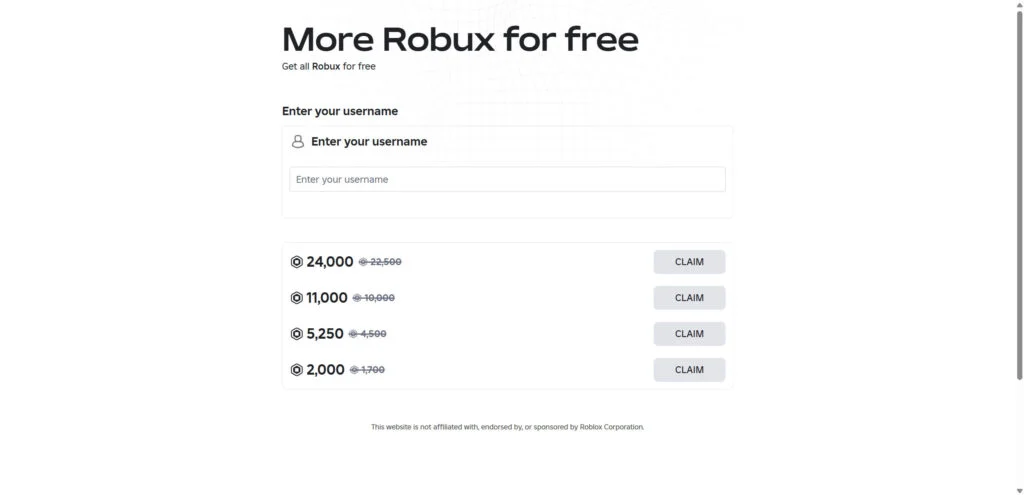
What Fortnit2022.blogspot.com holds out to visitors
Fortnit2022.blogspot.com’s pitch is a generator that hands out free Robux. You supply a Roblox username, choose an amount, often thousands, and press a button meant to “send” it.
Usually the screen then comes alive: a progress bar moves, fake server messages roll through a console and players who supposedly just got paid appear. None of it adds Robux.
No connection to the real Roblox
Roblox isn’t behind Fortnit2022.blogspot.com or any site like it. It doesn’t run them, approve them or partner with them, and it warns players against them.
Typing in your username doesn’t give a website any way to add Robux. Only Roblox itself can put currency into an account.
Who actually profits from “free” Robux
A content locker replaces any delivery. The page calls it “human verification,” but it’s a wall of apps, surveys and sign-ups that pay the site’s operator.
Put simply, this is where that leaves you:
- You can keep completing offers forever, and no Robux will ever arrive.
- Your completed offers make the operator money: a commission each time, usually from a cost-per-action (CPA) ad network.
- Some offers collect personal details, like your email, your phone number and more.
- Some lean on you to install apps or start subscriptions that can cost real money.
- Later, some request your Roblox login code or password.
Treat Fortnit2022.blogspot.com as what it is, a free Robux scam. Leave your username out, ignore its “verification” offers and never share your password or a login code there.
What We Found on Fortnit2022.blogspot.com
Here’s what we noticed when we looked at Fortnit2022.blogspot.com:
- It asks for a Roblox username, then locks the reward behind a wall of offers before anything is supposed to arrive.
- Fortnit2022.blogspot.com is hosted on Blogger, Google’s free blogging platform, where anyone can put up a page in minutes.
How the Fortnit2022.blogspot.com Scam Works
These sites run on recycled parts. Free Robux pages come from the same small set of kits, and the script barely changes between domains. Here is the routine.
Step 1: A shared link promises free Robux
Few players find Fortnit2022.blogspot.com or similar pages with a search. Links get dropped into YouTube comments, TikTok videos, Discord servers and messages sent inside Roblox.
Nobody needs a long speech to sell this. “Claim 10,000 free Robux,” “Working generator” and “No password needed” do the job, while fake comments underneath swear it worked.
Many of these sites are built on free services such as Blogger (blogspot.com) or Netlify (netlify.app). There’s nothing to pay, and when one gets reported, a replacement is easy.
Step 2: You’re prompted for your Roblox username
You’re asked for your username first, plus an amount, often a big one like 10,000 or 22,500 Robux. Then you click “Generate” or “Continue.” It all seems harmless.
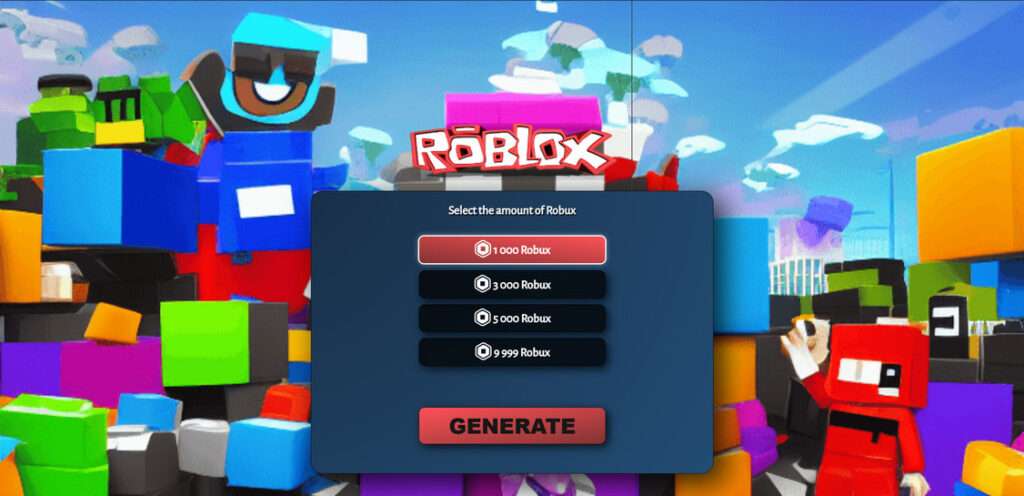
Asking for your username is about feeling, not function: it makes the offer seem personal and the Robux seem on their way. Some pages even show your avatar.
Knowing your username gives a website no power to send you Robux. The site asks anyway, because it keeps you invested in a delivery that will never actually happen.
Step 3: The fake generator’s show begins
What follows is pure performance. A console prints lines such as “Connecting to Roblox servers” and “Injecting Robux into account,” and a progress bar fills along with them.
Every line and every bit of that progress bar comes from a script that runs identically for everyone. Your Robux balance stays the same, and nothing gets injected.
Just before it would finish, the show pauses and announces that the transfer is “almost complete.” The pause sets up the real ask.
Step 4: You’re told to verify you’re human first
The bot check works like this: a box opens with apps, games, surveys and sign-ups, and the site says finishing one or two offers will “prove you’re not a bot.”
No matter how many offers you finish, this box never leads to Robux. It’s a content locker, an ad tool from CPA networks that pays the operator for each one.
Step 5: Your effort pays someone else
The operator makes money from every task in the locker. An app install, survey answer or trial sign-up can bring in a commission, multiplied across thousands of visitors.
Some tasks are nothing worse than tedious. Others ask for a phone number that starts a paid text subscription, or steer you toward apps from outside the official app stores.
Because most visitors to these pages are children, those offers carry more risk. A young player may agree to charges or terms they don’t really understand.
Step 6: The Robux reward never lands
You complete the offers, and then the page says verification “failed,” wants one more task, or simply refreshes. Your Roblox balance hasn’t moved.
By then, the operator’s payment for your time and data has already come in.
A later prompt for your password or login code, supposedly to “finish the transfer,” should be treated as one thing: an attempt to take over your account.
Red Flags of Free Robux Sites Like Fortnit2022.blogspot.com
The same signs appear on almost every free Robux site. One of them on its own is reason enough to leave the page.
It claims Robux will cost you nothing
Roblox doesn’t use outside sites to give away Robux. If a site offers you free Robux, it’s running a scam, whatever it calls the tool.
It collects your username to “send” currency
Only Roblox can put Robux into an account. A website that asks you to type in your name can’t, so that username box is just part of the show.
A generator screen with a progress bar and console
The fake loading screens and the “connecting to server” and “injection” messages are animations. Real Roblox purchases happen on roblox.com or in the official app, minus the theater.
“Human verification” tied to a list of offers
You’ll never be asked to install apps or fill in surveys by a real bot check. A CAPTCHA takes seconds. Verification that pays somebody else is a content locker.
Constant winner updates and rave comments
Notice the same “winners” popping up repeatedly? The list is part of the script. Live Robux feeds and gushing comments are scripted or come from fake accounts.
Disposable addresses on free platforms
Here’s what a throwaway page’s address looks like: free hosting like blogspot.com or netlify.app, a random string of letters, or some mix of “rbx,” “free” and “robux.”
Why Free Robux Generators Can’t Work
Part of the trick is the word itself: “generator” sounds technical, so it can feel plausible. Yet there’s nothing for an outside site to generate or hack.
Robux aren’t stored on some outside website. They live on Roblox’s servers, and only Roblox adds them, after a purchase, a Premium membership or a sale there.
Roblox spells this out on its help pages. If someone offers free Robux, memberships or valuable items, it’s a scam, and they’re really trying to get your account.
A site that could break into Roblox still wouldn’t have a reason to give currency away free. What these pages are actually able to hand out is ads.
Same Kit, Different Domains
MalwareTips keeps running into new free Robux pages, and Fortnit2022.blogspot.com is one of many that look nearly identical. Most are built from a handful of ready-made templates.
Look at the content-locker accounts and they differ, yet the page design is the same. That suggests the templates are sold or shared rather than run by one person.
Because the kit gets passed around, a single takedown rarely ends the problem. Renamed copies often appear within days, each running the same script.
Placed next to one another, the copies give themselves away with the same fingerprints:
- A headline offering “free Robux” or a “Robux generator”
- A username field next to an amount selector
- A progress console that’s only for show
- Offers stacked inside a so-called “human verification” box
- Comments or a live feed claiming recent winners got their payouts
Spot this pattern on a page and there’s nothing left to test. The address doesn’t matter; it’s the same scam.
The Real Risks for Your Account, Device and Data
Most visitors get nothing for their time. The bigger risks are in what the offers, and any pop-ups or messages that come later, try to get from you. Watch these:
- Your Roblox login. Some versions want your password, a 2-step verification code or a “login code.” Hand those over, and someone can lock you out and clear your inventory.
- Your device. Adware, or something worse, can ride along with the app files these offers send you to download outside Google Play or the App Store.
- Your phone bill. A premium text subscription can start once you enter a phone number in some offers, and the weekly charges keep coming until you cancel.
- Your personal details. Filling in surveys and sign-ups hands over names, emails, ages and addresses. They end up on marketing lists and feed spam campaigns.
- Your browser. Fake alerts and more “free Robux” ads start filling the screen after you allow notifications, which some offer pages ask you to do.
No matter what a site promises, asking for your Roblox password outside the official login page marks it as an account thief. Roblox says it never does that.
How to Get Robux the Safe Way
Nobody can give you a free shortcut to Robux. What you can do is pick a safe option that keeps your account secure:
- Head to roblox.com or open the official Roblox app and buy Robux there.
- Get a Roblox gift card from a legitimate store and redeem it through Roblox’s redemption page.
- Collect the Robux that a Roblox Premium membership includes each month.
- Design items, passes or experiences, then sell them on Roblox itself for Robux.
Claims of a Roblox promotion are easy to check: visit Roblox’s official website or social accounts. Real promotions don’t need your username typed into a stranger’s site.
A Note for Parents
Free Robux sites aim directly at children, since a child is more likely to trust a flashy page and less likely to read the terms of an offer.
Nothing you install will help as much as a short conversation. Let your child know free Robux offers are always fake, and only a parent gets their Roblox password.
- Your child’s Roblox account should have 2-step verification switched on.
- Use Roblox’s parental controls to limit spending and look over what’s happening on the account.
- Have your phone carrier switch off premium text subscriptions on the phone your child uses.
- Settle on one house rule: an unexpected charge or login request gets brought to you first.
A child who already used a site like Fortnit2022.blogspot.com doesn’t need punishment for the mistake. Go through the steps below side by side, beginning with the password.
What to Do If You Have Fallen Victim to This Scam
If you used Fortnit2022.blogspot.com by entering your username, completing offers or sharing other details, these steps keep the damage small. Begin by protecting your account.
- Make your Roblox account safe. Your password needs changing on roblox.com right away if you typed it anywhere on the site. Sign out of all other sessions too.
- Enable 2-step verification. If your password leaks again, the code sent to you becomes a second barrier, and nobody can sign in without it.
- Replace shared passwords. If the password you use on Roblox opens other accounts, such as your email, change each of them, beginning with the email.
- Clean out apps you added for the offers. Uninstall them first. Then scan your device with Malwarebytes Free, following the steps below.
- Don’t let subscriptions keep running. Check your phone bill and app store subscriptions for charges from the offers, and cancel each one with your carrier or in the store settings.
- Shut off spam notifications. Open your browser settings and remove notification permission for sites you don’t recognize. For extra help, AdGuard can block many ads leading to these pages.
- Report the source. Use Roblox’s Report Abuse tools for a message or experience that shared the link, and each platform’s own tools for the video, comment or post.
- Skip “recovery” offers. If someone says they can get your lost items or Robux back in exchange for a fee or your password, that’s a second scam.
If you can no longer get into your account, Roblox’s official support form is the place to request recovery. Gather the username, email and any purchase receipts first.
Is Your Device Infected? Run a Free Malware Scan
Slow performance, constant pop-ups, or strange behavior? These are classic signs of a malware infection. The fastest way to find out is to scan your device with Malwarebytes Free — one of the most trusted malware removal tools available.
The free version detects and removes the most common threats, including:
- Adware — the cause of those annoying pop-ups
- Browser hijackers — unwanted redirects and changed homepages
- Trojans and spyware — hidden programs stealing your data
- Potentially unwanted programs (PUPs) — software you never asked for
👉 Select your device below — Windows, Mac, or Android — then follow the simple steps to download Malwarebytes, scan your system, and remove any threats it finds. The scan usually takes 5 to 20 minutes.
Run a Malware Scan with Malwarebytes for Windows
Malwarebytes is one of the most popular and trusted anti-malware tools for Windows — and it’s completely free for removing infections. It catches threats that many antivirus programs miss, including adware, browser hijackers, and trojans. Follow the steps below to scan and clean your PC in just a few minutes.
Download Malwarebytes
Click the button below to download the latest version of Malwarebytes for Windows from the official source. The free version is all you need — it will scan your computer and remove adware, browser hijackers, and other malicious software at no cost.
Download MalwarebytesOfficial installer for Windows 11 and 10. Your download starts right away.Want real-time protection? See Malwarebytes Premium Malwarebytes Free for WindowsScans and removes malware at no cost
-
Install Malwarebytes
When the download finishes, open your Downloads folder and double-click the MBSetup file. If Windows shows a User Account Control pop-up, click “Yes” to allow the installation.

Follow the On-Screen Prompts to Install Malwarebytes
The setup wizard will walk you through a few quick screens:
-
Choose where you’re installing the program — “Personal Computer” or “Work Computer” — then click Next.

-
Malwarebytes will now install on your device. This usually takes under a minute.

-
When installation is complete, the “Welcome to Malwarebytes” screen will open automatically.

-
On the final screen, click Open Malwarebytes to launch the program.

-
Enable “Scan for Rootkits”
Before scanning, turn on rootkit detection so Malwarebytes can find even the most hidden threats. Click the Settings gear icon on the left side of the screen.

In the settings menu, find “Scan for rootkits” and click the toggle so it turns blue.

Done? Click “Dashboard” in the left pane to return to the main screen.
Start the Scan
Click the blue Scan button. Malwarebytes will automatically update its virus database and start checking your computer for malware.

-
Wait for the Scan to Finish
The scan checks your entire system for browser hijackers and other malicious programs, so it can take 5 to 20 minutes depending on your computer. Feel free to do something else — just check back occasionally to see the progress.

-
Quarantine the Detected Threats
When the scan is done, you’ll see a list of everything Malwarebytes found — malware, adware, and potentially unwanted programs. Click the “Quarantine” button to remove all of them at once.

Malwarebytes will now remove the malicious files and registry entries and move them safely into quarantine.

-
Restart Your Computer
Some threats can only be fully removed after a reboot. If Malwarebytes asks you to restart, click Yes. Once you’re logged back in, Malwarebytes has finished removing the threats it found.

That’s it — your Windows PC is now clean of trojans, adware, and other malware, and should be back to running smoothly.
If you are still having problems with your computer after completing these instructions, then please follow one of the steps:
- Run a computer scan with ESET Online Scanner
- Ask for help in our Windows Malware Removal Help & Support forum.
Run a Malware Scan with Malwarebytes for Mac
Malwarebytes for Mac is a free on-demand scanner that removes the malware other security software tends to miss — adware, browser hijackers, and unwanted programs included. Cleaning an infected Mac with Malwarebytes has always been completely free, and it’s our go-to recommendation. Follow the steps below to scan and clean your Mac in just a few minutes.
-
Download Malwarebytes for Mac
Click the button below to download the latest version of Malwarebytes for Mac.
Download MalwarebytesOfficial installer for macOS. Your download starts right away.Want real-time protection? See Malwarebytes PremiumMalwarebytes Free for MacScans and removes malware at no cost -
Open the Malwarebytes setup file
When the download finishes, open your Downloads folder and double-click the setup file to begin the installation.

-
Follow the On-Screen Prompts to Install Malwarebytes
The Malwarebytes for Mac Installer will guide you through a few quick screens. Click “Continue” and keep following the prompts until the installation completes.



When the installation is complete, Malwarebytes opens to the Welcome to Malwarebytes screen. Click “Get started“.
-
Select “Personal Computer” or “Work Computer”
Malwarebytes will ask what type of computer you’re installing it on. Click either Personal Computer or Work Computer, whichever applies.

-
Start the Scan
Click the “Scan” button. Malwarebytes will automatically update its detection database and begin checking your Mac for malware.

-
Wait for the Scan to Finish
Malwarebytes will scan your Mac for adware, browser hijackers, and other malicious programs. This can take a few minutes, so feel free to do something else — just check back occasionally to see the progress.

-
Quarantine the Detected Threats
When the scan is done, you’ll see a list of everything Malwarebytes found. Click the “Quarantine” button to remove all the threats at once.

-
Restart Your Mac
Malwarebytes will now remove all the malicious files it found. Some threats can only be fully removed after a reboot — if Malwarebytes asks you to restart, allow it. Once you’re logged back in, your Mac is clean.

That’s it — your Mac is now free of adware, rogue browser extensions, and other potentially harmful software.
If you are still experiencing problems while trying to remove a malicious program from your computer, please ask for help in our Mac Malware Removal Help & Support forum.
Run a Malware Scan with Malwarebytes for Android
Malwarebytes for Android automatically detects and removes dangerous threats like malware and ransomware so you don’t have to worry about your most-used device being compromised. Aggressive detection of adware and potentially unwanted programs keeps your Android phone or tablet running smooth.
-
Download Malwarebytes for Android.
You can download Malwarebytes for Android by clicking the link below.
Get Malwarebytes for AndroidOpens Google Play in a new tab.Want real-time protection? See Malwarebytes Premium for AndroidMalwarebytes for AndroidScans your phone and removes malware at no cost -
Install Malwarebytes for Android on your phone.
In the Google Play Store, tap “Install” to install Malwarebytes for Android on your device.

When the installation process has finished, tap “Open” to begin using Malwarebytes for Android. You can also open Malwarebytes by tapping on its icon in your phone menu or home screen.

-
Follow the on-screen prompts to complete the setup process
When Malwarebytes will open, you will see the Malwarebytes Setup Wizard which will guide you through a series of permissions and other setup options.
This is the first of two screens that explain the difference between the Premium and Free versions. Swipe this screen to continue.
Tap on “Got it” to proceed to the next step.
Malwarebytes for Android will now ask for a set of permissions that are required to scan your device and protect it from malware. Tap on “Give permission” to continue.
Tap on “Allow” to permit Malwarebytes to access the files on your phone.
-
Update database and run a scan with Malwarebytes for Android
You will now be prompted to update the Malwarebytes database and run a full system scan.

Click on “Update database” to update the Malwarebytes for Android definitions to the latest version, then click on “Run full scan” to perform a system scan.

-
Wait for the Malwarebytes scan to complete.
Malwarebytes will now start scanning your phone for adware and other malicious apps. This process can take a few minutes, so we suggest you do something else and periodically check on the status of the scan to see when it is finished.

-
Click on “Remove Selected”.
When the scan has been completed, you will be presented with a screen showing the malware infections that Malwarebytes for Android has detected. To remove the malicious apps that Malwarebytes has found, tap on the “Remove Selected” button.

-
Restart your phone.
Malwarebytes for Android will now remove all the malicious apps that it has found. To complete the malware removal process, Malwarebytes may ask you to restart your device.
That’s it — your Android phone is now clean — no more malicious apps, adware, or browser redirects.
If you are still having problems with your phone after completing these instructions, then please follow one of the steps:
- Restore your phone to factory settings by going to Settings > General management > Reset > Factory data reset.
- Ask for help in our Mobile Malware Removal Help & Support forum.
Stay Protected: Block Ads and Malicious Sites
Now that your device is clean, keep it that way. Most infections start with a malicious ad or a fake download button — so blocking them at the source is your best defense.
We recommend AdGuard, which blocks malicious ads, phishing pages, and dangerous redirects before they can reach you.
👉 Download AdGuard and browse safely
Frequently Asked Questions
Is Fortnit2022.blogspot.com a real Robux generator?
No, it isn’t. Fortnit2022.blogspot.com is a free Robux scam: the generator is only an animation, and “verification” means completing offers that earn the operator money while you get nothing.
Can a website add Robux to my account with only my username?
No. A username just tells a site who you are. It gives the site no way to send currency, because only Roblox can add Robux to an account.
Why does Fortnit2022.blogspot.com make me complete offers?
The offers aren’t a step toward Robux. They are the business. Every survey, sign-up or app install you complete pays the operator a commission through an ad network.
Can I get banned for using a Robux generator?
The fake generator can’t affect your account at all. Cheat tools can, because breaking Roblox’s rules can get an account banned. And none of those tools can actually create Robux.
I entered my username on Fortnit2022.blogspot.com. Is my account in danger?
A username by itself won’t unlock your account. Did you also share your password or a login code? That’s where the danger begins, so change your password.
Is there any legitimate way to get free Robux?
Free Robux never comes from a generator or website. The no-cost route runs through creating on Roblox; the paid routes are Robux, a gift card or Premium.
The Bottom Line
Fortnit2022.blogspot.com is a free Robux scam, plain and simple. The generator is for show, the “human verification” is an ad wall, and your account will never get any Robux.
Skip it completely. Keep your username off the page, leave its offers alone, and only ever type your Roblox password on roblox.com or in the official app.
Already tried it? Change your Roblox password and turn on 2-step verification. If the offers started any subscriptions, cancel them, then report the link where you found it.

Join the discussion
0 commentsShare your experience or ask a question about this article.
Discussion
Start the conversation
Have a question or something useful to share? Add the first comment.