

An email says Temu spotted a duplicate payment on your order. A refund is ready, and the message makes collecting it sound almost automatic.
There’s an order reference, a specific amount, and a short processing time. Before confirming anything, compare that reassuring story with your own payment record.
Overview
The message invents a payment problem you can supposedly fix
The Temu refund email scam claims an order was overpaid or charged twice. It presents a confirmation as the final step before returning the excess.
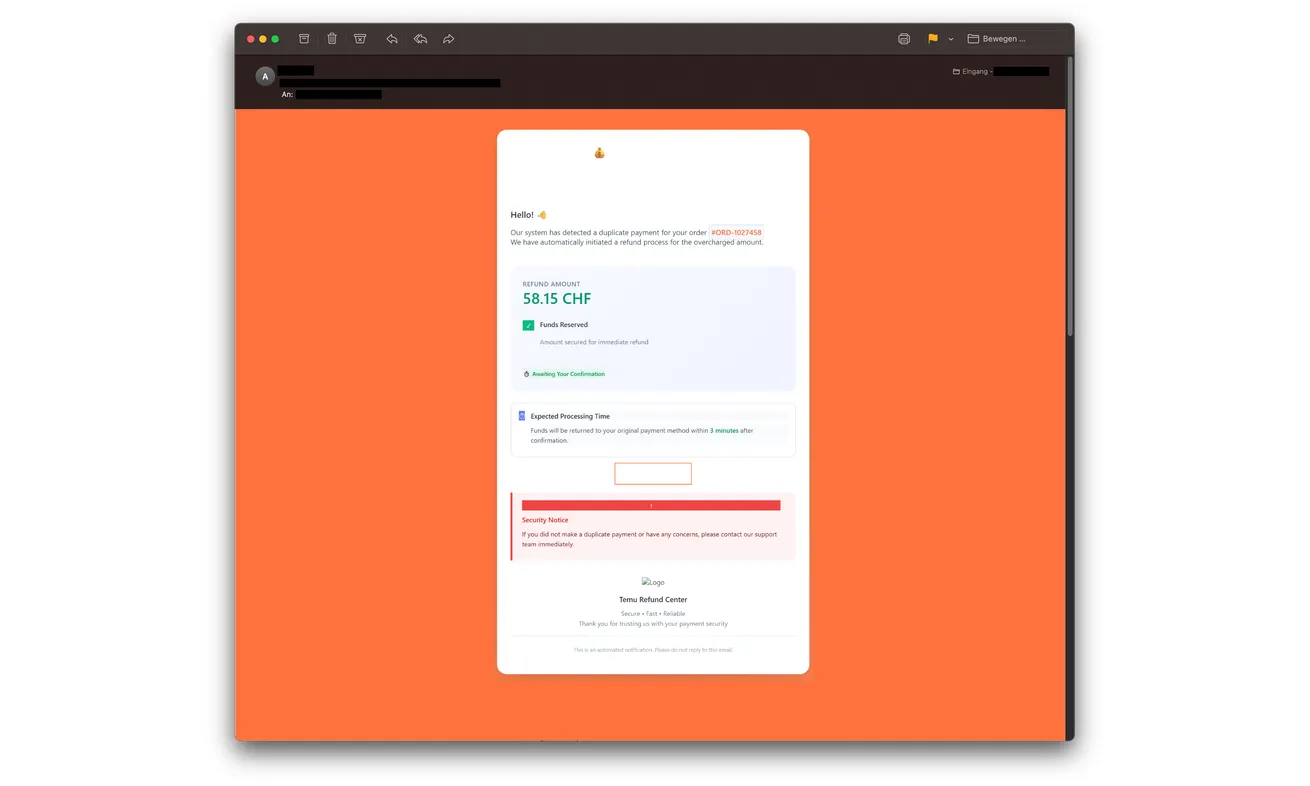
The screenshot above shows a police-published example promising CHF 58.15. That is the email’s claim, not a verified amount owed to a customer.
The genuine Temu marketplace is being impersonated. This warning concerns a fraudulent refund route, not a conclusion that all Temu refunds are scams.
The supposed credit becomes a request for account and card information
Swiss police document the sequence: a counterfeit Temu page collects login information, then card details and a financial institution’s SMS security code.
The attackers seek to trigger a card charge while the recipient expects money back. The direction of the transaction is the crucial difference.
A genuine-looking bank code can therefore arrive during a fraudulent process. Its arrival doesn’t authenticate the page asking you to enter it.
Your order history is a better starting point than the refund button
Open the Temu app or website independently and compare the order with your bank or card record. Keep the email out of that checking route.
- Check whether a duplicate charge actually exists.
- Don’t treat an order number in an email as proof of account access.
- A refund story doesn’t authorize a new purchase.
- Read the purpose of any code or bank approval before responding.
- Contact the card issuer promptly if you disclosed card details.
Why an Unexpected Refund Can Be More Persuasive Than a Bill
A suspicious invoice asks you to part with money. A refund email initially asks you to accept something you believe should already belong to you.
It can feel like good customer service: the retailer noticed an error before you did. That relief makes the first confirmation button easier to trust.
It also creates a small task: confirm the repayment so the matter can be finished. The message supplies both the problem and the proposed solution.
But a detailed account of an error isn’t the same as a payment record. The sender can write an amount and reference without demonstrating a duplicate debit.
Start with the transaction you can verify. If you never ordered, the mismatch is obvious. If you did order, check rather than assuming the email relates to it.
Frequent shoppers may have several pending orders and card entries. That makes a plausible refund easier to overlook, not more trustworthy.
You don’t have to solve the mystery through the supplied button. A real billing question can be raised with the retailer and card issuer separately.
How the Temu Refund Email Scam Works
Step 1: The email announces an overpayment and a ready refund
The supposed refund center says a duplicate payment was detected. The example presents reserved funds and a quick return after confirmation.
Those details make the message feel like progress already made on your behalf. Ignoring it can seem like delaying money you’re entitled to receive.
Don’t accept that premise without checking. Compare the date, amount, and order against records you obtained outside the email.
Step 2: The claim moves you to a Temu-looking page
The button takes the reader toward a counterfeit site. Familiar colors and shopping-account language help the transition feel like part of the retailer’s service.
The form then asks for login information. You came to receive a credit, but are now being invited to surrender access to an account.
Use the retailer’s independently opened app for any genuine account check. Don’t enter a password merely to learn whether the email’s claim was true.
If your password manager doesn’t recognize the destination, don’t copy the password manually to overcome that warning sign. Check the real site first.
Step 3: Card details are framed as refund processing
Next comes the card form. A refund heading doesn’t make your card number, expiry date, or security code safe to give this unverified site.
A label can say refund while the information supports a charge. Judge the request by what you’re authorizing, not just the heading above it.
Don’t keep filling fields because you already provided the login. Each additional disclosure is another reason to stop and report what happened.
Nor should you try a different card after a supposed processing error. That can expose a second payment method to the same operator.
Step 4: An SMS code is used to push the charge through
Police warn that attackers try to obtain the bank’s security code after initiating a card charge. The recipient may still believe they’re confirming a refund.
Read the bank’s message carefully. An amount, merchant, or purchase approval should not be explained away by an unrelated webpage promising repayment.
If you didn’t initiate the operation described by the bank, don’t approve it. Contact the issuer independently if the wording leaves you uncertain.
A code can expire, but an expired code doesn’t make previously disclosed card information safe. Report the card exposure even when you stopped at that stage.
Step 5: The promised repayment distracts from the real account activity
A processing message can keep you waiting for a credit instead of checking for a debit. Leave the page and consult the genuine financial record.
If you see an unwanted charge, contact the issuer rather than asking the fake refund center to correct it. Don’t authorize another transaction as a reversal.
Also protect the shopping login you supplied. Card replacement and account recovery solve different parts of the incident.
Keep those two tasks separate when seeking help: someone obtained your login, and someone may have obtained or used your card information.
What Temu’s Own Phishing Advice Says
Temu’s scam-email guidance tells customers to check suspicious messages through the genuine website rather than following email links.
It identifies passwords, card security information, and related personal details as information official emails should not ask you to supply.
The company also provides a phishing-report address, reportphishing@temu.com. Reporting a message there is different from contacting your issuer about an exposed card.
A report helps the impersonated service investigate the message. It doesn’t freeze a card, invalidate a password, or start every recovery procedure on your behalf.
Ask Temu about the order and your issuer about protecting the card. Each has a different part of the problem to address.
Check Whether You Actually Paid Twice
Find the order yourself in the genuine account. Note its total and payment method without using the email’s reference as your only search clue.
Then compare the card history. Record the transaction status as your issuer displays it, including whether an entry is pending or completed.
Two similar-looking entries need explanation, but they don’t establish that an unsolicited refund email is genuine. Your issuer can clarify the actual card record.
If an adjustment is legitimate, resolve it through the established order-support route. There’s no advantage in continuing with a separate page you can’t authenticate.
For a shared household card, ask the authorized account holder about the purchase. Don’t circulate the full card statement to people offering to identify the charge.
If you haven’t bought anything, don’t create an account to investigate the promised refund. That only gives the false story more of your attention.
If you discover an unrelated unauthorized charge, report that actual charge. It deserves attention even if the email’s amount happens not to match it.
The Code Belongs to the Operation, Not the Conversation
People often think of an SMS code as a general identity check. In practice, the message may describe a particular login, payment, or other sensitive action.
The useful question isn’t simply whether the code came from your bank. Ask whether you intended the exact operation the bank is asking you to authorize.
A fraudulent page can keep calling the process a refund while a genuine financial service describes something else. Trust the operation’s meaning over that explanation.
If you can’t tell, stop. You can ask the issuer for clarification without returning to the disputed page or generating another code.
When reporting, mention both screens: the page promised money back, and the bank message asked you to confirm an action. That distinction helps explain the deception.
Never publish a current security code while asking for advice. A screenshot can preserve context without exposing active credentials or your full payment information.
Keep Your Real Order Separate From the Fake Refund
A fraudulent refund message doesn’t cancel a genuine purchase. Check the order itself before assuming you must reorder, return something, or pay again.
If card protection affects a legitimate payment, discuss that with the issuer and retailer through the genuine order record. Don’t let the phishing sender handle it.
The same separation matters with refunds already under discussion. Compare a message with the support case you actually opened, not simply its mention of repayment.
A person helping you can collect order dates and references without taking your passwords. Keep account recovery under the authorized holder’s control.
For the issuer, prepare a short sequence: the duplicate-payment claim, the information entered, any code supplied, and the real transaction you now see.
State uncertainty honestly. If you don’t remember whether you pressed the final confirmation, say so and ask the issuer to check its records.
That is more useful than guessing that nothing happened because the fake page displayed an error. Its success message isn’t your bank’s transaction history.
What to Do if You Have Fallen Victim to This Scam
-
Stop the refund process immediately. Close the counterfeit page and don’t respond to emails offering to finish or repair the repayment.
Work from what you remember and evidence already saved. You don’t need to revisit the site to complete a perfect incident report.
-
Call your card issuer after entering card information. Use the number on the card or the issuer’s established app.
Explain that a Temu refund impersonation collected the details. Ask about blocking or replacing the card and any attempts already visible.
Tell the issuer whether you also entered an SMS code or approved a request. Don’t describe a completed approval as merely clicking a link.
-
Dispute unwanted activity through the appropriate process. Preserve the transaction amount, currency, merchant descriptor, date, and reference.
Ask the issuer what evidence and deadlines apply. A dispute isn’t a guaranteed refund, so act promptly rather than waiting for the fake site’s promise.
-
Replace the exposed Temu password. Reach the genuine account independently and follow its account-security or recovery process.
Use a new password you haven’t used elsewhere. If you reused the disclosed one, protect those other accounts through their own legitimate websites.
-
Review the genuine shopping account. Look for orders, contact changes, or other activity you don’t recognize and raise concerns with Temu support.
Don’t assume replacing the card automatically secures the shopping account. Likewise, a password reset doesn’t recall information already sent to a false card form.
-
Keep the fraudulent email and report it. Save the sender details, original message, and any existing image of the payment instructions.
Use Temu’s published phishing channel and consider reporting financial loss to local police. Remove private identifiers before sharing a warning publicly.
-
Separate reading, clicking, and disclosure. Receiving the email isn’t proof that someone accessed your account. Record each action accurately.
If you entered only an email address, watch for more targeted approaches. If you supplied passwords or card details, take the stronger protective actions above.
-
Keep later help inside the case you opened. Don’t pay a recovery agent or approve a verification charge to release the missing refund.
Someone repeating the order reference may simply have the same fraudulent message. Check unexpected follow-up with the real provider before acting.
Frequently Asked Questions
Is the Temu Refund Center email a real refund notice?
The duplicate-payment campaign described here is confirmed phishing. Verify a real refund through your independently opened Temu account and financial records.
Does the exact order reference prove the sender is Temu?
No. A reference printed in an email isn’t independent evidence. Compare it with the genuine order and ask official support about discrepancies.
Why would a refund page ask for an SMS security code?
In the documented scam, attackers seek a code for a card charge. Don’t approve an operation because the surrounding page labels it a refund.
What if I entered my card but withheld the code?
Contact the issuer anyway. Refusing a code may stop that attempt, but the card details you supplied are still exposed.
Should I wait for the promised processing time?
Not after a disclosure. Contact the relevant providers promptly; waiting for the fake credit can delay protecting your card and account.
Does this mean legitimate Temu refunds are fraudulent?
No. The warning is about an impersonation email and counterfeit claim process. Actual order adjustments should be checked through genuine support.
The Bottom Line
Don’t confirm a Temu refund through this duplicate-payment email. Its repayment story leads to credential theft and a possible card charge, not verified money owed.
Already entered details? Protect the card with your issuer and recover the shopping account separately. Check any genuine refund through the real order record.

Join the discussion
0 commentsShare your experience or ask a question about this article.
Discussion
Start the conversation
Have a question or something useful to share? Add the first comment.