

A message says your Swiss e-vignette has been deactivated because of a billing problem. You thought the motorway charge was already taken care of.
With a journey coming up, a quick online correction sounds easier than risking trouble on the road. First, check who is supplying the correction.
Overview
The warning turns an existing purchase into a new payment problem
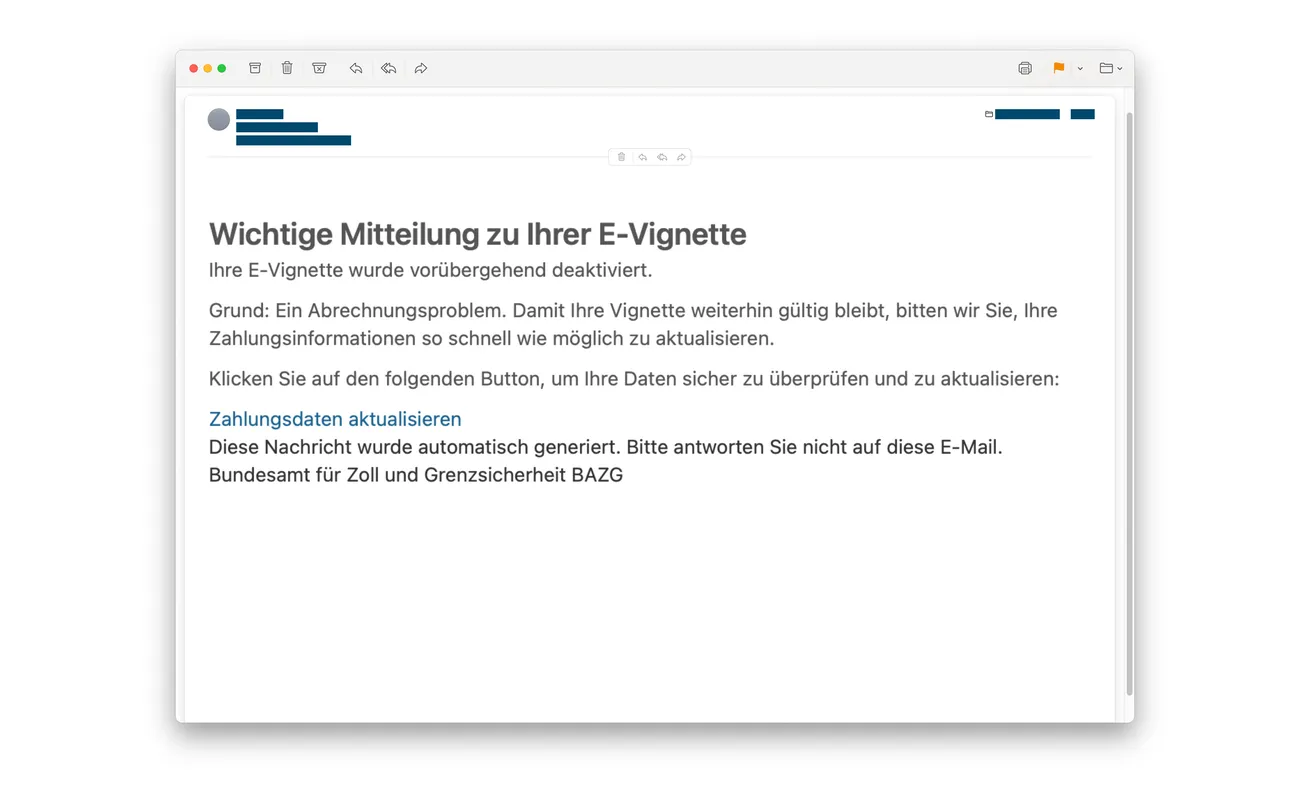
The Swiss e-vignette email scam claims something went wrong with your digital motorway vignette. Its apparent solution is to verify the vehicle and pay again.
It impersonates the Federal Office for Customs and Border Security, or FOCBS, also known by the German abbreviation BAZG.
The genuine Swiss motorway charge isn’t the scam. The deception is the unsolicited deactivation story and the counterfeit route used to collect payment information.
The vehicle check is controlled by the same impostor
Police describe a fake number-plate check that leads to an apparent invalidity result and another purchase request.
Entering your plate can make the result look personal. It doesn’t show that the page consulted a real government record.
Switzerland’s cybersecurity office separately warns about deactivation emails. Even a genuine agency email address printed inside a message doesn’t authenticate its sender.
Check the original ticket before buying anything else
Use your existing purchase record and the genuine service, not the email’s checker. Protect an exposed card separately from resolving whether your vehicle has valid coverage.
- Don’t pay through a deactivation email.
- Don’t accept the linked page’s plate result as an official decision.
- Find the ticket from your original purchase.
- Ask the issuer about card details or approvals already supplied.
- Verify genuine travel requirements without returning to the suspicious link.
Why Drivers May Pay Twice Without Questioning the Story
An e-vignette is less visible than a sticker on the windshield. After purchase, you may rely on a confirmation rather than a physical reminder.
That makes a billing-error message an effective way to reopen a task you considered finished. It creates doubt without needing to describe a real journey.
A looming trip supplies the urgency. You don’t want to discover a problem at the wrong moment, and paying again can feel like avoiding a larger inconvenience.
The supposed technical failure also sounds fixable. Unlike a strange prize or investment, it resembles something you could imagine happening during an ordinary online purchase.
The email then supplies the tool for resolving the doubt it created. That’s the important connection: the alarming claim and the reassuring checker come from one unverified route.
A personalized answer can conceal that connection. Seeing your own registration displayed beside an error feels different from receiving a generic warning.
But repeating what you typed isn’t independent verification. The page doesn’t need access to your vehicle record to put your plate into an alarming sentence.
If a genuine purchase needs checking, start with information you obtained before the email arrived. Your receipt is a better starting point than its invented error.
How the Swiss E-Vignette Email Scam Works
Step 1: A billing notice says the vignette no longer works
The message adopts a customs identity and claims your vignette has been deactivated. A technical or payment problem supplies the explanation.
That is an allegation from the sender, not a confirmed change to your ticket. Don’t treat it as a notice that your vehicle has actually lost validity.
The threat of driving without coverage makes the linked action feel necessary. The safer response is to check your real purchase independently.
If you don’t own a vehicle or haven’t bought a Swiss vignette, that contradiction helps expose the pretext. Travelers still need the same independent check.
Step 2: A copied portal asks for the number plate
The recipient reaches a government-style page through the email. It offers what appears to be a simple check of the affected vehicle.
A plate request may seem reasonable because a real e-vignette is tied to a registration. Familiar subject matter makes the false form easier to accept.
Don’t confuse a reasonable-looking field with an authorized destination. A counterfeit portal can ask the same initial question as a genuine service.
It can also display official symbols and familiar menu items. Those elements are much easier to copy than access to a real purchase database.
Step 3: The page produces an error that appears to concern your vehicle
Police describe a personalized result presenting the vignette as unregistered or invalid. The site has now supplied apparent confirmation of the email’s warning.
You may feel you’ve checked the warning for yourself. But the email and its checker are still telling one unverified story.
The result doesn’t become an official decision because it includes your plate. Leave the page rather than trying other spellings or another family vehicle.
Repeated checks may reveal more information while doing nothing to establish the truth. You need a separate record, not another answer from the imitation.
Step 4: Another purchase is presented as the repair
The fake failure leads to a new payment request. Card details are collected under the excuse of restoring the vignette.
Police warn that attempted charges may exceed the amount presented. There isn’t one fixed extra amount that every recipient should expect.
Read genuine banking prompts carefully if any appear. The amount, merchant and action shown by the issuer matter more than the website’s repair story.
Don’t approve an unfamiliar payment because the page calls it a temporary verification. A description inside the fake checkout doesn’t bind the bank transaction.
If payment seems unsuccessful, don’t switch cards to finish the repair. Stop and tell the issuer what information and approvals you already supplied.
What the Real Swiss E-Vignette Service Actually Lets You Check
Use the ticket you bought, not a fresh email link
The official FOCBS vignette FAQ identifies the genuine purchase service and explains the difference between a ticket and a public plate search.
Open your original confirmation or established account independently. Check the plate, country and relevant validity period on that record.
If a rental agency, family member or employer arranged the purchase, ask them for the existing record. Don’t pay just because you personally lack the receipt.
You can find the official shop through that FAQ. Avoid an advertisement or a destination copied from the suspicious message when trying to return.
A missing public result can have an innocent explanation
Public visibility is an option requiring consent. A ticket that isn’t publicly viewable may therefore fail to appear in that type of lookup.
That limitation matters when a false checker tells you no vignette exists. Don’t convert an absence of public information into an automatic instruction to buy.
Find your own ticket and ask the genuine service about a real problem. Don’t ask the email’s website to explain how public visibility works.
A reseller fee and a phishing form aren’t the same thing
The official price is CHF40. FOCBS explains that third parties may charge permissible service fees for arranging an e-vignette.
A higher price alone therefore doesn’t prove a seller is committing this scam. The key issue here is the false deactivation and unauthorized collection process.
If your actual purchase came through an intermediary, identify it from your original receipt. Keep any service-fee question separate from the impersonation email.
That distinction avoids accusing a real business merely because a criminal chose the same subject. It also keeps the response focused on the exposed payment details.
Don’t Let an Official Contact in the Footer Override the Link
The federal cybersecurity warning notes that these emails can include an NCSC contact address even though they weren’t sent by NCSC.
A real address can be copied as easily as a coat of arms. Its presence doesn’t demonstrate that the named office controls the message.
The payment destination is still the part asking you to act. Don’t mentally transfer trust from one authentic-looking footer line to the whole journey.
Similarly, a website might link to real government information. That doesn’t make its own form an official ticket checker.
Keep the sender, destination and requested action together when assessing the message. A legitimate detail inside an otherwise false request doesn’t cancel the false request.
You don’t need to test the live phishing page to prove this. Preserve what arrived and use the genuine authority’s independently located guidance.
For Rented Vehicles and Fleet Drivers
If you didn’t arrange the original vignette, ask the person or company that did. Use the contact from your existing rental agreement or workplace records.
Confirm which vehicle and registration were covered. A vague assurance that someone usually buys vignettes isn’t as useful as the relevant purchase record.
Don’t send the rental agreement to the deactivation email’s help desk. It can reveal personal information while doing nothing to authenticate the demand.
For a company fleet, nominate one person to check the issue. Several employees independently attempting payment can create confusion and expose more cards.
If someone else paid through the suspicious link, tell them promptly that the issuer needs the incident details. Don’t assume a fleet administrator can protect their card.
Keep the phishing report out of ordinary travel-expense processing until it’s assessed. Otherwise an invented repair fee may look like an approved transport cost.
If You Bought Again, Separate the Two Purchases
A driver can have an original legitimate ticket and a later fraudulent transaction. Don’t describe both simply as “the vignette payment” when contacting support.
Record when and where the original ticket was bought. Then identify the later card submission made through the deactivation message.
The bank needs to investigate the suspicious payment exposure. The genuine shop can help with questions about its own ticket or a real duplicate purchase.
The official FAQ describes conditions for duplicate-purchase refunds. It isn’t a promise that customs will reimburse money sent to an impersonator.
Keep those routes separate rather than waiting for one office to solve everything. Your issuer’s protective advice may be urgent even while travel paperwork remains unresolved.
If you’re due to drive, verify actual coverage through the proper service. Refusing a phishing link doesn’t itself establish that a vehicle meets motorway requirements.
What to Do if You Have Fallen Victim to This Scam
-
Stop the supposed reactivation. Leave the fake checker and refuse further payment prompts. Don’t try additional plates or another card.
If you only read the email, report it and delete it. The message alone doesn’t prove anything changed about your vignette.
-
Tell the card issuer about the false purchase page. Use your existing banking app or your card’s own contact number.
Ask about card protection and attempted transactions. State whether you supplied the card number, security details, a code or a banking approval.
Report the actual amount displayed by the bank, not just the figure advertised on the website. They may not be the same.
-
Document the original ticket separately. Keep the legitimate receipt, registration information and purchase channel available for a genuine service inquiry.
For a shared vehicle, check who arranged the vignette before anyone pays again. A short conversation can prevent a second person following the same false instruction.
-
Review and dispute unfamiliar transactions promptly. Save descriptors, amounts and dates, then follow the issuer’s instructions and deadlines.
Don’t assume a missing receipt or failed webpage means no charge was attempted. Ask the provider to assess pending activity as well.
-
Address other exposed account details. If the imitation also requested a password, change it through the real service and resolve reuse elsewhere.
A plate entry alone isn’t a banking login. Explain your actual interaction instead of assuming every account has been compromised.
-
Preserve and report the impersonation. Keep the email, claimed error, destination and a timeline without returning to the site for more screenshots.
Use official reporting routes and contact police for financial loss or misuse. Never post unredacted payment details while warning other drivers.
-
Reject offers to clear the supposed problem for another fee. A follow-up caller’s knowledge of your plate doesn’t verify their authority.
Consult the bank or genuine vignette service independently. Don’t allow a stranger to turn a deactivation story into another payment or remote-access request.
Frequently Asked Questions
Does this email mean my Swiss e-vignette was canceled?
No. The documented campaign uses a false deactivation claim. Establish the real ticket’s status through your existing purchase record and the genuine service.
Why does the linked checker show my own plate?
A website can repeat information you entered. That doesn’t prove it queried official records or produced a valid administrative decision.
Does no public search result mean I need another vignette?
Not necessarily. Public visibility requires consent. Check your own ticket rather than treating an empty public lookup as proof of nonpurchase.
Is every site charging more than CHF40 fraudulent?
No. The official FAQ permits certain third-party service fees. A reseller-price question is different from this false deactivation and card-harvesting campaign.
Will customs refund the money paid to the fake page?
Don’t assume so. Contact your issuer about the fraudulent transaction; official duplicate-purchase refund conditions don’t automatically cover payments to an impostor.
What if the email prints a genuine NCSC address?
The cybersecurity office warns that its contact details can appear in messages it didn’t send. A copied address doesn’t authenticate the payment route.
The Bottom Line
Don’t repurchase through the Swiss e-vignette deactivation email. Its fake checker turns a manufactured error into a request for payment information.
Find your original ticket through a trusted route. If you exposed a card or approved a charge, speak to the issuer without waiting for another email.

Join the discussion
0 commentsShare your experience or ask a question about this article.
Discussion
Start the conversation
Have a question or something useful to share? Add the first comment.