

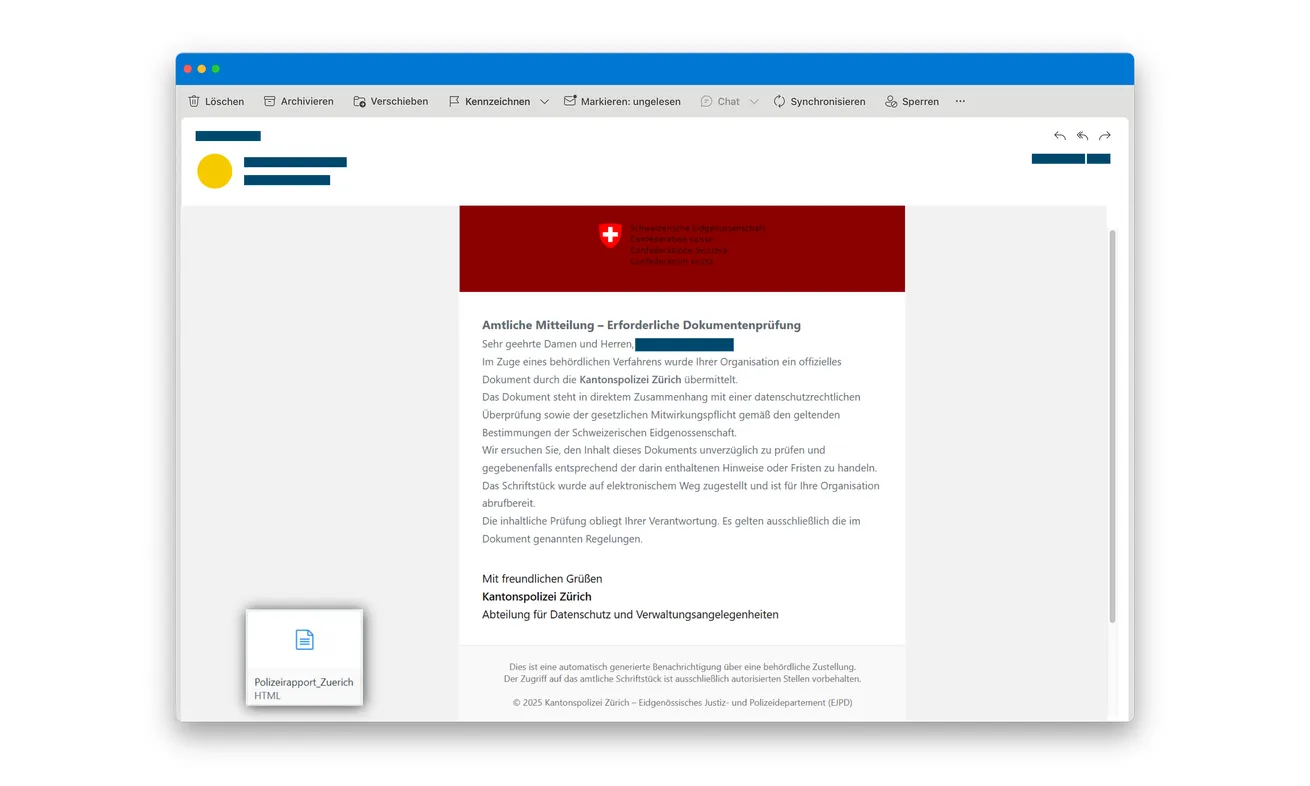
An email claiming to come from Zurich police says your organization has received an official document. It mentions data protection and a duty to cooperate.
The attachment looks like the place to find out what’s going on. Before opening it, notice what kind of document the sender has actually supplied.
Overview
The police document is an entry point to a false login
The Zurich police HTML email scam impersonates the cantonal police and asks an organization to open an attached web document.
Its legal-sounding explanation encourages cooperation before the recipient understands the request. The attachment then presents a login instead of simply delivering the promised information.
The genuine police aren’t operating this credential-collection scheme. An unexpected email doesn’t establish that your organization is under investigation or required to supply its passwords.
Police identify an HTML attachment and counterfeit portal
The official police warning describes the HTML-phishing campaign: an attachment opens a fake government-style sign-in screen asking for a username and password.
An error or stalled page can follow submission. That apparent failure doesn’t mean the credentials weren’t collected or can’t be tried against a genuine account.
This warning establishes credential phishing. It doesn’t establish that opening the attachment automatically installs a Trojan on every device.
Account containment matters more than completing the document
If you entered a work login, contact your IT or security team promptly. Describe the attachment and the account used, rather than just reporting a suspicious email.
- Don’t open the HTML file to investigate the supposed case.
- Don’t enter a work password in the attachment’s login screen.
- Verify any real police correspondence through independently obtained contacts.
- Report exposed credentials through your organization’s incident route.
- Keep the original message available without forwarding an active trap to colleagues.
Why This Message Can Reach the Wrong Person at Work
A police-branded email doesn’t need to arrive directly with a security specialist. It might first be read by reception, administration or someone monitoring a shared inbox.
The reference to data protection makes it sound relevant to almost any organization. The reader may worry about delaying a request that belongs with someone more senior.
That creates a forwarding risk. A colleague can receive the attachment accompanied by a helpful note asking them to deal with it.
Now the second person sees both an official-looking document and a request from someone they know. The colleague’s involvement can lend trust they never intended.
Keep the distinction clear when escalating: “This may be phishing; please assess it,” not “Police need us to complete this form.”
The first message describes a suspicion. The second turns the stranger’s demand into an internal instruction.
No employee should have to decide a legal obligation by opening an unknown attachment. Establish a genuine contact and involve the appropriate internal team first.
If your organization has an established process for official correspondence, use it. A deadline printed in an email isn’t a reason to bypass that process.
How the Zurich Police HTML Email Scam Works
Step 1: A police identity creates a duty to respond
The email claims an official document has been delivered and connects it to data protection or a statutory requirement to cooperate.
That language makes the attachment seem like necessary reading rather than an optional download. The recipient is pushed to discover the details by opening it.
The message doesn’t itself establish a real case. A logo, department name or formal signature can be copied without the authority they imply.
Don’t reply with internal contacts, employee lists or case guesses. Verify the sender through your own official-contact lookup instead.
Step 2: The attached HTML file opens in a browser
HTML is a format for web documents. An HTML attachment can render a page in your browser, even though it arrived as a file in email.
That is different from receiving a straightforward page of readable correspondence. A web document can display interactive fields and direct information to an online destination.
Its local origin doesn’t make the form trustworthy. You shouldn’t assume that information stays on your computer simply because the file came from the Downloads folder.
The attachment’s displayed name may sound like a police report. The extension and actual request matter more than that friendly label.
Don’t execute or reopen the file to see whether its source is convincing. Let the security team handle technical examination in an appropriate environment.
Step 3: The document becomes an internal-looking sign-in page
The counterfeit page adopts a government or police-portal appearance and requests credentials. The promised document has become a reason to authenticate.
You expected a document, but now the attachment wants a password. Don’t let that change pass as an ordinary step in reading police correspondence.
The police-published example uses federal internal-portal styling after a cantonal-police message. That identity shift is another reason to question the journey.
A plausible login design doesn’t establish which service, if any, is actually being accessed. Don’t choose a password simply because the screen resembles a familiar sign-in.
A warning banner about confidentiality can also appear on a counterfeit page. Security language is not a substitute for verifying who receives the credentials.
If the page rejects one account, don’t try an administrator login or ask a colleague to use theirs. That would widen the exposure.
Step 4: An error can disguise a completed disclosure
Police describe errors or stalled loading after the information is entered. That outcome may look like a technical problem rather than successful data collection.
It can keep the recipient occupied with troubleshooting while someone attempts the credentials against a real service.
Don’t wait for a document to appear before reporting what you entered. The login submission, not a successful download, is the relevant account-security event.
If a genuine authentication prompt arrives unexpectedly, refuse it and tell your security team. A prompt after the attachment isn’t proof you’re finishing an authorized police request.
Record what you remember without returning to reproduce the sequence. The original email and a clear timeline can be enough to begin containment.
A Document Can Be Dangerous Without Installing Software
People often ask whether an attachment “gave them a virus.” In this case, that question can distract from the established risk: a password entered into a fake form.
A device scan can’t revoke a password or undo a sign-in made elsewhere. Account protection needs its own response through the genuine service.
Conversely, opening an HTML file isn’t by itself proof of a malware infection. Don’t declare the whole network infected based on the file type alone.
Give IT the actual interaction: opened only, entered credentials, approved a prompt, downloaded another file or installed something. Each detail helps determine the right investigation.
If something else was downloaded or executed, report that as an additional exposure. Don’t assume it’s covered by changing the password.
The security team can decide whether device inspection or cleanup is needed. Preserve the evidence and follow its instructions rather than trying random fixes.
For a personal account used on a work device, be explicit about that distinction. The organization needs to understand the device event and the affected service.
You don’t need to paste a secret into an incident ticket to explain which account was used. Identify the account without repeating its password.
Verifying the Supposed Police Contact
Use a route outside the attachment
Find the relevant authority through an established official website or your organization’s verified records. Don’t call a number printed in the imitation portal.
Ask whether the correspondence and reference are genuine before sending personal or organizational documents. A real inquiry doesn’t require trusting the suspect file first.
If the message provides no useful case details, that’s a reason to ask the authority independently, not a reason to reveal your login to find them.
Keep any real legal matter separate from the phishing assessment. An organization can refuse a fraudulent route while properly handling genuine correspondence.
Don’t authenticate the message by its familiar pieces
A copied email signature or real office address can sit beside a fraudulent attachment. The presence of authentic public information doesn’t authorize the collection form.
The Swiss Federal Tax Administration also warns about digital impersonation, including HTML-based credential collection in government-themed messages.
That separate warning illustrates the broader tactic. It doesn’t make tax authorities responsible for this police email or establish a common operator.
A browser tab carrying a government name is likewise only a label until its destination is independently established. Labels are easy to reproduce.
Escalate safely inside the organization
Use the reporting button or incident channel your organization provides. If you’re unsure how to submit the original message, ask IT before forwarding its attachment.
Tell the recipient not to open it casually. Include the account involved and when the interaction occurred so containment can start quickly.
Don’t send the file to a group chat to ask whether anyone recognizes it. That creates more opportunities for someone to open it.
A plain-language alert can warn colleagues without carrying the live document. Keep the original available for the people handling the investigation.
If a Shared Inbox or Administrator Account Was Used
Be specific about the account’s role. A shared mailbox, ordinary employee account and administrator login can expose different resources and require different containment.
The person responsible for the system should assess sessions, authentication settings and recent activity. Don’t assume changing one password automatically closes every existing session.
For email access, the team may need to inspect forwarding rules, sent messages and recovery settings. Those checks address potential misuse rather than merely restoring access.
If fraudulent mail was sent onward, affected recipients may need an internal warning. Let the incident owner coordinate that warning to avoid conflicting instructions.
Record any unusual sign-in alerts even if they occurred after the page appeared to fail. They can help connect the disclosure to attempted access.
Don’t conceal the event because the account still works. Early reporting gives the organization a chance to contain a problem before visible disruption.
If you were covering a colleague’s inbox, tell the incident team whose account was open. The person receiving the message and the person entering credentials may differ.
That detail helps them contact the right account owner without spreading the attachment through another round of internal forwarding.
What to Do if You Have Fallen Victim to This Scam
-
Stop interacting with the attachment. Close the page and refuse new login or approval requests. Don’t keep refreshing to retrieve the supposed report.
If the email was only received, report it through the normal channel. Receipt alone doesn’t prove an account or device was compromised.
-
Tell your IT or security contact immediately. Say the message impersonated Zurich police and supplied an HTML file leading to a login.
Identify which account you entered and whether you approved any authentication prompt. Explain additional downloads or installations separately.
-
Change exposed credentials through the genuine service. Follow your organization’s containment procedure, including any required session revocation or account recovery.
If the password was reused for other services, replace it there too. Don’t use the attachment’s account-help link for recovery.
-
Have the affected account checked for misuse. The responsible administrator should assess recent access, changed settings and actions taken through the account.
For a mailbox, ask about suspicious forwarding or messages sent in your name. Keep the investigation coordinated rather than making unrecorded changes yourself.
-
Describe the device exposure accurately. Opening a page, submitting a password and installing software are different events.
Let the security team determine whether further device assessment is needed. A completed scan shouldn’t be treated as proof that stolen credentials are now safe.
-
Preserve the original evidence. Keep the email, attachment name, sender information and a timeline available through the organization’s approved reporting process.
Don’t reopen the file just to take a better screenshot. Don’t include passwords, confidential documents or unrelated personal data in a public report.
-
Verify and report the impersonation independently. Use the genuine police authority’s contact route if a real document still needs checking.
Coordinate any police report or colleague warning with the incident owner. Reject anyone offering to clear the supposed case in exchange for another login or fee.
Frequently Asked Questions
Is this HTML document a genuine Zurich police report?
The documented campaign is fraudulent. It uses a police-document story to deliver a counterfeit sign-in screen, not an authenticated official report.
Can an HTML attachment behave like a website?
Yes. A browser can render an HTML file with forms and online communication. Receiving it as an attachment doesn’t guarantee that entered information stays local.
Does opening it automatically mean I installed a Trojan?
No such automatic infection is established by this warning. Report what you actually did so IT can assess account exposure and any separate device risk.
What if the login failed after I entered my password?
Report the disclosure immediately. An error doesn’t prove the information wasn’t collected, and the credentials could still be tried against the real service.
Should I forward the attachment to coworkers to warn them?
Use the approved security-reporting route. Warn other staff without distributing the active file or turning the stranger’s request into an internal instruction.
Will changing the password finish the incident?
Not necessarily. The account owner or administrator should assess sessions, settings and activity, plus any additional exposure. Follow the organization’s containment process.
The Bottom Line
Don’t sign in through the Zurich police HTML email’s attachment. Its official-document story leads to a counterfeit portal collecting credentials.
If you entered a login, report it to IT and secure the real account immediately. Verify genuine police correspondence separately, without reopening the file.

Join the discussion
0 commentsShare your experience or ask a question about this article.
Discussion
Start the conversation
Have a question or something useful to share? Add the first comment.