

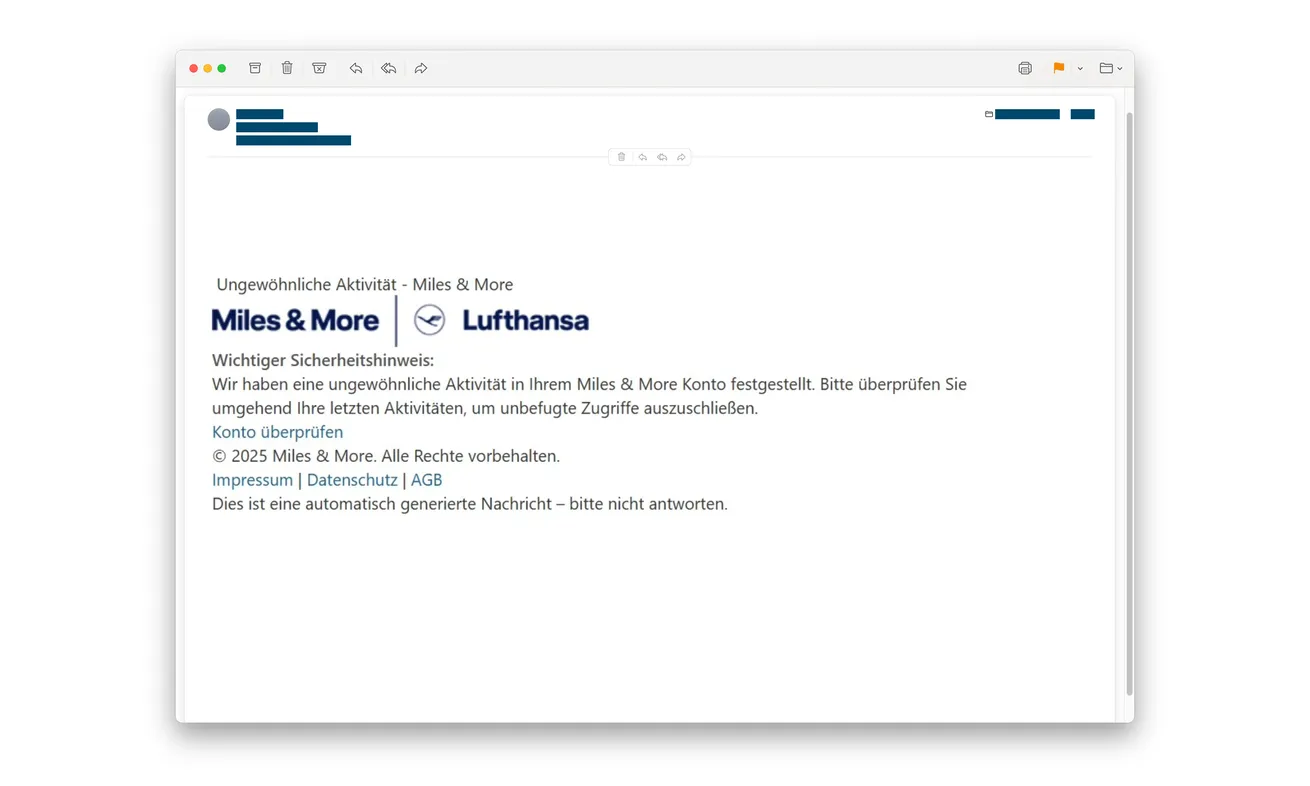
A Miles & More email says unusual activity has been detected and asks you to review your account. The familiar Lufthansa branding makes it worth noticing.
If you use the program or its credit card, you may want to check immediately. First, make sure you’re checking the account through the right door.
Overview
The security alert impersonates a trusted travel brand
The Miles & More email scam claims your account needs attention because of unusual activity. Its button presents signing in as a protective action.
The actual loyalty program, airline and legitimate card services aren’t operating this collection scheme. Their names are being used to lend authority to an imitation.
A real customer can find the subject plausible. Recent travel or ordinary card use doesn’t authenticate the unexpected message.
The linked login targets the online card account
Police identify the false Miles & More alert and its counterfeit sign-in page collecting a username and password.
The warning concerns access to an online card account, with potential exposure of personal information and card functions. It’s more than a request to confirm newsletter preferences.
Don’t assume every affected account has the same issuer, authentication controls or permissions. Tell the relevant provider which real account credentials you entered.
Protect the account you actually used
A loyalty-member account and a credit-card banking account aren’t interchangeable. Your response should identify which login was disclosed, then involve the correct service.
- Don’t open the alert’s account-checking link.
- Review activity through your existing app or independently reached service.
- Replace an exposed password through the genuine account.
- Contact the card issuer after a card-account login was shared.
- Refuse unexpected verification prompts while the incident is assessed.
A Warning About Fraud Can Become the Fraud
Security alerts ask people to act when something looks wrong. Scammers exploit that reasonable habit by making their own sign-in page the supposed solution.
The wording doesn’t have to promise a prize or demand an immediate purchase. It can simply suggest that reviewing recent activity is the responsible thing to do.
You think you’re checking for fraud. But the unfamiliar form is asking for the very credentials someone would need to attempt account access.
Familiar logos help the transition. Miles & More and Lufthansa are recognizable together, so the message can feel connected to a real travel relationship.
A recent flight, card payment or reward redemption may supply context in your own mind. The sender doesn’t need to know that event occurred.
The safer habit isn’t ignoring security concerns. It’s opening the real account independently whenever an unexpected message asks you to investigate one.
You can still review transactions, account notices and security settings. The only thing you leave behind is the stranger’s chosen route.
That keeps a sensible account check from becoming an unnecessary credential disclosure.
How the Miles & More Email Scam Works
Step 1: The inbox message announces unusual activity
The email claims something suspicious has happened and asks the recipient to check recent account activity. The reproduced example uses both brand names prominently.
It doesn’t establish that the recipient’s account experienced an unauthorized login. The security claim comes from the same unverified sender supplying the link.
Don’t reply with a member number or card details to help locate the problem. Start through the genuine service instead.
A message can also look convincing without using your name. Conversely, a personalized greeting wouldn’t prove it came from the program.
Step 2: The check-account link opens a copied login
The destination imitates a legitimate sign-in screen. Familiar design encourages the recipient to finish a task they think is already necessary.
At this point, the original alert and the supposed verification are still one untrusted journey. The page isn’t independent confirmation of the email.
Don’t use a browser padlock as an ownership test. Encryption doesn’t tell you whether a card provider authorized the form.
Nor should a working help link elsewhere on the page settle the question. A counterfeit form can sit beside links to real public information.
Step 3: Signing in sends credentials to the impostor
Police describe the username and password being transmitted when the recipient selects the login action. The page doesn’t need to complete a genuine account session first.
That means an error afterward isn’t reassuring. The information may have reached the collector before the screen failed or asked you to try again.
Don’t test another password or a second account. Troubleshooting the imitation can expose credentials that weren’t involved in the first attempt.
If your password is reused elsewhere, those accounts need separate attention. The same person can try known credentials outside the service named in the email.
Changing a password through the fake form isn’t a remedy. Reach the real provider yourself and use its actual account-security process.
Step 4: The stolen login can be used against the real service
The police warning identifies potential access to personal information and card-account functions. The exact consequences depend on the account and its protections.
Don’t claim a charge, setting change or account takeover occurred solely because credentials were entered. Ask the provider to investigate actual activity.
Equally, don’t wait for a visible loss before reporting. Protecting the login can matter even when your balance and recent transactions appear unchanged.
Decline unexpected authentication requests if they arrive. A prompt generated after the phishing attempt isn’t necessarily something you intentionally initiated.
Explain any approval you supplied separately from the password. Support needs an accurate sequence, not just the description “I opened an airline email.”
Your Member Account and Your Card Account Need Different Checks
Identify which username and password you entered
Think about where you normally use that login. Is it your loyalty profile, your card-management service or an email address paired with a reused password?
You don’t need to include the password in a support message. Identify the affected account without creating another copy of the secret.
If you’re unsure, explain the account name and sign-in route you ordinarily use. A genuine provider can help distinguish its service from another one.
Don’t let the logo on the fake page decide the answer. The important fact is which real credentials you gave it.
Take card-account exposure to the actual issuer
Use your own card, statement or established banking app to obtain the correct contact. Don’t assume a number supplied by the security email is genuine.
Ask about protecting online access, reviewing changes and handling unfamiliar transactions. Follow the issuer’s advice about the card itself.
The loyalty program can help with membership questions, but it isn’t a substitute for your issuer’s payment-security process.
This distinction is especially important when traveling. Don’t call a search advertisement’s emergency number merely because it’s the first convenient option.
Use the program’s genuine member-account guidance where relevant
Miles & More’s own phishing advice recommends independent navigation and account protection after responding to a fraudulent message.
If the member-account password was exposed, change it through the genuine service and contact its support as appropriate.
Check for unfamiliar profile changes or activity. Don’t promise yourself that replacing the card password automatically fixed a separate loyalty login.
The Pretext Can Change From an Alert to an App Update
The Miles & More card service publishes additional phishing warnings, including a separate message claiming an app update is required.
That related variant uses a short action window and an update button. It isn’t evidence that every unusual-activity email follows the same sequence.
The practical connection is the false security task. An account check, profile update or app repair can all make handing over information sound protective.
Don’t rely on matching one exact subject line. A changed heading doesn’t make a familiar credential request safe.
For a genuine app update, use the normal app-store route. Don’t install something because an email claims it’s necessary to preserve access.
For an account concern, open the actual app or website independently. You can investigate the concern without using the message’s link.
Keep the variants separate when reporting. Record what your message said rather than copying details from a different example.
If the Alert Arrives While You’re Traveling
An unexpected security message can be particularly distracting between flights or while checking into accommodation. Don’t let the inconvenience dictate which support contact you trust.
Use the banking or member app already installed on your device. If you need a telephone number, obtain it from your own card or established account records.
Ask the provider to check unfamiliar activity rather than assuming every foreign-currency entry is fraudulent. Describe the date, amount and merchant as they actually appear.
If an assistant or family member manages travel arrangements, tell them which account was exposed. They may otherwise keep using it without knowing there’s a security concern.
Don’t send them your password to resolve the matter faster. Use the provider’s genuine recovery and authorized-access arrangements.
If connectivity prevents an immediate detailed review, stop interacting with the email anyway. Completing an unverified login won’t solve a difficulty reaching real support.
Keep issuer contact and membership help separate in your notes. That makes it easier to resume the right conversation without returning to the phishing message.
What a Helpful Incident Record Looks Like
Start with the email’s subject and the time you opened it. Add the destination if available without revisiting the page.
Then describe what you entered, which real account uses those credentials and whether any authentication request appeared.
Record what the genuine account shows now, including unfamiliar changes or transactions. Keep those observations separate from threats made by the email.
If you didn’t authorize anything, say that. If you approved a prompt believing it was a security check, explain the belief and the action accurately.
A failed-looking page belongs in the timeline, but it doesn’t erase the disclosure. Support needs to know both events occurred.
Keep the record private. Public screenshots shouldn’t display member numbers, full card details, private bookings or authentication codes.
If the email reached a work travel inbox, notify the person handling the account. They may need to warn another colleague who received the same forwarding.
Don’t ask that colleague to repeat the login to see whether it works. One exposed account shouldn’t become two during informal testing.
What to Do if You Have Fallen Victim to This Scam
-
Leave the alert’s sign-in page. Stop retrying credentials and refuse unexpected codes or approvals. Don’t follow its password-recovery instructions.
If you only read the message, report it as phishing. Its arrival alone isn’t evidence that your card account was accessed.
-
Replace the exposed password through the real account. Use your usual app or independently opened service.
Address password reuse elsewhere, prioritizing email if it shares the same credentials. Enable or review available multifactor protection through the genuine provider.
-
Contact the card issuer for a card-account disclosure. Explain that a fake Miles & More alert collected the online login.
Ask about restricting access, reviewing sessions and protecting the card. Mention any additional card fields, security codes or approvals separately.
If you cannot sign in, don’t keep guessing passwords on the imitation. Use the issuer’s established recovery or fraud-support route.
-
Check the relevant accounts for actual misuse. Review available transactions, contact details and security changes with the appropriate provider.
For membership exposure, ask the loyalty service about unfamiliar activity. For financial activity, follow the issuer’s instructions and reporting deadlines.
-
Preserve evidence without spreading the link. Save the original message, destination and timeline for your providers and police where appropriate.
A redacted screenshot can warn others, but an active forwarded security button can expose them to the same trap.
-
Report losses and impersonation through genuine channels. Keep reference numbers and provider advice together in your private incident record.
Don’t assume reporting to an airline automatically opens a banking dispute. Each organization needs the part of the incident it can actually address.
-
Verify any follow-up independently. Someone may know the program name or refer to your concern about the first email.
Don’t share more credentials, install remote access or pay a fee to clear the alert. End the approach and contact the real service yourself.
Frequently Asked Questions
Is the unusual-activity email genuinely from Miles & More?
The documented campaign is an impersonation. Its copied login collects credentials; use the genuine account independently to investigate any real security concern.
Does the Lufthansa logo authenticate the message?
No. Recognizable branding can be reproduced. The logo doesn’t establish who sent the email or who receives information through its linked form.
Which account is at risk after I entered a password?
The real account using those credentials needs protection. Distinguish the loyalty-member account from online card banking, and address any password reuse.
Can a failed login still expose my credentials?
Yes. The counterfeit page can collect information before showing an error. Don’t repeat the attempt; change the password through the genuine provider.
Is the app-update email the same exact campaign?
The card service documents a related variant. Don’t merge its details into every alert, but independently verify unexpected update or security instructions.
Should I contact the loyalty program or my card issuer?
Contact the issuer for card-account or financial exposure. Contact the program for a compromised member account. You may need both if credentials were reused.
The Bottom Line
Don’t sign in through the Miles & More security email. The documented alert uses a fraud-prevention story to send credentials to a counterfeit page.
If you responded, secure the actual accounts involved and contact the issuer where relevant. Investigate real alerts through your established app or independently opened website.

Join the discussion
0 commentsShare your experience or ask a question about this article.
Discussion
Start the conversation
Have a question or something useful to share? Add the first comment.