

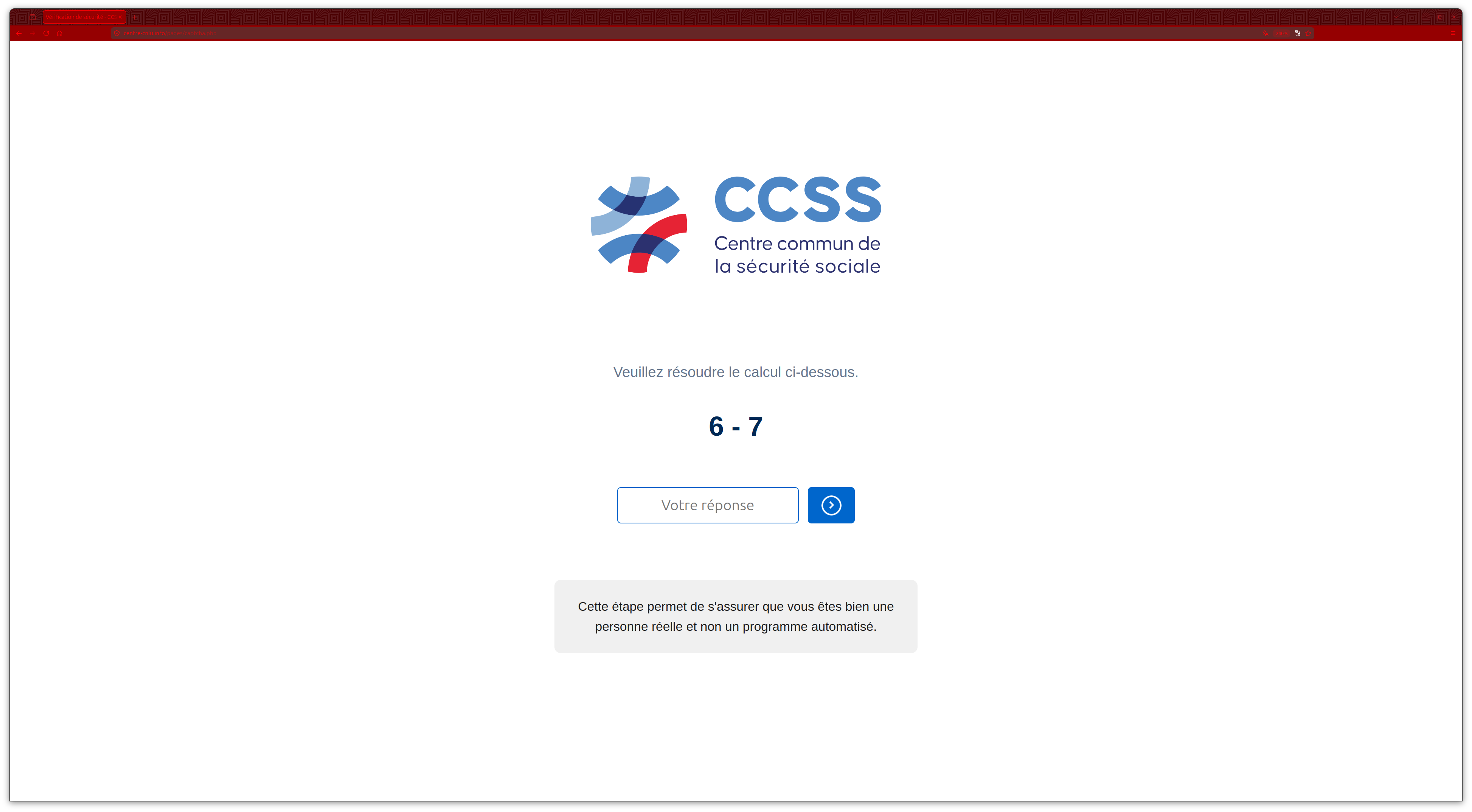
A page carrying the CCSS logo asks you to solve a quick calculation before continuing. Behind it is a notice about your health card.
The design makes the next task look ordinary: update a few details and get the card sorted. It’s worth checking what that process actually asks for.
Overview
An Expired Health Card Becomes a Reason to Disclose Financial Secrets
The CCSS card renewal scam imitates Luxembourg’s social security administration. A false renewal process gradually requests personal details, card information, and LuxTrust credentials.
The real Centre commun de la sécurité sociale is not the operator of these pages. Its identity is being used to make the requests seem official.
This isn’t a complaint about a late health card. The documented website is an impersonation designed to collect information under a false administrative pretext.
The Real Card Renewal Doesn’t Require This Payment Route
CCSS says renewal and dispatch are free. It also warns against false expiry messages sent through email, SMS, and copied websites.
GOVCERT documents this particular cloned site through its screens, including the preliminary math task, information forms, and misleading completion page.
You don’t have to judge this on the web address alone. The real card service doesn’t require the financial details the clone demands.
Three Separate Types of Information Need Protecting
A name and telephone number, a payment card, and a digital-identity credential aren’t interchangeable. The right response depends on which stages you completed.
- Personal details can make later impersonation attempts more convincing.
- Card information calls for a conversation with the financial institution.
- Exposed LuxTrust access also needs attention from the identity provider.
- A card-renewal confirmation on the false site doesn’t resolve any of those risks.
The Math Check Isn’t a Certificate of Safety
People are used to proving they’re human before a website allows them to continue. A calculation can feel like another routine security step.
The original screen shows a CCSS mark above the task. That combination encourages the visitor to accept both the branding and the procedure without examining either.
But a page owner can draw a logo and display a calculation. Completing the task doesn’t establish that the owner is Luxembourg’s social security administration.
The math question in this case is not evidence that solving it installs malware. The documented threat is the collection of information on the pages afterward.
You shouldn’t try the gate to investigate. An original screen and the authority’s description provide enough context without taking you into the phishing workflow.
If you already passed it, don’t assume you must finish. A preliminary step doesn’t create an obligation to provide a card or login.
How the CCSS Card Renewal Scam Works
Step 1: A Government-Looking Page Asks You to Pass a Small Check
The false site begins with a human-verification-style calculation. It creates a pause before the form, but not an independent check on the site’s authenticity.
GOVCERT identifies the campaign domain as centre-cnlu[.]info. The name may sound administrative, but that wording doesn’t make it a CCSS service.
The published analysis establishes the page sequence, not one universal way every victim arrived. Avoid assuming your version must come through a particular email subject.
Whether the link reached you by SMS or another route, the important boundary is the same: don’t let an unsolicited page decide where you authenticate.
Step 2: The Renewal Story Makes Personal Questions Seem Necessary
After the gate, the page says the insurance card has expired. It asks for identifying information before it asks for anything that looks overtly financial.
A person expecting a replacement might reasonably assume the administrator needs to know who they are. That expectation is what the fake process exploits.
Pause before filling gaps the message creates. Have you independently established that a renewal is needed, and that this is the institution’s actual request?
You can ask CCSS through its genuine website without completing the suspicious form. You don’t need to provide more information to earn the right to check.
Step 3: Another Page Requests Contact and Address Details
The collection continues across separate forms. Breaking a request into stages can make each small disclosure feel like progress toward receiving a replacement.
That can also hide how much you’ve provided overall. A second page isn’t a new independent organization merely because it has a different heading.
Think about the combined record: identity details, where you live, and how to reach you. Those pieces can help an impostor personalize a later approach.
This is a risk to consider, not evidence that every victim receives another call. If someone does contact you, don’t let familiar details substitute for verification.
Step 4: The Card Task Turns Into a Request for Financial Credentials
The false process proceeds to card information and LuxTrust credentials. That is a major change from identifying an insured person for a replacement document.
CCSS says its card renewal does not require bank details or your LuxTrust user ID. The unsolicited workflow can’t overrule that by copying its colors.
Don’t supply a second card if the first one appears rejected. A failure message belongs to the same untrusted process, not an independent assessment by your issuer.
If you stopped before the LuxTrust screen, the payment-card disclosure still needs attention. Conversely, giving identity credentials requires more than checking a single card statement.
A form can make unrelated secrets look like mandatory fields. You’re allowed to leave them blank and end the interaction, even halfway through.
Step 5: A Payment-Brand Loading Screen Creates Reassurance
GOVCERT describes a fake loading stage that pretends to connect with Visa or Mastercard before showing a successful result.
Recognizable payment names can make waiting feel reassuring: perhaps the card is simply being verified. The screen itself doesn’t demonstrate that either network approved this process.
Don’t infer the size or existence of a real payment from an animation. Your financial institution’s records, not the website’s progress display, establish account activity.
Even a genuine payment notification must be checked against what you intended. Successful processing wouldn’t make a fraudulent renewal request legitimate.
Step 6: The Return Button Opens the Authentic CCSS Site
The final navigation sends the visitor to the genuine CCSS website. That last stop is useful camouflage after the earlier forms.
A reader may conclude everything is fine because the browser now shows the real institution. But the preceding pages haven’t become part of that institution retroactively.
Consider the journey as separate destinations. Information submitted before the redirect may already be outside your control, regardless of what the current tab displays.
Don’t expect the authentic site to contain a replacement request simply because a false screen announced one. Verify the administrative issue through CCSS directly.
What a Genuine Card Question Shouldn’t Require
The official CCSS warning makes an unusually practical distinction: card renewal and delivery have no charge, and the listed personal and financial fields aren’t required for that renewal.
That is specific to this card procedure. It doesn’t mean a government service can never need identification, or that every official online transaction must be free.
Use the institution’s instructions for the service you’re actually requesting. A general memory of using digital identity elsewhere doesn’t validate this unexpected form.
To check a health-card issue, type the official address or use an existing trusted bookmark. Don’t use a search advertisement as your only proof of the destination.
If support asks which message you received, describe the expiry notice and copied site. You can show non-sensitive wording without handing over banking credentials.
The CCSS warning includes examples and false domains. Those help recognize known attempts, but a new domain doesn’t become safe simply by being absent from a list.
When the Same Details Reach Different Accounts
A card issuer handles the payment instrument. LuxTrust handles the digital identity. CCSS handles the genuine social-security question. Don’t expect one report to automatically reach all three.
You may need to explain the same incident to more than one provider, but each should receive only the information relevant to its role.
For example, the bank needs to know which card and approvals were involved. CCSS doesn’t need your full card number to confirm an impersonation message.
The genuine LuxTrust support page provides the route for certificate exposure. Reach it separately rather than using a help button inside the false form.
Be particularly wary of anyone offering to coordinate all these organizations from an incoming call. A convincing explanation doesn’t grant them authority over your banking app.
What to Do if You Have Fallen Victim to This Scam
Make a quick inventory of what you entered. That will help the right provider protect the right thing.
-
Leave the cloned card service. Don’t solve another check, repeat a submission, or try a different payment method to finish the request.
If you still need a health card, handle that separately through CCSS. An unfinished false form doesn’t prevent you from using the genuine service.
-
Notify the issuer of any card you supplied. Explain that it was entered into a fake CCSS renewal page and ask about blocking, replacement, and transaction review.
Include payment approvals or wallet-registration prompts you accepted. Describe the action displayed rather than repeating the page’s claim that it was only verification.
-
Contact LuxTrust for disclosed identity credentials. Ask official support about suspending the affected certificate and securing the relevant product.
Tell your bank as well if the identity could authorize financial access. Don’t assume replacing the plastic card alone addresses a separate digital-identity exposure.
-
Secure reused account secrets. Reset exposed passwords through genuine sites and review available access and recovery controls for suspicious changes.
If a work credential was involved, notify the designated security contact. Keep personal medical and banking records out of ordinary workplace group chats.
-
Save what you already have. Keep the original message, visible address, transaction references, and a timeline of the forms completed.
Don’t return to gather a perfect screenshot if that requires re-entering private information. Existing evidence and an accurate description are more important than reproducing the attempt.
-
Report the impersonation and any loss. Use the bank’s dispute process for financial activity and contact police for a fraud report where appropriate.
Luxembourg police’s phishing guidance explains why unexpected institutional messages need independent verification. Reporting doesn’t guarantee recovery or cancel a card.
-
Screen follow-up contacts carefully. Someone quoting your submitted details may be continuing the deception, not calling to help resolve it.
Don’t reveal approval codes or pay a release fee. Keep using the genuine providers and the incident references they gave you.
If You’re Helping Someone Who Started the Form
Ask them to describe the last screen they remember. Did they enter an address, type a card, provide a password, or approve something on another device?
A calm reconstruction is more useful than arguing about whether the logo looked convincing. The answers determine which accounts may need protection.
Let the account holder speak to the bank and identity provider through their normal verification process. You can help organize the questions without collecting their secret codes.
If nothing was entered, don’t turn a suspicious visit into a certainty of account theft. Explain the warning and close the page.
If information was supplied, don’t wait for a health-card delivery date to pass. Financial and credential protection should begin while the exposure is still fresh.
After urgent reporting, help remove the original message from everyday view. That reduces the chance of someone returning to finish the supposed renewal later.
If several household members received it, check their responses individually. One person’s untouched message doesn’t tell you whether another person completed a card or identity form.
Keep copies of genuine case references and the instructions already provided. That avoids repeating sensitive details to a new contact who merely claims to know the incident.
When you discuss an unfamiliar payment, preserve its actual amount and recipient. Don’t describe it as a CCSS bill unless the genuine institution confirms that connection.
Once access is protected, follow the institution’s real card-request procedure if necessary. Don’t abandon a genuine administrative need because an impostor tried to exploit it.
Frequently Asked Questions
Is CCSS Charging to Renew My Social Security Card?
CCSS says renewal and delivery are free. A copied expiry page asking for payment details doesn’t establish a real administrative fee.
Does Passing the Math Check Prove the Page Is Official?
No. The calculation appears on the documented phishing site. It doesn’t authenticate the page or establish any connection to the real administration.
Does This Warning Apply Only to SMS?
No. CCSS warns about fraudulent emails, texts, and websites. The particular form sequence can be recognized without assuming every visitor received an identical message.
Did the Page Really Contact Visa or Mastercard?
The authority describes the loading display as fake. Use your issuer’s transaction records to determine actual card activity rather than trusting that animation.
What if the Browser Ended Up on the Genuine CCSS Website?
The phishing process can redirect there after collection. A safe final destination doesn’t erase earlier disclosures or prove CCSS received a valid card request.
Should I Contact the Bank or LuxTrust First?
Act promptly on both if both were exposed. The bank addresses financial access and transactions; LuxTrust can advise on the affected digital certificate.
The Bottom Line
Don’t use the CCSS card renewal scam’s forms. A supposed free-card replacement is being used to obtain information the real procedure doesn’t require.
Open CCSS independently for the card question. If you disclosed financial or LuxTrust details, contact the relevant providers immediately and preserve the message for reporting.

Join the discussion
0 commentsShare your experience or ask a question about this article.
Discussion
Start the conversation
Have a question or something useful to share? Add the first comment.