

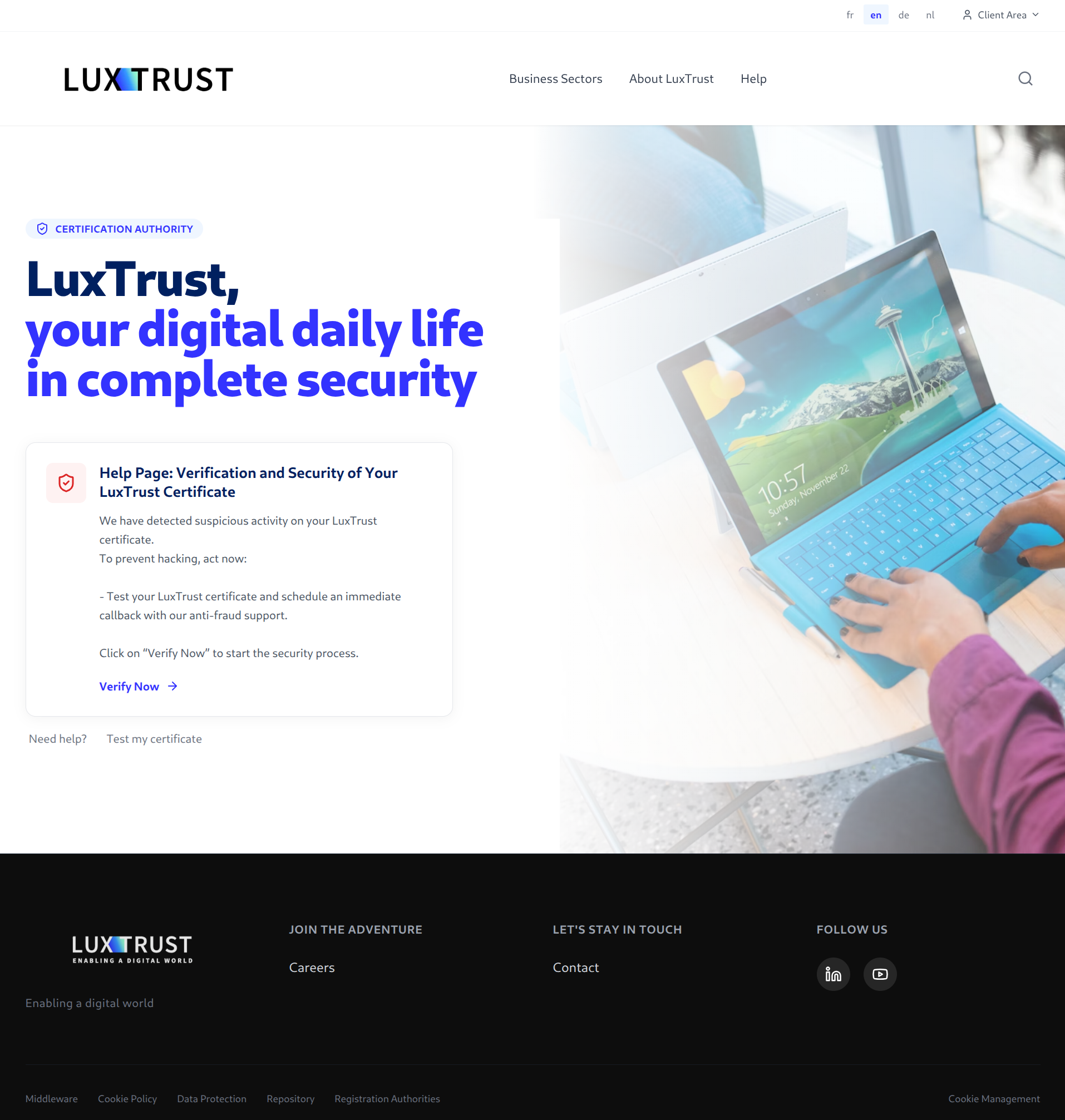
A LuxTrust-looking page says suspicious activity has been detected on your certificate. It offers an identity check and a callback from an anti-fraud assistant.
When the message is about protecting access, checking your details can feel like the safest move. First, look at who is asking and what they want.
Overview
The Security Warning Is the Bait for a False Identity Check
The LuxTrust security alert scam uses a copied website to claim your digital certificate may be at risk. Its proposed solution is a detailed verification form.
LuxTrust is a genuine digital-identity provider being impersonated. The problem is the false page and its collection requests, not the legitimate service.
The example above shows a reassuring design wrapped around an alarming claim. The invitation to verify now turns concern about theft into a reason to disclose information.
The Form Goes as Far as Banking Security Answers
GOVCERT documents the copied site at luxtrust[.]support, including requests for personal details, LuxTrust credentials, and bank-account security-question answers.
At the end, the page promises a callback from a LuxTrust assistant. The analysis does not establish a completed call or a particular final payment demand.
The promised call is still important: someone who has just disclosed information may be unusually receptive to a person claiming to finish the protection process.
Protect the Identity and the Bank Account Through Their Actual Providers
Don’t let the false page choose your support contact. Open the genuine service yourself and explain which information or approvals were exposed.
- A security allegation on a website doesn’t prove your real certificate was compromised.
- An unsolicited identity check isn’t entitled to your banking security answers.
- A promised callback doesn’t authenticate whoever contacts you next.
- Account protection may involve both LuxTrust and your bank, depending on what you disclosed.
The Trick Is to Make Disclosure Feel Like Self-Defense
Most phishing warnings tell you to protect your account. This scam borrows that advice and offers itself as the way to follow it.
Instead of tempting you with a prize, the page describes a threat. Instead of asking you to ignore security, it asks you to complete security.
That reversal can make hesitation feel dangerous. You may worry that delaying the identity check gives a hacker more time.
But the page hasn’t established that the emergency exists. An alarm and the proposed remedy come from the same unverified source.
You can take the concern seriously without following that source’s instructions. Leave the page and contact the genuine provider through an independently obtained route.
This gives you a way to respond without surrendering control. If something is wrong, the real provider can explain it outside the suspicious workflow.
A copied security page doesn’t need to look amateurish. Professional spacing, familiar colors, and reassuring language can accompany a completely unauthorized request.
How the LuxTrust Security Alert Scam Works
Step 1: The Page Announces Suspicious Certificate Activity
The copied homepage uses LuxTrust branding and describes a possible threat to the certificate. Its message encourages the visitor to act before hacking occurs.
That claim is presented as a finding, but the page itself supplies no independent reason to believe it has inspected your genuine account.
A website can display a warning to anyone who arrives. Seeing a security statement in your browser doesn’t establish that it is personalized or technically verified.
Don’t try to resolve that uncertainty by submitting more information to the same page. Use a real support channel to find out whether action is needed.
Step 2: Verify Now Opens a More Intrusive Identity Process
The protection offer leads into identity validation. The user is encouraged to treat the form as a necessary response to the earlier alert.
Once the task is framed that way, even unusual questions can feel like safeguards. You may assume that thorough questioning means the service is being careful.
Thoroughness isn’t proof of authorization. A false form can ask more questions precisely because it wants a more complete record of you.
Evaluate the requester before the fields. A form doesn’t become trustworthy because it knows the terminology of digital certificates or looks similar to a familiar login.
If you didn’t independently initiate a genuine account task, stop and establish the purpose elsewhere. You don’t have to finish verification to ask a question.
Step 3: The Questions Reach Into Your Banking Security
The government analysis describes collection of detailed personal information and LuxTrust credentials. It also identifies requests for bank security-question answers.
Those answers deserve the same caution as other authentication secrets. They may be relevant to recovery or identity checks, not merely biographical conversation.
Sharing an answer doesn’t prove someone automatically accessed the account. It does mean the bank should know which security information no longer remains private.
If you reuse the same answer elsewhere, consider that separate exposure too. A secret doesn’t stay exclusive to one account merely because the form named one bank.
Don’t supply additional answers to repair a supposed failed check. The error and the next question can both belong to the same impostor.
Similarly, don’t read an unexpected one-time code to someone who offers help with the form. Establish the contact independently before discussing any account issue.
Step 4: The Confirmation Promises a Helpful Callback
After the requests, the page tells the visitor that a LuxTrust assistant will call. That creates an expectation of personal help after the online process.
A later caller might therefore seem less unexpected. The page has already supplied a role, a purpose, and a reason to listen.
The warning records a callback promise, not what a caller ultimately said. Treat an incoming call as unverified rather than expecting a particular script.
The practical boundary is straightforward: a promised call doesn’t verify the caller. Reach real support yourself before acting on an incoming request.
If the caller refers to details you just entered, that can be consistent with the exposure. It is not independent proof that they work for LuxTrust.
Why a Brand Name Followed by Support Can Still Be Wrong
The domain in the warning includes the LuxTrust name and a support ending. That makes it sound like a dedicated help service.
Sounding appropriate isn’t the same as belonging to the provider. A criminal can choose a name that describes exactly the role they want you to believe.
Don’t authenticate a website by reading only the brand word. Use an established bookmark or open the official provider’s site independently.
The original screenshot also copies site navigation and promotional imagery. Those details make the page familiar, but copying them doesn’t transfer the company’s authority.
Nor does a security-themed label establish that a certificate has been tested. The allegation and the verification form need scrutiny together.
You don’t need to test the false site with real credentials. The government warning already records what the form sought, without requiring another victim to demonstrate it.
Real LuxTrust Support Is Not Your Bank’s Fraud Department
LuxTrust’s own anti-phishing guide makes a useful distinction: it isn’t a bank and doesn’t control customers’ bank accounts.
The guide also explains that a caller doesn’t need your UserID and password to change a certificate’s status. Don’t disclose them to a supposed protector.
That doesn’t mean digital-identity credentials are never used legitimately. Customer-initiated authentication through verified services is different from surrendering secrets to an unverified helper.
Likewise, the existence of genuine renewal notifications doesn’t validate every email mentioning a certificate. Check the specific request and destination rather than assuming all notices are alike.
The official support information explains certificate suspension and advises phishing victims to contact their bank about financial protection as well.
A suspended certificate doesn’t automatically refund a payment. A card replacement doesn’t automatically replace exposed security answers. Each provider needs the relevant part of the story.
Security Questions Are Not Harmless Small Talk
When a false form asks about a bank’s security questions, the danger isn’t limited to the current visit. Those answers may continue to matter after the tab closes.
Don’t assume a password reset changes every recovery secret. Ask the bank what needs reviewing and whether the disclosed answers should be replaced.
If you can’t change an answer yourself, tell support rather than inventing a workaround. The provider should explain how it protects the affected account.
Keep those answers out of public screenshots and reports to unrelated platforms. You can say a question was answered without publishing the answer.
If the details include another person’s information, warn them privately about the exposure. They may need to review a separate account or watch for personalized contact.
For work-related certificates, follow the organization’s incident procedure too. A personal bank report doesn’t necessarily address professional access associated with the same identity.
What to Do if You Have Fallen Victim to This Scam
Don’t wait for the promised assistant to take charge. Start a new conversation with the genuine providers instead.
-
Abandon the false verification and any linked conversation. Close the page, decline unexpected approvals, and don’t provide another answer to complete the task.
If someone calls about it, end the conversation before checking independently. Don’t accept their offer to transfer you into a supposedly trusted department.
-
Contact LuxTrust about credentials or certificate access you exposed. Use the official support page or a contact you obtained from the genuine site.
Describe the fake security alert and ask about suspending the affected certificate. Follow the real provider’s recovery instructions, not a link supplied by the impostor.
-
Tell your bank about the banking information and answers disclosed. Explain whether the exposure included credentials, security answers, codes, or a completed approval.
Ask the bank to assess access, relevant recovery settings, and unfamiliar activity. It needs more detail than simply hearing that you saw a fake LuxTrust logo.
If money moved, preserve the real transaction reference and ask about investigation or recovery options. Don’t send another transfer to reverse the first one.
-
Replace exposed secrets in the right places. Change compromised passwords through genuine services and address reused security answers with the providers concerned.
Check available session, device, and recovery controls. A provider can tell you which actions apply to your account rather than assuming every control works identically.
-
Keep evidence without spreading the secrets. Retain the original message, page address, call times, and notifications already available.
Write a timeline of the questions answered and approvals made. Mask personal identifiers in material shared with anyone who doesn’t need the full record.
-
Report the attempted impersonation or theft. Use the relevant provider’s reporting route and contact police when information or money was stolen.
The police phishing advice recommends independently contacting the organization when a request is uncertain. A report doesn’t itself secure an account.
-
Reject anyone selling a special recovery shortcut. Don’t pay for a certificate rescue or disclose a new approval code to unlock supposedly protected funds.
Keep using the support channel you verified and the case reference it supplied. An unsolicited caller’s familiarity with the incident doesn’t grant authority.
If You Stopped Before Entering a Password
Work from what happened, not the worst scenario you can imagine. Opening the page alone doesn’t establish that your certificate or bank account was taken over.
If you supplied contact details, be cautious about a personalized follow-up. If you gave security answers, tell the bank even without a disclosed password.
If you approved an action, identify what the app displayed. The word verification on a separate webpage doesn’t determine what that approval actually did.
If you entered nothing and made no approvals, close the page and report the approach. There is no need to complete it to cancel it.
The documented campaign doesn’t establish a software infection. Account recovery, banking review, and device cleanup are different issues, and shouldn’t be substituted for one another.
If a separate installation or remote-access session occurred, mention it when seeking help. Don’t omit that detail simply because the initial warning concerned a certificate.
A relative can help find genuine contact information and organize the timeline. They don’t need your password, security answers, or one-time codes to do that.
Once the immediate issue is handled, keep the provider’s written instructions. They give you something trustworthy to return to when another alarming message arrives.
Frequently Asked Questions
Does the Alert Prove My LuxTrust Certificate Was Hacked?
No. It is a claim on a documented impersonation site. Check genuine account concerns with LuxTrust independently rather than accepting the page’s diagnosis.
Is a Site Official Because LuxTrust Appears in Its Address?
No. The campaign used a convincing brand-based support domain. Verify ownership through an established official route, not the wording of an unfamiliar address.
Why Does the Form Ask My Bank’s Security Questions?
Those requests are part of the information-harvesting process. Tell your bank if you answered them so it can assess the affected recovery or verification information.
Did the Authority Confirm a Follow-Up Call Took Place?
The published page sequence ends with a callback promise. Further telephone exploitation is a concern, not a completed call established by that analysis.
Can LuxTrust Block Transactions in My Bank Account?
LuxTrust isn’t your bank. Contact it about the certificate and contact your financial institution about payments, account access, and other banking protections.
Will Changing My Password Fix Disclosed Security Answers?
Not necessarily. Ask the relevant provider how to replace or protect those separate secrets. Don’t assume one reset updates every recovery control.
The Bottom Line
Don’t complete the LuxTrust security alert scam’s identity check or trust its callback promise. A copied protection page is collecting secrets, not establishing your safety.
If you disclosed information, contact genuine LuxTrust support and the affected bank now. Protect the certificate, passwords, and security answers according to what actually left your control.

Join the discussion
0 commentsShare your experience or ask a question about this article.
Discussion
Start the conversation
Have a question or something useful to share? Add the first comment.