

You search for a SIMBA top-up, tap a familiar-looking result, and reach a page asking for your payment details. It looks like a routine recharge.
Before you enter a card or approve anything on your phone, take a closer look at how you reached that page.
Overview
A paid search result borrows SIMBA’s name
The SIMBA top-up scam places counterfeit recharge pages in sponsored Google search results. People looking for their mobile provider can land on a criminal’s payment form.
This is confirmed phishing. Singapore Police reported at least 62 cases and S$83,000 in losses since March 2026 in their SIMBA impersonation warning.
Those figures describe reports covered by that warning. They aren’t a price, a subscription charge, or an estimate of what every affected customer loses.
SIMBA is the provider being imitated. The fraudulent search result isn’t evidence that SIMBA operates the fake page or that Google itself was breached.
The dangerous part comes after the familiar branding
The fake website asks for information that seems normal during a top-up: a phone number and card details. Further prompts can request OTPs or digital-token approvals.
Police linked this process to unauthorized card transactions. The requested approval deserves as much attention as the page where you first entered your card.
A recharge may be a small purchase. The information and authorizations collected during the fake checkout can expose considerably more than the intended top-up amount.
What identifies this particular scam
- A sponsored result appears when someone searches for a SIMBA recharge.
- The destination resembles the provider’s website but uses a different domain.
- The page collects phone and payment information.
- Additional messages ask for OTPs or token approvals.
- Card transactions appear that the customer did not intend to authorize.
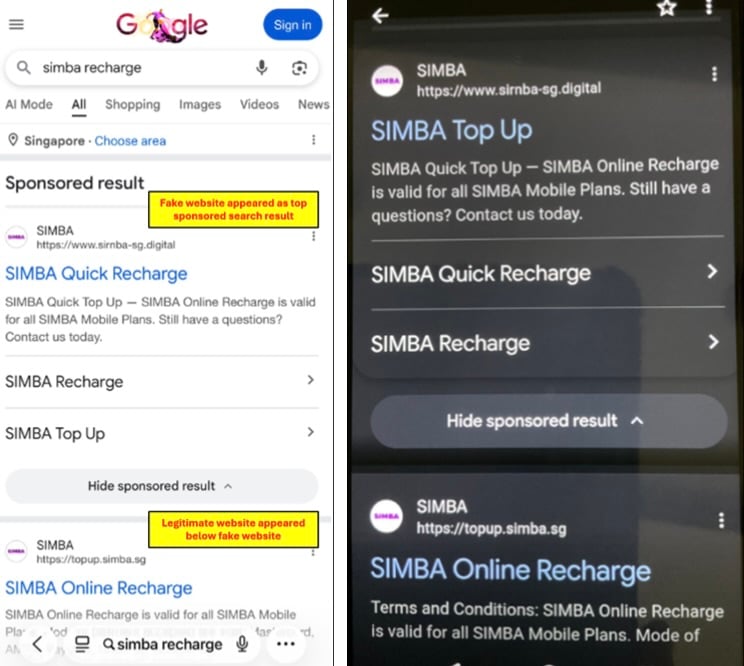
The police screenshot above shows a fraudulent sponsored result above the genuine top-up result. Its annotations belong to the original police example.
In that example, the suspicious address is simba-sg[.]digital. The legitimate result displays topup.simba.sg, under the provider’s simba.sg domain.
Addresses used by criminals can change. Recognizing this one example helps, but a saved route to the genuine provider offers better protection than memorizing one bad domain.
How the SIMBA Top-Up Scam Works
Step 1: Your search brings the fake page to you
You don’t need to receive an unexpected text or follow a stranger’s message. The scam can begin with a search you made yourself.
That changes how the link feels. You were already planning to recharge, so a result displaying the right provider’s name seems to answer your request.
The sponsored label means the result is an advertisement. It doesn’t establish that the business whose name appears in the ad controls the destination.
Placement matters, too. A result near the top is easy to tap when you’re busy, especially if you’re trying to restore mobile service quickly.
The police example demonstrates this ordering. It doesn’t mean every SIMBA search shows the same ad or that every sponsored result is fraudulent.
Step 2: The website makes a card request seem ordinary
The imitation page follows the activity you expected to complete. A phone number identifies the service being recharged; a card appears to pay for it.
A phone number and card can belong in a genuine recharge. On the imitation page, you’re handing them to someone outside the provider’s payment process.
A logo, familiar color scheme, or provider name inside the page cannot settle that question. The same material can appear on an unrelated website.
Check the address bar before entering anything. Don’t use a reassuring heading inside the page as a substitute for checking where your browser actually is.
If the full address is hidden on a small screen, stop and expand it. A quick payment isn’t worth making the destination impossible to inspect.
Step 3: Your payment details leave the normal top-up process
Entering your card into the counterfeit form gives sensitive payment information to the people behind that page. A phone number may also help them target follow-up prompts.
The page may continue behaving like a checkout afterward. A loading screen, confirmation message, or another form doesn’t establish that a genuine recharge is being processed.
Don’t keep supplying information because you’ve already started. You can stop halfway through, even if the page says the payment is incomplete.
If you entered the card but closed the page before an approval, tell your bank exactly that. The bank needs your actual exposure, not your guess.
Step 4: An OTP or token prompt raises the stakes
Police say victims were directed to provide OTPs or approve digital-token requests. These steps can move the fraud beyond collecting a card number.
Read the bank’s own message. Check the amount, merchant, and purpose wherever those details are shown, rather than following instructions on the supposed recharge page.
An approval requested during a top-up isn’t automatically an approval for that top-up. Treat a different merchant, unexpected amount, or unexplained authorization as a reason to stop.
Some requests may concern account or payment setup rather than an immediate purchase. If the purpose is unclear, decline it and ask your bank directly.
Never pass an OTP to a caller or chat contact who offers to finish the recharge. That moves the approval outside the trusted payment interface.
A repeated request doesn’t make the previous one harmless. Several codes or approvals can represent several attempts, so report each one you remember completing.
Step 5: The loss appears somewhere other than your phone balance
The intended purchase is mobile credit. The reported harm is unauthorized card spending, which may be visible in your bank account instead of your SIMBA account.
A failed recharge can distract you from that difference. Before retrying the payment, check your bank through its genuine app or another trusted route.
Don’t assume your information is safe because the mobile balance stayed unchanged. A counterfeit checkout can collect information without delivering any recharge.
Likewise, a charge you don’t recognize needs prompt attention even if the fake page eventually displayed a success message.
Step 6: Another attempt can create more exposure
If the page appears broken, trying another card is an understandable response. On a phishing site, it gives the same criminals another payment credential.
Switching browsers or refreshing the counterfeit page doesn’t change who runs it. Leave the session and start again from the provider’s established route.
A message asking you to resolve a failed top-up should receive the same scrutiny. Verify the original transaction before entering any replacement payment details.
This warning concerns the documented search-ad phishing process. It doesn’t establish a filter-refill subscription, a recurring mobile plan, or a specific malware download.
How to Reach the Real SIMBA Top-Up Page
Use the provider’s official SIMBA website or an existing trusted app to find its recharge options. Avoid building your payment route from a new advertisement.
The genuine top-up address in the police example is a subdomain of simba.sg. The dot before that domain matters more than a familiar word elsewhere.
For example, adding SIMBA to an unrelated domain’s name doesn’t place that site under the provider’s control. Read the hostname, not just the search-result heading.
The padlock is also limited. It concerns the connection to the website you opened; it doesn’t certify that the website belongs to your phone provider.
A genuine provider page can change its appearance. An unfamiliar design alone isn’t proof of fraud, just as an accurate imitation isn’t proof of legitimacy.
If you can’t confidently identify the destination, contact SIMBA through its official site before paying. You don’t need to complete the transaction while that uncertainty remains.
Once you’ve established the correct route, save it for future use. That removes the need to judge a fresh collection of search ads every time.
What to Do if You Have Fallen Victim to This Scam
-
Contact your bank immediately. Use its genuine app, the number on your card, or another independently established channel. Say you entered details on a fake SIMBA page.
Ask about blocking or replacing the exposed card and stopping suspicious transactions. Explain whether you supplied card details, an OTP, a token approval, or several of these.
If a payment is pending, report it now. Waiting for it to finish can reduce the time available for the bank to respond.
-
Review what you actually approved. Check recent transactions and bank notifications. Note amounts, merchants, timestamps, and any setup or authorization messages associated with the incident.
Tell the bank about repeated approvals or additional cards you tried. Don’t minimize an action because the fake website described it as verification or a retry.
Ask the bank whether any payment credentials or authorizations need revoking. Follow its instructions rather than assuming a password change covers every card-related risk.
-
Keep the evidence without reopening the payment process. Save the URL, search-ad screenshot if available, bank messages, transaction references, and the approximate time you visited.
A browser-history entry can help identify the destination. Don’t return to the form to reproduce the scam or submit more information for a better screenshot.
Keep unredacted evidence for your bank and police. Before sharing a warning publicly, hide card numbers, phone numbers, OTPs, account information, and personal identifiers.
-
Check whether the genuine recharge happened. Open SIMBA through a trusted route and review your balance or transaction history. Ask its support team about an uncertain recharge.
This separates the legitimate service question from the card-fraud report. A mobile provider and a bank may need to investigate different parts of the incident.
If you still need mobile credit, make the replacement purchase only after establishing the genuine destination and arranging a safe payment method with your bank.
-
Report the phishing attempt. Give local police the fake address and payment evidence. In Singapore, the official ScamShield service provides scam guidance.
Report the misleading advertisement through the search platform’s reporting controls as well. Include the destination URL so the report identifies more than a copied brand name.
Reporting helps establish the pattern, but it doesn’t replace asking your bank to protect the account. Handle urgent financial exposure first.
-
Protect any other credentials you disclosed. If you also entered a reused password, change it on the genuine service and anywhere else you used it.
Use a trusted device if anything was installed during the incident. A visit alone doesn’t prove infection, and this warning doesn’t describe a required app download.
If you only saw the ad and never opened or used the form, you don’t need to treat that exposure as a completed card theft.
-
Reject paid recovery offers. Someone promising a guaranteed refund may use your concern about the top-up to request another payment or banking approval.
Keep refund and dispute discussions within the channels you independently established with your bank and provider. A stranger cannot validate their authority by quoting your loss.
Check later statements for additional transactions. A replacement card or an initial refund doesn’t remove the need to follow the bank’s remaining instructions.
Frequently Asked Questions
Is SIMBA itself a scam?
No. This warning concerns criminals impersonating SIMBA through counterfeit recharge pages. Use the genuine provider’s channels for service and top-up questions.
The stolen branding attracts customers who already want to pay SIMBA. It doesn’t establish that the provider receives or operates those fraudulent payment requests.
Does a sponsored Google result mean the page is approved by SIMBA?
No. A sponsored placement identifies an advertisement. It doesn’t establish that the displayed brand owns the website receiving your payment details.
Open the provider independently and compare the destination before paying. The police example shows why choosing the first result can be risky.
What if I entered my card but never supplied an OTP?
Contact your bank and describe that exact situation. Missing the OTP stage doesn’t make an exposed card number safe or settle what protective action is needed.
Don’t enter a code afterward to cancel the attempt. Any claimed cancellation requiring another approval should be checked directly with the bank.
Can the fake address change?
Yes. The pictured domain identifies one documented example, not a complete list. Criminals can imitate the same recharge process using other addresses.
A trusted route to the genuine provider is more useful than checking whether a suspicious domain happens to match this screenshot.
Does receiving a real bank notification prove the recharge page was genuine?
No. A genuine bank can notify you about a transaction initiated through fraud. Read what the notification authorizes before deciding whether it matches your purchase.
If the details differ or the purpose is unclear, decline the request and contact the bank through its established channel.
Do I need to install an antivirus after seeing the advertisement?
Seeing the ad doesn’t establish malware infection. The documented SIMBA campaign centers on payment information and approvals, so bank protection is the immediate priority.
If you installed an unfamiliar app as well, describe that separate exposure when seeking technical help. A scanner cannot reverse a card transaction.
The Bottom Line
A SIMBA recharge search can lead to a counterfeit checkout before you notice the address changed. Use the genuine provider’s route and read every bank approval.
If you’ve already used the fake page, stop retrying and contact your bank. Protecting the exposed card matters more than getting the interrupted top-up to finish.

Join the discussion
0 commentsShare your experience or ask a question about this article.
Discussion
Start the conversation
Have a question or something useful to share? Add the first comment.