

An email bearing the TurboTax name says something needs attention before you can continue. With tax paperwork already on your mind, the review button looks worth opening.
Before following that request, take a moment to find out what the message is actually asking you to trust.
Overview
The message borrows the name of a real tax service
The TurboTax email scam is phishing that impersonates TurboTax or its parent company, Intuit. The legitimate service is not the operator of the fraudulent message.
A warning might mention account access, a filing problem, a refund, or exposed information. Different stories can lead to the same request: follow this route and identify yourself.
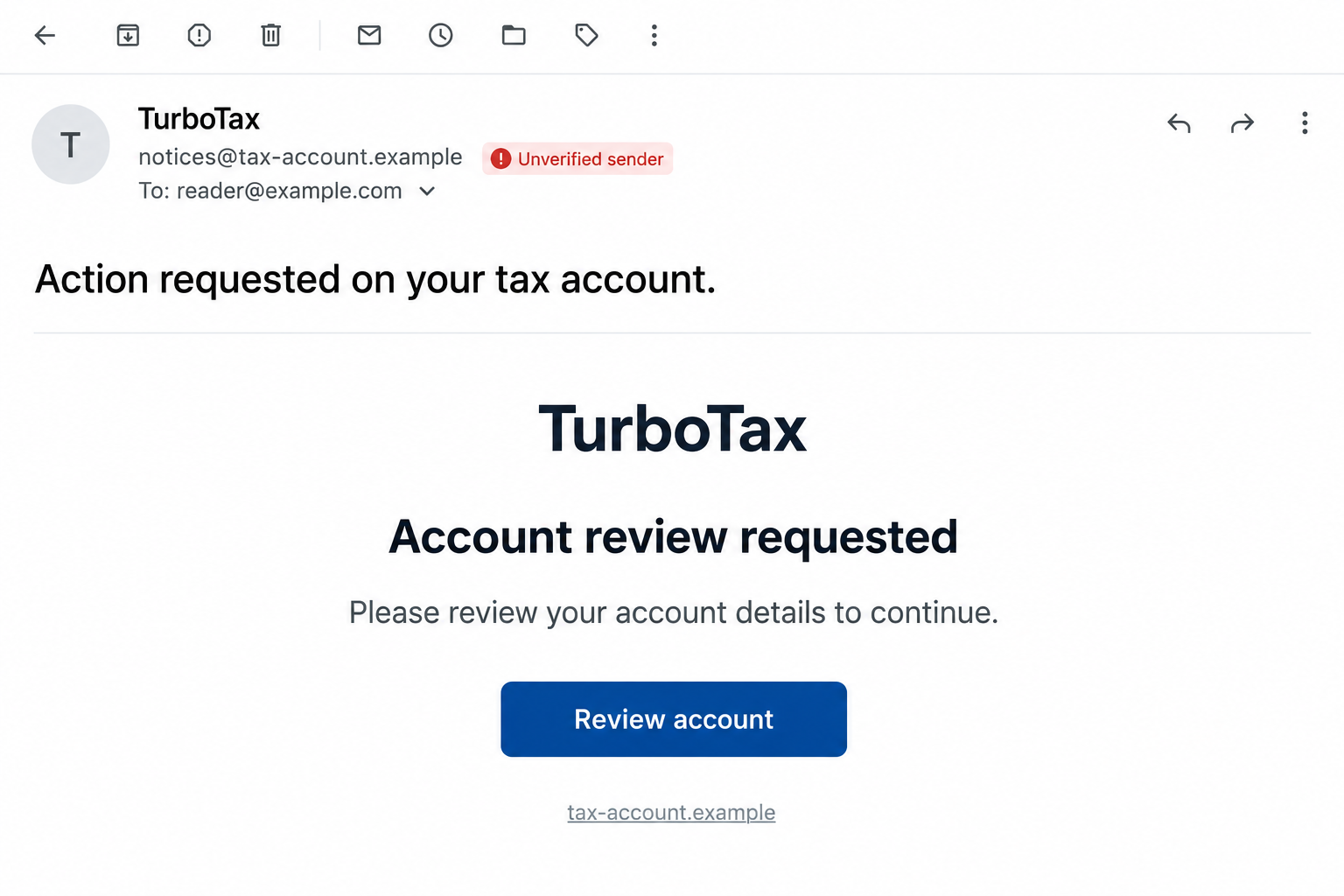
The opening image illustrates that kind of request. It is not an intercepted email, and its fictional sender and example destination are deliberately nonfunctional.
The requested action matters more than the familiar branding
A tax-service logo can be copied. What matters is whether the email sends you to an impostor that collects passwords, verification codes, or sensitive records.
Intuit’s official phishing guidance warns about these tactics and recommends signing in independently instead of following a doubtful message.
That advice does not mean every unexpected TurboTax notification is fraudulent. It means the message should not supply both the alarming claim and your only way to check it.
Separate the account question from the tax question
Before acting, identify which of these issues the email claims to address:
- A TurboTax or Intuit sign-in problem.
- A request for identity documents or financial details.
- The status of a return you actually submitted.
- A supposed refund or additional payment.
- An IRS matter that belongs with the IRS, not an email sender.
These issues have different verification routes. A problem with a software account is not automatically a problem with your tax return.
Why a Tax Email Can Catch You Off Guard
You already expect complicated paperwork
Tax filing involves unfamiliar labels, documents, and requests that do not always arrive together. An extra account check can feel like another ordinary administrative step.
If you recently filed, the timing seems to fit. If you have not filed, the same message may make you worry that somebody acted without permission.
Neither reaction establishes what happened. Start with your own records: which service you used, which account you created, and what you last did there.
Receiving the email does not prove that TurboTax was breached or that the sender has seen your return. Do not assume more access than you can establish.
The promise of a quick fix narrows your attention
A single button makes a complicated worry look manageable. You may concentrate on finishing the check rather than asking why that particular page deserves your information.
The easiest-looking route is not necessarily the right one. Opening the genuine service yourself takes the decision away from whoever wrote the email.
Don’t let a countdown in your inbox replace the filing date you already know. If you’re unsure about a real deadline, ask your usual tax professional.
How the TurboTax Email Scam Works
Step 1: A plausible account or filing problem gets your attention
The email presents a reason to act: restricted access, incomplete information, a security concern, or a refund that supposedly needs confirmation.
Some versions sound helpful rather than threatening. A message promising to protect your account can produce the same response as one warning that you will lose access.
A subject line is only the sender’s claim. It cannot tell you whether a return was accepted, an account was accessed, or money is available.
Step 2: The email directs you into its own verification process
A button or linked instruction offers to resolve the issue. The destination may resemble a familiar sign-in page, with copied colors and an ordinary-looking form.
The visible button text is not the destination address. A link labelled as an account center can still open a website controlled by someone else.
On a computer, previewing a link can reveal an obvious mismatch. On a touch device, avoid experimenting with unfamiliar gestures that might open it accidentally.
You do not need to investigate the destination yourself. Leave the email and open the service through a bookmark or address you already know.
Step 3: A familiar form turns a warning into a disclosure
The imitation asks for credentials or personal information under the label of confirmation. Entering them gives the receiving website information, whatever the form calls the process.
If the page asks for your email password, leave it. Your mailbox has its own sign-in; an unverified tax form shouldn’t collect that password.
A request for a document deserves the same care. A return or tax form can contain information about income, addresses, dependents, and financial arrangements.
Do not upload an entire document when you have not verified who requested it. Cropping a page is not enough if the remaining information is still sensitive.
The danger is disclosure to the wrong recipient, not merely whether a payment was charged. A page can take information without producing a transaction receipt.
Step 4: A security code makes the request seem more legitimate
A follow-up screen may ask for an account code. Because genuine services use codes too, the extra step can make the imitation feel reassuring.
Read the genuine code message carefully. Check what account and action it refers to before doing anything with it.
Use codes only in the legitimate process you initiated. Do not relay one to someone who contacted you or enter it into their unverified form.
If a code arrives unexpectedly, that is a reason to review account security through the real service. It is not an instruction to approve somebody else’s request.
Step 5: The final screen does not tell you what was taken
An error or completion message can end the interaction without explaining where your information went. Neither result confirms that your real account was repaired.
Check the actual account and describe your exposure accurately. Entering a password, uploading a return, and receiving an email require different responses.
Do not keep trying other passwords or documents to make a suspicious page work. More attempts can turn one disclosure into several.
If the page later disappears, preserve the information you already have. You do not need a working scam page to ask the genuine provider for help.
How to Check a TurboTax Email Without Following Its Link
Start with the account you actually use
Open TurboTax’s official website independently, then use its sign-in route. Avoid a new support link supplied by the suspicious email.
Look for account notices and the activity relevant to the claim. If something is unclear, contact support through Intuit’s established channels.
An absent dashboard notice is not a universal authenticity test. Ask about the specific message rather than assuming every real communication must appear in one particular place.
Keep tax-software records and IRS records distinct. A TurboTax screen and an IRS notice may describe different parts of the same filing process.
Read the address without treating it as a guarantee
Expand the sender details if your email app allows it. A display name saying TurboTax tells you very little about the account or system that sent it.
A brand name placed somewhere inside a long address is not enough. A lookalike ending, extra word, or unrelated domain can change who controls the destination.
Equally, a correct-looking sender does not authorize a reply containing private records. Let independent account access or verified support settle an important request.
Spelling and greetings are secondary clues. A personalized, fluent message can still be fraudulent, while an awkwardly worded genuine notice deserves verification rather than an automatic accusation.
Find recovery help without starting another risky conversation
Intuit’s official contact page links account recovery and TurboTax support. Use it if the usual sign-in no longer works.
Describe the problem before sending sensitive material. Ask which official process applies, and submit any required evidence only through that verified process.
A stranger answering your public complaint isn’t necessarily support. Keep account recovery with the official service, even if the stranger seems to understand the problem.
Keep an established preparer in the conversation
If somebody normally helps with your taxes, contact them through the channel you used before. Explain the request without forwarding passwords or sign-in codes.
They can help identify which return or document the message appears to reference. That does not make them responsible for recovering your Intuit account.
Keep a trusted copy of your existing paperwork. Compare any reported change with that record before assuming the suspicious email describes a real filing event.
If you discover a discrepancy, record it precisely. A changed contact address, unfamiliar submission, and missing document are different findings that support can investigate separately.
What to Do if You Have Fallen Victim to This Scam
-
Stop the interaction and record what you shared. Note the credentials, codes, documents, payment details, or identifying information involved. Keep uncertain details marked as uncertain.
If you only received the message, there is no reason to assume your account was entered. Report it without creating an exposure by testing the link.
If you opened a page but submitted nothing, close it. Check whether you actually typed anything rather than treating every click as a confirmed account takeover.
-
Change an exposed Intuit password through the real account. Use a unique replacement, and address any other account where you reused the compromised password.
If access has been lost, follow official recovery. Do not negotiate with a stranger who says a fee will restore your tax records.
Tell support if a code or approval was also involved. Do not assume a password change explains every action that happened during the incident.
-
Review recovery details and stronger sign-in protection. Check that the account’s email and phone belong to you, then use the security options offered in the real account.
Intuit’s account verification guidance explains its Sign in & security settings and two-step verification.
Do not blindly approve prompts while reviewing settings. An unexpected request still needs checking, even when you are trying to secure the account.
-
Protect the mailbox if its credentials were disclosed. Recover access, change the password, review recovery contacts, and check for unfamiliar forwarding or account changes.
Consider what that mailbox receives: tax notices, banking messages, and password resets may all require attention. Prioritize accounts connected to information you actually exposed.
-
Assess document and identity exposure separately. If you uploaded records, list their sensitive contents privately. Do not circulate the same unredacted files to ask whether the email was fraudulent.
Use IdentityTheft.gov for guidance suited to the information involved. A copied tax document can contain details about more than the account holder.
If another person’s information was included, discuss that exposure with them privately. Let them protect their records without publishing names or identification numbers in a warning.
-
Check actual filing problems with the appropriate authority. A suspicious email alone does not establish that somebody filed a return using your identity.
If you find an unexpected return, rejection, or IRS notice, follow the IRS identity-theft guide and instructions for that specific situation.
Avoid submitting additional forms or changing a legitimate return solely because an email frightened you. Get case-specific help when genuine tax records show a problem.
-
Contact the financial provider if payment information was supplied. Explain what you entered or authorized and ask what restrictions, replacement, or recovery options are available.
The FTC’s scam-response guidance distinguishes payment methods. Do not describe a payment you approved as something you never authorized; explain the deception accurately.
-
Report the impersonation and keep a usable record. Intuit’s security guidance directs suspicious brand-related emails to security@intuit.com. Forward the original rather than replying to its sender.
Retain the subject, sender details, time, visible destination, and support reference numbers. Avoid including unrelated tax documents in a phishing report.
After preserving what is needed, remove the message so nobody accidentally follows it later. Continue checking genuine account notices through your own trusted route.
Frequently Asked Questions
Does a TurboTax logo mean an email is authentic?
No. Branding can be copied. Confirm an important request through your real account or support reached independently.
Does this email prove somebody accessed my tax return?
No. Receiving a warning is different from confirming unauthorized access. Check the account and respond to the information you actually disclosed.
Should I provide a code to cancel the supposed security issue?
Do not give codes to an unexpected contact. Use them only within the genuine sign-in or recovery process you initiated.
Is a TurboTax account problem the same as an IRS problem?
No. The software account, submitted return, and IRS records are separate matters. Use the service responsible for the particular issue.
What if the suspicious email knows my real name?
A name does not authenticate the sender. It also does not show how much other information they have. Verify the request independently.
Can I report the email without opening its attachment?
Yes. Preserve and forward the suspicious email through Intuit’s official reporting instructions. You do not need to open or complete an attached form.
The Bottom Line
Do not use a TurboTax email scam link to fix an account or claim a refund. Check the request through the genuine service instead.
If you responded, secure the affected accounts and assess any document or financial exposure. Address real tax issues through verified support and the appropriate official process.

Join the discussion
0 commentsShare your experience or ask a question about this article.
Discussion
Start the conversation
Have a question or something useful to share? Add the first comment.