

A promising AI desktop app turns up in a search, and its GitHub release looks ready to install. Even the setup file has a familiar publisher.
Before you give that download permission to run, take a closer look at what came inside the ZIP. That detail matters more than the polished release page.
Overview
Researchers found malicious packages behind familiar AI names
On October 27, 2026, Check Point Research documented Yoba malware distributed through fake AI application repositories and GitHub Pages sites.
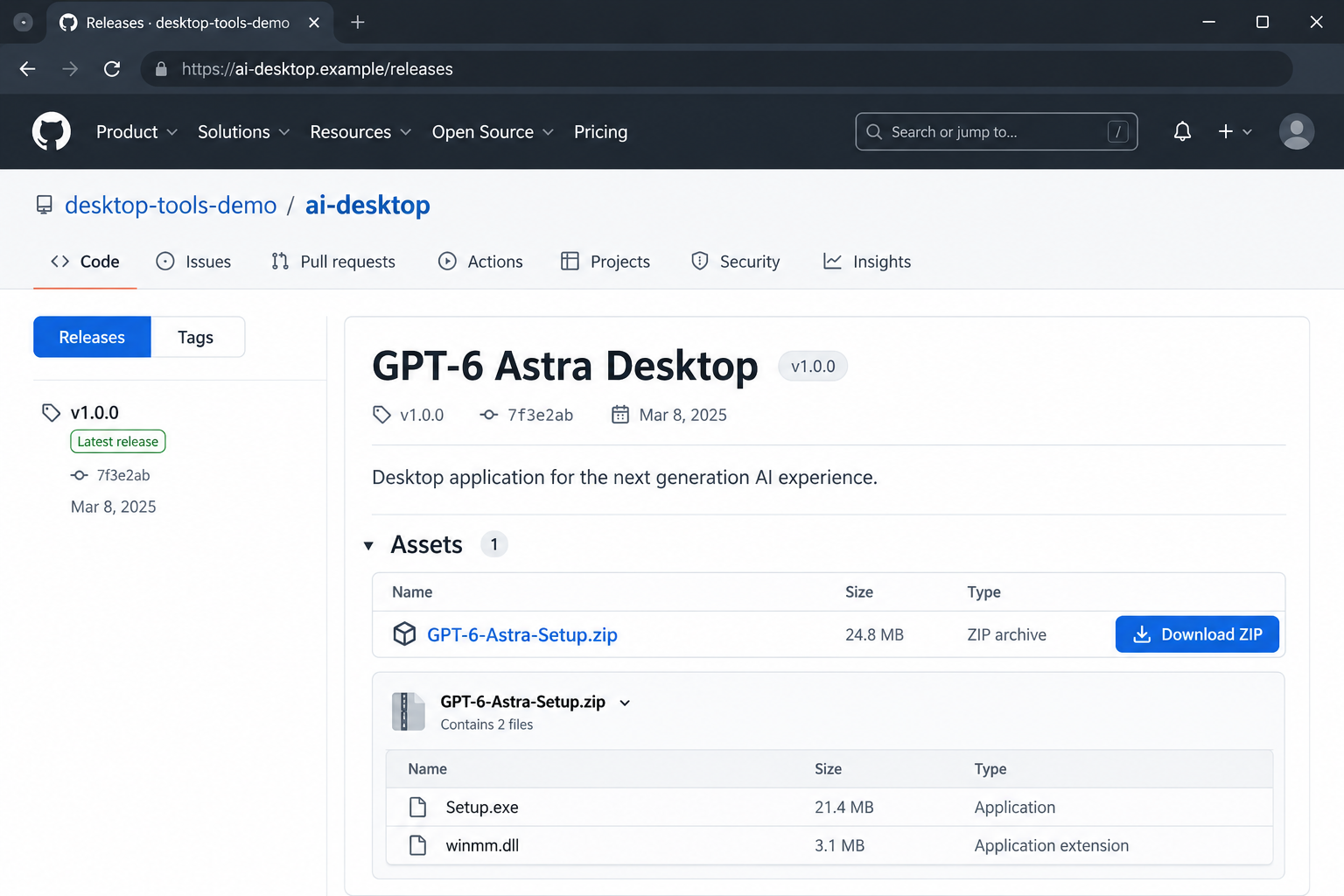
The lures borrowed names including GPT-5.6 Sol, GPT-6 Astra, and Claude Opus. Their presence on GitHub did not make them official OpenAI or Anthropic releases.
The important finding was inside the package: a genuine, digitally signed executable sat alongside a malicious DLL. Running the trusted-looking program could load the other file.
Check Point observed cryptocurrency mining after infection. Its plain-language campaign summary also explains that the loader can deliver additional payloads.
The signature belongs to a file, not the whole download
A publisher name in Windows can answer who signed that particular executable. It does not certify every neighboring file, the archive, or the repository distributing it.
You can recognize the publisher of Setup.exe and still miss the dangerous file beside it. Checking that signature alone leaves the rest of the package unverified.
This finding does not mean ChatGPT, Claude, GitHub, OpenAI, or Anthropic was compromised. The malicious distribution package is the problem.
What deserves a second look before installation
- An AI app download reached through an unfamiliar repository instead of the developer’s own website.
- A ZIP containing an installer plus DLL files you were never told about.
- A request for administrator access before you have established who supplied the package.
- A model name, release badge, or search position used as the main reason to trust the download.
The image above is an illustrative release page, not a recovered malicious website. Its address, release date, version, and file sizes are fictional.
How the Fake AI Download Scam Works
Step 1: A search for an AI app leads to an unofficial release
The lure meets a straightforward need: someone wants an AI tool on their Windows desktop. A downloadable release seems quicker than sorting through competing search results.
Release notes and an app icon can make a repository feel familiar. They do not tell you whether its owner represents the AI developer.
Ask a narrower question than whether the page looks professional: did the genuine developer direct you to this exact account and release?
Follow the route outward from the developer’s website. Starting at an unknown download page and looking for reasons to approve it reverses that check.
Step 2: The archive makes the installer look routine
A ZIP can feel like packaging rather than software. You extract it, see Setup.exe, and assume the other files are ordinary installation components.
In this campaign, the neighboring DLL mattered. You did not need to deliberately open that DLL for it to become part of the execution chain.
Do not copy the setup file into another folder and experiment. Altering the package is not a dependable way for a home user to make it safe.
There is also no need to test whether a suspicious app really answers prompts. A working interface would not establish that its installation was harmless.
Step 3: A genuine executable loads code from the wrong source
The technique is often called DLL sideloading. In everyday terms, a legitimate program starts and brings another file into the process.
If that companion file belongs to the attacker, the useful reputation of the first program does not protect you from the second.
This explains why checking only Setup.exe can produce a comforting but incomplete answer. The question is what the supplied package will cause Windows to run.
Do not whitelist the folder, disable antivirus, or dismiss a detection because the installer shows a recognized publisher. Those actions remove useful checks at precisely the wrong moment.
Step 4: An administrator prompt raises the stakes
An elevation request asks for more than permission to try an app. It can give a process broader ability to change the computer.
Cancel if the source remains uncertain. A message saying administrator privileges are required is a demand from the package, not independent evidence that granting them is appropriate.
On a work laptop, ask IT to approve the exact product and distribution source. A personal search result should not decide what receives elevated access.
Step 5: The infection can outlast the first launch
The reported chain used scheduled persistence. Closing the visible setup window therefore cannot be treated as undoing everything it started.
That distinction changes the response. Deleting the ZIP removes the original delivery file, but it does not establish that later components or scheduled activity have disappeared.
Record when you ran the download and whether you approved an administrator prompt. Those facts help a technician investigate more effectively than guessing from the filename alone.
Step 6: Mining can stay quiet while you use the computer
The observed mining component could pause when the user was active. A machine that feels normal during a quick check is therefore not cleared by that experience.
Fan noise, heat, or resource use can be clues, but they have many other causes. Neither their presence nor their absence diagnoses this campaign.
The loader also means the investigation should not end with the word miner. Establish what actually ran on the affected computer before deciding its exposure was limited.
How to Check an AI App Without Testing the Suspicious Download
Open a fresh browser window and reach the AI developer through an address you already know. Find its downloads or help area there.
If an official page links to an app store or repository, follow that link. Compare the complete publisher account, not just an icon or product name.
When you cannot find the claimed release through the developer, leave the downloaded package unopened. You do not owe an unknown uploader a chance to prove itself.
A new model name can make hesitation feel like missing out. Treat that feeling as a reason to slow down, especially when the download promises early access.
Do not send a private company installer or confidential archive to public analysis services without permission. IT can preserve and examine it through an approved process.
For a family member, explain the actual trap: the familiar signed file can be only one part of the download. That is more useful than saying GitHub is unsafe.
What to Do if You Downloaded or Ran the Fake App
- Separate downloading from execution. Note whether you merely saved the ZIP, extracted it, started Setup.exe, or approved elevated access. Do not reopen it to check.
- Stop using an affected PC for sensitive work. If the installer ran, disconnect its network connection and contact your workplace security team when applicable.
- Preserve the download route. Keep the repository address, archive name, time, and any detection screenshot. Do not forward the executable to coworkers or relatives.
- Protect accounts elsewhere. Use a separate trusted device to review important account activity, revoke unfamiliar sessions, and replace credentials potentially exposed on the affected PC.
- Check payment activity when relevant. Contact your financial provider through its official app or known number if you find an unauthorized transaction or exposed banking session.
- Have the whole chain assessed. Ask about persistence and additional payloads. Removing a mining process alone does not answer what else the loader may have installed.
- Report the distribution page. Use GitHub’s abuse reporting route from the genuine service. Describe the malicious package without encouraging anyone to run it.
If nothing was executed, avoid assuming the computer is infected solely because the file was downloaded. Keep security software current and remove the unopened package after any needed reporting.
If execution is uncertain, say so. An honest timeline with gaps is safer than telling a technician the computer is clean because no app window appeared.
A bank alert does not prove Yoba caused a loss. Preserve both records so the relevant providers can investigate instead of tying unrelated events together.
Checking a Windows PC After the Installer Ran
These checks support an investigation. A clean scan cannot certify that a loader never ran, that no information left the device, or that every persistence method is gone.
On managed equipment, let IT handle containment and recovery. For a personal PC, seek qualified help if sensitive accounts, persistent detections, or administrator access were involved.
- Start with containment. Keep the suspect system off the network. Use another device for help, account changes, and downloading trustworthy recovery instructions.
- Use installed Windows protection. Open Windows Security, then Virus & threat protection. Under Scan options, choose Microsoft Defender Antivirus (offline scan), if available.
- Save work before that scan. Windows restarts to run it. Review Protection history afterward, and share the actual detection names with whoever is helping you.
- Consider a second assessment. After containment, a technician can arrange a verified Malwarebytes installer and a Custom Scan without casually reconnecting the suspect system.
- Quarantine confirmed threats. Follow the scanner’s removal prompts and requested restart. Do not restore detected files because you still want the promised AI app.
- Escalate uncertain recovery. Repeated detections or unexplained scheduled activity justify professional review and potentially a clean Windows reinstall, with personal data preserved safely first.
Microsoft describes the offline scan and its restart in the Windows Security scan guidance.
If Malwarebytes is used, obtain it through the established MalwareTips download route, rather than another search ad or an unexpected support message.
Its Custom Scan instructions lead through the Scanner tile’s three-dot menu, Advanced Scan, and Custom Scan. Configure the relevant drives before starting.
The vendor currently lists Custom Scan as free. Malwarebytes Premium is an optional paid product; purchasing ongoing protection does not prove an existing infection is fully resolved.
Keep a record of what was removed and what remains uncertain. Account recovery and computer recovery are separate jobs, and both may need attention.
Which Accounts Need Attention After a Launch?
Start with the accounts used on the affected computer during the possible exposure. Email is particularly important because it often receives password-reset messages for other services.
Review that account’s recovery information and active sessions from a trusted device. An unfamiliar recovery address or authentication method needs attention even if the password still works.
Next consider financial accounts, work access, and any password manager that was unlocked. Tell the relevant provider or administrator what happened before making assumptions about the damage.
Do not write every new password into a document on the suspect PC. You would be placing the recovery information back into the environment you are investigating.
If a browser saved passwords, ask your helper how that affects the recovery plan. Removing saved entries locally does not invalidate credentials another person might already possess.
Prioritize rather than changing dozens of accounts in a rush. Secure the main email account and financial access first, then work through the remaining exposed services carefully.
For a business login, do not improvise changes that could lock out your team or disrupt shared systems. Report it and let the account administrator coordinate recovery.
Watch for unexpected approval requests while that work continues. Decline requests you did not initiate, and never send a helper the code shown by your authenticator.
Keep notifications and transaction records if something looks wrong. A useful report identifies the service, time, and action instead of simply saying the AI app hacked everything.
Finally, distinguish restored access from resolved exposure. Being able to sign in again does not prove that previous sessions were revoked or information was never copied.
That is why the device assessment and account review should run together. Finishing one does not automatically complete the other.
Frequently Asked Questions
Does a valid digital signature make the ZIP safe?
No. A signature on one executable does not cover every companion file. This campaign used that distinction to make a malicious package appear more trustworthy.
Are the genuine ChatGPT and Claude apps involved?
The finding concerns unofficial malicious packages borrowing their names and signed files. It does not establish that the genuine AI services or their official downloads were compromised.
Can simply reading the GitHub page install Yoba?
The documented delivery relies on running the supplied package. Reading a page, downloading an archive, and executing an installer are different exposure levels.
Is cryptocurrency mining the only possible damage?
Mining was observed, but the loader can deliver other payloads. Assess the affected machine rather than assuming every copy produces exactly the same outcome.
Should I remove every file named winmm.dll?
No. Windows also uses legitimate files with that name. A filename without its location, origin, and execution context is not enough to identify malicious software.
Will deleting the installer fix everything?
Not if it already launched components or established persistence. Preserve useful details, contain the device, and investigate before treating deletion as a complete recovery.
The Bottom Line
A familiar AI name and a genuine signed executable are not enough to trust an unofficial download. Reach the app through its developer’s own distribution route.
If you ran one of these packages, stop using that PC for sensitive activity. Get the full infection chain assessed and protect important accounts from a separate trusted device.

Join the discussion
0 commentsShare your experience or ask a question about this article.
Discussion
Start the conversation
Have a question or something useful to share? Add the first comment.