

The document looks like ordinary work: a proposal to review, an invoice to check, or a contract awaiting your attention. Opening it seems harmless enough.
Then a verification screen asks you to take a short detour through Microsoft. That request deserves a closer look before you follow its instructions.
Overview
A confirmed campaign uses everyday business documents
ANY.RUN’s October 27, 2026 investigation describes SkyW4lker phishing aimed at Microsoft 365 accounts through commercial offers, contracts, invoices, and other document lures.
Observed emails included password-protected PDF, DOCX, or XLSX attachments, with the password supplied in the message. Document links led through decoy pages toward a sign-in request.
The researchers connected 618 related sandbox analyses between June 23 and October 21. Those are analysis sessions, not a count of successfully compromised people or businesses.
The genuine login page can approve an attacker’s request
In the device-code route, the attacker supplies a code and directs you to Microsoft’s real authentication page. Completing that process can authorize the attacker’s session.
You may perform your normal multifactor authentication along the way. The problem is whose request you are approving, rather than whether the sign-in page is genuine.
This is impersonation and account-access fraud. Microsoft and the legitimate services used as stepping stones are not identified as the scam operators.
The request to watch for
- An unexpected business attachment whose password arrives in the same email.
- A document that sends you through verification screens before showing the promised content.
- A code supplied by that document or its linked page, rather than a sign-in process you independently started.
- A demand to approve account access simply to read an ordinary proposal or invoice.
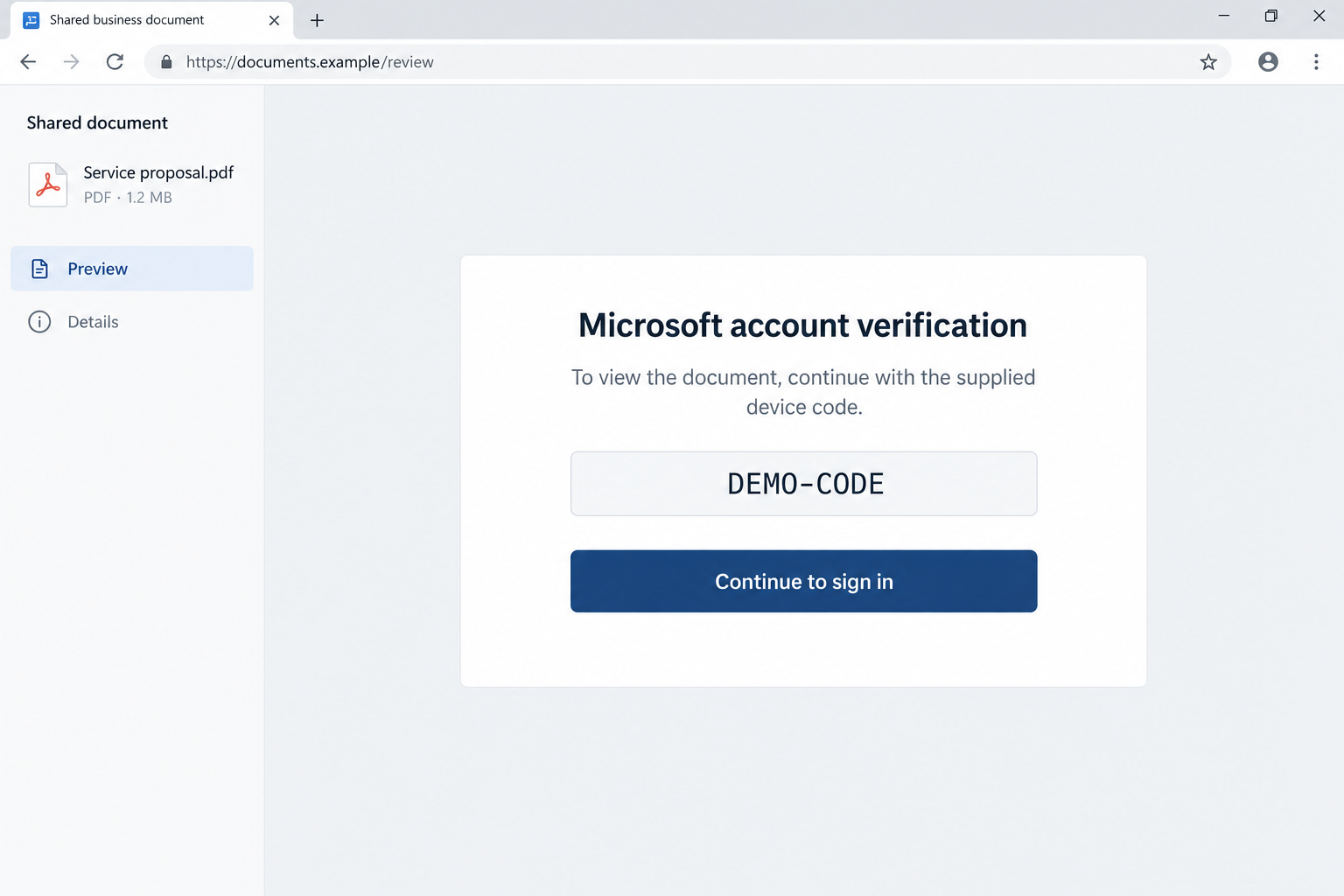
The lead image illustrates that last handoff. Its example address and DEMO-CODE are fictional and nonfunctional; it is not a screenshot recovered from SkyW4lker.
How the SkyW4lker Phishing Scam Works
Step 1: A familiar work task gets the attachment opened
An invoice invites you to check a charge. A proposal asks you to evaluate an opportunity. A contract suggests someone is waiting for your answer.
Each gives the attachment a purpose before you have established who sent it. That matters when your inbox already contains plenty of genuine business documents.
The useful first check is whether you expected this particular task from this particular person. Recognizing a company name is a much weaker test.
If the sender is a known contact, reach them through a conversation or number you used before. An attacker can exploit a convincing name or compromised mailbox.
Step 2: The supplied password gives the file a confidential feel
A protected attachment can appear careful and professional. The password also creates a small task that pulls you further into the sender’s instructions.
But a password delivered alongside a document does not authenticate its author. Anyone who assembled the email could have supplied both.
Do not treat successful unlocking as verification. It only shows that the password opens the supplied file, not that its links lead to an authorized business workflow.
Step 3: Intermediate pages make the route feel official
The documented chain can include CAPTCHA gates or a lure hosted through a legitimate service before the phishing page. Each screen adds another apparently routine instruction.
For the reader, the important change is when reviewing a document becomes an account-authorization task. Stop at that change, even if the earlier screens looked normal.
A page hosted on a recognizable platform can still contain instructions written by an untrusted user. The platform’s reputation does not validate that user’s document.
Do not keep clicking to discover whether the next screen is safer. Verification should happen outside the route supplied by the suspicious message.
Step 4: The attacker hands you a device code
Device-code sign-in has legitimate uses, such as authorizing a device that cannot conveniently handle the full login process itself.
In phishing, the criminal starts that process and persuades you to finish it. The code connects your approval to the waiting request.
That is why an unexpected code is different from a code you requested while setting up your own device. Its origin matters.
You should be able to explain what device or application you are authorizing and why. A document saying verification is required does not answer those questions.
Step 5: You sign in correctly, but for the wrong session
The address bar may show Microsoft. Your password manager may recognize it. Your usual authentication prompt may behave exactly as expected.
Those checks establish the destination of your credentials. They do not establish that the device code came from a request you intended to authorize.
Microsoft’s device-code phishing explanation describes this authorization trap in a separate campaign. The general mechanism explains why the genuine login page is not enough.
Keep MFA enabled. Calling this an MFA bypass without explanation can hide the practical issue: the victim may complete MFA for an attacker-initiated sign-in.
Step 6: The attacker can keep access after you close the page
Once authorization succeeds, access and refresh tokens can let the attacker use the account. Closing the document does not automatically invalidate that access.
A password change can be useful, but recovery needs to address sessions, tokens, and changes made inside the account as well.
The result is not necessarily a broken computer or a suspicious installed program. A cloud account can need urgent recovery while the laptop appears perfectly normal.
How to Check the Document Before Approving Anything
First, identify the business transaction. Which order, project, or conversation explains why you received this file? Do not rely on a generic reference to your company.
Next, contact the supposed sender through an established channel. Ask whether they sent the exact document and whether it should require a device-code authorization.
If your company has a normal document-sharing system, open it from your bookmark or work portal. Look for the file there without using the email’s navigation.
An unfamiliar file does not become trustworthy because the sender explains away every concern. Their explanations are part of the same unverified conversation.
For finance teams, keep payment decisions outside this exchange. A document-access request should not also become permission to change a supplier’s banking instructions.
If the message feels urgent, tell the real sender you are checking it. A short delay is easier to resolve than unauthorized access to your work account.
Do not paste codes into a sign-in page while asking a colleague whether the request is safe. Approval may finish before that conversation does.
What to Do if You Entered the Code or Approved Access
- Stop the document workflow. Close the suspicious pages. Do not try another supplied code or repeat the process to see whether the file eventually opens.
- Contact your IT or security team immediately. Explain that you completed a device-code sign-in from a business document, even if the page really belonged to Microsoft.
- Give a precise timeline. Provide the email, attachment name, approval time, and any permissions or device name you saw. Preserve the original message when your organization allows it.
- Request account containment. Administrators should assess temporary account blocking, revoke sign-in sessions and refresh tokens, and investigate ongoing access through approved company procedures.
- Review account changes. Check unfamiliar authentication methods, registered devices, application consent, and unexpected privileges. Remove unauthorized access under the administrator’s direction.
- Inspect mailbox behavior. Look for forwarding, hidden or unfamiliar rules, suspicious sent messages, and missing correspondence. An empty Sent folder does not settle the investigation.
- Protect connected business activity. Tell the relevant team if the mailbox handles invoices, payroll, or customer documents. Verify any recent changes through independent contacts.
- Change credentials through a trusted route. Follow your administrator’s recovery instructions. Do not use a password-reset link supplied by the original document or a follow-up stranger.
Microsoft’s compromised cloud email response guidance covers account containment, session revocation, authentication methods, app permissions, and mailbox forwarding.
Token revocation is not a reason to promise instant closure. Some access can persist briefly, so the administrator should determine whether stronger temporary containment is needed.
Keep sensitive recovery conversations outside a potentially compromised mailbox. A phone call to an established help desk can prevent the attacker from following each recovery step.
If you only viewed the document and never entered a code or approved access, report the attempt anyway. Do not describe a confirmed takeover without evidence.
If you typed credentials into a separate unfamiliar page, include that detail too. The response must cover what you actually entered, not just the best-known device-code route.
Why a Malware Scan Does Not Revoke a Microsoft Session
A scanner examines activity and files on a device. Revoking a cloud session changes whether the service will continue accepting an attacker’s authorization.
They answer different questions. A scan reporting no malware does not mean a code approval was harmless or that the work account is secure.
For this reason, downloading a cleaner should not delay the call to IT. The urgent task is to contain the account and inspect its use.
If you also ran an unexpected program, tell the security team. That adds a device investigation, but it does not replace the account investigation.
Avoid anyone who offers to recover the account in exchange for a verification code. Handing over another approval can extend the original problem.
What Businesses Can Change After an Attempt
Give staff a simple reporting route for unexpected device codes. People should not have to decide which phishing kit they encountered before asking for help.
Train around the decision point: who started this authorization? Telling employees only to inspect the URL leaves a gap when the final page is legitimate.
Administrators can review whether device-code authentication is needed and restrict it where appropriate. Any change should account for approved devices and existing business workflows.
Use the incident to review document-sharing habits as well. If colleagues routinely accept unexplained files and improvised verification steps, a convincing lure has less resistance.
Help employees report promptly without embarrassment. A fast admission that someone entered a code gives the response team a better chance to limit account access.
When notifying customers or partners, describe verified exposure. Do not claim every recipient was compromised simply because the same campaign sent them an email.
If the Account Handles Supplier Payments or Customer Files
Tell the response team what the mailbox actually does. A purchasing inbox and a general newsletter account may require different follow-up, even if the entry point was identical.
For supplier payments, identify recent requests to change bank details. Pause questionable changes and verify them with the supplier through a number established before the incident.
Do not reply to the disputed thread asking whether its new instructions are genuine. If an attacker controls a participant’s mailbox, that keeps verification inside the compromised conversation.
Have finance compare any questioned request with the actual payment record. A modified invoice and an executed transfer are different events, and the response should reflect that distinction.
If money moved, contact the bank promptly with the transaction reference. Do not wait for the entire cloud investigation to finish before asking about a recall.
For customer information, have the appropriate internal team establish which files or messages were accessed. Avoid telling every customer their data was stolen without supporting findings.
If the account sent malicious documents, use a clean communication channel to warn affected contacts. Explain what to avoid opening and where they can verify your message.
A warning should not include the live phishing link as an ordinary clickable instruction. Share indicators through the security team’s approved reporting format.
Keep a short incident timeline as decisions are made. Record when access was contained, which suspicious changes were found, and who verified any pending payment instructions.
This follow-up is about limiting consequences, not assuming they all occurred. The investigation may find an unsuccessful attempt, a brief session, or broader account use.
Close the loop with the employee who reported the document. Knowing the outcome helps them recognize the same authorization trick without making every future proposal feel dangerous.
Frequently Asked Questions
Can the Microsoft login page be real in this scam?
Yes. Device-code phishing can send you to genuine Microsoft authentication while the supplied code belongs to an attacker-initiated request. The code’s origin is the missing check.
Does the attachment password prove the sender is genuine?
No. A sender can provide both an attachment and its password. Unlocking the file does not verify the sender’s identity or authorize its instructions.
Did SkyW4lker compromise 618 businesses?
The research reports 618 related sandbox analyses. That number cannot be converted into a victim count, confirmed account compromises, or a total financial loss.
Should I disable multifactor authentication?
No. Keep it enabled. The lesson is to avoid completing authentication for an unexpected request and let administrators review which authorization flows the organization permits.
Is changing my password enough?
Do not assume so. Have the administrator address sessions, refresh tokens, authentication changes, application access, and mailbox activity, along with the appropriate credential reset.
Am I infected if I opened the email?
Receiving or reading the email does not by itself establish malware infection or account takeover. Report the actions you took so the response matches the exposure.
The Bottom Line
Do not enter a device code supplied by an unexpected document to unlock ordinary business content. Verify the sender and use your established work-sharing route.
If you already completed the sign-in, report it immediately as a possible account compromise. A genuine Microsoft page does not undo authorization given to the wrong request.

Join the discussion
0 commentsShare your experience or ask a question about this article.
Discussion
Start the conversation
Have a question or something useful to share? Add the first comment.