

A security subscription renewal is easy to put off until an email says the payment has already gone through.
When that message names Bitdefender and offers a quick way to cancel, taking a minute before responding can make all the difference.
Overview
What the Bitdefender renewal email scam claims
The Bitdefender renewal email scam uses an invented subscription charge to start a conversation about a refund. It impersonates Bitdefender; it is not its billing service.
The email wants you to believe a purchase has happened already. Instead of selling protection, it offers an apparent escape from an unwanted bill.
You might ignore an antivirus advertisement without a second thought. A charge you never approved is harder to leave alone, which is why this approach works.
What has been documented
Bitdefender’s warning about fake renewal emails describes messages claiming a multi-year subscription renewed, with fabricated billing references and a callback number.
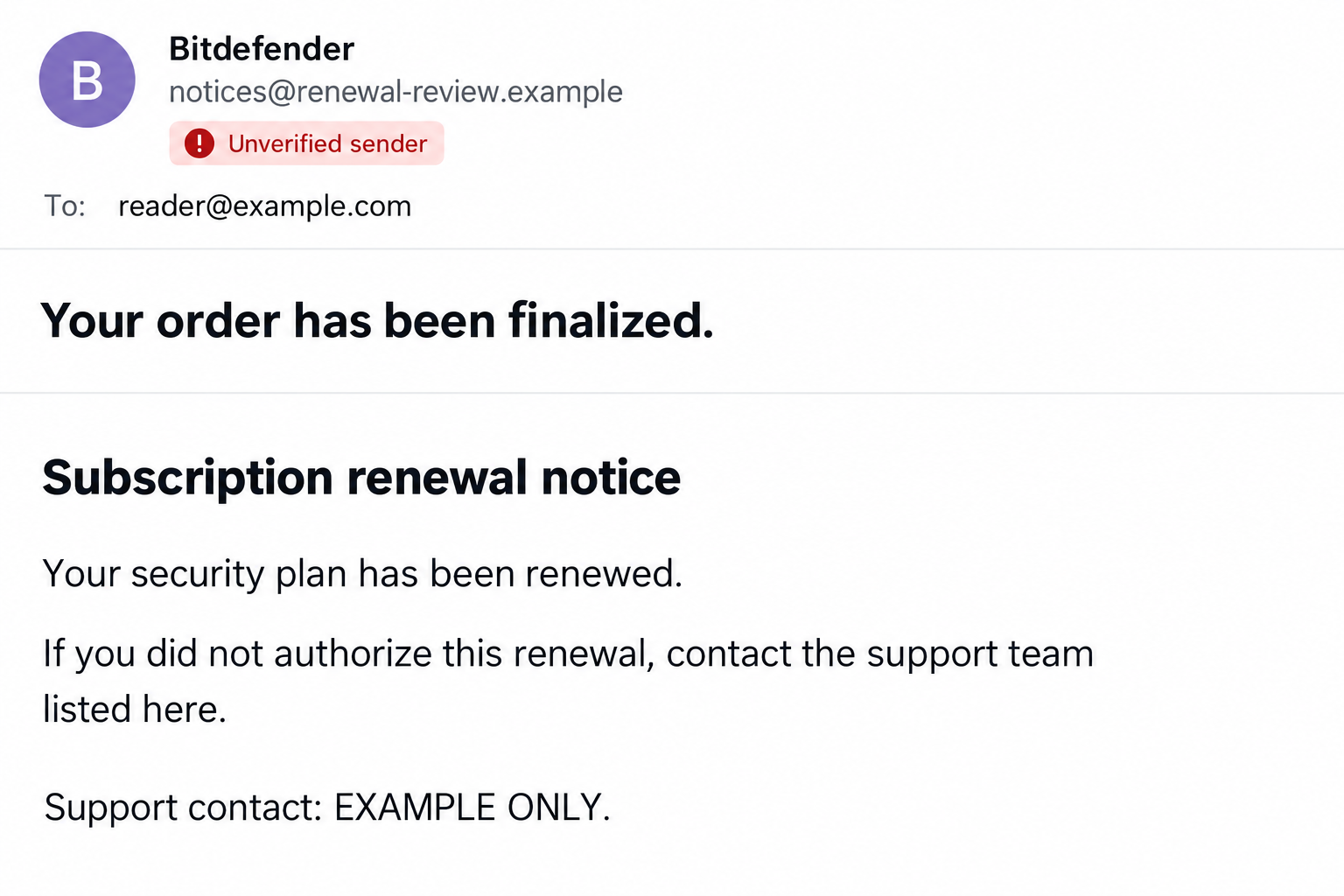
One documented subject is “Your Order Has Been Finalized.” The notice can also arrive through a calendar invitation, rather than an ordinary inbox message.
The image above is a generated illustration of this approach, not an intercepted email. Its sender and support details are fictional.
What the sender wants you to do
The requested callback moves the conversation away from an email you can inspect and toward a person controlling the supposed cancellation process.
- Believe an unverified renewal amount is a real charge.
- Call the contact supplied by the message.
- Follow refund instructions involving financial information or computer access.
- Keep responding because stopping supposedly leaves the unwanted payment in place.
An invoice alone does not establish that money left your account. Check your actual payment activity and subscription separately before deciding what needs disputing.
How the Scam Works
Step 1: A supposed renewal interrupts your day
The opening message borrows the familiar shape of a purchase confirmation. A product name, renewal period, transaction reference, and support contact make it look administrative.
Those details give you things to react to without giving you independent proof. A transaction number typed into an email is not a bank record.
A long subscription period makes the alleged bill feel especially unwelcome. The goal is to make resolving it seem more urgent than checking the sender.
You do not need a current Bitdefender subscription for the lure to reach you. The scam depends on the billing story, not a verified customer relationship.
Step 2: The message supplies its own cancellation route
The email presents a phone number as the practical way to reverse the purchase. That number belongs to the story you are being asked to trust.
Calling it does not independently verify anything. It simply connects you with whoever controls the contact advertised in the suspicious message.
Bitdefender says its legitimate renewal emails do not include phone numbers. Treat the callback demand as a warning and use its official support route instead.
A calendar entry deserves the same caution. An event appearing beside real appointments does not mean your provider approved its description, links, or contact information.
Step 3: A supposed agent turns cancellation into a task
Once you call, the impersonator can answer objections, offer reassurance, and tell you what to do next. The conversation becomes the main tool.
A refund sounds like help, which makes extra requests easier to rationalize. You may be asked to provide financial details or follow a computer-based process.
Realizing the email is fraudulent does not require completing that process. You can end the call without proving your identity or giving a reason.
Write down what the person actually requested if you already spoke. Separate that record from assumptions about what every version of the scam might do.
Step 4: Remote access creates a separate risk
Bitdefender also documents scams that misuse remote-access software. A legitimate support application can become dangerous when an impostor directs its use.
The application’s brand is not the deciding factor. The concern is who gained access, what permissions they received, and what they did during the session.
Depending on those permissions, another person may view sensitive information or operate the computer. Do not open online banking while an unknown caller can watch.
Not every fake renewal email reaches this stage. Receiving the message alone is different from installing software, sharing a session code, or allowing control.
Step 5: The fake refund keeps you engaged
The caller’s instructions may keep returning to the same promise: finish the next task and the unwanted charge will disappear.
That framing can hide the real decision. You are being asked to trust an unverified person with information, access, or money before confirming a genuine bill.
A request to move funds or authorize a payment needs its own independent verification. Calling it a refund does not make an outgoing transfer safe.
If a real transaction appears on your account, speak with your bank or payment provider directly. Do not let the caller conduct that conversation for you.
How to Check a Bitdefender Renewal Safely
Start with the subscription, not the email
Open Bitdefender Central using a trusted bookmark or by entering the address yourself. Review the subscription details available in your account.
If you purchased through another seller, check that original purchase record as well. A missing entry in one account is not a complete payment investigation.
Use Bitdefender’s official support website when the records do not make sense. Describe the message without using its advertised contact route.
Check whether money actually moved
Review your bank or card account through its usual app or website. Compare actual transactions with your purchase history, not just the email’s claimed amount.
If a charge is unfamiliar, ask the provider to identify it and explain the dispute options. A matching amount alone does not authenticate an email.
Likewise, a legitimate renewal you forgot about does not validate a separate unsolicited caller. Keep the subscription question and the caller’s identity separate.
Do not make the calendar invitation interactive
There is no need to accept an unexpected billing event to read its claims. Avoid replying through the invitation or following its embedded instructions.
After preserving any needed evidence, use your calendar provider’s reporting or removal options. Review its invitation settings if unwanted events keep appearing.
A calendar alert may feel more personal than spam. It still needs the same independent checks as any other message asking you to resolve a payment.
Have the right information ready for genuine support
Find your original order confirmation, the account email used for the purchase, and the subscription dates you can verify. Keep the suspicious notice alongside them.
Explain whether your concern is an unknown charge, a genuine renewal you want canceled, or an impostor who obtained access. These require different investigations.
Do not forward card numbers or passwords as proof. Genuine support can explain what limited order information it needs through its established process.
If the purchase came through a reseller, identify that seller from your original records. Do not assume the name in the surprise invoice identifies it correctly.
Ask for a case reference and retain the answer. Written records make it easier to distinguish a genuine follow-up from another unexpected incoming contact.
Give your bank a clear account of the incident
A fake invoice and an actual unauthorized transaction are different things. Tell the bank which one you can confirm rather than repeating the email as fact.
If you allowed computer access while banking, say that explicitly. Include whether you signed in, approved anything, or disclosed a code during the session.
You do not have to know every technical detail before calling. Start with the actions you remember and provide the timeline you preserved.
If the caller told you to keep the session secret, include that instruction in your report. It helps explain why you may have delayed asking for help.
Do not feel obliged to finish their refund procedure first. Your bank can hear your concerns without a cancellation reference supplied by the impostor.
Keep monitoring through your normal banking route after the first report. Ask the provider how to recognize its genuine follow-up and where to send additional evidence.
If a family member helped with the call, compare notes privately. They may remember a software name or instruction that clarifies the exposure.
What to Do if You Have Fallen Victim to This Scam
-
Stop the conversation and preserve the essentials. Save the email, sender details, callback information, and any payment instructions before deleting or reporting the message.
Keep a brief timeline of calls, software installed, information shared, and money sent. Do not call again to collect more evidence or confront the impersonator.
-
Contact the financial provider if money or card details were involved. Use the contact in your trusted banking app, statement, or card.
Explain whether you disclosed details, approved a transaction, or sent funds. Ask about blocking further activity, replacing exposed cards, and available dispute procedures.
-
Secure accounts from a different trusted device if remote access occurred. Prioritize email, banking, and accounts you opened during the session.
Change exposed or reused passwords and review recent access. Enable stronger sign-in protection where available without following any instructions supplied by the caller.
-
End unauthorized computer access. Follow the conditional cleanup guidance below if you installed a support tool, shared access credentials, or allowed control.
On a work computer, involve your IT team promptly. Give them the timeline before removing software that may matter to their investigation.
-
Address identity information separately. If you shared identifying documents or other sensitive personal details, use IdentityTheft.gov for a recovery plan suited to the exposure.
A password change does not cancel a disclosed identity document. Keep records of what was shared and ask the issuing organization about protective options.
-
Report the impersonation and watch for follow-up approaches. Share the message with official Bitdefender support and report the fraud through the FTC’s scam recovery guidance.
A later caller offering guaranteed recovery is not automatically trustworthy. Do not pay an advance fee merely because they know details of the first incident.
If You Allowed Remote Access or Installed Software
Contain the session before cleaning up
This section applies to computer access or installations, not merely receiving the email. An inbox message alone does not establish that your device contains malware.
-
Disconnect the affected computer from the internet. End the remote session and disconnect Wi-Fi or the network cable while you assess what happened.
Use a different trusted device to contact your bank or IT team. Do not reconnect simply because the caller says the refund remains unfinished.
-
Record and remove unauthorized remote-support software. Note the application’s name first. On Windows, open Settings, Apps, Installed apps, then select the unwanted application’s uninstall option.
Follow Microsoft’s removal instructions. Do not remove business support software without checking with IT or delete unfamiliar system components by guesswork.
-
Run a reputable security scan. Malwarebytes offers a free manual scan. Our Malwarebytes scanning guide explains the process; review findings and quarantine detected threats.
Follow any restart prompt and retain the scan report. A clean result does not prove no information was viewed or undo permissions granted elsewhere.
-
Get help if access or suspicious behavior persists. Avoid random registry fixes or another stranger’s remote session.
Consult your administrator or MalwareTips malware-removal help. Explain that an impostor had access, even if the installed application itself is legitimate.
Keep filtering separate from recovery
AdGuard can provide optional protection against known malicious pages when the relevant protection features are enabled. Features and coverage vary by product.
It cannot reverse a transfer, recover a disclosed password, or revoke remote access you already allowed. Those problems need the account and device actions above.
Some product links may earn MalwareTips a commission. Purchasing software is not a condition for disputing fraud, securing accounts, or getting basic recovery guidance.
Frequently Asked Questions
Does the renewal email prove Bitdefender charged me?
No. The documented scam invents a billing event. Check actual payment records and your subscription independently instead of treating an emailed invoice as proof.
What if I really have a Bitdefender subscription?
That makes the message feel plausible, but does not authenticate it. Verify the renewal through your account or official support without using the suspicious contact details.
Can the scam arrive as a calendar invitation?
Yes. Bitdefender describes that delivery method. An invitation appearing in your calendar does not establish a genuine subscription or a trusted support contact.
Is every remote-support application malware?
No. Legitimate tools can be misused by impostors. Investigate who received access and remove unauthorized access rather than assuming an application’s name settles the issue.
Do I need a malware scan if I only read the message?
Reading this billing lure alone does not demonstrate infection. Scanning becomes more relevant after downloads, installations, remote control, or other evidence of device exposure.
Will security software recover money sent to the caller?
No. Contact the payment provider promptly about recovery options. Security tools address device threats and do not guarantee transaction reversal or reimbursement.
The Bottom Line
Do not use a surprise Bitdefender renewal email as your route to a refund. Its billing story can lead directly to an impostor’s instructions.
Check your subscription and actual transactions independently. If you shared money, credentials, or remote access, respond to that specific exposure rather than continuing the supposed cancellation.

Join the discussion
0 commentsShare your experience or ask a question about this article.
Discussion
Start the conversation
Have a question or something useful to share? Add the first comment.