

A text warning that your driver’s license could be suspended can interrupt everything else you were doing, even when you cannot remember an unpaid ticket.
Before trying to make the warning disappear, take a moment to check how it reached you and where it wants you to go.
Overview
What the Georgia DDS text scam claims
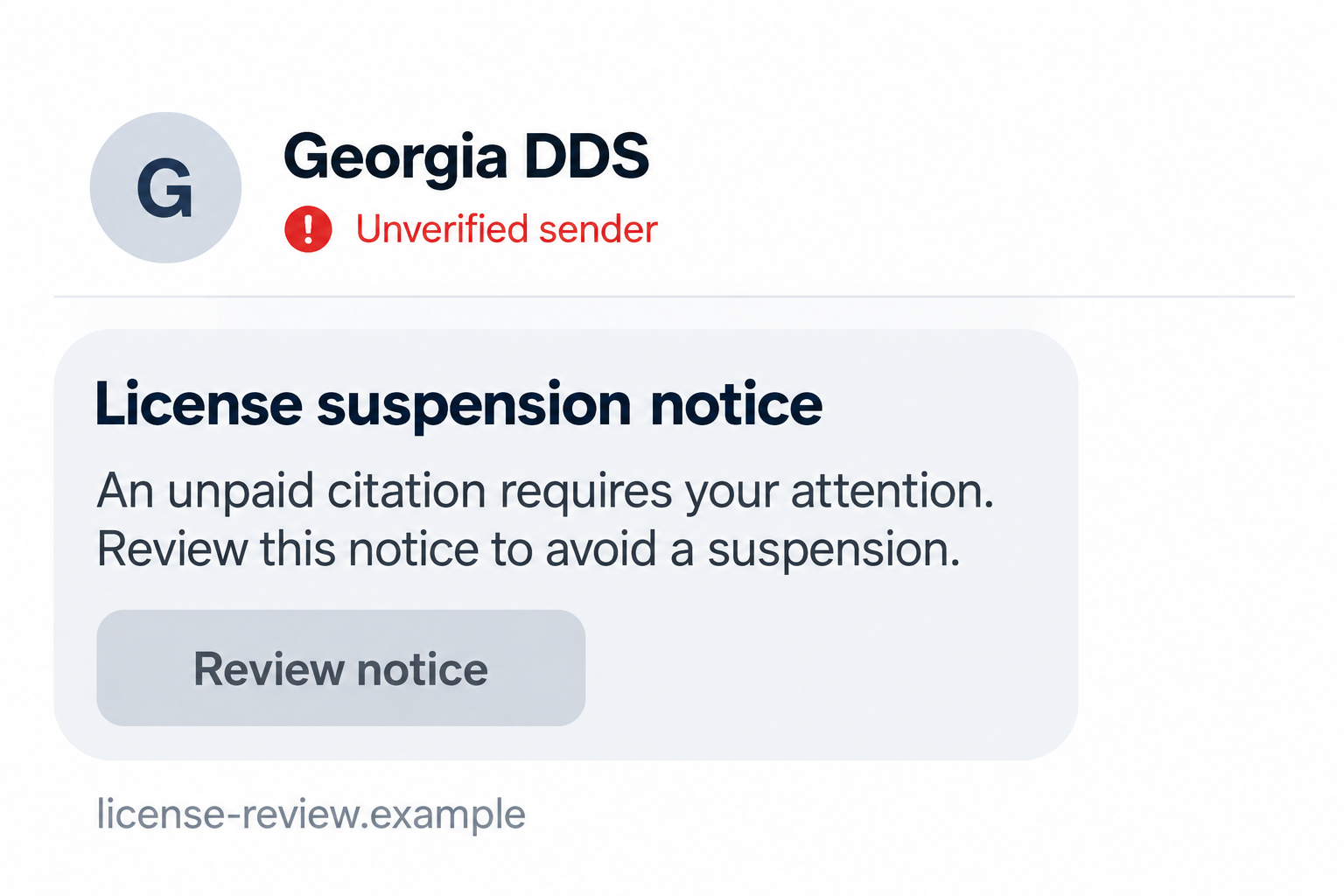
The Georgia DDS text scam impersonates the Georgia Department of Driver Services and claims that an unpaid obligation threatens your license or driving privileges.
The message directs you toward a payment or information page. Its purpose is to make an unverified demand feel like an immediate government requirement.
This warning concerns fraudulent messages, not the real DDS. Legitimate license issues still need attention through the appropriate agency or court.
What Georgia’s official warnings say
Georgia DDS warns about fake texts threatening fines, suspension, and other consequences to push recipients toward fraudulent websites.
The agency says it does not send unsolicited texts requesting payment or personal information. That distinction matters more than a convincing heading or official-looking language.
The image above is a generated example of the lure, not an authentic DDS notification. Its website and notice details are fictional.
Which details deserve caution
A believable text can still be fraudulent. Look at the requested action and verify the claimed obligation outside the message.
- An unexpected text says a payment is needed to prevent suspension.
- The message sends you to its own website to settle the matter.
- A supposed notice asks for personal or card information before independent verification.
- The wording rushes you past questions about the citation, agency, and payment recipient.
Do not assume every digital DDS alert is fake. The real DDS 2 GO app offers notifications and services; unsolicited payment demands are a different issue.
How the Scam Works
Step 1: The text presents an unfamiliar obligation
The message announces a problem you may not have known about: an unpaid citation or another supposed issue affecting your license.
That uncertainty works in the sender’s favor. Many drivers cannot immediately recall every parking, traffic, or administrative matter that might involve them.
The text does not need to prove a specific case exists before creating concern. It only needs the possibility to feel serious enough to investigate.
Investigation is reasonable. The mistake would be letting the unverified sender choose the website and payment route you use to do it.
Step 2: An agency name gives the threat apparent authority
The sender borrows the DDS name or uses language suggesting a state motor-vehicle agency. That makes the text sound more consequential than an ordinary payment request.
Georgia’s driver-services agency is DDS. Messages naming a supposed Georgia “DMV” do not become official merely because that abbreviation is familiar from other states.
However, correct naming is not proof either. An impostor can copy the real agency name just as easily as it can invent the obligation.
You don’t have to judge how official the wording sounds. Ask the real agency or court whether the matter exists and how it should be handled.
Step 3: Suspension language makes delay feel dangerous
The text turns a questionable balance into a threat to your ability to drive. For someone relying on a car, that changes the emotional stakes.
A short deadline or additional consequences can make the payment seem easier than asking questions. That urgency is part of what needs checking.
Do not let a message’s countdown replace your own records. A claim that action is overdue still requires a real underlying obligation.
At the same time, do not ignore a genuine suspension or court deadline. Check through official channels rather than deciding either way from the text alone.
Step 4: The link offers a convenient payment shortcut
The message supplies a website that appears to resolve the threat. Following it moves you into a process chosen by the sender.
A page can copy agency branding, display a payment form, and describe penalties without holding any authority to collect a legitimate obligation.
An encrypted connection does not establish government ownership. Neither do familiar colors, a department name, or a reference to a law in the page text.
Do not enter identifying information just to see whether the site recognizes you. The information you provide may itself be what the fraudulent form wants.
Step 5: The supposed solution exposes information or money
If you follow the payment process, you may disclose card or personal information to an unverified recipient instead of settling a real government balance.
The specific exposure depends on what the page requested and what you entered. Save those details if you already interacted with it.
A confirmation page does not establish that a citation was paid or a license issue resolved. Verify the real situation independently afterward.
Likewise, a failed payment does not mean nothing was exposed. If you submitted card details, ask your provider about protecting the account.
How to Check Your Georgia License Safely
Start from the real DDS website or an existing app
Open Georgia DDS through a trusted bookmark or by entering the address yourself. Use its links to reach the appropriate service.
The official site identifies its online services and explains how to access them. Do not substitute an address copied from the threatening text.
If you already use DDS 2 GO, open that established app directly rather than installing an app from the message.
Genuine app features include license-status information and alerts. Their existence is why “DDS never communicates digitally” would be an inaccurate rule.
Find out what kind of issue is actually alleged
A driver’s license, vehicle registration, and court citation are related to driving but are not the same record or administrative process.
Ask which organization is responsible for the alleged obligation. A vague text combining several consequences does not answer that question.
For a court matter, use independently obtained court contact information. For license status, start with DDS instead of assuming a payment page controls both.
Do not make a payment based only on an unfamiliar reference number. Ask for enough official information to understand what it concerns and where it belongs.
Use personalized reinstatement information if needed
If official records show a real license issue, follow DDS reinstatement guidance for your circumstances.
Requirements vary. This article cannot determine whether you owe a fee, need a court disposition, or must complete another step.
Allow for the possibility that records need clarification or updating between organizations. Ask the responsible office rather than relying on a single screenshot.
Keep official receipts and instructions. Paying an impostor does not satisfy an actual obligation, even if the fake page promised to restore your status.
What to Do if You Have Fallen Victim to This Scam
-
Stop interacting with the message and preserve evidence. Save the text, sender details, link address, and any receipt before reporting or deleting it.
Do not return to the fraudulent page to investigate further. Record what you already know without giving it additional information.
-
Contact your payment provider if card details or money were involved. Use the trusted banking app or the contact printed on your card.
Explain whether you submitted information, attempted payment, or see a completed transaction. Ask about protective measures, replacement, monitoring, and available dispute options.
A transaction’s status and payment method affect recovery. The FTC’s scam recovery guidance explains common next steps without guaranteeing a refund.
-
Check the real license or citation issue independently. Start from DDS or the responsible court’s official contact route.
Tell them what the text claimed and ask what the actual records show. Do not assume the scam payment cleared anything, or that every separate obligation is imaginary.
-
Secure any account whose credentials you entered. Change the exposed password through the legitimate service and replace it anywhere else you reused it.
If you supplied a one-time code, report that too. Review available sign-in activity and recovery settings, especially for an email account connected to other services.
-
Address disclosed identity information. List the details the form requested and what you actually submitted.
Use IdentityTheft.gov for an exposure-specific recovery plan. If a driver’s-license image or number was shared, ask DDS about the appropriate protective response.
-
Report the fraudulent text. Use your messaging provider’s reporting option and the reporting guidance available through official government channels.
Keep private documents, card numbers, and codes out of public comments. The original message and transaction records can be shared securely with the organizations investigating.
-
Watch for follow-up requests. Another message claiming the payment failed or that a refund requires more information is not independently trustworthy.
Confirm any new contact through the organization it claims to represent. Do not pay an additional fee to a stranger promising guaranteed recovery.
Common Assumptions That Can Lead You Astray
“The page looked exactly like a government website”
Appearance can be copied. A professional page and a working form tell you little about who receives the information entered there.
Open the service through the official DDS site instead of comparing logos in detail. That avoids letting a fraudulent design set the terms of your investigation.
Search results and advertisements are not automatic proof either. Check the actual destination and use an established official route when dealing with personal records.
“I only paid a small amount”
The transaction amount is not the only concern. A small attempted payment may still involve disclosing a card number, billing details, or identity information.
Tell your provider what was submitted, even if the charge was minor or did not complete. Let it assess the appropriate account protections.
Do not assume a second, larger request is legitimate because the first one produced a receipt. A receipt generated by the same page is not independent verification.
“I received a real DDS alert before, so this one must be genuine”
Previous legitimate contact does not authenticate a new unsolicited payment text. Judge the new request through your own account and official records.
Similarly, this scam does not invalidate every genuine DDS notification. The practical boundary is the unsolicited demand for payment or personal information.
Keep trusted app access and bookmarks available so that checking a worrying message does not require following its link.
“A failed payment means the site got nothing”
A form can receive submitted information even when the next screen displays an error. Do not infer the exposure solely from whether you received a receipt.
Record whether you typed information, submitted it, entered an additional code, or approved something in a banking app. Give those distinctions to your provider.
Do not keep retrying the same payment to find out whether the page works. Repeated attempts can create more confusion about what was authorized.
If a later charge appears, preserve its details and update the original report. Keep the provider’s case reference so the new information reaches the right investigation.
“Warning friends means forwarding the whole message”
You can warn someone without making the fraudulent link easy to click. Describe the suspension claim and tell them to use DDS directly.
If sharing a screenshot privately, obscure personal information and avoid presenting the link as a useful payment route. State clearly that the demand is unverified.
Do not accuse an identifiable person of running the scam based on a displayed number alone. Preserve the message for the organizations able to investigate it.
A helpful warning gives people a safer way to check their own records. It does not need to repeat the sender’s deadline or make the threat sound confirmed.
For a relative worried about driving the next morning, help them find the official contact or existing app. Avoid checking by interacting with the suspicious form.
That practical help is often more useful than a long list of design flaws. The decision is where to verify, not whether the fake page looks convincing.
Frequently Asked Questions
Does Georgia DDS send unsolicited payment texts?
DDS says it does not send unsolicited texts requesting payment or personal information. Verify a threatening payment message through its official website, not the supplied link.
Are all DDS app notifications fraudulent?
No. DDS 2 GO provides legitimate alerts and services. An established app notification is different from a stranger’s text demanding payment on an unverified website.
What if the message says Georgia DMV?
Georgia’s driver-services agency is DDS, and officials have warned about fake DMV messages. Correct agency wording still would not authenticate an unsolicited payment demand.
Should I ignore a real suspension because I received a scam text?
No. Check your actual status and follow official instructions for a genuine issue. A fraudulent text and a legitimate obligation can exist at the same time.
Do I need malware removal after reading the text?
Reading the message alone does not establish infection. Prioritize the information or payment exposure that actually occurred; device cleanup depends on downloads or other evidence.
Can a payment receipt prove my license is safe?
Not when it comes from the suspicious page. Check status through DDS and confirm any real court matter independently instead of relying on the receipt.
The Bottom Line
Do not pay a Georgia DDS suspension demand through an unsolicited text. Its link and deadline are not proof that a real obligation exists.
Check through DDS or the responsible court independently. If you already paid or shared information, contact the relevant provider and protect that specific exposure.

Join the discussion
0 commentsShare your experience or ask a question about this article.
Discussion
Start the conversation
Have a question or something useful to share? Add the first comment.