

An unpleasant email becomes much harder to shrug off when the sender appears to be you. For a moment, even familiar account details can feel suspicious.
Before responding to whatever the message demands, it helps to understand what that sender line can tell you, and what it cannot.
Overview
What a scam email from your own address means
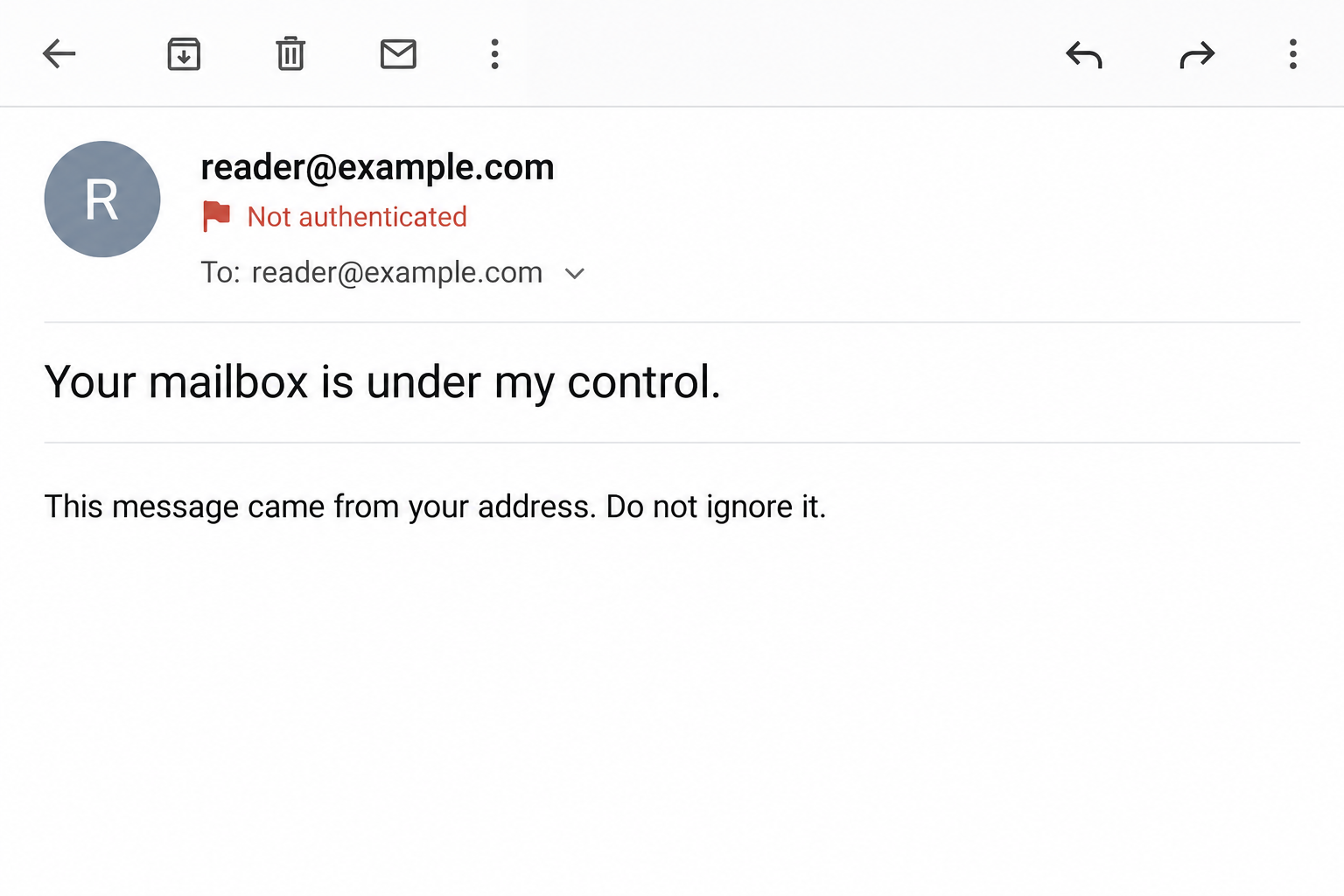
A scam email from your own address uses the apparent sender as part of its story. The message may claim that this proves control of your mailbox.
That conclusion does not follow from the visible address alone. Sender information can be forged, making a message appear to come from someone who never sent it.
We’re looking at threatening messages that use this trick. An ordinary email you sent yourself is different, and unusual account activity still deserves its own check.
What sender spoofing can explain
Google’s guidance on email spoofing explains that spam can display a forged sender or reply-to address without originating from that account.
Seeing your address is therefore a reason to check carefully, not proof that the sender logged in. Genuine compromise needs a separate investigation.
The image above is a generated illustration, not a received email or diagnostic result. Both addresses are fictional, and the warning is illustrative.
What the threatening sender wants
The visible address makes an unsupported claim feel like evidence. Once frightened, the recipient may be more likely to follow the message’s demands.
- Accept the sender line as proof of mailbox control.
- Believe broader claims about surveillance or access without independent confirmation.
- Respond, follow a link, or pay to make a threat go away.
- Stay in the sender’s conversation instead of checking the real account.
Do not assume a threatening message is harmless merely because spoofing is possible. Check actual account evidence and take specific, credible threats seriously.
How the Scam Works
Step 1: The email arrives with a familiar sender address
The opening surprise is not necessarily the wording. It is the appearance of your own address where you expect the sender’s identity to be.
Email applications often emphasize that visible line. Someone reading quickly may treat it as a reliable statement about the account used to send the message.
That assumption gives the scam room to work. The address displayed in a message is not the same thing as verified evidence of a successful login.
Expand the details if needed, but do not let the display alone dictate your response. Start thinking about independent account checks instead.
Step 2: The sender turns appearance into a claim of control
The threatening text presents the apparent self-addressed delivery as proof that the writer owns or controls your mailbox.
It may pair that claim with broader statements about your device or private information. Those statements still need evidence beyond the message’s own assertions.
A correctly displayed address establishes neither device access nor possession of private files. An email can claim much more than its technical details support.
Keep a clear distinction between what you can observe and what you are being told. That makes it easier to choose useful protective actions.
Step 3: The threat discourages a calm investigation
A demand for secrecy, payment, or immediate action can make checking the account feel risky. The sender wants the message to remain your main reference point.
You do not need to reply to establish whether your account is secure. Nor must you prove to the sender that their story is false.
Answering can reveal that you are reading and willing to engage. It also gives the sender more opportunities to reshape the story around your questions.
Preserve the message and leave that conversation. Account settings reached independently provide better evidence than reassurance or intimidation from the person making the demand.
Step 4: A requested action creates a real exposure
A forged sender does not itself grant access, but following the email’s instructions can create a separate problem.
A linked sign-in page can ask for credentials. A payment demand can produce a financial loss. An attachment may require investigation if you downloaded or opened it.
These are possible exposure paths, not a claim that every own-address email contains all of them. Record the specific actions you actually took.
Do not open a file or test a link to find out whether the threat is genuine. That is unnecessary for checking your existing account activity.
Step 5: Doubt keeps the demand alive
Even after recognizing possible spoofing, a recipient may wonder whether this particular email is different. That uncertainty can make the payment seem like an escape.
Paying does not establish that the sender’s claims were true or guarantee that they will stop. It leaves the underlying question unresolved.
The better way forward is to review actual signs of access and secure anything exposed. If evidence shows compromise, act on that evidence through official recovery.
If the threat involves real intimate material or personal danger, seek appropriate help. An explanation of spoofing is not a reason to dismiss concrete evidence.
What Email Details Can and Cannot Prove
The From and Reply-To fields serve different purposes
The visible From field identifies the claimed sender. A Reply-To field, when present, can direct replies somewhere else.
Differences can be useful warning signs, but a match does not establish authenticity. Forged or misleading details can be made internally consistent.
Do not reply just to see which address receives the answer. You can examine available details without contacting the person behind the message.
If this is a work mailbox, your administrator may have better tools to investigate the original message. Share it privately through the approved reporting process.
Authentication checks answer a narrower question
Google’s email authentication guidance explains how Gmail displays authentication information and why missing authentication deserves caution.
In Gmail, expanded security details may show mailed-by and signed-by information. Other providers present these details differently, so use their own instructions.
SPF and DKIM results concern sending authorization or message signing. They do not certify that every statement in an email is truthful or safe.
Some legitimate forwarded or mailing-list messages have authentication complications. Conversely, malicious senders can authenticate mail from domains they control. No single badge replaces context.
A Sent-folder search is useful but not conclusive
Look for unexpected sent messages as one account check. Their presence can provide a reason to investigate further.
Their absence is not an all-clear. Account activity, security settings, connected applications, and recovery information may provide other evidence.
Do not compare a header’s IP address with your home connection and treat the result as decisive. Mail delivery involves infrastructure that requires proper interpretation.
When the details are unclear, ask your provider or administrator. Avoid uploading full private message headers to random public analysis sites.
How to Check Whether Your Account Was Actually Accessed
Open the real account without using the message
Use your established app or bookmark. Review recent security activity and recognized devices using the service’s own account controls.
For Google accounts, start with Google’s compromised-account guidance. It explains checks for unauthorized activity and protective changes.
Look for unfamiliar recovery details, forwarding rules, or connected access where the provider exposes those settings. Record anything suspicious before changing it.
A location label can be approximate, so investigate unfamiliar entries carefully. Do not dismiss clear unauthorized changes simply because the email might have been spoofed.
Consider reused passwords separately
A password appearing in a threat is a separate fact from the sender address. Determine whether it is current, reused, or already replaced.
Replace an exposed or reused password through the legitimate service. Use a unique one and review available multifactor protection.
Do not enter the password into a link supplied by the threatening sender to “check” it. That would create a new disclosure.
If you lose access, follow the provider’s official recovery process. An unsolicited paid helper does not become authorized because the situation is stressful.
What to Do if You Have Fallen Victim to This Scam
-
Preserve the email and stop engaging. Keep the original message, relevant headers, demands, and payment details before reporting it as spam or phishing.
Do not reply, pay to test the claim, or contact a recovery service advertised by the sender. Save evidence privately rather than posting sensitive details publicly.
-
Check actual account access through the official service. Review activity, devices, recovery information, and settings using your own app or bookmark.
For a managed work or school account, notify the administrator. Give them the original message and explain whether you clicked, entered information, or approved access.
-
Secure credentials and permissions that were exposed. Change compromised or reused passwords, review connected access, and enable appropriate multifactor protection.
If you entered a code or approved an access request, say so when seeking support. Changing a password alone may not address every permission already granted.
-
Use official account recovery if locked out. For Google, use its account recovery instructions rather than a link in the threat.
Keep recovery codes and answers private. Avoid anyone promising guaranteed access in exchange for money or asking to take over the recovery conversation.
-
Contact the payment provider if money was sent. Explain the extortion or fraud and ask promptly about available recovery or restriction options.
Retain transaction references and receipts. The FTC’s scam recovery guidance covers different payment methods, but no route guarantees reimbursement.
-
Report credible threats and image-based abuse appropriately. If actual intimate material or personal danger is involved, do not treat spoofing as a complete explanation.
The FBI’s sextortion guidance provides reporting advice. Minors should involve a trusted adult; preserve evidence without forwarding intimate images.
-
Investigate device exposure only when relevant. If you downloaded software, opened a suspicious attachment, or granted remote access, describe that separately to qualified support.
An own-address message alone does not diagnose malware. Focus first on actual actions and evidence instead of buying a scanner to interpret a sender line.
Keep the Investigation Manageable
Write down facts before drawing conclusions
A short record helps: what the message displayed, what it claimed, what you did, and what independent account checks found.
Those categories stop an alarming claim from quietly turning into an assumed fact. They also help a provider or administrator understand the incident.
Keep the distinction when speaking with relatives or colleagues. Saying “my address was displayed” is more accurate than saying “my account was hacked” without evidence.
Do not chase a perfect answer inside the threat
You may never identify the exact sender or sending system yourself. You can still secure your account and report the message without solving that mystery.
Once evidence is preserved and independent checks are complete, avoid repeatedly reopening the threat looking for reassurance. Follow up on actual security findings instead.
If a new concrete sign appears, reassess it. Calm verification means remaining responsive to evidence, not assuming every alarming message is either genuine or harmless.
Keep private evidence out of public troubleshooting
A full message can contain personal addresses, routing details, payment references, or information about other people. Share it only through an appropriate private reporting route.
If you need help describing the problem, summarize the claim without publishing the entire threat. An administrator can request the original when necessary.
Keep an unchanged copy for your own records. If you create a redacted version for discussion, do not replace the original with that edited copy.
Also note which details came from your own account checks. That prevents a helpful explanation from accidentally presenting the sender’s allegations as verified findings.
You do not need a public verdict about the sender’s identity to take sensible security steps. Protecting your account and privacy can come first.
Frequently Asked Questions
Does my address in the From field prove my mailbox was hacked?
No. Sender spoofing can explain that display. Check account activity and security settings independently before concluding that someone successfully accessed the mailbox.
Is no copy in Sent proof that everything is safe?
No. It is one useful check, not a complete investigation. Review access records, recovery settings, rules, and connected permissions available through your provider.
Does passing email authentication mean the threat is true?
No. Authentication addresses particular sending or signing properties. It does not certify every claim in a message or guarantee that its requests are safe.
Should I respond and ask the sender for proof?
Do not engage with the threatening sender. Preserve the message and verify account facts through official support or your administrator instead.
What if the sender has real private images?
That is a separate, serious issue. Preserve evidence, seek appropriate reporting support, and do not dismiss credible image-based abuse simply because the sender address may be forged.
Will changing my password stop all spoofed email?
No. A unique password protects account access, but outside senders can still forge visible addresses. Keep filtering and reporting unwanted messages while reviewing real security evidence.
The Bottom Line
A threat displaying your own email address is not proof of mailbox control. Do not pay or follow instructions merely because the sender line looks familiar.
Preserve the message, check real account activity independently, and act on any actual exposure. Treat credible personal threats separately rather than letting spoofing explain away genuine evidence.

Join the discussion
0 commentsShare your experience or ask a question about this article.
Discussion
Start the conversation
Have a question or something useful to share? Add the first comment.