


The buyer agrees to your price, promises a quick payment, and asks you to check your email. Everything seems settled until one unexpected requirement appears.
A business account supposedly stands between you and the money. Before you follow the instructions, look closely at who is asking you to do what.
Overview
A supposed incoming payment becomes an outgoing expense
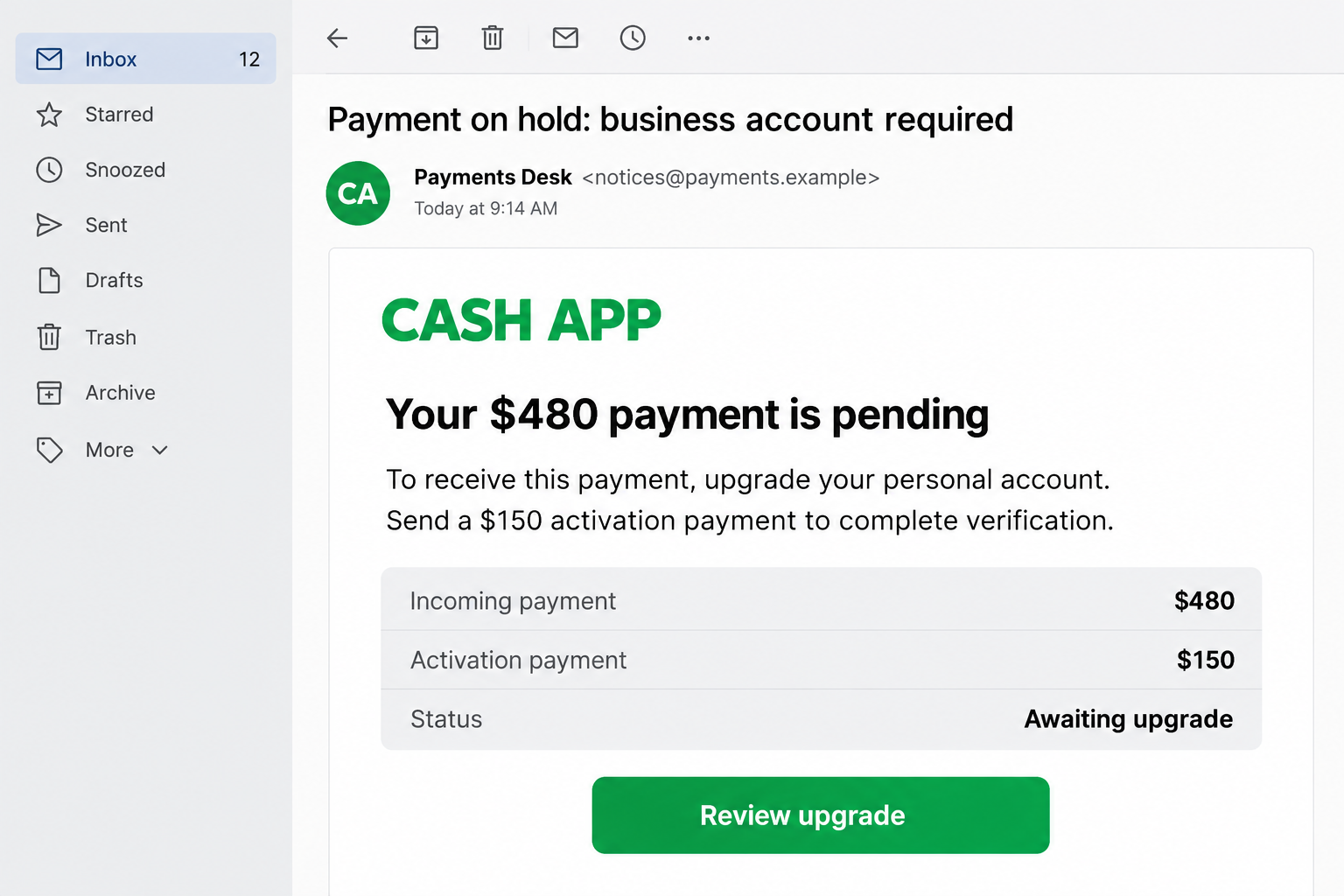
The Cash App business account upgrade scam targets someone expecting money, often a seller. A fraudulent notice says the transfer cannot reach a personal account.
The recipient must supposedly pay an activation, expansion, or verification charge. Sometimes the buyer claims to have advanced extra money and demands that amount back.
Both stories reverse the transaction. Instead of receiving the agreed price, the seller is persuaded to make a fresh payment from their own funds.
The notice and buyer’s assurances are not independent confirmation. They can be coordinated parts of the same deception, even when the email looks professionally designed.
Cash App Business is real, but this payment demand is not
Cash App offers genuine business accounts. Its terms explain that verification requirements and disclosed transaction-processing fees can apply.
That does not authorize a stranger to collect an upgrade payment. A buyer cannot establish a platform requirement by sending an email or screenshot.
The scam starts when you must pay another person before supposedly receiving their money. Cash App is being impersonated, not operating this scam.
The important checks happen outside the buyer’s messages
- Open Cash App yourself and inspect the actual payment record.
- Distinguish money received from a request asking you to pay.
- Ask official support about a genuine restriction or missing transfer.
- Keep the item until you have independently verified the transaction.
- Reject a private payment described as an upgrade or release fee.
The email pictured above is an invented, nonfunctional illustration. Its figures and sender are examples, not an authenticated receipt or a claim about one specific victim.
Why This Trick Catches Sellers Off Guard
You listed something because you wanted to sell it, not investigate a payment system. A buyer who accepts the price without argument can feel like welcome progress.
Once that person says they have paid, your attention shifts toward pickup, shipping, and being a reliable seller. An administrative email seems like the final detail.
The scammer exploits that change in expectations. The question becomes how to finish receiving the payment, rather than whether any payment was made.
Business-account terminology helps because it sounds plausible. Many legitimate services have personal accounts, commercial features, verification checks, and different fees.
You do not need to know every account rule to protect yourself. You need to avoid letting the buyer become your source of official payment instructions.
A supposed inconvenience on your account should be checked with the platform. The other party’s confidence, patience, or irritation cannot resolve it.
How the Cash App Business Account Upgrade Scam Works
Step 1: A buyer makes the deal feel finished
The conversation begins around an item, service, or payment you actually expect. The buyer may ask few practical questions and offer to pay before collection.
Quick agreement is not proof of fraud. The warning emerges when the discussion moves from purchasing the item to directing your account activity.
A buyer can know the correct listing price, your display name, and the collection arrangements because you supplied them during the conversation.
Seeing those details repeated in a later notice therefore does not authenticate it. The email may simply recycle information already available to the sender.
Step 2: The buyer moves payment confirmation into email
You are asked for an email address, sometimes with an explanation that a business payment needs one. An apparent Cash App notice follows.
Some legitimate businesses do send receipts by email. The issue is whether the claimed transfer exists in your independently opened account, not whether an email arrived.
A message can display a familiar name while using an unrelated sender address. Its graphics, receipt number, and payment summary can all be fabricated.
The buyer may also supply a screenshot. That is another claim from the person seeking your cooperation, not access to their authenticated payment history.
Step 3: A business-account problem explains the missing funds
The fraudulent notice says your account cannot accept the amount, lacks business status, or needs its receiving limit expanded. Your absent money suddenly has an explanation.
This is an effective diversion. Instead of questioning the buyer’s payment, you are encouraged to treat your own account as the obstacle.
The buyer may insist the transfer is already beyond their control. A supposed support department, visible only through the suspicious message, provides the next instructions.
A genuine delay can happen for many reasons. Never let that uncertainty become permission to pay a stranger or disclose account secrets.
Step 4: The seller is told to fund the solution
One version asks for a direct activation payment. Another claims the buyer must send extra funds, which you must return before the larger transfer becomes available.
The names vary, but the requested action is the same: authorize an outgoing transfer because someone promises that doing so will unlock incoming money.
An invented example makes the direction clear. A seller expecting $480 is told to send $150 first. That $150 is a separate payment, not receipt of $480.
The buyer’s promise to reimburse it does not change which account loses money when you approve the transfer.
Step 5: A deadline or reimbursement promise suppresses doubt
The notice may say the payment will expire, the buyer will lose their funds, or your account could be restricted unless you complete the process quickly.
The pressure can become personal. The buyer accuses you of holding their extra money or refusing to cooperate after they supposedly helped with your account.
You do not owe a refund merely because another person claims to have paid. Establish what actually arrived before discussing any return.
If they refuse to let you contact support independently, stop the transaction. Their urgency is not a substitute for a verifiable account record.
Step 6: The fee is gone, while the promised payment remains unresolved
After you pay, the contact may disappear or introduce another condition. A clearance charge or correction request can keep the same story running.
A link can also lead to a copied sign-in form. If you entered a code there, the problem may extend beyond the money already sent.
These outcomes depend on what you actually did. Sending money, sharing account access, and simply receiving the notice require different responses.
Do not make a second transfer to repair the first. Move the dispute into official support and preserve the conversation before access to it disappears.
Real Account Requirements Versus an Invented Release Fee
A legitimate processing fee is disclosed by the platform
Cash App’s business terms describe applicable processing fees and payments credited after those fees. That is different from a buyer collecting money in a private transfer.
A real fee can affect how much a merchant receives. It does not make the other party an authorized upgrade agent.
Read the terms presented within your actual account. Do not compare an unfamiliar email against another screenshot supplied by the same buyer.
Identity verification is not a request to surrender a sign-in code
Financial services may need identity information through their official procedures. That does not mean an incoming caller or message should receive your PIN or sign-in code.
A code delivered to your number can be connected to a real login attempt. Calling it an upgrade confirmation does not change what it authorizes.
Enter sensitive information only after independently opening the service and confirming the process. If uncertain, stop and ask support before proceeding.
A pending record is something to investigate, not a reason to pay privately
Some genuine transactions need attention. A missing or pending entry alone cannot tell you whether a buyer is dishonest or a technical issue exists.
What matters is how the issue is resolved. Official assistance can examine the transaction without directing you to a stranger’s account to unlock it.
If the purchase cannot be verified, delay handover or shipping. A completed conversation is not the same as a completed payment.
How to Check the Message Without Following Its Trap
Close the email and open Cash App normally. Find the relevant transaction yourself rather than using a notification button supplied by the buyer.
Compare the amount, sender, direction, and status. A payment request can contain a convincing amount while still asking you to send money.
Use support reached through the app or the FTC’s independently listed Cash App contact options. Describe the claimed upgrade requirement.
If support cannot verify the purchase, keep the goods. Do not arrange a rushed collection simply because the buyer shows a receipt image.
Also check the actual sender and destination before forwarding the message to anyone else. Preserve suspicious links as text, without encouraging another person to open them.
There is no need to argue with the buyer about fonts or spelling. The unsupported demand for a separate payment is more important than superficial mistakes.
What to Do if You Have Fallen Victim to This Scam
-
End the upgrade process and keep any unsent goods.
Cancel further fee payments. Do not send a supposed refund, complete another verification deposit, or let the buyer collect an item against unverified funds.
If shipping has already started, ask the carrier whether interception is available. Do not assume it can stop every parcel or recover an item already delivered.
-
Identify exactly what left your account.
Record each outgoing amount, payment identifier, recipient, and time. Separate those transfers from the incoming payment the buyer claimed to have made.
This distinction helps support investigate the actual loss rather than searching only for a promised payment that may never have existed.
-
Report the transfers through your real Cash App account.
Open the affected payment and use its available reporting options. Explain that a fake business-account requirement induced you to send the money.
Ask whether the transfer can be stopped or recovered. If you approved it under deception, describe that accurately rather than calling it an unknown transaction.
-
Tell the linked financial provider what happened.
Contact the bank or card issuer involved in funding the payment. Ask what investigation, account-protection, or dispute options apply to your particular transaction.
The FTC recommends promptly contacting the payment provider. Recovery depends on the circumstances; a complaint does not guarantee reimbursement.
-
Protect access if you revealed credentials or codes.
Tell Cash App support which information you shared. Secure the linked email account, review unfamiliar activity, and follow official account-recovery instructions.
If a reused password was entered on a fake page, replace it wherever else it protects an account. Do not give a second code to the caller.
-
Save a compact evidence file.
Keep the listing, buyer profile, messages, full email, payment details, and any collection information. Include the false upgrade instruction and promised reimbursement.
Retain original files when possible. Redact account numbers, addresses, and personal contact details from anything you share publicly.
-
Report the buyer where the transaction began.
Use the marketplace’s fraud-reporting tools and provide the account or listing involved. You can also report the deceptive payment solicitation to the relevant fraud authority.
Do not confuse a marketplace report with a financial dispute. Each organization needs its own report if it controls a different part of the transaction.
-
Ignore paid offers to recover the transfer.
Someone who approaches after your complaint may promise an instant reversal, special employee access, or recovery after one more fee. Do not fund that promise.
Continue only through the support case you opened independently. A person who knows your loss amount may have learned it from a public post.
Frequently Asked Questions
Does Cash App have genuine business accounts?
Yes. The scam is not the account category. It is the demand that you pay another person to release an alleged transfer or refund invented extra funds.
Can a real business account charge processing fees?
Yes, disclosed transaction fees can apply. Read the official terms and account notices. A private transfer to a buyer is not the same as a platform-deducted fee.
What if the email shows my name and the correct sale price?
The buyer may already know both details. Matching information makes the message relevant, but does not prove that the claimed payment exists.
Should I refund extra money the buyer says they sent?
First establish whether any extra payment actually arrived. For a genuine issue, ask official support how to handle the original transaction without creating an unrelated transfer.
Does a pending payment mean the whole account is a scam?
No. A pending status can have legitimate explanations. The account problem needs independent checking; it does not justify an outsider’s activation-fee demand.
Will reporting the scam automatically return my money?
No. Report promptly and ask about available recovery options, but do not rely on a guaranteed refund or pay someone who promises one.
The Bottom Line
Do not pay a buyer to upgrade your Cash App account or release their alleged payment. Confirm the transaction inside your own account before handing anything over.
If you already transferred money, report that outgoing payment to Cash App and the financial provider involved. Stop following the buyer’s instructions while the matter is investigated.

Join the discussion
0 commentsShare your experience or ask a question about this article.
Discussion
Start the conversation
Have a question or something useful to share? Add the first comment.